Download to read offline
![API List (e2d3)
Method Description Parameter Return Value
e2d3.initialize It is required to be activated first on a page in which
you make graphs.
You can confirm whether your API is available in
Office.jp with callback.
Inserted: Office Application is
activated.
DocumentOpened: The file is
opened with the application
being integrated
e2d3.setBindData You can make data bind for the graph from a selected
area.
The data of the selected area will be reflected on a
graph by making data bind. You can display area
selection with the parameter
@args [object] necessary:
id(strings) : unique bind ID
(consecutive numbers from the
whole bind numbers when any
number is not specified)
is_prompt(0 | 1) :
1, it displays Area Selection UI.
0, when the data area is already
selected and Area Selection UNI is
not required.
@callback [funciton] necessary:
callback after process completion
Bind object will return
callback Parameter when it
succeeds.
It returns “false” when it fails.](https://image.slidesharecdn.com/e2d3ver-141021203444-conversion-gate01/85/E2D3-ver-0-2-API-Instruction-3-320.jpg)
![API List (e2d3)
Method Description Parameter Return Value
e2d3.addChangeEvent You can register onChange event of bind
target data.
When you alter the cell value against bind
data which is already registered in
setBindData, You can select it as callback
@binding [object] necessary:
Binding object.
Please set returned Bind object with setBindData object
@callback [funciton] :
Calllback after processing completion
When callback
function is selected
and it is successful,
“true” will be
returned .
When it fails, it
returns “false”.
e2d3.bind2Json You can acquire Cell area data of bind
target in JSON format from selected Bind
ID.
@bindId [strings] necessary:
unique Bind ID. Please select Bind ID set in set BindId
@args [object] necessary:
dimension(1d | 2d) : JSON data structure.
1d: the first row of data. If the value on th top is a
number, it will be JSON format; e.g. [[1,2,3…]].
If the value on th top is a character, it will be a format
such as [{a:[1,2,3…]}].
2d: 2 dimensional data. The first row of Excel table will
be converted to a title row. The title is compatible with
muti-bite data.
[
{“a”:”1”,”b”:”2”,”c”:”3”},
{“a”:”100”,”b”:”101”,”c”:”102”},...
]
@callback [funciton] necessary:
Callback after process completion
When it succeeds
JSON data
structured as
callback parameter
will be returned.
When it fails, it
returns “false”.](https://image.slidesharecdn.com/e2d3ver-141021203444-conversion-gate01/85/E2D3-ver-0-2-API-Instruction-4-320.jpg)
![Method Description Parameter Return Value
e2d3.json2Excel You can insert simple 2 dimensional JSON
array into each cell in Excel.
You can use format of [[a,b,c],[x,y,z]…].
*You can only insert value Please acquire
the value from selected area using other
method; e.g. bind2json.
@json [array] necessary:
JSON format data to insert into cells.
It is available in JavaScript array object and text e.g.
“[[a,b,c],[x,y,z]…]”.
TSV file or CSV file can be acquired from jQuery.
*Caution: D3.csv method converts data.
@callback [funciton] :
Callback after processing completion
When callback
function is selected
and it is successful,
“true” will be
returned.
When it fails, it
returns “false”.
e2d3.trimmedJson2Exce
l
Insert JSON data including an object into
each cell in Excel.
You can specify corresponding JSON
format by parameter.
*Currently 2d option is available. Please
use json2Excel in Array format when using
1d.
@json [array,object] necessary:
JSON format CSV file data to insert into cells.
@args [object] necessary:
dimension(2d) : JSON data structure.
2d: 2 dimensional data. The first row of Excel table will
be converted to a title row. The title is compatible with
multi-bite data.
[
{“a”:”1”,”b”:”2”,”c”:”3”},
{“a”:”100”,”b”:”101”,”c”:”102”},...
]
@callback [funciton] necessary:
Callback after process completion
When callback
function is selected
and it is successful,
“true” will be
returned.
When it fails, it
returns “false”.](https://image.slidesharecdn.com/e2d3ver-141021203444-conversion-gate01/85/E2D3-ver-0-2-API-Instruction-5-320.jpg)
![API List (e2d3)
Method Description Parameter Return Value
e2d3.releaseBindDataBy
Id
You can cancel specified Bind ID.
When data areas are different in each
graph, it is recommended to set Parameter
to call up the event in a page.
Altering graphs does not affect bind and it
will remain unchanged.
@args [object] necessary:
id(strings) : unique bind ID (consecutive numbers from
the whole bind numbers when any number is not
specified.)
isDataDelete(1|Unspecified) :
1, values in the cells of data area bound will be deleted
when you cancel bind.
@callback [function] necessary:
callback after process completion
When callback
function is selected
and it is successful,
“true” will be
returned.
When it fails, it
returns “false”.](https://image.slidesharecdn.com/e2d3ver-141021203444-conversion-gate01/85/E2D3-ver-0-2-API-Instruction-6-320.jpg)
![API List (Global)
Method Description Parameter Return Value
showObj The function for debugging.
Given object and array in the end of <body> tag will be
written.
@obj [object array] necessary:
Object or array to be developed
@s [number]:
Parameter to process Loop. Currently it
is not available.
showError The function for debugging.
When “#message_area” exists, given messages will be
displayed within the area.
Given messages in the beginning of <body> tag will be
displayed.
Messages will be displayed using “fadein” and ‘fadeOut”
in jQuery.
@message [strings] necessary:
Messages to display
@_type [strings]:
It sets a theme for Message area.
Color theme of Twitter Bootstrap will be
applied.
“default”, ”primary”, ”success”, ”warning”
, ”danger “ are available.](https://image.slidesharecdn.com/e2d3ver-141021203444-conversion-gate01/85/E2D3-ver-0-2-API-Instruction-7-320.jpg)
![API List (Currently Unavailable)
Method Description Parameter Return Value
e2d3.getBindDataById You can obtain Bind Object by Bind ID when you want to
obtain Bind data that are not in setBindData Callback.
*This method is not available yet. Please save data
separately gained by Callback function of setBindData
@bindId [strings] necessary:
Target Bind ID
@callback [funciton] necessary:
Callback after process completion
Bind object returns a
callback parameter
when it succeeds.
It returns “false”
when it fails.
e2d3.getAllBindData You can obtain whole bind data in arrays
when you want to obtain Bind data that are
not in setBindData Callback.
*This method is not available yet. Please save data
separately gained by Callback function of setBindData
@callback [funciton] necessary:
Callback after process completion
Bind object will return
a callback parameter
when it succeeds.
It returns “false”
when it fails.](https://image.slidesharecdn.com/e2d3ver-141021203444-conversion-gate01/85/E2D3-ver-0-2-API-Instruction-8-320.jpg)
![E2D3 Project Member
[ver. 0.2, 2014/9/19-11/19]
Chief Engineer: Yu Yamamoto
Engineer: Nobuaki Okada, Norihiko Sawa, Shu Saikawa, Takeshi Osoekawa, Teruyoshi Matsushima
Legal Affairs: Ryo Kato
Logo Designer: Shuntaro Okazaki
Slide Designer: Motoi Takase
Translator: Takeshi Shinohara
Video Editor: Iwao Katsumura
Web Designer: Junichi Tashiro
Project Leader: Yasunobu Igarashi
Acknowledge: We would like to thank Tsuyoshi Matsuzaki for his helpful suggestions.
[ver. 0.1, 2014/5/1-6/24]
Chief Engineer: Teruyoshi Matsushima
Project Leader: Yasunobu Igarashi](https://image.slidesharecdn.com/e2d3ver-141021203444-conversion-gate01/85/E2D3-ver-0-2-API-Instruction-9-320.jpg)

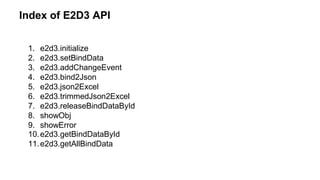
The document provides an overview of the e2d3 API version 0.2, detailing methods for data binding and graph creation in Excel. It includes descriptions of key methods such as e2d3.initialize, e2d3.setbinddata, and e2d3.bind2json, along with their parameters and return values. It also lists project contributors and acknowledges support from individuals involved in its development.


