Shaping the Future
E-Learning at WMG
Chris Evans
E-Learning Update Agenda
1. Review of the Past Academic Year
2. A Selection of e-Learning Case
Studies
3. The Quality Cycle. How we improve
e-Learning
4. Questions
24/07/2014
Shaping the Future
Review of the past
academic year
Review of the Past Academic Year
24/07/2014
Review of the Past Academic Year
 Moodle 100% across many programmes
 All programmes represented
 Minimum Standard
 New Academic Programmes
 Lesson Capture/Podcasting/Screencasting
 Teaching Online
 Review of e-Learning Needs
 Paperless Trials
 MOOCs (Massive Open Online Courses)
Shaping the Future
A Selection of
e-Learning Case
Studies
E-Learning Intranet Site
Case Studies
Case Studies
What the case study is
Why it was done
What technology was used
Lessons learned
Find out more
Case Studies
Student Induction Screencasts
Synchronous Online Teaching
Audience Response System
Pre-Module PowerPoint Screencasts
Video Podcasts
Shaping the Future
The Quality Cycle
How we improve
e-Learning
Quality Cycle
Act
EvaluateImprove
Plan
Completing the Cycle
Act
EvaluateImprove
Plan
Plans and Actions
 Working Groups and Committees
–WMG
–University
–National
 WMG Future Needs and Priorities
 Draft e-Learning Strategy
 Digital Road Map
 Minimum Standard
 New Working Groups
Quality Cycle
Act
EvaluateImprove
Plan
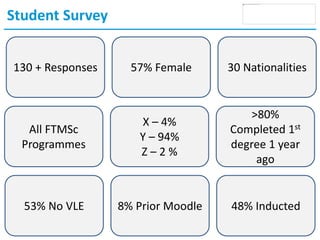
Student Survey
130 + Responses 57% Female 30 Nationalities
All FTMSc
Programmes
X – 4%
Y – 94%
Z – 2 %
>80%
Completed 1st
degree 1 year
ago
53% No VLE 8% Prior Moodle 48% Inducted
What do you normally use computers for?
0% 10% 20% 30% 40% 50% 60% 70% 80% 90% 100%
Basic communication i.e. e-mail, chat
Video/audio conferencing, webinars
Social media / news
Games
Web browsing
Art / visualisation
MS Word, Excel, PowerPoint etc.
3-Dimensional drawing
Simulations, i.e. FEA, CFD etc
Programming, i.e. Java, SQL, C++ etc.
Web development, i.e. HTML, CSS, PHP etc.
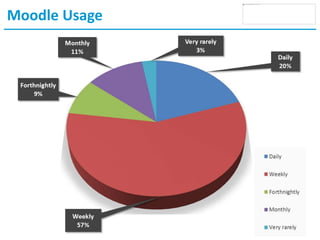
Moodle Usage
Moodle Features
0 0.5 1 1.5 2 2.5 3 3.5 4 4.5
The ability to receive PMA grades and feedback
Live streaming lectures
The ability to browse the library's catalogue of…
Access to recorded lectures with playback features
Search field for easy navigation in Moodle
Collaborative text editing, i.e. Google Docs
An interactive, online comprehensive Moodle guide
Searchable database of student issues and…
Built-in plagiarism checking capability
Instant IT Support chat box
Centralised social space for all WMG students
Please rate how well the following features would assist you in studying more
effectively:
Areas for Improvement
None
40%
PMA and dissertation
submission
8%
Video recorded lectures
5%
Layout design
5%
Integration with Facebook
6%
User-friendly webpage
navigation
6%
Alerts i.e.: Timetable change
6%
Access to resources i.e.: Journal
articles
3%
Regular update
3%
Notes for all courses to be
uploaded
3%
Built-in plagiarism checker
software
3%
Easy booking to workshops
3%
Pop-up tips about useful
materials available in Moodle
3%
Multiple download of notes
3%
Availability of chat room
3%
None
PMA and dissertation
submission
Video recorded lectures
Layout design
Integration with Facebook
User-friendly webpage
navigation
Alerts i.e.: Timetable change
Access to resources i.e.:
Journal articles
Regular update
Notes for all courses to be
uploaded
Built-in plagiarism checker
software
Easy booking to workshops
Pop-up tips about useful
materials available in Moodle
Multiple download of notes
Availability of chat room
The use of Moodle
0 0.5 1 1.5 2 2.5 3 3.5 4
Helpful in my studies
Easy to use
Supports independent learning
Motivates learning at home
Enjoyable
Good communication tool
Replaces face-to-face learning
Facilitates online group discussion
Improves student-staff engagement
Please indicate the extent to which you agree with the following statements about
Moodle
Use of Videoed Lectures
0% 10% 20% 30% 40% 50% 60% 70% 80%
For homework
As a revision tool
To reinforce understanding
As a module elective preview/selection tool
As an external marketing tool
For which of these do you think video a recorded lesson could be used?
Paperless?
Would you prefer lecture notes and hand-
outs to be distributed on paper,
electronically or both?
Paper, Electronic or Both?
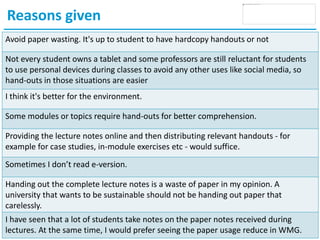
Reasons given
Avoid paper wasting. It's up to student to have hardcopy handouts or not
Not every student owns a tablet and some professors are still reluctant for students
to use personal devices during classes to avoid any other uses like social media, so
hand-outs in those situations are easier
I think it's better for the environment.
Some modules or topics require hand-outs for better comprehension.
Providing the lecture notes online and then distributing relevant handouts - for
example for case studies, in-module exercises etc - would suffice.
Sometimes I don’t read e-version.
Handing out the complete lecture notes is a waste of paper in my opinion. A
university that wants to be sustainable should not be handing out paper that
carelessly.
I have seen that a lot of students take notes on the paper notes received during
lectures. At the same time, I would prefer seeing the paper usage reduce in WMG.
Summary
 Evolution of e-Learning at WMG
 Good Practice Guides
 Drive Quality Improvements
Shaping the Future
Questions?

E learning staff update 201419601

  • 1.
  • 2.
    E-Learning Update Agenda 1.Review of the Past Academic Year 2. A Selection of e-Learning Case Studies 3. The Quality Cycle. How we improve e-Learning 4. Questions 24/07/2014
  • 3.
    Shaping the Future Reviewof the past academic year
  • 4.
    Review of thePast Academic Year 24/07/2014
  • 5.
    Review of thePast Academic Year  Moodle 100% across many programmes  All programmes represented  Minimum Standard  New Academic Programmes  Lesson Capture/Podcasting/Screencasting  Teaching Online  Review of e-Learning Needs  Paperless Trials  MOOCs (Massive Open Online Courses)
  • 6.
    Shaping the Future ASelection of e-Learning Case Studies
  • 7.
  • 8.
  • 9.
    Case Studies What thecase study is Why it was done What technology was used Lessons learned Find out more
  • 10.
  • 11.
  • 12.
  • 13.
  • 14.
  • 15.
  • 16.
    Shaping the Future TheQuality Cycle How we improve e-Learning
  • 17.
  • 18.
  • 19.
    Plans and Actions Working Groups and Committees –WMG –University –National  WMG Future Needs and Priorities  Draft e-Learning Strategy  Digital Road Map  Minimum Standard  New Working Groups
  • 20.
  • 21.
    Student Survey 130 +Responses 57% Female 30 Nationalities All FTMSc Programmes X – 4% Y – 94% Z – 2 % >80% Completed 1st degree 1 year ago 53% No VLE 8% Prior Moodle 48% Inducted
  • 22.
    What do younormally use computers for? 0% 10% 20% 30% 40% 50% 60% 70% 80% 90% 100% Basic communication i.e. e-mail, chat Video/audio conferencing, webinars Social media / news Games Web browsing Art / visualisation MS Word, Excel, PowerPoint etc. 3-Dimensional drawing Simulations, i.e. FEA, CFD etc Programming, i.e. Java, SQL, C++ etc. Web development, i.e. HTML, CSS, PHP etc.
  • 23.
  • 24.
    Moodle Features 0 0.51 1.5 2 2.5 3 3.5 4 4.5 The ability to receive PMA grades and feedback Live streaming lectures The ability to browse the library's catalogue of… Access to recorded lectures with playback features Search field for easy navigation in Moodle Collaborative text editing, i.e. Google Docs An interactive, online comprehensive Moodle guide Searchable database of student issues and… Built-in plagiarism checking capability Instant IT Support chat box Centralised social space for all WMG students Please rate how well the following features would assist you in studying more effectively:
  • 25.
    Areas for Improvement None 40% PMAand dissertation submission 8% Video recorded lectures 5% Layout design 5% Integration with Facebook 6% User-friendly webpage navigation 6% Alerts i.e.: Timetable change 6% Access to resources i.e.: Journal articles 3% Regular update 3% Notes for all courses to be uploaded 3% Built-in plagiarism checker software 3% Easy booking to workshops 3% Pop-up tips about useful materials available in Moodle 3% Multiple download of notes 3% Availability of chat room 3% None PMA and dissertation submission Video recorded lectures Layout design Integration with Facebook User-friendly webpage navigation Alerts i.e.: Timetable change Access to resources i.e.: Journal articles Regular update Notes for all courses to be uploaded Built-in plagiarism checker software Easy booking to workshops Pop-up tips about useful materials available in Moodle Multiple download of notes Availability of chat room
  • 26.
    The use ofMoodle 0 0.5 1 1.5 2 2.5 3 3.5 4 Helpful in my studies Easy to use Supports independent learning Motivates learning at home Enjoyable Good communication tool Replaces face-to-face learning Facilitates online group discussion Improves student-staff engagement Please indicate the extent to which you agree with the following statements about Moodle
  • 27.
    Use of VideoedLectures 0% 10% 20% 30% 40% 50% 60% 70% 80% For homework As a revision tool To reinforce understanding As a module elective preview/selection tool As an external marketing tool For which of these do you think video a recorded lesson could be used?
  • 28.
    Paperless? Would you preferlecture notes and hand- outs to be distributed on paper, electronically or both?
  • 29.
  • 30.
    Reasons given Avoid paperwasting. It's up to student to have hardcopy handouts or not Not every student owns a tablet and some professors are still reluctant for students to use personal devices during classes to avoid any other uses like social media, so hand-outs in those situations are easier I think it's better for the environment. Some modules or topics require hand-outs for better comprehension. Providing the lecture notes online and then distributing relevant handouts - for example for case studies, in-module exercises etc - would suffice. Sometimes I don’t read e-version. Handing out the complete lecture notes is a waste of paper in my opinion. A university that wants to be sustainable should not be handing out paper that carelessly. I have seen that a lot of students take notes on the paper notes received during lectures. At the same time, I would prefer seeing the paper usage reduce in WMG.
  • 31.
    Summary  Evolution ofe-Learning at WMG  Good Practice Guides  Drive Quality Improvements
  • 32.

Editor's Notes

  • #3 Plan – Assess Educational Needs Act – Design Robust Curricula and programmes with specified outcomes and standards Evaluate – Gather Feedback from Learners and Other stakeholders Improve - Use the feedback to modify programmes, teaching and learning and assessment approaches
  • #6 Minimum standard
  • #18 Plan – Assess Educational Needs Act – Design Robust Curricula and programmes with specified outcomes and standards Evaluate – Gather Feedback from Learners and Other stakeholders Improve - Use the feedback to modify programmes, teaching and learning and assessment approaches
  • #19 Plan – Assess Educational Needs Act – Design Robust Curricula and programmes with specified outcomes and standards Evaluate – Gather Feedback from Learners and Other stakeholders Improve - Use the feedback to modify programmes, teaching and learning and assessment approaches
  • #20 Wmg embraces digital technologies and delivers WMGs objectives
  • #21 Plan – Assess Educational Needs Act – Design Robust Curricula and programmes with specified outcomes and standards Evaluate – Gather Feedback from Learners and Other stakeholders Improve - Use the feedback to modify programmes, teaching and learning and assessment approaches
  • #22 Siti Bahrom and John Thornby
  • #26 Other comments A chat facility for everyone to ask questions Better access to module reviews Better mobile access Timetable on all modules – to include room numbers etc