




Technical Track       Reykjavik 6th December 2010Microsoft DenmarkThomas HalsePartner Technology Advisor& Sure Step Leadthoha@microsoft.com
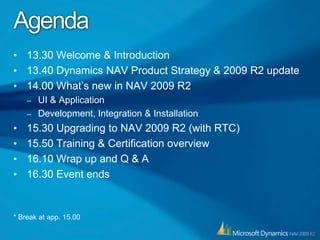
Agenda13.30 Welcome & Introduction13.40 Dynamics NAV Product Strategy & 2009 R2 update14.00 What’s new in NAV 2009 R2UI & ApplicationDevelopment, Integration & Installation15.30 Upgrading to NAV 2009 R2 (with RTC)15.50 Training & Certification overview16.10 Wrap up and Q & A16.30 Event ends * Break at app. 15.00
Dynamics NAV Product Strategy & 2009 R2 update
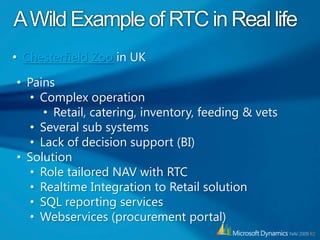
A Wild Example of RTC in Real lifeChesterfield Zoo in UK
Pains
Complex operation
Retail, catering, inventory, feeding & vets
Several sub systems
Lack of decision support (BI)
Solution
Role tailored NAV with RTC
Realtime Integration to Retail solution
SQL reporting services
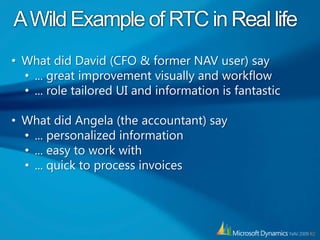
Webservices (procurement portal)A Wild Example of RTC in Real lifeWhat did David (CFO & former NAV user) say
... great improvement visually and workflow
... role tailored UI and information is fantastic
What did Angela (the accountant) say
... personalized information
... easy to work with
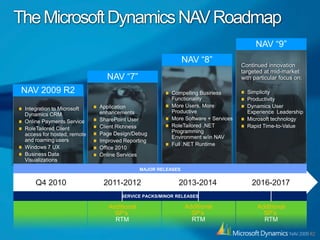
... quick to process invoicesThe Microsoft Dynamics NAV RoadmapNAV “9”Continued innovation targeted at mid-market with particular focus on:SimplicityProductivityDynamics User Experience  LeadershipMicrosoft technologyRapid Time-to-ValueNAV “8”NAV “7”Compelling Business FunctionalityMore Users, More ProductiveMore Software + ServicesRoleTailored .NET Programming Environment w/in NAVFull .NET RuntimeNAV 2009 R2Application enhancementsSharePoint UserClient RichnessPage Design/DebugImproved ReportingOffice 2010Online ServicesIntegration to Microsoft Dynamics CRMOnline Payments ServiceRoleTailored Client access for hosted, remote and roaming usersWindows 7 UXBusiness Data VisualizationsMAJOR RELEASESQ4 20102011-20122016-20172013-2014SERVICE PACKS/MINOR RELEASESAdditionalSP’s RTMAdditionalSP’s RTMAdditionalSP’s RTM
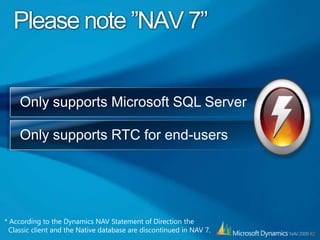
Please note ”NAV 7”Only supports Microsoft SQL ServerOnly supports RTC for end-users* According to the Dynamics NAV Statement of Direction the  Classic client and the Native database are discontinued in NAV 7.
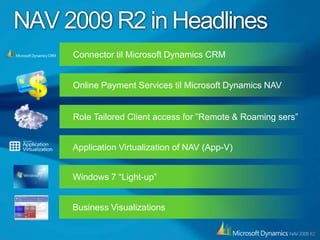
NAV 2009 R2 in HeadlinesConnector til Microsoft Dynamics CRMOnline Payment Services til Microsoft Dynamics NAVRole Tailored Client access for ”Remote &Roaming sers”Application Virtualization of NAV (App-V)Windows 7 “Light-up”Business Visualizations
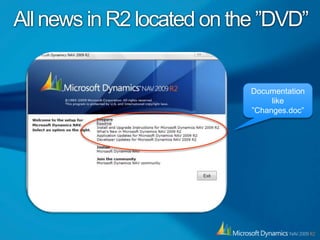
All news in R2 located on the ”DVD”Documentation like”Changes.doc”
What’s new in NAV 2009 R2UI & Application
UI & Application OverviewWindows ”light up” - enhanced UI
Jump lists Icon overlay, Filter on subforms
Application improvements
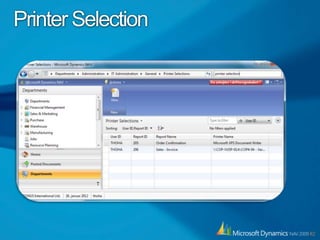
Printer selection
System indicator
New application features
CRM connector
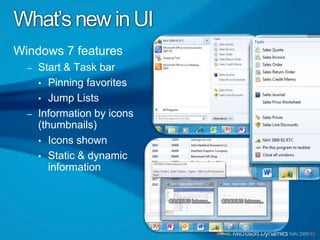
Online payment servicesWhat’s new in UIWindows 7 featuresStart & Task barPinning favoritesJump ListsInformation by icons (thumbnails)Icons shownStatic & dynamic information
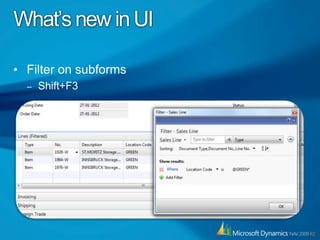
What’s new in UIFilter on subformsShift+F3
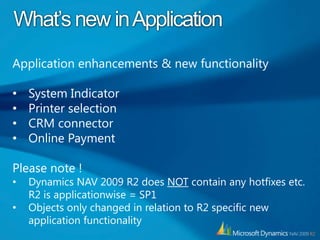
What’s new in ApplicationApplication enhancements & new functionalitySystem Indicator
Printer selection
CRM connector
Online PaymentPlease note !Dynamics NAV 2009 R2 does NOT contain any hotfixes etc. R2 is applicationwise = SP1
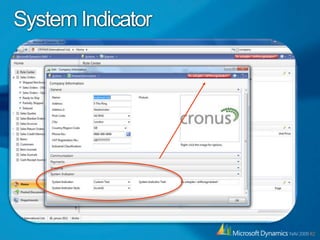
Objects only changed in relation to R2 specific new application functionalitySystem Indicator
Printer Selection
CRM Connector for NAV
CRM Connector for Dynamics NAVDesigned for out-of-the box Dynamics product integration
Supports  CRM 4.0 and NAV 2009 R2 and future versions
Supports CRM online and “on-premise” installation
Available  (free) for customers  on BREP holding valid licenses for both CRM and NAV.CRM Connector for Dynamics NAVUser friendly UI for configuring data mapping
Development Tools available
Build-in Scheduling option
One or two-way integration option
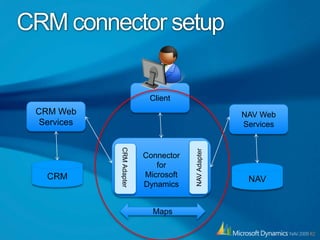
Connector is not localized (W1)CRM connector setupClientCRM Web ServicesNAV Web ServicesNAV AdapterConnector for Microsoft DynamicsCRM AdapterCRMNAVMaps
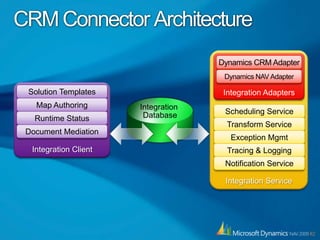
CRM Connector ArchitectureIntegration ServiceIntegration AdaptersDynamics CRM AdapterDynamics NAV AdapterIntegration ClientSolution TemplatesMap AuthoringScheduling ServiceIntegration DatabaseRuntime StatusTransform ServiceDocument MediationException MgmtTracing & LoggingNotification Service
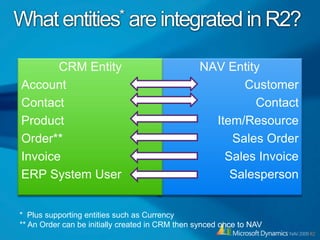
What entities* are integrated in R2?NAV EntityCustomerContactItem/ResourceSales OrderSales InvoiceSalespersonCRM EntityAccountContactProductOrder**InvoiceERP System User*  Plus supporting entities such as Currency** An Order can be initially created in CRM then synced once to NAV
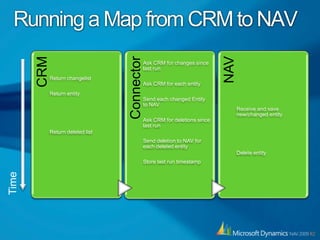
Running a Map from CRM to NAVTime
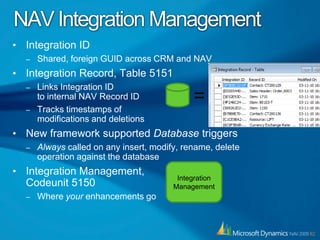
NAV Integration ManagementIntegration IDShared, foreign GUID across CRM and NAVIntegration Record, Table 5151Links Integration IDto internal NAV Record IDTracks timestamps of modifications and deletionsNew framework supported Database triggers Always called on any insert, modify, rename, delete operation against the databaseIntegration Management,Codeunit 5150Where your enhancements go=Integration Management
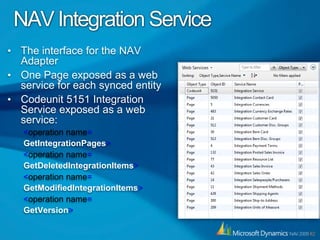
NAV Integration ServiceThe interface for the NAV AdapterOne Page exposed as a web service for each synced entityCodeunit 5151 Integration Service exposed as a web service:<operation name=GetIntegrationPages><operation name=GetDeletedIntegrationItems><operation name=GetModifiedIntegrationItems><operation name=GetVersion>
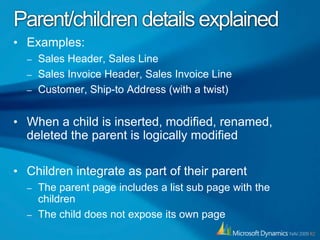
Parent/children details explainedExamples:Sales Header, Sales LineSales Invoice Header, Sales Invoice LineCustomer, Ship-to Address (with a twist)When a child is inserted, modified, renamed, deleted the parent is logically modifiedChildren integrate as part of their parentThe parent page includes a list sub page with the childrenThe child does not expose its own page
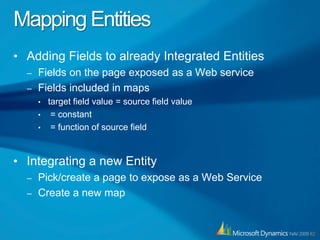
Mapping EntitiesAdding Fields to already Integrated EntitiesFields on the page exposed as a Web serviceFields included in mapstarget field value = source field value = constant = function of source fieldIntegrating a new EntityPick/create a page to expose as a Web ServiceCreate a new map
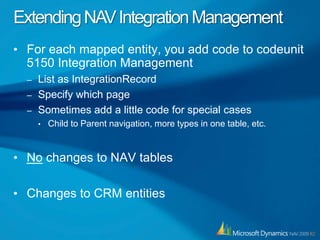
Extending NAV Integration ManagementFor each mapped entity, you add code to codeunit 5150 Integration ManagementList as IntegrationRecordSpecify which pageSometimes add a little code for special casesChild to Parent navigation, more types in one table, etc.No changes to NAV tablesChanges to CRM entities
Implementation ConsiderationsEvery instance of a NAV to CRM integration is a projectCarefully analyze, design, implement, and testVery rarely, the out-of-the-box integration will sufficeSpecial cases like parent/child, partial integrationFuture versionsThe Dynamics Connector customizes CRMMust merge with any existing CRM customizationsBackup and Restore must be synced across 3 databases: CRM, NAV, and Integration
Online Payment Service
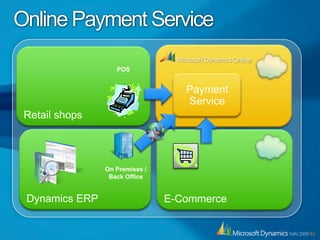
Online Payment ServiceRetail shopsPOSPayment ServiceDynamics ERPE-Commerce On Premises /Back Office
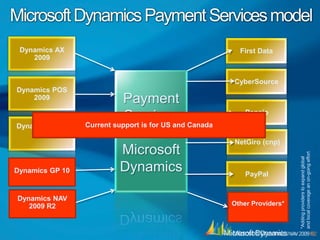
Microsoft Dynamics Payment Services modelDynamics AX 2009First DataCyberSourcePayment  Services for Microsoft DynamicsDynamics POS 2009PensioCurrent support is for US and CanadaDynamics RMS 2.0NetGiro (cnp)Dynamics GP 10PayPal*Adding providers to expand global and local coverage an on-going effortDynamics NAV 2009 R2Other Providers*
What’s new in NAV 2009 R2Development, Integration & Installation
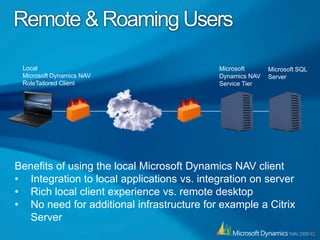
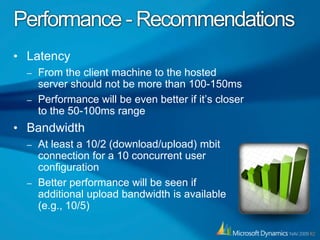
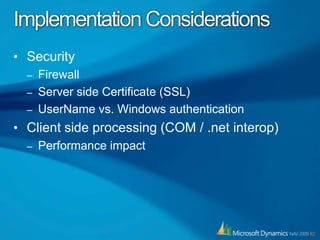
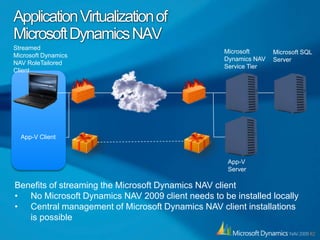
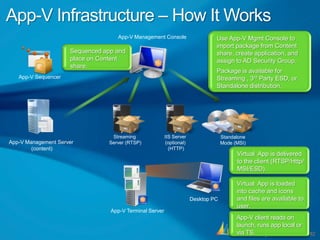
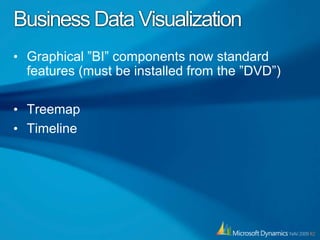
Technical content overviewWhat’s new in C/SIDEPage Design, ”Go to definition”, Object locking, Report enhancement, Treeview.NET interoperabilityRemote/Roaming users & AppVBusiness Data Visualization
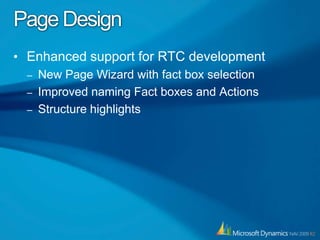
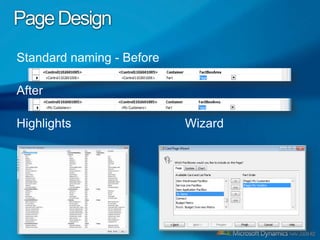
Page DesignEnhanced support for RTC developmentNew Page Wizard with fact box selectionImproved naming Fact boxes and ActionsStructure highlights
Page DesignStandard naming - BeforeAfterHighlights                                 Wizard
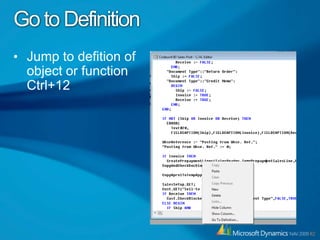
Go to DefinitionJump to defition of object or function Ctrl+12
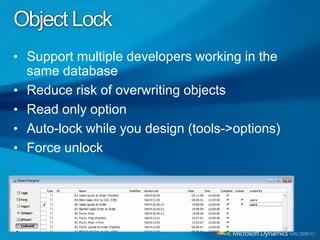
Object LockSupport multiple developers working in the same databaseReduce risk of overwriting objectsRead only optionAuto-lock while you design (tools->options)Force unlock
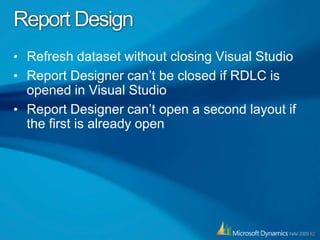
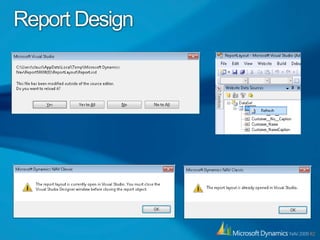
Report DesignRefresh dataset without closing Visual StudioReport Designer can’t be closed if RDLC is opened in Visual StudioReport Designer can’t open a second layout if the first is already open
Report Design
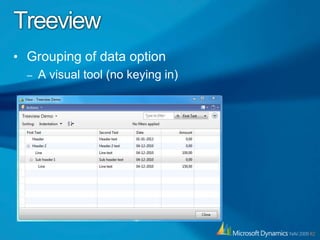
TreeviewGrouping of data optionA visual tool (no keying in)
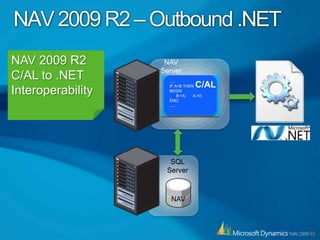
.NET Interoperability
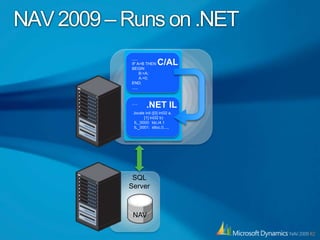
NAV 2009 – Runs on .NET.....IF A>B THENBEGIN      B:=A;A:=0;END;.....C/AL.NET IL..... .locals init ([0] int32 a,           [1] int32 b)  IL_0000:  ldc.i4.1  IL_0001:  stloc.0.....SQL ServerNAV
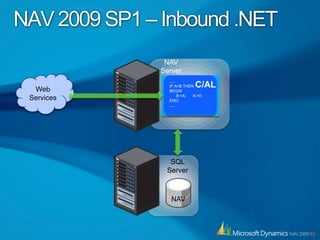
NAV 2009 SP1 – Inbound .NETNAVServerWeb Services.....IF A>B THENBEGIN      B:=A;A:=0;END;.....C/ALSQL ServerNAV

Dynamics nav 2009 r2 launch iceland technical track external

  • 1.
    Technical Track Reykjavik 6th December 2010Microsoft DenmarkThomas HalsePartner Technology Advisor& Sure Step Leadthoha@microsoft.com
  • 2.
    Agenda13.30 Welcome &Introduction13.40 Dynamics NAV Product Strategy & 2009 R2 update14.00 What’s new in NAV 2009 R2UI & ApplicationDevelopment, Integration & Installation15.30 Upgrading to NAV 2009 R2 (with RTC)15.50 Training & Certification overview16.10 Wrap up and Q & A16.30 Event ends * Break at app. 15.00
  • 3.
    Dynamics NAV ProductStrategy & 2009 R2 update
  • 4.
    A Wild Exampleof RTC in Real lifeChesterfield Zoo in UK
  • 5.
  • 6.
  • 7.
  • 8.
  • 9.
    Lack of decisionsupport (BI)
  • 10.
  • 11.
  • 12.
  • 13.
  • 14.
    Webservices (procurement portal)AWild Example of RTC in Real lifeWhat did David (CFO & former NAV user) say
  • 15.
    ... great improvementvisually and workflow
  • 16.
    ... role tailoredUI and information is fantastic
  • 17.
    What did Angela(the accountant) say
  • 18.
  • 19.
    ... easy towork with
  • 20.
    ... quick toprocess invoicesThe Microsoft Dynamics NAV RoadmapNAV “9”Continued innovation targeted at mid-market with particular focus on:SimplicityProductivityDynamics User Experience LeadershipMicrosoft technologyRapid Time-to-ValueNAV “8”NAV “7”Compelling Business FunctionalityMore Users, More ProductiveMore Software + ServicesRoleTailored .NET Programming Environment w/in NAVFull .NET RuntimeNAV 2009 R2Application enhancementsSharePoint UserClient RichnessPage Design/DebugImproved ReportingOffice 2010Online ServicesIntegration to Microsoft Dynamics CRMOnline Payments ServiceRoleTailored Client access for hosted, remote and roaming usersWindows 7 UXBusiness Data VisualizationsMAJOR RELEASESQ4 20102011-20122016-20172013-2014SERVICE PACKS/MINOR RELEASESAdditionalSP’s RTMAdditionalSP’s RTMAdditionalSP’s RTM
  • 21.
    Please note ”NAV7”Only supports Microsoft SQL ServerOnly supports RTC for end-users* According to the Dynamics NAV Statement of Direction the Classic client and the Native database are discontinued in NAV 7.
  • 22.
    NAV 2009 R2in HeadlinesConnector til Microsoft Dynamics CRMOnline Payment Services til Microsoft Dynamics NAVRole Tailored Client access for ”Remote &Roaming sers”Application Virtualization of NAV (App-V)Windows 7 “Light-up”Business Visualizations
  • 23.
    All news inR2 located on the ”DVD”Documentation like”Changes.doc”
  • 24.
    What’s new inNAV 2009 R2UI & Application
  • 25.
    UI & ApplicationOverviewWindows ”light up” - enhanced UI
  • 26.
    Jump lists Iconoverlay, Filter on subforms
  • 27.
  • 28.
  • 29.
  • 30.
  • 31.
  • 32.
    Online payment servicesWhat’snew in UIWindows 7 featuresStart & Task barPinning favoritesJump ListsInformation by icons (thumbnails)Icons shownStatic & dynamic information
  • 33.
    What’s new inUIFilter on subformsShift+F3
  • 34.
    What’s new inApplicationApplication enhancements & new functionalitySystem Indicator
  • 35.
  • 36.
  • 37.
    Online PaymentPlease note!Dynamics NAV 2009 R2 does NOT contain any hotfixes etc. R2 is applicationwise = SP1
  • 38.
    Objects only changedin relation to R2 specific new application functionalitySystem Indicator
  • 39.
  • 40.
  • 41.
    CRM Connector forDynamics NAVDesigned for out-of-the box Dynamics product integration
  • 42.
    Supports CRM4.0 and NAV 2009 R2 and future versions
  • 43.
    Supports CRM onlineand “on-premise” installation
  • 44.
    Available (free)for customers on BREP holding valid licenses for both CRM and NAV.CRM Connector for Dynamics NAVUser friendly UI for configuring data mapping
  • 45.
  • 46.
  • 47.
    One or two-wayintegration option
  • 48.
    Connector is notlocalized (W1)CRM connector setupClientCRM Web ServicesNAV Web ServicesNAV AdapterConnector for Microsoft DynamicsCRM AdapterCRMNAVMaps
  • 49.
    CRM Connector ArchitectureIntegrationServiceIntegration AdaptersDynamics CRM AdapterDynamics NAV AdapterIntegration ClientSolution TemplatesMap AuthoringScheduling ServiceIntegration DatabaseRuntime StatusTransform ServiceDocument MediationException MgmtTracing & LoggingNotification Service
  • 50.
    What entities* areintegrated in R2?NAV EntityCustomerContactItem/ResourceSales OrderSales InvoiceSalespersonCRM EntityAccountContactProductOrder**InvoiceERP System User* Plus supporting entities such as Currency** An Order can be initially created in CRM then synced once to NAV
  • 51.
    Running a Mapfrom CRM to NAVTime
  • 52.
    NAV Integration ManagementIntegrationIDShared, foreign GUID across CRM and NAVIntegration Record, Table 5151Links Integration IDto internal NAV Record IDTracks timestamps of modifications and deletionsNew framework supported Database triggers Always called on any insert, modify, rename, delete operation against the databaseIntegration Management,Codeunit 5150Where your enhancements go=Integration Management
  • 53.
    NAV Integration ServiceTheinterface for the NAV AdapterOne Page exposed as a web service for each synced entityCodeunit 5151 Integration Service exposed as a web service:<operation name=GetIntegrationPages><operation name=GetDeletedIntegrationItems><operation name=GetModifiedIntegrationItems><operation name=GetVersion>
  • 54.
    Parent/children details explainedExamples:SalesHeader, Sales LineSales Invoice Header, Sales Invoice LineCustomer, Ship-to Address (with a twist)When a child is inserted, modified, renamed, deleted the parent is logically modifiedChildren integrate as part of their parentThe parent page includes a list sub page with the childrenThe child does not expose its own page
  • 55.
    Mapping EntitiesAdding Fieldsto already Integrated EntitiesFields on the page exposed as a Web serviceFields included in mapstarget field value = source field value = constant = function of source fieldIntegrating a new EntityPick/create a page to expose as a Web ServiceCreate a new map
  • 56.
    Extending NAV IntegrationManagementFor each mapped entity, you add code to codeunit 5150 Integration ManagementList as IntegrationRecordSpecify which pageSometimes add a little code for special casesChild to Parent navigation, more types in one table, etc.No changes to NAV tablesChanges to CRM entities
  • 57.
    Implementation ConsiderationsEvery instanceof a NAV to CRM integration is a projectCarefully analyze, design, implement, and testVery rarely, the out-of-the-box integration will sufficeSpecial cases like parent/child, partial integrationFuture versionsThe Dynamics Connector customizes CRMMust merge with any existing CRM customizationsBackup and Restore must be synced across 3 databases: CRM, NAV, and Integration
  • 58.
  • 59.
    Online Payment ServiceRetailshopsPOSPayment ServiceDynamics ERPE-Commerce On Premises /Back Office
  • 60.
    Microsoft Dynamics PaymentServices modelDynamics AX 2009First DataCyberSourcePayment Services for Microsoft DynamicsDynamics POS 2009PensioCurrent support is for US and CanadaDynamics RMS 2.0NetGiro (cnp)Dynamics GP 10PayPal*Adding providers to expand global and local coverage an on-going effortDynamics NAV 2009 R2Other Providers*
  • 61.
    What’s new inNAV 2009 R2Development, Integration & Installation
  • 62.
    Technical content overviewWhat’snew in C/SIDEPage Design, ”Go to definition”, Object locking, Report enhancement, Treeview.NET interoperabilityRemote/Roaming users & AppVBusiness Data Visualization
  • 63.
    Page DesignEnhanced supportfor RTC developmentNew Page Wizard with fact box selectionImproved naming Fact boxes and ActionsStructure highlights
  • 64.
    Page DesignStandard naming- BeforeAfterHighlights Wizard
  • 65.
    Go to DefinitionJumpto defition of object or function Ctrl+12
  • 66.
    Object LockSupport multipledevelopers working in the same databaseReduce risk of overwriting objectsRead only optionAuto-lock while you design (tools->options)Force unlock
  • 67.
    Report DesignRefresh datasetwithout closing Visual StudioReport Designer can’t be closed if RDLC is opened in Visual StudioReport Designer can’t open a second layout if the first is already open
  • 68.
  • 69.
    TreeviewGrouping of dataoptionA visual tool (no keying in)
  • 70.
  • 71.
    NAV 2009 –Runs on .NET.....IF A>B THENBEGIN B:=A;A:=0;END;.....C/AL.NET IL..... .locals init ([0] int32 a, [1] int32 b) IL_0000: ldc.i4.1 IL_0001: stloc.0.....SQL ServerNAV
  • 72.
    NAV 2009 SP1– Inbound .NETNAVServerWeb Services.....IF A>B THENBEGIN B:=A;A:=0;END;.....C/ALSQL ServerNAV