
Open source Real-Time
Operating System with Arduino.
Agenda
• Introduction
• Concept of RTOS
• FreeRTOS
• DuinOS – FreeRTOS for Arduino
• Example of multitask running with DuinOS
• Communication
• What needs to be improved
• Limitations of Arduino
• Other approach tried
• Other things learned
• Further Development
• Conclusion
2
Introduction
• Interest in the PMC project.
• Problem: Command sent to the board takes some
time to execute, as it runs in an loop.
• Need for a client/server running simultaneously.
• Solution sugested – RTOS.
• RTOS could provide a better use of Arduino’s
resources.
3
Concept of RTOS
• RTOS – Real-Time Operating System.
• Real-time: Rigid control of time processing
considering the inputs.
• Dividing duties requires capability to:
 Switch task without corruption.
 Determine priorities when conflicts occur.
 Provide clean, independent storage for each task.
 Provide inter-task communication when required.
4
How does an RTOS work?
• Two most common designs:
 Event-driven switch task; when a higher priority
need servicing, called preemptive priority or priority
scheduling.
 Time-sharing desings switch tasks on a regular
clocked interrupt, called Round Robin.
5
Characteristics of FreeRTOS
• Lightweight embeddable multi-task real-time
operating system.
• Cooperative, preemptive and hybrid scheduling.
• Use of tasks and co-routines.
• Multiple inter-tasks communication (queues,
semaphores, mutexes).
• The scheduling works with priorities.
6
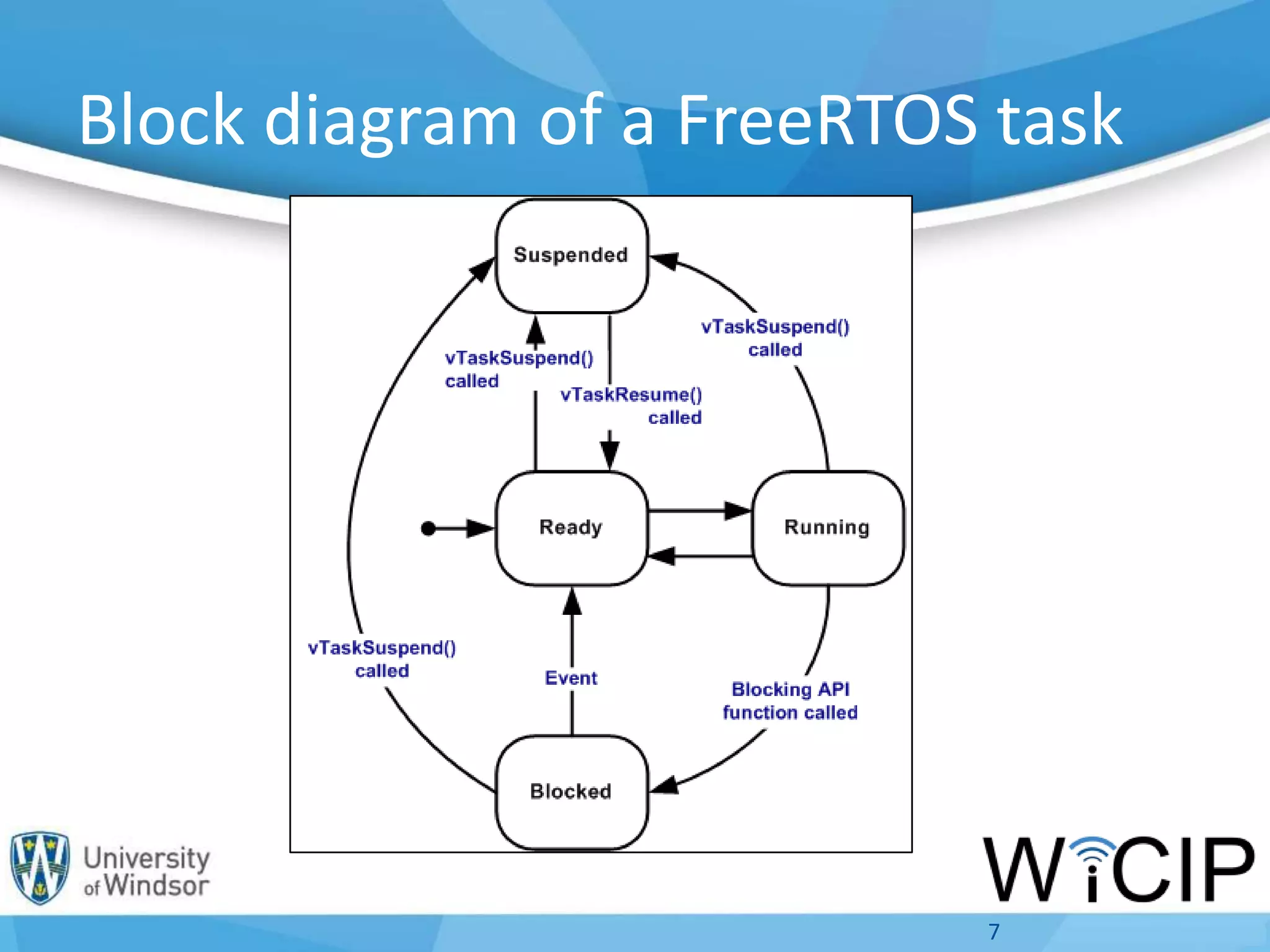
Block diagram of a FreeRTOS task
7
DuinOS – FreeRTOS version for Arduino
• RTOS with a preemptive multitasking system for
Arduino and Atmel AVR based boards.
• Developed by RobotGroup, from Argentina.
• Open-source, with contribution of people from
USA, Brazil, Italy…
• Still in development, however very recent changes
were not found in the project.
8
Particularities of duinOS
The language is turned into easier commands in order
to be more acessible to an Arduino user:
• Suspend task:
#define suspend() vTaskSuspend(NULL)
• Delay command turned into Task delay:
#define delay(ticks) vTaskDelay(ticks)
9
Example of a duinOS multitask
application running
10
• Task declaration:
declareTaskLoop(redLED); declareTaskLoop(greenLED);
declareTaskLoop(yellowLED); declareTaskLoop(read_button);
• Tasks:
taskLoop(redLED) :Blinks red LED 10 times every second and then suspend.
taskLoop(greenLED): Blinks green LED every second.
taskLoop(yellowLED): Blinks yellow LED twice a second.
taskLoop(read_button): If button is pressed, suspends green and yellow LED tasks, turn
off LEDs and resumes the rel LED task.
• Task start. Goes in setup function:
createTaskLoop(redLED, NORMAL_PRIORITY); createTaskLoop(greenLED,
LOW_PRIORITY); createTaskLoop(yellowLED, HIGH_PRIORITY)....
• Loop function is empty! All delay used in the tasks is processing time for another task.
Communication tasks using DuinOS
• In a first moment, the connection routine
was developed in the setup.
• Then, it was developed a connection task.
• Next Step: Server-specific task and a client-
specific task. Both wait until the connection
is established to start running, through inter-
task communication.
• Watchdog was used in the prototype.
11
• Client declaration not working in a first moment.
Issued solved waiting for the connection, using
inter-task communication to start the task.
• Reception of the HTTP request was not occuring
correctly. Solved adding more delay between each
step, resulting in more free time for the other tasks
to run.
• A blink LED task run at the same time in order to
show Arduino was still running.
12
Communication tasks using DuinOS
What needs to be improved
• Creation of a socket inside the Task. Arduino to
browser communication is established but no data
os received. Probably because of the lack of socket
information inside the task.
• Task exclusively to write in the database.
• Lack of documentation of DuinOS!
• Explore more the use of semaphores and mutexes
instead of global variables.
13
Limitations of Arduino and duinOS
• Need for step by step execution of the code.
• Socket creation inside a task??
• Lack of documentation of DuinOS affects the results
of using this RTOS in a project!
14
Other approach tried - NILRTOS
• NilRTOS is fast tiny preemptive RTOS.
• Designed specially for Arduino UNO.
• Working perfectly for the client. All data is received
by the browser.
• Work simply by adding a Library to normal Arduino.
15
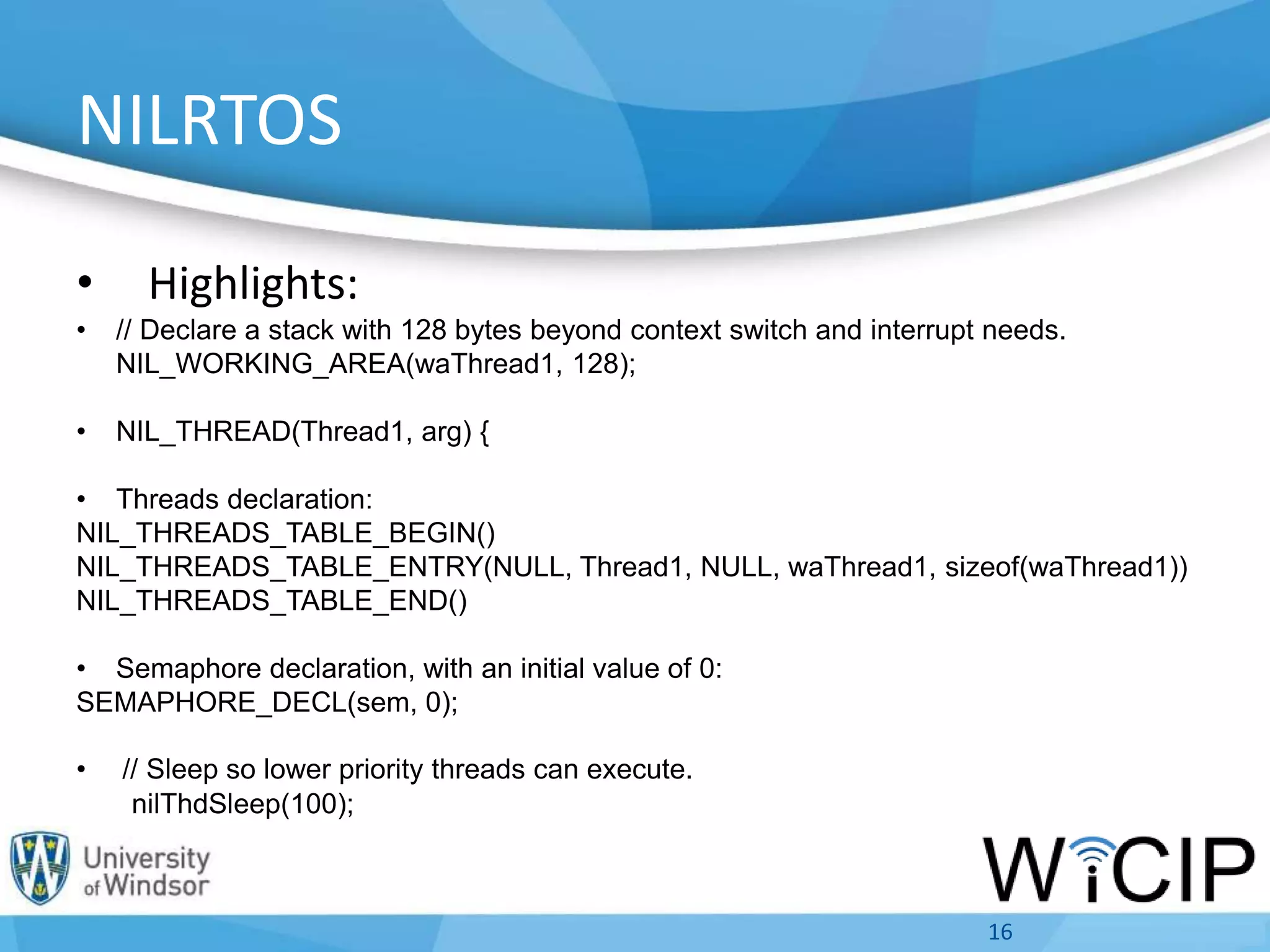
NILRTOS
• Highlights:
• // Declare a stack with 128 bytes beyond context switch and interrupt needs.
NIL_WORKING_AREA(waThread1, 128);
• NIL_THREAD(Thread1, arg) {
• Threads declaration:
NIL_THREADS_TABLE_BEGIN()
NIL_THREADS_TABLE_ENTRY(NULL, Thread1, NULL, waThread1, sizeof(waThread1))
NIL_THREADS_TABLE_END()
• Semaphore declaration, with an initial value of 0:
SEMAPHORE_DECL(sem, 0);
• // Sleep so lower priority threads can execute.
nilThdSleep(100);
16
Limitations of NILRTOS
• One task has to be stopped, so the others can run.
• In a RTOS, the “jump” between different tasks have to
be executed by the system and not defined by the
user.
• Suggested not to use NiLRTOS, as it is not a proper
functioning RTOS.
• Not suitable for my project. However, several
concepts of RTOS were learned while trying this
approach.
17
Other things learned
• Basics of PHP and MySQL.
• Database configuration and access control using
Wamp server.
• HTTP protocol request and response.
• Object oriented programming; classes and objects.
• Watchdogs.
• Semaphores and mutexes.
18
Other possibilities
• Use of idle tasks with a hook to initiate the task,
allowing the use of Arduino in a low energy mode.
• Get better documentation and examples.
• In order to better understand how the RTOS
improve the use of a microcontroler, a more
powerful IDE than Arduino needs to be used.
19Photovoltaic Monitoring and Control
Conclusion
• RTOS is a very powerful solution for embedded
systems, which can improve the funcionality of na
embedded system.
• However one microcontroller can run only one task
at a time, with a powerful scheduler and a well
planed application it appear that several tasks are
being executed at the same time.
20Photovoltaic Monitoring and Control
Conclusion
• DuinOS is a good RTOS for Arduino, however some
points need to be improved and a proper
documentation still has to be created.
• The communication libraries of DuinOS need to be
improved in order to get a better functionality.
• NILRTOS is a working RTOS which can be perfectly
used for small applications, specially with UNO, in
order to achieve a certain level of multitasking.
21Photovoltaic Monitoring and Control
Thank you.

DuinOS Presentation - FINAL

  • 1.
    Open source Real-Time OperatingSystem with Arduino.
  • 2.
    Agenda • Introduction • Conceptof RTOS • FreeRTOS • DuinOS – FreeRTOS for Arduino • Example of multitask running with DuinOS • Communication • What needs to be improved • Limitations of Arduino • Other approach tried • Other things learned • Further Development • Conclusion 2
  • 3.
    Introduction • Interest inthe PMC project. • Problem: Command sent to the board takes some time to execute, as it runs in an loop. • Need for a client/server running simultaneously. • Solution sugested – RTOS. • RTOS could provide a better use of Arduino’s resources. 3
  • 4.
    Concept of RTOS •RTOS – Real-Time Operating System. • Real-time: Rigid control of time processing considering the inputs. • Dividing duties requires capability to:  Switch task without corruption.  Determine priorities when conflicts occur.  Provide clean, independent storage for each task.  Provide inter-task communication when required. 4
  • 5.
    How does anRTOS work? • Two most common designs:  Event-driven switch task; when a higher priority need servicing, called preemptive priority or priority scheduling.  Time-sharing desings switch tasks on a regular clocked interrupt, called Round Robin. 5
  • 6.
    Characteristics of FreeRTOS •Lightweight embeddable multi-task real-time operating system. • Cooperative, preemptive and hybrid scheduling. • Use of tasks and co-routines. • Multiple inter-tasks communication (queues, semaphores, mutexes). • The scheduling works with priorities. 6
  • 7.
    Block diagram ofa FreeRTOS task 7
  • 8.
    DuinOS – FreeRTOSversion for Arduino • RTOS with a preemptive multitasking system for Arduino and Atmel AVR based boards. • Developed by RobotGroup, from Argentina. • Open-source, with contribution of people from USA, Brazil, Italy… • Still in development, however very recent changes were not found in the project. 8
  • 9.
    Particularities of duinOS Thelanguage is turned into easier commands in order to be more acessible to an Arduino user: • Suspend task: #define suspend() vTaskSuspend(NULL) • Delay command turned into Task delay: #define delay(ticks) vTaskDelay(ticks) 9
  • 10.
    Example of aduinOS multitask application running 10 • Task declaration: declareTaskLoop(redLED); declareTaskLoop(greenLED); declareTaskLoop(yellowLED); declareTaskLoop(read_button); • Tasks: taskLoop(redLED) :Blinks red LED 10 times every second and then suspend. taskLoop(greenLED): Blinks green LED every second. taskLoop(yellowLED): Blinks yellow LED twice a second. taskLoop(read_button): If button is pressed, suspends green and yellow LED tasks, turn off LEDs and resumes the rel LED task. • Task start. Goes in setup function: createTaskLoop(redLED, NORMAL_PRIORITY); createTaskLoop(greenLED, LOW_PRIORITY); createTaskLoop(yellowLED, HIGH_PRIORITY).... • Loop function is empty! All delay used in the tasks is processing time for another task.
  • 11.
    Communication tasks usingDuinOS • In a first moment, the connection routine was developed in the setup. • Then, it was developed a connection task. • Next Step: Server-specific task and a client- specific task. Both wait until the connection is established to start running, through inter- task communication. • Watchdog was used in the prototype. 11
  • 12.
    • Client declarationnot working in a first moment. Issued solved waiting for the connection, using inter-task communication to start the task. • Reception of the HTTP request was not occuring correctly. Solved adding more delay between each step, resulting in more free time for the other tasks to run. • A blink LED task run at the same time in order to show Arduino was still running. 12 Communication tasks using DuinOS
  • 13.
    What needs tobe improved • Creation of a socket inside the Task. Arduino to browser communication is established but no data os received. Probably because of the lack of socket information inside the task. • Task exclusively to write in the database. • Lack of documentation of DuinOS! • Explore more the use of semaphores and mutexes instead of global variables. 13
  • 14.
    Limitations of Arduinoand duinOS • Need for step by step execution of the code. • Socket creation inside a task?? • Lack of documentation of DuinOS affects the results of using this RTOS in a project! 14
  • 15.
    Other approach tried- NILRTOS • NilRTOS is fast tiny preemptive RTOS. • Designed specially for Arduino UNO. • Working perfectly for the client. All data is received by the browser. • Work simply by adding a Library to normal Arduino. 15
  • 16.
    NILRTOS • Highlights: • //Declare a stack with 128 bytes beyond context switch and interrupt needs. NIL_WORKING_AREA(waThread1, 128); • NIL_THREAD(Thread1, arg) { • Threads declaration: NIL_THREADS_TABLE_BEGIN() NIL_THREADS_TABLE_ENTRY(NULL, Thread1, NULL, waThread1, sizeof(waThread1)) NIL_THREADS_TABLE_END() • Semaphore declaration, with an initial value of 0: SEMAPHORE_DECL(sem, 0); • // Sleep so lower priority threads can execute. nilThdSleep(100); 16
  • 17.
    Limitations of NILRTOS •One task has to be stopped, so the others can run. • In a RTOS, the “jump” between different tasks have to be executed by the system and not defined by the user. • Suggested not to use NiLRTOS, as it is not a proper functioning RTOS. • Not suitable for my project. However, several concepts of RTOS were learned while trying this approach. 17
  • 18.
    Other things learned •Basics of PHP and MySQL. • Database configuration and access control using Wamp server. • HTTP protocol request and response. • Object oriented programming; classes and objects. • Watchdogs. • Semaphores and mutexes. 18
  • 19.
    Other possibilities • Useof idle tasks with a hook to initiate the task, allowing the use of Arduino in a low energy mode. • Get better documentation and examples. • In order to better understand how the RTOS improve the use of a microcontroler, a more powerful IDE than Arduino needs to be used. 19Photovoltaic Monitoring and Control
  • 20.
    Conclusion • RTOS isa very powerful solution for embedded systems, which can improve the funcionality of na embedded system. • However one microcontroller can run only one task at a time, with a powerful scheduler and a well planed application it appear that several tasks are being executed at the same time. 20Photovoltaic Monitoring and Control
  • 21.
    Conclusion • DuinOS isa good RTOS for Arduino, however some points need to be improved and a proper documentation still has to be created. • The communication libraries of DuinOS need to be improved in order to get a better functionality. • NILRTOS is a working RTOS which can be perfectly used for small applications, specially with UNO, in order to achieve a certain level of multitasking. 21Photovoltaic Monitoring and Control
  • 22.