Business Continuity Planning
with SQL Server HADR options
Prem Mehra
Program Manager
Microsoft Corporation
Key Takeaways of the
Session
• SQL Server 2008 and SQL Server 2008 R2 can meet
very high HA and DR requirements
• Upgrades to SQL Server 2008 and to SQL Server 2008
R2 can be achieved with downtime limited to minutes
• Demanding HA and DR deployments require very good
documented operational procedures and highly skilled
staff
Current Technologies
• Failover Clustering
– Local server redundancy
• Database Mirroring
– Local server & storage redundancy
– Disaster recovery
• Log Shipping
– Additional disaster sites
for databases
– App/user error recovery
• Replication
– Database reporting
and read scale out
with redundancy
• Always On Partner Solutions
– Highest hardware reliability
Database
Mirroring
Hot
Standby
Warm
Standby
App/User
Error
Recovery
Log Shipping
Log Shipping With
Restore Delay
Production
Database
Replication Database
Scale Out
For Queries
Failover
Cluster
# Architecture Key Distinguishing
Scenario Use & Deployment
Characteristics
Examples
1 Failover Clustering for HA and
Database Mirroring for DR
A) Single data copy for HA sufficient
B) Positive experience with Failover clustering
C) Comfortable deploying two different
technologies for HA & DR
ServiceU and
CareGroup
2 Synchronous Database
Mirroring for HA/DR and Log
Shipping for additional DR
A) Require deploying fewer (only one) technology
for HA & DR
B) Avoid costs associated with Failover clustering
C) For HA, remote data center execution
acceptable
bwin
3 Geo-Cluster for HA/DR A) Require deploying fewer (only one) technology
for HA & DR
B) Positive experience with Geo-Clustering
Edgenet
4 Failover Clustering for HA and
SAN-based Replication for DR
A) Require deploying single DR technology across
multiple DBMSs
B) A third party DR technology acceptable
MySpace
5 Peer-to-Peer Replication for HA
and DR (and reporting)
A) Simultaneous data manipulation from multiple
sites
B) Potential data loss acceptable
Enterprise in
Travel Industry
Proven HA / DR Architectures:
Successfully Deployed by Customers
Atlanta Standby Data Center
Memphis Primary Data Center
SQL Server Infrastructure
DNS
Asynchronous Database
Mirroring
Windows 2008 SQL 2008 Windows 2008 SQL 2008
M
I
R
R
O
R
Preferred
P
R
I
N
C
I
P
A
L
DB Connection to Memphis
for Regular Test Exercise
DNS
WEB FARM WEB FARM
DNS
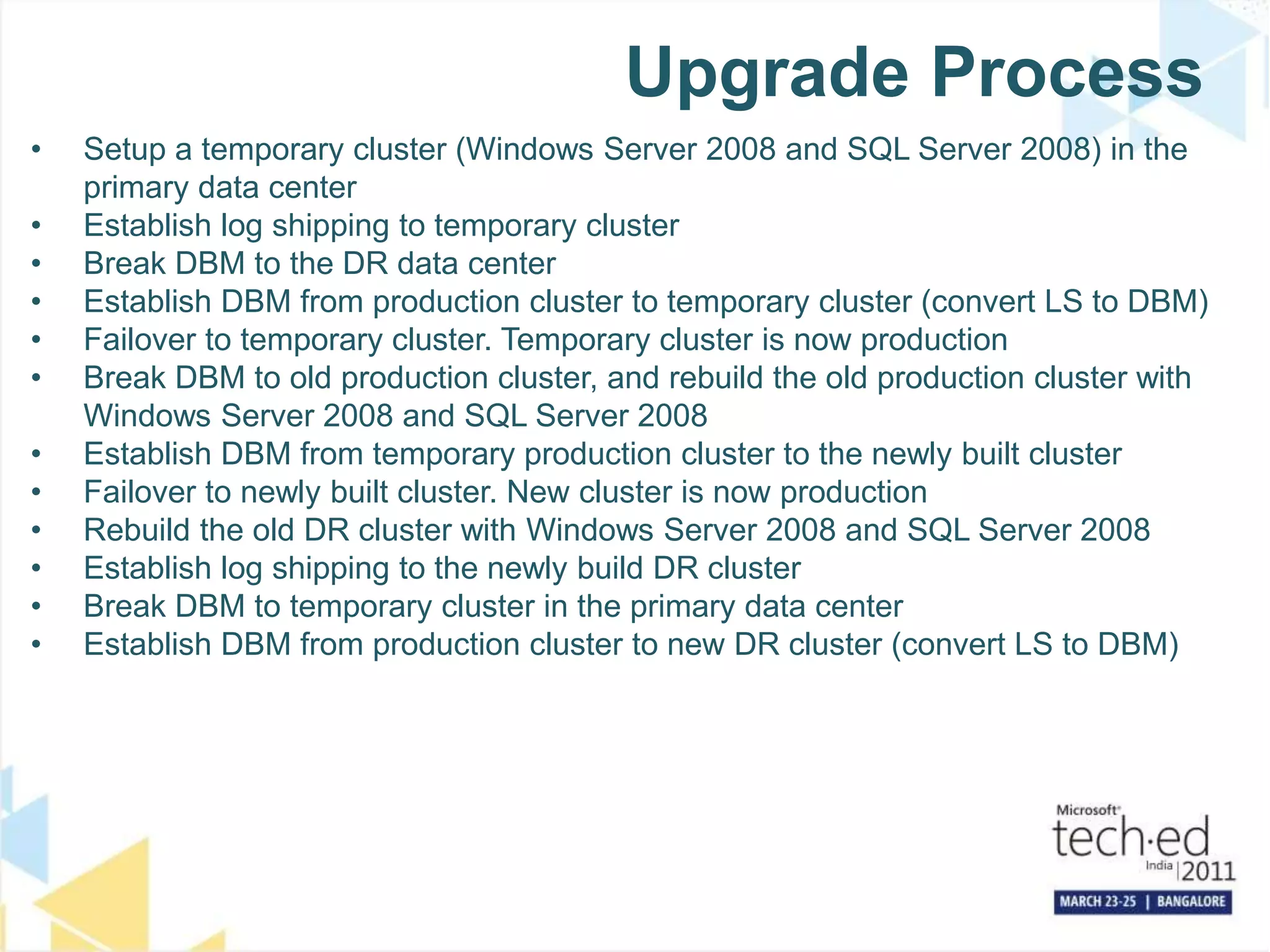
Upgrade Process
• Setup a temporary cluster (Windows Server 2008 and SQL Server 2008) in the
primary data center
• Establish log shipping to temporary cluster
• Break DBM to the DR data center
• Establish DBM from production cluster to temporary cluster (convert LS to DBM)
• Failover to temporary cluster. Temporary cluster is now production
• Break DBM to old production cluster, and rebuild the old production cluster with
Windows Server 2008 and SQL Server 2008
• Establish DBM from temporary production cluster to the newly built cluster
• Failover to newly built cluster. New cluster is now production
• Rebuild the old DR cluster with Windows Server 2008 and SQL Server 2008
• Establish log shipping to the newly build DR cluster
• Break DBM to temporary cluster in the primary data center
• Establish DBM from production cluster to new DR cluster (convert LS to DBM)
7
Mirror
Server
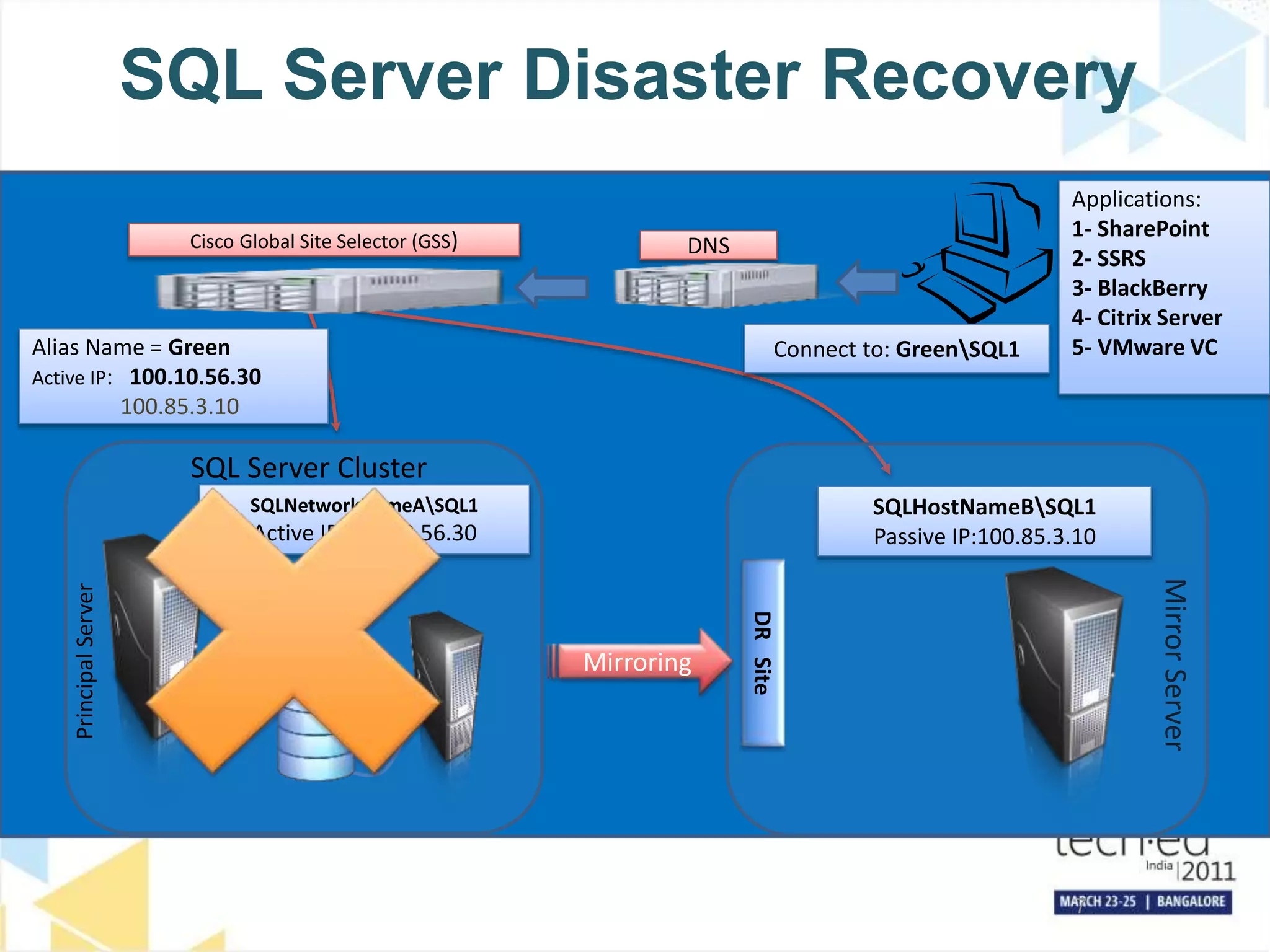
SQL Server Disaster Recovery
SQL Server Cluster
Cisco Global Site Selector (GSS) DNS
SQLNetworkNameASQL1
Active IP:100.10.56.30
Alias Name = Green
Active IP: 100.10.56.30
100.85.3.10
Connect to: GreenSQL1
SQLHostNameBSQL1
Passive IP:100.85.3.10
DR
Site
Mirroring
Principal
Server
Applications:
1- SharePoint
2- SSRS
3- BlackBerry
4- Citrix Server
5- VMware VC
Windows Server 2008 R2
SQL Server 2008 R2
Mirroring
Mirroring
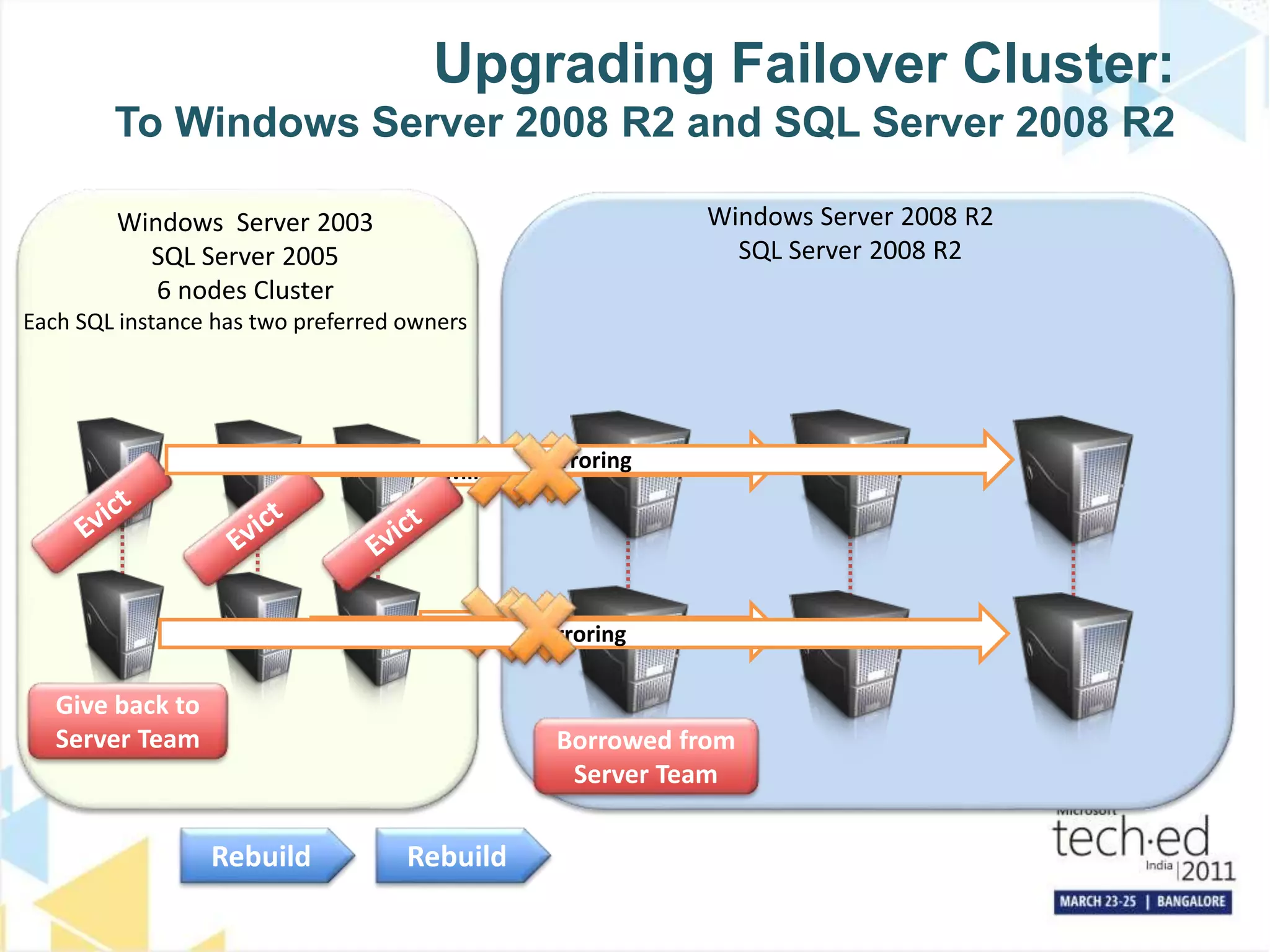
Upgrading Failover Cluster:
To Windows Server 2008 R2 and SQL Server 2008 R2
Windows Server 2003
SQL Server 2005
6 nodes Cluster
Each SQL instance has two preferred owners
Give back to
Server Team
Mirroring
Mirroring
Mirroring
Mirroring
Borrowed from
Server Team
Rebuild
Rebuild
Infrastructure
Scale Up & Zero Data Loss
Principal Mirror
Log Shipping
1h delay
Log Shipping
2nd copy
All Log Backups and
Full Backups Days 1,3,5…
All Log Backups and
Full Backups Days 2,4,6…
HA Zero Data Loss Solution
Remarks
• Zero data loss is higher priority than Availability, so if we can’t harden the
transaction to disk in two datacenters, we put our application offline
• If “Principal” fails, we put our application offline, failover to “Mirror”, break the
mirror and promote “Log Shipping Copy 2” to be the new mirror.
• If “Mirror” fails, we put our application offline, let “Log Shipping” catch up and
promote it to be the new mirror
• If either of the log shipping secondaries fail, we continue operation
• One of the log shipping secondaries has the one hour delay to be able to fix
human or applications errors (like deleting data) quickly, if we do not detect
deleted data within an hour we have to restore on of our backups
• Backup Infrastructure: Each datacenter has one file server optimized to hold
large files (but just a few < 10,000) and one to hold small files (but many of
them > 1,000,000)
Infrastructure
Scale Up and High Availability
Principal Mirror
Log Shipping
1h delay
Log Shipping
2nd copy
All Log Backups and
Full Backups Days 1,3,5…
All Log Backups and
Full Backups Days 2,4,6…
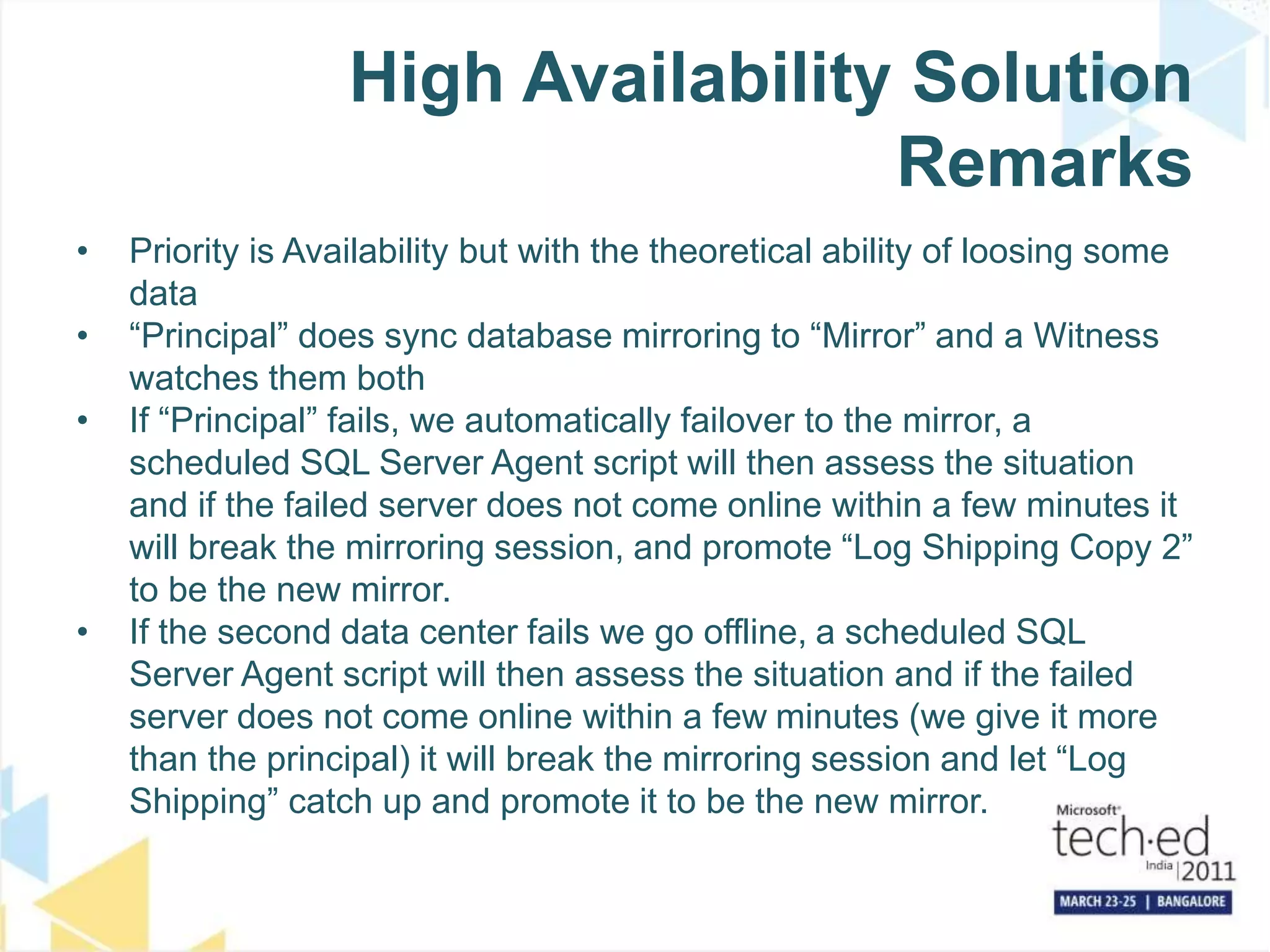
High Availability Solution
Remarks
• Priority is Availability but with the theoretical ability of loosing some
data
• “Principal” does sync database mirroring to “Mirror” and a Witness
watches them both
• If “Principal” fails, we automatically failover to the mirror, a
scheduled SQL Server Agent script will then assess the situation
and if the failed server does not come online within a few minutes it
will break the mirroring session, and promote “Log Shipping Copy 2”
to be the new mirror.
• If the second data center fails we go offline, a scheduled SQL
Server Agent script will then assess the situation and if the failed
server does not come online within a few minutes (we give it more
than the principal) it will break the mirroring session and let “Log
Shipping” catch up and promote it to be the new mirror.
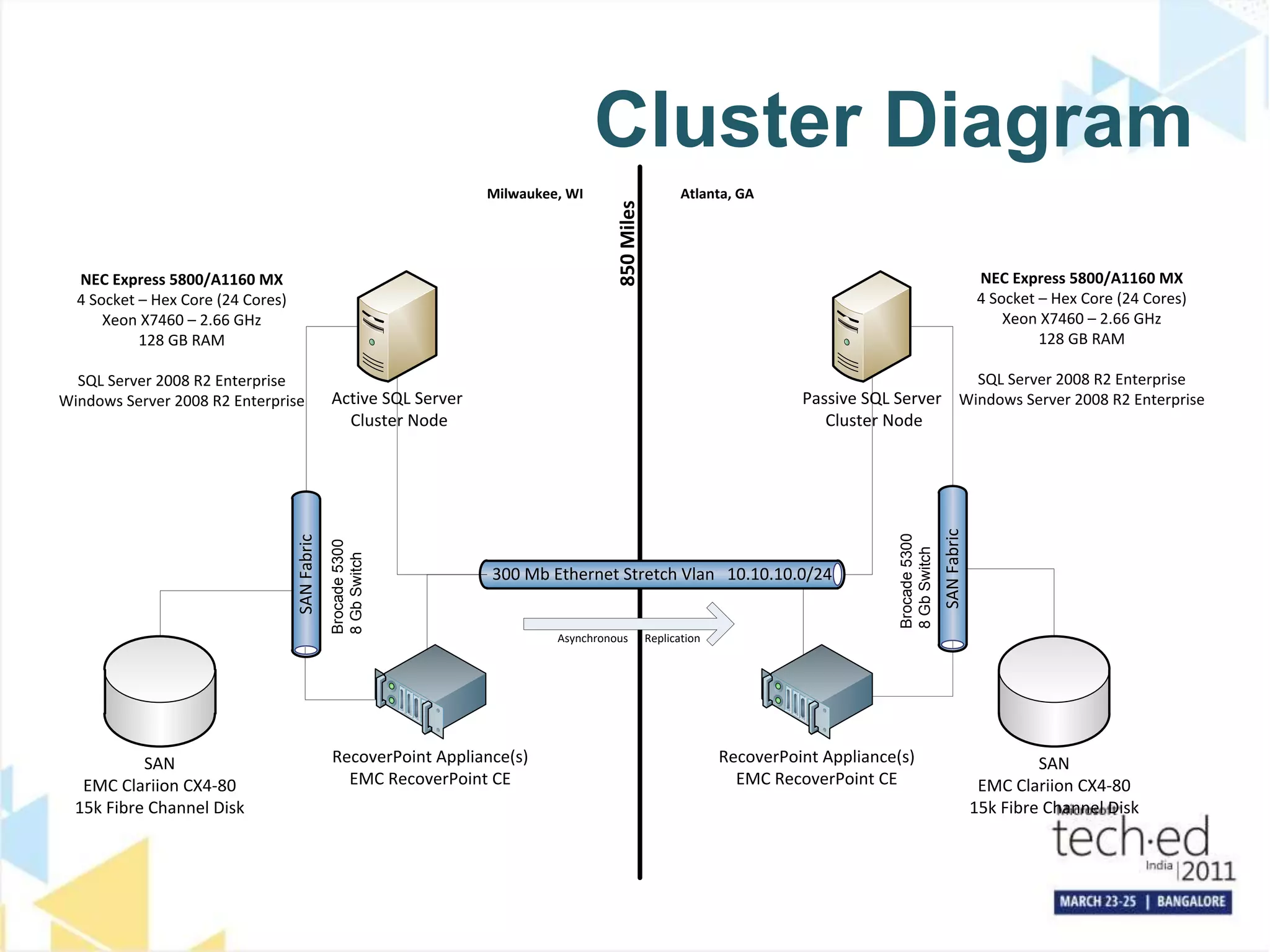
Cluster Diagram
RecoverPoint Appliance(s)
EMC RecoverPoint CE
Milwaukee, WI Atlanta, GA
300 Mb Ethernet Stretch Vlan 10.10.10.0/24
RecoverPoint Appliance(s)
EMC RecoverPoint CE
Asynchronous Replication
850
Miles
NEC Express 5800/A1160 MX
4 Socket – Hex Core (24 Cores)
Xeon X7460 – 2.66 GHz
128 GB RAM
SQL Server 2008 R2 Enterprise
Windows Server 2008 R2 Enterprise
NEC Express 5800/A1160 MX
4 Socket – Hex Core (24 Cores)
Xeon X7460 – 2.66 GHz
128 GB RAM
SQL Server 2008 R2 Enterprise
Windows Server 2008 R2 Enterprise
SAN
Fabric
Brocade
5300
8
Gb
Switch
SAN
Fabric
Brocade
5300
8
Gb
Switch
SAN
EMC Clariion CX4-80
15k Fibre Channel Disk
SAN
EMC Clariion CX4-80
15k Fibre Channel Disk
Passive SQL Server
Cluster Node
Active SQL Server
Cluster Node
• On the Target Server
• Add the SAN snapped drives as mount points
• Eliminates the Drive Letter limitation by allowing as many drives as needed
• Install SQL Server on the local drive
• Place the System Databases on the SAN Drive under a mount point
• Attach the User Databases , create the jobs, monitoring scripts, etc.
• Verify connectivity by running all the SELECT Stored Procedures
• Add the Target Server to the cluster
• Run the verification procedure on the snapped drives
• Saw a saving of over 2 hours per server
Old Data Center New Data Center
Still Live in Production!
Snap
Replicate Data
Moving Databases to New Datacenter
Preparation
• Make another Copy of the volumes on the Source Server and replicate
them to the Target Server
• Here is the Tricky Part
• Stop SQL Server
• Remove the volumes used to prep the server
• Add the latest volumes with EXACTLY the same layout as the prep volumes
• Start SQL Server
• Test connectivity, call the SPROCS which run SELECT Statements
Moving Databases to New Datacenter
After the Prep is Done
• Trickery & Shenanigans
• The sys.sysDatabases stores only where the MDF file is located
so as long as the MDF is where sys.sysDatabases says, no
issues will exist
• Since the sys.sysFiles data is stored in each database the
switch can take place seamlessly
Moving Databases to New Datacenter
Why Does This Work?
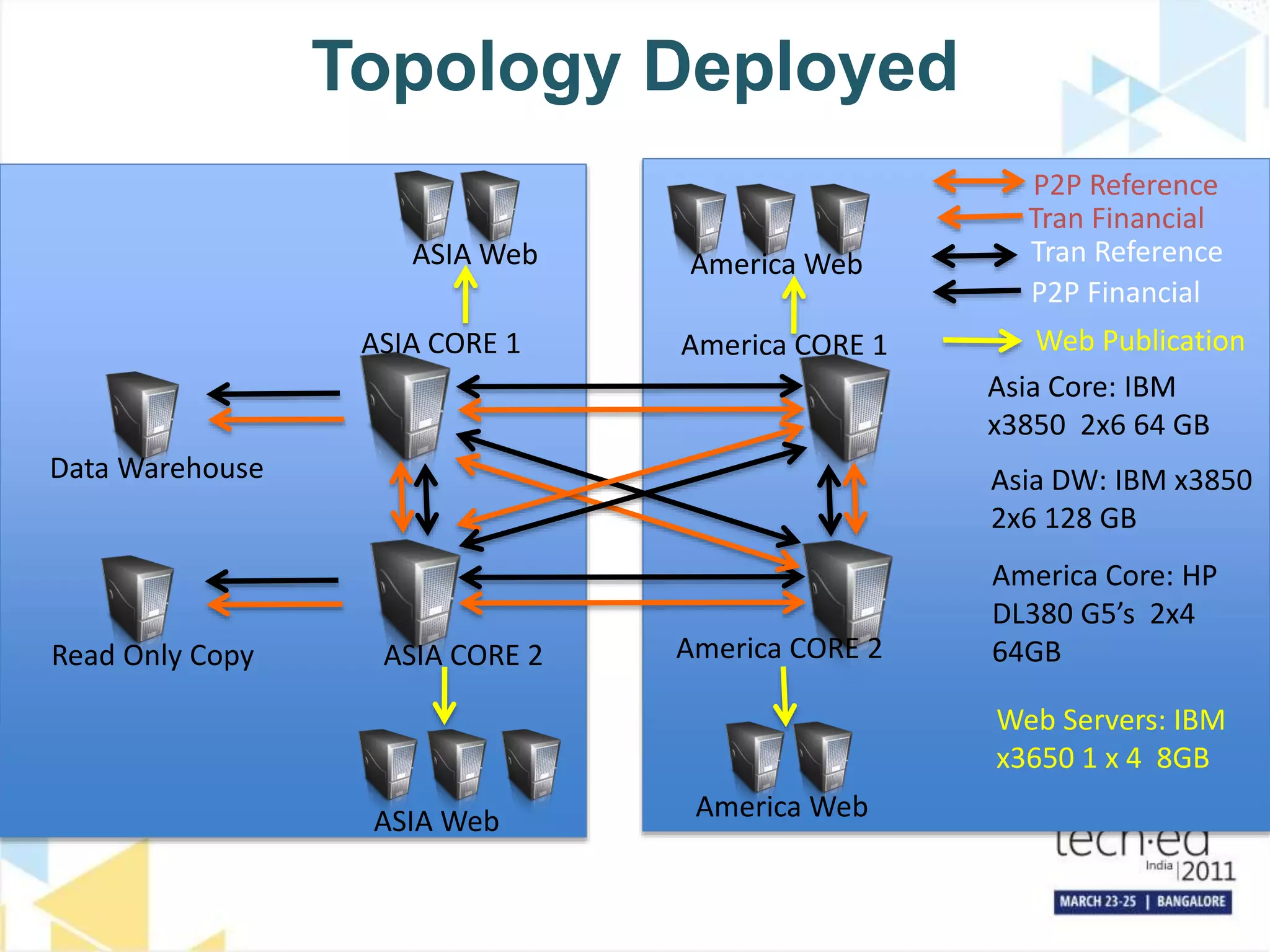
Topology Deployed
ASIA CORE 1
ASIA CORE 2
Data Warehouse
ASIA Web
America Web
America Web
ASIA Web
Read Only Copy
America CORE 1
America CORE 2
P2P Reference
P2P Financial
Web Publication
Asia Core: IBM
x3850 2x6 64 GB
Asia DW: IBM x3850
2x6 128 GB
America Core: HP
DL380 G5’s 2x4
64GB
Web Servers: IBM
x3650 1 x 4 8GB
Tran Reference
Tran Financial
Š 2011 Microsoft Corporation. All rights reserved. Microsoft, Windows, Windows Vista and other product names are or may be registered trademarks and/or trademarks in
the U.S. and/or other countries.
The information herein is for informational purposes only and represents the current view of Microsoft Corporation as of the date of this presentation. Because Microsoft
must respond to changing market conditions, it should not be interpreted to be a commitment on the part of Microsoft, and Microsoft cannot guarantee the accuracy of any
information provided after the date of this presentation.
MICROSOFT MAKES NO WARRANTIES, EXPRESS, IMPLIED OR STATUTORY, AS TO THE INFORMATION IN THIS PRESENTATION.

Business_Continuity_Planning_with_SQL_Server_HADR_options_TechEd_Bangalore_2011.pptx

  • 1.
    Business Continuity Planning withSQL Server HADR options Prem Mehra Program Manager Microsoft Corporation
  • 2.
    Key Takeaways ofthe Session • SQL Server 2008 and SQL Server 2008 R2 can meet very high HA and DR requirements • Upgrades to SQL Server 2008 and to SQL Server 2008 R2 can be achieved with downtime limited to minutes • Demanding HA and DR deployments require very good documented operational procedures and highly skilled staff
  • 3.
    Current Technologies • FailoverClustering – Local server redundancy • Database Mirroring – Local server & storage redundancy – Disaster recovery • Log Shipping – Additional disaster sites for databases – App/user error recovery • Replication – Database reporting and read scale out with redundancy • Always On Partner Solutions – Highest hardware reliability Database Mirroring Hot Standby Warm Standby App/User Error Recovery Log Shipping Log Shipping With Restore Delay Production Database Replication Database Scale Out For Queries Failover Cluster
  • 4.
    # Architecture KeyDistinguishing Scenario Use & Deployment Characteristics Examples 1 Failover Clustering for HA and Database Mirroring for DR A) Single data copy for HA sufficient B) Positive experience with Failover clustering C) Comfortable deploying two different technologies for HA & DR ServiceU and CareGroup 2 Synchronous Database Mirroring for HA/DR and Log Shipping for additional DR A) Require deploying fewer (only one) technology for HA & DR B) Avoid costs associated with Failover clustering C) For HA, remote data center execution acceptable bwin 3 Geo-Cluster for HA/DR A) Require deploying fewer (only one) technology for HA & DR B) Positive experience with Geo-Clustering Edgenet 4 Failover Clustering for HA and SAN-based Replication for DR A) Require deploying single DR technology across multiple DBMSs B) A third party DR technology acceptable MySpace 5 Peer-to-Peer Replication for HA and DR (and reporting) A) Simultaneous data manipulation from multiple sites B) Potential data loss acceptable Enterprise in Travel Industry Proven HA / DR Architectures: Successfully Deployed by Customers
  • 5.
    Atlanta Standby DataCenter Memphis Primary Data Center SQL Server Infrastructure DNS Asynchronous Database Mirroring Windows 2008 SQL 2008 Windows 2008 SQL 2008 M I R R O R Preferred P R I N C I P A L DB Connection to Memphis for Regular Test Exercise DNS WEB FARM WEB FARM DNS
  • 6.
    Upgrade Process • Setupa temporary cluster (Windows Server 2008 and SQL Server 2008) in the primary data center • Establish log shipping to temporary cluster • Break DBM to the DR data center • Establish DBM from production cluster to temporary cluster (convert LS to DBM) • Failover to temporary cluster. Temporary cluster is now production • Break DBM to old production cluster, and rebuild the old production cluster with Windows Server 2008 and SQL Server 2008 • Establish DBM from temporary production cluster to the newly built cluster • Failover to newly built cluster. New cluster is now production • Rebuild the old DR cluster with Windows Server 2008 and SQL Server 2008 • Establish log shipping to the newly build DR cluster • Break DBM to temporary cluster in the primary data center • Establish DBM from production cluster to new DR cluster (convert LS to DBM)
  • 7.
    7 Mirror Server SQL Server DisasterRecovery SQL Server Cluster Cisco Global Site Selector (GSS) DNS SQLNetworkNameASQL1 Active IP:100.10.56.30 Alias Name = Green Active IP: 100.10.56.30 100.85.3.10 Connect to: GreenSQL1 SQLHostNameBSQL1 Passive IP:100.85.3.10 DR Site Mirroring Principal Server Applications: 1- SharePoint 2- SSRS 3- BlackBerry 4- Citrix Server 5- VMware VC
  • 8.
    Windows Server 2008R2 SQL Server 2008 R2 Mirroring Mirroring Upgrading Failover Cluster: To Windows Server 2008 R2 and SQL Server 2008 R2 Windows Server 2003 SQL Server 2005 6 nodes Cluster Each SQL instance has two preferred owners Give back to Server Team Mirroring Mirroring Mirroring Mirroring Borrowed from Server Team Rebuild Rebuild
  • 9.
    Infrastructure Scale Up &Zero Data Loss Principal Mirror Log Shipping 1h delay Log Shipping 2nd copy All Log Backups and Full Backups Days 1,3,5… All Log Backups and Full Backups Days 2,4,6…
  • 10.
    HA Zero DataLoss Solution Remarks • Zero data loss is higher priority than Availability, so if we can’t harden the transaction to disk in two datacenters, we put our application offline • If “Principal” fails, we put our application offline, failover to “Mirror”, break the mirror and promote “Log Shipping Copy 2” to be the new mirror. • If “Mirror” fails, we put our application offline, let “Log Shipping” catch up and promote it to be the new mirror • If either of the log shipping secondaries fail, we continue operation • One of the log shipping secondaries has the one hour delay to be able to fix human or applications errors (like deleting data) quickly, if we do not detect deleted data within an hour we have to restore on of our backups • Backup Infrastructure: Each datacenter has one file server optimized to hold large files (but just a few < 10,000) and one to hold small files (but many of them > 1,000,000)
  • 11.
    Infrastructure Scale Up andHigh Availability Principal Mirror Log Shipping 1h delay Log Shipping 2nd copy All Log Backups and Full Backups Days 1,3,5… All Log Backups and Full Backups Days 2,4,6…
  • 12.
    High Availability Solution Remarks •Priority is Availability but with the theoretical ability of loosing some data • “Principal” does sync database mirroring to “Mirror” and a Witness watches them both • If “Principal” fails, we automatically failover to the mirror, a scheduled SQL Server Agent script will then assess the situation and if the failed server does not come online within a few minutes it will break the mirroring session, and promote “Log Shipping Copy 2” to be the new mirror. • If the second data center fails we go offline, a scheduled SQL Server Agent script will then assess the situation and if the failed server does not come online within a few minutes (we give it more than the principal) it will break the mirroring session and let “Log Shipping” catch up and promote it to be the new mirror.
  • 13.
    Cluster Diagram RecoverPoint Appliance(s) EMCRecoverPoint CE Milwaukee, WI Atlanta, GA 300 Mb Ethernet Stretch Vlan 10.10.10.0/24 RecoverPoint Appliance(s) EMC RecoverPoint CE Asynchronous Replication 850 Miles NEC Express 5800/A1160 MX 4 Socket – Hex Core (24 Cores) Xeon X7460 – 2.66 GHz 128 GB RAM SQL Server 2008 R2 Enterprise Windows Server 2008 R2 Enterprise NEC Express 5800/A1160 MX 4 Socket – Hex Core (24 Cores) Xeon X7460 – 2.66 GHz 128 GB RAM SQL Server 2008 R2 Enterprise Windows Server 2008 R2 Enterprise SAN Fabric Brocade 5300 8 Gb Switch SAN Fabric Brocade 5300 8 Gb Switch SAN EMC Clariion CX4-80 15k Fibre Channel Disk SAN EMC Clariion CX4-80 15k Fibre Channel Disk Passive SQL Server Cluster Node Active SQL Server Cluster Node
  • 14.
    • On theTarget Server • Add the SAN snapped drives as mount points • Eliminates the Drive Letter limitation by allowing as many drives as needed • Install SQL Server on the local drive • Place the System Databases on the SAN Drive under a mount point • Attach the User Databases , create the jobs, monitoring scripts, etc. • Verify connectivity by running all the SELECT Stored Procedures • Add the Target Server to the cluster • Run the verification procedure on the snapped drives • Saw a saving of over 2 hours per server Old Data Center New Data Center Still Live in Production! Snap Replicate Data Moving Databases to New Datacenter Preparation
  • 15.
    • Make anotherCopy of the volumes on the Source Server and replicate them to the Target Server • Here is the Tricky Part • Stop SQL Server • Remove the volumes used to prep the server • Add the latest volumes with EXACTLY the same layout as the prep volumes • Start SQL Server • Test connectivity, call the SPROCS which run SELECT Statements Moving Databases to New Datacenter After the Prep is Done
  • 16.
    • Trickery &Shenanigans • The sys.sysDatabases stores only where the MDF file is located so as long as the MDF is where sys.sysDatabases says, no issues will exist • Since the sys.sysFiles data is stored in each database the switch can take place seamlessly Moving Databases to New Datacenter Why Does This Work?
  • 17.
    Topology Deployed ASIA CORE1 ASIA CORE 2 Data Warehouse ASIA Web America Web America Web ASIA Web Read Only Copy America CORE 1 America CORE 2 P2P Reference P2P Financial Web Publication Asia Core: IBM x3850 2x6 64 GB Asia DW: IBM x3850 2x6 128 GB America Core: HP DL380 G5’s 2x4 64GB Web Servers: IBM x3650 1 x 4 8GB Tran Reference Tran Financial
  • 18.
    Š 2011 MicrosoftCorporation. All rights reserved. Microsoft, Windows, Windows Vista and other product names are or may be registered trademarks and/or trademarks in the U.S. and/or other countries. The information herein is for informational purposes only and represents the current view of Microsoft Corporation as of the date of this presentation. Because Microsoft must respond to changing market conditions, it should not be interpreted to be a commitment on the part of Microsoft, and Microsoft cannot guarantee the accuracy of any information provided after the date of this presentation. MICROSOFT MAKES NO WARRANTIES, EXPRESS, IMPLIED OR STATUTORY, AS TO THE INFORMATION IN THIS PRESENTATION.

Editor's Notes

  • #5 Keep Myspace and Agoda greyed out (faded) and talk that these will not be discussed during this session.
  • #7 Too verbose. Rewrite to convey the message with fewer bullet points.