SQLskills presenting for
Ohio North SQL Server User Group
17th September 2018
A Tour Through Azure SQL Database –
Introduction to Azure Managed Instance
Tim Radney
Tim@SQLskills.com
2
© SQLskills, All rights reserved.
http://www.SQLskills.com
▪ Team of world-renowned SQL Server experts:
 Paul S. Randal (@PaulRandal)
 Glenn Berry (@GlennAlanBerry)
 Jonathan Kehayias (@SQLPoolBoy)
▪ Instructor-led training: Immersion Events (US, UK, and Ireland)
▪ Online training: http://pluralsight.com/
▪ Consulting: health checks, hardware, performance, upgrades
▪ Remote DBA: system monitoring and troubleshooting
▪ Conferences: PASS Summit, SQLintersection
▪ Become a SQLskills Insider
 http://www.sqlskills.com/Insider
 Kimberly L. Tripp (@KimberlyLTripp)
 Erin Stellato (@ErinStellato)
 Tim Radney (@TRadney)
3
© SQLskills, All rights reserved.
http://www.SQLskills.com
2018 Classes and Services
Training
 In-depth, instructor-led, technical training for SQL Server
 Held in the US (Chicago, IL and Bellevue, WA), the UK, Ireland, and Australia
 Online, LIVE, Immersion Events through the year
 Coming up in 2018 – in October:
 IETLB: Immersion Event on Transactions, Locking, Blocking, Isolation, Versioning
 IEQUERY: Immersion Event on Fixing Slow Queries, Inefficient Code, and
Caching/Statistics Problems
 US$699 each or US$1,749 combo
 Always announced first, and with a special discount, in our Insider newsletter
 https://www.sqlskills.com/Insider
 For more information: https://www.sqlskills.com/training/
Consulting
 New client discount: US$2,995 flat rate on first single-instance health
check
 For more information: https://www.sqlskills.com/services/
Our Fall SQLintersection Show
December 2-8, 2018 – in Las Vegas, NV
40+ SQL Sessions and 9 workshops:
 3 pre-conference workshops on Sunday, December 2, 2018
 Due Data Diligence: Developing a Strategy for BI, Analytics, and Beyond
with Stacia Varga
 Developer's Guide to SQL Server Performance with Brent Ozar
 Levelling up with PowerShell for the DBA with Ben Miller
 3 pre-conference workshops on Monday, December 3, 2018
 Performance Troubleshooting using Waits and Latches with Paul Randal
 Modernize Your Applications with Azure SQL Managed Instance
with Tim Radney and David Pless
 High Performance, Scalable, Asynchronous Processing using Service Broker
with Jonathan Kehayias
 3 post-conference workshops on Friday, December 7, 2018
 SQL Server 2016 / 2017 and Power BI Reporting Solutions with David Pless
 Troubleshoot Like a Microsoft Engineer with Tim Chapman
 Using Query Store to Easily Troubleshoot and Stabilize Your Workload
with Erin Stellato
Industry-experts and Microsoft speakers
Sessions on performance tuning, troubleshooting, coding / development,
query tuning, architecture, new features + vNext, plus much more!
Learn real-world solutions and bring back immediate ROI!
See more information online at www.SQLintersection.com
5
© SQLskills, All rights reserved.
http://www.SQLskills.com
▪ Email paul@SQLskills.com with the subject line:
PASSDC Pluralsight code
Get a FREE (no catches / no credit card) 30-day trial of our
175+ hours of SQLskills content on Pluralsight including 10+ hours on
Optimizing Procedural Code!
▪ Check out courses like these:
 SQL Server: Why Physical Database Design Matters
 4 hours on row structures, index structures, and why these things matter
 SQL Server: Optimizing Stored Procedure Performance (Parts 1 and
2)
 11 hours on stored procedure performance tuning
 SQL Server: Understanding and Using Azure SQL Database
 2 hours on Azure SQL Database
▪ See our full online library:
https://www.sqlskills.com/sql-server-training/online-training/
6
© SQLskills, All rights reserved.
http://www.SQLskills.com
Author/Instructor:
Tim Radney
▪ Consultant/Trainer/Speaker/Author
▪ Principal Consultant, SQLskills.com
 Email: Tim@SQLskills.com
 Blog: https://www.SQLskills.com/blogs/Tim
 Blog: http://www.timradney.com
 Twitter: @TRadney
▪ Microsoft Data Platform MVP
▪ Chapter Leader “Columbus GA SQL Users Group”
▪ PASS Regional Mentor “South East USA”
▪ Outstanding PASS Volunteer
▪ Regular presenter at worldwide conferences on administration, disaster recovery,
performance tuning, and Azure
▪ Friend of Red Gate
▪ (I also like electronics, aquaponics, farming chickens, crops, and tilapia)
7
© SQLskills, All rights reserved.
http://www.SQLskills.com
Overview
▪ What is Platform as a Service (PaaS)?
▪ Platform as a Service benefits
▪ Azure SQL Database
▪ Elastic Pools
▪ Azure SQL Database Managed Instance
▪ What sets Managed Instance apart?
8
© SQLskills, All rights reserved.
http://www.SQLskills.com
What is Platform as a Service?
▪ Azure Cloud Services
 Allows you to focus on applications, not hardware
 Support for full lifecycle: building, testing, deploying, managing,
updating
 Auto-scale to meet demand and save money
 Integrated health, monitoring, and load balancing
 Predictable performance and pricing, pay-as-you-go
 Secure and compliant for your sensitive data
 Supports geographically distributed development teams
 Pre-coded application components built-in: workflow, directory services,
security, search, and more
9
© SQLskills, All rights reserved.
http://www.SQLskills.com
Platform as a Service
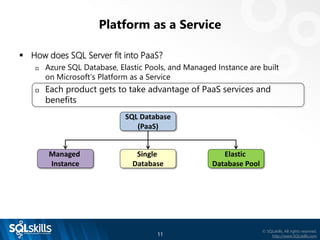
▪ How does SQL Server fit into PaaS?
 Azure SQL Database, Elastic Pools, and Managed Instance are built
on Microsoft’s Platform as a Service
 Each product gets to take advantage of PaaS services and benefits
SQL Database
(PaaS)
Single
Database
Elastic
Database Pool
Managed
Instance
10
© SQLskills, All rights reserved.
http://www.SQLskills.com
Platform as a Service
▪ How does SQL Server fit into PaaS?
 Azure SQL Database, Elastic Pools, and Managed Instance are
built on Microsoft’s Platform as a Service
 Each product gets to take advantage of PaaS services and benefits
SQL Database
(PaaS)
Single
Database
Elastic
Database Pool
Managed
Instance
11
© SQLskills, All rights reserved.
http://www.SQLskills.com
Platform as a Service
▪ How does SQL Server fit into PaaS?
 Azure SQL Database, Elastic Pools, and Managed Instance are built
on Microsoft’s Platform as a Service
 Each product gets to take advantage of PaaS services and
benefits
SQL Database
(PaaS)
Single
Database
Elastic
Database Pool
Managed
Instance
12
© SQLskills, All rights reserved.
http://www.SQLskills.com
Platform as a Service Benefits: Security
▪ Dynamic Data Masking
 Can limit access to sensitive data by controlling how the data appears
 Masking rules can be defined on particular columns
 No physical changes are made to the data
 https://azure.microsoft.com/en-us/documentation/articles/sql-
database-dynamic-data-masking-get-started/
▪ Row-Level Security
 Can restrict row-level access based on a user’s identity
 Access restriction logic is located in the database tier
 https://msdn.microsoft.com/en-us/library/dn765131.aspx
13
© SQLskills, All rights reserved.
http://www.SQLskills.com
Platform as a Service Benefits: Security
▪ Always Encrypted
 Allows clients to encrypt sensitive data inside client applications and not
reveal the encryption keys to the Database Engine
 Can ensure sensitive data never appears as plaintext inside the system
 Only client applications or app servers that have access to the keys can
access plaintext data
 Encryption keys are stored in the Azure Key Vault
 https://msdn.microsoft.com/en-us/library/mt163865.aspx
▪ Transparent Data Encryption
 Real-time encryption and decryption of the database, backups, and
transaction log files at rest
 Encrypts the storage of an entire database by using a symmetric key
 Supports Azure Key Vault integration
 https://msdn.microsoft.com/en-us/library/dn948096.aspx
14
© SQLskills, All rights reserved.
http://www.SQLskills.com
Platform as a Service Benefits: Security
▪ Threat Detection
 Allows customers to detect and respond to potential threats as they
occur
 Users receive alerts based on suspicious activities, vulnerabilities, and
more
 Recommendations provided to help investigate and mitigate the threat
▪ Vulnerability Assessment
 Service that provides visibility into your security state
 Provides steps to investigate, manage, and resolve vulnerabilities
 The tool uses a knowledge base of rules that flag security vulnerabilities
and deviations from known best practices
▪ Azure Active Directory integration
 Allows you to centrally manage identities of database users and other
Microsoft services
 Azure Active Directory supports multi-factor authentication
15
© SQLskills, All rights reserved.
http://www.SQLskills.com
Platform as a Service Benefits: Security
▪ Many compliance certifications
 DoD Provisional Authorizations at Impact Levels 5, 4, and 2
 FIPS 140-2 – US Federal Info Processing Standards
 HIPPA/HITECH – Health Care
 ISO 22301, 27001, 27017, 27018
 PCI DSS – Payment Card industry
 CJIS – US Criminal Justice Information Services
 Spain ENS – National Security Framework
 UK Cyber Essentials PLUS – cyber-security threats
 EU Model Clauses
 And many more
▪ Azure Trust Center http://bit.ly/2lKjwzK
16
© SQLskills, All rights reserved.
http://www.SQLskills.com
Platform as a Service Benefits: Data Protection
▪ Automated Backups
 They are handled for you; you handle restores
 Point-in-time restores
 Retention is based on tier
 Basic = 7 days; Standard, Premium, Managed Instance = 35 days
 Restores are to a new database
 https://azure.microsoft.com/en-us/documentation/articles/sql-
database-business-continuity/
▪ Built-in High Availability
 Storage replication, failure detection, and failover are fully automated
and function without humans
 Failovers are fully automated without loss of any committed data
 Routing of connections is dynamically managed
17
© SQLskills, All rights reserved.
http://www.SQLskills.com
Platform as a Service Benefits: Data Protection
▪ Geo-replication
 Available in all tiers for Azure SQL Database
 Provides a replica database (secondary) in a different region
 Estimated Recovery Time (ERT) <30s with a
Recovery Point Objective (RPO) <5s
 Can replicate storage, Azure VMs, and more
 http://bit.ly/1McsB0y
18
© SQLskills, All rights reserved.
http://www.SQLskills.com
Platform as a Service Benefits: Performance
▪ In-memory support for Azure DB Premium tier and Managed Instance
 A memory-optimized table is represented in active memory
 http://bit.ly/1WLQoDy
▪ Performance recommendations – auto tuning
 Index recommendations that have potential to improve query
performance
 Analyzes SQL database’s usage history
 Allows for automatic FORCE PLAN
 Allows for automatic CREATE INDEX
 Allows for automatic DELETE INDEX
 Parameterize query and fix schema recommendations
 http://bit.ly/1HikabH
19
© SQLskills, All rights reserved.
http://www.SQLskills.com
Platform as a Service Benefits: Performance
▪ Query Store
 Detailed historical information about all queries
 Enables you to easily identify queries that are performing poorly
 Keeps a history of each query, including its associated plans, run-time
statistics, and information about resource consumption
 Query Store is a database-level feature, recently enabled by default
 https://msdn.microsoft.com/en-US/library/dn817826.aspx
▪ Erin Stellato’s Pluralsight course: SQL Server: Introduction to Query Store
 http://bit.ly/2nwld8Z
20
© SQLskills, All rights reserved.
http://www.SQLskills.com
Azure SQL Database
▪ Azure SQL Database is a ‘database as a service’
 SQL Database is a cloud relational database service
 Predictable performance and pricing
 Elastic database pool for unpredictable workloads
 99.99% availability built-in
 Geo-replication and restore services for data protection
 Supports existing SQL Server tools, libraries, and APIs
 Scalability with minimal effort
 Secure and compliant for your sensitive data
21
© SQLskills, All rights reserved.
http://www.SQLskills.com
Azure SQL Database: On-premises Differences
▪ SQL Server Agent
 Does not exist
 Use an on-premises SQL Server Agent
 Use a VM running SQL Server
 Elastic Jobs, currently in preview
 Azure Automation
▪ Database Mail
 Not supported
 Alert rules can be added for certain metrics and notifications emailed
 Leverage an Azure VM or on-premises instance
▪ Cross-database queries
 Not supported
 Elastic Query?
22
© SQLskills, All rights reserved.
http://www.SQLskills.com
Azure SQL Database: On-premises Differences
▪ Events and Notifications
 Events, event notifications, and query notifications are not supported
 Alert rules can be added for certain metrics and notifications emailed
▪ SQL Server Trace / Profiler
 Deprecated with SQL Server 2012
 Was not built into Azure SQL Database
 Instance level, it would capture instance level data, not database specific
▪ Trace Flags and sp_configure
 Trace flags are also instance-level and not supported with Azure SQL
Database
 Anything requiring sp_configure and RECONFIGURE are not supported
23
© SQLskills, All rights reserved.
http://www.SQLskills.com
Azure SQL Database: On-premises Differences
▪ SQL Server Reporting Services (SSRS)
 Can use on-premises or Azure VM (additional licensing)
 Can use Power BI
▪ SQL Server Integration Services (SSIS)
 Can use on-premises or Azure VM (additional licensing)
 Can use Azure Data Factory
24
© SQLskills, All rights reserved.
http://www.SQLskills.com
Azure SQL Database: On-premises Differences
▪ Log shipping
 You can’t log ship to an Azure SQL Database
 You can log ship to an Azure VM running SQL Server
▪ Database mirroring
 You can’t mirror to an Azure SQL Database
 You can mirror to an Azure VM running SQL Server
▪ Availability groups
 You can’t have a secondary database as an Azure SQL Database
 You can setup a secondary to an Azure VM running SQL Server
▪ Transactional replication
 Azure SQL Database can be a subscriber, not a publisher
25
© SQLskills, All rights reserved.
http://www.SQLskills.com
Azure SQL Database: Pricing
▪ Database Transaction Units – DTU
 Bundled measure of compute, storage, and I/O resources
 Basic Tier – very small workloads
 5 DTU
 Standard storage
 Standard Tier – low, medium, and high CPU workloads, standard I/O
 10 DTU – 3000 DTU
 Standard storage
 Premium Tier – medium and high CPU workloads, intense I/O
 150 DTU – 4000 DTU
 Premium storage (orders of magnitude faster)
26
© SQLskills, All rights reserved.
http://www.SQLskills.com
Azure SQL Database: Pricing
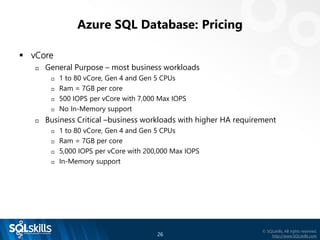
▪ vCore
 General Purpose – most business workloads
 1 to 80 vCore, Gen 4 and Gen 5 CPUs
 Ram = 7GB per core
 500 IOPS per vCore with 7,000 Max IOPS
 No In-Memory support
 Business Critical –business workloads with higher HA requirement
 1 to 80 vCore, Gen 4 and Gen 5 CPUs
 Ram = 7GB per core
 5,000 IOPS per vCore with 200,000 Max IOPS
 In-Memory support
27
© SQLskills, All rights reserved.
http://www.SQLskills.com
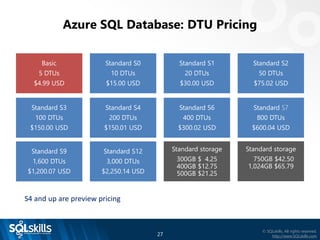
Azure SQL Database: DTU Pricing
Standard S4
200 DTUs
$150.01 USD
Standard S9
1,600 DTUs
$1,200.07 USD
Standard S3
100 DTUs
$150.00 USD
Basic
5 DTUs
$4.99 USD
Standard S6
400 DTUs
$300.02 USD
Standard S7
800 DTUs
$600.04 USD
Standard S2
50 DTUs
$75.02 USD
Standard S1
20 DTUs
$30.00 USD
Standard S0
10 DTUs
$15.00 USD
Standard S12
3,000 DTUs
$2,250.14 USD
Standard storage
300GB $ 4.25
400GB $12.75
500GB $21.25
Standard storage
750GB $42.50
1,024GB $65.79
S4 and up are preview pricing
28
© SQLskills, All rights reserved.
http://www.SQLskills.com
Azure SQL Database: DTU Pricing
Premium P1
125 DTUs
$465.00 USD
Premium P6
1,000 DTUs
$3,720.00 USD
Premium P2
250 DTUs
$930.00 USD
Premium P4
500 DTUs
$1,860.00 USD
Premium P11
1,750 DTUs
$7,000.11 USD
Premium P15
4,000 DTUs
$15,999.97 USD
In-Memory support
increases as you
scale
29
© SQLskills, All rights reserved.
http://www.SQLskills.com
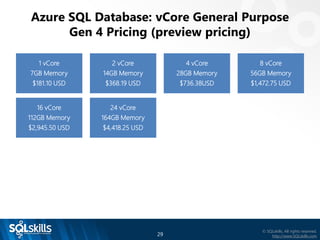
Azure SQL Database: vCore General Purpose
Gen 4 Pricing (preview pricing)
24 vCore
164GB Memory
$4,418.25 USD
16 vCore
112GB Memory
$2,945.50 USD
1 vCore
7GB Memory
$181.10 USD
8 vCore
56GB Memory
$1,472.75 USD
4 vCore
28GB Memory
$736.38USD
2 vCore
14GB Memory
$368.19 USD
30
© SQLskills, All rights reserved.
http://www.SQLskills.com
Azure SQL Database: vCore General Purpose
Gen 5 Pricing (preview pricing)
32 vCore
176GB Memory
$5,891.00 USD
24 vCore
132GB Memory
$4,418.25 USD
2 vCore
11GB Memory
$ 368.19 USD
16 vCore
88GB Memory
$2,945.50 USD
8 vCore
44GB Memory
$1,472.75 USD
4 vCore
22GB Memory
$ 736.38 USD
80 vCore
440GB Memory
$14,727.49 USD
48 vCore
264GB Memory
$8,836.50 USD
31
© SQLskills, All rights reserved.
http://www.SQLskills.com
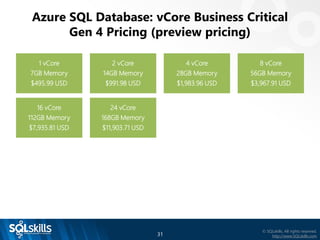
Azure SQL Database: vCore Business Critical
Gen 4 Pricing (preview pricing)
24 vCore
168GB Memory
$11,903.71 USD
16 vCore
112GB Memory
$7,935.81 USD
1 vCore
7GB Memory
$495.99 USD
8 vCore
56GB Memory
$3,967.91 USD
4 vCore
28GB Memory
$1,983.96 USD
2 vCore
14GB Memory
$991.98 USD
32
© SQLskills, All rights reserved.
http://www.SQLskills.com
Azure SQL Database: vCore Business Critical
Gen 5 Pricing (preview pricing)
32 vCore
176GB Memory
$15,871.61 USD
24 vCore
132GB Memory
$11,903.71 USD
2 vCore
11GB Memory
$ 991.98 USD
16 vCore
88GB Memory
$7,935.81 USD
8 vCore
44GB Memory
$3,967.91 USD
4 vCore
22GB Memory
$ 1,983.96 USD
80 vCore
440GB Memory
$39,679.01USD
48 vCore
264GB Memory
$23,807.41 USD
33
© SQLskills, All rights reserved.
http://www.SQLskills.com
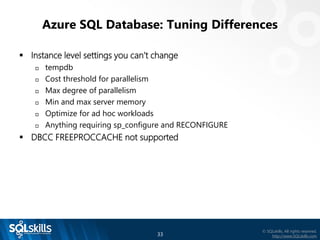
Azure SQL Database: Tuning Differences
▪ Instance level settings you can’t change
 tempdb
 Cost threshold for parallelism
 Max degree of parallelism
 Min and max server memory
 Optimize for ad hoc workloads
 Anything requiring sp_configure and RECONFIGURE
▪ DBCC FREEPROCCACHE not supported
34
© SQLskills, All rights reserved.
http://www.SQLskills.com
Azure SQL Database: Tuning Options
▪ Throw hardware at it; increase DTU size
▪ Tune your workloads; with minor changes, your existing workload scripts
should work.
 File statistics
 http://www.sqlskills.com/blogs/paul/how-to-examine-io-subsystem-
latencies-from-within-sql-server/
 sys.master_files does not exist, modify to use sys.databases
 File statistics over time
 http://www.sqlskills.com/blogs/paul/capturing-io-latencies-period-time/
 sys.master_files does not exist, modify to use sys.databases
35
© SQLskills, All rights reserved.
http://www.SQLskills.com
Azure SQL Database: Tuning Options
▪ With minor changes, your existing workload scripts should work
 Wait statistics
 http://www.sqlskills.com/blogs/paul/wait-statistics-or-please-tell-me-where-
it-hurts/
 sys.dm_os_wait_stats contains wait statistics for the container your database
is in, use sys.dm_db_wait_stats for database specific data
 Waits over a period of time
 http://www.sqlskills.com/blogs/paul/capturing-wait-statistics-period-time/
 Change os to db,
▪ Getting started tuning performance in Azure SQL Database
 http://bit.ly/1pHB7dn
▪ Glenn Berry DMVs – includes Azure SQL Database
 https://www.sqlskills.com/blogs/glenn/category/dmv-queries/
36
© SQLskills, All rights reserved.
http://www.SQLskills.com
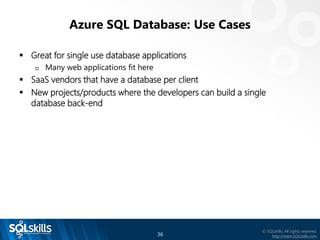
Azure SQL Database: Use Cases
▪ Great for single use database applications
 Many web applications fit here
▪ SaaS vendors that have a database per client
▪ New projects/products where the developers can build a single
database back-end
37
© SQLskills, All rights reserved.
http://www.SQLskills.com
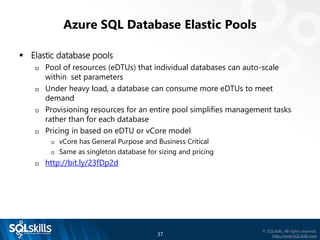
Azure SQL Database Elastic Pools
▪ Elastic database pools
 Pool of resources (eDTUs) that individual databases can auto-scale
within set parameters
 Under heavy load, a database can consume more eDTUs to meet
demand
 Provisioning resources for an entire pool simplifies management tasks
rather than for each database
 Pricing in based on eDTU or vCore model
 vCore has General Purpose and Business Critical
 Same as singleton database for sizing and pricing
 http://bit.ly/23fDp2d
38
© SQLskills, All rights reserved.
http://www.SQLskills.com
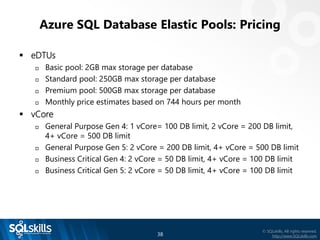
Azure SQL Database Elastic Pools: Pricing
▪ eDTUs
 Basic pool: 2GB max storage per database
 Standard pool: 250GB max storage per database
 Premium pool: 500GB max storage per database
 Monthly price estimates based on 744 hours per month
▪ vCore
 General Purpose Gen 4: 1 vCore= 100 DB limit, 2 vCore = 200 DB limit,
4+ vCore = 500 DB limit
 General Purpose Gen 5: 2 vCore = 200 DB limit, 4+ vCore = 500 DB limit
 Business Critical Gen 4: 2 vCore = 50 DB limit, 4+ vCore = 100 DB limit
 Business Critical Gen 5: 2 vCore = 50 DB limit, 4+ vCore = 100 DB limit
39
© SQLskills, All rights reserved.
http://www.SQLskills.com
Azure SQL Database Elastic Pools: Pricing
▪ Basic eDTU pricing
eDTUs Per
Pool
Max Storage
per pool
Max DBs Max eDTUs
per DB
Monthly
Price
50 5GB 100 5 $73.61 USD
100 10GB 200 5 $147.22 USD
200 20GB 500 5 $294.44 USD
300 29GB 500 5 $441.65 USD
40
© SQLskills, All rights reserved.
http://www.SQLskills.com
Azure SQL Database Elastic Pools: Pricing
▪ Basic eDTU pricing
eDTUs Per
Pool
Max Storage
per pool
Max DBs Max eDTUs
per DB
Monthly
Price
400 39GB 500 5 $588.87 USD
800 78GB 500 5 $1,177.74
USD
1,200 117GB 500 5 $1,766.60
USD
1,600 156GB 500 5 $2,355.47
USD
41
© SQLskills, All rights reserved.
http://www.SQLskills.com
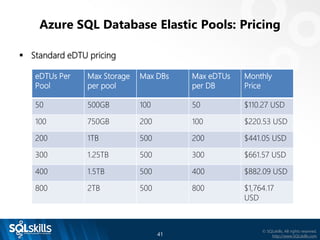
Azure SQL Database Elastic Pools: Pricing
▪ Standard eDTU pricing
eDTUs Per
Pool
Max Storage
per pool
Max DBs Max eDTUs
per DB
Monthly
Price
50 500GB 100 50 $110.27 USD
100 750GB 200 100 $220.53 USD
200 1TB 500 200 $441.05 USD
300 1.25TB 500 300 $661.57 USD
400 1.5TB 500 400 $882.09 USD
800 2TB 500 800 $1,764.17
USD
42
© SQLskills, All rights reserved.
http://www.SQLskills.com
Azure SQL Database Elastic Pools: Pricing
▪ Standard eDTU pricing
eDTUs Per
Pool
Max Storage
per pool
Max DBs Max eDTUs
per DB
Monthly
Price
1,200 2.5TB 500 1,200 $2,646.25
USD
1,600 3TB 500 1,600 $3,528.34
USD
2,000 3.5TB 500 2,000 $4,410.42
USD
2,500 4TB 500 2,500 $5,513.03
USD
3,000 4TB 500 3,000 $6,615.63
USD
43
© SQLskills, All rights reserved.
http://www.SQLskills.com
Azure SQL Database Elastic Pools: Pricing
▪ Premium eDTU pricing
eDTUs Per
Pool
Max Storage
per pool
Max DBs Max eDTUs
per DB
Monthly
Price
125 1,024GB 50 125 $684.38 USD
250 1,024GB 100 250 $1,368.75
USD
500 1,024GB 100 500 $2.737.50
USD
1,000 1,024GB 100 1,000 $5,475.00
USD
1,500 1.5TB 100 1,000 $8,212.50
USD
44
© SQLskills, All rights reserved.
http://www.SQLskills.com
Azure SQL Database Elastic Pools: Pricing
▪ Premium eDTU pricing
eDTUs Per
Pool
Max Storage
per pool
Max DBs Max eDTUs
per DB
Monthly Price
2,000 2TB 100 1,750 $10,950.00
USD
2,500 2.5TB 100 1,750 $13,687.50
USD
3,000 3TB 100 1,750 $16,425.00
USD
3,500 3.5TB 100 1,750 $19,162.50
USD
4,000 4TB 100 4,000 $21,900.00
USD
45
© SQLskills, All rights reserved.
http://www.SQLskills.com
Elastic Pool: Use Cases
▪ An Elastic Pool is the solution for customers that have to manage larger
numbers of Azure SQL Databases
▪ Allows for managing a pool of resources for many databases rather
than micro-managing singleton databases
▪ SaaS customers have been able to migrate from managing singleton
databases to Elastic Pools with a cost savings of over $48k per year
▪ Most clients have seen a net benefit of offering Azure SQL databases
more DTU scale when they need it, so more resources available to the
workloads, and overall cost savings. It’s a win-win
46
© SQLskills, All rights reserved.
http://www.SQLskills.com
Azure SQL Database Managed Instance
▪ Introduced at Build in Spring 2017 and just released in Public Preview on
March 6th 2018
▪ Bridges the Azure gap between Azure SQL Database and SQL Server on
an Azure VM
▪ Managed Instance is built on an instance-scoped programming model
 Makes Managed Instances more compatible with on-premises SQL
Server
▪ Single and elastic databases are built on a database-scoped
programming model
47
© SQLskills, All rights reserved.
http://www.SQLskills.com
Managed Instance
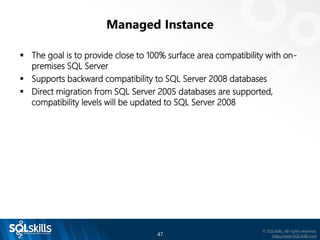
▪ The goal is to provide close to 100% surface area compatibility with on-
premises SQL Server
▪ Supports backward compatibility to SQL Server 2008 databases
▪ Direct migration from SQL Server 2005 databases are supported,
compatibility levels will be updated to SQL Server 2008
48
© SQLskills, All rights reserved.
http://www.SQLskills.com
What Sets Managed Instance Apart?
▪ Provides an entire SQL Server instance experience
 All the databases within the instance are on the same server
 Full support for cross-database queries
 This is important for many applications
▪ Global temp tables are supported
 Azure SQL DB just recently started supporting global temp tables
▪ SQL Server Agent built in
 No Agent support was a huge drawback for many customers in Azure
SQL DB, had to use Azure Automation, Elastic Jobs, PowerShell, on-
premises
49
© SQLskills, All rights reserved.
http://www.SQLskills.com
What Sets Managed Instance Apart?
▪ Service Broker
 Message-based communication platform
 Not available in Azure SQL Database
▪ Transactional Replication
 Can be a publisher or subscriber
▪ Change Data Capture
▪ SQL Server Auditing
▪ Common Language Runtime (CLR)
▪ Database Mail
50
© SQLskills, All rights reserved.
http://www.SQLskills.com
Managed Instance Additional Features
▪ Managed Instance Auditing
 Tracks database events and writes them to an audit log in your Azure
storage account
 Helps maintain regulatory compliance, gain insight into discrepancies,
and understand database activity
▪ Data encryption in motion
 Uses Transport Layer Security to encrypt data in motion
51
© SQLskills, All rights reserved.
http://www.SQLskills.com
Managed Instance: Technical Specs
▪ General Purpose service tier, business applications with typical
performance and HA requirements
▪ Azure Premium remote storage up to 8TB
▪ Up to 100 databases per instance
▪ vCores: Gen 4: 8, 16, 24; Gen 5: 8, 16, 24, 32, 40
 Processors Intel E5-2673 v3 (Haswell) 2.4 GHz
Intel E5-2673 v4 (Broadwell) 2.3 GHz
▪ Minimum storage 32GB Max storage 8TB
▪ Maximum database size 4TB
▪ IOPS 500-7,500 per data file, IOPS grow with storage size
52
© SQLskills, All rights reserved.
http://www.SQLskills.com
Managed Instance: Technical Specs
▪ Business Critical service tier, business applications with high performance
and HA requirements
▪ Azure Premium local storage up to 1TB
▪ Up to 100 databases per instance
▪ vCores: Gen 4: 8, 16, 24
 Processors Intel E5-2673 v3 (Haswell) 2.4 GHz
▪ Minimum storage 32GB Max storage 1TB
▪ Maximum database size 1TB
▪ Super fast storage
53
© SQLskills, All rights reserved.
http://www.SQLskills.com
Managed Instance: General Purpose Pricing
▪ Using East US (and all in US$) (preview pricing)
 vCores compute –Gen 4 – monthly estimate
 8 cores = $ 795.70 16 cores = $1,591.40
 24 cores = $ 2,387.10
 vCores compute –Gen 5 – monthly estimate
 8 cores = $ 795.70 16 cores = $1,591.40
 24 cores = $2,387.10 32 cores = $3,182.80
 40 cores = $3,978.50
 Storage – starts at 32GB increases to 8TB in 32GB increments
 32GB = included 128GB = $ 6.07
 1TB = $ 62.74 4TB = $263.12
 6TB = $386.58 8TB = $516.12
▪ https://azure.microsoft.com/en-us/pricing/details/sql-
database/managed/
54
© SQLskills, All rights reserved.
http://www.SQLskills.com
Managed Instance: Business Critical Pricing
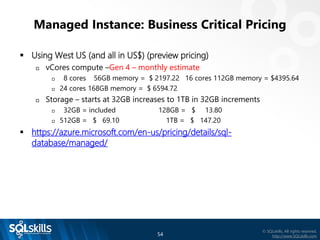
▪ Using West US (and all in US$) (preview pricing)
 vCores compute –Gen 4 – monthly estimate
 8 cores 56GB memory = $ 2197.22 16 cores 112GB memory = $4395.64
 24 cores 168GB memory = $ 6594.72
 Storage – starts at 32GB increases to 1TB in 32GB increments
 32GB = included 128GB = $ 13.80
 512GB = $ 69.10 1TB = $ 147.20
▪ https://azure.microsoft.com/en-us/pricing/details/sql-
database/managed/
55
© SQLskills, All rights reserved.
http://www.SQLskills.com
Managed Instance: Pricing
▪ Azure Hybrid Benefit – convert on-premises license with SA to MI
licenses
 8 Standard Edition licenses = 1 Managed Instance General Purpose (8
vCore)
 2 Enterprise licenses = 1 Managed Instance General Purpose (8 vCore)
 https://azure.microsoft.com/en-us/pricing/hybrid-benefit/
 Azure Hybrid Benefit for SQL Server provides SQL Server Enterprise
Edition customers with Software Assurance four cores in the cloud for
every one core they own on-premises when selecting the Managed
Instance General Purpose option.
56
© SQLskills, All rights reserved.
http://www.SQLskills.com
Managed Instance: Use Cases
▪ When you need more than singleton or elastic pools can provide, but
still want a managed environment, features such as:
 Cross database query
 SQL Server Agent
 Database Mail
 Service Broker, and more
▪ Managed Instance GA pricing should be somewhat comparable with
IaaS. For example, a D16 (16 vCPU, 64GB RAM) with three P40 disk is
approx. $3,348 while a Gen 5 (16 vCore, 88GB RAM) instance with 6TB
of storage would be approx. $3,637 if we double the preview pricing.
 However, Managed Instance means you don’t have to worry about
patching the OS or SQL Server, and you have built in HA with a non-
readable secondary. You have to build that out yourself in IaaS and pay
for the compute.
57
© SQLskills, All rights reserved.
http://www.SQLskills.com
Key Takeaways
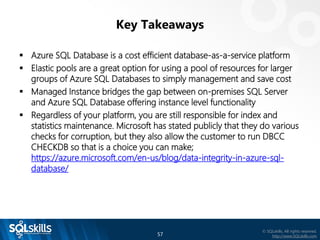
▪ Azure SQL Database is a cost efficient database-as-a-service platform
▪ Elastic pools are a great option for using a pool of resources for larger
groups of Azure SQL Databases to simply management and save cost
▪ Managed Instance bridges the gap between on-premises SQL Server
and Azure SQL Database offering instance level functionality
▪ Regardless of your platform, you are still responsible for index and
statistics maintenance. Microsoft has stated publicly that they do various
checks for corruption, but they also allow the customer to run DBCC
CHECKDB so that is a choice you can make;
https://azure.microsoft.com/en-us/blog/data-integrity-in-azure-sql-
database/
58
© SQLskills, All rights reserved.
http://www.SQLskills.com
Summary
▪ What we covered
 What is Platform as a Service (PaaS)?
 Platform as a Service benefits
 Azure SQL Database
 Elastic Pools
 Azure SQL Database Managed Instance
 What sets Managed Instance apart?
Thank you!
tim@sqlskills.com
@tradney

Azure SQL Database Introduction by Tim Radney

  • 1.
    SQLskills presenting for OhioNorth SQL Server User Group 17th September 2018 A Tour Through Azure SQL Database – Introduction to Azure Managed Instance Tim Radney Tim@SQLskills.com
  • 2.
    2 © SQLskills, Allrights reserved. http://www.SQLskills.com ▪ Team of world-renowned SQL Server experts:  Paul S. Randal (@PaulRandal)  Glenn Berry (@GlennAlanBerry)  Jonathan Kehayias (@SQLPoolBoy) ▪ Instructor-led training: Immersion Events (US, UK, and Ireland) ▪ Online training: http://pluralsight.com/ ▪ Consulting: health checks, hardware, performance, upgrades ▪ Remote DBA: system monitoring and troubleshooting ▪ Conferences: PASS Summit, SQLintersection ▪ Become a SQLskills Insider  http://www.sqlskills.com/Insider  Kimberly L. Tripp (@KimberlyLTripp)  Erin Stellato (@ErinStellato)  Tim Radney (@TRadney)
  • 3.
    3 © SQLskills, Allrights reserved. http://www.SQLskills.com 2018 Classes and Services Training  In-depth, instructor-led, technical training for SQL Server  Held in the US (Chicago, IL and Bellevue, WA), the UK, Ireland, and Australia  Online, LIVE, Immersion Events through the year  Coming up in 2018 – in October:  IETLB: Immersion Event on Transactions, Locking, Blocking, Isolation, Versioning  IEQUERY: Immersion Event on Fixing Slow Queries, Inefficient Code, and Caching/Statistics Problems  US$699 each or US$1,749 combo  Always announced first, and with a special discount, in our Insider newsletter  https://www.sqlskills.com/Insider  For more information: https://www.sqlskills.com/training/ Consulting  New client discount: US$2,995 flat rate on first single-instance health check  For more information: https://www.sqlskills.com/services/
  • 4.
    Our Fall SQLintersectionShow December 2-8, 2018 – in Las Vegas, NV 40+ SQL Sessions and 9 workshops:  3 pre-conference workshops on Sunday, December 2, 2018  Due Data Diligence: Developing a Strategy for BI, Analytics, and Beyond with Stacia Varga  Developer's Guide to SQL Server Performance with Brent Ozar  Levelling up with PowerShell for the DBA with Ben Miller  3 pre-conference workshops on Monday, December 3, 2018  Performance Troubleshooting using Waits and Latches with Paul Randal  Modernize Your Applications with Azure SQL Managed Instance with Tim Radney and David Pless  High Performance, Scalable, Asynchronous Processing using Service Broker with Jonathan Kehayias  3 post-conference workshops on Friday, December 7, 2018  SQL Server 2016 / 2017 and Power BI Reporting Solutions with David Pless  Troubleshoot Like a Microsoft Engineer with Tim Chapman  Using Query Store to Easily Troubleshoot and Stabilize Your Workload with Erin Stellato Industry-experts and Microsoft speakers Sessions on performance tuning, troubleshooting, coding / development, query tuning, architecture, new features + vNext, plus much more! Learn real-world solutions and bring back immediate ROI! See more information online at www.SQLintersection.com
  • 5.
    5 © SQLskills, Allrights reserved. http://www.SQLskills.com ▪ Email paul@SQLskills.com with the subject line: PASSDC Pluralsight code Get a FREE (no catches / no credit card) 30-day trial of our 175+ hours of SQLskills content on Pluralsight including 10+ hours on Optimizing Procedural Code! ▪ Check out courses like these:  SQL Server: Why Physical Database Design Matters  4 hours on row structures, index structures, and why these things matter  SQL Server: Optimizing Stored Procedure Performance (Parts 1 and 2)  11 hours on stored procedure performance tuning  SQL Server: Understanding and Using Azure SQL Database  2 hours on Azure SQL Database ▪ See our full online library: https://www.sqlskills.com/sql-server-training/online-training/
  • 6.
    6 © SQLskills, Allrights reserved. http://www.SQLskills.com Author/Instructor: Tim Radney ▪ Consultant/Trainer/Speaker/Author ▪ Principal Consultant, SQLskills.com  Email: Tim@SQLskills.com  Blog: https://www.SQLskills.com/blogs/Tim  Blog: http://www.timradney.com  Twitter: @TRadney ▪ Microsoft Data Platform MVP ▪ Chapter Leader “Columbus GA SQL Users Group” ▪ PASS Regional Mentor “South East USA” ▪ Outstanding PASS Volunteer ▪ Regular presenter at worldwide conferences on administration, disaster recovery, performance tuning, and Azure ▪ Friend of Red Gate ▪ (I also like electronics, aquaponics, farming chickens, crops, and tilapia)
  • 7.
    7 © SQLskills, Allrights reserved. http://www.SQLskills.com Overview ▪ What is Platform as a Service (PaaS)? ▪ Platform as a Service benefits ▪ Azure SQL Database ▪ Elastic Pools ▪ Azure SQL Database Managed Instance ▪ What sets Managed Instance apart?
  • 8.
    8 © SQLskills, Allrights reserved. http://www.SQLskills.com What is Platform as a Service? ▪ Azure Cloud Services  Allows you to focus on applications, not hardware  Support for full lifecycle: building, testing, deploying, managing, updating  Auto-scale to meet demand and save money  Integrated health, monitoring, and load balancing  Predictable performance and pricing, pay-as-you-go  Secure and compliant for your sensitive data  Supports geographically distributed development teams  Pre-coded application components built-in: workflow, directory services, security, search, and more
  • 9.
    9 © SQLskills, Allrights reserved. http://www.SQLskills.com Platform as a Service ▪ How does SQL Server fit into PaaS?  Azure SQL Database, Elastic Pools, and Managed Instance are built on Microsoft’s Platform as a Service  Each product gets to take advantage of PaaS services and benefits SQL Database (PaaS) Single Database Elastic Database Pool Managed Instance
  • 10.
    10 © SQLskills, Allrights reserved. http://www.SQLskills.com Platform as a Service ▪ How does SQL Server fit into PaaS?  Azure SQL Database, Elastic Pools, and Managed Instance are built on Microsoft’s Platform as a Service  Each product gets to take advantage of PaaS services and benefits SQL Database (PaaS) Single Database Elastic Database Pool Managed Instance
  • 11.
    11 © SQLskills, Allrights reserved. http://www.SQLskills.com Platform as a Service ▪ How does SQL Server fit into PaaS?  Azure SQL Database, Elastic Pools, and Managed Instance are built on Microsoft’s Platform as a Service  Each product gets to take advantage of PaaS services and benefits SQL Database (PaaS) Single Database Elastic Database Pool Managed Instance
  • 12.
    12 © SQLskills, Allrights reserved. http://www.SQLskills.com Platform as a Service Benefits: Security ▪ Dynamic Data Masking  Can limit access to sensitive data by controlling how the data appears  Masking rules can be defined on particular columns  No physical changes are made to the data  https://azure.microsoft.com/en-us/documentation/articles/sql- database-dynamic-data-masking-get-started/ ▪ Row-Level Security  Can restrict row-level access based on a user’s identity  Access restriction logic is located in the database tier  https://msdn.microsoft.com/en-us/library/dn765131.aspx
  • 13.
    13 © SQLskills, Allrights reserved. http://www.SQLskills.com Platform as a Service Benefits: Security ▪ Always Encrypted  Allows clients to encrypt sensitive data inside client applications and not reveal the encryption keys to the Database Engine  Can ensure sensitive data never appears as plaintext inside the system  Only client applications or app servers that have access to the keys can access plaintext data  Encryption keys are stored in the Azure Key Vault  https://msdn.microsoft.com/en-us/library/mt163865.aspx ▪ Transparent Data Encryption  Real-time encryption and decryption of the database, backups, and transaction log files at rest  Encrypts the storage of an entire database by using a symmetric key  Supports Azure Key Vault integration  https://msdn.microsoft.com/en-us/library/dn948096.aspx
  • 14.
    14 © SQLskills, Allrights reserved. http://www.SQLskills.com Platform as a Service Benefits: Security ▪ Threat Detection  Allows customers to detect and respond to potential threats as they occur  Users receive alerts based on suspicious activities, vulnerabilities, and more  Recommendations provided to help investigate and mitigate the threat ▪ Vulnerability Assessment  Service that provides visibility into your security state  Provides steps to investigate, manage, and resolve vulnerabilities  The tool uses a knowledge base of rules that flag security vulnerabilities and deviations from known best practices ▪ Azure Active Directory integration  Allows you to centrally manage identities of database users and other Microsoft services  Azure Active Directory supports multi-factor authentication
  • 15.
    15 © SQLskills, Allrights reserved. http://www.SQLskills.com Platform as a Service Benefits: Security ▪ Many compliance certifications  DoD Provisional Authorizations at Impact Levels 5, 4, and 2  FIPS 140-2 – US Federal Info Processing Standards  HIPPA/HITECH – Health Care  ISO 22301, 27001, 27017, 27018  PCI DSS – Payment Card industry  CJIS – US Criminal Justice Information Services  Spain ENS – National Security Framework  UK Cyber Essentials PLUS – cyber-security threats  EU Model Clauses  And many more ▪ Azure Trust Center http://bit.ly/2lKjwzK
  • 16.
    16 © SQLskills, Allrights reserved. http://www.SQLskills.com Platform as a Service Benefits: Data Protection ▪ Automated Backups  They are handled for you; you handle restores  Point-in-time restores  Retention is based on tier  Basic = 7 days; Standard, Premium, Managed Instance = 35 days  Restores are to a new database  https://azure.microsoft.com/en-us/documentation/articles/sql- database-business-continuity/ ▪ Built-in High Availability  Storage replication, failure detection, and failover are fully automated and function without humans  Failovers are fully automated without loss of any committed data  Routing of connections is dynamically managed
  • 17.
    17 © SQLskills, Allrights reserved. http://www.SQLskills.com Platform as a Service Benefits: Data Protection ▪ Geo-replication  Available in all tiers for Azure SQL Database  Provides a replica database (secondary) in a different region  Estimated Recovery Time (ERT) <30s with a Recovery Point Objective (RPO) <5s  Can replicate storage, Azure VMs, and more  http://bit.ly/1McsB0y
  • 18.
    18 © SQLskills, Allrights reserved. http://www.SQLskills.com Platform as a Service Benefits: Performance ▪ In-memory support for Azure DB Premium tier and Managed Instance  A memory-optimized table is represented in active memory  http://bit.ly/1WLQoDy ▪ Performance recommendations – auto tuning  Index recommendations that have potential to improve query performance  Analyzes SQL database’s usage history  Allows for automatic FORCE PLAN  Allows for automatic CREATE INDEX  Allows for automatic DELETE INDEX  Parameterize query and fix schema recommendations  http://bit.ly/1HikabH
  • 19.
    19 © SQLskills, Allrights reserved. http://www.SQLskills.com Platform as a Service Benefits: Performance ▪ Query Store  Detailed historical information about all queries  Enables you to easily identify queries that are performing poorly  Keeps a history of each query, including its associated plans, run-time statistics, and information about resource consumption  Query Store is a database-level feature, recently enabled by default  https://msdn.microsoft.com/en-US/library/dn817826.aspx ▪ Erin Stellato’s Pluralsight course: SQL Server: Introduction to Query Store  http://bit.ly/2nwld8Z
  • 20.
    20 © SQLskills, Allrights reserved. http://www.SQLskills.com Azure SQL Database ▪ Azure SQL Database is a ‘database as a service’  SQL Database is a cloud relational database service  Predictable performance and pricing  Elastic database pool for unpredictable workloads  99.99% availability built-in  Geo-replication and restore services for data protection  Supports existing SQL Server tools, libraries, and APIs  Scalability with minimal effort  Secure and compliant for your sensitive data
  • 21.
    21 © SQLskills, Allrights reserved. http://www.SQLskills.com Azure SQL Database: On-premises Differences ▪ SQL Server Agent  Does not exist  Use an on-premises SQL Server Agent  Use a VM running SQL Server  Elastic Jobs, currently in preview  Azure Automation ▪ Database Mail  Not supported  Alert rules can be added for certain metrics and notifications emailed  Leverage an Azure VM or on-premises instance ▪ Cross-database queries  Not supported  Elastic Query?
  • 22.
    22 © SQLskills, Allrights reserved. http://www.SQLskills.com Azure SQL Database: On-premises Differences ▪ Events and Notifications  Events, event notifications, and query notifications are not supported  Alert rules can be added for certain metrics and notifications emailed ▪ SQL Server Trace / Profiler  Deprecated with SQL Server 2012  Was not built into Azure SQL Database  Instance level, it would capture instance level data, not database specific ▪ Trace Flags and sp_configure  Trace flags are also instance-level and not supported with Azure SQL Database  Anything requiring sp_configure and RECONFIGURE are not supported
  • 23.
    23 © SQLskills, Allrights reserved. http://www.SQLskills.com Azure SQL Database: On-premises Differences ▪ SQL Server Reporting Services (SSRS)  Can use on-premises or Azure VM (additional licensing)  Can use Power BI ▪ SQL Server Integration Services (SSIS)  Can use on-premises or Azure VM (additional licensing)  Can use Azure Data Factory
  • 24.
    24 © SQLskills, Allrights reserved. http://www.SQLskills.com Azure SQL Database: On-premises Differences ▪ Log shipping  You can’t log ship to an Azure SQL Database  You can log ship to an Azure VM running SQL Server ▪ Database mirroring  You can’t mirror to an Azure SQL Database  You can mirror to an Azure VM running SQL Server ▪ Availability groups  You can’t have a secondary database as an Azure SQL Database  You can setup a secondary to an Azure VM running SQL Server ▪ Transactional replication  Azure SQL Database can be a subscriber, not a publisher
  • 25.
    25 © SQLskills, Allrights reserved. http://www.SQLskills.com Azure SQL Database: Pricing ▪ Database Transaction Units – DTU  Bundled measure of compute, storage, and I/O resources  Basic Tier – very small workloads  5 DTU  Standard storage  Standard Tier – low, medium, and high CPU workloads, standard I/O  10 DTU – 3000 DTU  Standard storage  Premium Tier – medium and high CPU workloads, intense I/O  150 DTU – 4000 DTU  Premium storage (orders of magnitude faster)
  • 26.
    26 © SQLskills, Allrights reserved. http://www.SQLskills.com Azure SQL Database: Pricing ▪ vCore  General Purpose – most business workloads  1 to 80 vCore, Gen 4 and Gen 5 CPUs  Ram = 7GB per core  500 IOPS per vCore with 7,000 Max IOPS  No In-Memory support  Business Critical –business workloads with higher HA requirement  1 to 80 vCore, Gen 4 and Gen 5 CPUs  Ram = 7GB per core  5,000 IOPS per vCore with 200,000 Max IOPS  In-Memory support
  • 27.
    27 © SQLskills, Allrights reserved. http://www.SQLskills.com Azure SQL Database: DTU Pricing Standard S4 200 DTUs $150.01 USD Standard S9 1,600 DTUs $1,200.07 USD Standard S3 100 DTUs $150.00 USD Basic 5 DTUs $4.99 USD Standard S6 400 DTUs $300.02 USD Standard S7 800 DTUs $600.04 USD Standard S2 50 DTUs $75.02 USD Standard S1 20 DTUs $30.00 USD Standard S0 10 DTUs $15.00 USD Standard S12 3,000 DTUs $2,250.14 USD Standard storage 300GB $ 4.25 400GB $12.75 500GB $21.25 Standard storage 750GB $42.50 1,024GB $65.79 S4 and up are preview pricing
  • 28.
    28 © SQLskills, Allrights reserved. http://www.SQLskills.com Azure SQL Database: DTU Pricing Premium P1 125 DTUs $465.00 USD Premium P6 1,000 DTUs $3,720.00 USD Premium P2 250 DTUs $930.00 USD Premium P4 500 DTUs $1,860.00 USD Premium P11 1,750 DTUs $7,000.11 USD Premium P15 4,000 DTUs $15,999.97 USD In-Memory support increases as you scale
  • 29.
    29 © SQLskills, Allrights reserved. http://www.SQLskills.com Azure SQL Database: vCore General Purpose Gen 4 Pricing (preview pricing) 24 vCore 164GB Memory $4,418.25 USD 16 vCore 112GB Memory $2,945.50 USD 1 vCore 7GB Memory $181.10 USD 8 vCore 56GB Memory $1,472.75 USD 4 vCore 28GB Memory $736.38USD 2 vCore 14GB Memory $368.19 USD
  • 30.
    30 © SQLskills, Allrights reserved. http://www.SQLskills.com Azure SQL Database: vCore General Purpose Gen 5 Pricing (preview pricing) 32 vCore 176GB Memory $5,891.00 USD 24 vCore 132GB Memory $4,418.25 USD 2 vCore 11GB Memory $ 368.19 USD 16 vCore 88GB Memory $2,945.50 USD 8 vCore 44GB Memory $1,472.75 USD 4 vCore 22GB Memory $ 736.38 USD 80 vCore 440GB Memory $14,727.49 USD 48 vCore 264GB Memory $8,836.50 USD
  • 31.
    31 © SQLskills, Allrights reserved. http://www.SQLskills.com Azure SQL Database: vCore Business Critical Gen 4 Pricing (preview pricing) 24 vCore 168GB Memory $11,903.71 USD 16 vCore 112GB Memory $7,935.81 USD 1 vCore 7GB Memory $495.99 USD 8 vCore 56GB Memory $3,967.91 USD 4 vCore 28GB Memory $1,983.96 USD 2 vCore 14GB Memory $991.98 USD
  • 32.
    32 © SQLskills, Allrights reserved. http://www.SQLskills.com Azure SQL Database: vCore Business Critical Gen 5 Pricing (preview pricing) 32 vCore 176GB Memory $15,871.61 USD 24 vCore 132GB Memory $11,903.71 USD 2 vCore 11GB Memory $ 991.98 USD 16 vCore 88GB Memory $7,935.81 USD 8 vCore 44GB Memory $3,967.91 USD 4 vCore 22GB Memory $ 1,983.96 USD 80 vCore 440GB Memory $39,679.01USD 48 vCore 264GB Memory $23,807.41 USD
  • 33.
    33 © SQLskills, Allrights reserved. http://www.SQLskills.com Azure SQL Database: Tuning Differences ▪ Instance level settings you can’t change  tempdb  Cost threshold for parallelism  Max degree of parallelism  Min and max server memory  Optimize for ad hoc workloads  Anything requiring sp_configure and RECONFIGURE ▪ DBCC FREEPROCCACHE not supported
  • 34.
    34 © SQLskills, Allrights reserved. http://www.SQLskills.com Azure SQL Database: Tuning Options ▪ Throw hardware at it; increase DTU size ▪ Tune your workloads; with minor changes, your existing workload scripts should work.  File statistics  http://www.sqlskills.com/blogs/paul/how-to-examine-io-subsystem- latencies-from-within-sql-server/  sys.master_files does not exist, modify to use sys.databases  File statistics over time  http://www.sqlskills.com/blogs/paul/capturing-io-latencies-period-time/  sys.master_files does not exist, modify to use sys.databases
  • 35.
    35 © SQLskills, Allrights reserved. http://www.SQLskills.com Azure SQL Database: Tuning Options ▪ With minor changes, your existing workload scripts should work  Wait statistics  http://www.sqlskills.com/blogs/paul/wait-statistics-or-please-tell-me-where- it-hurts/  sys.dm_os_wait_stats contains wait statistics for the container your database is in, use sys.dm_db_wait_stats for database specific data  Waits over a period of time  http://www.sqlskills.com/blogs/paul/capturing-wait-statistics-period-time/  Change os to db, ▪ Getting started tuning performance in Azure SQL Database  http://bit.ly/1pHB7dn ▪ Glenn Berry DMVs – includes Azure SQL Database  https://www.sqlskills.com/blogs/glenn/category/dmv-queries/
  • 36.
    36 © SQLskills, Allrights reserved. http://www.SQLskills.com Azure SQL Database: Use Cases ▪ Great for single use database applications  Many web applications fit here ▪ SaaS vendors that have a database per client ▪ New projects/products where the developers can build a single database back-end
  • 37.
    37 © SQLskills, Allrights reserved. http://www.SQLskills.com Azure SQL Database Elastic Pools ▪ Elastic database pools  Pool of resources (eDTUs) that individual databases can auto-scale within set parameters  Under heavy load, a database can consume more eDTUs to meet demand  Provisioning resources for an entire pool simplifies management tasks rather than for each database  Pricing in based on eDTU or vCore model  vCore has General Purpose and Business Critical  Same as singleton database for sizing and pricing  http://bit.ly/23fDp2d
  • 38.
    38 © SQLskills, Allrights reserved. http://www.SQLskills.com Azure SQL Database Elastic Pools: Pricing ▪ eDTUs  Basic pool: 2GB max storage per database  Standard pool: 250GB max storage per database  Premium pool: 500GB max storage per database  Monthly price estimates based on 744 hours per month ▪ vCore  General Purpose Gen 4: 1 vCore= 100 DB limit, 2 vCore = 200 DB limit, 4+ vCore = 500 DB limit  General Purpose Gen 5: 2 vCore = 200 DB limit, 4+ vCore = 500 DB limit  Business Critical Gen 4: 2 vCore = 50 DB limit, 4+ vCore = 100 DB limit  Business Critical Gen 5: 2 vCore = 50 DB limit, 4+ vCore = 100 DB limit
  • 39.
    39 © SQLskills, Allrights reserved. http://www.SQLskills.com Azure SQL Database Elastic Pools: Pricing ▪ Basic eDTU pricing eDTUs Per Pool Max Storage per pool Max DBs Max eDTUs per DB Monthly Price 50 5GB 100 5 $73.61 USD 100 10GB 200 5 $147.22 USD 200 20GB 500 5 $294.44 USD 300 29GB 500 5 $441.65 USD
  • 40.
    40 © SQLskills, Allrights reserved. http://www.SQLskills.com Azure SQL Database Elastic Pools: Pricing ▪ Basic eDTU pricing eDTUs Per Pool Max Storage per pool Max DBs Max eDTUs per DB Monthly Price 400 39GB 500 5 $588.87 USD 800 78GB 500 5 $1,177.74 USD 1,200 117GB 500 5 $1,766.60 USD 1,600 156GB 500 5 $2,355.47 USD
  • 41.
    41 © SQLskills, Allrights reserved. http://www.SQLskills.com Azure SQL Database Elastic Pools: Pricing ▪ Standard eDTU pricing eDTUs Per Pool Max Storage per pool Max DBs Max eDTUs per DB Monthly Price 50 500GB 100 50 $110.27 USD 100 750GB 200 100 $220.53 USD 200 1TB 500 200 $441.05 USD 300 1.25TB 500 300 $661.57 USD 400 1.5TB 500 400 $882.09 USD 800 2TB 500 800 $1,764.17 USD
  • 42.
    42 © SQLskills, Allrights reserved. http://www.SQLskills.com Azure SQL Database Elastic Pools: Pricing ▪ Standard eDTU pricing eDTUs Per Pool Max Storage per pool Max DBs Max eDTUs per DB Monthly Price 1,200 2.5TB 500 1,200 $2,646.25 USD 1,600 3TB 500 1,600 $3,528.34 USD 2,000 3.5TB 500 2,000 $4,410.42 USD 2,500 4TB 500 2,500 $5,513.03 USD 3,000 4TB 500 3,000 $6,615.63 USD
  • 43.
    43 © SQLskills, Allrights reserved. http://www.SQLskills.com Azure SQL Database Elastic Pools: Pricing ▪ Premium eDTU pricing eDTUs Per Pool Max Storage per pool Max DBs Max eDTUs per DB Monthly Price 125 1,024GB 50 125 $684.38 USD 250 1,024GB 100 250 $1,368.75 USD 500 1,024GB 100 500 $2.737.50 USD 1,000 1,024GB 100 1,000 $5,475.00 USD 1,500 1.5TB 100 1,000 $8,212.50 USD
  • 44.
    44 © SQLskills, Allrights reserved. http://www.SQLskills.com Azure SQL Database Elastic Pools: Pricing ▪ Premium eDTU pricing eDTUs Per Pool Max Storage per pool Max DBs Max eDTUs per DB Monthly Price 2,000 2TB 100 1,750 $10,950.00 USD 2,500 2.5TB 100 1,750 $13,687.50 USD 3,000 3TB 100 1,750 $16,425.00 USD 3,500 3.5TB 100 1,750 $19,162.50 USD 4,000 4TB 100 4,000 $21,900.00 USD
  • 45.
    45 © SQLskills, Allrights reserved. http://www.SQLskills.com Elastic Pool: Use Cases ▪ An Elastic Pool is the solution for customers that have to manage larger numbers of Azure SQL Databases ▪ Allows for managing a pool of resources for many databases rather than micro-managing singleton databases ▪ SaaS customers have been able to migrate from managing singleton databases to Elastic Pools with a cost savings of over $48k per year ▪ Most clients have seen a net benefit of offering Azure SQL databases more DTU scale when they need it, so more resources available to the workloads, and overall cost savings. It’s a win-win
  • 46.
    46 © SQLskills, Allrights reserved. http://www.SQLskills.com Azure SQL Database Managed Instance ▪ Introduced at Build in Spring 2017 and just released in Public Preview on March 6th 2018 ▪ Bridges the Azure gap between Azure SQL Database and SQL Server on an Azure VM ▪ Managed Instance is built on an instance-scoped programming model  Makes Managed Instances more compatible with on-premises SQL Server ▪ Single and elastic databases are built on a database-scoped programming model
  • 47.
    47 © SQLskills, Allrights reserved. http://www.SQLskills.com Managed Instance ▪ The goal is to provide close to 100% surface area compatibility with on- premises SQL Server ▪ Supports backward compatibility to SQL Server 2008 databases ▪ Direct migration from SQL Server 2005 databases are supported, compatibility levels will be updated to SQL Server 2008
  • 48.
    48 © SQLskills, Allrights reserved. http://www.SQLskills.com What Sets Managed Instance Apart? ▪ Provides an entire SQL Server instance experience  All the databases within the instance are on the same server  Full support for cross-database queries  This is important for many applications ▪ Global temp tables are supported  Azure SQL DB just recently started supporting global temp tables ▪ SQL Server Agent built in  No Agent support was a huge drawback for many customers in Azure SQL DB, had to use Azure Automation, Elastic Jobs, PowerShell, on- premises
  • 49.
    49 © SQLskills, Allrights reserved. http://www.SQLskills.com What Sets Managed Instance Apart? ▪ Service Broker  Message-based communication platform  Not available in Azure SQL Database ▪ Transactional Replication  Can be a publisher or subscriber ▪ Change Data Capture ▪ SQL Server Auditing ▪ Common Language Runtime (CLR) ▪ Database Mail
  • 50.
    50 © SQLskills, Allrights reserved. http://www.SQLskills.com Managed Instance Additional Features ▪ Managed Instance Auditing  Tracks database events and writes them to an audit log in your Azure storage account  Helps maintain regulatory compliance, gain insight into discrepancies, and understand database activity ▪ Data encryption in motion  Uses Transport Layer Security to encrypt data in motion
  • 51.
    51 © SQLskills, Allrights reserved. http://www.SQLskills.com Managed Instance: Technical Specs ▪ General Purpose service tier, business applications with typical performance and HA requirements ▪ Azure Premium remote storage up to 8TB ▪ Up to 100 databases per instance ▪ vCores: Gen 4: 8, 16, 24; Gen 5: 8, 16, 24, 32, 40  Processors Intel E5-2673 v3 (Haswell) 2.4 GHz Intel E5-2673 v4 (Broadwell) 2.3 GHz ▪ Minimum storage 32GB Max storage 8TB ▪ Maximum database size 4TB ▪ IOPS 500-7,500 per data file, IOPS grow with storage size
  • 52.
    52 © SQLskills, Allrights reserved. http://www.SQLskills.com Managed Instance: Technical Specs ▪ Business Critical service tier, business applications with high performance and HA requirements ▪ Azure Premium local storage up to 1TB ▪ Up to 100 databases per instance ▪ vCores: Gen 4: 8, 16, 24  Processors Intel E5-2673 v3 (Haswell) 2.4 GHz ▪ Minimum storage 32GB Max storage 1TB ▪ Maximum database size 1TB ▪ Super fast storage
  • 53.
    53 © SQLskills, Allrights reserved. http://www.SQLskills.com Managed Instance: General Purpose Pricing ▪ Using East US (and all in US$) (preview pricing)  vCores compute –Gen 4 – monthly estimate  8 cores = $ 795.70 16 cores = $1,591.40  24 cores = $ 2,387.10  vCores compute –Gen 5 – monthly estimate  8 cores = $ 795.70 16 cores = $1,591.40  24 cores = $2,387.10 32 cores = $3,182.80  40 cores = $3,978.50  Storage – starts at 32GB increases to 8TB in 32GB increments  32GB = included 128GB = $ 6.07  1TB = $ 62.74 4TB = $263.12  6TB = $386.58 8TB = $516.12 ▪ https://azure.microsoft.com/en-us/pricing/details/sql- database/managed/
  • 54.
    54 © SQLskills, Allrights reserved. http://www.SQLskills.com Managed Instance: Business Critical Pricing ▪ Using West US (and all in US$) (preview pricing)  vCores compute –Gen 4 – monthly estimate  8 cores 56GB memory = $ 2197.22 16 cores 112GB memory = $4395.64  24 cores 168GB memory = $ 6594.72  Storage – starts at 32GB increases to 1TB in 32GB increments  32GB = included 128GB = $ 13.80  512GB = $ 69.10 1TB = $ 147.20 ▪ https://azure.microsoft.com/en-us/pricing/details/sql- database/managed/
  • 55.
    55 © SQLskills, Allrights reserved. http://www.SQLskills.com Managed Instance: Pricing ▪ Azure Hybrid Benefit – convert on-premises license with SA to MI licenses  8 Standard Edition licenses = 1 Managed Instance General Purpose (8 vCore)  2 Enterprise licenses = 1 Managed Instance General Purpose (8 vCore)  https://azure.microsoft.com/en-us/pricing/hybrid-benefit/  Azure Hybrid Benefit for SQL Server provides SQL Server Enterprise Edition customers with Software Assurance four cores in the cloud for every one core they own on-premises when selecting the Managed Instance General Purpose option.
  • 56.
    56 © SQLskills, Allrights reserved. http://www.SQLskills.com Managed Instance: Use Cases ▪ When you need more than singleton or elastic pools can provide, but still want a managed environment, features such as:  Cross database query  SQL Server Agent  Database Mail  Service Broker, and more ▪ Managed Instance GA pricing should be somewhat comparable with IaaS. For example, a D16 (16 vCPU, 64GB RAM) with three P40 disk is approx. $3,348 while a Gen 5 (16 vCore, 88GB RAM) instance with 6TB of storage would be approx. $3,637 if we double the preview pricing.  However, Managed Instance means you don’t have to worry about patching the OS or SQL Server, and you have built in HA with a non- readable secondary. You have to build that out yourself in IaaS and pay for the compute.
  • 57.
    57 © SQLskills, Allrights reserved. http://www.SQLskills.com Key Takeaways ▪ Azure SQL Database is a cost efficient database-as-a-service platform ▪ Elastic pools are a great option for using a pool of resources for larger groups of Azure SQL Databases to simply management and save cost ▪ Managed Instance bridges the gap between on-premises SQL Server and Azure SQL Database offering instance level functionality ▪ Regardless of your platform, you are still responsible for index and statistics maintenance. Microsoft has stated publicly that they do various checks for corruption, but they also allow the customer to run DBCC CHECKDB so that is a choice you can make; https://azure.microsoft.com/en-us/blog/data-integrity-in-azure-sql- database/
  • 58.
    58 © SQLskills, Allrights reserved. http://www.SQLskills.com Summary ▪ What we covered  What is Platform as a Service (PaaS)?  Platform as a Service benefits  Azure SQL Database  Elastic Pools  Azure SQL Database Managed Instance  What sets Managed Instance apart?
  • 59.