High Availability & Disaster Recovery with
SQL Server AlwaysOn Availability Groups

Turgay Sahtiyan
Microsoft – Senior SQL Server PFE
www.turgaysahtiyan.com
@ @turgaysahtiyan
Turgay Sahtiyan
Istanbul, Turkey
Microsoft GBS Team - Senior SQL Server PFE
+12 years IT experience / Last 8 years SQL Server
Key areas : HA&DR Solutions, Performance Tuning, PDW

Community Geek
Founder and Former President of SQLPass Turkey Chapter
Former SQL Server MVP
Speaker / Writer / Presenter at Microsoft & SQLSaturdays & Local User
Groups

Social Media
Twitter : @turgaysahtiyan
Blog : www.turgaysahtiyan.com
Linkedin : http://aka.ms/turgaysahtiyan_li
1
Agenda
HA&DR Solutions Before SQL Server AlwaysOn AGs
Limitations of Current HA/DR Solutions

SQL Server AlwaysOn Availability Groups
Client Failover using Virtual Network Name
Readable Secondary – ReadOnly Routing
Backup on Secondary Replicas

Availability Group Scenarios
Comparison of SQL Server HA&DR Solutions
Real-Life Customer Scenario
What’s Coming with SQL Server 2014

2
SQL Server High Availability
HA&DR solutions before SQL Server 2012 AlwaysOn
Database Mirroring
Failover Cluster Instance
Log Shipping

These features help the customer to reach enough HA&DR
but..
Customers demand more
Better Availability
Higher ROI
Simplicity

3
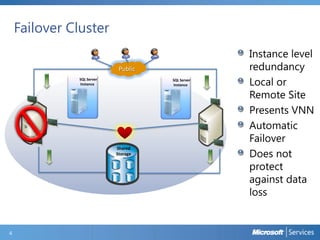
Failover Cluster
Public
SQL Server
Instance

SQL Server
Instance

Shared
Storage

4

Instance level
redundancy
Local or
Remote Site
Presents VNN
Automatic
Failover
Does not
protect
against data
loss
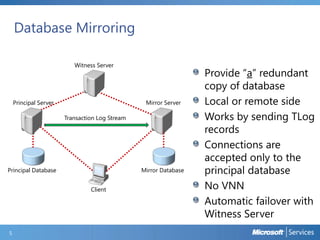
Database Mirroring
Witness Server

Mirror Server

Principal Server
Transaction Log Stream

Principal Database

Mirror Database
Client

5

Provide “a” redundant
copy of database
Local or remote side
Works by sending TLog
records
Connections are
accepted only to the
principal database
No VNN
Automatic failover with
Witness Server
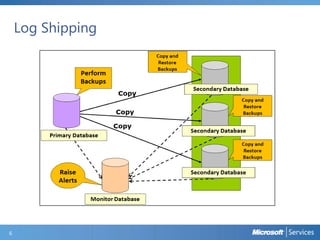
Log Shipping

6
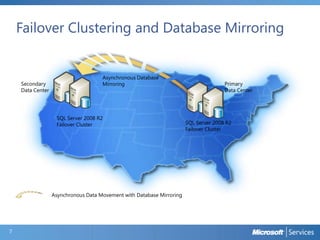
Failover Clustering and Database Mirroring

Secondary
Data Center

Asynchronous Database
Mirroring

SQL Server 2008 R2
Failover Cluster

Asynchronous Data Movement with Database Mirroring

7

Primary
Data Center

SQL Server 2008 R2
Failover Cluster
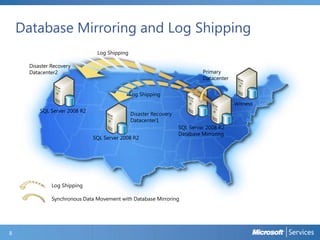
Database Mirroring and Log Shipping
Log Shipping
Disaster Recovery
Datacenter2

Primary
Datacenter

Log Shipping
Witness
SQL Server 2008 R2

Disaster Recovery
Datacenter1
SQL Server 2008 R2

SQL Server 2008 R2
Database Mirroring

Log Shipping
Synchronous Data Movement with Database Mirroring

8
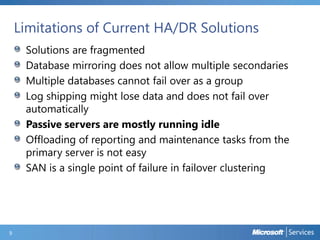
Limitations of Current HA/DR Solutions
Solutions are fragmented
Database mirroring does not allow multiple secondaries
Multiple databases cannot fail over as a group
Log shipping might lose data and does not fail over
automatically
Passive servers are mostly running idle
Offloading of reporting and maintenance tasks from the
primary server is not easy
SAN is a single point of failure in failover clustering

9
AlwaysOn Availability Groups

10
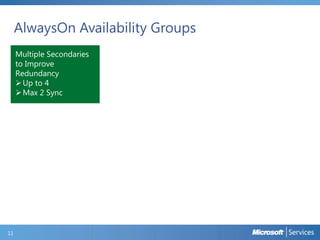
AlwaysOn Availability Groups
to Improve
Redundancy

11
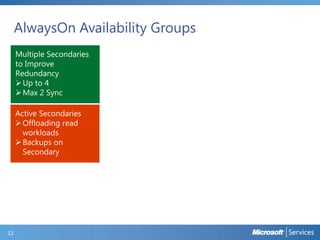
AlwaysOn Availability Groups
to Improve
Redundancy

12
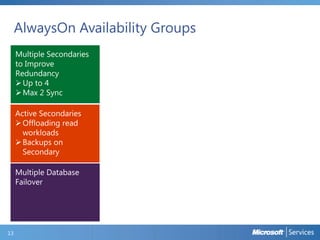
AlwaysOn Availability Groups
to Improve
Redundancy

13
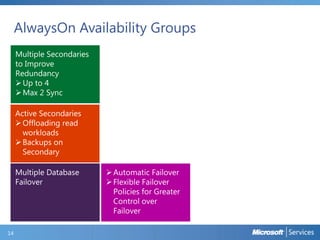
AlwaysOn Availability Groups
to Improve
Redundancy

14
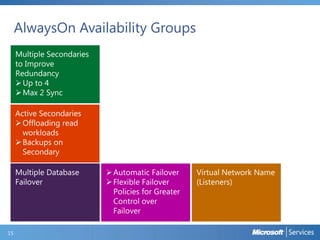
AlwaysOn Availability Groups
to Improve
Redundancy

15
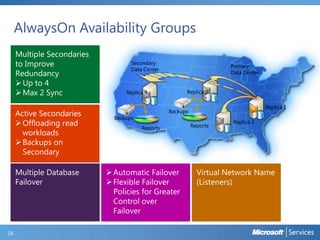
AlwaysOn Availability Groups
to Improve
Redundancy

Secondary
Data Center

Replica 4

A

A
Replica 3

A

Backups

Backups
Reports

16

Primary
Data Center

Reports

A

Replica 2

Replica 1
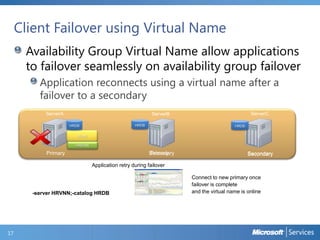
Client Failover using Virtual Name
Availability Group Virtual Name allow applications
to failover seamlessly on availability group failover
Application reconnects using a virtual name after a
failover to a secondary
ServerA

ServerC

ServerB
HRDB

HRDB

HRDB

AGHR
HRVNN

Primary
Secondary

Primary

Secondary

Application retry during failover

-server HRVNN;-catalog HRDB

17

Connect to new primary once
failover is complete
and the virtual name is online
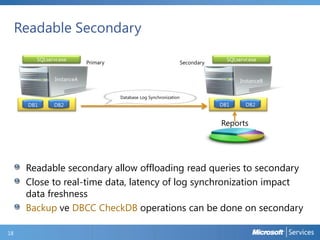
Readable Secondary
SQLservr.exe

Primary

Secondary

SQLservr.exe

InstanceA

InstanceB
Database Log Synchronization

DB1

DB2

DB1

DB2

Reports

Readable secondary allow offloading read queries to secondary
Close to real-time data, latency of log synchronization impact
data freshness
Backup ve DBCC CheckDB operations can be done on secondary
18
Active Secondary : Read-only Routing
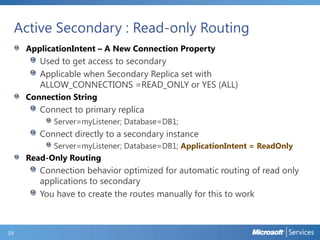
ApplicationIntent – A New Connection Property

Used to get access to secondary
Applicable when Secondary Replica set with
ALLOW_CONNECTIONS =READ_ONLY or YES (ALL)
Connection String

Connect to primary replica
Server=myListener; Database=DB1;

Connect directly to a secondary instance
Server=myListener; Database=DB1; ApplicationIntent = ReadOnly

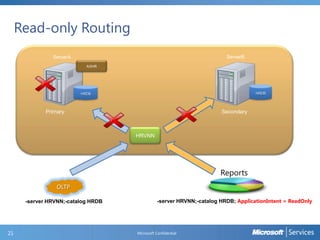
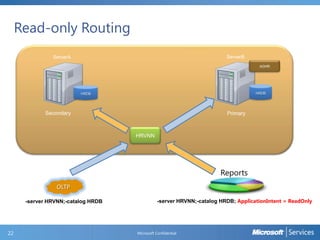
Read-Only Routing

Connection behavior optimized for automatic routing of read only
applications to secondary
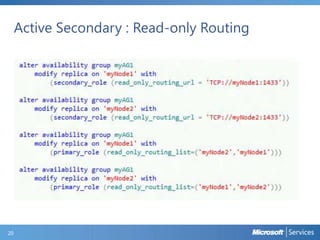
You have to create the routes manually for this to work

19
Active Secondary : Read-only Routing

20
Read-only Routing
ServerB

ServerA
AGHR

HRDB

HRDB

Primary

Secondary

HRVNN

Reports
OLTP
-server HRVNN;-catalog HRDB

21

-server HRVNN;-catalog HRDB; ApplicationIntent = ReadOnly

Microsoft Confidential
Read-only Routing
ServerB

ServerA

AGHR

HRDB

HRDB

Secondary

Primary

HRVNN

Reports
OLTP
-server HRVNN;-catalog HRDB

22

-server HRVNN;-catalog HRDB; ApplicationIntent = ReadOnly

Microsoft Confidential
Backup on Secondary Replicas
Backups can be done on any replica of a database
Log backups done on all replicas form a single log chain
Backups on primary replica still works
Supported backup types on secondary:
Full - COPY_ONLY method is only one supported Availability Replica

Transaction Log
Differential - Not Supported

Backup Preference
Prefer Secondary
Secondary Only
Primary
Any Replica

sys.fn_hadr_backup_is_preferred_replica

23
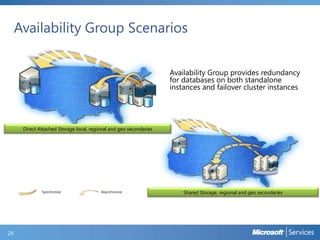
Availability Group Scenarios

A
A

A

Availability Group provides redundancy
for databases on both standalone
instances and failover cluster instances

A

Direct Attached Storage local, regional and geo secondaries
A

A
A

Synchronize

24

Asynchronize

Shared Storage, regional and geo secondaries
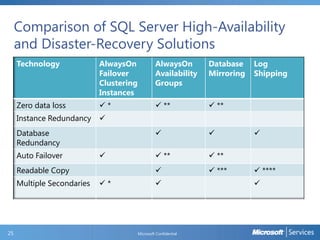
Comparison of SQL Server High-Availability
and Disaster-Recovery Solutions
Technology

AlwaysOn
Failover
Clustering
Instances

AlwaysOn
Availability
Groups

Database
Mirroring

Zero data loss

*

 **

 **

Instance Redundancy






 **

 **



 ***

Database
Redundancy

Auto Failover



Readable Copy
Multiple Secondaries

25

*



Microsoft Confidential

Log
Shipping



 ****

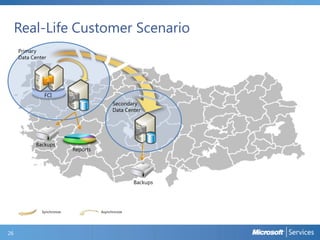
Real-Life Customer Scenario
Primary
Data Center

A

FCI

A

Secondary
Data Center

A

Backups

Reports

Backups

Synchronize

26

Asynchronize
What’s Coming with SQL Server 2014
Increase number of secondaries to 8 (from 4)
Increase availability of Readable Secondaries
Use readable secondaries despite network failures (important in
geo-distributed environments)

AlwaysOn Availability Groups Add Azure Replica Wizard
Support for Windows Server 2012 Cluster Shared Volumes
(CSV)
Enhanced Diagnostics

27
Thanks!
Questions?
Turgay Sahtiyan
Microsoft – Senior SQL Server PFE
www.turgaysahtiyan.com
@ @turgaysahtiyan

Microsoft MEA Services Webcast - HA & DR with SQL Server AlwaysOn Availability Groups

  • 1.
    High Availability &Disaster Recovery with SQL Server AlwaysOn Availability Groups Turgay Sahtiyan Microsoft – Senior SQL Server PFE www.turgaysahtiyan.com @ @turgaysahtiyan
  • 2.
    Turgay Sahtiyan Istanbul, Turkey MicrosoftGBS Team - Senior SQL Server PFE +12 years IT experience / Last 8 years SQL Server Key areas : HA&DR Solutions, Performance Tuning, PDW Community Geek Founder and Former President of SQLPass Turkey Chapter Former SQL Server MVP Speaker / Writer / Presenter at Microsoft & SQLSaturdays & Local User Groups Social Media Twitter : @turgaysahtiyan Blog : www.turgaysahtiyan.com Linkedin : http://aka.ms/turgaysahtiyan_li 1
  • 3.
    Agenda HA&DR Solutions BeforeSQL Server AlwaysOn AGs Limitations of Current HA/DR Solutions SQL Server AlwaysOn Availability Groups Client Failover using Virtual Network Name Readable Secondary – ReadOnly Routing Backup on Secondary Replicas Availability Group Scenarios Comparison of SQL Server HA&DR Solutions Real-Life Customer Scenario What’s Coming with SQL Server 2014 2
  • 4.
    SQL Server HighAvailability HA&DR solutions before SQL Server 2012 AlwaysOn Database Mirroring Failover Cluster Instance Log Shipping These features help the customer to reach enough HA&DR but.. Customers demand more Better Availability Higher ROI Simplicity 3
  • 5.
    Failover Cluster Public SQL Server Instance SQLServer Instance Shared Storage 4 Instance level redundancy Local or Remote Site Presents VNN Automatic Failover Does not protect against data loss
  • 6.
    Database Mirroring Witness Server MirrorServer Principal Server Transaction Log Stream Principal Database Mirror Database Client 5 Provide “a” redundant copy of database Local or remote side Works by sending TLog records Connections are accepted only to the principal database No VNN Automatic failover with Witness Server
  • 7.
  • 8.
    Failover Clustering andDatabase Mirroring Secondary Data Center Asynchronous Database Mirroring SQL Server 2008 R2 Failover Cluster Asynchronous Data Movement with Database Mirroring 7 Primary Data Center SQL Server 2008 R2 Failover Cluster
  • 9.
    Database Mirroring andLog Shipping Log Shipping Disaster Recovery Datacenter2 Primary Datacenter Log Shipping Witness SQL Server 2008 R2 Disaster Recovery Datacenter1 SQL Server 2008 R2 SQL Server 2008 R2 Database Mirroring Log Shipping Synchronous Data Movement with Database Mirroring 8
  • 10.
    Limitations of CurrentHA/DR Solutions Solutions are fragmented Database mirroring does not allow multiple secondaries Multiple databases cannot fail over as a group Log shipping might lose data and does not fail over automatically Passive servers are mostly running idle Offloading of reporting and maintenance tasks from the primary server is not easy SAN is a single point of failure in failover clustering 9
  • 11.
  • 12.
    AlwaysOn Availability Groups toImprove Redundancy 11
  • 13.
    AlwaysOn Availability Groups toImprove Redundancy 12
  • 14.
    AlwaysOn Availability Groups toImprove Redundancy 13
  • 15.
    AlwaysOn Availability Groups toImprove Redundancy 14
  • 16.
    AlwaysOn Availability Groups toImprove Redundancy 15
  • 17.
    AlwaysOn Availability Groups toImprove Redundancy Secondary Data Center Replica 4 A A Replica 3 A Backups Backups Reports 16 Primary Data Center Reports A Replica 2 Replica 1
  • 18.
    Client Failover usingVirtual Name Availability Group Virtual Name allow applications to failover seamlessly on availability group failover Application reconnects using a virtual name after a failover to a secondary ServerA ServerC ServerB HRDB HRDB HRDB AGHR HRVNN Primary Secondary Primary Secondary Application retry during failover -server HRVNN;-catalog HRDB 17 Connect to new primary once failover is complete and the virtual name is online
  • 19.
    Readable Secondary SQLservr.exe Primary Secondary SQLservr.exe InstanceA InstanceB Database LogSynchronization DB1 DB2 DB1 DB2 Reports Readable secondary allow offloading read queries to secondary Close to real-time data, latency of log synchronization impact data freshness Backup ve DBCC CheckDB operations can be done on secondary 18
  • 20.
    Active Secondary :Read-only Routing ApplicationIntent – A New Connection Property Used to get access to secondary Applicable when Secondary Replica set with ALLOW_CONNECTIONS =READ_ONLY or YES (ALL) Connection String Connect to primary replica Server=myListener; Database=DB1; Connect directly to a secondary instance Server=myListener; Database=DB1; ApplicationIntent = ReadOnly Read-Only Routing Connection behavior optimized for automatic routing of read only applications to secondary You have to create the routes manually for this to work 19
  • 21.
    Active Secondary :Read-only Routing 20
  • 22.
    Read-only Routing ServerB ServerA AGHR HRDB HRDB Primary Secondary HRVNN Reports OLTP -server HRVNN;-catalogHRDB 21 -server HRVNN;-catalog HRDB; ApplicationIntent = ReadOnly Microsoft Confidential
  • 23.
    Read-only Routing ServerB ServerA AGHR HRDB HRDB Secondary Primary HRVNN Reports OLTP -server HRVNN;-catalogHRDB 22 -server HRVNN;-catalog HRDB; ApplicationIntent = ReadOnly Microsoft Confidential
  • 24.
    Backup on SecondaryReplicas Backups can be done on any replica of a database Log backups done on all replicas form a single log chain Backups on primary replica still works Supported backup types on secondary: Full - COPY_ONLY method is only one supported Availability Replica Transaction Log Differential - Not Supported Backup Preference Prefer Secondary Secondary Only Primary Any Replica sys.fn_hadr_backup_is_preferred_replica 23
  • 25.
    Availability Group Scenarios A A A AvailabilityGroup provides redundancy for databases on both standalone instances and failover cluster instances A Direct Attached Storage local, regional and geo secondaries A A A Synchronize 24 Asynchronize Shared Storage, regional and geo secondaries
  • 26.
    Comparison of SQLServer High-Availability and Disaster-Recovery Solutions Technology AlwaysOn Failover Clustering Instances AlwaysOn Availability Groups Database Mirroring Zero data loss *  **  ** Instance Redundancy     **  **   *** Database Redundancy Auto Failover  Readable Copy Multiple Secondaries 25 *  Microsoft Confidential Log Shipping   **** 
  • 27.
    Real-Life Customer Scenario Primary DataCenter A FCI A Secondary Data Center A Backups Reports Backups Synchronize 26 Asynchronize
  • 28.
    What’s Coming withSQL Server 2014 Increase number of secondaries to 8 (from 4) Increase availability of Readable Secondaries Use readable secondaries despite network failures (important in geo-distributed environments) AlwaysOn Availability Groups Add Azure Replica Wizard Support for Windows Server 2012 Cluster Shared Volumes (CSV) Enhanced Diagnostics 27
  • 29.
    Thanks! Questions? Turgay Sahtiyan Microsoft –Senior SQL Server PFE www.turgaysahtiyan.com @ @turgaysahtiyan