


Do’s and Dont’s for Office 365
Development
Chris O’Brien - MVP
Independent Consultant
Head of Development, Content and
Code
www.sharepointnutsandbolts.com
@ChrisO_Brien
http://cob-sp.com/COBLinkedIn
About me
Agenda
• The Office 365 dev landscape – things you
CAN’T do
• The DON’T list:
• 4 fundamental don’ts
• 4 “more debatable” don’ts 
• The DO list
• Remote provisioning
• Office 365 apps/auth over SharePoint Add-ins
• App script parts
• Summary
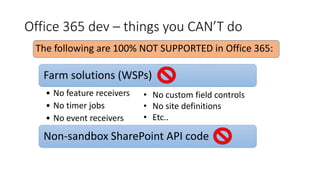
Office 365 dev – things you CAN’T do
Farm solutions (WSPs)
• No feature receivers
• No timer jobs
• No event receivers
Non-sandbox SharePoint API code
• No custom field controls
• No site definitions
• Etc..
The following are 100% NOT SUPPORTED in Office 365:
Fundamental “don’ts”
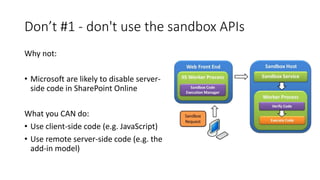
Don’t #1 - don't use the sandbox APIs
Why not:
• Microsoft are likely to disable server-
side code in SharePoint Online
What you CAN do:
• Use client-side code (e.g. JavaScript)
• Use remote server-side code (e.g. the
add-in model)
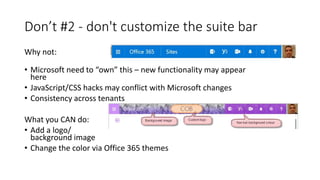
Don’t #2 - don't customize the suite bar
Why not:
• Microsoft need to “own” this – new functionality may appear
here
• JavaScript/CSS hacks may conflict with Microsoft changes
• Consistency across tenants
What you CAN do:
• Add a logo/
background image
• Change the color via Office 365 themes
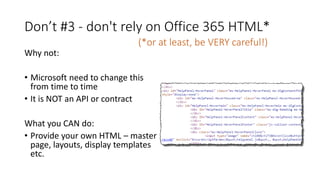
Don’t #3 - don't rely on Office 365 HTML*
Why not:
• Microsoft need to change this
from time to time
• It is NOT an API or contract
What you CAN do:
• Provide your own HTML – master
page, layouts, display templates
etc.
(*or at least, be VERY careful!)
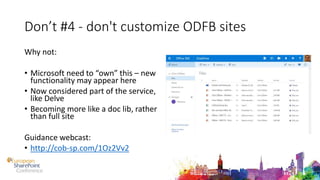
Don’t #4 - don't customize ODFB sites
Why not:
• Microsoft need to “own” this – new
functionality may appear here
• Now considered part of the service,
like Delve
• Becoming more like a doc lib, rather
than full site
Guidance webcast:
• http://cob-sp.com/1Oz2Vv2
Fundamental
“don’ts” summary:
1. Don’t use the sandbox APIs
2. Don’t customize the suite
bar
3. Don’t rely on Office 365
HTML
4. Don’t customize ODFB sites
Do’s:
1. Do use Office 365 themes/suite
bar options
2. Do use remote APIs:
1. CSOM (.NET)
2. JSOM
3. REST
4. Android/iOS
More controversial don’ts
1. Don’t use a custom master page
2. Don’t use a custom web
template
3. Don’t use Features to provision
fields and content types
..also:
1. Don’t use web parts
More debatable/controversial
don’ts:
#1 Don’t use a
custom master page
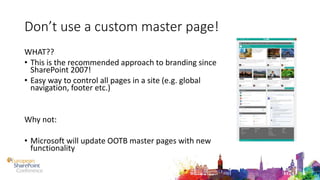
Don’t use a custom master page!
WHAT??
• This is the recommended approach to branding since
SharePoint 2007!
• Easy way to control all pages in a site (e.g. global
navigation, footer etc.)
Why not:
• Microsoft will update OOTB master pages with new
functionality
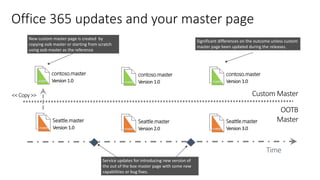
Office 365 updates and your master page
Time
OOTB
Master
Custom Master<< Copy >>
Service updates for introducing new version of
the out of the box master page with some new
capabilities or bug fixes.
Significant differences on the outcome unless custom
master page been updated during the releases.
New custom master page is created by
copying oob master or starting from scratch
using oob master as the reference
master
Seattle.master
Version 1.0 master
Seattle.master
Version 2.0 master
Seattle.master
Version 3.0
master
contoso.master
Version 1.0 master
contoso.master
Version 1.0 master
contoso.master
Version 1.0
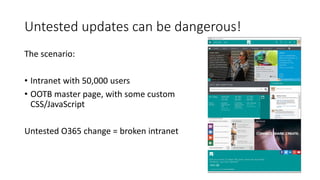
Untested updates can be dangerous!
The scenario:
• Intranet with 50,000 users
• OOTB master page, with some custom
CSS/JavaScript
Untested O365 change = broken intranet
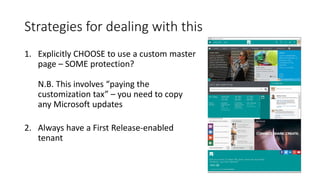
Strategies for dealing with this
1. Explicitly CHOOSE to use a custom master
page – SOME protection?
N.B. This involves “paying the
customization tax” – you need to copy
any Microsoft updates
2. Always have a First Release-enabled
tenant
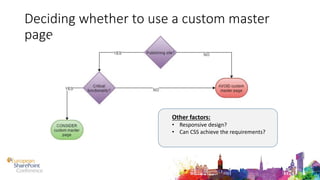
Deciding whether to use a custom master
page
Other factors:
• Responsive design?
• Can CSS achieve the requirements?
More debatable/controversial
don’ts:
#2 Don’t use custom
WebTemplates
Don’t use custom WebTemplates!
Why not:
• It’s the same deal as custom master pages –
Microsoft will want to update e.g. the team
site definition
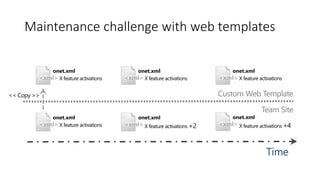
Maintenance challenge with web templates
Time
Team Site
Custom Web Template
<xml>
onet.xml
X feature activations
<xml>
onet.xml
X feature activations <xml>
onet.xml
X feature activations +2 <xml>
onet.xml
X feature activations +4
<xml>
onet.xml
X feature activations <xml>
onet.xml
X feature activations
<< Copy >>
More debatable/controversial
don’ts:
#3 Don’t use Features
to provision
fields/content types
etc.
Don’t use Features for provisioning
Why not:
• Provisioned artifacts have
dependency on Feature XML (in
content database)
• Microsoft don’t like this for
running Office 365
BUT:
• Is that the implementer’s
problem? 
Do’s:
#1 Do use remote
provisioning
Remote provisioning – the alternative to
WebTemplates
• Better APIs for remote provisioning now
• OfficeDev Patterns and Practices site provisioning framework:
• XML for defining custom site “template” definition
• Remote code (PowerShell or .NET) to create sites – Azure WebJob
• Full engine/framework for creating sites from a SharePoint list item
• Ability to “extract template” from an existing site
Custom sites via remote
provisioning in Office 365
DEMO
Do’s:
#2 Use Office 365
apps in preference
to SharePoint Add-
ins
Using Office 365 APIs
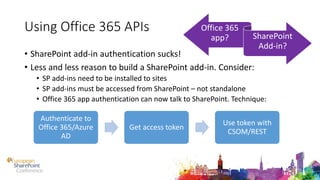
• SharePoint add-in authentication sucks!
• Less and less reason to build a SharePoint add-in. Consider:
• SP add-ins need to be installed to sites
• SP add-ins must be accessed from SharePoint – not standalone
• Office 365 app authentication can now talk to SharePoint. Technique:
Authenticate to
Office 365/Azure
AD
Get access token
Use token with
CSOM/REST
Office 365
app? SharePoint
Add-in?
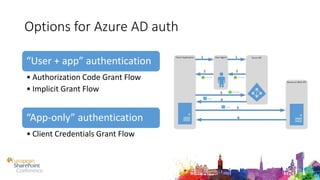
Options for Azure AD auth
“User + app” authentication
• Authorization Code Grant Flow
• Implicit Grant Flow
“App-only” authentication
• Client Credentials Grant Flow
Using an Office 365 auth
token to talk to SharePoint
DEMO
More debatable/controversial
don’ts:
#4 Don’t use web
parts
Do’s:
#3 Use app script
parts (cloud-friendly
web parts)
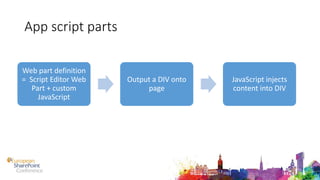
App script parts
Web part definition
= Script Editor Web
Part + custom
JavaScript
Output a DIV onto
page
JavaScript injects
content into DIV
App script parts (modern
web parts)
DEMO
App script parts - advanced
• Sometimes you need “web part properties”
• This involves:
• Storing the data
• Presenting the UI
• Options:
• Persist somewhere custom
• Persist to Script Editor config (hidden field) – see
https://olescorner.wordpress.com/2015/06/04/49
Do’s:
#4 Create multiple
tenancies (if doing
development)
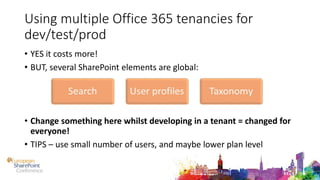
Using multiple Office 365 tenancies for
dev/test/prod
• YES it costs more!
• BUT, several SharePoint elements are global:
• Change something here whilst developing in a tenant = changed for
everyone!
• TIPS – use small number of users, and maybe lower plan level
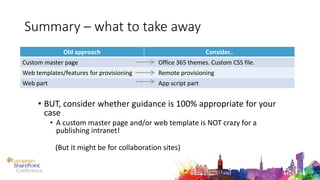
Summary – what to take away
• BUT, consider whether guidance is 100% appropriate for your
case
• A custom master page and/or web template is NOT crazy for a
publishing intranet!
(But it might be for collaboration sites)
Old approach Consider..
Custom master page Office 365 themes. Custom CSS file.
Web templates/features for provisioning Remote provisioning
Web part App script part
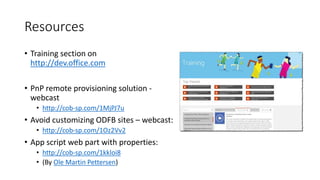
Resources
• Training section on
http://dev.office.com
• PnP remote provisioning solution -
webcast
• http://cob-sp.com/1MjPJ7u
• Avoid customizing ODFB sites – webcast:
• http://cob-sp.com/1Oz2Vv2
• App script web part with properties:
• http://cob-sp.com/1kkloi8
• (By Ole Martin Pettersen)
Hackathon
WINNING TEAM GETS
THANK YOU!
ANY QUESTIONS?
Chris O’Brien
www.sharepointnutsandbolts.com

Do's and don'ts for Office 365 development

  • 1.
    Do’s and Dont’sfor Office 365 Development Chris O’Brien - MVP
  • 2.
    Independent Consultant Head ofDevelopment, Content and Code www.sharepointnutsandbolts.com @ChrisO_Brien http://cob-sp.com/COBLinkedIn About me
  • 3.
    Agenda • The Office365 dev landscape – things you CAN’T do • The DON’T list: • 4 fundamental don’ts • 4 “more debatable” don’ts  • The DO list • Remote provisioning • Office 365 apps/auth over SharePoint Add-ins • App script parts • Summary
  • 4.
    Office 365 dev– things you CAN’T do Farm solutions (WSPs) • No feature receivers • No timer jobs • No event receivers Non-sandbox SharePoint API code • No custom field controls • No site definitions • Etc.. The following are 100% NOT SUPPORTED in Office 365:
  • 5.
  • 6.
    Don’t #1 -don't use the sandbox APIs Why not: • Microsoft are likely to disable server- side code in SharePoint Online What you CAN do: • Use client-side code (e.g. JavaScript) • Use remote server-side code (e.g. the add-in model)
  • 7.
    Don’t #2 -don't customize the suite bar Why not: • Microsoft need to “own” this – new functionality may appear here • JavaScript/CSS hacks may conflict with Microsoft changes • Consistency across tenants What you CAN do: • Add a logo/ background image • Change the color via Office 365 themes
  • 8.
    Don’t #3 -don't rely on Office 365 HTML* Why not: • Microsoft need to change this from time to time • It is NOT an API or contract What you CAN do: • Provide your own HTML – master page, layouts, display templates etc. (*or at least, be VERY careful!)
  • 9.
    Don’t #4 -don't customize ODFB sites Why not: • Microsoft need to “own” this – new functionality may appear here • Now considered part of the service, like Delve • Becoming more like a doc lib, rather than full site Guidance webcast: • http://cob-sp.com/1Oz2Vv2
  • 10.
    Fundamental “don’ts” summary: 1. Don’tuse the sandbox APIs 2. Don’t customize the suite bar 3. Don’t rely on Office 365 HTML 4. Don’t customize ODFB sites
  • 11.
    Do’s: 1. Do useOffice 365 themes/suite bar options 2. Do use remote APIs: 1. CSOM (.NET) 2. JSOM 3. REST 4. Android/iOS
  • 12.
    More controversial don’ts 1.Don’t use a custom master page 2. Don’t use a custom web template 3. Don’t use Features to provision fields and content types ..also: 1. Don’t use web parts
  • 13.
  • 14.
    Don’t use acustom master page! WHAT?? • This is the recommended approach to branding since SharePoint 2007! • Easy way to control all pages in a site (e.g. global navigation, footer etc.) Why not: • Microsoft will update OOTB master pages with new functionality
  • 15.
    Office 365 updatesand your master page Time OOTB Master Custom Master<< Copy >> Service updates for introducing new version of the out of the box master page with some new capabilities or bug fixes. Significant differences on the outcome unless custom master page been updated during the releases. New custom master page is created by copying oob master or starting from scratch using oob master as the reference master Seattle.master Version 1.0 master Seattle.master Version 2.0 master Seattle.master Version 3.0 master contoso.master Version 1.0 master contoso.master Version 1.0 master contoso.master Version 1.0
  • 17.
    Untested updates canbe dangerous! The scenario: • Intranet with 50,000 users • OOTB master page, with some custom CSS/JavaScript Untested O365 change = broken intranet
  • 18.
    Strategies for dealingwith this 1. Explicitly CHOOSE to use a custom master page – SOME protection? N.B. This involves “paying the customization tax” – you need to copy any Microsoft updates 2. Always have a First Release-enabled tenant
  • 19.
    Deciding whether touse a custom master page Other factors: • Responsive design? • Can CSS achieve the requirements?
  • 20.
  • 21.
    Don’t use customWebTemplates! Why not: • It’s the same deal as custom master pages – Microsoft will want to update e.g. the team site definition
  • 22.
    Maintenance challenge withweb templates Time Team Site Custom Web Template <xml> onet.xml X feature activations <xml> onet.xml X feature activations <xml> onet.xml X feature activations +2 <xml> onet.xml X feature activations +4 <xml> onet.xml X feature activations <xml> onet.xml X feature activations << Copy >>
  • 23.
    More debatable/controversial don’ts: #3 Don’tuse Features to provision fields/content types etc.
  • 24.
    Don’t use Featuresfor provisioning Why not: • Provisioned artifacts have dependency on Feature XML (in content database) • Microsoft don’t like this for running Office 365 BUT: • Is that the implementer’s problem? 
  • 25.
    Do’s: #1 Do useremote provisioning
  • 26.
    Remote provisioning –the alternative to WebTemplates • Better APIs for remote provisioning now • OfficeDev Patterns and Practices site provisioning framework: • XML for defining custom site “template” definition • Remote code (PowerShell or .NET) to create sites – Azure WebJob • Full engine/framework for creating sites from a SharePoint list item • Ability to “extract template” from an existing site
  • 27.
    Custom sites viaremote provisioning in Office 365 DEMO
  • 28.
    Do’s: #2 Use Office365 apps in preference to SharePoint Add- ins
  • 29.
    Using Office 365APIs • SharePoint add-in authentication sucks! • Less and less reason to build a SharePoint add-in. Consider: • SP add-ins need to be installed to sites • SP add-ins must be accessed from SharePoint – not standalone • Office 365 app authentication can now talk to SharePoint. Technique: Authenticate to Office 365/Azure AD Get access token Use token with CSOM/REST Office 365 app? SharePoint Add-in?
  • 30.
    Options for AzureAD auth “User + app” authentication • Authorization Code Grant Flow • Implicit Grant Flow “App-only” authentication • Client Credentials Grant Flow
  • 31.
    Using an Office365 auth token to talk to SharePoint DEMO
  • 32.
  • 33.
    Do’s: #3 Use appscript parts (cloud-friendly web parts)
  • 34.
    App script parts Webpart definition = Script Editor Web Part + custom JavaScript Output a DIV onto page JavaScript injects content into DIV
  • 35.
    App script parts(modern web parts) DEMO
  • 36.
    App script parts- advanced • Sometimes you need “web part properties” • This involves: • Storing the data • Presenting the UI • Options: • Persist somewhere custom • Persist to Script Editor config (hidden field) – see https://olescorner.wordpress.com/2015/06/04/49
  • 37.
  • 38.
    Using multiple Office365 tenancies for dev/test/prod • YES it costs more! • BUT, several SharePoint elements are global: • Change something here whilst developing in a tenant = changed for everyone! • TIPS – use small number of users, and maybe lower plan level
  • 39.
    Summary – whatto take away • BUT, consider whether guidance is 100% appropriate for your case • A custom master page and/or web template is NOT crazy for a publishing intranet! (But it might be for collaboration sites) Old approach Consider.. Custom master page Office 365 themes. Custom CSS file. Web templates/features for provisioning Remote provisioning Web part App script part
  • 40.
    Resources • Training sectionon http://dev.office.com • PnP remote provisioning solution - webcast • http://cob-sp.com/1MjPJ7u • Avoid customizing ODFB sites – webcast: • http://cob-sp.com/1Oz2Vv2 • App script web part with properties: • http://cob-sp.com/1kkloi8 • (By Ole Martin Pettersen)
  • 41.
  • 42.
    THANK YOU! ANY QUESTIONS? ChrisO’Brien www.sharepointnutsandbolts.com