









Wake up!
SharePoint for ASP.Net Developers(It’s gonna be ok, really)
Who are you?
Me:LiquidHub Solution ArchitectSharePoint ArchitectDeveloperFatherVirginia Tech HokieGamerWorld Famous Jungle Cruise Skipper (ret.)
SharePoint for the ASP.Net DeveloperWhat’s different?What’s the same?What tools do I need?10 things every SharePoint developer should knowHow to get your code rejected by your SharePoint Architect(s)Resources
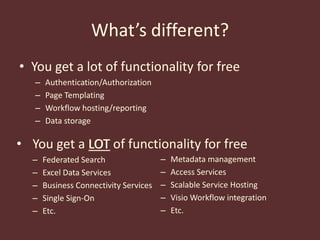
What’s different?You get a lot of functionality for freeAuthentication/AuthorizationPage TemplatingWorkflow hosting/reportingData storageYou get a LOT of functionality for free
Federated Search
Excel Data Services
Business Connectivity Services
Single Sign-On
Etc.LOTMetadata management
Access Services
Scalable Service Hosting
Visio Workflow integration
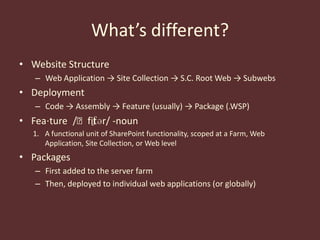
Etc.What’s different?Website StructureWeb Application -> Site Collection -> S.C. Root Web -> SubwebsDeploymentCode -> Assembly -> Feature (usually) -> Package (.WSP)Fea⋅ture /ˈfitʃər/ -nounA functional unit of SharePoint functionality, scoped at a Farm, Web Application, Site Collection, or Web levelPackagesFirst added to the server farmThen, deployed to individual web applications (or globally)
What’s the same?SharePoint is an ASP.Net appWeb.configHTTPHandlers/HTTPModulesAuthenticationMaster PagesWeb Parts == Composite Server ControlsInherit from System.Web.UI.WebControls.WebParts.WebPartPostbacks/Event Lifecycle Model
What tools do I need?Virtual Machine w/ Visual Studio, SQL Server, Active Directory, IIS, and MS Office running a server OS (64-bitfor SP 2010)Microsoft Office SharePoint Server 2007 SDKBDC definition editorWorkflow samples and lots moreMicrosoft SharePoint 2010 SDKDocumentationCode samplesSharePoint Visual Studio add-insWindows SharePoint Services 3.0 Tools: Visual Studio 2008 Extensions, Version 1.2 (VSeWSS)WSPBuilder (for VS 2008/SP 2007 or VS/SP 2010)
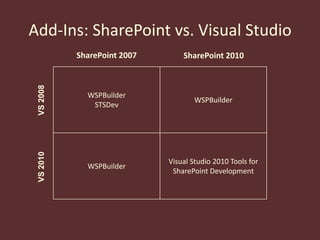
Visual Studio 2010 Tools for SharePoint Development (SP 2010 Only)Add-Ins: SharePoint vs. Visual StudioSharePoint 2007SharePoint 2010VS 2008VS 2010
Things every developer should know
10 Things Every SharePoint Developer Should KnowWhenever possible, avoid creating custom Site Definitions
10 Things Every SharePoint Developer Should KnowSolution packages are NOT side-by-side, versioned deployments
10 Things Every SharePoint Developer Should KnowWeb.config changes should be made in code, not by handSPWebConfigModification10 Things Every SharePoint Developer Should KnowSharePoint Designer can be the enemy of performance
10 Things Every SharePoint Developer Should KnowOut of the box master & layout pages should never be modified
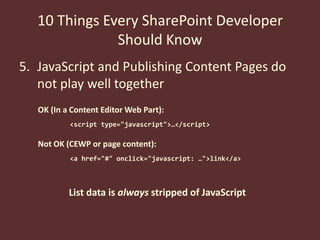
10 Things Every SharePoint Developer Should KnowJavaScript and Publishing Content Pages do not play well togetherOK (In a Content Editor Web Part):<script type="javascript">…</script>Not OK (CEWP or page content):<a href="#" onclick="javascript: …">link</a>List data is always stripped of JavaScript
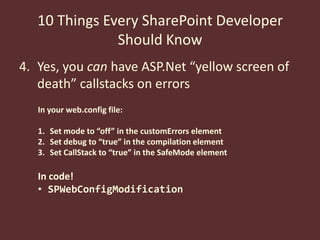
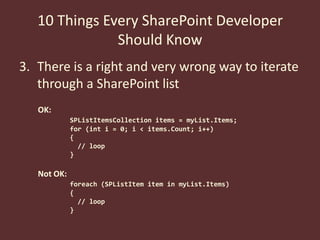
10 Things Every SharePoint Developer Should KnowYes, you can have ASP.Net “yellow screen of death” callstacks on errorsIn your web.config file:Set mode to “off” in the customErrors elementSet debug to “true” in the compilation elementSet CallStack to “true” in the SafeMode elementIn code!SPWebConfigModification10 Things Every SharePoint Developer Should KnowThere is a right and very wrong way to iterate through a SharePoint listOK:SPListItemsCollection items = myList.Items;for (int i = 0; i < items.Count; i++){	  // loop}Not OK:foreach (SPListItem item in myList.Items){  // loop}
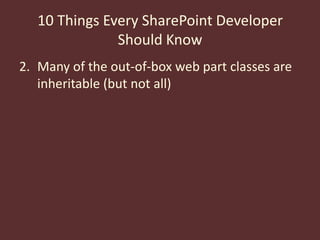
10 Things Every SharePoint Developer Should KnowMany of the out-of-box web part classes are inheritable (but not all)
10 Things Every SharePoint Developer Should KnowThe rules for proper disposal of SharePoint objects isn’t cut & dry – but there is help.SPDisposeCheck
How to get your code rejected by your SharePoint Architecture GroupDon’t dispose of your SPSite and SPWeb (and related) objects properlyThe SPDisposeCheck utility is invaluable for thisUse SPSecurity.RunWithElevatedPrivileges when unnecessary or just plain badlyLog errors to whatever’s handy at the timeMake changes to the web.config file without consideration for others

SharePoint for ASP.Net Developers

  • 1.
  • 2.
    SharePoint for ASP.NetDevelopers(It’s gonna be ok, really)
  • 3.
  • 4.
    Me:LiquidHub Solution ArchitectSharePointArchitectDeveloperFatherVirginia Tech HokieGamerWorld Famous Jungle Cruise Skipper (ret.)
  • 5.
    SharePoint for theASP.Net DeveloperWhat’s different?What’s the same?What tools do I need?10 things every SharePoint developer should knowHow to get your code rejected by your SharePoint Architect(s)Resources
  • 6.
    What’s different?You geta lot of functionality for freeAuthentication/AuthorizationPage TemplatingWorkflow hosting/reportingData storageYou get a LOT of functionality for free
  • 7.
  • 8.
  • 9.
  • 10.
  • 11.
  • 12.
  • 13.
  • 14.
  • 15.
    Etc.What’s different?Website StructureWebApplication -> Site Collection -> S.C. Root Web -> SubwebsDeploymentCode -> Assembly -> Feature (usually) -> Package (.WSP)Fea⋅ture /ˈfitʃər/ -nounA functional unit of SharePoint functionality, scoped at a Farm, Web Application, Site Collection, or Web levelPackagesFirst added to the server farmThen, deployed to individual web applications (or globally)
  • 16.
    What’s the same?SharePointis an ASP.Net appWeb.configHTTPHandlers/HTTPModulesAuthenticationMaster PagesWeb Parts == Composite Server ControlsInherit from System.Web.UI.WebControls.WebParts.WebPartPostbacks/Event Lifecycle Model
  • 17.
    What tools doI need?Virtual Machine w/ Visual Studio, SQL Server, Active Directory, IIS, and MS Office running a server OS (64-bitfor SP 2010)Microsoft Office SharePoint Server 2007 SDKBDC definition editorWorkflow samples and lots moreMicrosoft SharePoint 2010 SDKDocumentationCode samplesSharePoint Visual Studio add-insWindows SharePoint Services 3.0 Tools: Visual Studio 2008 Extensions, Version 1.2 (VSeWSS)WSPBuilder (for VS 2008/SP 2007 or VS/SP 2010)
  • 18.
    Visual Studio 2010Tools for SharePoint Development (SP 2010 Only)Add-Ins: SharePoint vs. Visual StudioSharePoint 2007SharePoint 2010VS 2008VS 2010
  • 19.
  • 20.
    10 Things EverySharePoint Developer Should KnowWhenever possible, avoid creating custom Site Definitions
  • 21.
    10 Things EverySharePoint Developer Should KnowSolution packages are NOT side-by-side, versioned deployments
  • 22.
    10 Things EverySharePoint Developer Should KnowWeb.config changes should be made in code, not by handSPWebConfigModification10 Things Every SharePoint Developer Should KnowSharePoint Designer can be the enemy of performance
  • 23.
    10 Things EverySharePoint Developer Should KnowOut of the box master & layout pages should never be modified
  • 24.
    10 Things EverySharePoint Developer Should KnowJavaScript and Publishing Content Pages do not play well togetherOK (In a Content Editor Web Part):<script type="javascript">…</script>Not OK (CEWP or page content):<a href="#" onclick="javascript: …">link</a>List data is always stripped of JavaScript
  • 25.
    10 Things EverySharePoint Developer Should KnowYes, you can have ASP.Net “yellow screen of death” callstacks on errorsIn your web.config file:Set mode to “off” in the customErrors elementSet debug to “true” in the compilation elementSet CallStack to “true” in the SafeMode elementIn code!SPWebConfigModification10 Things Every SharePoint Developer Should KnowThere is a right and very wrong way to iterate through a SharePoint listOK:SPListItemsCollection items = myList.Items;for (int i = 0; i < items.Count; i++){ // loop}Not OK:foreach (SPListItem item in myList.Items){ // loop}
  • 26.
    10 Things EverySharePoint Developer Should KnowMany of the out-of-box web part classes are inheritable (but not all)
  • 27.
    10 Things EverySharePoint Developer Should KnowThe rules for proper disposal of SharePoint objects isn’t cut & dry – but there is help.SPDisposeCheck
  • 28.
    How to getyour code rejected by your SharePoint Architecture GroupDon’t dispose of your SPSite and SPWeb (and related) objects properlyThe SPDisposeCheck utility is invaluable for thisUse SPSecurity.RunWithElevatedPrivileges when unnecessary or just plain badlyLog errors to whatever’s handy at the timeMake changes to the web.config file without consideration for others