Nik Panter
Vice President, Services | Salesforce MVP
nik@cloud4good.com
@nikpanter
Documenting Your Salesforce Org
Forward-Looking Statements
Statement under the Private Securities Litigation Reform Act of 1995:
This presentation may contain forward-looking statements that involve risks, uncertainties, and assumptions. If any such uncertainties materialize or if any
of the assumptions proves incorrect, the results of salesforce.com, inc. could differ materially from the results expressed or implied by the forward-looking
statements we make. All statements other than statements of historical fact could be deemed forward-looking, including any projections of product or
service availability, subscriber growth, earnings, revenues, or other financial items and any statements regarding strategies or plans of management for
future operations, statements of belief, any statements concerning new, planned, or upgraded services or technology developments and customer contracts
or use of our services.
The risks and uncertainties referred to above include – but are not limited to – risks associated with developing and delivering new functionality for our
service, new products and services, our new business model, our past operating losses, possible fluctuations in our operating results and rate of growth,
interruptions or delays in our Web hosting, breach of our security measures, the outcome of any litigation, risks associated with completed and any possible
mergers and acquisitions, the immature market in which we operate, our relatively limited operating history, our ability to expand, retain, and motivate our
employees and manage our growth, new releases of our service and successful customer deployment, our limited history reselling non-salesforce.com
products, and utilization and selling to larger enterprise customers. Further information on potential factors that could affect the financial results of
salesforce.com, inc. is included in our annual report on Form 10-K for the most recent fiscal year and in our quarterly report on Form 10-Q for the most
recent fiscal quarter. These documents and others containing important disclosures are available on the SEC Filings section of the Investor Information
section of our Web site.
Any unreleased services or features referenced in this or other presentations, press releases or public statements are not currently available and may not
be delivered on time or at all. Customers who purchase our services should make the purchase decisions based upon features that are currently available.
Salesforce.com, inc. assumes no obligation and does not intend to update these forward-looking statements.
OVERVIEW
What We Are Going To Talk About
• What is documentation?
• Why is it important?
• What do I do?
• What to document?
• How to document?
• Apps to assist.
• Q&A
DOCUMENTATION IS…
Simply, a document or documents that helps define what your
Salesforce org is.
Can be a Word document and Excel spreadsheet, especially for
SMB/solo admins.
Larger organizations may need to follow ISO standards to keep
corporate ISO certification.
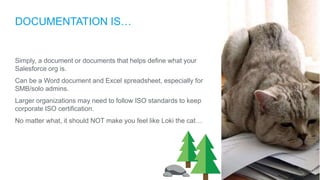
No matter what, it should NOT make you feel like Loki the cat…
WHY IS IT IMPORTANT?
Keep (and look) organized and professional.
Allow others to learn and see what your Salesforce is.
Allow developers/integrators to ’read’ your setup.
Keep your sanity!
So….
What Do I DO?
WHAT TO DOCUMENT
Answer the 5 Ws
• Who uses Salesforce
• What are the reasons you use Salesforce
• Where do you put data into Salesforce
• When should Salesforce be used
• Why is your company using Salesforce
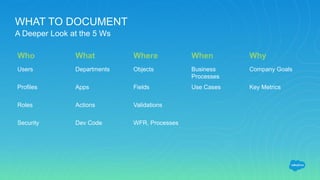
WHAT TO DOCUMENT
A Deeper Look at the 5 Ws
Who What Where When Why
Users Departments Objects Business
Processes
Company Goals
Profiles Apps Fields Use Cases Key Metrics
Roles Actions Validations
Security Dev Code WFR, Processes
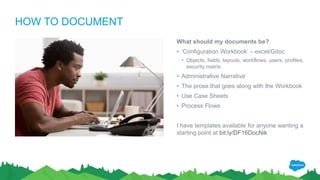
HOW TO DOCUMENT
What should my documents be?
• ‘Configuration Workbook’ – excel/Gdoc
• Objects, fields, layouts, workflows, users, profiles,
security matrix.
• Administrative Narrative
• The prose that goes along with the Workbook
• Use Case Sheets
• Process Flows
I have templates available for anyone wanting a
starting point at bit.ly/DF16DocNik
APPS TO ASSIST
App Exchange
• Config Work Book (concret.io)
• Octopus (Astrea IT)
Web
• sftoolkit.co (Ben Edwards)
• ColumnCopy (Chrome Extension)
Office Applications
• Lucidchart or Visio
• Office or Google Apps
• SharePoint or Google Sites
• Confluence by Atlassian
Questions?
Thank Y u
Documenting Your Salesforce Org	 by Nik Panter

Documenting Your Salesforce Org by Nik Panter

  • 1.
    Nik Panter Vice President,Services | Salesforce MVP nik@cloud4good.com @nikpanter Documenting Your Salesforce Org
  • 2.
    Forward-Looking Statements Statement underthe Private Securities Litigation Reform Act of 1995: This presentation may contain forward-looking statements that involve risks, uncertainties, and assumptions. If any such uncertainties materialize or if any of the assumptions proves incorrect, the results of salesforce.com, inc. could differ materially from the results expressed or implied by the forward-looking statements we make. All statements other than statements of historical fact could be deemed forward-looking, including any projections of product or service availability, subscriber growth, earnings, revenues, or other financial items and any statements regarding strategies or plans of management for future operations, statements of belief, any statements concerning new, planned, or upgraded services or technology developments and customer contracts or use of our services. The risks and uncertainties referred to above include – but are not limited to – risks associated with developing and delivering new functionality for our service, new products and services, our new business model, our past operating losses, possible fluctuations in our operating results and rate of growth, interruptions or delays in our Web hosting, breach of our security measures, the outcome of any litigation, risks associated with completed and any possible mergers and acquisitions, the immature market in which we operate, our relatively limited operating history, our ability to expand, retain, and motivate our employees and manage our growth, new releases of our service and successful customer deployment, our limited history reselling non-salesforce.com products, and utilization and selling to larger enterprise customers. Further information on potential factors that could affect the financial results of salesforce.com, inc. is included in our annual report on Form 10-K for the most recent fiscal year and in our quarterly report on Form 10-Q for the most recent fiscal quarter. These documents and others containing important disclosures are available on the SEC Filings section of the Investor Information section of our Web site. Any unreleased services or features referenced in this or other presentations, press releases or public statements are not currently available and may not be delivered on time or at all. Customers who purchase our services should make the purchase decisions based upon features that are currently available. Salesforce.com, inc. assumes no obligation and does not intend to update these forward-looking statements.
  • 3.
    OVERVIEW What We AreGoing To Talk About • What is documentation? • Why is it important? • What do I do? • What to document? • How to document? • Apps to assist. • Q&A
  • 4.
    DOCUMENTATION IS… Simply, adocument or documents that helps define what your Salesforce org is. Can be a Word document and Excel spreadsheet, especially for SMB/solo admins. Larger organizations may need to follow ISO standards to keep corporate ISO certification. No matter what, it should NOT make you feel like Loki the cat…
  • 5.
    WHY IS ITIMPORTANT? Keep (and look) organized and professional. Allow others to learn and see what your Salesforce is. Allow developers/integrators to ’read’ your setup. Keep your sanity!
  • 6.
  • 7.
    WHAT TO DOCUMENT Answerthe 5 Ws • Who uses Salesforce • What are the reasons you use Salesforce • Where do you put data into Salesforce • When should Salesforce be used • Why is your company using Salesforce
  • 8.
    WHAT TO DOCUMENT ADeeper Look at the 5 Ws Who What Where When Why Users Departments Objects Business Processes Company Goals Profiles Apps Fields Use Cases Key Metrics Roles Actions Validations Security Dev Code WFR, Processes
  • 9.
    HOW TO DOCUMENT Whatshould my documents be? • ‘Configuration Workbook’ – excel/Gdoc • Objects, fields, layouts, workflows, users, profiles, security matrix. • Administrative Narrative • The prose that goes along with the Workbook • Use Case Sheets • Process Flows I have templates available for anyone wanting a starting point at bit.ly/DF16DocNik
  • 10.
    APPS TO ASSIST AppExchange • Config Work Book (concret.io) • Octopus (Astrea IT) Web • sftoolkit.co (Ben Edwards) • ColumnCopy (Chrome Extension) Office Applications • Lucidchart or Visio • Office or Google Apps • SharePoint or Google Sites • Confluence by Atlassian
  • 11.
  • 12.

Editor's Notes

  • #3 Key Takeaway: We are a publicly traded company. Please make your buying decisions only on the products commercially available from Salesforce. Talk Track: Before I begin, just a quick note that when considering future developments, whether by us or with any other solution provider, you should always base your purchasing decisions on what is currently available.
  • #4 Go through what we will talk about (:30)
  • #5 Documentation – what can it mean. Differences between SMB and ENT (2:00)
  • #6 Talk on points of why it’s important… Keep organization high Allows for easier conversations around updates and changes If you need to be out of office, someone else can look and understand what your org is A valuable resume addition (3:00)
  • #8 Who uses the org (users, profiles, roles) What is used (objects, worfklow, processes) Where When do you use Salesforce (business processes behind the technology) Why (the 64,000 question – what are the key goals of your company’s Salesforce use) (2:00)
  • #9 Deeper dive into the 5W’s – others can be added based on company. Don’t need everything just for the start. (3:00)
  • #10 The documents we need to create. Other examples based on what you need. (3:00)
  • #11 Apps to assist in the documentation (2:00)