

Dockerizing Windows Server
Applications
Ender Barillas
Taylor Brown
Program Manager
Principal Program Manager Lead
Setting Up
Agenda
Architecture
More
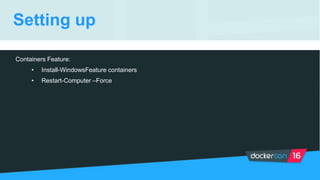
Setting up
Setting up
Containers Feature:
• Install-WindowsFeature containers
• Restart-Computer –Force
Setting up
Docker:
• New-Item -Type Directory -Path 'C:Program Filesdocker'
• Invoke-WebRequest https://aka.ms/tp5/b/dockerd -OutFile
$env:ProgramFilesdockerdockerd.exe
• Invoke-WebRequest https://aka.ms/tp5/b/docker -OutFile
$env:ProgramFilesdockerdocker.exe
• [Environment]::SetEnvironmentVariable("Path", $env:Path + ";C:Program FilesDocker",
[EnvironmentVariableTarget]::Machine)
• Close and reopen powershell
• dockerd --register-service
• Start-Service docker
Setting up
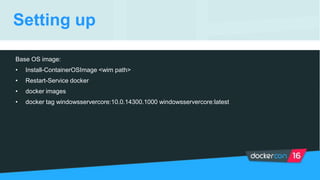
Base OS image:
• Install-ContainerOSImage <wim path>
• Restart-Service docker
• docker images
• docker tag windowsservercore:10.0.14300.1000 windowsservercore:latest
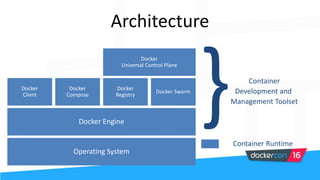
Architecture
Architecture
Container
Development and
Management Toolset
Container Runtime
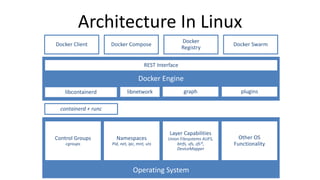
Architecture In Linux
containerd + runc
REST Interface
libcontainerd graphlibnetwork plugins
Control Groups
cgroups
Namespaces
Pid, net, ipc, mnt, uts
Layer Capabilities
Union Filesystems AUFS,
btrfs, vfs, zfs*,
DeviceMapper
Other OS
Functionality
Docker Client
Docker
Registry
Docker Compose Docker Swarm
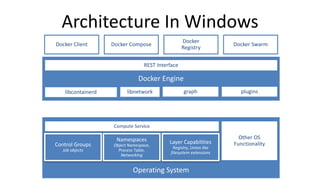
Architecture In Windows
REST Interface
libcontainerd graphlibnetwork plugins
Control Groups
Job objects
Namespaces
Object Namespace,
Process Table,
Networking
Layer Capabilities
Registry, Union like
filesystem extensions
Other OS
Functionality
Compute Service
Docker Client
Docker
Registry
Docker Compose Docker Swarm
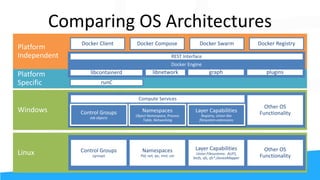
Comparing OS Architectures
Control Groups
cgroups
Namespaces
Pid, net, ipc, mnt, uts
Layer Capabilities
Union Filesystems: AUFS,
btrfs, vfs, zfs*,DeviceMapper
Other OS
Functionality
runC
REST Interface
libcontainerd graphlibnetwork plugins
Control Groups
Job objects
Namespaces
Object Namespace, Process
Table, Networking
Layer Capabilities
Registry, Union like
filesystem extensions
Other OS
Functionality
Compute Services
Docker Client Docker SwarmDocker Compose Docker Registry
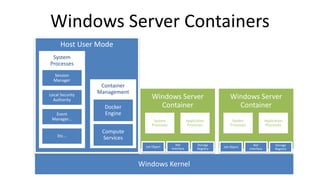
Host User Mode
Container
Management
Windows Server Containers
System
Processes
Application
Processes
System
Processes
System
Processes
Application
Processes
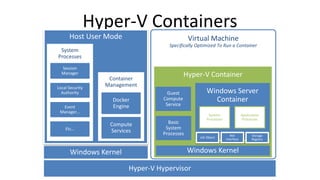
Hyper-V Containers
Host User Mode Virtual Machine
Specifically Optimized To Run a Container
Container
Management
System
Processes
System
Processes
Application
Processes
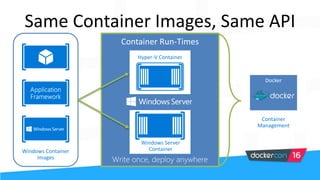
Same Container Images, Same API
Container
Management
Docker
Windows Container
Images
Hyper-V Container
Windows Server
Container
Networking
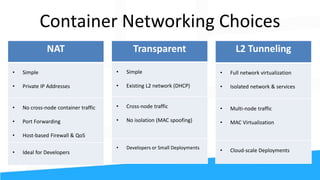
Container Networking Choices
NAT
• Simple
• Private IP Addresses
• No cross-node container traffic
• Port Forwarding
• Host-based Firewall & QoS
• Ideal for Developers
L2 Tunneling
• Full network virtualization
• Isolated network & services
• Multi-node traffic
• MAC Virtualization
• Cloud-scale Deployments
Transparent
• Simple
• Existing L2 network (DHCP)
• Cross-node traffic
• No isolation (MAC spoofing)
• Developers or Small Deployments
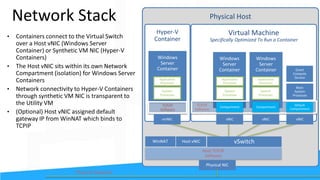
Physical HostNetwork Stack
Virtual Machine
Specifically Optimized To Run a Container
System
Processes
Application
Processes
TCP/IP
Software
System
Processes
Application
Processes
Host TCP/IP
Software
Hyper-V
Container
System
Processes
Application
Processes
TCP/IP
Software
Physical Network
Thank you!

Dockerizing Windows Server Applications by Ender Barillas and Taylor Brown

  • 1.
    Dockerizing Windows Server Applications EnderBarillas Taylor Brown Program Manager Principal Program Manager Lead
  • 2.
  • 3.
  • 4.
    Setting up Containers Feature: •Install-WindowsFeature containers • Restart-Computer –Force
  • 5.
    Setting up Docker: • New-Item-Type Directory -Path 'C:Program Filesdocker' • Invoke-WebRequest https://aka.ms/tp5/b/dockerd -OutFile $env:ProgramFilesdockerdockerd.exe • Invoke-WebRequest https://aka.ms/tp5/b/docker -OutFile $env:ProgramFilesdockerdocker.exe • [Environment]::SetEnvironmentVariable("Path", $env:Path + ";C:Program FilesDocker", [EnvironmentVariableTarget]::Machine) • Close and reopen powershell • dockerd --register-service • Start-Service docker
  • 6.
    Setting up Base OSimage: • Install-ContainerOSImage <wim path> • Restart-Service docker • docker images • docker tag windowsservercore:10.0.14300.1000 windowsservercore:latest
  • 7.
  • 8.
  • 9.
    Architecture In Linux containerd+ runc REST Interface libcontainerd graphlibnetwork plugins Control Groups cgroups Namespaces Pid, net, ipc, mnt, uts Layer Capabilities Union Filesystems AUFS, btrfs, vfs, zfs*, DeviceMapper Other OS Functionality Docker Client Docker Registry Docker Compose Docker Swarm
  • 10.
    Architecture In Windows RESTInterface libcontainerd graphlibnetwork plugins Control Groups Job objects Namespaces Object Namespace, Process Table, Networking Layer Capabilities Registry, Union like filesystem extensions Other OS Functionality Compute Service Docker Client Docker Registry Docker Compose Docker Swarm
  • 11.
    Comparing OS Architectures ControlGroups cgroups Namespaces Pid, net, ipc, mnt, uts Layer Capabilities Union Filesystems: AUFS, btrfs, vfs, zfs*,DeviceMapper Other OS Functionality runC REST Interface libcontainerd graphlibnetwork plugins Control Groups Job objects Namespaces Object Namespace, Process Table, Networking Layer Capabilities Registry, Union like filesystem extensions Other OS Functionality Compute Services Docker Client Docker SwarmDocker Compose Docker Registry
  • 12.
    Host User Mode Container Management WindowsServer Containers System Processes Application Processes System Processes System Processes Application Processes
  • 13.
    Hyper-V Containers Host UserMode Virtual Machine Specifically Optimized To Run a Container Container Management System Processes System Processes Application Processes
  • 14.
    Same Container Images,Same API Container Management Docker Windows Container Images Hyper-V Container Windows Server Container
  • 15.
  • 16.
    Container Networking Choices NAT •Simple • Private IP Addresses • No cross-node container traffic • Port Forwarding • Host-based Firewall & QoS • Ideal for Developers L2 Tunneling • Full network virtualization • Isolated network & services • Multi-node traffic • MAC Virtualization • Cloud-scale Deployments Transparent • Simple • Existing L2 network (DHCP) • Cross-node traffic • No isolation (MAC spoofing) • Developers or Small Deployments
  • 17.
    Physical HostNetwork Stack VirtualMachine Specifically Optimized To Run a Container System Processes Application Processes TCP/IP Software System Processes Application Processes Host TCP/IP Software Hyper-V Container System Processes Application Processes TCP/IP Software Physical Network
  • 18.

Editor's Notes

  • #18 We have a simplified view of the network stack from the perspective of the container host. A container host could either be a physical machine or VM. Somehow, this container host has connectivity through a physical network. Now it is the job of the container host to provide connectivity to the containers. Depending on the external connectivity and network requirements, it will provide connectivity through either an internal or external vSwitch. That vSwitch has a number of ports on it (just like a physical switch) which connect to host vNICs in the Windows Server Containers. Each host vNIC is inside a network compartment for isolation. In the Hyper-V Container case, we have a Utility VM wrapping the windows container and a synthetic M NIC is exposed through the Utility VM to connect directly to the container itself External connectivity is provided in a number of different ways which we will speak about in a minute. For one particulanetwork mode – NAT – we will also have a host vNIC attached to WinNAT and assigned the NAT’s default gateway IP address.