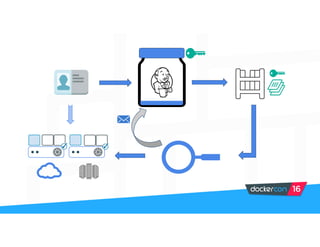
Securing your
software
supply chain
David Lawrence
Ying Li
Security Engineers
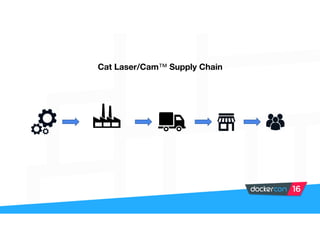
Cat Laser/Cam™ Supply Chain
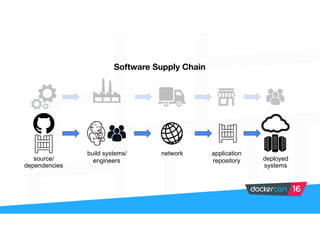
Software Supply Chain
source/
dependencies
build systems/
engineers
network application
repository deployed
systems
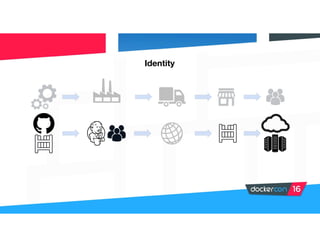
Identity
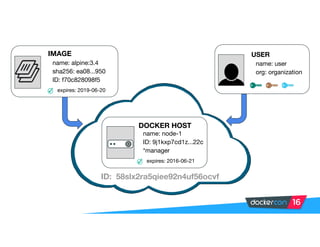
IMAGE
name: alpine:3.4

sha256: ea08...950

ID: f70c828098f5
expires: 2019-06-20
USER
name: user

org: organization
DOCKER HOST
name: node-1

ID: 9j1kxp7cd1z...22c

*manager
expires: 2016-06-21
ID: 58slx2ra5qiee92n4uf56ocvf
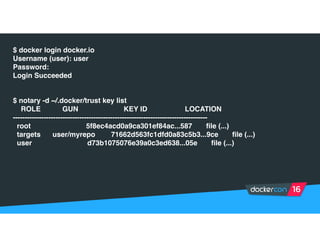
$ docker login docker.io
Username (user): user
Password:
Login Succeeded
$ notary -d ~/.docker/trust key list
ROLE GUN KEY ID LOCATION
----------------------------------------------------------------------------------
root 5f8ec4acd0a9ca301ef84ac...587 file (...)
targets user/myrepo 71662d563fc1dfd0a83c5b3...9ce file (...)
user d73b1075076e39a0c3ed638...05e file (...)
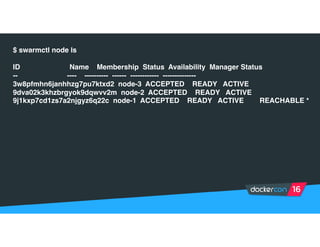
$ swarmctl node ls
ID Name Membership Status Availability Manager Status
-- ---- ---------- ------ ------------ --------------
3w8pfmhn6janhhzg7pu7ktxd2 node-3 ACCEPTED READY ACTIVE
9dva02k3khzbrgyok9dqwvv2m node-2 ACCEPTED READY ACTIVE
9j1kxp7cd1zs7a2njgyz6q22c node-1 ACCEPTED READY ACTIVE REACHABLE *
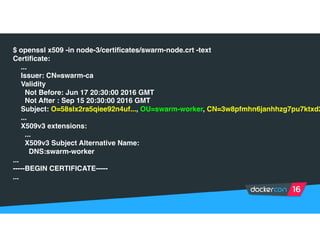
$ openssl x509 -in node-3/certificates/swarm-node.crt -text
Certificate:
...
Issuer: CN=swarm-ca
Validity
Not Before: Jun 17 20:30:00 2016 GMT
Not After : Sep 15 20:30:00 2016 GMT
Subject: O=58slx2ra5qiee92n4uf..., OU=swarm-worker, CN=3w8pfmhn6janhhzg7pu7ktxd2
...
X509v3 extensions:
...
X509v3 Subject Alternative Name:
DNS:swarm-worker
...
-----BEGIN CERTIFICATE-----
...
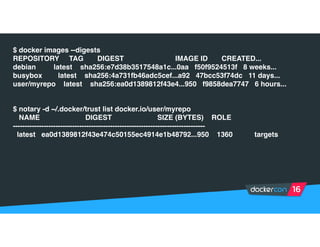
$ docker images --digests
REPOSITORY TAG DIGEST IMAGE ID CREATED...
debian latest sha256:e7d38b3517548a1c...0aa f50f9524513f 8 weeks...
busybox latest sha256:4a731fb46adc5cef...a92 47bcc53f74dc 11 days...
user/myrepo latest sha256:ea0d1389812f43e4...950 f9858dea7747 6 hours...
$ notary -d ~/.docker/trust list docker.io/user/myrepo
NAME DIGEST SIZE (BYTES) ROLE
---------------------------------------------------------------------------------
latest ea0d1389812f43e474c50155ec4914e1b48792...950 1360 targets
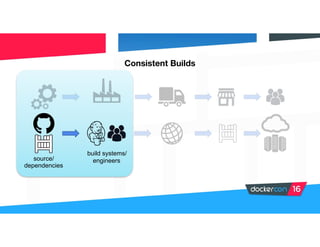
source/
dependencies
Consistent Builds
build systems/
engineers
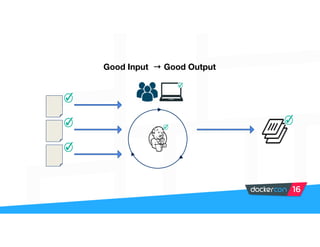
Good Input → Good Output
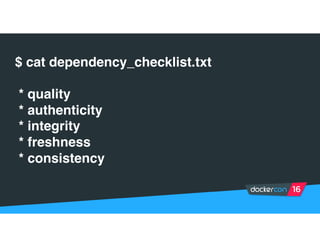
$ cat dependency_checklist.txt
* quality
* authenticity
* integrity
* freshness
* consistency
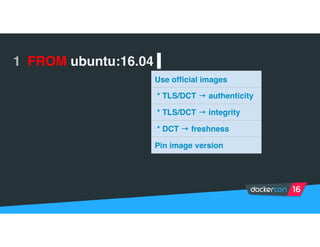
1 FROM ubuntu:16.04 |
Use official images
* TLS/DCT → authenticity
* TLS/DCT → integrity
* DCT → freshness
Pin image version
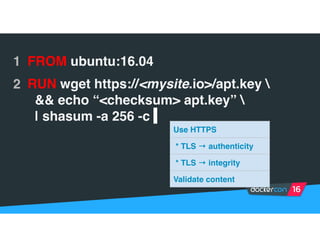
1 FROM ubuntu:16.04
2 RUN wget https://<mysite.io>/apt.key 
&& echo “<checksum> apt.key” 
| shasum -a 256 -c |
Use HTTPS
* TLS → authenticity
* TLS → integrity
Validate content
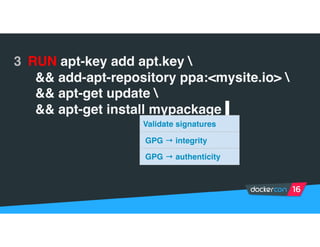
3 RUN apt-key add apt.key 
&& add-apt-repository ppa:<mysite.io> 
&& apt-get update 
&& apt-get install mypackage |
Validate signatures
GPG → integrity
GPG → authenticity
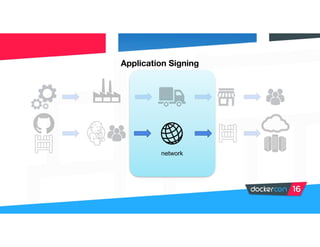
Application Signing
network
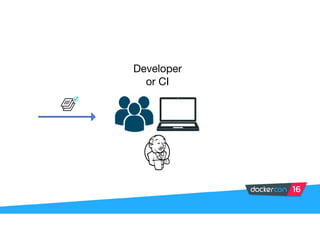
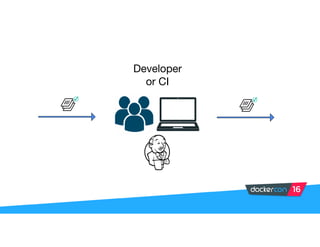
Developer

or CI
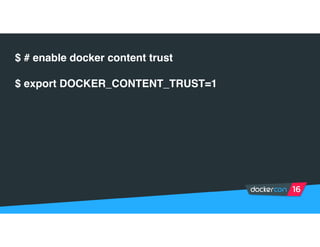
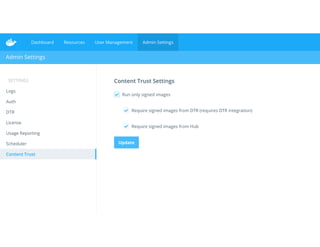
$ # enable docker content trust
$ export DOCKER_CONTENT_TRUST=1
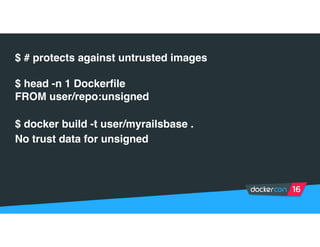
$ # protects against untrusted images
$ head -n 1 Dockerfile
FROM user/repo:unsigned
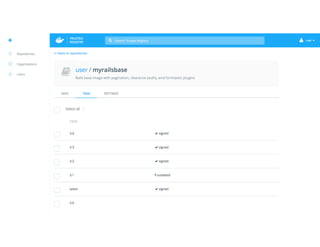
$ docker build -t user/myrailsbase .
No trust data for unsigned
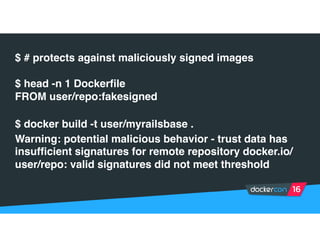
$ # protects against maliciously signed images
$ head -n 1 Dockerfile
FROM user/repo:fakesigned
$ docker build -t user/myrailsbase .
Warning: potential malicious behavior - trust data has
insufficient signatures for remote repository docker.io/
user/repo: valid signatures did not meet threshold
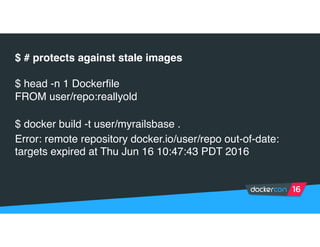
$ # protects against stale images
$ head -n 1 Dockerfile
FROM user/repo:reallyold
$ docker build -t user/myrailsbase .
Error: remote repository docker.io/user/repo out-of-date:
targets expired at Thu Jun 16 10:47:43 PDT 2016
Developer

or CI
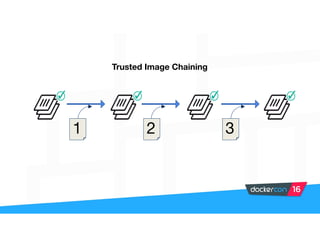
321
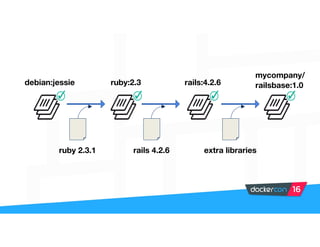
Trusted Image Chaining
debian:jessie
ruby 2.3.1
ruby:2.3
rails 4.2.6
rails:4.2.6
extra libraries
mycompany/
railsbase:1.0
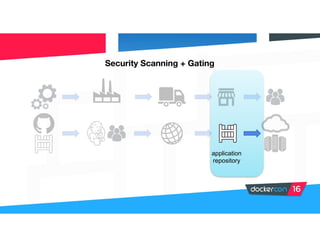
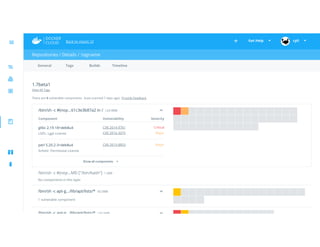
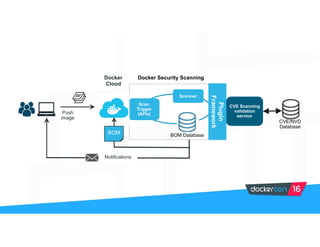
Security Scanning + Gating
application
repository
Scanner
CVE Scanning
validation
service
Docker Security Scanning
Scan
Trigger
(APIs)
Plugin
Framework
CVE/NVD
Database
BOM DatabaseBOM
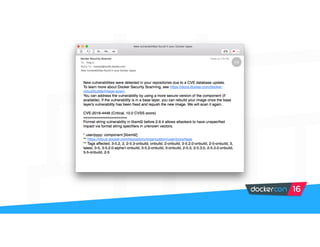
Notifications
Push
image
Docker
Cloud
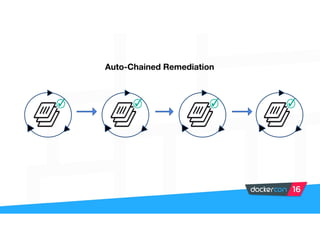
Auto-Chained Remediation
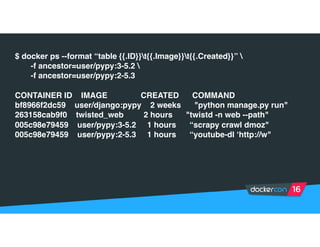
$ docker ps --format “table {{.ID}}t{{.Image}}t{{.Created}}” 
-f ancestor=user/pypy:3-5.2 
-f ancestor=user/pypy:2-5.3
CONTAINER ID IMAGE CREATED COMMAND
bf8966f2dc59 user/django:pypy 2 weeks "python manage.py run"
263158cab9f0 twisted_web 2 hours "twistd -n web --path"
005c98e79459 user/pypy:3-5.2 1 hours “scrapy crawl dmoz"
005c98e79459 user/pypy:2-5.3 1 hours “youtube-dl ‘http://w"
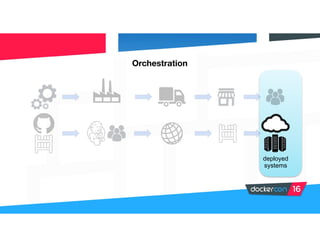
Orchestration
deployed
systems
$ docker run -it --net host --pid host --cap-add audit_control ... docker/docker-bench-security
[INFO] 1 - Host Configuration
[WARN] 1.1 - Create a separate partition for containers
[PASS] 1.2 - Use an updated Linux Kernel
[PASS] 1.4 - Remove all non-essential services from the host - Network
[PASS] 1.5 - Keep Docker up to date
[INFO] * Using 1.11.2 which is current as of 2016-06-02
[INFO] * Check with your operating system vendor for support and security maintenance for docker
[INFO] 1.6 - Only allow trusted users to control Docker daemon
[INFO] * docker:x:999:docker
[WARN] 1.7 - Failed to inspect: auditctl command not found.
[WARN] 1.8 - Failed to inspect: auditctl command not found.
[WARN] 1.9 - Failed to inspect: auditctl command not found.
[INFO] 1.10 - Audit Docker files and directories - docker.service
[INFO] * File not found
[INFO] 1.11 - Audit Docker files and directories - docker.socket
[INFO] * File not found
...
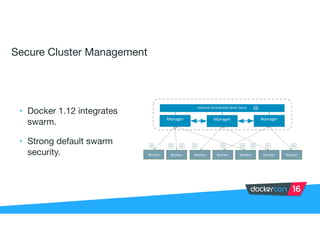
Secure Cluster Management
• Docker 1.12 integrates
swarm.

• Strong default swarm
security.
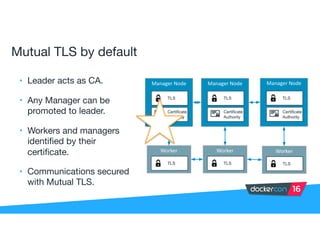
Mutual TLS by default
• Leader acts as CA.

• Any Manager can be
promoted to leader.

• Workers and managers
identified by their
certificate.

• Communications secured
with Mutual TLS.
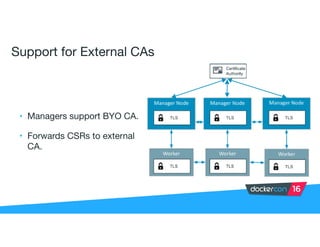
Support for External CAs
• Managers support BYO CA.

• Forwards CSRs to external
CA.
Automatic Certificate Rotation
• Customizable certificate rotation periods.

• Occurs automatically.

• Ensures potentially compromised or leaked certificates are rotated out
of use.

• Whitelist of currently valid certificates.
Secure Addition of Nodes
Three ways to approve addition of a node to the cluster:

• Automatic acceptance.

• Secret token.

• Manual approval.
DEMO
Thank you!

Docker Security Deep Dive by Ying Li and David Lawrence

  • 1.
    Securing your software supply chain DavidLawrence Ying Li Security Engineers
  • 2.
  • 3.
    Software Supply Chain source/ dependencies buildsystems/ engineers network application repository deployed systems
  • 4.
  • 5.
    IMAGE name: alpine:3.4 sha256: ea08...950 ID:f70c828098f5 expires: 2019-06-20 USER name: user org: organization DOCKER HOST name: node-1 ID: 9j1kxp7cd1z...22c *manager expires: 2016-06-21 ID: 58slx2ra5qiee92n4uf56ocvf
  • 6.
    $ docker logindocker.io Username (user): user Password: Login Succeeded $ notary -d ~/.docker/trust key list ROLE GUN KEY ID LOCATION ---------------------------------------------------------------------------------- root 5f8ec4acd0a9ca301ef84ac...587 file (...) targets user/myrepo 71662d563fc1dfd0a83c5b3...9ce file (...) user d73b1075076e39a0c3ed638...05e file (...)
  • 7.
    $ swarmctl nodels ID Name Membership Status Availability Manager Status -- ---- ---------- ------ ------------ -------------- 3w8pfmhn6janhhzg7pu7ktxd2 node-3 ACCEPTED READY ACTIVE 9dva02k3khzbrgyok9dqwvv2m node-2 ACCEPTED READY ACTIVE 9j1kxp7cd1zs7a2njgyz6q22c node-1 ACCEPTED READY ACTIVE REACHABLE *
  • 8.
    $ openssl x509-in node-3/certificates/swarm-node.crt -text Certificate: ... Issuer: CN=swarm-ca Validity Not Before: Jun 17 20:30:00 2016 GMT Not After : Sep 15 20:30:00 2016 GMT Subject: O=58slx2ra5qiee92n4uf..., OU=swarm-worker, CN=3w8pfmhn6janhhzg7pu7ktxd2 ... X509v3 extensions: ... X509v3 Subject Alternative Name: DNS:swarm-worker ... -----BEGIN CERTIFICATE----- ...
  • 9.
    $ docker images--digests REPOSITORY TAG DIGEST IMAGE ID CREATED... debian latest sha256:e7d38b3517548a1c...0aa f50f9524513f 8 weeks... busybox latest sha256:4a731fb46adc5cef...a92 47bcc53f74dc 11 days... user/myrepo latest sha256:ea0d1389812f43e4...950 f9858dea7747 6 hours... $ notary -d ~/.docker/trust list docker.io/user/myrepo NAME DIGEST SIZE (BYTES) ROLE --------------------------------------------------------------------------------- latest ea0d1389812f43e474c50155ec4914e1b48792...950 1360 targets
  • 10.
  • 11.
    Good Input →Good Output
  • 12.
    $ cat dependency_checklist.txt *quality * authenticity * integrity * freshness * consistency
  • 13.
    1 FROM ubuntu:16.04| Use official images * TLS/DCT → authenticity * TLS/DCT → integrity * DCT → freshness Pin image version
  • 14.
    1 FROM ubuntu:16.04 2RUN wget https://<mysite.io>/apt.key && echo “<checksum> apt.key” | shasum -a 256 -c | Use HTTPS * TLS → authenticity * TLS → integrity Validate content
  • 15.
    3 RUN apt-keyadd apt.key && add-apt-repository ppa:<mysite.io> && apt-get update && apt-get install mypackage | Validate signatures GPG → integrity GPG → authenticity
  • 16.
  • 17.
  • 18.
    $ # enabledocker content trust $ export DOCKER_CONTENT_TRUST=1
  • 19.
    $ # protectsagainst untrusted images $ head -n 1 Dockerfile FROM user/repo:unsigned $ docker build -t user/myrailsbase . No trust data for unsigned
  • 20.
    $ # protectsagainst maliciously signed images $ head -n 1 Dockerfile FROM user/repo:fakesigned $ docker build -t user/myrailsbase . Warning: potential malicious behavior - trust data has insufficient signatures for remote repository docker.io/ user/repo: valid signatures did not meet threshold
  • 21.
    $ # protectsagainst stale images $ head -n 1 Dockerfile FROM user/repo:reallyold $ docker build -t user/myrailsbase . Error: remote repository docker.io/user/repo out-of-date: targets expired at Thu Jun 16 10:47:43 PDT 2016
  • 22.
  • 23.
  • 24.
  • 25.
    Security Scanning +Gating application repository
  • 27.
    Scanner CVE Scanning validation service Docker SecurityScanning Scan Trigger (APIs) Plugin Framework CVE/NVD Database BOM DatabaseBOM Notifications Push image Docker Cloud
  • 29.
  • 32.
    $ docker ps--format “table {{.ID}}t{{.Image}}t{{.Created}}” -f ancestor=user/pypy:3-5.2 -f ancestor=user/pypy:2-5.3 CONTAINER ID IMAGE CREATED COMMAND bf8966f2dc59 user/django:pypy 2 weeks "python manage.py run" 263158cab9f0 twisted_web 2 hours "twistd -n web --path" 005c98e79459 user/pypy:3-5.2 1 hours “scrapy crawl dmoz" 005c98e79459 user/pypy:2-5.3 1 hours “youtube-dl ‘http://w"
  • 33.
  • 35.
    $ docker run-it --net host --pid host --cap-add audit_control ... docker/docker-bench-security [INFO] 1 - Host Configuration [WARN] 1.1 - Create a separate partition for containers [PASS] 1.2 - Use an updated Linux Kernel [PASS] 1.4 - Remove all non-essential services from the host - Network [PASS] 1.5 - Keep Docker up to date [INFO] * Using 1.11.2 which is current as of 2016-06-02 [INFO] * Check with your operating system vendor for support and security maintenance for docker [INFO] 1.6 - Only allow trusted users to control Docker daemon [INFO] * docker:x:999:docker [WARN] 1.7 - Failed to inspect: auditctl command not found. [WARN] 1.8 - Failed to inspect: auditctl command not found. [WARN] 1.9 - Failed to inspect: auditctl command not found. [INFO] 1.10 - Audit Docker files and directories - docker.service [INFO] * File not found [INFO] 1.11 - Audit Docker files and directories - docker.socket [INFO] * File not found ...
  • 36.
    Secure Cluster Management •Docker 1.12 integrates swarm. • Strong default swarm security.
  • 37.
    Mutual TLS bydefault • Leader acts as CA. • Any Manager can be promoted to leader. • Workers and managers identified by their certificate. • Communications secured with Mutual TLS.
  • 38.
    Support for ExternalCAs • Managers support BYO CA. • Forwards CSRs to external CA.
  • 39.
    Automatic Certificate Rotation •Customizable certificate rotation periods. • Occurs automatically. • Ensures potentially compromised or leaked certificates are rotated out of use. • Whitelist of currently valid certificates.
  • 40.
    Secure Addition ofNodes Three ways to approve addition of a node to the cluster: • Automatic acceptance. • Secret token. • Manual approval.
  • 41.
  • 44.