Docker Practical Solutions
Kesav Kolla (kesav@hotelsoft.com)
CTO
Hotelsoft Inc
About Me
Over 18 yrs of Experience in Software industry
Focused in application development
15yrs working in HealthCare domain
Worked at (Stanford Hospitals, Kaiser Permanente, Sutter Health ….)
Architect & Develop enterprise solutions for Hospitals
Founder & CTO Hotelsoft Inc
Founded in 2014
Goal to provide unified application for managing hotels
Multi-tenant applications as SAAS
Released first product Revenue Management
Analyzing data over million+ records
Looking to hire people like you
Tech @Hotelsoft
What we use?
JavaScript - Full stack
Front end - (HTML5, AngularJS, ReactJS, Webpack, CSS3, CSS components ….)
Application Server - (Node.js, Loopback ….)
Database - (PostgreSQL both RDBMS and Document Store)
R - statistical analysis
Tech Ops @Hotelsoft Contd….
Load balancer (HaProxy, PgPool)
CI/CD (Jenkins)
Distributed Rotating Proxy (Tor)
Distributed Queuing (Apache Kafka, Nats)
Central Logging (ELK stack)
Distributed Cache (Redis, Infinispan)
Challenges
Multi-Tenant + Multi-Application
Scale applications per each tenant and per application
Multiple Physical Servers across different data centers
Multiple environments (Dev, Staging, Prod)
Version upgrades
Docker @ Hotelsoft
What do we run in Docker? - Everything
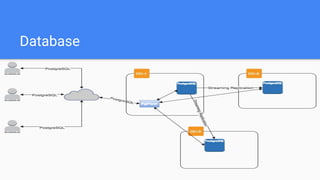
Database (PostgreSQL) Master / Slaves
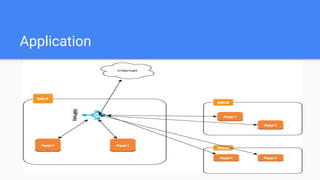
Application server (Node.js)
Caching, Queues
Load balancers
Database
Application
Problem 1 - Base image
Keep the base image as minimal as possible
Install all purpose packages (Eg… curl, pigz, wget, vim, etc…)
Configure all required repositories (ppa for git, nodejs, haproxy etc…)
Setup appropriate locale, timezones etc… (locale-gen en_US.UTF-8 && echo
'LANG="en_US.UTF-8"' > /etc/default/locale)
Problem 2 - container processes
Docker container only runs single process. (CMD [xxxx])
How can I run multiple services in single container?
There is no init process in container so how to start multiple processes?
How to make sure the process is keep running?
Problem 2 - Contd...
We’ve a solution for all the container process issues.
Base image (http://phusion.github.io/baseimage-docker/)
Phusion base image provides:
init system (based on supervisor)
syslong-ng
cron
Problem 2 - Contd...
The init system in Phusion will auto start
/etc/service/<xxxx>
Will start run.sh at the start of container
Each service is monitored by supervisor so app crashes it will restart
automatically
Problem 3 - Securing container
No standard file/remote access services inside container
No Telnet/SSH daemon inside container
No FTP daemon inside container
No port mapping to host
Only way to get inside container is to use docker exec
Only application protocols are allowed inside container
Problem 3 - Contd ...
No access to container directly from internet.
Only pre identified containers (HAProxy, pgpool) are open to internet.
Access to applications and database are routed through HAProxy and pgpool
Only HAProxy and pgpool ports are mapped with host and thus accessible from
internet
Problem 4 - Grant Access
How to give internal developers access to containers?
SSH authorized-keys with command
Eg: Give user to access to app container:
command="docker exec -it container-app",no-port-forwarding,no-X11-forwarding,no-agent-forwarding ssh-rsa
xxxxxxxxxxx
When user does ssh to host machine then he will automatically placed inside
container
Problem 4 - Contd...
SSH authorized_keys only allow one command
Allow multiple container access to internal users.
Custom shell script for each user based on what he needs
Eg: user1-routing.sh
command="user1-routing.sh",no-port-forwarding,no-X11-forwarding,no-agent-forwarding ssh-rsa xxxxxxxxxxx
Problem 4 - Contd...
user1-routing.sh
#!/usr/bin/env bash
case ${SSH_ORIGINAL_COMMAND} in
app1)
docker exec -it container-app1 bash -l
;;
app2)
docker exec -it container-app2 bash -l
;;
db)
docker exec -it container-db su -c "psql hotelsoft" postgres
*)
echo "Invalid command"
;;
esac
exit
Problem 5 - Transferring files
Transfer files into container
docker cp <file> container:<path>
Transfer files from container
docker cp container:<path/file> <path>
From internet (Use git, dropbox, gdrive etc…)
Problem 6 - Multi host networking
We’ve physical machines located in 3 data centers
Each datacenter hosts multiple machines.
Containers deployed across machines across data centers
Communication between containers
Using overlay networking
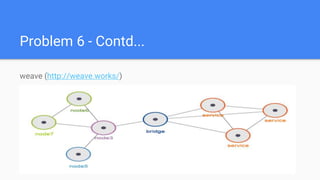
Problem 6 - Contd...
weave (http://weave.works/)
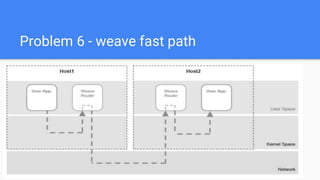
Problem 6 - weave fast path
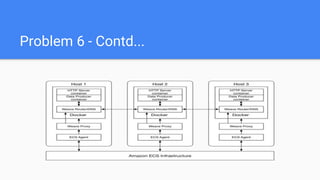
Problem 6 - Contd...
Problem 6 - Weave Features
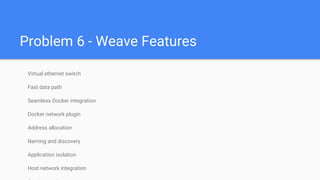
Virtual ethernet switch
Fast data path
Seamless Docker integration
Docker network plugin
Address allocation
Naming and discovery
Application isolation
Host network integration
Problem 7 - Storage
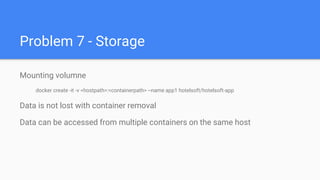
Mounting volumne
docker create -it -v <hostpath>:<containerpath> --name app1 hotelsoft/hotelsoft-app
Data is not lost with container removal
Data can be accessed from multiple containers on the same host
Problem 7 - Shared Storage
Problem 7 - GlusterFS
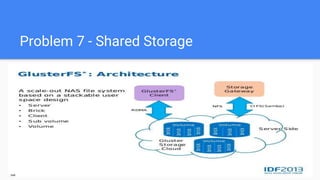
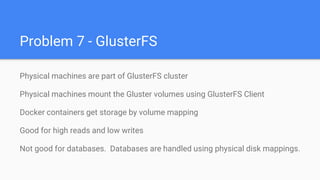
Physical machines are part of GlusterFS cluster
Physical machines mount the Gluster volumes using GlusterFS Client
Docker containers get storage by volume mapping
Good for high reads and low writes
Not good for databases. Databases are handled using physical disk mappings.
Problem 8 - HAProxy loadbalancing
Auto scale application nodes
Update HAProxy configuration

Docker practical solutions

  • 1.
    Docker Practical Solutions KesavKolla (kesav@hotelsoft.com) CTO Hotelsoft Inc
  • 2.
    About Me Over 18yrs of Experience in Software industry Focused in application development 15yrs working in HealthCare domain Worked at (Stanford Hospitals, Kaiser Permanente, Sutter Health ….) Architect & Develop enterprise solutions for Hospitals Founder & CTO Hotelsoft Inc
  • 3.
    Founded in 2014 Goalto provide unified application for managing hotels Multi-tenant applications as SAAS Released first product Revenue Management Analyzing data over million+ records Looking to hire people like you
  • 4.
    Tech @Hotelsoft What weuse? JavaScript - Full stack Front end - (HTML5, AngularJS, ReactJS, Webpack, CSS3, CSS components ….) Application Server - (Node.js, Loopback ….) Database - (PostgreSQL both RDBMS and Document Store) R - statistical analysis
  • 5.
    Tech Ops @HotelsoftContd…. Load balancer (HaProxy, PgPool) CI/CD (Jenkins) Distributed Rotating Proxy (Tor) Distributed Queuing (Apache Kafka, Nats) Central Logging (ELK stack) Distributed Cache (Redis, Infinispan)
  • 6.
    Challenges Multi-Tenant + Multi-Application Scaleapplications per each tenant and per application Multiple Physical Servers across different data centers Multiple environments (Dev, Staging, Prod) Version upgrades
  • 7.
    Docker @ Hotelsoft Whatdo we run in Docker? - Everything Database (PostgreSQL) Master / Slaves Application server (Node.js) Caching, Queues Load balancers
  • 8.
  • 9.
  • 10.
    Problem 1 -Base image Keep the base image as minimal as possible Install all purpose packages (Eg… curl, pigz, wget, vim, etc…) Configure all required repositories (ppa for git, nodejs, haproxy etc…) Setup appropriate locale, timezones etc… (locale-gen en_US.UTF-8 && echo 'LANG="en_US.UTF-8"' > /etc/default/locale)
  • 11.
    Problem 2 -container processes Docker container only runs single process. (CMD [xxxx]) How can I run multiple services in single container? There is no init process in container so how to start multiple processes? How to make sure the process is keep running?
  • 12.
    Problem 2 -Contd... We’ve a solution for all the container process issues. Base image (http://phusion.github.io/baseimage-docker/) Phusion base image provides: init system (based on supervisor) syslong-ng cron
  • 13.
    Problem 2 -Contd... The init system in Phusion will auto start /etc/service/<xxxx> Will start run.sh at the start of container Each service is monitored by supervisor so app crashes it will restart automatically
  • 14.
    Problem 3 -Securing container No standard file/remote access services inside container No Telnet/SSH daemon inside container No FTP daemon inside container No port mapping to host Only way to get inside container is to use docker exec Only application protocols are allowed inside container
  • 15.
    Problem 3 -Contd ... No access to container directly from internet. Only pre identified containers (HAProxy, pgpool) are open to internet. Access to applications and database are routed through HAProxy and pgpool Only HAProxy and pgpool ports are mapped with host and thus accessible from internet
  • 16.
    Problem 4 -Grant Access How to give internal developers access to containers? SSH authorized-keys with command Eg: Give user to access to app container: command="docker exec -it container-app",no-port-forwarding,no-X11-forwarding,no-agent-forwarding ssh-rsa xxxxxxxxxxx When user does ssh to host machine then he will automatically placed inside container
  • 17.
    Problem 4 -Contd... SSH authorized_keys only allow one command Allow multiple container access to internal users. Custom shell script for each user based on what he needs Eg: user1-routing.sh command="user1-routing.sh",no-port-forwarding,no-X11-forwarding,no-agent-forwarding ssh-rsa xxxxxxxxxxx
  • 18.
    Problem 4 -Contd... user1-routing.sh #!/usr/bin/env bash case ${SSH_ORIGINAL_COMMAND} in app1) docker exec -it container-app1 bash -l ;; app2) docker exec -it container-app2 bash -l ;; db) docker exec -it container-db su -c "psql hotelsoft" postgres *) echo "Invalid command" ;; esac exit
  • 19.
    Problem 5 -Transferring files Transfer files into container docker cp <file> container:<path> Transfer files from container docker cp container:<path/file> <path> From internet (Use git, dropbox, gdrive etc…)
  • 20.
    Problem 6 -Multi host networking We’ve physical machines located in 3 data centers Each datacenter hosts multiple machines. Containers deployed across machines across data centers Communication between containers Using overlay networking
  • 21.
    Problem 6 -Contd... weave (http://weave.works/)
  • 22.
    Problem 6 -weave fast path
  • 23.
    Problem 6 -Contd...
  • 24.
    Problem 6 -Weave Features Virtual ethernet switch Fast data path Seamless Docker integration Docker network plugin Address allocation Naming and discovery Application isolation Host network integration
  • 25.
    Problem 7 -Storage Mounting volumne docker create -it -v <hostpath>:<containerpath> --name app1 hotelsoft/hotelsoft-app Data is not lost with container removal Data can be accessed from multiple containers on the same host
  • 26.
    Problem 7 -Shared Storage
  • 27.
    Problem 7 -GlusterFS Physical machines are part of GlusterFS cluster Physical machines mount the Gluster volumes using GlusterFS Client Docker containers get storage by volume mapping Good for high reads and low writes Not good for databases. Databases are handled using physical disk mappings.
  • 28.
    Problem 8 -HAProxy loadbalancing Auto scale application nodes Update HAProxy configuration