Copyright © 2018 Samsung SDS America, Inc. All rights reserved
October, 2018
Signing
Helm Charts
and Helm
v3
Matt Farina
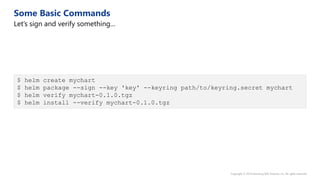
$ helm create mychart
$ helm package --sign --key 'key' --keyring path/to/keyring.secret mychart
$ helm verify mychart-0.1.0.tgz
$ helm install --verify mychart-0.1.0.tgz
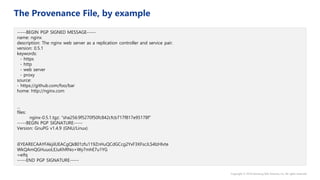
-----BEGIN PGP SIGNED MESSAGE-----
name: nginx
description: The nginx web server as a replication controller and service pair.
version: 0.5.1
keywords:
- https
- http
- web server
- proxy
source:
- https://github.com/foo/bar
home: http://nginx.com
...
files:
nginx-0.5.1.tgz: “sha256:9f5270f50fc842cfcb717f817e95178f”
-----BEGIN PGP SIGNATURE-----
Version: GnuPG v1.4.9 (GNU/Linux)
iEYEARECAAYFAkjilUEACgQkB01zfu119ZnHuQCdGCcg2YxF3XFscJLS4lzHlvte
WkQAmQGHuuoLEJuKhRNo+Wy7mhE7u1YG
=eifq
-----END PGP SIGNATURE-----
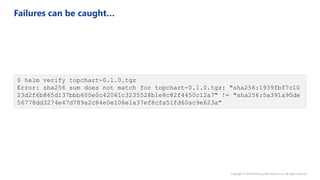
$ helm verify topchart-0.1.0.tgz
Error: sha256 sum does not match for topchart-0.1.0.tgz: "sha256:1939fbf7c10
23d2f6b865d137bbb600e0c42061c3235528b1e8c82f4450c12a7" != "sha256:5a391a90de
56778dd3274e47d789a2c84e0e106e1a37ef8cfa51fd60ac9e623a"
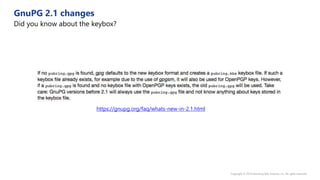
https://gnupg.org/faq/whats-new-in-2.1.html
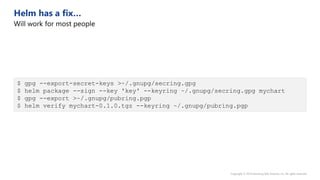
$ gpg --export-secret-keys >~/.gnupg/secring.gpg
$ helm package --sign --key 'key' --keyring ~/.gnupg/secring.gpg mychart
$ gpg --export >~/.gnupg/pubring.pgp
$ helm verify mychart-0.1.0.tgz --keyring ~/.gnupg/pubring.pgp
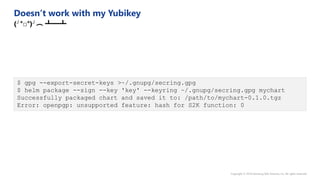
$ gpg --export-secret-keys >~/.gnupg/secring.gpg
$ helm package --sign --key 'key' --keyring ~/.gnupg/secring.gpg mychart
Successfully packaged chart and saved it to: /path/to/mychart-0.1.0.tgz
Error: openpgp: unsupported feature: hash for S2K function: 0
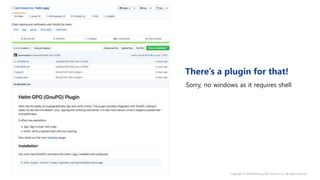
Sorry, no windows as it requires shell
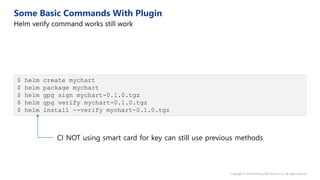
$ helm create mychart
$ helm package mychart
$ helm gpg sign mychart-0.1.0.tgz
$ helm gpg verify mychart-0.1.0.tgz
$ helm install --verify mychart-0.1.0.tgz
CI NOT using smart card for key can still use previous methods
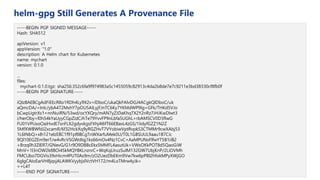
-----BEGIN PGP SIGNED MESSAGE-----
Hash: SHA512
apiVersion: v1
appVersion: "1.0"
description: A Helm chart for Kubernetes
name: mychart
version: 0.1.0
...
files:
mychart-0.1.0.tgz: sha256:352c6fa9f974983a5c1455059c82913c4da2b8de7e7c9211e3bd38330cf8fb0f
-----BEGIN PGP SIGNATURE-----
iQIzBAEBCgAdFiEEcR8o1RDh4Ly9X2v+lDboC/ukaQkFAlvOGJ4ACgkQlDboC/uk
aQmcDA/+InIc/ybA472MxhY7pOU5AILyjFJnTC6Ky7YKMdWP9Ig+GFk/THKd5VJo
bCwpUgtrXs1+nnNuiRN/53wd/ocYXQry/mAN7yZJDaKhqTX2Y2nRz7JHJKwDIwt3
i/herOby+l0h54kYaUyyCGpZidCJhTe79YvvFP9nLbfa5UGhL+rbAMSCV0D3fIwG
FU01VPUsoOaiHvdE7snFLX2gdyvkgsFXhj4I6fT66EBaxL4zGS/1IidyfGZZ1N2Z
5MfXWBWfdJ2xcamR/6f32HckXq9yRGZHvT7VYobiwVptRvpkS3CTMMr9cwXAbj53
1L6INbQ+xlh121elzEBC1f91pf8BCgTnWXarfuMek0U/T0L1GBSUUL9aau1B7Cic
9Ql10EGZEm9erT/w4vRcVSGWdIqj1ks66mOv4Nz1CvC+AaMPUNxFlfwYT5B1iiB2
+8rzq0h3ZIER7/GNevG/G1r9O9DBBcEkx5MMFL4asutUk+VWsOKkPOT8d5QaoGiW
MnV+1l3nOW2k8BOi4SkMQYBKLnznrC+WqKqLIruzSulM132GW7UbjKnP/2LiOVMh
FMCUbo7DGVis39xHicm4PUT0As9m/zO2UezDbEKm9Vw7kw6pPBl2hfokMPyXWjGO
6glgCAIoEarVH8jqsjALAWKVyybjslVctVH172/m4LoTMrw4yJk=
=+L4T
-----END PGP SIGNATURE-----
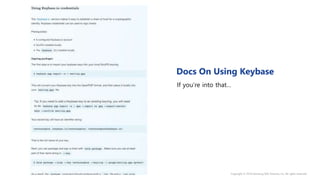
If you’re into that…
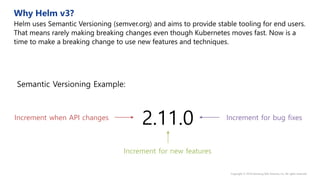
2.11.0
Semantic Versioning Example:
Increment for new features
Increment for bug fixesIncrement when API changes
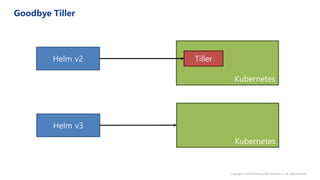
Kubernetes
TillerHelm v2
Kubernetes
Helm v3
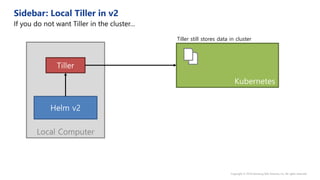
Local Computer
Kubernetes
Tiller
Helm v2
Tiller still stores data in cluster
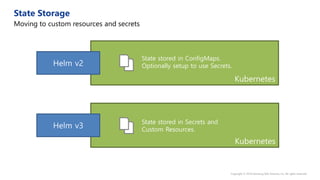
Kubernetes
Helm v2
Kubernetes
Helm v3
State stored in ConfigMaps.
Optionally setup to use Secrets.
State stored in Secrets and
Custom Resources.
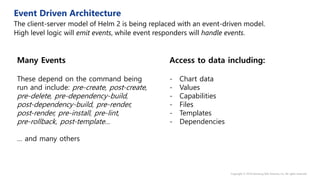
Access to data including:
- Chart data
- Values
- Capabilities
- Files
- Templates
- Dependencies
Many Events
These depend on the command being
run and include: pre-create, post-create,
pre-delete, pre-dependency-build,
post-dependency-build, pre-render,
post-render, pre-install, pre-lint,
pre-rollback, post-template…
… and many others
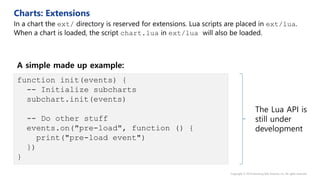
function init(events) {
-- Initialize subcharts
subchart.init(events)
-- Do other stuff
events.on("pre-load", function () {
print("pre-load event")
})
}
A simple made up example:
The Lua API is
still under
development
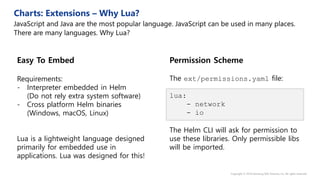
Permission Scheme
The ext/permissions.yaml file:
lua:
- network
- io
The Helm CLI will ask for permission to
use these libraries. Only permissible libs
will be imported.
Easy To Embed
Requirements:
- Interpreter embedded in Helm
(Do not rely extra system software)
- Cross platform Helm binaries
(Windows, macOS, Linux)
Lua is a lightweight language designed
primarily for embedded use in
applications. Lua was designed for this!
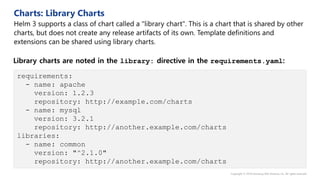
requirements:
- name: apache
version: 1.2.3
repository: http://example.com/charts
- name: mysql
version: 3.2.1
repository: http://another.example.com/charts
libraries:
- name: common
version: "^2.1.0"
repository: http://another.example.com/charts
Library charts are noted in the library: directive in the requirements.yaml:
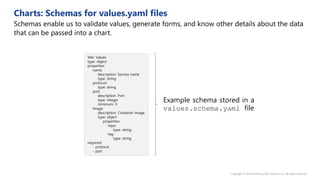
title: Values
type: object
properties:
name:
description: Service name
type: string
protocol:
type: string
port:
description: Port
type: integer
minimum: 0
image:
description: Container Image
type: object
properties:
repo:
type: string
tag:
type: string
required:
- protocol
- port
Example schema stored in a
values.schema.yaml file
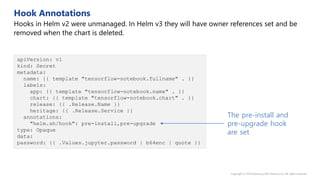
apiVersion: v1
kind: Secret
metadata:
name: {{ template "tensorflow-notebook.fullname" . }}
labels:
app: {{ template "tensorflow-notebook.name" . }}
chart: {{ template "tensorflow-notebook.chart" . }}
release: {{ .Release.Name }}
heritage: {{ .Release.Service }}
annotations:
"helm.sh/hook": pre-install,pre-upgrade
type: Opaque
data:
password: {{ .Values.jupyter.password | b64enc | quote }}
The pre-install and
pre-upgrade hook
are set
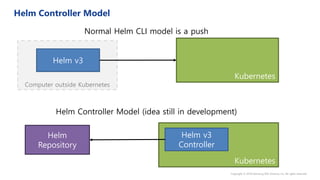
Computer outside Kubernetes
Kubernetes
Helm v3
Normal Helm CLI model is a push
Helm Controller Model (idea still in development)
Kubernetes
Helm v3
Controller
Helm
Repository
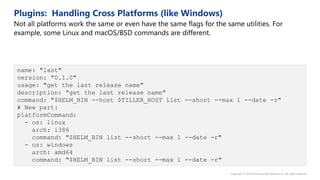
name: "last"
version: "0.1.0"
usage: "get the last release name"
description: "get the last release name"
command: "$HELM_BIN --host $TILLER_HOST list --short --max 1 --date -r"
# New part:
platformCommand:
- os: linux
arch: i386
command: "$HELM_BIN list --short --max 1 --date -r"
- os: windows
arch: amd64
command: "$HELM_BIN list --short --max 1 --date -r"
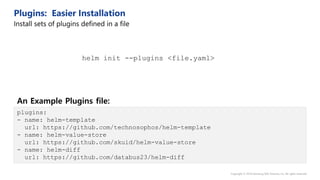
plugins:
- name: helm-template
url: https://github.com/technosophos/helm-template
- name: helm-value-store
url: https://github.com/skuid/helm-value-store
- name: helm-diff
url: https://github.com/databus23/helm-diff
helm init --plugins <file.yaml>
An Example Plugins file:
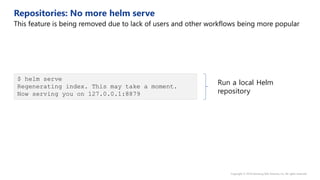
$ helm serve
Regenerating index. This may take a moment.
Now serving you on 127.0.0.1:8879
Run a local Helm
repository
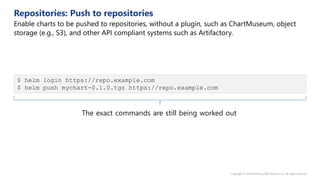
$ helm login https://repo.example.com
$ helm push mychart-0.1.0.tgz https://repo.example.com
The exact commands are still being worked out
{
"apiVersion": "v2",
"entries": {
"artifactory": {
"ref": "https://kubernetes-charts-incubator.storage.googleapis.com/artifactory.json",
"stable": {
"created": "2017-07-06T01:33:50.952Z",
"description": "Universal Repository Manager supporting all major packaging formats,nbuild tools and CI servers.",
"digest": "249e27501dbfe1bd93d4039b04440f0ff19c707ba720540f391b5aefa3571455",
"home": "https://www.jfrog.com/artifactory/",
"icon": "https://raw.githubusercontent.com/JFrogDev/artifactory-dcos/master/images/jfrog_med.png",
"keywords": [
"artifactory",
"jfrog"
],
"maintainers": [
{
"email": "[redacted]",
"name": "[redacted]"
}
],
"name": "artifactory",
"sources": [
"https://bintray.com/jfrog/product/JFrog-Artifactory-Pro/view",
"https://github.com/JFrogDev"
],
"urls": [
"https://kubernetes-charts-incubator.storage.googleapis.com/artifactory-5.2.0.tgz"
],
"version": "5.2.0"
}
}
}
}
An example index.json file
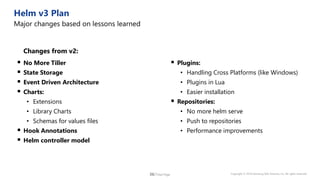
 No More Tiller
 State Storage
 Event Driven Architecture
 Charts:
• Extensions
• Library Charts
• Schemas for values files
 Hook Annotations
 Helm controller model
Changes from v2:
 Plugins:
• Handling Cross Platforms (like Windows)
• Plugins in Lua
• Easier installation
 Repositories:
• No more helm serve
• Push to repositories
• Performance improvements
Helm @ Orchestructure

Helm @ Orchestructure

  • 1.
    Copyright © 2018Samsung SDS America, Inc. All rights reserved October, 2018 Signing Helm Charts and Helm v3 Matt Farina
  • 4.
    $ helm createmychart $ helm package --sign --key 'key' --keyring path/to/keyring.secret mychart $ helm verify mychart-0.1.0.tgz $ helm install --verify mychart-0.1.0.tgz
  • 5.
    -----BEGIN PGP SIGNEDMESSAGE----- name: nginx description: The nginx web server as a replication controller and service pair. version: 0.5.1 keywords: - https - http - web server - proxy source: - https://github.com/foo/bar home: http://nginx.com ... files: nginx-0.5.1.tgz: “sha256:9f5270f50fc842cfcb717f817e95178f” -----BEGIN PGP SIGNATURE----- Version: GnuPG v1.4.9 (GNU/Linux) iEYEARECAAYFAkjilUEACgQkB01zfu119ZnHuQCdGCcg2YxF3XFscJLS4lzHlvte WkQAmQGHuuoLEJuKhRNo+Wy7mhE7u1YG =eifq -----END PGP SIGNATURE-----
  • 6.
    $ helm verifytopchart-0.1.0.tgz Error: sha256 sum does not match for topchart-0.1.0.tgz: "sha256:1939fbf7c10 23d2f6b865d137bbb600e0c42061c3235528b1e8c82f4450c12a7" != "sha256:5a391a90de 56778dd3274e47d789a2c84e0e106e1a37ef8cfa51fd60ac9e623a"
  • 8.
  • 9.
    $ gpg --export-secret-keys>~/.gnupg/secring.gpg $ helm package --sign --key 'key' --keyring ~/.gnupg/secring.gpg mychart $ gpg --export >~/.gnupg/pubring.pgp $ helm verify mychart-0.1.0.tgz --keyring ~/.gnupg/pubring.pgp
  • 10.
    $ gpg --export-secret-keys>~/.gnupg/secring.gpg $ helm package --sign --key 'key' --keyring ~/.gnupg/secring.gpg mychart Successfully packaged chart and saved it to: /path/to/mychart-0.1.0.tgz Error: openpgp: unsupported feature: hash for S2K function: 0
  • 12.
    Sorry, no windowsas it requires shell
  • 13.
    $ helm createmychart $ helm package mychart $ helm gpg sign mychart-0.1.0.tgz $ helm gpg verify mychart-0.1.0.tgz $ helm install --verify mychart-0.1.0.tgz CI NOT using smart card for key can still use previous methods
  • 14.
    -----BEGIN PGP SIGNEDMESSAGE----- Hash: SHA512 apiVersion: v1 appVersion: "1.0" description: A Helm chart for Kubernetes name: mychart version: 0.1.0 ... files: mychart-0.1.0.tgz: sha256:352c6fa9f974983a5c1455059c82913c4da2b8de7e7c9211e3bd38330cf8fb0f -----BEGIN PGP SIGNATURE----- iQIzBAEBCgAdFiEEcR8o1RDh4Ly9X2v+lDboC/ukaQkFAlvOGJ4ACgkQlDboC/uk aQmcDA/+InIc/ybA472MxhY7pOU5AILyjFJnTC6Ky7YKMdWP9Ig+GFk/THKd5VJo bCwpUgtrXs1+nnNuiRN/53wd/ocYXQry/mAN7yZJDaKhqTX2Y2nRz7JHJKwDIwt3 i/herOby+l0h54kYaUyyCGpZidCJhTe79YvvFP9nLbfa5UGhL+rbAMSCV0D3fIwG FU01VPUsoOaiHvdE7snFLX2gdyvkgsFXhj4I6fT66EBaxL4zGS/1IidyfGZZ1N2Z 5MfXWBWfdJ2xcamR/6f32HckXq9yRGZHvT7VYobiwVptRvpkS3CTMMr9cwXAbj53 1L6INbQ+xlh121elzEBC1f91pf8BCgTnWXarfuMek0U/T0L1GBSUUL9aau1B7Cic 9Ql10EGZEm9erT/w4vRcVSGWdIqj1ks66mOv4Nz1CvC+AaMPUNxFlfwYT5B1iiB2 +8rzq0h3ZIER7/GNevG/G1r9O9DBBcEkx5MMFL4asutUk+VWsOKkPOT8d5QaoGiW MnV+1l3nOW2k8BOi4SkMQYBKLnznrC+WqKqLIruzSulM132GW7UbjKnP/2LiOVMh FMCUbo7DGVis39xHicm4PUT0As9m/zO2UezDbEKm9Vw7kw6pPBl2hfokMPyXWjGO 6glgCAIoEarVH8jqsjALAWKVyybjslVctVH172/m4LoTMrw4yJk= =+L4T -----END PGP SIGNATURE-----
  • 15.
  • 18.
    2.11.0 Semantic Versioning Example: Incrementfor new features Increment for bug fixesIncrement when API changes
  • 19.
  • 20.
  • 22.
    Kubernetes Helm v2 Kubernetes Helm v3 Statestored in ConfigMaps. Optionally setup to use Secrets. State stored in Secrets and Custom Resources.
  • 23.
    Access to dataincluding: - Chart data - Values - Capabilities - Files - Templates - Dependencies Many Events These depend on the command being run and include: pre-create, post-create, pre-delete, pre-dependency-build, post-dependency-build, pre-render, post-render, pre-install, pre-lint, pre-rollback, post-template… … and many others
  • 24.
    function init(events) { --Initialize subcharts subchart.init(events) -- Do other stuff events.on("pre-load", function () { print("pre-load event") }) } A simple made up example: The Lua API is still under development
  • 25.
    Permission Scheme The ext/permissions.yamlfile: lua: - network - io The Helm CLI will ask for permission to use these libraries. Only permissible libs will be imported. Easy To Embed Requirements: - Interpreter embedded in Helm (Do not rely extra system software) - Cross platform Helm binaries (Windows, macOS, Linux) Lua is a lightweight language designed primarily for embedded use in applications. Lua was designed for this!
  • 26.
    requirements: - name: apache version:1.2.3 repository: http://example.com/charts - name: mysql version: 3.2.1 repository: http://another.example.com/charts libraries: - name: common version: "^2.1.0" repository: http://another.example.com/charts Library charts are noted in the library: directive in the requirements.yaml:
  • 27.
    title: Values type: object properties: name: description:Service name type: string protocol: type: string port: description: Port type: integer minimum: 0 image: description: Container Image type: object properties: repo: type: string tag: type: string required: - protocol - port Example schema stored in a values.schema.yaml file
  • 28.
    apiVersion: v1 kind: Secret metadata: name:{{ template "tensorflow-notebook.fullname" . }} labels: app: {{ template "tensorflow-notebook.name" . }} chart: {{ template "tensorflow-notebook.chart" . }} release: {{ .Release.Name }} heritage: {{ .Release.Service }} annotations: "helm.sh/hook": pre-install,pre-upgrade type: Opaque data: password: {{ .Values.jupyter.password | b64enc | quote }} The pre-install and pre-upgrade hook are set
  • 29.
    Computer outside Kubernetes Kubernetes Helmv3 Normal Helm CLI model is a push Helm Controller Model (idea still in development) Kubernetes Helm v3 Controller Helm Repository
  • 30.
    name: "last" version: "0.1.0" usage:"get the last release name" description: "get the last release name" command: "$HELM_BIN --host $TILLER_HOST list --short --max 1 --date -r" # New part: platformCommand: - os: linux arch: i386 command: "$HELM_BIN list --short --max 1 --date -r" - os: windows arch: amd64 command: "$HELM_BIN list --short --max 1 --date -r"
  • 32.
    plugins: - name: helm-template url:https://github.com/technosophos/helm-template - name: helm-value-store url: https://github.com/skuid/helm-value-store - name: helm-diff url: https://github.com/databus23/helm-diff helm init --plugins <file.yaml> An Example Plugins file:
  • 33.
    $ helm serve Regeneratingindex. This may take a moment. Now serving you on 127.0.0.1:8879 Run a local Helm repository
  • 34.
    $ helm loginhttps://repo.example.com $ helm push mychart-0.1.0.tgz https://repo.example.com The exact commands are still being worked out
  • 35.
    { "apiVersion": "v2", "entries": { "artifactory":{ "ref": "https://kubernetes-charts-incubator.storage.googleapis.com/artifactory.json", "stable": { "created": "2017-07-06T01:33:50.952Z", "description": "Universal Repository Manager supporting all major packaging formats,nbuild tools and CI servers.", "digest": "249e27501dbfe1bd93d4039b04440f0ff19c707ba720540f391b5aefa3571455", "home": "https://www.jfrog.com/artifactory/", "icon": "https://raw.githubusercontent.com/JFrogDev/artifactory-dcos/master/images/jfrog_med.png", "keywords": [ "artifactory", "jfrog" ], "maintainers": [ { "email": "[redacted]", "name": "[redacted]" } ], "name": "artifactory", "sources": [ "https://bintray.com/jfrog/product/JFrog-Artifactory-Pro/view", "https://github.com/JFrogDev" ], "urls": [ "https://kubernetes-charts-incubator.storage.googleapis.com/artifactory-5.2.0.tgz" ], "version": "5.2.0" } } } } An example index.json file
  • 36.
     No MoreTiller  State Storage  Event Driven Architecture  Charts: • Extensions • Library Charts • Schemas for values files  Hook Annotations  Helm controller model Changes from v2:  Plugins: • Handling Cross Platforms (like Windows) • Plugins in Lua • Easier installation  Repositories: • No more helm serve • Push to repositories • Performance improvements