do something useful with
Apps Script in 5 minutes
8. Copy between databases
Bruce McPherson
www.mcpher.com
Snippet objectives
● Open a database using dbabstraction
● Copy to another couple of formats
Libraries used
● database abstraction
● driver sheet
● driver mongoLab
● driver drive
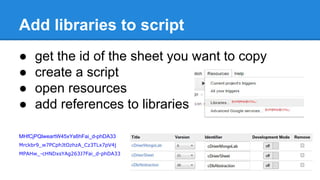
Add libraries to script
● get the id of the sheet you want to copy
● create a script
● open resources
● add references to libraries
MHfCjPQlweartW45xYs6hFai_d-phDA33
Mrckbr9_w7PCphJtOzhzA_Cz3TLx7pV4j
MPAHw_-cHNDxsYAg263J7Fai_d-phDA33
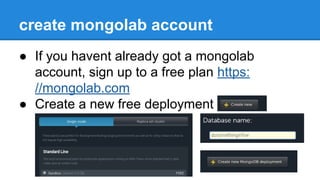
create mongolab account
● If you havent already got a mongolab
account, sign up to a free plan https:
//mongolab.com
● Create a new free deployment
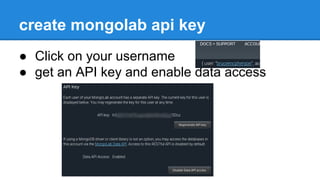
create mongolab api key
● Click on your username
● get an API key and enable data access
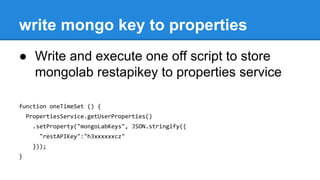
write mongo key to properties
● Write and execute one off script to store
mongolab restapikey to properties service
function oneTimeSet () {
PropertiesService.getUserProperties()
.setProperty("mongoLabKeys", JSON.stringify({
"restAPIKey":"h3xxxxxxcz"
}));
}
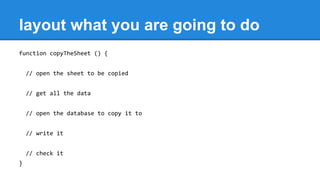
layout what you are going to do
function copyTheSheet () {
// open the sheet to be copied
// get all the data
// open the database to copy it to
// write it
// check it
}
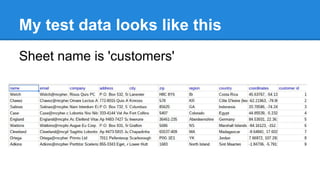
My test data looks like this
Sheet name is 'customers'
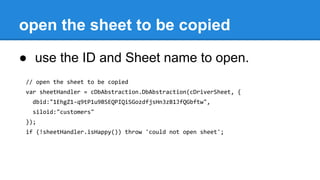
open the sheet to be copied
● use the ID and Sheet name to open.
// open the sheet to be copied
var sheetHandler = cDbAbstraction.DbAbstraction(cDriverSheet, {
dbid:"1EhgZ1-q9tP1u9BSEQPIQiSGozdfjsHn3zB1JfQGbftw",
siloid:"customers"
});
if (!sheetHandler.isHappy()) throw 'could not open sheet';
Get the data on the sheet
● a query with no arguments gets all the data
// get all the data
var result = sheetHandler.query();
if (result.handleCode < 0) throw JSON.stringify(result);
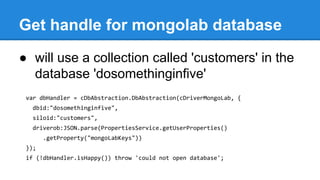
Get handle for mongolab database
● will use a collection called 'customers' in the
database 'dosomethinginfive'
var dbHandler = cDbAbstraction.DbAbstraction(cDriverMongoLab, {
dbid:"dosomethinginfive",
siloid:"customers",
driverob:JSON.parse(PropertiesService.getUserProperties()
.getProperty("mongoLabKeys"))
});
if (!dbHandler.isHappy()) throw 'could not open database';
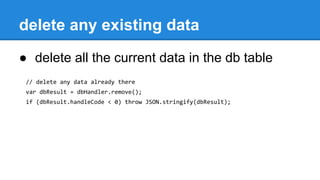
delete any existing data
● delete all the current data in the db table
// delete any data already there
var dbResult = dbHandler.remove();
if (dbResult.handleCode < 0) throw JSON.stringify(dbResult);
copy the data from the sheet
● copy the data from the sheet
// write it all
var dbResult = dbHandler.save (result.data);
if (dbResult.handleCode < 0) throw JSON.stringify(dbResult);
check all was written
● do a count query on what was written
// check that it was all written
var dbResult = dbHandler.count ();
if (dbResult.data[0].count !== result.data.length)
throw 'data counts dont match';
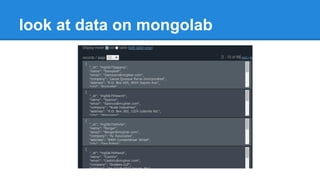
look at data on mongolab
Homework
Do the same thing, but copy to a Drive file
instead of MongoLab.
Hints.
● You'll need cDriverDrive (Ma__4vH--nQ_FPsuNF1BFuyz3TLx7pV4j)
● There is only one line different from the mongolab version (specify the folder and file name)
// open the database to copy it to
var dbHandler = cDbAbstraction.DbAbstraction(cDriverDrive, {
dbid:"/datahandler/driverdrive/tasks",
siloid:"customers.json"
});
Follow up materials
Take a copy of these slides
Join me on G+, or the G+ community
More on desktop liberation
More on database abstraction
More 5 minute things

Do something in 5 with gas 8-copy between databases

  • 1.
    do something usefulwith Apps Script in 5 minutes 8. Copy between databases Bruce McPherson www.mcpher.com
  • 2.
    Snippet objectives ● Opena database using dbabstraction ● Copy to another couple of formats Libraries used ● database abstraction ● driver sheet ● driver mongoLab ● driver drive
  • 3.
    Add libraries toscript ● get the id of the sheet you want to copy ● create a script ● open resources ● add references to libraries MHfCjPQlweartW45xYs6hFai_d-phDA33 Mrckbr9_w7PCphJtOzhzA_Cz3TLx7pV4j MPAHw_-cHNDxsYAg263J7Fai_d-phDA33
  • 4.
    create mongolab account ●If you havent already got a mongolab account, sign up to a free plan https: //mongolab.com ● Create a new free deployment
  • 5.
    create mongolab apikey ● Click on your username ● get an API key and enable data access
  • 6.
    write mongo keyto properties ● Write and execute one off script to store mongolab restapikey to properties service function oneTimeSet () { PropertiesService.getUserProperties() .setProperty("mongoLabKeys", JSON.stringify({ "restAPIKey":"h3xxxxxxcz" })); }
  • 7.
    layout what youare going to do function copyTheSheet () { // open the sheet to be copied // get all the data // open the database to copy it to // write it // check it }
  • 8.
    My test datalooks like this Sheet name is 'customers'
  • 9.
    open the sheetto be copied ● use the ID and Sheet name to open. // open the sheet to be copied var sheetHandler = cDbAbstraction.DbAbstraction(cDriverSheet, { dbid:"1EhgZ1-q9tP1u9BSEQPIQiSGozdfjsHn3zB1JfQGbftw", siloid:"customers" }); if (!sheetHandler.isHappy()) throw 'could not open sheet';
  • 10.
    Get the dataon the sheet ● a query with no arguments gets all the data // get all the data var result = sheetHandler.query(); if (result.handleCode < 0) throw JSON.stringify(result);
  • 11.
    Get handle formongolab database ● will use a collection called 'customers' in the database 'dosomethinginfive' var dbHandler = cDbAbstraction.DbAbstraction(cDriverMongoLab, { dbid:"dosomethinginfive", siloid:"customers", driverob:JSON.parse(PropertiesService.getUserProperties() .getProperty("mongoLabKeys")) }); if (!dbHandler.isHappy()) throw 'could not open database';
  • 12.
    delete any existingdata ● delete all the current data in the db table // delete any data already there var dbResult = dbHandler.remove(); if (dbResult.handleCode < 0) throw JSON.stringify(dbResult);
  • 13.
    copy the datafrom the sheet ● copy the data from the sheet // write it all var dbResult = dbHandler.save (result.data); if (dbResult.handleCode < 0) throw JSON.stringify(dbResult);
  • 14.
    check all waswritten ● do a count query on what was written // check that it was all written var dbResult = dbHandler.count (); if (dbResult.data[0].count !== result.data.length) throw 'data counts dont match';
  • 15.
    look at dataon mongolab
  • 16.
    Homework Do the samething, but copy to a Drive file instead of MongoLab. Hints. ● You'll need cDriverDrive (Ma__4vH--nQ_FPsuNF1BFuyz3TLx7pV4j) ● There is only one line different from the mongolab version (specify the folder and file name) // open the database to copy it to var dbHandler = cDbAbstraction.DbAbstraction(cDriverDrive, { dbid:"/datahandler/driverdrive/tasks", siloid:"customers.json" });
  • 17.
    Follow up materials Takea copy of these slides Join me on G+, or the G+ community More on desktop liberation More on database abstraction More 5 minute things