Downloaded 35 times

![{
“company”: “Netlight”,
“offices”: [
{ “location”: “Stockholm”, “count”: 17 },
{ “location”: “Oslo”, “count”: 42 }
],
“salt”: true
}](https://image.slidesharecdn.com/teknikkvallajax-100121032826-phpapp01/85/Ajax-a-quick-introduction-7-320.jpg)


![{ “data”: [1, 2, 3] }](https://image.slidesharecdn.com/teknikkvallajax-100121032826-phpapp01/85/Ajax-a-quick-introduction-11-320.jpg)
![{ “data”: [1, 2, 3] }
<script
type=”text/javascript”
src=”http://domain.com/service?callback=method”>
</script>](https://image.slidesharecdn.com/teknikkvallajax-100121032826-phpapp01/85/Ajax-a-quick-introduction-12-320.jpg)
![{ “data”: [1, 2, 3] }
<script
type=”text/javascript”
src=”http://domain.com/service?callback=method”>
</script>
method({ “data”: [1, 2, 3] });](https://image.slidesharecdn.com/teknikkvallajax-100121032826-phpapp01/85/Ajax-a-quick-introduction-13-320.jpg)
![JSONP Call
// simplified implementation
function getJSONP = function(url) {
// create script element
var script = document.createElement("script");
script.setAttribute("type", "text/javascript");
script.setAttribute("src", url);
// append to <head>
var head = document.getElementsByTagName('head')[0];
head.appendChild(script);
};](https://image.slidesharecdn.com/teknikkvallajax-100121032826-phpapp01/85/Ajax-a-quick-introduction-14-320.jpg)
![JSONP with
Object References
var refStore = {};
var refCounter = new Date().getTime();
function getJSONP2 = function(url, callback, that) {
// get unique callback name
var callbackName = "JSONPCallback" + (refCounter++);
// closure invokes original callback
refStore[callbackName] = function(data) {
callback.call(that, data); // set context
refStore[callbackName] = null; // cleanup
}
getJSONP(url + "callback=refStore." + callbackName);
};](https://image.slidesharecdn.com/teknikkvallajax-100121032826-phpapp01/85/Ajax-a-quick-introduction-15-320.jpg)



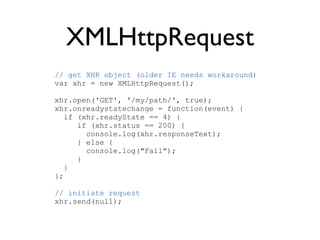
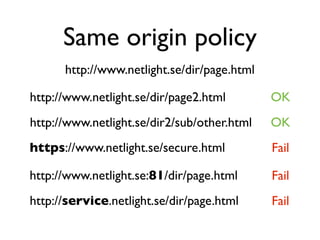
This document provides an introduction to Ajax including: 1) An overview of Ajax and that it allows for asynchronous JavaScript and XML requests. 2) An example of how to make an XMLHttpRequest to get data from a server. 3) A discussion of the same-origin policy and techniques like JSONP that allow requesting data from other domains. 4) Code examples of making JSONP requests by dynamically inserting <script> tags and passing callback functions.


