The document explains the 'this' keyword in Java, which refers to the current object in methods and constructors to avoid confusion between class attributes and parameters. It details the structure and initialization of arrays, including one-dimensional and two-dimensional arrays, with examples of how to declare, create, and assign values to them. Additionally, it shows the use of for loops for accessing and manipulating array values.


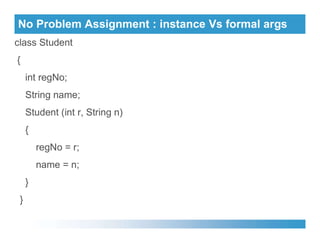
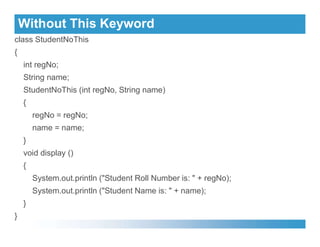
![This Keyword
class WithoutThis
{
public static void main(String args[])
{
StudentNoThis s2 = new StudentNoThis (102, "Mohamed");
System.out.println ("s2 object contains:");
System.out.println ("s2 object contains:");
s2.display ();
}
}
Output
s2 object contains:
Student Roll Number is: 0
Student Name is: null](https://image.slidesharecdn.com/arrays-240829020809-63986b3b/85/Arrays-a-detailed-explanation-and-presentation-6-320.jpg)
![Array
An Array is a collection of elements that share the same type and
name. The elements from the array can be accessed by the index.
For example, an array as ‘marks’ can be defined to represent a
set of marks of a group of students
A specific element in an array is accessed by the use of a
subscript or an index used inside the brackets, along with the
subscript or an index used inside the brackets, along with the
name of the array.
For example, marks[5] would store the marks of the fifth student.
While the complete set of values is called an array, the individual
values are known as elements](https://image.slidesharecdn.com/arrays-240829020809-63986b3b/85/Arrays-a-detailed-explanation-and-presentation-7-320.jpg)
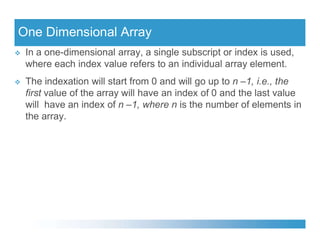
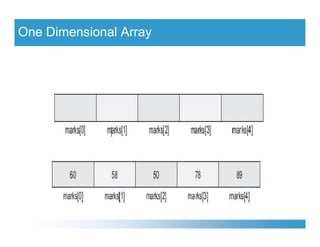
![One Dimensional Array
For example, if an array named marks has been declared to
store the marks of five students, the computer reserves five
contiguous locations in the memory.
The five marks to be assigned to each array element are 60, 58,
50, 78, and 89.
It will be done as follows:
It will be done as follows:
Marks[0] = 60;
Marks[1] = 58;
Marks[2] = 50;
Marks[3] = 78;
Marks[4] = 89;](https://image.slidesharecdn.com/arrays-240829020809-63986b3b/85/Arrays-a-detailed-explanation-and-presentation-10-320.jpg)
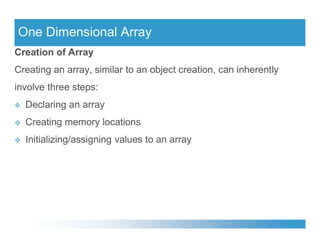
![Declaring an Array
Declaring an array is same as declaring a normal variable except
that it must use a set of square brackets with the variable type.
There can be two ways in which an array can be declared.
type arrayname[];
type arrayname[];
type[] arrayname;
So the above marks array having elements of integer type can be
declared either as
int marks[]; or int[] marks;](https://image.slidesharecdn.com/arrays-240829020809-63986b3b/85/Arrays-a-detailed-explanation-and-presentation-13-320.jpg)
![Creating Memory Locations
An array can be assigned to memory when it is declared it and
also the size can be specified.
Syntax: Arrayname = new type [size];
Example: marks = new int[5];
Both (declaration of array and creation of memory location), help
in the creation of an array.
Syntax:
type arrayname[] = new type[]; or type[] arrayname = new type[];
Example: int marks[] = new int[5];](https://image.slidesharecdn.com/arrays-240829020809-63986b3b/85/Arrays-a-detailed-explanation-and-presentation-14-320.jpg)
![Initializing/ assigning Values to an Array
Assignment of values to an array, which can also be termed as
initialization of array, can be done as follows:
Syntax: Arrayname[index] = value;
Example:
int[] marks = new int[5];
int[] marks = new int[5];
marks[0] = 60;
marks[1] = 58;
marks[2] = 50;
marks[3] = 78;
marks[4] = 89;](https://image.slidesharecdn.com/arrays-240829020809-63986b3b/85/Arrays-a-detailed-explanation-and-presentation-15-320.jpg)
![Initializing/ assigning Values to an Array
Arrays can alternately be assigned values or initialized in the same
way as the variables, i.e., at the time of declaration itself.
Syntax:
type arrayname[] = {list of values};
Example:
Example:
int marks[] = {60, 58, 50, 78, 89}](https://image.slidesharecdn.com/arrays-240829020809-63986b3b/85/Arrays-a-detailed-explanation-and-presentation-16-320.jpg)
![for Loops with Arrays
The for loops can be used to assign as well as access values from
an array. To obtain the number of values in an array, i.e., the length
of the array, we use the name of the array followed by the dot
operator and the variable length. This length property is associated
with all the arrays in Java.
with all the arrays in Java.
int[] marks = {60, 58, 50, 78, 89};
for (int i = 0; i<marks.length; i++)
{
System.out.println(marks[i]);
}](https://image.slidesharecdn.com/arrays-240829020809-63986b3b/85/Arrays-a-detailed-explanation-and-presentation-17-320.jpg)
![for Loops with Arrays
To Print Array Values
for (int i = 0; i<marks.length; i++)
System.out.println(marks[i]);](https://image.slidesharecdn.com/arrays-240829020809-63986b3b/85/Arrays-a-detailed-explanation-and-presentation-18-320.jpg)
![for Loops with Arrays
import java.util.*;
class ArrayTest
{
public static void main(String args[]) {
Scanner dis=new Scanner(System.in);
int a[],n,i;
System.out.println("Enter the size of Array:");
n=dis.nextInt();
n=dis.nextInt();
a=new int[n];
System.out.println("Enter the elements into Array:");
for(i=0;i<n;i++) {
a[i]=dis.nextInt();
}
System.out.println("The elements of Array:");
for(i=0;i<n;i++) {
System.out.print(a[i]+" ");
}
}}](https://image.slidesharecdn.com/arrays-240829020809-63986b3b/85/Arrays-a-detailed-explanation-and-presentation-19-320.jpg)
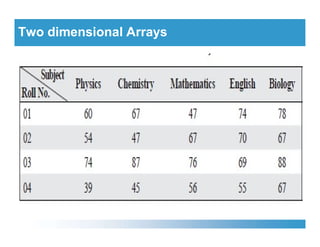
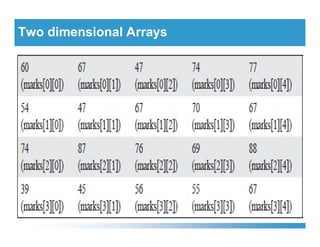
![Two dimensional Arrays
Sometimes values can be conceptualized in the form of a table that
is in the form of rows and columns.
Syntax: datatype arr-name[row-size][column-size];
Example: int a[3][3];
The elements are stored in memory locations as follows:
The elements are stored in memory locations as follows:
Column0 Column 1 Column 2
Row 0 a[0][0] a[0][1] a[0][2]
Row 1 a[1][0] a[1][1] a[1][2]
Row 2 a[2][0] a[2][1] a[2][2]](https://image.slidesharecdn.com/arrays-240829020809-63986b3b/85/Arrays-a-detailed-explanation-and-presentation-20-320.jpg)
![Two dimensional Arrays
Like a one-dimensional array, two-dimensional arrays may be
initialized with values at the time of their creation. For example,
int marks[2][4] = {2, 3, 6, 0, 9, 3, 3, 2};
This declaration shows that the first two rows of a 2 × 4 matrix have
been initialized by the values shown in the list above
been initialized by the values shown in the list above](https://image.slidesharecdn.com/arrays-240829020809-63986b3b/85/Arrays-a-detailed-explanation-and-presentation-23-320.jpg)


![Getting Started with Apache Spark: Big Data Made Simple [Free Meetup]](https://cdn.slidesharecdn.com/ss_thumbnails/apachesparkgettingstarted-260203175547-8361bcc3-thumbnail.jpg?width=640&height=640&fit=bounds)


