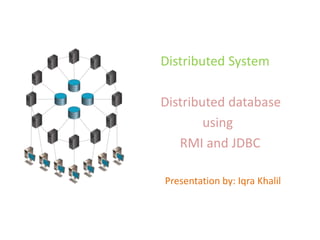
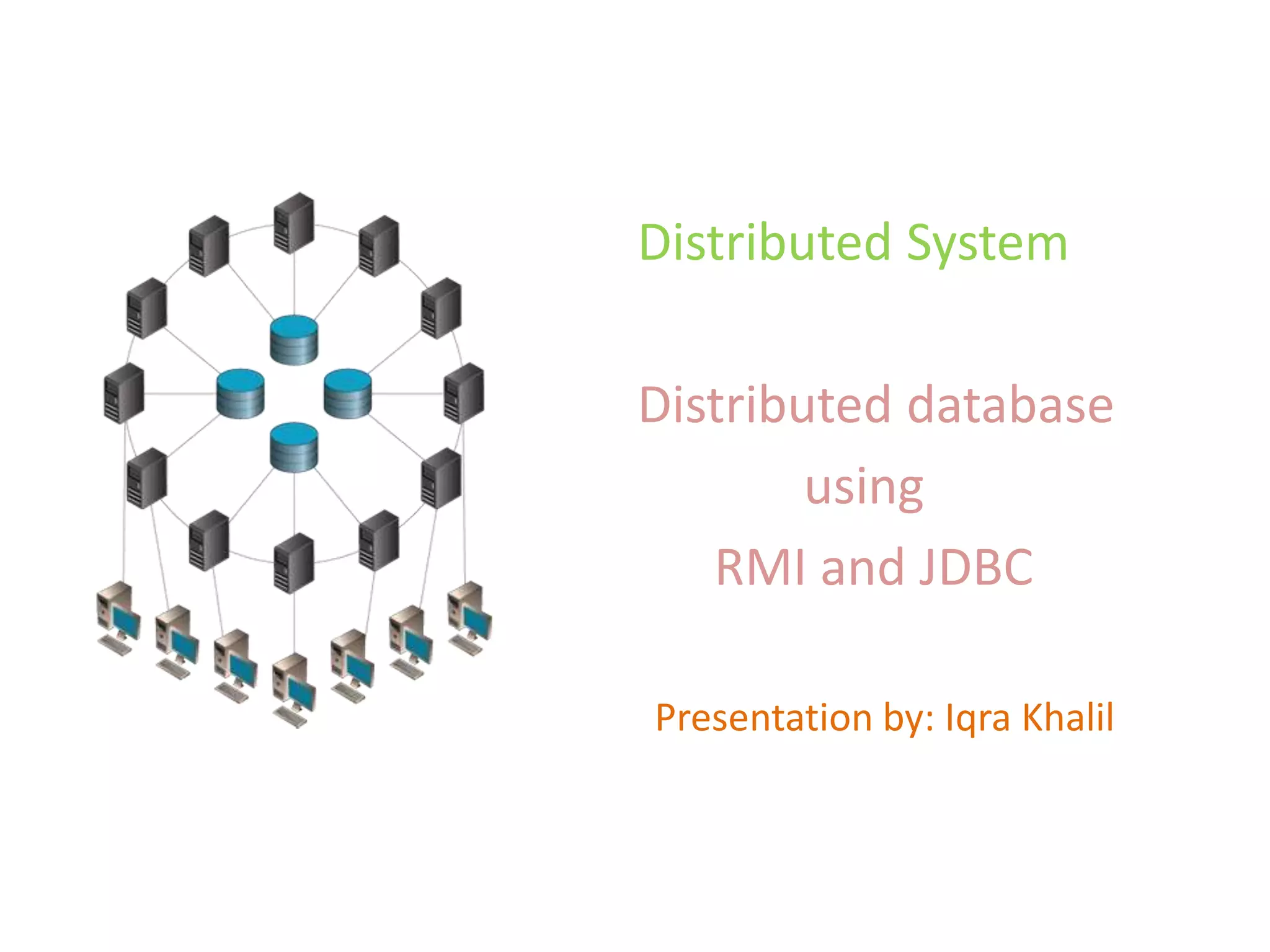

Distributed System
Distributed database
using
RMI and JDBC
Presentation by: Iqra Khalil
Distributed system
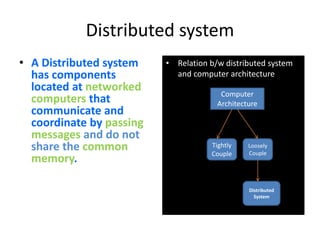
• A Distributed system
has components
located at networked
computers that
communicate and
coordinate by passing
messages and do not
share the common
memory.
• Relation b/w distributed system
and computer architecture
Computer
Architecture
Tightly
Couple
Loosely
Couple
Distributed
System
3As
• ABOUT:
What is DS about?
 Fault tolerance
• Awesome:
 Heterogeneity of components
 Openness
 Scalability
 Failure handling
 Concurrency of components
 Transparency
That’s why it every where
Google , Amazon cloud , Skype ,Facebook , bit torrent, www, intranet
• Aware:
Have to awareness of this field.
HISTORY
 1945-1980
− Computers were large and expensive.
− No way to connect them.
− All systems were Centralized Systems.
 Mid-1980s
− Powerful microprocessors.
− High Speed Computer Networks (LANs , WANs).
HISTORY
Then came the
DISTRIBUTED
SYSTEMS…
TYPES OF D.S.
• Distributed Computing Systems.
−Cluster Computing Systems.
−Grid Computing Systems.
• Distributed Information Systems.
• Distributed Pervasive Systems.
DISTRIBUTED COMPUTING SYSTEMS
Cluster Computing Systems
• Goal: High performance computing tasks.
Cluster Computing Systems:
 A computer cluster consists of a set of loosely or tightly
connected computers that work together so that, in many
respects, they can be viewed as a single system. Unlike
grid computers, computer clusters have each node set to
perform the same task, controlled and scheduled by software.
Most common use: a single program is run in
parallel on multiple machines
DISTRIBUTED COMPUTING SYSTEMS
Grid Computing Systems
Grid Computing Systems:
 Contrary to clusters, grids are usually composed of
different types of computers (hardware, OS, network,
security, etc.)
 At its most basic level, grid computing is a computernetwork in
which each computer's resources are shared with every
other computer in the system. Processing power, memory and data
storage are all community resources that authorized users can tap
into and leverage for specific tasks
 Resources from different organizations are brought
together to allow collaboration
 Examples: WWW…
DISTRIBUTED INFORMATION SYSTEMS
• Goal: Distribute information across several
Servers.
− Remote processes called Clients access the
servers to manipulate the information
− Different communication models are used. The
most usual are RPC (Remote Procedure Calls)
and the object oriented RMI (Remote Method
Invocations)
DISTRIBUTED INFORMATION SYSTEMS
−Often associated with Transaction systems
− Examples:
 Banks;
 Travel agencies;
 Rent-a-Cars’;
 Art Gallery
 ETC…
DISTRIBUTED PERVASIVE SYSTEMS
− These are the distributed systems involving
mobile and embedded computer devices like
Small, wireless, battery-powered devices (
smart phones, sensors, wireless surveillance
cams, portable ECG monitors, etc.)
− These systems characterized by their
“instability” when compared to more
“traditional” distributed systems
DISTRIBUTED PERVASIVE SYSTEMS
−Pervasive Systems are all around us, and
ideally should be able to adapt to the lack of
human administrative control:
 Automatically connect to a different network;
 Discover services and react accordingly;
 Automatic self configuration (E.g.: UPnP –
Universal Plug and Play)…
− Examples: Home Systems, Electronic Health
Care Systems, Sensor Networks, etc.
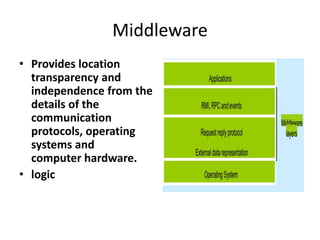
Middleware
• Provides location
transparency and
independence from the
details of the
communication
protocols, operating
systems and
computer hardware.
• logic
Middleware Technologies
• RPC
• CORBA
• COM/DCOM
• RMI
• Others
SOA , Ajax, jquery ,json
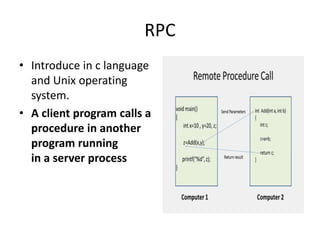
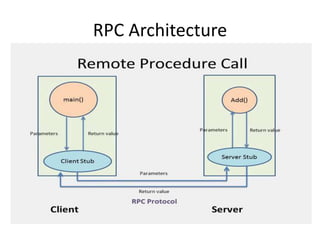
RPC
• Introduce in c language
and Unix operating
system.
• A client program calls a
procedure in another
program running
in a server process
RPC Architecture
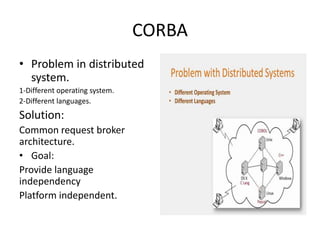
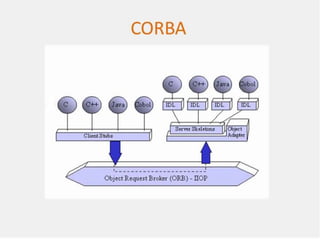
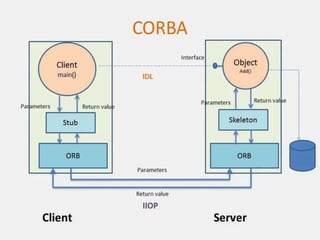
CORBA
• Problem in distributed
system.
1-Different operating system.
2-Different languages.
Solution:
Common request broker
architecture.
• Goal:
Provide language
independency
Platform independent.
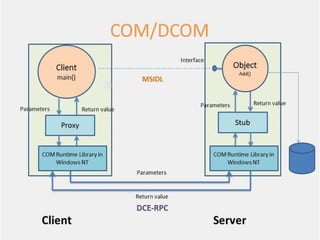
COM/DCOM
• COM/DCOM (Distributed Component Object Model)
is a set of Microsoft concepts and program interfaces
in which client program object s can request services
from server program objects on other computers in a
network.
• Goal:
Language independence
VC++ ,VB , VBScript
RMI
• The RMI (Remote Method Invocation)
provides a mechanism to create distributed
application in java. The RMI allows an object
to invoke methods on an object running in
another JVM.
• Goal:
Platform independency
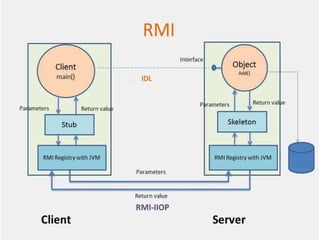
Stub
• The stub is an object, acts as a gateway for the client side. All
the outgoing requests are routed through it. It resides at the
client side and represents the remote object. When the caller
invokes method on the stub object, it does the following
tasks:
• It initiates a connection with remote Virtual Machine (JVM),
• It writes and transmits (marshals) the parameters to the
remote Virtual Machine (JVM),
• It waits for the result
• It reads (unmarshals) the return value or exception, and
• It finally, returns the value to the caller.
Skeleton
• The skeleton is an object, acts as a gateway for the
server side object. All the incoming requests are
routed through it. When the skeleton receives the
incoming request, it does the following tasks:
• It reads the parameter for the remote method
• It invokes the method on the actual remote object,
and
• It writes and transmits (marshals) the result to the
caller.
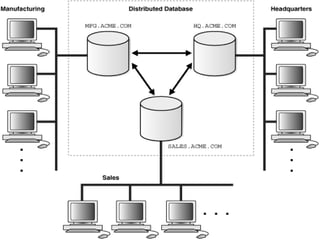
Distributed Database
• A distributed database (DDB) is a collection of multiple,
logically interrelated databases. distributed over a computer
network.
• A distributed database management system (DDBMS) is the
software that manages the DDB and provides an access
mechanism that makes this distribution transparent to. the
users.
Centralize vs. distributed database
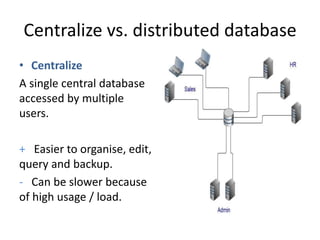
• Centralize
A single central database
accessed by multiple
users.
+ Easier to organise, edit,
query and backup.
- Can be slower because
of high usage / load.
Centralize vs. distributed database
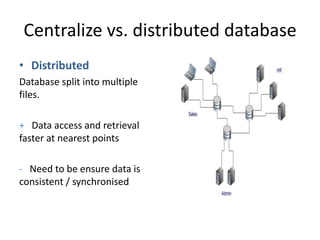
• Distributed
Database split into multiple
files.
+ Data access and retrieval
faster at nearest points
- Need to be ensure data is
consistent / synchronised
JDBC
• Java JDBC is a java API to connect and execute query with the
database. JDBC API uses jdbc drivers to connect with the
database.
• The JDBC API consists of the following core parts:
• JDBC Drivers
• Connections
• Statements
• Result Sets
JDBC
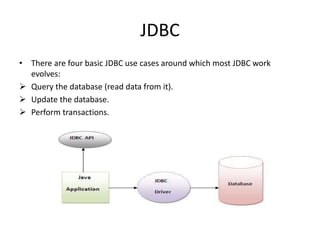
• There are four basic JDBC use cases around which most JDBC work
evolves:
 Query the database (read data from it).
 Update the database.
 Perform transactions.
JDBC- Drivers
A JDBC driver is a collection of Java classes that
enables you to connect to a certain database.
For instance, MYSQL will have its own JDBC
driver. A JDBC driver implements a lot of the
JDBC interfaces. When your code uses a given
JDBC driver, it actually just uses the standard
JDBC interfaces. The concrete JDBC driver used
is hidden behind the JDBC interfaces.
JDBC-CONNECTIONS
• Once a JDBC driver is loaded and initialized,
you need to connect to the database. You do
so by obtaining a Connection to the database
via the JDBC API and the loaded driver. All
communication with the database happens
via a connection. An application can have
more than one connection open to a database
at a time.
JDBC-STATEMENTS
• A Statement is what you use to execute
queries and updates against the database.
There are a few different types of statements
you can use. Each statement corresponds to a
single query or update.
JDBC-RESULT SETS
• When you perform a query against the database you
get back a Result Set. You can then traverse
this Result Set to read the result of the query.
Distributed System

Distributed System

  • 1.
    Distributed System Distributed database using RMIand JDBC Presentation by: Iqra Khalil
  • 2.
    Distributed system • ADistributed system has components located at networked computers that communicate and coordinate by passing messages and do not share the common memory. • Relation b/w distributed system and computer architecture Computer Architecture Tightly Couple Loosely Couple Distributed System
  • 3.
    3As • ABOUT: What isDS about?  Fault tolerance • Awesome:  Heterogeneity of components  Openness  Scalability  Failure handling  Concurrency of components  Transparency That’s why it every where Google , Amazon cloud , Skype ,Facebook , bit torrent, www, intranet • Aware: Have to awareness of this field.
  • 4.
    HISTORY  1945-1980 − Computerswere large and expensive. − No way to connect them. − All systems were Centralized Systems.  Mid-1980s − Powerful microprocessors. − High Speed Computer Networks (LANs , WANs).
  • 5.
  • 6.
    TYPES OF D.S. •Distributed Computing Systems. −Cluster Computing Systems. −Grid Computing Systems. • Distributed Information Systems. • Distributed Pervasive Systems.
  • 7.
    DISTRIBUTED COMPUTING SYSTEMS ClusterComputing Systems • Goal: High performance computing tasks. Cluster Computing Systems:  A computer cluster consists of a set of loosely or tightly connected computers that work together so that, in many respects, they can be viewed as a single system. Unlike grid computers, computer clusters have each node set to perform the same task, controlled and scheduled by software. Most common use: a single program is run in parallel on multiple machines
  • 8.
    DISTRIBUTED COMPUTING SYSTEMS GridComputing Systems Grid Computing Systems:  Contrary to clusters, grids are usually composed of different types of computers (hardware, OS, network, security, etc.)  At its most basic level, grid computing is a computernetwork in which each computer's resources are shared with every other computer in the system. Processing power, memory and data storage are all community resources that authorized users can tap into and leverage for specific tasks  Resources from different organizations are brought together to allow collaboration  Examples: WWW…
  • 9.
    DISTRIBUTED INFORMATION SYSTEMS •Goal: Distribute information across several Servers. − Remote processes called Clients access the servers to manipulate the information − Different communication models are used. The most usual are RPC (Remote Procedure Calls) and the object oriented RMI (Remote Method Invocations)
  • 10.
    DISTRIBUTED INFORMATION SYSTEMS −Oftenassociated with Transaction systems − Examples:  Banks;  Travel agencies;  Rent-a-Cars’;  Art Gallery  ETC…
  • 11.
    DISTRIBUTED PERVASIVE SYSTEMS −These are the distributed systems involving mobile and embedded computer devices like Small, wireless, battery-powered devices ( smart phones, sensors, wireless surveillance cams, portable ECG monitors, etc.) − These systems characterized by their “instability” when compared to more “traditional” distributed systems
  • 12.
    DISTRIBUTED PERVASIVE SYSTEMS −PervasiveSystems are all around us, and ideally should be able to adapt to the lack of human administrative control:  Automatically connect to a different network;  Discover services and react accordingly;  Automatic self configuration (E.g.: UPnP – Universal Plug and Play)… − Examples: Home Systems, Electronic Health Care Systems, Sensor Networks, etc.
  • 13.
    Middleware • Provides location transparencyand independence from the details of the communication protocols, operating systems and computer hardware. • logic
  • 14.
    Middleware Technologies • RPC •CORBA • COM/DCOM • RMI • Others SOA , Ajax, jquery ,json
  • 15.
    RPC • Introduce inc language and Unix operating system. • A client program calls a procedure in another program running in a server process
  • 16.
  • 17.
    CORBA • Problem indistributed system. 1-Different operating system. 2-Different languages. Solution: Common request broker architecture. • Goal: Provide language independency Platform independent.
  • 20.
    COM/DCOM • COM/DCOM (DistributedComponent Object Model) is a set of Microsoft concepts and program interfaces in which client program object s can request services from server program objects on other computers in a network. • Goal: Language independence VC++ ,VB , VBScript
  • 22.
    RMI • The RMI(Remote Method Invocation) provides a mechanism to create distributed application in java. The RMI allows an object to invoke methods on an object running in another JVM. • Goal: Platform independency
  • 24.
    Stub • The stubis an object, acts as a gateway for the client side. All the outgoing requests are routed through it. It resides at the client side and represents the remote object. When the caller invokes method on the stub object, it does the following tasks: • It initiates a connection with remote Virtual Machine (JVM), • It writes and transmits (marshals) the parameters to the remote Virtual Machine (JVM), • It waits for the result • It reads (unmarshals) the return value or exception, and • It finally, returns the value to the caller.
  • 25.
    Skeleton • The skeletonis an object, acts as a gateway for the server side object. All the incoming requests are routed through it. When the skeleton receives the incoming request, it does the following tasks: • It reads the parameter for the remote method • It invokes the method on the actual remote object, and • It writes and transmits (marshals) the result to the caller.
  • 26.
    Distributed Database • Adistributed database (DDB) is a collection of multiple, logically interrelated databases. distributed over a computer network. • A distributed database management system (DDBMS) is the software that manages the DDB and provides an access mechanism that makes this distribution transparent to. the users.
  • 28.
    Centralize vs. distributeddatabase • Centralize A single central database accessed by multiple users. + Easier to organise, edit, query and backup. - Can be slower because of high usage / load.
  • 29.
    Centralize vs. distributeddatabase • Distributed Database split into multiple files. + Data access and retrieval faster at nearest points - Need to be ensure data is consistent / synchronised
  • 30.
    JDBC • Java JDBCis a java API to connect and execute query with the database. JDBC API uses jdbc drivers to connect with the database. • The JDBC API consists of the following core parts: • JDBC Drivers • Connections • Statements • Result Sets
  • 31.
    JDBC • There arefour basic JDBC use cases around which most JDBC work evolves:  Query the database (read data from it).  Update the database.  Perform transactions.
  • 32.
    JDBC- Drivers A JDBCdriver is a collection of Java classes that enables you to connect to a certain database. For instance, MYSQL will have its own JDBC driver. A JDBC driver implements a lot of the JDBC interfaces. When your code uses a given JDBC driver, it actually just uses the standard JDBC interfaces. The concrete JDBC driver used is hidden behind the JDBC interfaces.
  • 33.
    JDBC-CONNECTIONS • Once aJDBC driver is loaded and initialized, you need to connect to the database. You do so by obtaining a Connection to the database via the JDBC API and the loaded driver. All communication with the database happens via a connection. An application can have more than one connection open to a database at a time.
  • 34.
    JDBC-STATEMENTS • A Statementis what you use to execute queries and updates against the database. There are a few different types of statements you can use. Each statement corresponds to a single query or update.
  • 35.
    JDBC-RESULT SETS • Whenyou perform a query against the database you get back a Result Set. You can then traverse this Result Set to read the result of the query.