Modeling and Mappingforms over databases:empowering users to DESIGN databases IN INDUSTRIAL DOMAINSDissertation ProposalOctober 07 2010Ritu Khare1
Database Design by Non-technical UsersWhy existing methods have not reached the industrial domains?MOTIVATION2
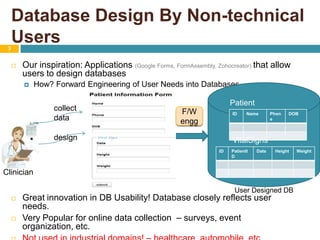
Database Design By Non-technical Users 3Our inspiration: Applications (Google Forms, FormAssembly, Zohocreator) that allow users to design databasesHow? Forward Engineering of User Needs into DatabasesGreat innovation in DB Usability! Database closely reflects user needs. Very Popular for online data collection  – surveys, event organization, etc. Not used in industrial domains! – healthcare, automobile, etc. Patientcollect dataF/W enggdesignVitalSignsClinicianUser Designed DB
Why existing methods are unfit for industrial domains?No provision to modify or extend an existing databaseTranslation(Forward Engineering) Method is not reported.Not tested on non-technical usersDatabases are required to evolve w.r.t. new user needsData and Database Quality is important quality leads to productivity. (Batini and Scannapieco, 2006)Users have no background in data modeling and databases4Existing ApplicationsFeatures of Industrial Domains
Proposed System and Research GoalsOpportunity: FormsExample: Form to Database MappingChallenges in MappingTHE PROPOSAL5
Proposed System and Research Goals6Proposed System: An application tomodel and map user needs into an existing databaseGoals:Modeling: “Usable” medium for users to model needs Efficiency, Effectiveness, Adoption Mapping: The resultant database should be high-quality, i.e. should satisfy: (Silberschatz et al. 2001, Batini and Scannapieco, 2006, Batini et al. 1992)NormalizationCompletenessCompactness Correctness
Opportunity: Forms7MODELING: Data-entry Forms provide a good communication medium for users to specify their data collection needs. (Choobineh et al. 1988, Embley, 1989)MAPPING: Important information on databases could be retrieved by analyzing forms (Choobineh and Mannino, 1988). Search forms provide a useful way in determining the underlying database(Benslimane, 2007) (Covered in Candidacy Exam)Data-entry forms provide key guidelines in designing a prospective database(Mannino and Choobineh, 1984).
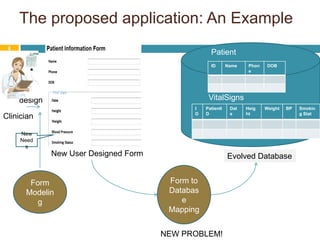
The proposed application: An ExamplePatientVitalSignsdesignClinicianNew NeedsNew User Designed FormExisting DatabaseEvolved DatabaseForm to Database Mapping8Form ModelingNEW PROBLEM!
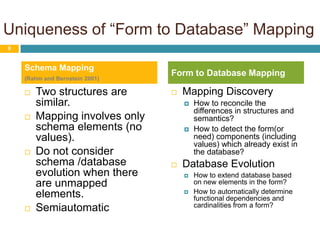
Uniqueness of “Form to Database” MappingTwo structures are similar. Mapping involves only schema elements (no values).Do not consider schema /database evolution when there are unmapped elements.SemiautomaticMapping DiscoveryHow to reconcile the differences in structures and semantics?How to detect the form(or need) components (including values) which already exist in the database? Database EvolutionHow to extend database based on new elements in the form?How to automatically determine functional dependencies and cardinalities from a form?9Schema Mapping(Rahm and Bernstein 2001)Form to Database Mapping
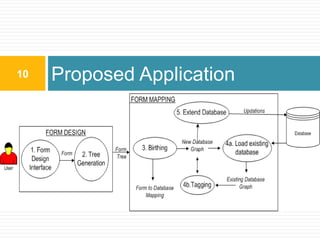
Proposed Application10
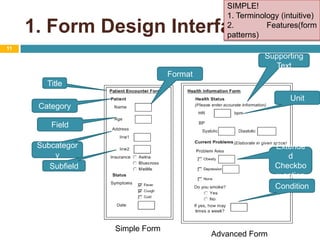
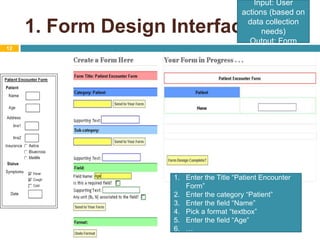
1. Form Design Interface11SIMPLE!1. Terminology (intuitive)2. Features(form patterns)Supporting TextFormatTitleUnitCategoryFieldSubcategoryExtended Checkbox optionSubfieldConditionSimple FormAdvanced Form
1. Form Design Interface12Input: User actions (based on data collection needs)Output: FormEnter the Title “Patient Encounter Form”Enter the category “Patient”Enter the field “Name”Pick a format “textbox”Enter the field “Age”…
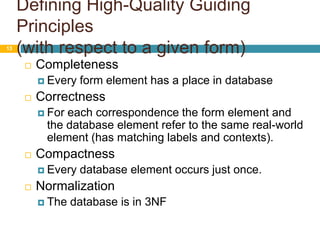
Defining High-Quality Guiding Principles(with respect to a given form)13CompletenessEvery form element has a place in databaseCorrectnessFor each correspondence the form element and the database element refer to the same real-world element (has matching labels and contexts). CompactnessEvery database element occurs just once. NormalizationThe database is in 3NF
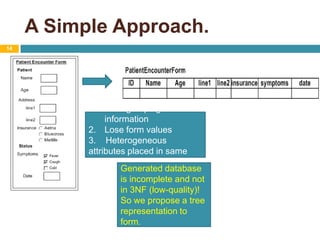
A Simple Approach. 14Lose grouping information Lose form values3.    Heterogeneous attributes placed in same relation. Generated database is incomplete and not in 3NF (low-quality)!So we propose a tree representation to form.
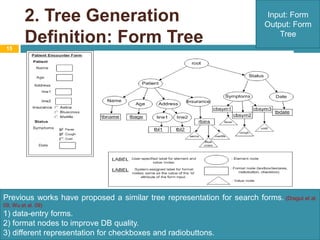
2. Tree Generation Definition: Form Tree15Input: FormOutput: Form TreePrevious works have proposed a similar tree representation for search forms.(Dragut et al. 09, Wu et al. 09)1) data-entry forms.2) format nodes to improve DB quality. 3) different representation for checkboxes and radiobuttons.
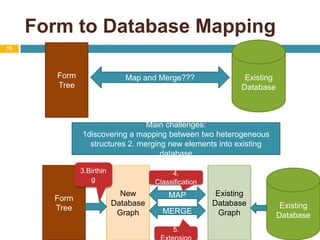
Form to Database Mapping16ExistingDatabaseForm TreeMap and Merge???Main challenges: 1discovering a mapping between two heterogeneous structures 2. merging new elements into existing database3.BirthingForm TreeNew Database GraphExistingDatabase GraphExistingDatabase4. ClassificationMAPMERGE5. Extension
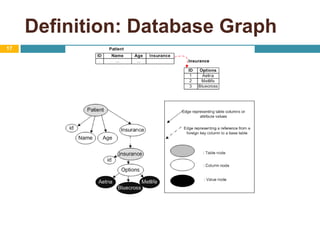
Definition: Database Graph17
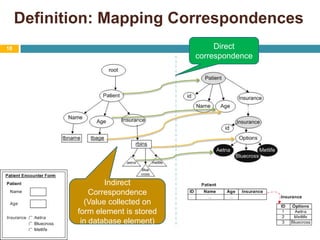
Definition: Mapping Correspondences18Direct correspondenceIndirectCorrespondence(Value collected on form element is stored in database element)
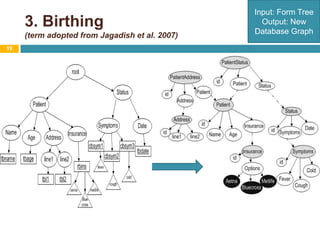
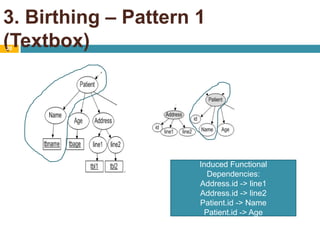
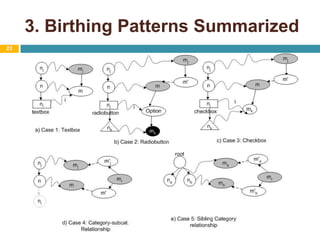
3. Birthing(term adopted from Jagadish et al. 2007)19Input: Form TreeOutput: New Database Graph
3. Birthing – Pattern 1 (Textbox)20Induced Functional Dependencies:Address.id -> line1Address.id -> line2Patient.id -> NamePatient.id -> Age
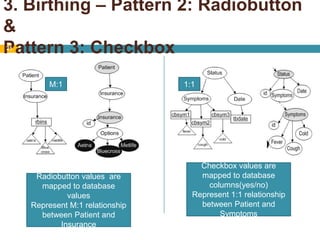
3. Birthing – Pattern 2: Radiobutton & Pattern 3: Checkbox21M:11:1Checkbox values are mapped to database columns(yes/no)Represent 1:1 relationship between Patient and SymptomsRadiobutton values  are mapped to database valuesRepresent M:1 relationship between Patient and Insurance
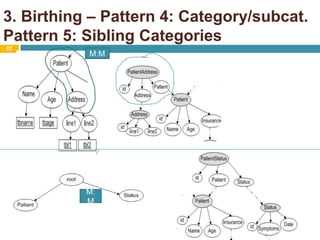
3. Birthing – Pattern 4: Category/subcat. Pattern 5: Sibling Categories22M:MM:M
3. Birthing Patterns Summarized23
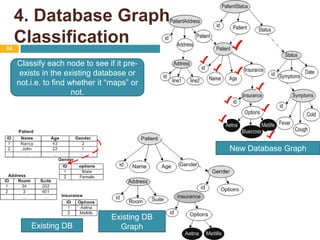
4. Database Graph Classification24Classify each node to see if it pre-exists in the existing database or not.i.e. to find whether it “maps” or not. New Database GraphExisting DBGraphExisting DB
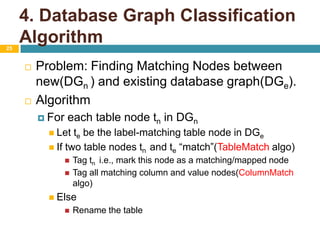
4. Database Graph ClassificationAlgorithm25Problem: Finding Matching Nodes between new(DGn) and existing database graph(DGe).AlgorithmFor each table node tnin DGnLet te be the label-matching table node in DGeIf two table nodes tnand te “match”(TableMatchalgo)Tag tn i.e., mark this node as a matching/mapped nodeTag all matching column and value nodes(ColumnMatchalgo)ElseRename the table
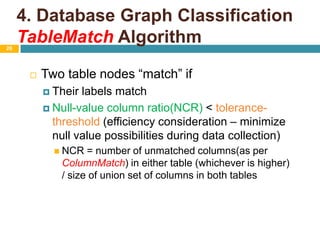
4. Database Graph ClassificationTableMatch Algorithm26Two table nodes “match” ifTheir labels matchNull-value column ratio(NCR) < tolerance-threshold (efficiency consideration – minimize null value possibilities during data collection)NCR = number of unmatched columns(as per ColumnMatch) in either table (whichever is higher) / size of union set of columns in both tables
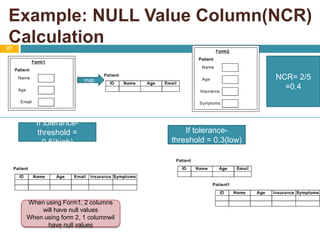
Example: NULL Value Column(NCR) Calculation27NCR= 2/5=0.4mapIf tolerance-threshold = 0.5(high)If tolerance-threshold = 0.3(low)When using Form1, 2 columns will have null valuesWhen using form 2, 1 columnwil have null values
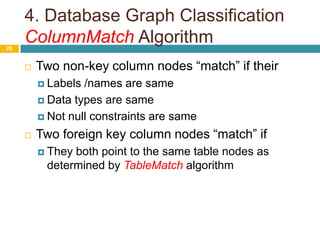
4. Database Graph ClassificationColumnMatch Algorithm28Two non-key column nodes “match” if theirLabels /names are sameData types are sameNot null constraints are sameTwo foreign key column nodes “match” if They both point to the same table nodes as determined by TableMatch algorithm
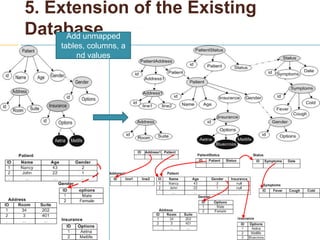
5. Extension of the Existing Database29Add unmapped tables, columns, and values
Usability ExperimentsMapping ExperimentsContributionsPreliminary Evaluation30Implementation – MySQL, JAVA, JSP, JavaScript, HTML, CSS, Lucene Indexing Package, yFiles Package
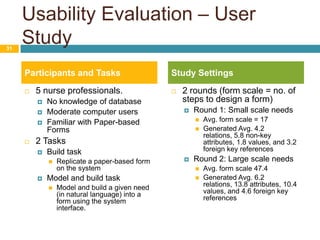
Usability Evaluation – User Study5 nurse professionals. No knowledge of database Moderate computer usersFamiliar with Paper-based Forms2 TasksBuild taskReplicate a paper-based form on the systemModel and build task Model and build a given need (in natural language) into a form using the system interface. 2 rounds (form scale = no. of steps to design a form)Round 1: Small scale needs Avg. form scale = 17Generated Avg. 4.2 relations, 5.8 non-key attributes, 1.8 values, and 3.2 foreign key referencesRound 2: Large scale needs Avg. form scale 47.4Generated Avg. 6.2 relations, 13.8 attributes, 10.4 values, and 4.6 foreign key references31Participants and TasksStudy Settings
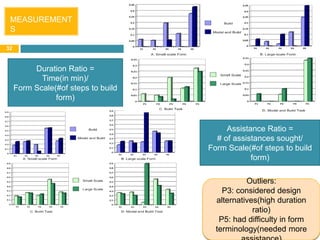
32MEASUREMENTSDuration Ratio = Time(in min)/ Form Scale(#of steps to build form)Assistance Ratio =# of assistances sought/ Form Scale(#of steps to build form)Outliers: P3: considered design alternatives(high duration ratio)P5: had difficulty in form terminology(needed more assistance)
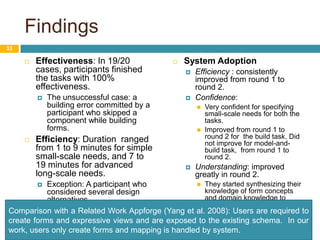
FindingsEffectiveness: In 19/20 cases, participants finished the tasks with 100% effectiveness. The unsuccessful case: a building error committed by a participant who skipped a component while building forms.Efficiency: Duration  ranged from 1 to 9 minutes for simple small-scale needs, and 7 to 19 minutes for advanced long-scale needs. Exception: A participant who considered several design alternatives .System AdoptionEfficiency : consistently improved from round 1 to round 2. Confidence: Very confident for specifying small-scale needs for both the tasks. Improved from round 1 to round 2 for  the build task. Did not improve for model-and-build task,  from round 1 to round 2. Understanding: improved greatly in round 2.They started synthesizing their knowledge of form concepts and domain knowledge to consider different design alternatives. 33Comparison with a Related Work Appforge (Yang et al. 2008): Users are required to create forms and expressive views and are exposed to the existing schema.  In our work, users only create forms and mapping is handled by system.
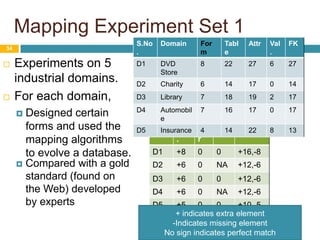
Mapping Experiment Set 1Experiments on 5 industrial domains. For each domain,Designed certain forms and used the mapping algorithms to evolve a database. 34Compared with a gold standard (found on the Web) developed by experts+ indicates extra elementIndicates missing elementNo sign indicates perfect match
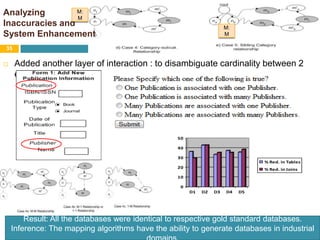
Analyzing Inaccuracies and System Enhancement 35M:MM:MAdded another layer of interaction : to disambiguate cardinality between 2 entities. Result: All the databases were identical to respective gold standard databases. Inference: The mapping algorithms have the ability to generate databases in industrial domains.
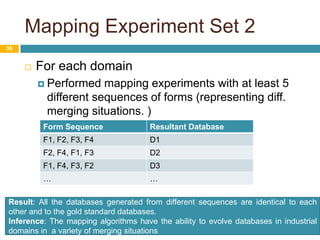
Mapping Experiment Set 236For each domainPerformed mapping experiments with at least 5 different sequences of forms (representing diff. merging situations. )Result: All the databases generated from different sequences are identical to each other and to the gold standard databases. Inference: The mapping algorithms have the ability to evolve databases in industrial domains in  a variety of merging situations
Current and Predicted Contributions37Introducing the Form to Database Mapping Algorithmsdriven by data-quality principlesMapping experiments on 5 domainsSystem has the potential to generate high-quality databases in industrial settings solely based on user-designed forms and user-provided domain knowledge.to evolve existing databases in a variety of merging situations. Usability StudySystem has the potential to be adopted by non-technical users while providing them efficiency and effectiveness in form modeling.
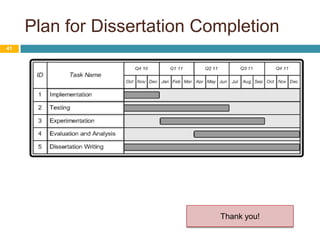
Possible Research ExperimentsOther Research Areas/System RefinementPlan for Thesis CompletionWhat Next?38
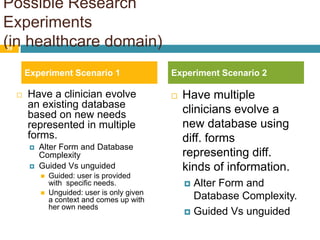
Possible Research Experiments(in healthcare domain)Have multiple clinicians evolve a new database using diff. forms representing diff. kinds of information. Alter Form and Database Complexity. Guided Vs unguided39Experiment Scenario 1Experiment Scenario 2Have a clinician evolve an existing database based on new needs represented in multiple forms.
Alter Form and Database Complexity
Guided Vs unguided

Dissertation Proposal Presentation

  • 1.
    Modeling and Mappingformsover databases:empowering users to DESIGN databases IN INDUSTRIAL DOMAINSDissertation ProposalOctober 07 2010Ritu Khare1
  • 2.
    Database Design byNon-technical UsersWhy existing methods have not reached the industrial domains?MOTIVATION2
  • 3.
    Database Design ByNon-technical Users 3Our inspiration: Applications (Google Forms, FormAssembly, Zohocreator) that allow users to design databasesHow? Forward Engineering of User Needs into DatabasesGreat innovation in DB Usability! Database closely reflects user needs. Very Popular for online data collection – surveys, event organization, etc. Not used in industrial domains! – healthcare, automobile, etc. Patientcollect dataF/W enggdesignVitalSignsClinicianUser Designed DB
  • 4.
    Why existing methodsare unfit for industrial domains?No provision to modify or extend an existing databaseTranslation(Forward Engineering) Method is not reported.Not tested on non-technical usersDatabases are required to evolve w.r.t. new user needsData and Database Quality is important quality leads to productivity. (Batini and Scannapieco, 2006)Users have no background in data modeling and databases4Existing ApplicationsFeatures of Industrial Domains
  • 5.
    Proposed System andResearch GoalsOpportunity: FormsExample: Form to Database MappingChallenges in MappingTHE PROPOSAL5
  • 6.
    Proposed System andResearch Goals6Proposed System: An application tomodel and map user needs into an existing databaseGoals:Modeling: “Usable” medium for users to model needs Efficiency, Effectiveness, Adoption Mapping: The resultant database should be high-quality, i.e. should satisfy: (Silberschatz et al. 2001, Batini and Scannapieco, 2006, Batini et al. 1992)NormalizationCompletenessCompactness Correctness
  • 7.
    Opportunity: Forms7MODELING: Data-entryForms provide a good communication medium for users to specify their data collection needs. (Choobineh et al. 1988, Embley, 1989)MAPPING: Important information on databases could be retrieved by analyzing forms (Choobineh and Mannino, 1988). Search forms provide a useful way in determining the underlying database(Benslimane, 2007) (Covered in Candidacy Exam)Data-entry forms provide key guidelines in designing a prospective database(Mannino and Choobineh, 1984).
  • 8.
    The proposed application:An ExamplePatientVitalSignsdesignClinicianNew NeedsNew User Designed FormExisting DatabaseEvolved DatabaseForm to Database Mapping8Form ModelingNEW PROBLEM!
  • 9.
    Uniqueness of “Formto Database” MappingTwo structures are similar. Mapping involves only schema elements (no values).Do not consider schema /database evolution when there are unmapped elements.SemiautomaticMapping DiscoveryHow to reconcile the differences in structures and semantics?How to detect the form(or need) components (including values) which already exist in the database? Database EvolutionHow to extend database based on new elements in the form?How to automatically determine functional dependencies and cardinalities from a form?9Schema Mapping(Rahm and Bernstein 2001)Form to Database Mapping
  • 10.
  • 11.
    1. Form DesignInterface11SIMPLE!1. Terminology (intuitive)2. Features(form patterns)Supporting TextFormatTitleUnitCategoryFieldSubcategoryExtended Checkbox optionSubfieldConditionSimple FormAdvanced Form
  • 12.
    1. Form DesignInterface12Input: User actions (based on data collection needs)Output: FormEnter the Title “Patient Encounter Form”Enter the category “Patient”Enter the field “Name”Pick a format “textbox”Enter the field “Age”…
  • 13.
    Defining High-Quality GuidingPrinciples(with respect to a given form)13CompletenessEvery form element has a place in databaseCorrectnessFor each correspondence the form element and the database element refer to the same real-world element (has matching labels and contexts). CompactnessEvery database element occurs just once. NormalizationThe database is in 3NF
  • 14.
    A Simple Approach.14Lose grouping information Lose form values3. Heterogeneous attributes placed in same relation. Generated database is incomplete and not in 3NF (low-quality)!So we propose a tree representation to form.
  • 15.
    2. Tree GenerationDefinition: Form Tree15Input: FormOutput: Form TreePrevious works have proposed a similar tree representation for search forms.(Dragut et al. 09, Wu et al. 09)1) data-entry forms.2) format nodes to improve DB quality. 3) different representation for checkboxes and radiobuttons.
  • 16.
    Form to DatabaseMapping16ExistingDatabaseForm TreeMap and Merge???Main challenges: 1discovering a mapping between two heterogeneous structures 2. merging new elements into existing database3.BirthingForm TreeNew Database GraphExistingDatabase GraphExistingDatabase4. ClassificationMAPMERGE5. Extension
  • 17.
  • 18.
    Definition: Mapping Correspondences18DirectcorrespondenceIndirectCorrespondence(Value collected on form element is stored in database element)
  • 19.
    3. Birthing(term adoptedfrom Jagadish et al. 2007)19Input: Form TreeOutput: New Database Graph
  • 20.
    3. Birthing –Pattern 1 (Textbox)20Induced Functional Dependencies:Address.id -> line1Address.id -> line2Patient.id -> NamePatient.id -> Age
  • 21.
    3. Birthing –Pattern 2: Radiobutton & Pattern 3: Checkbox21M:11:1Checkbox values are mapped to database columns(yes/no)Represent 1:1 relationship between Patient and SymptomsRadiobutton values are mapped to database valuesRepresent M:1 relationship between Patient and Insurance
  • 22.
    3. Birthing –Pattern 4: Category/subcat. Pattern 5: Sibling Categories22M:MM:M
  • 23.
  • 24.
    4. Database GraphClassification24Classify each node to see if it pre-exists in the existing database or not.i.e. to find whether it “maps” or not. New Database GraphExisting DBGraphExisting DB
  • 25.
    4. Database GraphClassificationAlgorithm25Problem: Finding Matching Nodes between new(DGn) and existing database graph(DGe).AlgorithmFor each table node tnin DGnLet te be the label-matching table node in DGeIf two table nodes tnand te “match”(TableMatchalgo)Tag tn i.e., mark this node as a matching/mapped nodeTag all matching column and value nodes(ColumnMatchalgo)ElseRename the table
  • 26.
    4. Database GraphClassificationTableMatch Algorithm26Two table nodes “match” ifTheir labels matchNull-value column ratio(NCR) < tolerance-threshold (efficiency consideration – minimize null value possibilities during data collection)NCR = number of unmatched columns(as per ColumnMatch) in either table (whichever is higher) / size of union set of columns in both tables
  • 27.
    Example: NULL ValueColumn(NCR) Calculation27NCR= 2/5=0.4mapIf tolerance-threshold = 0.5(high)If tolerance-threshold = 0.3(low)When using Form1, 2 columns will have null valuesWhen using form 2, 1 columnwil have null values
  • 28.
    4. Database GraphClassificationColumnMatch Algorithm28Two non-key column nodes “match” if theirLabels /names are sameData types are sameNot null constraints are sameTwo foreign key column nodes “match” if They both point to the same table nodes as determined by TableMatch algorithm
  • 29.
    5. Extension ofthe Existing Database29Add unmapped tables, columns, and values
  • 30.
    Usability ExperimentsMapping ExperimentsContributionsPreliminaryEvaluation30Implementation – MySQL, JAVA, JSP, JavaScript, HTML, CSS, Lucene Indexing Package, yFiles Package
  • 31.
    Usability Evaluation –User Study5 nurse professionals. No knowledge of database Moderate computer usersFamiliar with Paper-based Forms2 TasksBuild taskReplicate a paper-based form on the systemModel and build task Model and build a given need (in natural language) into a form using the system interface. 2 rounds (form scale = no. of steps to design a form)Round 1: Small scale needs Avg. form scale = 17Generated Avg. 4.2 relations, 5.8 non-key attributes, 1.8 values, and 3.2 foreign key referencesRound 2: Large scale needs Avg. form scale 47.4Generated Avg. 6.2 relations, 13.8 attributes, 10.4 values, and 4.6 foreign key references31Participants and TasksStudy Settings
  • 32.
    32MEASUREMENTSDuration Ratio =Time(in min)/ Form Scale(#of steps to build form)Assistance Ratio =# of assistances sought/ Form Scale(#of steps to build form)Outliers: P3: considered design alternatives(high duration ratio)P5: had difficulty in form terminology(needed more assistance)
  • 33.
    FindingsEffectiveness: In 19/20cases, participants finished the tasks with 100% effectiveness. The unsuccessful case: a building error committed by a participant who skipped a component while building forms.Efficiency: Duration ranged from 1 to 9 minutes for simple small-scale needs, and 7 to 19 minutes for advanced long-scale needs. Exception: A participant who considered several design alternatives .System AdoptionEfficiency : consistently improved from round 1 to round 2. Confidence: Very confident for specifying small-scale needs for both the tasks. Improved from round 1 to round 2 for the build task. Did not improve for model-and-build task, from round 1 to round 2. Understanding: improved greatly in round 2.They started synthesizing their knowledge of form concepts and domain knowledge to consider different design alternatives. 33Comparison with a Related Work Appforge (Yang et al. 2008): Users are required to create forms and expressive views and are exposed to the existing schema. In our work, users only create forms and mapping is handled by system.
  • 34.
    Mapping Experiment Set1Experiments on 5 industrial domains. For each domain,Designed certain forms and used the mapping algorithms to evolve a database. 34Compared with a gold standard (found on the Web) developed by experts+ indicates extra elementIndicates missing elementNo sign indicates perfect match
  • 35.
    Analyzing Inaccuracies andSystem Enhancement 35M:MM:MAdded another layer of interaction : to disambiguate cardinality between 2 entities. Result: All the databases were identical to respective gold standard databases. Inference: The mapping algorithms have the ability to generate databases in industrial domains.
  • 36.
    Mapping Experiment Set236For each domainPerformed mapping experiments with at least 5 different sequences of forms (representing diff. merging situations. )Result: All the databases generated from different sequences are identical to each other and to the gold standard databases. Inference: The mapping algorithms have the ability to evolve databases in industrial domains in a variety of merging situations
  • 37.
    Current and PredictedContributions37Introducing the Form to Database Mapping Algorithmsdriven by data-quality principlesMapping experiments on 5 domainsSystem has the potential to generate high-quality databases in industrial settings solely based on user-designed forms and user-provided domain knowledge.to evolve existing databases in a variety of merging situations. Usability StudySystem has the potential to be adopted by non-technical users while providing them efficiency and effectiveness in form modeling.
  • 38.
    Possible Research ExperimentsOtherResearch Areas/System RefinementPlan for Thesis CompletionWhat Next?38
  • 39.
    Possible Research Experiments(inhealthcare domain)Have multiple clinicians evolve a new database using diff. forms representing diff. kinds of information. Alter Form and Database Complexity. Guided Vs unguided39Experiment Scenario 1Experiment Scenario 2Have a clinician evolve an existing database based on new needs represented in multiple forms.
  • 40.
    Alter Form andDatabase Complexity
  • 41.

Editor's Notes

  • #3 Lets start with the motivation of this work.
  • #12 Using the Form Design Interface, users can design simple as well as advanced forms. To make it usable for non-tech. users, we have kept the interface simple in terms of terminology as well as design. Terminology means – terms used are simple and commonplace – features supported are present in various data-entry forms – which users might already be familiar with. E.g. terms used are