Failure analysis
Business impact analysis
Backup and archive
By Davin.J.Abraham
1701310002
M.Tech Database Systems/SRM
Failure Analysis
 Involves analysing both the physical and virtual infrastructure.
 Components to identify systems that are susceptible to a single point
of failure.
 Implementing fault-tolerance mechanisms.
Business continuity (BC)
 is an integrated and enterprise-wide process
 Includes all activities (internal and external to IT) that a business
must perform to mitigate the impact of planned and unplanned
downtime.
 BC entails preparing for, responding to, and recovering from a system
outage that adversely affects business operations.
Single Point of Failure
 A single point of failure refers to the failure of a component that can
terminate the availability of the entire system or IT service.
 In a setup in which each component must function as required to
ensure data availability, the failure of a single physical or virtual
component causes the unavailability of an application. This failure
results in disruption of business operations
 For example:
Failure of a hypervisor can affect all the running VMs and the virtual
network, which are hosted on it.
Resolving Single Points of Failure
 To mitigate single points of failure, systems are designed with
redundancy, such that the system fails only if all the components in
the redundancy group fail.
 Data centers follow stringent guidelines to implement fault tolerance
for uninterrupted information availability. Careful analysis is
performed to eliminate every single point of failure.
 Implementing a VM Fault Tolerance mechanism ensures BC in the
event of a server failure. This technique creates duplicate copies of
each VM on another server so that when a VM failure is detected, the
duplicate VM can be used for failover. The two VMs are kept in
synchronization with each other in order to perform successful
failover.
Multipathing Software
 Configuration of multiple paths increases the data availability through path
failover. If servers are configured with one I/O path to the data, there will be
no access to the data if that path fails. Redundant paths to the data eliminate
the possibility of the path becoming a single point of failure. Multiple paths to
data also improve I/O performance through load balancing among the paths
and maximize server, storage, and data path utilization.
 In practice, merely configuring multiple paths does not serve the purpose.
Even with multiple paths, if one path fails, I/O does not reroute unless the
system recognizes that it has an alternative path. Multi-pathing software
provides the functionality to recognize and utilize alternative I/O paths to
data. Multi-pathing software also manages the load balancing by distributing
I/Os to all available, active paths.
Business Impact Analysis
 identifies which business units, operations, and processes are essential to the
survival of the business.
 It evaluates the financial,operational, and service impacts of a disruption to
essential business processes.
 Selected functional areas are evaluated to determine resilience of the
infrastructure to support information availability.
 The impact may be specified in terms of money or in terms of time.
 Based on the potential impacts associated with downtime, businesses can
prioritize and implement counter-measures to mitigate the likelihood of such
disruptions
BIA Tasks
 Determine the business areas.
 For each business area, identify the key business processes critical to
its operation.
 Determine the attributes of the business process in terms of
applications, databases, and hardware and software requirements.
 Estimate the costs of failure for each business process.
 Calculate the maximum tolerable outage and defi ne RTO and RPO for
each business process.
BIA Tasks (continued)
 Establish the minimum resources required for the operation of business
processes.
 Determine recovery strategies and the cost for implementing them.
 Optimize the backup and business recovery strategy based on business
priorities.
 Analyse the current state of BC readiness and optimize future BC planning.
BC Technology Solutions
 After analyzing the business impact of an outage, designing the appropriate
solutions to recover from a failure is the next important activity.
 One or more copies of the data are maintained using any of the following
strategies so that data can be recovered or business operations can be
restarted using an alternative copy:
 Backup
 Local Replication
 Remote Replication
Backup
 is an additional copy of production data, created and retained for the sole
purpose of recovering lost or corrupted data.
 With growing business and regulatory demands for data storage, retention,
and availability, organizations are faced with the task of backing up an ever-
increasing amount of data.
 This task becomes more challenging with the growth of information, stagnant
IT budgets,and less time for taking backups
Backup purposes:
 Disaster Recovery
 Restores production data to an operational state after disaster
 Operational
 Restore data in the event of data loss or logical corruptions
that may occur during routine processing
 Archival
 Preserve transaction records, email, and other business work
products for regulatory compliance
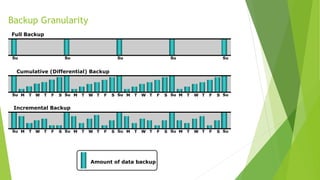
Backup Granularity
Full Backup
Su Su Su Su Su
Incremental Backup
Su Su Su Su SuM T TW F S M T TW F S M T TW F S M T TW F S
Cumulative (Differential) Backup
Su Su Su Su SuM T TW F S M T TW F S M T TW F S M T TW F S
Amount of data backup
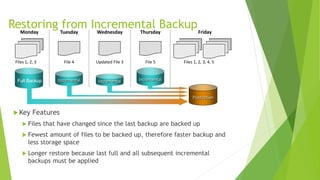
Restoring from Incremental Backup
 Key Features
 Files that have changed since the last backup are backed up
 Fewest amount of files to be backed up, therefore faster backup and
less storage space
 Longer restore because last full and all subsequent incremental
backups must be applied
Incremental
Tuesday
File 4
Incremental
Wednesday
Updated File 3
Incremental
Thursday
File 5 Files 1, 2, 3, 4, 5
Production
Friday
Files 1, 2, 3
Monday
Full Backup
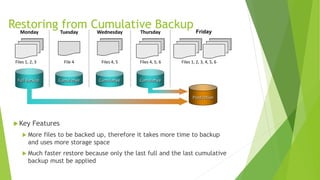
Restoring from Cumulative Backup
 Key Features
 More files to be backed up, therefore it takes more time to backup
and uses more storage space
 Much faster restore because only the last full and the last cumulative
backup must be applied
Cumulative
Tuesday
File 4Files 1, 2, 3
Monday
Full Backup Cumulative
Wednesday
Files 4, 5
Cumulative
Thursday
Files 4, 5, 6 Files 1, 2, 3, 4, 5, 6
Production
Friday
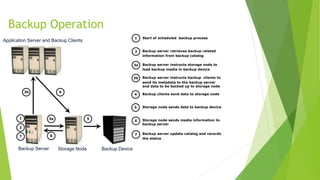
Backup Operation
1
Application Server and Backup Clients
Backup Server Storage Node Backup Device
2
7
3b 4
53a
6
3a Backup server instructs storage node to
load backup media in backup device
Start of scheduled backup process1
Backup server retrieves backup related
information from backup catalog
2
Backup server instructs backup clients to
send its metadata to the backup server
and data to be backed up to storage node
3b
Backup clients send data to storage node4
Storage node sends data to backup device5
Storage node sends media information to
backup server
6
Backup server update catalog and records
the status
7
Restore Operation
Application Server and Backup Clients
1
5
2
4
3
3
Backup Server Storage Node Backup Device
1 Backup server scans backup catalog
to identify data to be restore and the
client that will receive data
2 Backup server instructs storage node
to load backup media in backup device
3 Data is then read and send to backup
client
4 Storage node sends restore metadata
to backup server
5 Backup server updates catalog
Backup Technology options
 Backup to Tape
 Physical tape library
 Backup to Disk
 Backup to virtual tape
 Virtual tape library
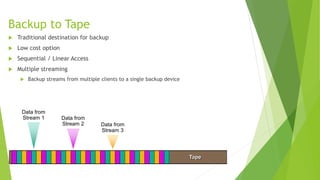
Backup to Tape
 Traditional destination for backup
 Low cost option
 Sequential / Linear Access
 Multiple streaming
 Backup streams from multiple clients to a single backup device
Tape
Data from
Stream 1 Data from
Stream 2 Data from
Stream 3
Tape Limitations
 Reliability
 Restore performance
 Mount, load to ready, rewind, dismount times
 Sequential Access
 Cannot be accessed by multiple hosts simultaneously
 Controlled environment for tape storage
 Wear and tear of tape
 Shipping/handling challenges
 Tape management challenges
Backup to Disk
 Ease of implementation
 Fast access
 More Reliable
 Random Access
 Multiple hosts access
 Enhanced overall backup and recovery performance
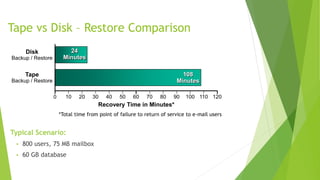
Tape vs Disk – Restore Comparison
Typical Scenario:
 800 users, 75 MB mailbox
 60 GB database
*Total time from point of failure to return of service to e-mail users
0 10 20 30 40 50 60 70 80 90 100 120110
Recovery Time in Minutes*
Tape
Backup / Restore
Disk
Backup / Restore
108
Minutes
24
Minutes
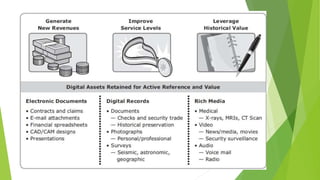
Data archiving
 is the process of moving data that is no longer actively used, from primary
storage to a low-cost secondary storage.
 The data is retained in the secondary storage for a long term to meet
regulatory requirements.
 Moving the data from primary storage reduces the amount of data to be
backed up. This reduces the time required to back up the data
life cycle of information
 In the life cycle of information, data is actively created, accessed, and
changed.
 As data ages, it is less likely to be changed and eventually becomes “fixed”
 but continues to be accessed by applications and users. This data is called
fixed content. X-rays, e-mails, and multimedia fi les are examples of fixed
content.
Archiving Server & Storage Device
An archiving server is software installed on a host that enables administrators to
configure the policies for archiving data.
 Policies can be defined based on file size, file type, or
creation/modification/access time.
 The archiving server receives the data to be archived from the agent and
sends it to the archive storage device.
 An archiving storage device stores fixed content. Different types of storage
media options such as optical, tapes, and low-cost disk drives are available
for archiving
ARCHIVING DATA TO CLOUD STORAGE
 Today, organizations use cloud storage to archive their data.
 Cloud storage does not require any upfront capital expenditure (CAPEX) to
the organization, such as buying archival hardware and software
components.
 Organizations need to pay only for the cloud resources they consume.
 Cloud computing provides infinitely scalable storage to organizations as a
service.
 This enables businesses to expand their storage as required. To use cloud
storage for archiving, the archiving application must support the cloud
storage APIs.

Failure analysis buisness impact-backup-archive

  • 1.
    Failure analysis Business impactanalysis Backup and archive By Davin.J.Abraham 1701310002 M.Tech Database Systems/SRM
  • 2.
    Failure Analysis  Involvesanalysing both the physical and virtual infrastructure.  Components to identify systems that are susceptible to a single point of failure.  Implementing fault-tolerance mechanisms. Business continuity (BC)  is an integrated and enterprise-wide process  Includes all activities (internal and external to IT) that a business must perform to mitigate the impact of planned and unplanned downtime.  BC entails preparing for, responding to, and recovering from a system outage that adversely affects business operations.
  • 3.
    Single Point ofFailure  A single point of failure refers to the failure of a component that can terminate the availability of the entire system or IT service.  In a setup in which each component must function as required to ensure data availability, the failure of a single physical or virtual component causes the unavailability of an application. This failure results in disruption of business operations  For example: Failure of a hypervisor can affect all the running VMs and the virtual network, which are hosted on it.
  • 4.
    Resolving Single Pointsof Failure  To mitigate single points of failure, systems are designed with redundancy, such that the system fails only if all the components in the redundancy group fail.  Data centers follow stringent guidelines to implement fault tolerance for uninterrupted information availability. Careful analysis is performed to eliminate every single point of failure.  Implementing a VM Fault Tolerance mechanism ensures BC in the event of a server failure. This technique creates duplicate copies of each VM on another server so that when a VM failure is detected, the duplicate VM can be used for failover. The two VMs are kept in synchronization with each other in order to perform successful failover.
  • 5.
    Multipathing Software  Configurationof multiple paths increases the data availability through path failover. If servers are configured with one I/O path to the data, there will be no access to the data if that path fails. Redundant paths to the data eliminate the possibility of the path becoming a single point of failure. Multiple paths to data also improve I/O performance through load balancing among the paths and maximize server, storage, and data path utilization.  In practice, merely configuring multiple paths does not serve the purpose. Even with multiple paths, if one path fails, I/O does not reroute unless the system recognizes that it has an alternative path. Multi-pathing software provides the functionality to recognize and utilize alternative I/O paths to data. Multi-pathing software also manages the load balancing by distributing I/Os to all available, active paths.
  • 6.
    Business Impact Analysis identifies which business units, operations, and processes are essential to the survival of the business.  It evaluates the financial,operational, and service impacts of a disruption to essential business processes.  Selected functional areas are evaluated to determine resilience of the infrastructure to support information availability.  The impact may be specified in terms of money or in terms of time.  Based on the potential impacts associated with downtime, businesses can prioritize and implement counter-measures to mitigate the likelihood of such disruptions
  • 7.
    BIA Tasks  Determinethe business areas.  For each business area, identify the key business processes critical to its operation.  Determine the attributes of the business process in terms of applications, databases, and hardware and software requirements.  Estimate the costs of failure for each business process.  Calculate the maximum tolerable outage and defi ne RTO and RPO for each business process.
  • 8.
    BIA Tasks (continued) Establish the minimum resources required for the operation of business processes.  Determine recovery strategies and the cost for implementing them.  Optimize the backup and business recovery strategy based on business priorities.  Analyse the current state of BC readiness and optimize future BC planning.
  • 9.
    BC Technology Solutions After analyzing the business impact of an outage, designing the appropriate solutions to recover from a failure is the next important activity.  One or more copies of the data are maintained using any of the following strategies so that data can be recovered or business operations can be restarted using an alternative copy:  Backup  Local Replication  Remote Replication
  • 10.
    Backup  is anadditional copy of production data, created and retained for the sole purpose of recovering lost or corrupted data.  With growing business and regulatory demands for data storage, retention, and availability, organizations are faced with the task of backing up an ever- increasing amount of data.  This task becomes more challenging with the growth of information, stagnant IT budgets,and less time for taking backups
  • 11.
    Backup purposes:  DisasterRecovery  Restores production data to an operational state after disaster  Operational  Restore data in the event of data loss or logical corruptions that may occur during routine processing  Archival  Preserve transaction records, email, and other business work products for regulatory compliance
  • 12.
    Backup Granularity Full Backup SuSu Su Su Su Incremental Backup Su Su Su Su SuM T TW F S M T TW F S M T TW F S M T TW F S Cumulative (Differential) Backup Su Su Su Su SuM T TW F S M T TW F S M T TW F S M T TW F S Amount of data backup
  • 13.
    Restoring from IncrementalBackup  Key Features  Files that have changed since the last backup are backed up  Fewest amount of files to be backed up, therefore faster backup and less storage space  Longer restore because last full and all subsequent incremental backups must be applied Incremental Tuesday File 4 Incremental Wednesday Updated File 3 Incremental Thursday File 5 Files 1, 2, 3, 4, 5 Production Friday Files 1, 2, 3 Monday Full Backup
  • 14.
    Restoring from CumulativeBackup  Key Features  More files to be backed up, therefore it takes more time to backup and uses more storage space  Much faster restore because only the last full and the last cumulative backup must be applied Cumulative Tuesday File 4Files 1, 2, 3 Monday Full Backup Cumulative Wednesday Files 4, 5 Cumulative Thursday Files 4, 5, 6 Files 1, 2, 3, 4, 5, 6 Production Friday
  • 15.
    Backup Operation 1 Application Serverand Backup Clients Backup Server Storage Node Backup Device 2 7 3b 4 53a 6 3a Backup server instructs storage node to load backup media in backup device Start of scheduled backup process1 Backup server retrieves backup related information from backup catalog 2 Backup server instructs backup clients to send its metadata to the backup server and data to be backed up to storage node 3b Backup clients send data to storage node4 Storage node sends data to backup device5 Storage node sends media information to backup server 6 Backup server update catalog and records the status 7
  • 16.
    Restore Operation Application Serverand Backup Clients 1 5 2 4 3 3 Backup Server Storage Node Backup Device 1 Backup server scans backup catalog to identify data to be restore and the client that will receive data 2 Backup server instructs storage node to load backup media in backup device 3 Data is then read and send to backup client 4 Storage node sends restore metadata to backup server 5 Backup server updates catalog
  • 17.
    Backup Technology options Backup to Tape  Physical tape library  Backup to Disk  Backup to virtual tape  Virtual tape library
  • 18.
    Backup to Tape Traditional destination for backup  Low cost option  Sequential / Linear Access  Multiple streaming  Backup streams from multiple clients to a single backup device Tape Data from Stream 1 Data from Stream 2 Data from Stream 3
  • 19.
    Tape Limitations  Reliability Restore performance  Mount, load to ready, rewind, dismount times  Sequential Access  Cannot be accessed by multiple hosts simultaneously  Controlled environment for tape storage  Wear and tear of tape  Shipping/handling challenges  Tape management challenges
  • 20.
    Backup to Disk Ease of implementation  Fast access  More Reliable  Random Access  Multiple hosts access  Enhanced overall backup and recovery performance
  • 21.
    Tape vs Disk– Restore Comparison Typical Scenario:  800 users, 75 MB mailbox  60 GB database *Total time from point of failure to return of service to e-mail users 0 10 20 30 40 50 60 70 80 90 100 120110 Recovery Time in Minutes* Tape Backup / Restore Disk Backup / Restore 108 Minutes 24 Minutes
  • 22.
    Data archiving  isthe process of moving data that is no longer actively used, from primary storage to a low-cost secondary storage.  The data is retained in the secondary storage for a long term to meet regulatory requirements.  Moving the data from primary storage reduces the amount of data to be backed up. This reduces the time required to back up the data
  • 23.
    life cycle ofinformation  In the life cycle of information, data is actively created, accessed, and changed.  As data ages, it is less likely to be changed and eventually becomes “fixed”  but continues to be accessed by applications and users. This data is called fixed content. X-rays, e-mails, and multimedia fi les are examples of fixed content.
  • 24.
    Archiving Server &Storage Device An archiving server is software installed on a host that enables administrators to configure the policies for archiving data.  Policies can be defined based on file size, file type, or creation/modification/access time.  The archiving server receives the data to be archived from the agent and sends it to the archive storage device.  An archiving storage device stores fixed content. Different types of storage media options such as optical, tapes, and low-cost disk drives are available for archiving
  • 26.
    ARCHIVING DATA TOCLOUD STORAGE  Today, organizations use cloud storage to archive their data.  Cloud storage does not require any upfront capital expenditure (CAPEX) to the organization, such as buying archival hardware and software components.  Organizations need to pay only for the cloud resources they consume.  Cloud computing provides infinitely scalable storage to organizations as a service.  This enables businesses to expand their storage as required. To use cloud storage for archiving, the archiving application must support the cloud storage APIs.