Digital Technologies 120
Modern skills for a modern world
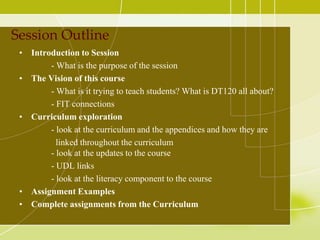
Session Outline
 • Introduction to Session
        - What is the purpose of the session
 • The Vision of this course
        - What is it trying to teach students? What is DT120 all about?
        - FIT connections
 • Curriculum exploration
        - look at the curriculum and the appendices and how they are
          linked throughout the curriculum
        - look at the updates to the course
        - UDL links
        - look at the literacy component to the course
 • Assignment Examples
 • Complete assignments from the Curriculum
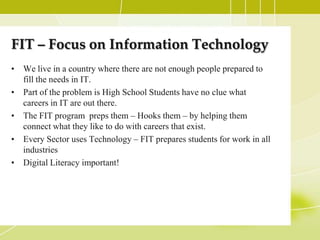
FIT – Focus on Information Technology
• We live in a country where there are not enough people prepared to
  fill the needs in IT.
• Part of the problem is High School Students have no clue what
  careers in IT are out there.
• The FIT program preps them – Hooks them – by helping them
  connect what they like to do with careers that exist.
• Every Sector uses Technology – FIT prepares students for work in all
  industries
• Digital Literacy important!
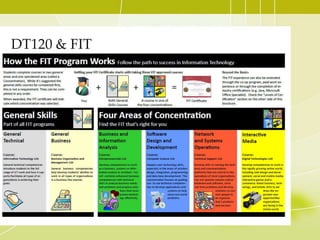
DT120 & FIT
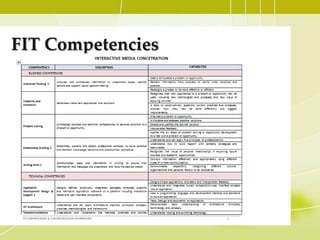
FIT Competencies
The Vision For This Course
• What is it trying to teach students?
• What is DT120 all about?
What is Digital Tech?
• Digital Technologies 120 gives students hands on
  experience with modern multimedia
  technologies. It will introduce them to issues
  such as copyright, design, communication and
  production. Areas studied include: digital audio
  and video, digital image production and
  manipulation, and website design.
The Outcomes
• G.C.O. 1.0 Demonstrate an awareness of the
  ethical and copyright implications of media
  creation.

• G.C.O. 2.0 Explore principles of effective design
  and communication.
• G.C.O. 3 Design and create media products in a
  variety of formats.
GCO1


          opyright & Digital Tech 120

• Students need to know what copyright is and how it
  applies to them in the context of this course. Often taught
  in the context of what type products they are producing.

•   Basic understanding of Canadian copyright law
•   Fair Dealing
•   Public Domain
•   Creative Commons licensing
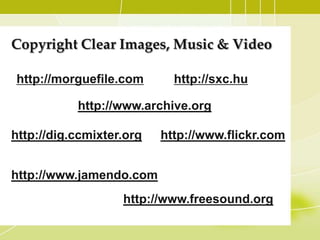
Copyright Clear Images, Music & Video

http://morguefile.com        http://sxc.hu

            http://www.archive.org/

http://dig.ccmixter.org/   http://www.flickr.com


http://www.jamendo.com
                    http://www.freesound.org/
Example of Student Copyright Free Work
• Open File Titled:
  “Student_Example_Copyright.wmv”
  from the Example Folder.
GCO2


Design & Communication
• Its just as much about the process as it is about
  the product
• Evidence of planning
• Understanding the Target Audience
• Done in the Context of 4 Areas of Study
Suggested Units of Study in DT120
• Digital Imaging

• Web Design

• Digital Audio

• Digital Video Production
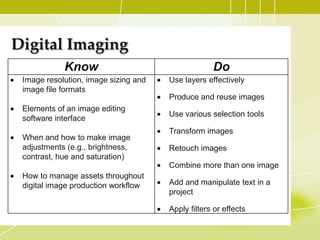
Digital Imaging
            Know                                   Do
 Image resolution, image sizing and   Use layers effectively
 image file formats
                                      Produce and reuse images
 Elements of an image editing
                                      Use various selection tools
 software interface
                                      Transform images
 When and how to make image
 adjustments (e.g., brightness,       Retouch images
 contrast, hue and saturation)
                                      Combine more than one image
 How to manage assets throughout
 digital image production workflow    Add and manipulate text in a
                                      project

                                      Apply filters or effects
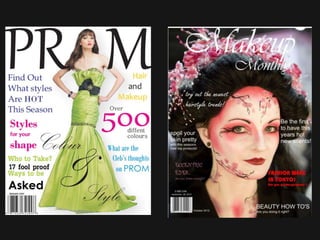
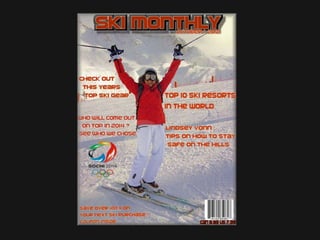
Sample Project - Magazine Cover
• Through this activity you will have an
  opportunity to practice using text
  layers. You will create a magazine
  cover that has several layers of text
  with different font styles, colors and
  sizes.
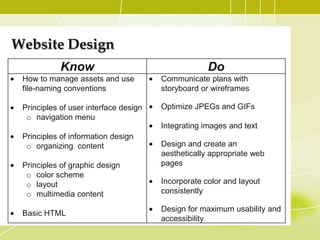
Website Design
            Know                                    Do
 How to manage assets and use          Communicate plans with
 file-naming conventions               storyboard or wireframes

 Principles of user interface design   Optimize JPEGs and GIFs
  o navigation menu
                                       Integrating images and text
 Principles of information design
  o organizing content                 Design and create an
                                       aesthetically appropriate web
 Principles of graphic design          pages
  o color scheme
  o layout                             Incorporate color and layout
  o multimedia content                 consistently

                                       Design for maximum usability and
 Basic HTML
                                       accessibility
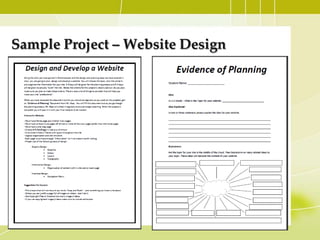
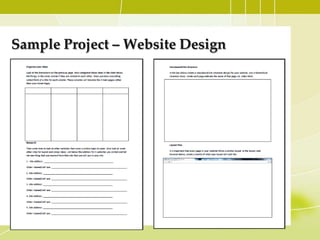
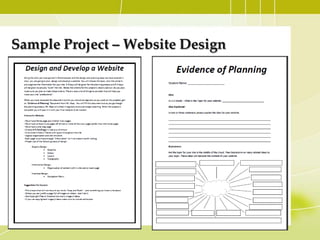
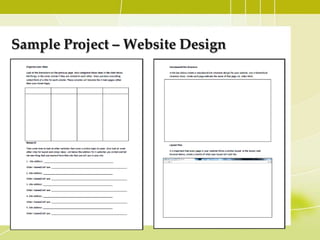
Sample Project – Website Design
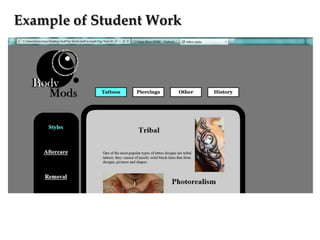
Example of Student Work
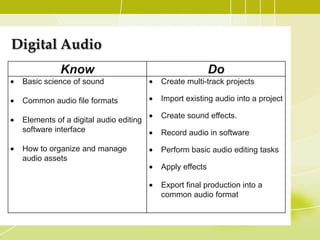
Digital Audio
            Know                                       Do
 Basic science of sound                Create multi-track projects

 Common audio file formats             Import existing audio into a project

                                       Create sound effects.
 Elements of a digital audio editing
 software interface                    Record audio in software

 How to organize and manage            Perform basic audio editing tasks
 audio assets
                                       Apply effects

                                       Export final production into a
                                       common audio format
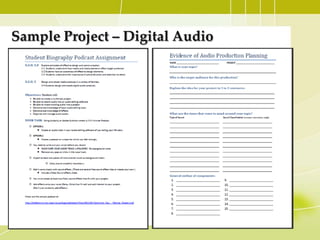
Sample Project – Digital Audio
Sample Student Work
• Open File Titled:
  “Student_Example_Digital_Audio.mp3”
  from the Example Folder.
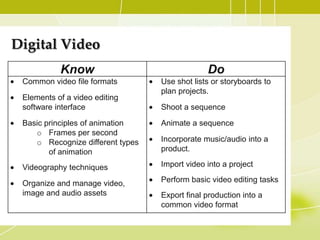
Digital Video
           Know                                Do
 Common video file formats        Use shot lists or storyboards to
                                  plan projects.
 Elements of a video editing
 software interface               Shoot a sequence

 Basic principles of animation    Animate a sequence
    o Frames per second
    o Recognize different types   Incorporate music/audio into a
        of animation              product.

 Videography techniques           Import video into a project

 Organize and manage video,       Perform basic video editing tasks
 image and audio assets           Export final production into a
                                  common video format
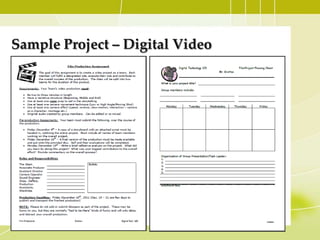
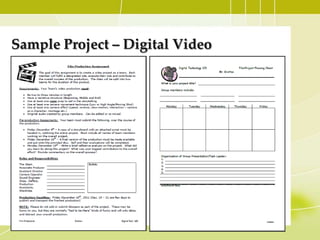
Sample Project – Digital Video
Sample Student Work
• Open & Watch the Video Titled :
  “Student_Example_Digital_Video.wmv”
Open Source/Cheap Solutions
• The Curriculum is being designed with not specific
  software in mind. This is so limitations due to financial
  restraints will not hamper the ability of a school to deliver
  this course.

   – Audacity (Digital Audio)
   – Gimp (Digital Images)
   – Windows Movie Maker Live (Though not “free” does
     come with most Windows based systems)
   – Wordpress/Blogger/N-vu (Web Design)
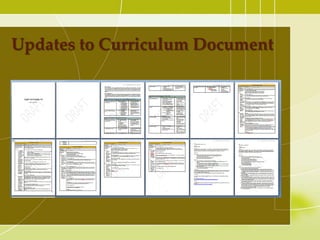
Updates to Curriculum Document
Literacy is an important component
• We the traditional literacy skills are key as are the digital literacy
   skills.
• To cultivate literacy skills, students of digital technologies will
   demonstrate:
1. proper evidence of planning through the use of
    1. graphic organizers,
    2. planning sheets,
    3. peer editing and brainstorming sessions.
2. Students will also be involved in creating scripts for both Audio and
    Visual units.
3. Student reflection on the process of a project as well as the goals
    and outcomes.
Keys to language arts and literacy
reading and viewing
• Reviewing materials to assist in the creation of products and when
   appraising technology media.

Writing and representing
• through the creation of written and visual products such as
  storyboards, scripts for short films and other technology platforms.

Speaking and Listening
• Students will apply their oral language skills through classroom
   interactions and presentations to peers.
Sample Project – Website Design
Sample Project – Digital Video
UDL – Universal Design for Learning
• Is a “framework for guiding educational practice that provides
  flexibility in the ways information is presented, in the ways students
  respond or demonstrate knowledge and skills, and in the ways
  students are engaged. It also “...reduces barriers in instruction,
  provides appropriate accommodations, supports, and challenges, and
  maintains high achievement expectations for all students, including
  students with disabilities and students who are limited English
  proficient.” (CAST 2011).

• Important principles planning and assessing:
   – Multiple means of representation: provide diverse learners
     options for acquiring information and knowledge
   – Multiple means of action and expression: provide learners
     options for demonstrating what they know
   – Multiple means of engagement: tap into learners' interests, offer
     appropriate challenges, and increase motivation
Sample UDL
• For universal strategies for different learning styles- provide
  generic pieces of the assignment and give students the option to use
  these pieces.

Soundscape UDL
• For universal strategies for different learning styles provide
   different tracks for a soundscape. Import the tracks into your audio
   editor and have the students focus on practicing the skills involved
   with editing of the tracks. (mix tracks, clip, mute) (Appendix I)
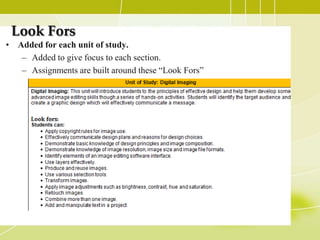
Look Fors
• Added for each unit of study.
   – Added to give focus to each section.
   – Assignments are built around these “Look Fors”
Assessment and Evaluation
• Use checklists and rubrics as a teaching strategy by developing each
  assessment tool collaboratively with the students.

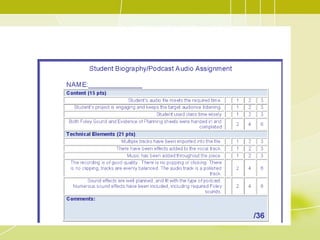
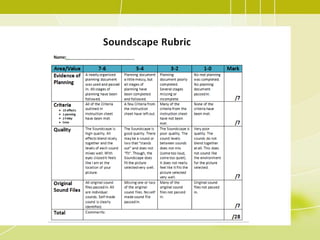
• Sample rubrics are included

• These rubrics are intended as a starting point. Suggested to build
  them together with classes.

• Because student achievement level may vary from class to class this
  provides an application of UDL by heightening the engagement of
  the students by communicating the standards of major projects and
  assignments.
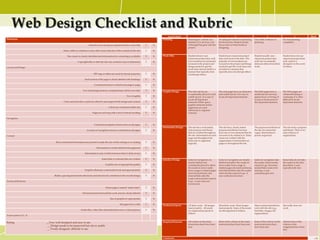
Web Design Checklist and Rubric
                                                                                                                                         Area/Value0                      4                               3                                  2                          1               Mark
Homepage                                                                                                                             Planning             Planning for website was        An adequate amount of planning       Very little evidence of       No real planning
                                                                                                                                                          detailed. It is obvious a lot   has been done. Student clearly       planning.                     completed.
                                                                 Attractive, has strong eye appeal and has a clear title.    Y   N                        of thought has gone into the    has an idea of what he/she is
                                                                                                                                                          project.                        designing.
                                       Index, table of contents or some other clear indicator of the contents of the site.   Y   N

                                           Site creator is clearly identified and information for contacting is available.   Y   N   Work Ethic           Student always uses             Student uses classroom project       Student usually uses          Student does not use
                                                                                                                                                          classroom project time well.    time well most of the time. The      classroom project time        classroom project time
                                                      Copyright date or date the site was created is easy to determine.      Y   N                        Conversations are primarily     majority of conversations are        well, but occasionally        well, and/or is
                                                                                                                                                          focused on the project and      focused on the project and things    distracts others from their   disruptive to the work
Layout and Design                                                                                                                                         things needed to get the        needed to get the work done and      work.                         of others.
                                                                                                                                                          work done and are held in a     are held in a manner that
                                                                                                                                                          manner that typically does      typically does not disrupt others.
                                                                       DIV tags or tables are used for layout purposes.      Y   N                        not disrupt others.

                                                              Each section of the page is clearly labeled with headings.     Y   N

                                                                       Consistent format is evident from page to page.       Y   N

                                                            Text and background are complimentary and do not clash.          Y   N   Graphic Design       The web site has an             The web pages have an attractive     The Web pages have a          The Web pages are
                                                                                                                                                          exceptionally attractive and    and usable layout. It is easy to     usable layout, but may        cluttered looking or
                                                                                                          Text is legible.   Y   N                        usable layout. It is easy to    locate all important elements.       appear busy or boring. It     confusing. It is often
                                                                                                                                                          locate all important                                                 is easy to locate most of     difficult to locate
                                       Color and fonts (face, style) are effective and support both design and content.      Y   N                        elements. White space,                                               the important elements.       important elements.
                                                                                                                                                          graphic elements and/or
                                                                                       Colors are consistent within site.    Y   N                        alignment are used
                                                                                                                                                          effectively to organize
                                                                      Pages are not long with a lot of vertical scrolling.   Y   N                        material.

Navigation

                                                                       Consistent navigation menu exists on all pages.       Y   N
                                                                                                                                     Information Design   The site has a well-stated,     The site has a clearly stated        The purpose and theme of      The site lacks a purpose
                                                                Location of navigation menu is consistent on all pages.      Y   N                        clear purpose and theme         purpose and theme, but may           the site are somewhat         and theme. There is no
                                                                                                                                                          that are evident throughout     have one or two elements that do     vague. Information is         real evidence of
Content                                                                                                                                                   the site. Information on each   not seem to be related to it. Some   poorly organized.             organization.
                                                                                                                                                          page and throughout the         issues are evident with the
                                                                                                                                                          entire site is organized        organization of information on
                               Rich content and information are present to make the site worth visiting or re-visiting.      Y   N                        logically.                      pages or throughout the site.
                                                                          Information is clearly labeled and organized.      Y   N

                                                              Information is easy to find (not more than 3 clicks away).     Y   N

                                                                                Some links to external sites are evident.    Y   N   Interface Design     Links for navigation are        Links for navigation are clearly     Links for navigation take     Some links do not take
                                                                                                                                                          clearly labeled and             labeled and allow the reader to      the reader where he/she       the reader to the sites
                                                                                    Graphics are of appropriate quality.     Y   N                        consistently placed to allow    move easily from a page to           expects to go, but some       described. A user
                                                                                                                                                          the reader to move easily       related pages (forward and back),    needed links seem to be       typically feels lost.
                                                             Graphics illustrate content effectively and appropriately.      Y   N                        from a page to related pages    and internal links take the reader   missing. A user
                                                                                                                                                          (forward and back), and         where he/she expects to go. A        sometimes gets lost.
                              Bullets, spacing and indents effectively and attractively contribute to the overall design.    Y   N                        internal links take the         user rarely becomes lost.
                                                                                                                                                          reader where he/she expects
Technical Elements                                                                                                                                        to go. A user does not
                                                                                                                                                          become lost.
                                                                                    Home page is named “index.html”.         Y   N

                                                           All internal and external links work and are clearly labeled.     Y   N

                                                                                         Size of graphics is appropriate.    Y   N

                                                                                                   All pages have a title.   Y   N   Technical Aspects    All links work. All images      Most links work. Most images         Many technical problems       Site really does not
                                                                                                                                                          load properly. All assets       load properly. Some of the assets    exist with the site (e.g.,    work.
                                                         Audio files, video files and animations serve a clear purpose.      Y   N                        are organized properly in       are disorganized in folders.         bad links, images, file
                                                                                                                                                          folders.                                                             organization).
Total number of Y, N


Rating                 __Very well designed and easy to use                                                                          Required Elements    All criteria on the main        Most of the criteria on the main     Some of the criteria on the   Almost none of the
                                                                                                                                                          instruction sheet have been     instruction sheet have been met.     main instruction sheet        criteria on the
                        __ Design needs to be improved but site is usable                                                                                 met.                                                                 have been met.                assignment have been
                        __ Poorly designed, difficult to use                                                                                                                                                                                                 met.


                                                                                                                                     Comments:                                                                                                                                            / 70
Hands on Activities
• HTML intro Activity

• Soundscape Assignment

• Video Editing Assignment

• Optional additional assignment
  – Magazine Assignment

Digital technologies 120 course overview

  • 1.
    Digital Technologies 120 Modernskills for a modern world
  • 2.
    Session Outline •Introduction to Session - What is the purpose of the session • The Vision of this course - What is it trying to teach students? What is DT120 all about? - FIT connections • Curriculum exploration - look at the curriculum and the appendices and how they are linked throughout the curriculum - look at the updates to the course - UDL links - look at the literacy component to the course • Assignment Examples • Complete assignments from the Curriculum
  • 3.
    FIT – Focuson Information Technology • We live in a country where there are not enough people prepared to fill the needs in IT. • Part of the problem is High School Students have no clue what careers in IT are out there. • The FIT program preps them – Hooks them – by helping them connect what they like to do with careers that exist. • Every Sector uses Technology – FIT prepares students for work in all industries • Digital Literacy important!
  • 4.
  • 6.
  • 7.
    The Vision ForThis Course • What is it trying to teach students? • What is DT120 all about?
  • 8.
    What is DigitalTech? • Digital Technologies 120 gives students hands on experience with modern multimedia technologies. It will introduce them to issues such as copyright, design, communication and production. Areas studied include: digital audio and video, digital image production and manipulation, and website design.
  • 9.
    The Outcomes • G.C.O.1.0 Demonstrate an awareness of the ethical and copyright implications of media creation. • G.C.O. 2.0 Explore principles of effective design and communication. • G.C.O. 3 Design and create media products in a variety of formats.
  • 10.
    GCO1 opyright & Digital Tech 120 • Students need to know what copyright is and how it applies to them in the context of this course. Often taught in the context of what type products they are producing. • Basic understanding of Canadian copyright law • Fair Dealing • Public Domain • Creative Commons licensing
  • 11.
    Copyright Clear Images,Music & Video http://morguefile.com http://sxc.hu http://www.archive.org/ http://dig.ccmixter.org/ http://www.flickr.com http://www.jamendo.com http://www.freesound.org/
  • 12.
    Example of StudentCopyright Free Work • Open File Titled: “Student_Example_Copyright.wmv” from the Example Folder.
  • 13.
    GCO2 Design & Communication •Its just as much about the process as it is about the product • Evidence of planning • Understanding the Target Audience • Done in the Context of 4 Areas of Study
  • 14.
    Suggested Units ofStudy in DT120 • Digital Imaging • Web Design • Digital Audio • Digital Video Production
  • 15.
    Digital Imaging Know Do Image resolution, image sizing and Use layers effectively image file formats Produce and reuse images Elements of an image editing Use various selection tools software interface Transform images When and how to make image adjustments (e.g., brightness, Retouch images contrast, hue and saturation) Combine more than one image How to manage assets throughout digital image production workflow Add and manipulate text in a project Apply filters or effects
  • 16.
    Sample Project -Magazine Cover • Through this activity you will have an opportunity to practice using text layers. You will create a magazine cover that has several layers of text with different font styles, colors and sizes.
  • 17.
    Website Design Know Do How to manage assets and use Communicate plans with file-naming conventions storyboard or wireframes Principles of user interface design Optimize JPEGs and GIFs o navigation menu Integrating images and text Principles of information design o organizing content Design and create an aesthetically appropriate web Principles of graphic design pages o color scheme o layout Incorporate color and layout o multimedia content consistently Design for maximum usability and Basic HTML accessibility
  • 20.
    Sample Project –Website Design
  • 21.
    Sample Project –Website Design
  • 22.
  • 23.
    Digital Audio Know Do Basic science of sound Create multi-track projects Common audio file formats Import existing audio into a project Create sound effects. Elements of a digital audio editing software interface Record audio in software How to organize and manage Perform basic audio editing tasks audio assets Apply effects Export final production into a common audio format
  • 24.
    Sample Project –Digital Audio
  • 25.
    Sample Student Work •Open File Titled: “Student_Example_Digital_Audio.mp3” from the Example Folder.
  • 26.
    Digital Video Know Do Common video file formats Use shot lists or storyboards to plan projects. Elements of a video editing software interface Shoot a sequence Basic principles of animation Animate a sequence o Frames per second o Recognize different types Incorporate music/audio into a of animation product. Videography techniques Import video into a project Organize and manage video, Perform basic video editing tasks image and audio assets Export final production into a common video format
  • 27.
    Sample Project –Digital Video
  • 28.
    Sample Student Work •Open & Watch the Video Titled : “Student_Example_Digital_Video.wmv”
  • 29.
    Open Source/Cheap Solutions •The Curriculum is being designed with not specific software in mind. This is so limitations due to financial restraints will not hamper the ability of a school to deliver this course. – Audacity (Digital Audio) – Gimp (Digital Images) – Windows Movie Maker Live (Though not “free” does come with most Windows based systems) – Wordpress/Blogger/N-vu (Web Design)
  • 30.
  • 31.
    Literacy is animportant component • We the traditional literacy skills are key as are the digital literacy skills. • To cultivate literacy skills, students of digital technologies will demonstrate: 1. proper evidence of planning through the use of 1. graphic organizers, 2. planning sheets, 3. peer editing and brainstorming sessions. 2. Students will also be involved in creating scripts for both Audio and Visual units. 3. Student reflection on the process of a project as well as the goals and outcomes.
  • 32.
    Keys to languagearts and literacy reading and viewing • Reviewing materials to assist in the creation of products and when appraising technology media. Writing and representing • through the creation of written and visual products such as storyboards, scripts for short films and other technology platforms. Speaking and Listening • Students will apply their oral language skills through classroom interactions and presentations to peers.
  • 33.
    Sample Project –Website Design
  • 34.
    Sample Project –Website Design
  • 35.
    Sample Project –Digital Video
  • 36.
    UDL – UniversalDesign for Learning • Is a “framework for guiding educational practice that provides flexibility in the ways information is presented, in the ways students respond or demonstrate knowledge and skills, and in the ways students are engaged. It also “...reduces barriers in instruction, provides appropriate accommodations, supports, and challenges, and maintains high achievement expectations for all students, including students with disabilities and students who are limited English proficient.” (CAST 2011). • Important principles planning and assessing: – Multiple means of representation: provide diverse learners options for acquiring information and knowledge – Multiple means of action and expression: provide learners options for demonstrating what they know – Multiple means of engagement: tap into learners' interests, offer appropriate challenges, and increase motivation
  • 37.
    Sample UDL • Foruniversal strategies for different learning styles- provide generic pieces of the assignment and give students the option to use these pieces. Soundscape UDL • For universal strategies for different learning styles provide different tracks for a soundscape. Import the tracks into your audio editor and have the students focus on practicing the skills involved with editing of the tracks. (mix tracks, clip, mute) (Appendix I)
  • 38.
    Look Fors • Addedfor each unit of study. – Added to give focus to each section. – Assignments are built around these “Look Fors”
  • 39.
    Assessment and Evaluation •Use checklists and rubrics as a teaching strategy by developing each assessment tool collaboratively with the students. • Sample rubrics are included • These rubrics are intended as a starting point. Suggested to build them together with classes. • Because student achievement level may vary from class to class this provides an application of UDL by heightening the engagement of the students by communicating the standards of major projects and assignments.
  • 40.
    Web Design Checklistand Rubric Area/Value0 4 3 2 1 Mark Homepage Planning Planning for website was An adequate amount of planning Very little evidence of No real planning detailed. It is obvious a lot has been done. Student clearly planning. completed. Attractive, has strong eye appeal and has a clear title. Y N of thought has gone into the has an idea of what he/she is project. designing. Index, table of contents or some other clear indicator of the contents of the site. Y N Site creator is clearly identified and information for contacting is available. Y N Work Ethic Student always uses Student uses classroom project Student usually uses Student does not use classroom project time well. time well most of the time. The classroom project time classroom project time Copyright date or date the site was created is easy to determine. Y N Conversations are primarily majority of conversations are well, but occasionally well, and/or is focused on the project and focused on the project and things distracts others from their disruptive to the work Layout and Design things needed to get the needed to get the work done and work. of others. work done and are held in a are held in a manner that manner that typically does typically does not disrupt others. DIV tags or tables are used for layout purposes. Y N not disrupt others. Each section of the page is clearly labeled with headings. Y N Consistent format is evident from page to page. Y N Text and background are complimentary and do not clash. Y N Graphic Design The web site has an The web pages have an attractive The Web pages have a The Web pages are exceptionally attractive and and usable layout. It is easy to usable layout, but may cluttered looking or Text is legible. Y N usable layout. It is easy to locate all important elements. appear busy or boring. It confusing. It is often locate all important is easy to locate most of difficult to locate Color and fonts (face, style) are effective and support both design and content. Y N elements. White space, the important elements. important elements. graphic elements and/or Colors are consistent within site. Y N alignment are used effectively to organize Pages are not long with a lot of vertical scrolling. Y N material. Navigation Consistent navigation menu exists on all pages. Y N Information Design The site has a well-stated, The site has a clearly stated The purpose and theme of The site lacks a purpose Location of navigation menu is consistent on all pages. Y N clear purpose and theme purpose and theme, but may the site are somewhat and theme. There is no that are evident throughout have one or two elements that do vague. Information is real evidence of Content the site. Information on each not seem to be related to it. Some poorly organized. organization. page and throughout the issues are evident with the entire site is organized organization of information on Rich content and information are present to make the site worth visiting or re-visiting. Y N logically. pages or throughout the site. Information is clearly labeled and organized. Y N Information is easy to find (not more than 3 clicks away). Y N Some links to external sites are evident. Y N Interface Design Links for navigation are Links for navigation are clearly Links for navigation take Some links do not take clearly labeled and labeled and allow the reader to the reader where he/she the reader to the sites Graphics are of appropriate quality. Y N consistently placed to allow move easily from a page to expects to go, but some described. A user the reader to move easily related pages (forward and back), needed links seem to be typically feels lost. Graphics illustrate content effectively and appropriately. Y N from a page to related pages and internal links take the reader missing. A user (forward and back), and where he/she expects to go. A sometimes gets lost. Bullets, spacing and indents effectively and attractively contribute to the overall design. Y N internal links take the user rarely becomes lost. reader where he/she expects Technical Elements to go. A user does not become lost. Home page is named “index.html”. Y N All internal and external links work and are clearly labeled. Y N Size of graphics is appropriate. Y N All pages have a title. Y N Technical Aspects All links work. All images Most links work. Most images Many technical problems Site really does not load properly. All assets load properly. Some of the assets exist with the site (e.g., work. Audio files, video files and animations serve a clear purpose. Y N are organized properly in are disorganized in folders. bad links, images, file folders. organization). Total number of Y, N Rating __Very well designed and easy to use Required Elements All criteria on the main Most of the criteria on the main Some of the criteria on the Almost none of the instruction sheet have been instruction sheet have been met. main instruction sheet criteria on the __ Design needs to be improved but site is usable met. have been met. assignment have been __ Poorly designed, difficult to use met. Comments: / 70
  • 43.
    Hands on Activities •HTML intro Activity • Soundscape Assignment • Video Editing Assignment • Optional additional assignment – Magazine Assignment

Editor's Notes

  • #17 Key points covered in this assignment:Font styles and SizesColorsLayers