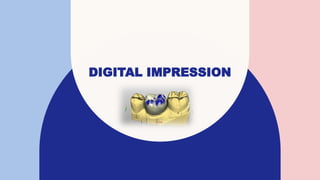
DIGITAL IMPRESSION
INTRODUCTION
• Computer-aided design and computer-aided manufacturing (CAD/CAM)
have been employed in the fabrication of restorations, especially ceramic
crowns and fixed dental prostheses (FDPs), since the 1980s
• CEREC was the first commercially available digital impression system.
2
IT IS POSSIBLE TO SCAN A PATIENT’S
ORAL CAVITY, DESIGN AND CREATE
RESTORATION AND FINALLY BOND IT
IN THE PATIENT’S MOUTH IN THE
COURSE OF ONE DAY.
Click to add picture
ADVANTAGES OF DIGITAL IMPRESSIONS:
1. Easy to correct, manipulate, or recapture images.
2. No use of impression material and no need for trays and gypsum.
3. Do not need to disinfect before sending information to the laboratory
4. Real-time visualization and evaluation
5. Saving time and increasing patient satisfaction (e.g. gag reflex).
4
DISADVANTAGES OF DIGITAL IMPRESSIONS:
1. Initial cost of equipment and software maintenance fees
2. Cannot capture subgingival margins if obscured with blood, saliva, or
tissue.
3. Unable to accurately capture images of the edentulous arches
4. Scanning patterns need to be followed as per manufacturer’s
recommendations
5. Learning curve can be difficult for some individuals
5
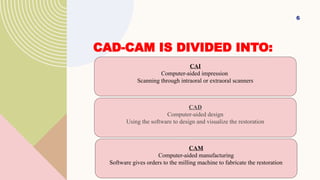
CAD-CAM IS DIVIDED INTO:
6
CAI
Computer-aided impression
Scanning through intraoral or extraoral scanners
CAD
Computer-aided design
Using the software to design and visualize the restoration
CAM
Computer-aided manufacturing
Software gives orders to the milling machine to fabricate the restoration
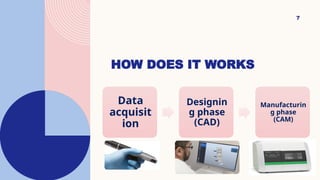
HOW DOES IT WORKS
7
Data
acquisit
ion
Designin
g phase
(CAD)
Manufacturin
g phase
(CAM)
• Gathering the information or data from the prepared teeth and the adjacent
structures using a scanner and then converted into optical impressions.
• A scanner is a technological device that uses light and special sensors to obtain
digitalized images of any object. It could be either:
• Intraoral that scans the preparation inside the patient’s mouth.
• Extraoral that scans a gypsum cast (3D model).
DATA ACQUISITION:
Fasbinder DJ. Digital dentistry: innovation for restorative treatment. Compend Contin Educ Dent 2010;31(4):2–11.
INTRAORAL SCANNING
• Higher cost (machines)
• Easier in use
• Can scan intra orally or extra orally
• Slower in full arch
• Cant scan big objects as articulator
EXTRAORAL SCANNING
• Less expensive
• Needs impression and ditching for the cast in case of preparation
• Only work extra orally
• Faster in full arch and articulator scanning also in scanning
impression
1- Chair side 2-
Laboratory
system
chairside
CAD/CAM full
system
Chairside scanners/lab milling
(Integrated chairside laboratory system)
• has its own scanner
and milling units
• Example cerec
• has only a scanner without designing
capabilities
• must be connected to an open
laboratory scanner for designing of
the restoration.
• Example; Carestream CS 3500
General classification of CAD/CAM systems
Abdullah A.O, Muhammed F.K, Zheng B, Liu Y. An Overview of Computer Aided Design/Computer Aided Manufacturing
(CAD/CAM) in Restorative Dentistry. J Dent Mater Tech 2018; 7(1): 1-10.
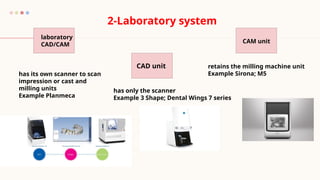
laboratory
CAD/CAM
CAD unit
CAM unit
2-Laboratory system
has its own scanner to scan
impression or cast and
milling units
Example Planmeca
has only the scanner
Example 3 Shape; Dental Wings 7 series
retains the milling machine unit
Example Sirona; M5
Intraor
al
system
s
CEREC
TRIOS
E4D
iTero
Lava
C.O.S
They vary from each other in terms of key features
such as
 Working principle,
 Light source
 The necessity of powder coat spraying,
 Operative process
 And output file format
15
CAD/CAM SYSTEMS AND DATA SHARING:
Open systems
Allow the adoption of the original data by
CAD software and CAM devices from
different companies.
Closed systems
No interchangeability between different
systems from other companies. All
procedures (data acquisition , virtual
design , and restoration fabrication by the
same company).
Miyazaki T, Hotta Y, Kunii J, et al. A review of dental CAD/CAM: current status and future perspectives from 20 years of experience. Dent Mater J
ERRORS DURING
INTRAORAL
SCANNING
16
1. INADEQUATE GUM RETRACTION
ISSUE:
IF THE GUM IS NOT RETRACTED
PROPERLY, THE SCANNER MAY
NOT CAPTURE THE FULL MARGIN,
LEADING TO INACCURACIES.
Use a retraction cord or other methods to
expose the margin clearly before
scanning.
17
2. Moisture and Saliva Interference
MOISTURE, SALIVA, OR BLOOD ON
THE TOOTH SURFACE CAN AFFECT
SCAN QUALITY AND CREATE
DISTORTED IMAGES.
18
keep the area dry by using air or
suction to clear away saliva. some
scanners may also require
powder for better imaging.
3. INCOMPLETE COVERAGE OF THE ARCH
ISSUE: MISSING AREAS, ESPECIALLY ON
HARD-TO-REACH POSTERIOR TEETH, CAN
LEAD TO AN INCOMPLETE
Ensure full coverage by systematically
scanning from different perspectives,
particularly for posterior teeth.
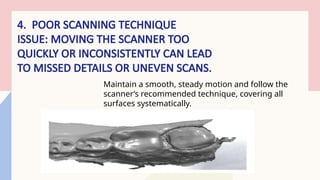
4. POOR SCANNING TECHNIQUE
ISSUE: MOVING THE SCANNER TOO
QUICKLY OR INCONSISTENTLY CAN LEAD
TO MISSED DETAILS OR UNEVEN SCANS.
Maintain a smooth, steady motion and follow the
scanner’s recommended technique, covering all
surfaces systematically.
5. INCORRECT BITE REGISTRATION ISSUE:
MISALIGNMENT OF THE UPPER AND LOWER
ARCHES DURING THE BITE SCAN CAN LEAD TO
OCCLUSAL ERRORS. Ensure the patient is in a natural bite
position and confirm the bite scan
alignment before saving it.

Digital impression.typescand techniquevpptx

  • 1.
  • 2.
    INTRODUCTION • Computer-aided designand computer-aided manufacturing (CAD/CAM) have been employed in the fabrication of restorations, especially ceramic crowns and fixed dental prostheses (FDPs), since the 1980s • CEREC was the first commercially available digital impression system. 2
  • 3.
    IT IS POSSIBLETO SCAN A PATIENT’S ORAL CAVITY, DESIGN AND CREATE RESTORATION AND FINALLY BOND IT IN THE PATIENT’S MOUTH IN THE COURSE OF ONE DAY. Click to add picture
  • 4.
    ADVANTAGES OF DIGITALIMPRESSIONS: 1. Easy to correct, manipulate, or recapture images. 2. No use of impression material and no need for trays and gypsum. 3. Do not need to disinfect before sending information to the laboratory 4. Real-time visualization and evaluation 5. Saving time and increasing patient satisfaction (e.g. gag reflex). 4
  • 5.
    DISADVANTAGES OF DIGITALIMPRESSIONS: 1. Initial cost of equipment and software maintenance fees 2. Cannot capture subgingival margins if obscured with blood, saliva, or tissue. 3. Unable to accurately capture images of the edentulous arches 4. Scanning patterns need to be followed as per manufacturer’s recommendations 5. Learning curve can be difficult for some individuals 5
  • 6.
    CAD-CAM IS DIVIDEDINTO: 6 CAI Computer-aided impression Scanning through intraoral or extraoral scanners CAD Computer-aided design Using the software to design and visualize the restoration CAM Computer-aided manufacturing Software gives orders to the milling machine to fabricate the restoration
  • 7.
    HOW DOES ITWORKS 7 Data acquisit ion Designin g phase (CAD) Manufacturin g phase (CAM)
  • 8.
    • Gathering theinformation or data from the prepared teeth and the adjacent structures using a scanner and then converted into optical impressions. • A scanner is a technological device that uses light and special sensors to obtain digitalized images of any object. It could be either: • Intraoral that scans the preparation inside the patient’s mouth. • Extraoral that scans a gypsum cast (3D model). DATA ACQUISITION: Fasbinder DJ. Digital dentistry: innovation for restorative treatment. Compend Contin Educ Dent 2010;31(4):2–11.
  • 9.
    INTRAORAL SCANNING • Highercost (machines) • Easier in use • Can scan intra orally or extra orally • Slower in full arch • Cant scan big objects as articulator
  • 10.
    EXTRAORAL SCANNING • Lessexpensive • Needs impression and ditching for the cast in case of preparation • Only work extra orally • Faster in full arch and articulator scanning also in scanning impression
  • 11.
    1- Chair side2- Laboratory system chairside CAD/CAM full system Chairside scanners/lab milling (Integrated chairside laboratory system) • has its own scanner and milling units • Example cerec • has only a scanner without designing capabilities • must be connected to an open laboratory scanner for designing of the restoration. • Example; Carestream CS 3500 General classification of CAD/CAM systems Abdullah A.O, Muhammed F.K, Zheng B, Liu Y. An Overview of Computer Aided Design/Computer Aided Manufacturing (CAD/CAM) in Restorative Dentistry. J Dent Mater Tech 2018; 7(1): 1-10.
  • 12.
    laboratory CAD/CAM CAD unit CAM unit 2-Laboratorysystem has its own scanner to scan impression or cast and milling units Example Planmeca has only the scanner Example 3 Shape; Dental Wings 7 series retains the milling machine unit Example Sirona; M5
  • 13.
  • 14.
    They vary fromeach other in terms of key features such as  Working principle,  Light source  The necessity of powder coat spraying,  Operative process  And output file format
  • 15.
    15 CAD/CAM SYSTEMS ANDDATA SHARING: Open systems Allow the adoption of the original data by CAD software and CAM devices from different companies. Closed systems No interchangeability between different systems from other companies. All procedures (data acquisition , virtual design , and restoration fabrication by the same company). Miyazaki T, Hotta Y, Kunii J, et al. A review of dental CAD/CAM: current status and future perspectives from 20 years of experience. Dent Mater J
  • 16.
  • 17.
    1. INADEQUATE GUMRETRACTION ISSUE: IF THE GUM IS NOT RETRACTED PROPERLY, THE SCANNER MAY NOT CAPTURE THE FULL MARGIN, LEADING TO INACCURACIES. Use a retraction cord or other methods to expose the margin clearly before scanning. 17
  • 18.
    2. Moisture andSaliva Interference MOISTURE, SALIVA, OR BLOOD ON THE TOOTH SURFACE CAN AFFECT SCAN QUALITY AND CREATE DISTORTED IMAGES. 18 keep the area dry by using air or suction to clear away saliva. some scanners may also require powder for better imaging.
  • 19.
    3. INCOMPLETE COVERAGEOF THE ARCH ISSUE: MISSING AREAS, ESPECIALLY ON HARD-TO-REACH POSTERIOR TEETH, CAN LEAD TO AN INCOMPLETE Ensure full coverage by systematically scanning from different perspectives, particularly for posterior teeth.
  • 20.
    4. POOR SCANNINGTECHNIQUE ISSUE: MOVING THE SCANNER TOO QUICKLY OR INCONSISTENTLY CAN LEAD TO MISSED DETAILS OR UNEVEN SCANS. Maintain a smooth, steady motion and follow the scanner’s recommended technique, covering all surfaces systematically.
  • 21.
    5. INCORRECT BITEREGISTRATION ISSUE: MISALIGNMENT OF THE UPPER AND LOWER ARCHES DURING THE BITE SCAN CAN LEAD TO OCCLUSAL ERRORS. Ensure the patient is in a natural bite position and confirm the bite scan alignment before saving it.