Digital Education
Revolution – NSW


 Coffs Harbour High School
Welcome
 Welcome   to the parent information
  session introducing the DER program at
  Coffs Harbour High.
 Tonight we will cover the following
  topics:
     Program background.
     The laptops.
     Usage in the classroom.
     Program requirements.
     Support arrangements.
DER – NSW. What is it?
   The Digital Education Revolution is the
    fulfilment of an election promise made by Kevin
    Rudd in the lead up to the last federal election
    to provide all students from years 9 to 12 with
    access to a computer.
   A federally funded initiative implemented by
    relevant state authorities (i.e. DET-NSW)
   Laptops rolled out each year to students in
    year 9, starting in 2009
   Laptops also rolled out to staff.
   Includes major infrastructure upgrades,
    teacher training and support networks.
DER NSW – Coffs Harbour
   Laptops have arrived and have been commissioned

   Rollout to students will occur on Thursday 1st March
    2012

   Students away will be caught up over the next couple
    of days

   Process is fairly well established, so few problems
    expected.

   TSO Introduction – Scott Heterick / Daniel Darwin
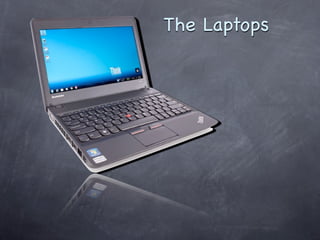
The Laptops
Laptops - Hardware

 ThinkPad X130E - Journey
 Latest Generation Intel Processor
 4GB RAM
 320GB hard drive
 HDMI port
 Card Reader
Laptops - Software
 Microsoft  Windows 7
 Microsoft Office Productivity Suite
 Adobe CS5 Suite (Web Premium)
 Filtered internet
      No Facebook, Youtube, or Twitter
      These aren't considered software for
       learning
 Much more! See https://www.det.nsw.edu.au/blog/9881-
  digitaleducationrevolutionnsw/entry/dernsw_2012_device_update
Laptops – Supporting
             Infrastructure

 Wireless access points (WAP’s) installed
  throughout the school
    All learning spaces have access

    Based on wireless N. Secure, reliable and fast!

 Backup is the students responsibility
    MyLocker available. Must be synchronised
     regularly.
    Otherwise use a USB key or external drive.
Laptops – Care and Safety
   Wetsuit based cover - also laptop has a much more
    rugged body
       Offers good protection
       Won’t stand up to mistreatment
       Laptops must be ‘shutdown’ before being placed inside.
   Anti-theft technology
       Laptop can be disabled remotely if lost or stolen.
   Safe usage at home
      E.g. Don’t sit laptop on a pillow.
   Bring to school fully charged.
   Easily fits in a student’s bag.
   Must be brought to school fully charged.
      Make charging part of your routine.
   Guides for safe usage are available. See the TSO.
In the Classroom
   Provide unprecedented opportunity for
    collaboration.
       Not just within a class group. Perhaps regional,
        national or even international collaboration is
        possible.

   Policies in place for appropriate use.
       Ergonomics
       Safe surfing & web filtering.

   Teachers have undertaken professional learning
In the Classroom

   Monday 5th March 2012 - Laptop Training Day
        File Management
        Making the most of Office 2010
        Moodle & other Web 2 tools
        OneNote
        Better Searching and Referencing
     
The User Charter


   An agreement between the student, parents/carers and
    the school regarding use and care of the laptop.

   Must be signed by both parents/guardians AND students
    before a laptop can be issued.
User Charter – Discussion /
           Q&A
Laptop Management
   If a laptop is stolen...
       Report to the TSO.
       Complete an incident report.
       Obtain a police report.
       Deliver to the Principal/HT .
       A laptop can be temporarily loaned to the student.
       Stolen laptops will be disabled.
Laptop Management

   If a laptop is lost...
       Report to TSO.
       Complete an incident report.
       Fill out a statutory declaration.
       Report to Principal/HT.
       Temporary loans of spare laptops may be available.
Laptop Management
 If   a laptop isn’t working...
      Report to TSO.
      TSO will diagnose and fix if possible.
      Otherwise will co-ordinate with vendors.
      Malicious or accidental damage is NOT
       covered by warranty.
      Temporary loans of spare laptops may be
       available.
Questions?

Digital education revolution_–_nsw

  • 1.
    Digital Education Revolution –NSW Coffs Harbour High School
  • 2.
    Welcome  Welcome to the parent information session introducing the DER program at Coffs Harbour High.  Tonight we will cover the following topics:  Program background.  The laptops.  Usage in the classroom.  Program requirements.  Support arrangements.
  • 3.
    DER – NSW.What is it?  The Digital Education Revolution is the fulfilment of an election promise made by Kevin Rudd in the lead up to the last federal election to provide all students from years 9 to 12 with access to a computer.  A federally funded initiative implemented by relevant state authorities (i.e. DET-NSW)  Laptops rolled out each year to students in year 9, starting in 2009  Laptops also rolled out to staff.  Includes major infrastructure upgrades, teacher training and support networks.
  • 4.
    DER NSW –Coffs Harbour  Laptops have arrived and have been commissioned  Rollout to students will occur on Thursday 1st March 2012  Students away will be caught up over the next couple of days  Process is fairly well established, so few problems expected.  TSO Introduction – Scott Heterick / Daniel Darwin
  • 5.
  • 6.
    Laptops - Hardware ThinkPad X130E - Journey  Latest Generation Intel Processor  4GB RAM  320GB hard drive  HDMI port  Card Reader
  • 7.
    Laptops - Software Microsoft Windows 7  Microsoft Office Productivity Suite  Adobe CS5 Suite (Web Premium)  Filtered internet  No Facebook, Youtube, or Twitter  These aren't considered software for learning  Much more! See https://www.det.nsw.edu.au/blog/9881- digitaleducationrevolutionnsw/entry/dernsw_2012_device_update
  • 8.
    Laptops – Supporting Infrastructure  Wireless access points (WAP’s) installed throughout the school  All learning spaces have access  Based on wireless N. Secure, reliable and fast!  Backup is the students responsibility  MyLocker available. Must be synchronised regularly.  Otherwise use a USB key or external drive.
  • 9.
    Laptops – Careand Safety  Wetsuit based cover - also laptop has a much more rugged body  Offers good protection  Won’t stand up to mistreatment  Laptops must be ‘shutdown’ before being placed inside.  Anti-theft technology  Laptop can be disabled remotely if lost or stolen.  Safe usage at home  E.g. Don’t sit laptop on a pillow.  Bring to school fully charged.  Easily fits in a student’s bag.  Must be brought to school fully charged.  Make charging part of your routine.  Guides for safe usage are available. See the TSO.
  • 10.
    In the Classroom  Provide unprecedented opportunity for collaboration.  Not just within a class group. Perhaps regional, national or even international collaboration is possible.  Policies in place for appropriate use.  Ergonomics  Safe surfing & web filtering.  Teachers have undertaken professional learning
  • 11.
    In the Classroom  Monday 5th March 2012 - Laptop Training Day  File Management  Making the most of Office 2010  Moodle & other Web 2 tools  OneNote  Better Searching and Referencing 
  • 12.
    The User Charter  An agreement between the student, parents/carers and the school regarding use and care of the laptop.  Must be signed by both parents/guardians AND students before a laptop can be issued.
  • 13.
    User Charter –Discussion / Q&A
  • 14.
    Laptop Management  If a laptop is stolen...  Report to the TSO.  Complete an incident report.  Obtain a police report.  Deliver to the Principal/HT .  A laptop can be temporarily loaned to the student.  Stolen laptops will be disabled.
  • 15.
    Laptop Management  If a laptop is lost...  Report to TSO.  Complete an incident report.  Fill out a statutory declaration.  Report to Principal/HT.  Temporary loans of spare laptops may be available.
  • 16.
    Laptop Management  If a laptop isn’t working...  Report to TSO.  TSO will diagnose and fix if possible.  Otherwise will co-ordinate with vendors.  Malicious or accidental damage is NOT covered by warranty.  Temporary loans of spare laptops may be available.
  • 17.