AZERBAIJAN STATE
OIL AND INDUSTRY UNIVERSITY
SUBJECT: FUNDAMENTALS OF PROGRAMMING
TEACHER: SEVINJ KARIMOVA
COMPUTER SCIENCE
STUDENT: SHAMS RASULZADE
GROUP : 606.20E
 Digital Coding of Images
 WHAT IS A DIGITAL IMAGE ?
• A digital image is an image composed of picture elements, also
known as pixels. Digital imaging is the creation of a
representation of the visual characteristics of an object .
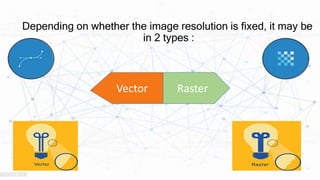
Depending on whether the image resolution is fixed, it may be
in 2 types :
Raster
Vector
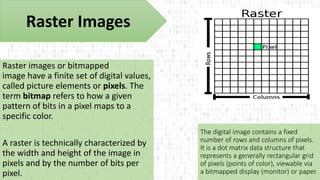
Raster images or bitmapped
image have a finite set of digital values,
called picture elements or pixels. The
term bitmap refers to how a given
pattern of bits in a pixel maps to a
specific color.
A raster is technically characterized by
the width and height of the image in
pixels and by the number of bits per
pixel.
Raster Images
The digital image contains a fixed
number of rows and columns of pixels.
It is a dot matrix data structure that
represents a generally rectangular grid
of pixels (points of color), viewable via
a bitmapped display (monitor) or paper.
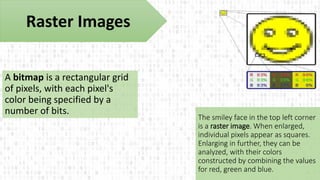
A bitmap is a rectangular grid
of pixels, with each pixel's
color being specified by a
number of bits.
The smiley face in the top left corner
is a raster image. When enlarged,
individual pixels appear as squares.
Enlarging in further, they can be
analyzed, with their colors
constructed by combining the values
for red, green and blue.
Raster Images
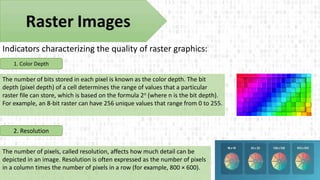
Indicators characterizing the quality of raster graphics:
1. Color Depth
2. Resolution
The number of bits stored in each pixel is known as the color depth. The bit
depth (pixel depth) of a cell determines the range of values that a particular
raster file can store, which is based on the formula 2n (where n is the bit depth).
For example, an 8-bit raster can have 256 unique values that range from 0 to 255.
The number of pixels, called resolution, affects how much detail can be
depicted in an image. Resolution is often expressed as the number of pixels
in a column times the number of pixels in a row (for example, 800 × 600).
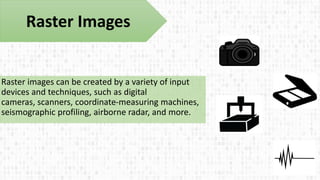
Raster images can be created by a variety of input
devices and techniques, such as digital
cameras, scanners, coordinate-measuring machines,
seismographic profiling, airborne radar, and more.
Raster Images
Vector Images
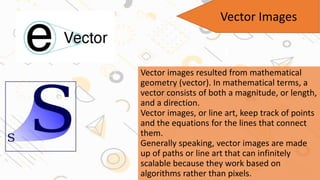
Vector images resulted from mathematical
geometry (vector). In mathematical terms, a
vector consists of both a magnitude, or length,
and a direction.
Vector images, or line art, keep track of points
and the equations for the lines that connect
them.
Generally speaking, vector images are made
up of paths or line art that can infinitely
scalable because they work based on
algorithms rather than pixels.
One of the greatest things about vector images is that
you can re-size them infinitely larger or smaller, and
they will still print out just as clearly, with no increase
(or decrease) in file size. Instead of sectioning off a
large region of computer memory and mapping that to
the display device, vector display devices use a variable
number of lines to create images—hence the term
"vector graphics."
Vector Images
Since vector display devices can define a line by dealing with
just two points, the device can reduce the total amount of
data it must deal with by organizing the image in terms of
pairs of points.
Vector graphics have the unique advantage over raster
graphics in that the points, lines, and curves may
be scaled up or down to any resolution . The points
determine the direction of the vector path; each path may
have various properties including values for stroke color,
shape, curve, thickness, and fill.
Vector Images
Unlike most digital images, vectors can't be
opened with all graphics programs. You'll need a
vector editor like Adobe Illustrator.
Vector graphics can be created in a form using
a pen plotter, a special type of printer.
Vector Images
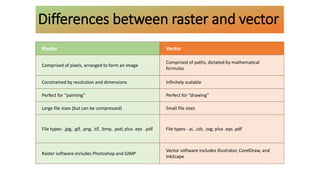
Raster Vector
Comprised of pixels, arranged to form an image
Comprised of paths, dictated by mathematical
formulas
Constrained by resolution and dimensions Infinitely scalable
Perfect for “painting” Perfect for “drawing”
Large file sizes (but can be compressed) Small file sizes
File types- .jpg, .gif, .png, .tif, .bmp, .psd; plus .eps .pdf File types- .ai, .cdr, .svg; plus .eps .pdf
Raster software includes Photoshop and GIMP
Vector software includes Illustrator, CorelDraw, and
InkScape
Differences between raster and vector
Digital images have several basic characteristics.
One is the type of the image. For example, a black
and white image records only the intensity of the
light falling on the pixels. A color image can have
three colors, normally RGB (Red, Green, Blue) or
four colors, CMYK (Cyan, Magenta, Yellow, blacK).
DIGITAL IMAGES
RGB
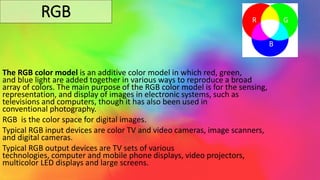
The RGB color model is an additive color model in which red, green,
and blue light are added together in various ways to reproduce a broad
array of colors. The main purpose of the RGB color model is for the sensing,
representation, and display of images in electronic systems, such as
televisions and computers, though it has also been used in
conventional photography.
RGB is the color space for digital images.
Typical RGB input devices are color TV and video cameras, image scanners,
and digital cameras.
Typical RGB output devices are TV sets of various
technologies, computer and mobile phone displays, video projectors,
multicolor LED displays and large screens.
R G
B
CMYK
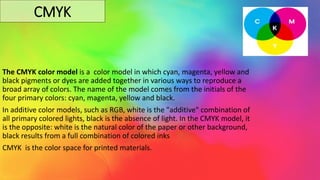
The CMYK color model is a color model in which cyan, magenta, yellow and
black pigments or dyes are added together in various ways to reproduce a
broad array of colors. The name of the model comes from the initials of the
four primary colors: cyan, magenta, yellow and black.
In additive color models, such as RGB, white is the "additive" combination of
all primary colored lights, black is the absence of light. In the CMYK model, it
is the opposite: white is the natural color of the paper or other background,
black results from a full combination of colored inks
CMYK is the color space for printed materials.
● Resources
https://pubmed.ncbi.nlm.nih.gov/3072645/#:~:text=Abstract,duplicate%20of%20the%20original%20picture
https://en.wikipedia.org/wiki/Digital_image
https://en.wikipedia.org/wiki/Raster_graphics
https://en.wikipedia.org/wiki/Vector_graphics
https://www.psprint.com/resources/difference-between-raster-vector/
https://www.encyclopedia.com/computing/news-wires-white-papers-and-books/digital-images
https://99designs.com/blog/tips/correct-file-formats-rgb-and-cmyk/
 Thank you for Attention 

Digital Coding of Images.pptx

  • 1.
    AZERBAIJAN STATE OIL ANDINDUSTRY UNIVERSITY SUBJECT: FUNDAMENTALS OF PROGRAMMING TEACHER: SEVINJ KARIMOVA COMPUTER SCIENCE STUDENT: SHAMS RASULZADE GROUP : 606.20E
  • 2.
  • 3.
     WHAT ISA DIGITAL IMAGE ? • A digital image is an image composed of picture elements, also known as pixels. Digital imaging is the creation of a representation of the visual characteristics of an object .
  • 4.
    Depending on whetherthe image resolution is fixed, it may be in 2 types : Raster Vector
  • 5.
    Raster images orbitmapped image have a finite set of digital values, called picture elements or pixels. The term bitmap refers to how a given pattern of bits in a pixel maps to a specific color. A raster is technically characterized by the width and height of the image in pixels and by the number of bits per pixel. Raster Images The digital image contains a fixed number of rows and columns of pixels. It is a dot matrix data structure that represents a generally rectangular grid of pixels (points of color), viewable via a bitmapped display (monitor) or paper.
  • 6.
    A bitmap isa rectangular grid of pixels, with each pixel's color being specified by a number of bits. The smiley face in the top left corner is a raster image. When enlarged, individual pixels appear as squares. Enlarging in further, they can be analyzed, with their colors constructed by combining the values for red, green and blue. Raster Images
  • 7.
    Indicators characterizing thequality of raster graphics: 1. Color Depth 2. Resolution The number of bits stored in each pixel is known as the color depth. The bit depth (pixel depth) of a cell determines the range of values that a particular raster file can store, which is based on the formula 2n (where n is the bit depth). For example, an 8-bit raster can have 256 unique values that range from 0 to 255. The number of pixels, called resolution, affects how much detail can be depicted in an image. Resolution is often expressed as the number of pixels in a column times the number of pixels in a row (for example, 800 × 600).
  • 8.
    Raster images canbe created by a variety of input devices and techniques, such as digital cameras, scanners, coordinate-measuring machines, seismographic profiling, airborne radar, and more. Raster Images
  • 9.
    Vector Images Vector imagesresulted from mathematical geometry (vector). In mathematical terms, a vector consists of both a magnitude, or length, and a direction. Vector images, or line art, keep track of points and the equations for the lines that connect them. Generally speaking, vector images are made up of paths or line art that can infinitely scalable because they work based on algorithms rather than pixels.
  • 10.
    One of thegreatest things about vector images is that you can re-size them infinitely larger or smaller, and they will still print out just as clearly, with no increase (or decrease) in file size. Instead of sectioning off a large region of computer memory and mapping that to the display device, vector display devices use a variable number of lines to create images—hence the term "vector graphics." Vector Images
  • 11.
    Since vector displaydevices can define a line by dealing with just two points, the device can reduce the total amount of data it must deal with by organizing the image in terms of pairs of points. Vector graphics have the unique advantage over raster graphics in that the points, lines, and curves may be scaled up or down to any resolution . The points determine the direction of the vector path; each path may have various properties including values for stroke color, shape, curve, thickness, and fill. Vector Images
  • 12.
    Unlike most digitalimages, vectors can't be opened with all graphics programs. You'll need a vector editor like Adobe Illustrator. Vector graphics can be created in a form using a pen plotter, a special type of printer. Vector Images
  • 13.
    Raster Vector Comprised ofpixels, arranged to form an image Comprised of paths, dictated by mathematical formulas Constrained by resolution and dimensions Infinitely scalable Perfect for “painting” Perfect for “drawing” Large file sizes (but can be compressed) Small file sizes File types- .jpg, .gif, .png, .tif, .bmp, .psd; plus .eps .pdf File types- .ai, .cdr, .svg; plus .eps .pdf Raster software includes Photoshop and GIMP Vector software includes Illustrator, CorelDraw, and InkScape Differences between raster and vector
  • 14.
    Digital images haveseveral basic characteristics. One is the type of the image. For example, a black and white image records only the intensity of the light falling on the pixels. A color image can have three colors, normally RGB (Red, Green, Blue) or four colors, CMYK (Cyan, Magenta, Yellow, blacK). DIGITAL IMAGES
  • 15.
    RGB The RGB colormodel is an additive color model in which red, green, and blue light are added together in various ways to reproduce a broad array of colors. The main purpose of the RGB color model is for the sensing, representation, and display of images in electronic systems, such as televisions and computers, though it has also been used in conventional photography. RGB is the color space for digital images. Typical RGB input devices are color TV and video cameras, image scanners, and digital cameras. Typical RGB output devices are TV sets of various technologies, computer and mobile phone displays, video projectors, multicolor LED displays and large screens. R G B
  • 16.
    CMYK The CMYK colormodel is a color model in which cyan, magenta, yellow and black pigments or dyes are added together in various ways to reproduce a broad array of colors. The name of the model comes from the initials of the four primary colors: cyan, magenta, yellow and black. In additive color models, such as RGB, white is the "additive" combination of all primary colored lights, black is the absence of light. In the CMYK model, it is the opposite: white is the natural color of the paper or other background, black results from a full combination of colored inks CMYK is the color space for printed materials.
  • 17.
  • 18.
     Thank youfor Attention 