Raster and Vector Images
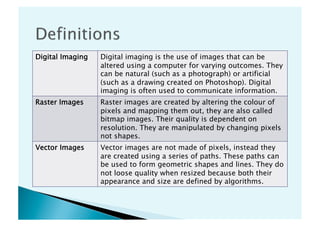
Digital Imaging   Digital imaging is the use of images that can be
                  altered using a computer for varying outcomes. They
                  can be natural (such as a photograph) or artificial
                  (such as a drawing created on Photoshop). Digital
                  imaging is often used to communicate information.
Raster Images     Raster images are created by altering the colour of
                  pixels and mapping them out, they are also called
                  bitmap images. Their quality is dependent on
                  resolution. They are manipulated by changing pixels
                  not shapes.
Vector Images     Vector images are not made of pixels, instead they
                  are created using a series of paths. These paths can
                  be used to form geometric shapes and lines. They do
                  not loose quality when resized because both their
                  appearance and size are defined by algorithms.
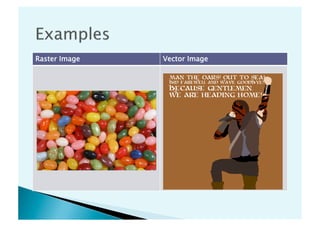
Raster Image   Vector Image
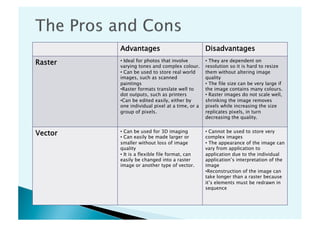
Advantages                             Disadvantages
Raster   •  Ideal for photos that involve
         varying tones and complex colour.
                                                •  They are dependent on
                                                resolution so it is hard to resize
         •  Can be used to store real world     them without altering image
         images, such as scanned                quality
         paintings                              •  The file size can be very large if
         • Raster formats translate well to     the image contains many colours.
         dot outputs, such as printers          •  Raster images do not scale well,
         • Can be edited easily, either by      shrinking the image removes
         one individual pixel at a time, or a   pixels while increasing the size
         group of pixels.                       replicates pixels, in turn
                                                decreasing the quality.


Vector   •  Can be used for 3D imaging
         •  Can easily be made larger or
                                                •  Cannot be used to store very
                                                complex images
         smaller without loss of image          •  The appearance of the image can
         quality                                vary from application to
         •  It is a flexible file format, can   application due to the individual
         easily be changed into a raster        application’s interpretation of the
         image or another type of vector.       image
                                                • Reconstruction of the image can
                                                take longer than a raster because
                                                it’s elements must be redrawn in
                                                sequence
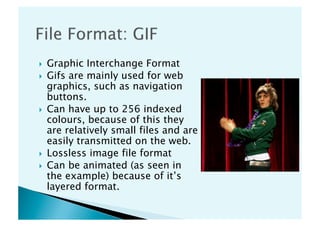
    Graphic Interchange Format
    Gifs are mainly used for web
     graphics, such as navigation
     buttons.
    Can have up to 256 indexed
     colours, because of this they
     are relatively small files and are
     easily transmitted on the web.
    Lossless image file format
    Can be animated (as seen in
     the example) because of it’s
     layered format.
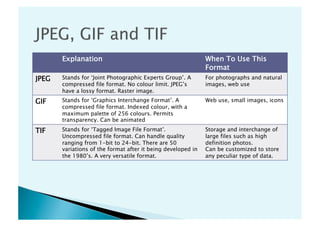
Explanation                                            When To Use This
                                                              Format
JPEG   Stands for ‘Joint Photographic Experts Group’. A       For photographs and natural
       compressed file format. No colour limit. JPEG’s        images, web use
       have a lossy format. Raster image.
GIF    Stands for ‘Graphics Interchange Format’. A            Web use, small images, icons
       compressed file format. Indexed colour, with a
       maximum palette of 256 colours. Permits
       transparency. Can be animated

TIF    Stands for ‘Tagged Image File Format’.                 Storage and interchange of
       Uncompressed file format. Can handle quality           large files such as high
       ranging from 1-bit to 24-bit. There are 50             definition photos.
       variations of the format after it being developed in   Can be customized to store
       the 1980’s. A very versatile format.                   any peculiar type of data.
    http://www.techterms.com/definition/
     vectorgraphic
    http://www.sharpened.net/glossary/definition/
     jpeg
    http://www.sharpened.net/glossary/definition/
     gif
    http://www.techterms.com/definition/tiff
    http://www.groups.esa.edu.au/course/view.php?
     id=2882
    


Portfolio Activity 5

  • 1.
  • 2.
    Digital Imaging Digital imaging is the use of images that can be altered using a computer for varying outcomes. They can be natural (such as a photograph) or artificial (such as a drawing created on Photoshop). Digital imaging is often used to communicate information. Raster Images Raster images are created by altering the colour of pixels and mapping them out, they are also called bitmap images. Their quality is dependent on resolution. They are manipulated by changing pixels not shapes. Vector Images Vector images are not made of pixels, instead they are created using a series of paths. These paths can be used to form geometric shapes and lines. They do not loose quality when resized because both their appearance and size are defined by algorithms.
  • 3.
    Raster Image Vector Image
  • 4.
    Advantages Disadvantages Raster •  Ideal for photos that involve varying tones and complex colour. •  They are dependent on resolution so it is hard to resize •  Can be used to store real world them without altering image images, such as scanned quality paintings •  The file size can be very large if • Raster formats translate well to the image contains many colours. dot outputs, such as printers •  Raster images do not scale well, • Can be edited easily, either by shrinking the image removes one individual pixel at a time, or a pixels while increasing the size group of pixels. replicates pixels, in turn decreasing the quality. Vector •  Can be used for 3D imaging •  Can easily be made larger or •  Cannot be used to store very complex images smaller without loss of image •  The appearance of the image can quality vary from application to •  It is a flexible file format, can application due to the individual easily be changed into a raster application’s interpretation of the image or another type of vector. image • Reconstruction of the image can take longer than a raster because it’s elements must be redrawn in sequence
  • 5.
      Graphic Interchange Format   Gifs are mainly used for web graphics, such as navigation buttons.   Can have up to 256 indexed colours, because of this they are relatively small files and are easily transmitted on the web.   Lossless image file format   Can be animated (as seen in the example) because of it’s layered format.
  • 6.
    Explanation When To Use This Format JPEG Stands for ‘Joint Photographic Experts Group’. A For photographs and natural compressed file format. No colour limit. JPEG’s images, web use have a lossy format. Raster image. GIF Stands for ‘Graphics Interchange Format’. A Web use, small images, icons compressed file format. Indexed colour, with a maximum palette of 256 colours. Permits transparency. Can be animated TIF Stands for ‘Tagged Image File Format’. Storage and interchange of Uncompressed file format. Can handle quality large files such as high ranging from 1-bit to 24-bit. There are 50 definition photos. variations of the format after it being developed in Can be customized to store the 1980’s. A very versatile format. any peculiar type of data.
  • 7.
      http://www.techterms.com/definition/ vectorgraphic   http://www.sharpened.net/glossary/definition/ jpeg   http://www.sharpened.net/glossary/definition/ gif   http://www.techterms.com/definition/tiff   http://www.groups.esa.edu.au/course/view.php? id=2882 