Surf Web Safe 
Soham 
Sengupta 
Web Security Unleashed 
CEO, Tech IT Easy Lab of Pervasive VM Computing 
+91 9830740684 (sohamsengupta@yahoo.com)
Topics I shall share today 
To 
Enchant you 
Topics I shall not harp on 
To kill your time 
1. Possible Attacks on your system 
2. Common Preventives 
3. Good practice to safe-surf web 
4. My own prescriptions 
5. Some wonderful demonstration 
replicating attacks 
6. Preventive mechanism 
A. Basic Cryptography 
B. Bookish Web Architectures 
C. Parsing it all for Linux against 
Microsoft 
D. A hell-lot-of slides to jam your 
brain. 
So, friends! May we whistle it 
off? 
sohamsengupta@yahoo.com Monday, October 13, 2014
1. Malicious Cookies 
2. Malicious Free / Open Source Software 
3. SQL Injection 
4. Script injection (E.g. Java script) 
5. Signed Applets 
6. An evil browser 
7. Browser Extension/ plug-in 
8. Phishing 
9. Pirated (Cracked) Operating System with Malicious 
sohamsengupta@yahoo.com Monday, October 13, 2014 3 
TCP/IP stack 
10.Improper and Insecure Use of USB 
11. Public Network Zones (E.g. Wi-Fi zone provided by a 
Cafeteria )
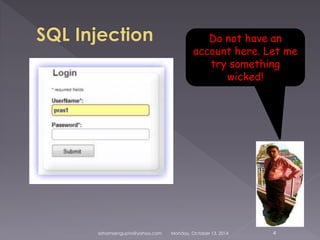
Do not have an 
account here. Let me 
try something 
wicked! 
sohamsengupta@yahoo.com Monday, October 13, 2014 4
Login Web Service (A servlet) 
sohamsengupta@yahoo.com Monday, October 13, 2014 5
sohamsengupta@yahoo.com Monday, October 13, 2014 6
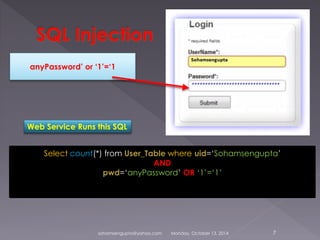
anyPassword’ or ‘1’=‘1 
Web Service Runs this SQL 
Select count(*) from User_Table where uid=‘Sohamsengupta’ 
AND 
pwd=‘anyPassword’ OR ‘1’=‘1’ 
sohamsengupta@yahoo.com Monday, October 13, 2014 7
 Applets are considered to be secure, 
because 
 They cannot access local machine’s files 
and other system resources 
 Java generally does not have access to 
native platform 
 But, 
Signed Applets can! 
 Users blindly trusts signed applets 
sohamsengupta@yahoo.com Monday, October 13, 2014 8
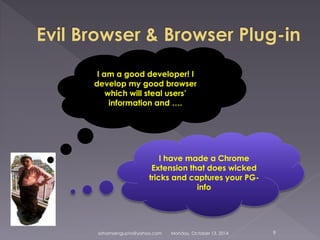
I am a good developer! I 
develop my good browser 
which will steal users’ 
information and …. 
I have made a Chrome 
Extension that does wicked 
tricks and captures your PG-info 
sohamsengupta@yahoo.com Monday, October 13, 2014 9
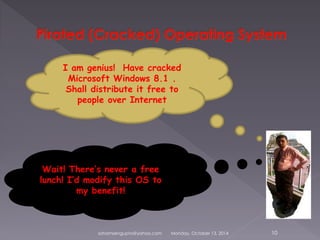
I am genius! Have cracked 
Microsoft Windows 8.1 . 
Shall distribute it free to 
people over Internet 
Wait! There’s never a free 
lunch! I’d modify this OS to 
my benefit! 
sohamsengupta@yahoo.com Monday, October 13, 2014 10
 Free utility software (Like, Document or 
Media Converters, Media Players, Live 
Wall papers, Games, Free Security 
Software etc.) are devils’ den! 
 They pass your data and documents to a 
remote server. 
 May impose key loggers to track your 
passwords and e-banking credentials 
sohamsengupta@yahoo.com Monday, October 13, 2014 11
 Can sniff your data transfer 
 Very risky if you use these Networks to 
connect to secure and sensitive sites 
 Do not use public Networks unless you 
must use them in urgency. 
sohamsengupta@yahoo.com Monday, October 13, 2014 12
 Beware of Java Script attack 
 Beware of Ajax service links sent in a 
mail 
 Avoid using Facebook Apps and 
clicking on any sort of links on a Social 
Networking portal such as Facebook 
 Be careful as you link your Gmail and 
Facebook to your smartphone (E.g. 
Android) 
sohamsengupta@yahoo.com Monday, October 13, 2014 13
 Use original OS and Antivirus 
 Use only trusted browser preferably 
Chrome 
 Activate 2-step authentication for mail, 
banking etc. 
 Always try to link more than one mails 
and mobile numbers for everything 
 Safe Facebooking 
sohamsengupta@yahoo.com Monday, October 13, 2014 14
 Do not use arbitrary software 
 Do not open mails that contain links 
promising a lottery 
 do not use Torrent downloaders 
 If you must use torrent, make it on a 
different (dual-boot at least) OS 
 Do not use your barcode scanner of 
smartphone to scan unknown QR codes 
sohamsengupta@yahoo.com Monday, October 13, 2014 15
 Using Open sources do not promote 
your social position always, free open 
sources can usher in serious threats! 
 Do not log in any where with Facebook 
or Gmail account. Doing so, you legally 
authorize some apps to post on your 
behalf. 
 Read carefully before you make a 
decision on web 
sohamsengupta@yahoo.com Monday, October 13, 2014 16
1) Phishing detection by smart phone 
2) Risks on Applets 
3) Malicious software development 
sohamsengupta@yahoo.com Monday, October 13, 2014 17

Soham web security

  • 1.
    Surf Web Safe Soham Sengupta Web Security Unleashed CEO, Tech IT Easy Lab of Pervasive VM Computing +91 9830740684 (sohamsengupta@yahoo.com)
  • 2.
    Topics I shallshare today To Enchant you Topics I shall not harp on To kill your time 1. Possible Attacks on your system 2. Common Preventives 3. Good practice to safe-surf web 4. My own prescriptions 5. Some wonderful demonstration replicating attacks 6. Preventive mechanism A. Basic Cryptography B. Bookish Web Architectures C. Parsing it all for Linux against Microsoft D. A hell-lot-of slides to jam your brain. So, friends! May we whistle it off? sohamsengupta@yahoo.com Monday, October 13, 2014
  • 3.
    1. Malicious Cookies 2. Malicious Free / Open Source Software 3. SQL Injection 4. Script injection (E.g. Java script) 5. Signed Applets 6. An evil browser 7. Browser Extension/ plug-in 8. Phishing 9. Pirated (Cracked) Operating System with Malicious sohamsengupta@yahoo.com Monday, October 13, 2014 3 TCP/IP stack 10.Improper and Insecure Use of USB 11. Public Network Zones (E.g. Wi-Fi zone provided by a Cafeteria )
  • 4.
    Do not havean account here. Let me try something wicked! sohamsengupta@yahoo.com Monday, October 13, 2014 4
  • 5.
    Login Web Service(A servlet) sohamsengupta@yahoo.com Monday, October 13, 2014 5
  • 6.
  • 7.
    anyPassword’ or ‘1’=‘1 Web Service Runs this SQL Select count(*) from User_Table where uid=‘Sohamsengupta’ AND pwd=‘anyPassword’ OR ‘1’=‘1’ sohamsengupta@yahoo.com Monday, October 13, 2014 7
  • 8.
     Applets areconsidered to be secure, because  They cannot access local machine’s files and other system resources  Java generally does not have access to native platform  But, Signed Applets can!  Users blindly trusts signed applets sohamsengupta@yahoo.com Monday, October 13, 2014 8
  • 9.
    I am agood developer! I develop my good browser which will steal users’ information and …. I have made a Chrome Extension that does wicked tricks and captures your PG-info sohamsengupta@yahoo.com Monday, October 13, 2014 9
  • 10.
    I am genius!Have cracked Microsoft Windows 8.1 . Shall distribute it free to people over Internet Wait! There’s never a free lunch! I’d modify this OS to my benefit! sohamsengupta@yahoo.com Monday, October 13, 2014 10
  • 11.
     Free utilitysoftware (Like, Document or Media Converters, Media Players, Live Wall papers, Games, Free Security Software etc.) are devils’ den!  They pass your data and documents to a remote server.  May impose key loggers to track your passwords and e-banking credentials sohamsengupta@yahoo.com Monday, October 13, 2014 11
  • 12.
     Can sniffyour data transfer  Very risky if you use these Networks to connect to secure and sensitive sites  Do not use public Networks unless you must use them in urgency. sohamsengupta@yahoo.com Monday, October 13, 2014 12
  • 13.
     Beware ofJava Script attack  Beware of Ajax service links sent in a mail  Avoid using Facebook Apps and clicking on any sort of links on a Social Networking portal such as Facebook  Be careful as you link your Gmail and Facebook to your smartphone (E.g. Android) sohamsengupta@yahoo.com Monday, October 13, 2014 13
  • 14.
     Use originalOS and Antivirus  Use only trusted browser preferably Chrome  Activate 2-step authentication for mail, banking etc.  Always try to link more than one mails and mobile numbers for everything  Safe Facebooking sohamsengupta@yahoo.com Monday, October 13, 2014 14
  • 15.
     Do notuse arbitrary software  Do not open mails that contain links promising a lottery  do not use Torrent downloaders  If you must use torrent, make it on a different (dual-boot at least) OS  Do not use your barcode scanner of smartphone to scan unknown QR codes sohamsengupta@yahoo.com Monday, October 13, 2014 15
  • 16.
     Using Opensources do not promote your social position always, free open sources can usher in serious threats!  Do not log in any where with Facebook or Gmail account. Doing so, you legally authorize some apps to post on your behalf.  Read carefully before you make a decision on web sohamsengupta@yahoo.com Monday, October 13, 2014 16
  • 17.
    1) Phishing detectionby smart phone 2) Risks on Applets 3) Malicious software development sohamsengupta@yahoo.com Monday, October 13, 2014 17