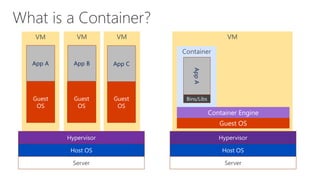
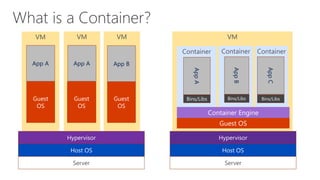
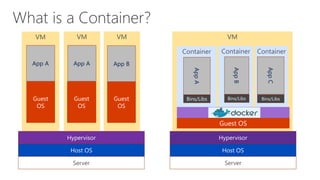
What is a Container?
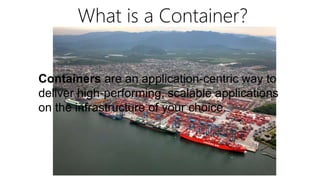
Containers are an application-centric way to
deliver high-performing, scalable applications
on the infrastructure of your choice.
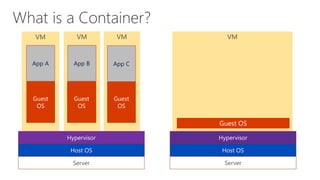
VMVMVMVM
Server
Host OS
Hypervisor
Guest
OS
Guest
OS
Guest
OS
App CApp BApp A
Server
Host OS
Hypervisor
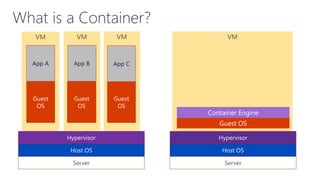
VMVMVMVM
Server
Host OS
Hypervisor
Guest
OS
Guest
OS
Guest
OS
App CApp BApp A
Server
Host OS
Hypervisor
VM
Container
VMVMVM
Server
Host OS
Hypervisor
Guest
OS
Guest
OS
Guest
OS
App CApp BApp A
Server
Host OS
Hypervisor
Bins/Libs
AppA
VM
ContainerContainerContainer
VMVMVM
Server
Host OS
Hypervisor
Guest
OS
Guest
OS
Guest
OS
App BApp AApp A
Server
Host OS
Hypervisor
Bins/Libs
AppB
AppC
Bins/Libs
AppA
Bins/Libs
VM
ContainerContainerContainer
VMVMVM
Server
Host OS
Hypervisor
Guest
OS
Guest
OS
Guest
OS
App BApp AApp A
Server
Host OS
Hypervisor
Bins/Libs
AppB
AppC
Bins/Libs
AppA
Bins/Libs
VM
ContainerContainerContainer
Server
Host OS
Hypervisor
Bins/Libs
AppB
AppC
Bins/Libs
AppA
Bins/Libs
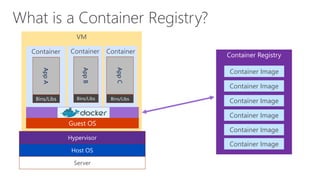
Container Image
Container Image
Container Image
Container Image
Container Image
Container Image
VM
ContainerContainerContainer
Server
Host OS
Hypervisor
Bins/Libs
AppB
AppC
Bins/Libs
AppA
Bins/Libs
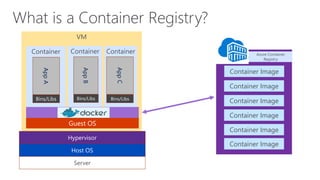
Container Image
Container Image
Container Image
Container Image
Container Image
Container Image
hub
Azure Container
Registry
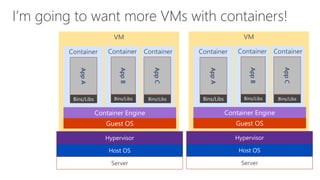
VM
ContainerContainerContainer
Server
Host OS
Hypervisor
Bins/Libs
AppB
AppC
Bins/Libs
AppA
Bins/Libs
VM
ContainerContainerContainer
Server
Host OS
Hypervisor
Bins/Libs
AppB
AppC
Bins/Libs
AppA
Bins/Libs
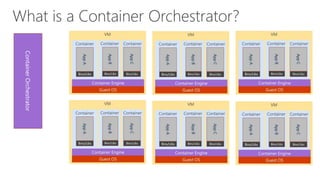
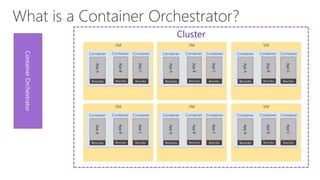
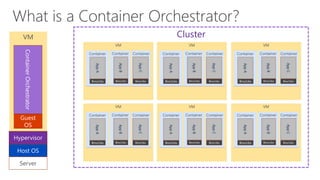
ContainerOrchestrator
Cluster
VM
Server
Host OS
Hypervisor
Guest
OS
ContainerOrchestrator
Cluster
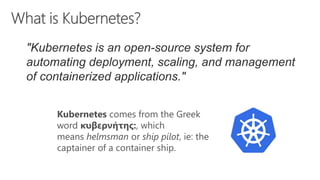
Kubernetes comes from the Greek
word κυβερνήτης:, which
means helmsman or ship pilot, ie: the
captainer of a container ship.
"Kubernetes is an open-source system for
automating deployment, scaling, and management
of containerized applications."
VM
Server
Host OS
Hypervisor
Guest
OS
Kubernetes
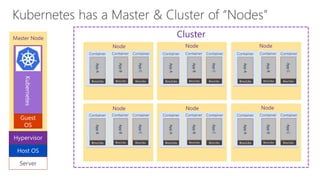
Master Node Cluster
Node Node Node
Node Node Node
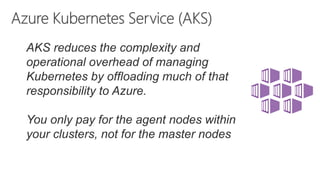
AKS reduces the complexity and
operational overhead of managing
Kubernetes by offloading much of that
responsibility to Azure.
You only pay for the agent nodes within
your clusters, not for the master nodes
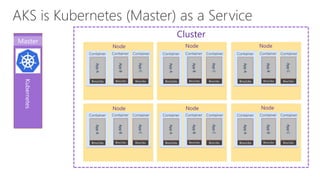
Kubernetes
Cluster
Node Node Node
Node Node Node
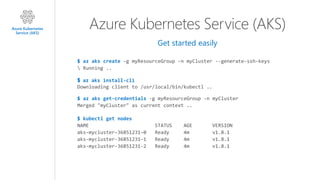
Azure Kubernetes Service (AKS)
Get started easily
$ az aks create
$ az aks install-cli
$ az aks get-credentials
$ kubectl get nodes
Azure Kubernetes
Service (AKS)
Azure Kubernetes Service (AKS)
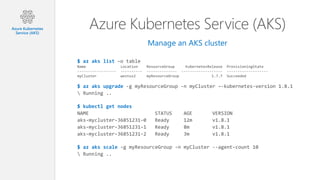
Manage an AKS cluster
$ az aks list
$ az aks upgrade
$ kubectl get nodes
$ az aks scale
Azure Kubernetes
Service (AKS)
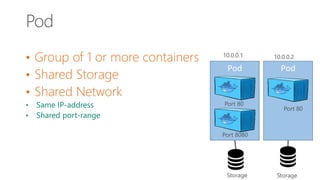
• Group of 1 or more containers
• Shared Storage
• Shared Network
• Same IP-address
• Shared port-range
Pod
10.0.0.1
Storage
Pod
10.0.0.2
Storage
Port 80
Port 8080
Port 80
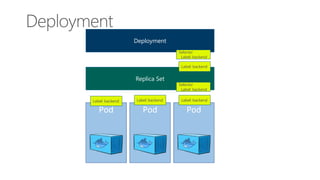
PodPod Pod
Replica Set
Deployment
Label: backend
Selector
Label: backend
Label: backend Label: backend
Label: backend
Selector
Label: backend
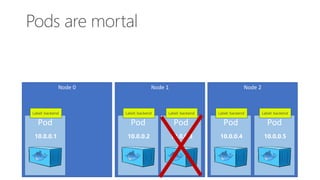
Node 1
Pod
Label: backend
10.0.0.2
Pod
Label: backend
10.0.0.3
Node 0
Pod
Label: backend
10.0.0.1
Node 2
Pod
Label: backend
10.0.0.4
Pod
Label: backend
10.0.0.5
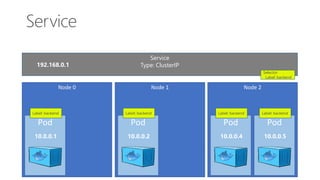
Service
Type: ClusterIP
Selector
Label: backend
Node 1
Pod
Label: backend
10.0.0.2
Node 0
Pod
Label: backend
10.0.0.1
Node 2
Pod
Label: backend
10.0.0.4
Pod
Label: backend
10.0.0.5
192.168.0.1
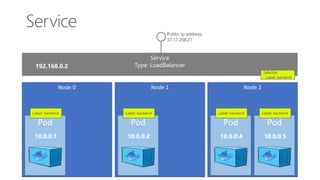
Service
Type: LoadBalancer
Selector
Label: backend
Node 1
Pod
Label: backend
10.0.0.2
Node 0
Pod
Label: backend
10.0.0.1
Node 2
Pod
Label: backend
10.0.0.4
Pod
Label: backend
10.0.0.5
Public ip address:
37.17.208.21
192.168.0.2
Pod
10.0.0.1
Pod
10.0.0.2
Pod
10.0.0.3
Service
Type: ClusterIP
Pod
10.0.0.4
Pod
10.0.0.5
Pod
10.0.0.6
Service
Type: ClusterIP
Pod
10.0.0.7
Pod
10.0.0.8
Pod
10.0.0.9
Service
Type: ClusterIP
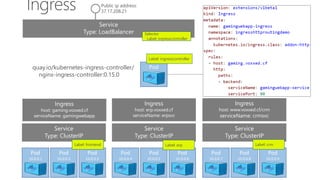
Service
Type: LoadBalancer
Public ip address:
37.17.208.21
Podquay.io/kubernetes-ingress-controller/
nginx-ingress-controller:0.15.0
Selector
Label: ingresscontroller
Ingress
host: gaming.voxxed.cf
serviceName: gamingwebapp
Ingress
host: erp.voxxed.cf
serviceName: erpsvc
Ingress
host: www.voxxed.cf/crm
serviceName: crmsvc
Label: erpLabel: frontend Label: crm
nginx.conf
gaming.voxxed.cf
10.0.0.1
10.0.0.2
10.0.0.3
erp.voxxed.cf
10.0.0.4
10.0.0.5
10.0.0.6
Voxxed.cf/crm
10.0.0.7
10.0.0.8
10.0.0.9
Automatically generated
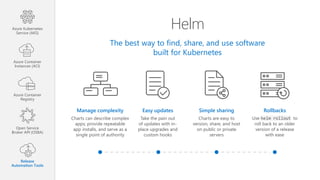
Helm
The best way to find, share, and use software
built for Kubernetes
Manage complexity
Charts can describe complex
apps; provide repeatable
app installs, and serve as a
single point of authority
Easy updates
Take the pain out
of updates with in-
place upgrades and
custom hooks
Simple sharing
Charts are easy to
version, share, and host
on public or private
servers
Rollbacks
Use helm rollout to
roll back to an older
version of a release
with ease
Azure Container
Instances (ACI)
Azure Container
Registry
Open Service
Broker API (OSBA)
Release
Automation Tools
Azure Kubernetes
Service (AKS)
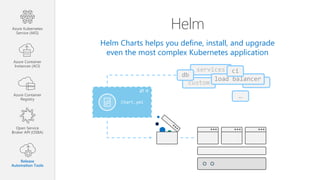
Helm
Helm Charts helps you define, install, and upgrade
even the most complex Kubernetes application
custom
services
Chart.yml
db
load balancer
ci
…
Azure Container
Instances (ACI)
Azure Container
Registry
Open Service
Broker API (OSBA)
Release
Automation Tools
Azure Kubernetes
Service (AKS)
Helm Charts
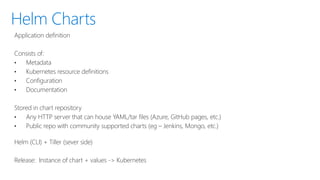
Application definition
Consists of:
• Metadata
• Kubernetes resource definitions
• Configuration
• Documentation
Stored in chart repository
• Any HTTP server that can house YAML/tar files (Azure, GitHub pages, etc.)
• Public repo with community supported charts (eg – Jenkins, Mongo, etc.)
Helm (CLI) + Tiller (sever side)
Release: Instance of chart + values -> Kubernetes
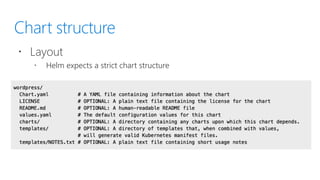
Chart structure
 Layout
 Helm expects a strict chart structure
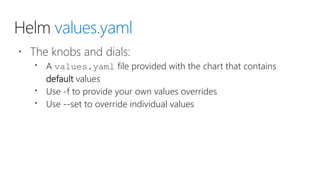
Helm values.yaml
 The knobs and dials:
 A values.yaml file provided with the chart that contains
default values
 Use -f to provide your own values overrides
 Use --set to override individual values
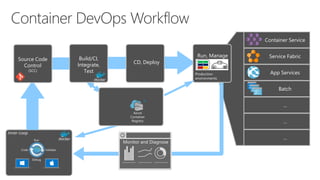
Inner-Loop
Build/CI,
Integrate,
Test Production
environments
Run, Manage
Container Service
Service Fabric
Batch
App Services
…
…
…
Code
Run
Validate
Debug
CD, Deploy
Source Code
Control
(SCC)
Azure
Container
Registry
Monitor and Diagnose
Multi-Container App
 Containers locally in visual studio
 Deploy to AKS through Helm
Microsoft Learn
AzureDevOps Handson Lab
Demo Repo
Multi-Container
Container
DevOps Bootcamp

DevOps Bootcamp

Editor's Notes

  • #28 Use Cases for Multi-Container Pods The primary purpose of a multi-container Pod is to support co-located, co-managed helper processes for a primary application. There are some general patterns for using helper processes in Pods: Sidecar containers “help” the main container. Some examples include log or data change watchers, monitoring adapters, and so on. A log watcher, for example, can be built once by a different team and reused across different applications. Another example of a sidecar container is a file or data loader that generates data for the main container. Proxies, bridges, and adapters connect the main container with the external world. For example, Apache HTTP server or nginx can serve static files. It can also act as a reverse proxy to a web application in the main container to log and limit HTTP requests. Another example is a helper container that re-routes requests from the main container to the external world. This makes it possible for the main container to connect to localhost to access, for example, an external database, but without any service discovery. While you can host a multi-tier application (such as WordPress) in a single Pod, the recommended way is to use separate Pods for each tier, for the simple reason that you can scale tiers up independently and distribute them across cluster nodes.

  • #29 When you use Deployments you don’t have to worry about managing the ReplicaSets that they create. Deployments own and manage their ReplicaSets