Agenda
• DevOps overview
• DevSecOps overview
• DevOps toolchain – Concept of Abstraction
• Work Flow examples
• WAF REST API
DevOps – High level overview
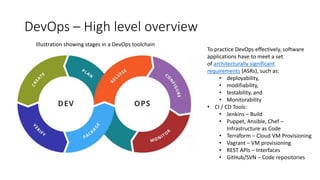
Illustration showing stages in a DevOps toolchain
To practice DevOps effectively, software
applications have to meet a set
of architecturally significant
requirements (ASRs), such as:
• deployability,
• modifiability,
• testability, and
• Monitorability
• CI / CD Tools:
• Jenkins – Build
• Puppet, Ansible, Chef –
Infrastructure as Code
• Terraform – Cloud VM Provisioning
• Vagrant – VM provisioning
• REST APIs – Interfaces
• GitHub/SVN – Code repositories
DevSecOps
• DevOps + Security
• Incorporates security into the testing process
• Focus is to identify loopholes early enough
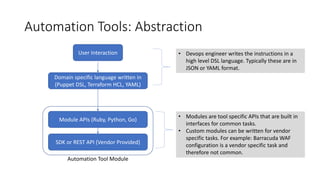
Automation Tools: Abstraction
Domain specific language written in
(Puppet DSL, Terraform HCL, YAML)
Module APIs (Ruby, Python, Go)
SDK or REST API (Vendor Provided)
Automation Tool Module
User Interaction • Devops engineer writes the instructions in a
high level DSL language. Typically these are in
JSON or YAML format.
• Modules are tool specific APIs that are built in
interfaces for common tasks.
• Custom modules can be written for vendor
specific tasks. For example: Barracuda WAF
configuration is a vendor specific task and
therefore not common.
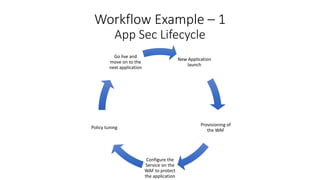
Workflow Example – 1
App Sec Lifecycle
New Application
launch
Provisioning of
the WAF
Configure the
Service on the
WAF to protect
the application
Policy tuning
Go live and
move on to the
next application
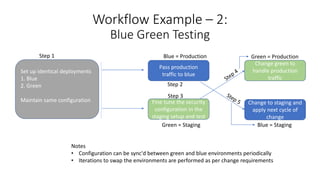
Workflow Example – 2:
Blue Green Testing
Set up identical deployments
1. Blue
2. Green
Maintain same configuration
Pass production
traffic to blue
Fine tune the security
configuration in the
staging setup and test
Change green to
handle production
traffic
Change to staging and
apply next cycle of
change
Step 1
Step 2
Step 3
Blue = Production
Green = Staging
Green = Production
Blue = Staging
Notes
• Configuration can be sync'd between green and blue environments periodically
• Iterations to swap the environments are performed as per change requirements
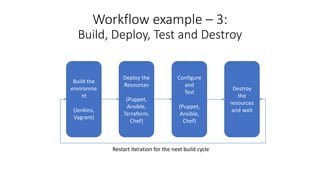
Workflow example – 3:
Build, Deploy, Test and Destroy
Build the
environme
nt
(Jenkins,
Vagrant)
Deploy the
Resources
(Puppet,
Ansible,
Terraform,
Chef)
Configure
and
Test
(Puppet,
Ansible,
Chef)
Destroy
the
resources
and wait
Restart Iteration for the next build cycle
REST API
• REST API v3: Enhanced to include API calls for almost all the features
• API v1 to be slowly phased out
• To be part of cloud release shortly
• Built using swagger (swagger.io) metadata specification
• Documentation
• Swagger UI – Provides API reference and curl command samples

Devops

  • 1.
    Agenda • DevOps overview •DevSecOps overview • DevOps toolchain – Concept of Abstraction • Work Flow examples • WAF REST API
  • 2.
    DevOps – Highlevel overview Illustration showing stages in a DevOps toolchain To practice DevOps effectively, software applications have to meet a set of architecturally significant requirements (ASRs), such as: • deployability, • modifiability, • testability, and • Monitorability • CI / CD Tools: • Jenkins – Build • Puppet, Ansible, Chef – Infrastructure as Code • Terraform – Cloud VM Provisioning • Vagrant – VM provisioning • REST APIs – Interfaces • GitHub/SVN – Code repositories
  • 3.
    DevSecOps • DevOps +Security • Incorporates security into the testing process • Focus is to identify loopholes early enough
  • 4.
    Automation Tools: Abstraction Domainspecific language written in (Puppet DSL, Terraform HCL, YAML) Module APIs (Ruby, Python, Go) SDK or REST API (Vendor Provided) Automation Tool Module User Interaction • Devops engineer writes the instructions in a high level DSL language. Typically these are in JSON or YAML format. • Modules are tool specific APIs that are built in interfaces for common tasks. • Custom modules can be written for vendor specific tasks. For example: Barracuda WAF configuration is a vendor specific task and therefore not common.
  • 5.
    Workflow Example –1 App Sec Lifecycle New Application launch Provisioning of the WAF Configure the Service on the WAF to protect the application Policy tuning Go live and move on to the next application
  • 6.
    Workflow Example –2: Blue Green Testing Set up identical deployments 1. Blue 2. Green Maintain same configuration Pass production traffic to blue Fine tune the security configuration in the staging setup and test Change green to handle production traffic Change to staging and apply next cycle of change Step 1 Step 2 Step 3 Blue = Production Green = Staging Green = Production Blue = Staging Notes • Configuration can be sync'd between green and blue environments periodically • Iterations to swap the environments are performed as per change requirements
  • 7.
    Workflow example –3: Build, Deploy, Test and Destroy Build the environme nt (Jenkins, Vagrant) Deploy the Resources (Puppet, Ansible, Terraform, Chef) Configure and Test (Puppet, Ansible, Chef) Destroy the resources and wait Restart Iteration for the next build cycle
  • 8.
    REST API • RESTAPI v3: Enhanced to include API calls for almost all the features • API v1 to be slowly phased out • To be part of cloud release shortly • Built using swagger (swagger.io) metadata specification • Documentation • Swagger UI – Provides API reference and curl command samples