Safe harbor statement
The following is intended to outline our general product direction. It is intended for information purposes
only, and may not be incorporated into any contract. It is not a commitment to deliver any material,
code, or functionality, and should not be relied upon in making purchasing decisions.
The development, release, timing, and pricing of any features or functionality described for Oracle’s
products may change and remains at the sole discretion of OracleCorporation.
Confidential – © 2019 Oracle
2
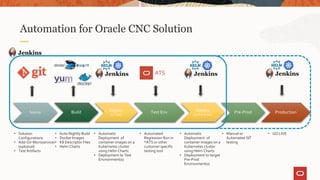
Automation for Oracle CNC Solution
Source Build Test Env Deploy
(to Pre-Prod)
Pre-Prod Production
• Solution
Configurations
• Add-On Microservices
(optional)
• Test Artifacts
• Auto Nightly Build
• Docker Images
• K8 Descriptor Files
• Helm Charts
• Automatic
Deployment of
container images on a
Kubernetes cluster
using Helm Charts
• Deployment to Test
Environment(s)
Deploy
(to Test)
• Automated
Regression Run in
*ATS or other
customer specific
testing tool
• Automatic
Deployment of
container images on a
Kubernetes cluster
using Helm Charts
• Deployment to target
Pre-Prod
Environment(s)
• Manual or
Automated SIT
testing
• GO LIVE
ATS
For next 15 minutes, we will run through Live Demo:
• We have taken PCF as an example but methodology is common to all NFs involving 5G
• The central repository is in place and all the docker images and Helm charts required for the deployment of
NF are uploaded to the central repository
• As a part of CNE deployment a local docker registry as well as helm repository is hosted on the Bastion
host, Git lab and Jenkins (which we will be using to onboard the NF and then to upgrade it)
• Our source code is placed in the Git lab and Jenkins will checkout this source code at the time of execution
of pipeline
CI/CD Demo
Pipeline is having 4 stages which you’ll see executing:
1. Download and Push Docker Image : This stage will download the docker images from the central repository and push
them to the docker registry running on the bastion host.
2. Download and Push Helm charts :This will download the helm charts from the central repo and push them to the
central repository
3. Deploy to the Environment :This stage is actually responsible to deploy the NF on the appropriate namespace which
we provide as a perimeter to our pipeline and checks if all the cluster components of the cluster are working fine and
are in running status
4. Post declaration action : Here we can add post declaration action like sending an email to the appropriate team
members in case of failure or success
CI/CD Demo
Thank you
Oracle Communications

CI_CD_Demo.pptx

  • 2.
    Safe harbor statement Thefollowing is intended to outline our general product direction. It is intended for information purposes only, and may not be incorporated into any contract. It is not a commitment to deliver any material, code, or functionality, and should not be relied upon in making purchasing decisions. The development, release, timing, and pricing of any features or functionality described for Oracle’s products may change and remains at the sole discretion of OracleCorporation. Confidential – © 2019 Oracle 2
  • 3.
    Automation for OracleCNC Solution Source Build Test Env Deploy (to Pre-Prod) Pre-Prod Production • Solution Configurations • Add-On Microservices (optional) • Test Artifacts • Auto Nightly Build • Docker Images • K8 Descriptor Files • Helm Charts • Automatic Deployment of container images on a Kubernetes cluster using Helm Charts • Deployment to Test Environment(s) Deploy (to Test) • Automated Regression Run in *ATS or other customer specific testing tool • Automatic Deployment of container images on a Kubernetes cluster using Helm Charts • Deployment to target Pre-Prod Environment(s) • Manual or Automated SIT testing • GO LIVE ATS
  • 4.
    For next 15minutes, we will run through Live Demo: • We have taken PCF as an example but methodology is common to all NFs involving 5G • The central repository is in place and all the docker images and Helm charts required for the deployment of NF are uploaded to the central repository • As a part of CNE deployment a local docker registry as well as helm repository is hosted on the Bastion host, Git lab and Jenkins (which we will be using to onboard the NF and then to upgrade it) • Our source code is placed in the Git lab and Jenkins will checkout this source code at the time of execution of pipeline CI/CD Demo
  • 5.
    Pipeline is having4 stages which you’ll see executing: 1. Download and Push Docker Image : This stage will download the docker images from the central repository and push them to the docker registry running on the bastion host. 2. Download and Push Helm charts :This will download the helm charts from the central repo and push them to the central repository 3. Deploy to the Environment :This stage is actually responsible to deploy the NF on the appropriate namespace which we provide as a perimeter to our pipeline and checks if all the cluster components of the cluster are working fine and are in running status 4. Post declaration action : Here we can add post declaration action like sending an email to the appropriate team members in case of failure or success CI/CD Demo
  • 6.