Barracuda Solutions on Amazon AWS
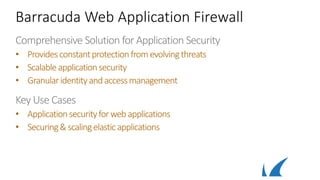
Barracuda Web Application Firewall
Comprehensive Solution for Application Security
• Providesconstantprotectionfromevolvingthreats
• Scalableapplicationsecurity
• Granularidentityandaccessmanagement
Key Use Cases
• Applicationsecurityforwebapplications
• Securing& scalingelasticapplications
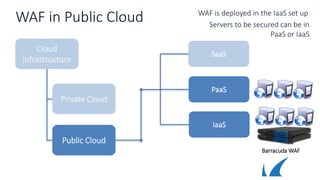
WAF in Public Cloud
Cloud
Infrastructure
Public Cloud
Private Cloud
SaaS
PaaS
IaaS
Barracuda WAF
Servers to be secured can be in
PaaS or IaaS
WAF is deployed in the IaaS set up
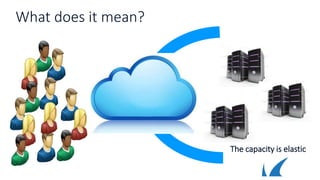
What does it mean?
The capacity is elastic
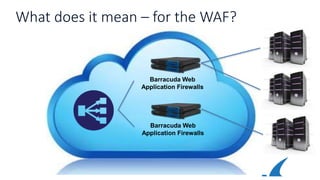
What does it mean – for the WAF?
Barracuda Web
Application Firewalls
Barracuda Web
Application Firewalls
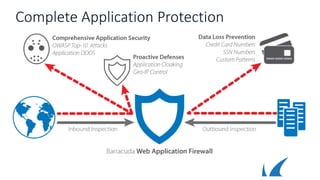
Complete Application Protection
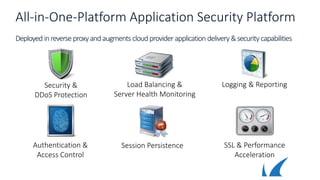
All-in-One-Platform Application Security Platform
Deployed inreverse proxyandaugments cloudprovider application delivery&security capabilities
Load Balancing &
Server Health Monitoring
SSL & Performance
Acceleration
Session Persistence
Security &
DDoS Protection
Logging & Reporting
Authentication &
Access Control
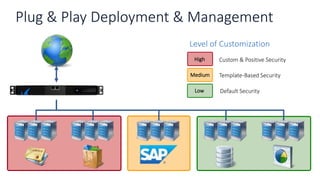
Plug & Play Deployment & Management
Level of Customization
Custom & Positive SecurityHigh
Template-Based SecurityMedium
Default SecurityLow
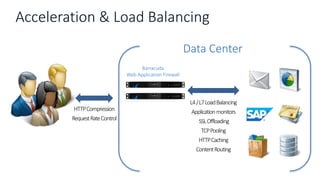
Acceleration & Load Balancing
Data Center
Barracuda
Web Application Firewall
L4/L7LoadBalancing
Applicationmonitors
SSLOffloading
TCPPooling
HTTPCaching
ContentRouting
HTTPCompression
RequestRateControl
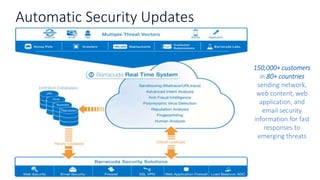
Automatic Security Updates
150,000+ customers
in 80+ countries
sending network,
web content, web
application, and
email security
information for fast
responses to
emerging threats
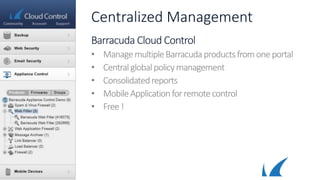
Centralized Management
Barracuda Cloud Control
• ManagemultipleBarracudaproductsfromoneportal
• Centralglobalpolicymanagement
• Consolidatedreports
• MobileApplicationforremote control
• Free !
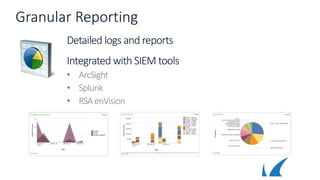
Granular Reporting
Detailed logs and reports
Integrated with SIEM tools
• ArcSight
• Splunk
• RSAenVision
Barracuda WAF Advantage
Constant Protection from
Evolving Threats
Block SQL injections, cross-site
attacks, session spoofing and more
Gain new capabilities to block
emerging threats
Prevent Data Loss
Inspects outbound traffic
Powerful authentication and
authorization
Accelerate Application Performance
Deploying on Amazon AWS
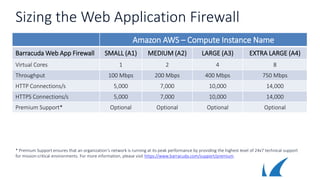
Sizing the Web Application Firewall
Amazon AWS – Compute Instance Name
Barracuda Web App Firewall SMALL (A1) MEDIUM (A2) LARGE (A3) EXTRA LARGE (A4)
Virtual Cores 1 2 4 8
Throughput 100 Mbps 200 Mbps 400 Mbps 750 Mbps
HTTP Connections/s 5,000 7,000 10,000 14,000
HTTPS Connections/s 5,000 7,000 10,000 14,000
Premium Support* Optional Optional Optional Optional
* Premium Support ensures that an organization‘s network is running at its peak performance by providing the highest level of 24x7 technical support
for mission-critical environments. For more information, please visit https://www.barracuda.com/support/premium.
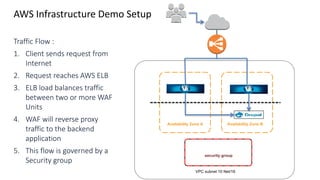
AWS Infrastructure Demo Setup
Availability Zone A Availability Zone B
VPC subnet 10 Net/16
security group
Traffic Flow :
1. Client sends request from
Internet
2. Request reaches AWS ELB
3. ELB load balances traffic
between two or more WAF
Units
4. WAF will reverse proxy
traffic to the backend
application
5. This flow is governed by a
Security group
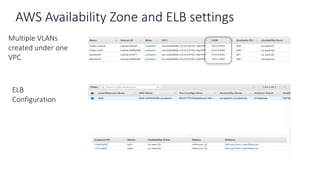
AWS Availability Zone and ELB settings
Multiple VLANs
created under one
VPC
ELB
Configuration
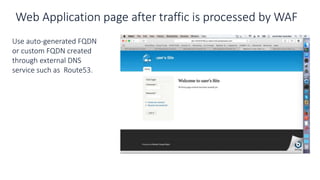
Web Application page after traffic is processed by WAF
Use auto-generated FQDN
or custom FQDN created
through external DNS
service such as Route53.

Barracuda WAF deployment in AWS

  • 1.
  • 3.
    Barracuda Web ApplicationFirewall Comprehensive Solution for Application Security • Providesconstantprotectionfromevolvingthreats • Scalableapplicationsecurity • Granularidentityandaccessmanagement Key Use Cases • Applicationsecurityforwebapplications • Securing& scalingelasticapplications
  • 4.
    WAF in PublicCloud Cloud Infrastructure Public Cloud Private Cloud SaaS PaaS IaaS Barracuda WAF Servers to be secured can be in PaaS or IaaS WAF is deployed in the IaaS set up
  • 5.
    What does itmean? The capacity is elastic
  • 6.
    What does itmean – for the WAF? Barracuda Web Application Firewalls Barracuda Web Application Firewalls
  • 7.
  • 8.
    All-in-One-Platform Application SecurityPlatform Deployed inreverse proxyandaugments cloudprovider application delivery&security capabilities Load Balancing & Server Health Monitoring SSL & Performance Acceleration Session Persistence Security & DDoS Protection Logging & Reporting Authentication & Access Control
  • 9.
    Plug & PlayDeployment & Management Level of Customization Custom & Positive SecurityHigh Template-Based SecurityMedium Default SecurityLow
  • 10.
    Acceleration & LoadBalancing Data Center Barracuda Web Application Firewall L4/L7LoadBalancing Applicationmonitors SSLOffloading TCPPooling HTTPCaching ContentRouting HTTPCompression RequestRateControl
  • 11.
    Automatic Security Updates 150,000+customers in 80+ countries sending network, web content, web application, and email security information for fast responses to emerging threats
  • 12.
    Centralized Management Barracuda CloudControl • ManagemultipleBarracudaproductsfromoneportal • Centralglobalpolicymanagement • Consolidatedreports • MobileApplicationforremote control • Free !
  • 13.
    Granular Reporting Detailed logsand reports Integrated with SIEM tools • ArcSight • Splunk • RSAenVision
  • 14.
    Barracuda WAF Advantage ConstantProtection from Evolving Threats Block SQL injections, cross-site attacks, session spoofing and more Gain new capabilities to block emerging threats Prevent Data Loss Inspects outbound traffic Powerful authentication and authorization Accelerate Application Performance
  • 15.
  • 16.
    Sizing the WebApplication Firewall Amazon AWS – Compute Instance Name Barracuda Web App Firewall SMALL (A1) MEDIUM (A2) LARGE (A3) EXTRA LARGE (A4) Virtual Cores 1 2 4 8 Throughput 100 Mbps 200 Mbps 400 Mbps 750 Mbps HTTP Connections/s 5,000 7,000 10,000 14,000 HTTPS Connections/s 5,000 7,000 10,000 14,000 Premium Support* Optional Optional Optional Optional * Premium Support ensures that an organization‘s network is running at its peak performance by providing the highest level of 24x7 technical support for mission-critical environments. For more information, please visit https://www.barracuda.com/support/premium.
  • 17.
    AWS Infrastructure DemoSetup Availability Zone A Availability Zone B VPC subnet 10 Net/16 security group Traffic Flow : 1. Client sends request from Internet 2. Request reaches AWS ELB 3. ELB load balances traffic between two or more WAF Units 4. WAF will reverse proxy traffic to the backend application 5. This flow is governed by a Security group
  • 18.
    AWS Availability Zoneand ELB settings Multiple VLANs created under one VPC ELB Configuration
  • 19.
    Web Application pageafter traffic is processed by WAF Use auto-generated FQDN or custom FQDN created through external DNS service such as Route53.

Editor's Notes

  • #6 Note for presenter : Click once to show – scale up – Click again to show – scale down Description : As the traffic to the web site grows, administrators can bring up additional instances of their application servers and when the traffic goes down they can shut down the additional instances. This is one of the most powerful capability of the cloud deployments – that is – scale the size based on traffic requirements.
  • #7 Note for presenter – Default -- Case 1 : WAF has to work in the Azure / AWS cloud – there are integration points that need to be handled like – system-ip is allocated by DHCP and not from consconf Click 1 -- Case 2 : Servers added to existing WAF in the cloud – requires API of the WAF Click 2 -- Case 3 : WAF may also be added to the cloud load balancer to handle more traffic – requires auto provisioning / spin up of WAF VM