Barracuda Web Application
Firewall
Securing cloud and hybrid deployments
Agenda
DeploymentOptions
Security Features
Reporting and Logging
Troubleshooting
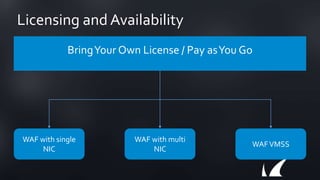
Licensing and Availability
BringYour Own License / Pay asYou Go
WAF with single
NIC
WAF with multi
NIC
WAFVMSS
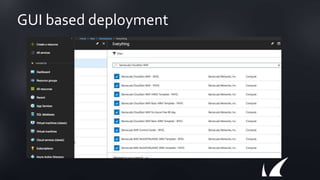
GUI based deployment
Template based provisioning
GitHub Repository:
https://github.com/barracudanetworks/waf-azure-
templates
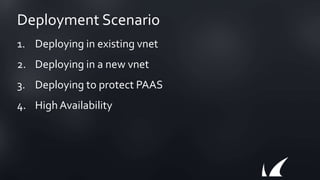
Deployment Scenario
1. Deploying in existing vnet
2. Deploying in a new vnet
3. Deploying to protect PAAS
4. High Availability
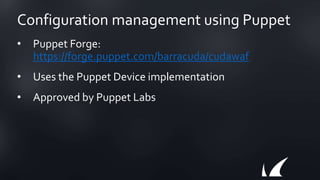
Configuration management using Puppet
• Puppet Forge:
https://forge.puppet.com/barracuda/cudawaf
• Uses the Puppet Device implementation
• Approved by Puppet Labs
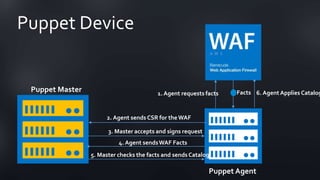
Puppet Device
2. Agent sends CSR for theWAF
3. Master accepts and signs request
4. Agent sendsWAF Facts
5. Master checks the facts and sends Catalog
6. AgentApplies CatalogPuppet Master
Puppet Agent
1. Agent requests facts Facts
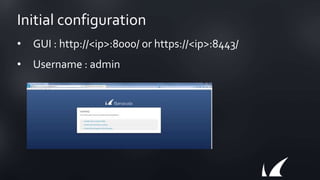
Initial configuration
• GUI : http://<ip>:8000/ or https://<ip>:8443/
• Username : admin
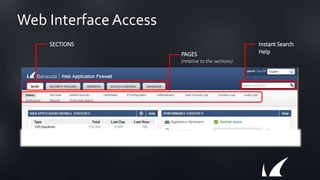
Web Interface Access
SECTIONS
PAGES
(relative to the sections)
Instant Search
Help
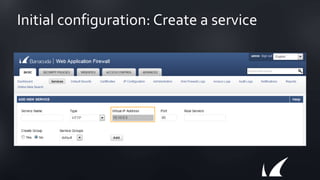
Initial configuration: Create a service
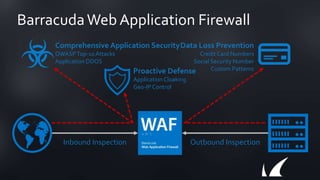
BarracudaWeb Application Firewall
Outbound InspectionInbound Inspection
Comprehensive Application Security
OWASPTop-10Attacks
Application DDOS
Proactive Defense
ApplicationCloaking
Geo-IP Control
Data Loss Prevention
Credit Card Numbers
Social Security Number
Custom Patterns
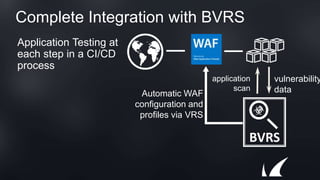
Complete Integration with BVRS
Application Testing at
each step in a CI/CD
process
BVRS
application
scan
vulnerability
dataAutomatic WAF
configuration and
profiles via VRS
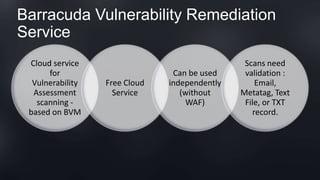
Barracuda Vulnerability Remediation
Service
Cloud service
for
Vulnerability
Assessment
scanning -
based on BVM
Free Cloud
Service
Can be used
independently
(without
WAF)
Scans need
validation :
Email,
Metatag, Text
File, or TXT
record.
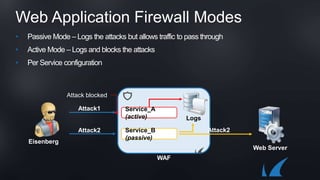
Web Application Firewall Modes
• Passive Mode – Logs the attacks but allows traffic to pass through
• Active Mode – Logs and blocks the attacks
• Per Service configuration
Web Server
Eisenberg
WAF
Service_A
(active)
Service_B
(passive)
Logs
Attack1
Attack2 Attack2
Attack blocked
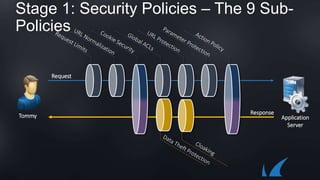
Stage 1: Security Policies – The 9 Sub-
Policies
Request
Response
Application
Server
Tommy
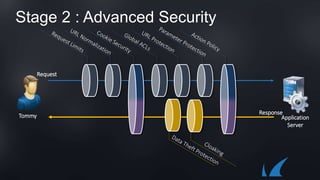
Stage 2 : Advanced Security
Response
Application
Server
Tommy
Request
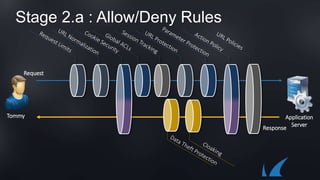
Stage 2.a : Allow/Deny Rules
Response
Application
Server
Tommy
Request
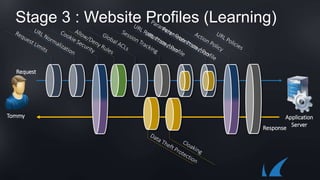
Stage 3 : Website Profiles (Learning)
Response
Application
Server
Tommy
Request
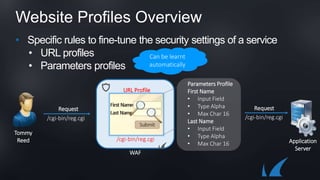
Website Profiles Overview
• Specific rules to fine-tune the security settings of a service
• URL profiles
• Parameters profiles
Tommy
Reed
WAF
/cgi-bin/reg.cgi
URL Profile
/cgi-bin/reg.cgi
Request
Parameters Profile
First Name
• Input Field
• Type Alpha
• Max Char 16
Last Name
• Input Field
• Type Alpha
• Max Char 16
/cgi-bin/reg.cgi
Request
Application
Server
Tommy
Reed
Can be learnt
automatically
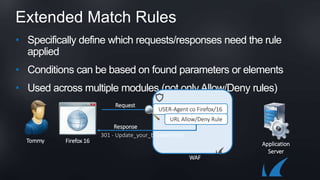
Extended Match Rules
• Specifically define which requests/responses need the rule
applied
• Conditions can be based on found parameters or elements
• Used across multiple modules (not only Allow/Deny rules)
Tommy Firefox 16
WAF
USER-Agent co Firefox/16
Application
Server
URL Allow/Deny Rule
Request
Response
301 - Update_your_browser.html
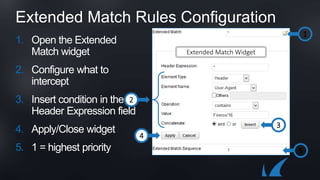
Extended Match Rules Configuration
1
2
3
4
5
Extended Match Widget
1. Open the Extended
Match widget
2. Configure what to
intercept
3. Insert condition in the
Header Expression field
4. Apply/Close widget
5. 1 = highest priority
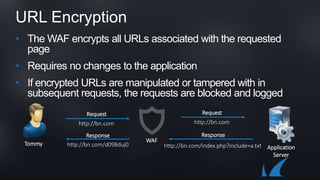
URL Encryption
• The WAF encrypts all URLs associated with the requested
page
• Requires no changes to the application
• If encrypted URLs are manipulated or tampered with in
subsequent requests, the requests are blocked and logged
WAF
Tommy
Application
Server
http://bn.com
Request
http://bn.com
Request
http://bn.com/index.php?include=a.txt
Response
http://bn.com/d098duj0
Response
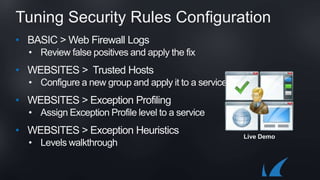
Tuning Security Rules Configuration
• BASIC > Web Firewall Logs
• Review false positives and apply the fix
• WEBSITES > Trusted Hosts
• Configure a new group and apply it to a service
• WEBSITES > Exception Profiling
• Assign Exception Profile level to a service
• WEBSITES > Exception Heuristics
• Levels walkthrough
Live Demo
Application DDoS Attack Protection
Topics Covered:
• IP Reputation Filter
• DDoS Policies
• Slow Client Attack Prevention
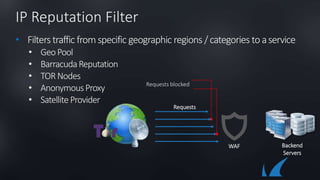
IP Reputation Filter
• Filters traffic from specific geographic regions / categories toaservice
• GeoPool
• BarracudaReputation
• TORNodes
• AnonymousProxy
• Satellite Provider
WAF
Requests
Requests blocked
Backend
Servers
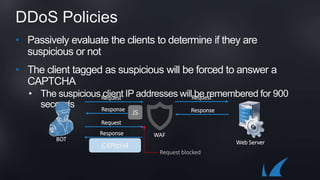
DDoS Policies
• Passively evaluate the clients to determine if they are
suspicious or not
• The client tagged as suspicious will be forced to answer a
CAPTCHA
• The suspicious client IP addresses will be remembered for 900
seconds
BOT
Request
WAF
Web Server
Request
ResponseResponse
JS
Request
Request blocked
Response
C4PtcH4
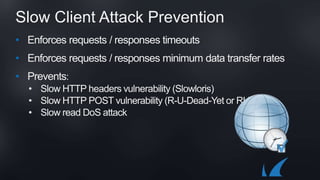
Slow Client Attack Prevention
• Enforces requests / responses timeouts
• Enforces requests / responses minimum data transfer rates
• Prevents:
• Slow HTTP headers vulnerability (Slowloris)
• Slow HTTP POST vulnerability (R-U-Dead-Yet or RUDY)
• Slow read DoS attack
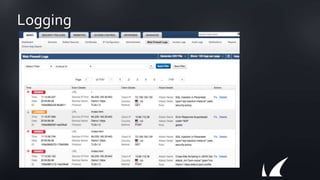
Logging
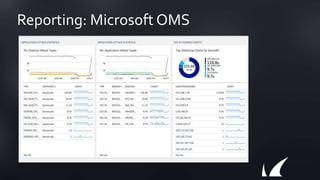
Reporting: Microsoft OMS
Troubleshooting
• Configuration problems
• Connectivity / Access problems
• System problems
ThankYou

Barracuda WAF Deployment in Microsoft Azure

  • 1.
    Barracuda Web Application Firewall Securingcloud and hybrid deployments
  • 2.
  • 3.
    Licensing and Availability BringYourOwn License / Pay asYou Go WAF with single NIC WAF with multi NIC WAFVMSS
  • 4.
  • 5.
    Template based provisioning GitHubRepository: https://github.com/barracudanetworks/waf-azure- templates
  • 6.
    Deployment Scenario 1. Deployingin existing vnet 2. Deploying in a new vnet 3. Deploying to protect PAAS 4. High Availability
  • 7.
    Configuration management usingPuppet • Puppet Forge: https://forge.puppet.com/barracuda/cudawaf • Uses the Puppet Device implementation • Approved by Puppet Labs
  • 8.
    Puppet Device 2. Agentsends CSR for theWAF 3. Master accepts and signs request 4. Agent sendsWAF Facts 5. Master checks the facts and sends Catalog 6. AgentApplies CatalogPuppet Master Puppet Agent 1. Agent requests facts Facts
  • 9.
    Initial configuration • GUI: http://<ip>:8000/ or https://<ip>:8443/ • Username : admin
  • 10.
    Web Interface Access SECTIONS PAGES (relativeto the sections) Instant Search Help
  • 11.
  • 12.
    BarracudaWeb Application Firewall OutboundInspectionInbound Inspection Comprehensive Application Security OWASPTop-10Attacks Application DDOS Proactive Defense ApplicationCloaking Geo-IP Control Data Loss Prevention Credit Card Numbers Social Security Number Custom Patterns
  • 13.
    Complete Integration withBVRS Application Testing at each step in a CI/CD process BVRS application scan vulnerability dataAutomatic WAF configuration and profiles via VRS
  • 14.
    Barracuda Vulnerability Remediation Service Cloudservice for Vulnerability Assessment scanning - based on BVM Free Cloud Service Can be used independently (without WAF) Scans need validation : Email, Metatag, Text File, or TXT record.
  • 15.
    Web Application FirewallModes • Passive Mode – Logs the attacks but allows traffic to pass through • Active Mode – Logs and blocks the attacks • Per Service configuration Web Server Eisenberg WAF Service_A (active) Service_B (passive) Logs Attack1 Attack2 Attack2 Attack blocked
  • 16.
    Stage 1: SecurityPolicies – The 9 Sub- Policies Request Response Application Server Tommy
  • 17.
    Stage 2 :Advanced Security Response Application Server Tommy Request
  • 18.
    Stage 2.a :Allow/Deny Rules Response Application Server Tommy Request
  • 19.
    Stage 3 :Website Profiles (Learning) Response Application Server Tommy Request
  • 20.
    Website Profiles Overview •Specific rules to fine-tune the security settings of a service • URL profiles • Parameters profiles Tommy Reed WAF /cgi-bin/reg.cgi URL Profile /cgi-bin/reg.cgi Request Parameters Profile First Name • Input Field • Type Alpha • Max Char 16 Last Name • Input Field • Type Alpha • Max Char 16 /cgi-bin/reg.cgi Request Application Server Tommy Reed Can be learnt automatically
  • 21.
    Extended Match Rules •Specifically define which requests/responses need the rule applied • Conditions can be based on found parameters or elements • Used across multiple modules (not only Allow/Deny rules) Tommy Firefox 16 WAF USER-Agent co Firefox/16 Application Server URL Allow/Deny Rule Request Response 301 - Update_your_browser.html
  • 22.
    Extended Match RulesConfiguration 1 2 3 4 5 Extended Match Widget 1. Open the Extended Match widget 2. Configure what to intercept 3. Insert condition in the Header Expression field 4. Apply/Close widget 5. 1 = highest priority
  • 23.
    URL Encryption • TheWAF encrypts all URLs associated with the requested page • Requires no changes to the application • If encrypted URLs are manipulated or tampered with in subsequent requests, the requests are blocked and logged WAF Tommy Application Server http://bn.com Request http://bn.com Request http://bn.com/index.php?include=a.txt Response http://bn.com/d098duj0 Response
  • 24.
    Tuning Security RulesConfiguration • BASIC > Web Firewall Logs • Review false positives and apply the fix • WEBSITES > Trusted Hosts • Configure a new group and apply it to a service • WEBSITES > Exception Profiling • Assign Exception Profile level to a service • WEBSITES > Exception Heuristics • Levels walkthrough Live Demo
  • 25.
    Application DDoS AttackProtection Topics Covered: • IP Reputation Filter • DDoS Policies • Slow Client Attack Prevention
  • 26.
    IP Reputation Filter •Filters traffic from specific geographic regions / categories toaservice • GeoPool • BarracudaReputation • TORNodes • AnonymousProxy • Satellite Provider WAF Requests Requests blocked Backend Servers
  • 27.
    DDoS Policies • Passivelyevaluate the clients to determine if they are suspicious or not • The client tagged as suspicious will be forced to answer a CAPTCHA • The suspicious client IP addresses will be remembered for 900 seconds BOT Request WAF Web Server Request ResponseResponse JS Request Request blocked Response C4PtcH4
  • 28.
    Slow Client AttackPrevention • Enforces requests / responses timeouts • Enforces requests / responses minimum data transfer rates • Prevents: • Slow HTTP headers vulnerability (Slowloris) • Slow HTTP POST vulnerability (R-U-Dead-Yet or RUDY) • Slow read DoS attack
  • 29.
  • 30.
  • 31.
    Troubleshooting • Configuration problems •Connectivity / Access problems • System problems
  • 32.

Editor's Notes

  • #13 The WAF protects applications by functioning as a reverse proxy – it intercepts all traffic and inspecting it for attacks blocking attacks BEFORE they reach your servers. It recognizes all kinds of obfuscations and attacks – and only allows traffic that conforms to security policies, both inbound and outbound. This protects your sites from all zero-day attacks as well. It protects custom code as well as third party-code, allowing customers to focus on their business. Because it’s also inspecting outbound traffic, the Barracuda Web Application Firewall also prevents leakage and theft of sensitive data, including server software information, credit cards, social security numbers, etc. With a Barracuda Web Application Firewall, customers get security and protection without having to make any lengthy and expensive changes to their application code or backend servers.