Development Workflow Guide
for Building Docker Apps
By Abdul khan
Author
• Abdul Khan
• IT Consultant based in Manchester, UK
• Engineering Lead, Executive, Technologist, Architect
• IT experience, within the private and public sectors (Retail, Banking, Digital, Insurance, M.O.D., HMRC, Aviation, Telecommunication,
Housing Associations, Education, Travel, and Pharmaceutical companies). Excellent architectural and strong DevOps experience with
proven-track record of delivering E2E, B2B and B2C solution on regional and global programs.
• SME in specializing in providing integration, data migration, digital transformations to the cloud solutions (Azure and AWS)
• Wealth of experience in global projects across EMEA, ASPAC and LATAM
• Liked in profile https://www.linkedin.com/in/abdul-khan-uk/
Accreditations
Thank you to my good friend and colleague for reviewing, adding value, sharing their vast experience and
knowledge.
• Steve Lampton (IT Consultant, Cloud SME) specialising in NetOps, DevOps and SecOps
Audience
Main Audience
• Architects
• Technical Leads and DevOps, NetOps an d SecOps
Assumptions
• Reader has some knowledge of Docker containerisation, and cloud platforms
technologies.
Development Workflow Guide for
Building Docker Apps
Content
1. Introduction
2. Step-by-step Workflow For Developing Docker Containerized Apps
3. Walk-Through – Initial Dockerfile (1/2) – Coding Sample
4. Walk-Though – Initial Dockerfile (2/2) – Coding Sample Explained
5. Walk-Though –Docker Compose File– Coding Sample
1. Introduction
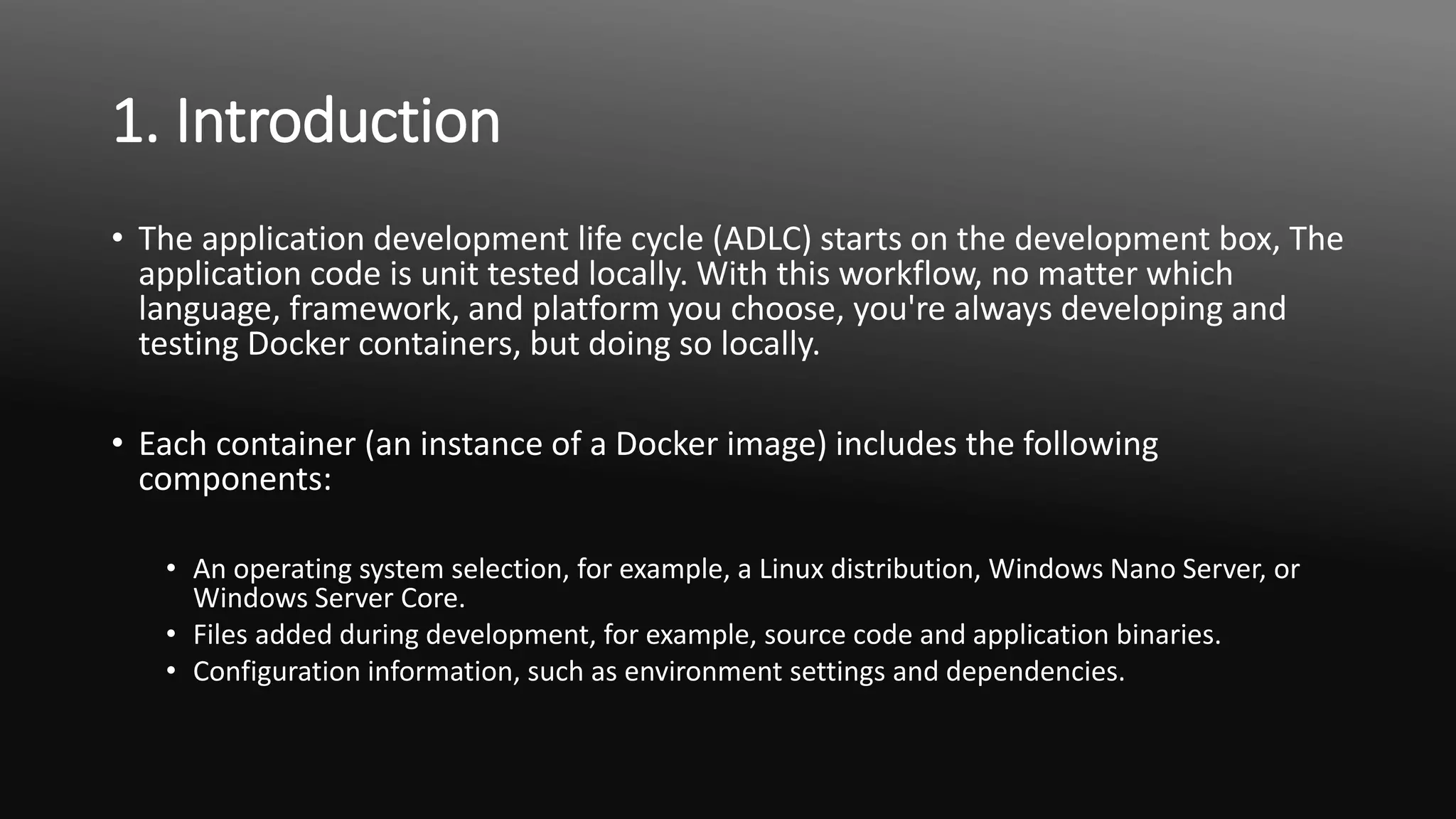
• The application development life cycle (ADLC) starts on the development box, The
application code is unit tested locally. With this workflow, no matter which
language, framework, and platform you choose, you're always developing and
testing Docker containers, but doing so locally.
• Each container (an instance of a Docker image) includes the following
components:
• An operating system selection, for example, a Linux distribution, Windows Nano Server, or
Windows Server Core.
• Files added during development, for example, source code and application binaries.
• Configuration information, such as environment settings and dependencies.
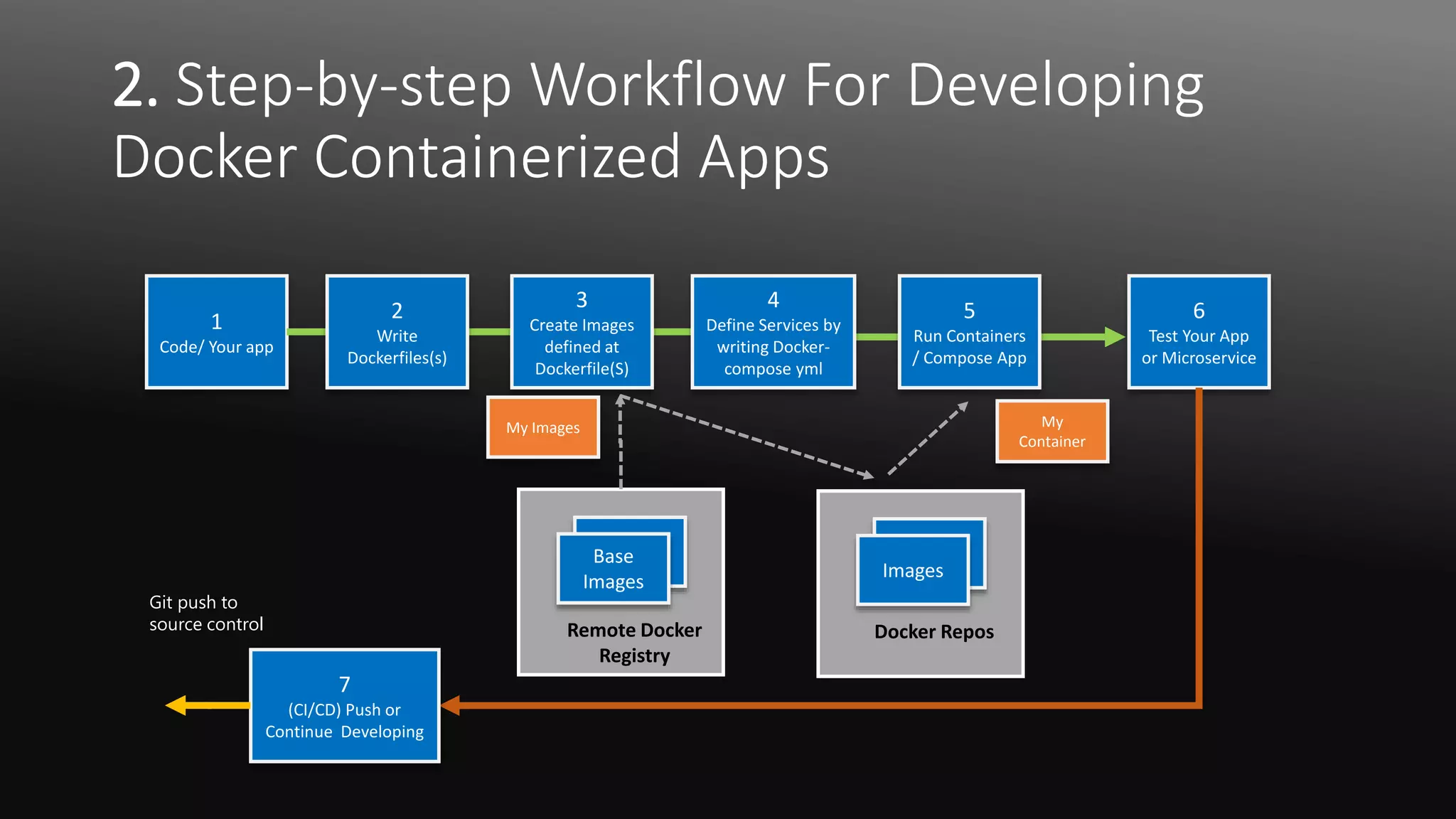
2. Step-by-step Workflow For Developing
Docker Containerized Apps
1
Code/ Your app
Docker Repos
6
Test Your App
or Microservice
App
CImages
Remote Docker
Registry
App
CBase
Images
7
(CI/CD) Push or
Continue Developing
2
Write
Dockerfiles(s)
3
Create Images
defined at
Dockerfile(S)
4
Define Services by
writing Docker-
compose yml
5
Run Containers
/ Compose App
My Images My
Container
Git push to
source control
Walk Through - Initial Dockerfile (1/2)
1 FROM mcr.microsoft.com/dotnet/core/aspnet:2.2 AS base
2 WORKDIR /app
3 EXPOSE 80
4
5 FROM mcr.microsoft.com/dotnet/core/sdk:2.2 AS build
6 WORKDIR /src
7 COPY src/Services/Catalog/Catalog.API/Catalog.API.csproj …
8 COPY src/BuildingBlocks/HealthChecks/src/Microsoft.AspNetCore.HealthChecks …
9 COPY src/BuildingBlocks/HealthChecks/src/Microsoft.Extensions.HealthChecks …
10 COPY src/BuildingBlocks/EventBus/IntegrationEventLogEF/ …
11 COPY src/BuildingBlocks/EventBus/EventBus/EventBus.csproj …
12 COPY src/BuildingBlocks/EventBus/EventBusRabbitMQ/EventBusRabbitMQ.csproj …
13 COPY src/BuildingBlocks/EventBus/EventBusServiceBus/EventBusServiceBus.csproj …
14 COPY src/BuildingBlocks/WebHostCustomization/WebHost.Customization …
15 COPY src/BuildingBlocks/HealthChecks/src/Microsoft.Extensions …
16 COPY src/BuildingBlocks/HealthChecks/src/Microsoft.Extensions …
17 RUN dotnet restore src/Services/Catalog/Catalog.API/Catalog.API.csproj
18 COPY . .
19 WORKDIR /src/src/Services/Catalog/Catalog.API
20 RUN dotnet build Catalog.API.csproj -c Release -o /app
21
22 FROM build AS publish
23 RUN dotnet publish Catalog.API.csproj -c Release -o /app
24
25 FROM base AS final
26 WORKDIR /app
27 COPY --from=publish /app .
28 ENTRYPOINT ["dotnet", "Catalog.API.dll"]
Walk-Through – Initial Dockerfile (2/2)
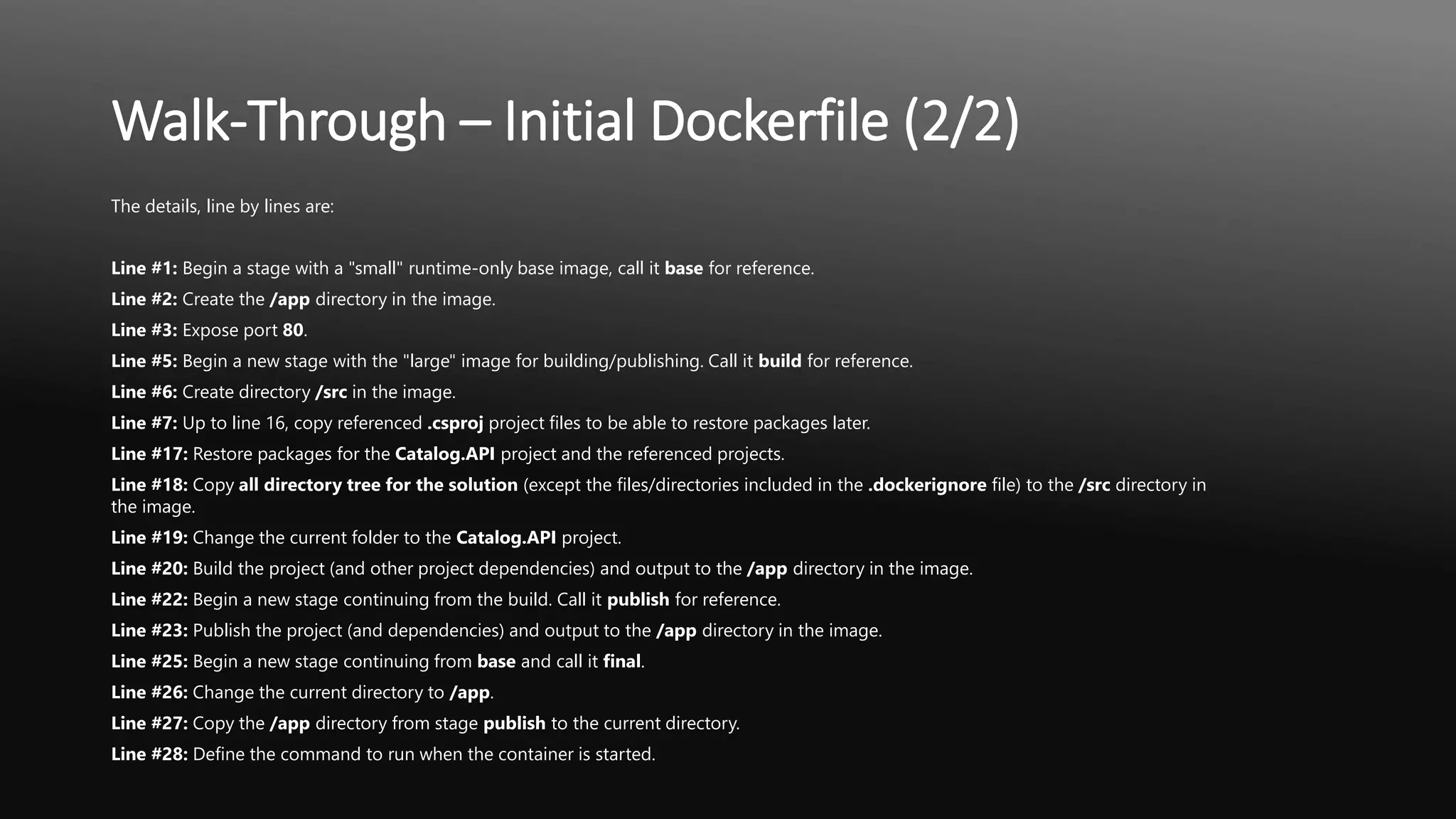
The details, line by lines are:
Line #1: Begin a stage with a "small" runtime-only base image, call it base for reference.
Line #2: Create the /app directory in the image.
Line #3: Expose port 80.
Line #5: Begin a new stage with the "large" image for building/publishing. Call it build for reference.
Line #6: Create directory /src in the image.
Line #7: Up to line 16, copy referenced .csproj project files to be able to restore packages later.
Line #17: Restore packages for the Catalog.API project and the referenced projects.
Line #18: Copy all directory tree for the solution (except the files/directories included in the .dockerignore file) to the /src directory in
the image.
Line #19: Change the current folder to the Catalog.API project.
Line #20: Build the project (and other project dependencies) and output to the /app directory in the image.
Line #22: Begin a new stage continuing from the build. Call it publish for reference.
Line #23: Publish the project (and dependencies) and output to the /app directory in the image.
Line #25: Begin a new stage continuing from base and call it final.
Line #26: Change the current directory to /app.
Line #27: Copy the /app directory from stage publish to the current directory.
Line #28: Define the command to run when the container is started.
Walk Through - Docker Compose YML
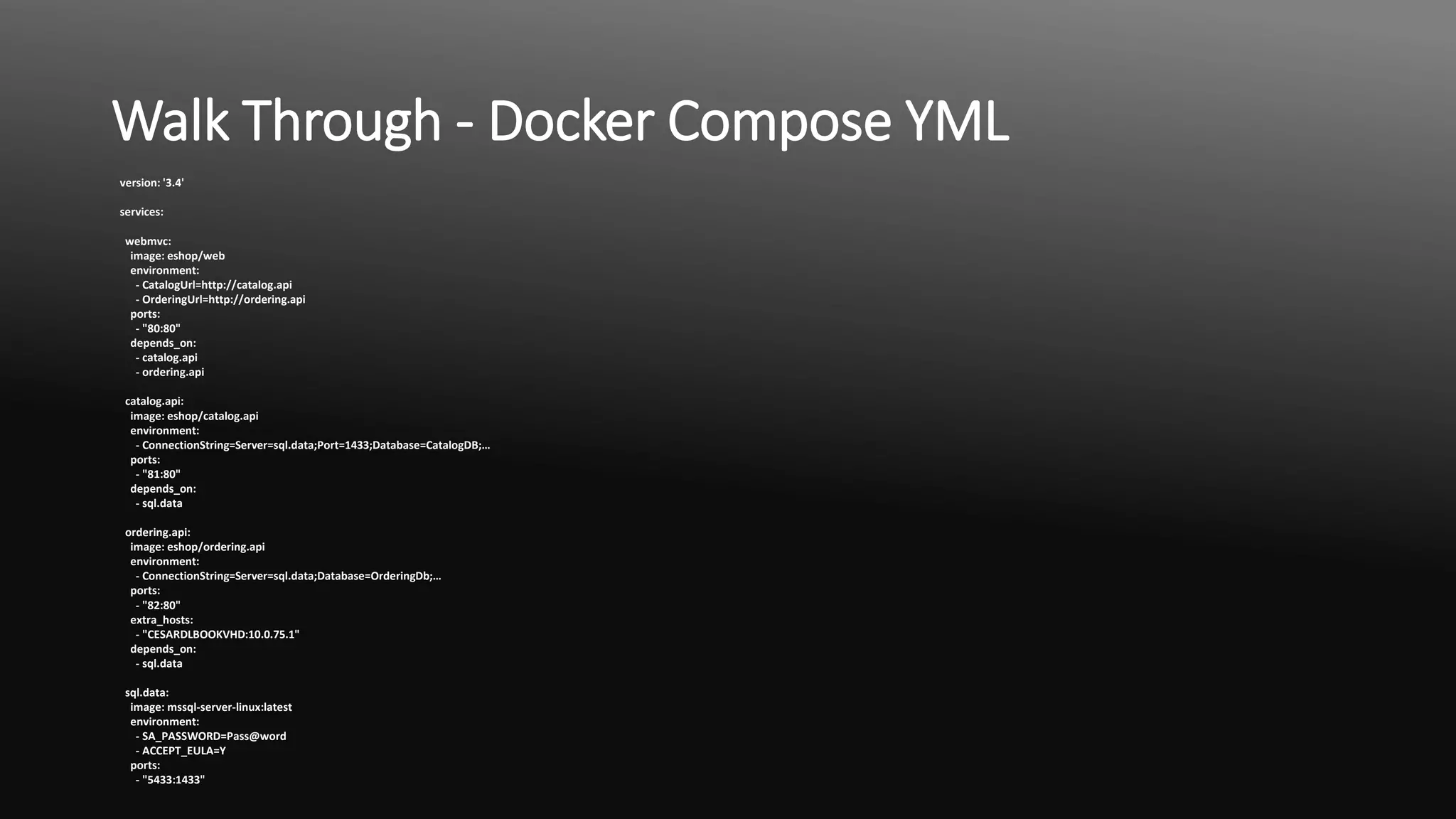
version: '3.4'
services:
webmvc:
image: eshop/web
environment:
- CatalogUrl=http://catalog.api
- OrderingUrl=http://ordering.api
ports:
- "80:80"
depends_on:
- catalog.api
- ordering.api
catalog.api:
image: eshop/catalog.api
environment:
- ConnectionString=Server=sql.data;Port=1433;Database=CatalogDB;…
ports:
- "81:80"
depends_on:
- sql.data
ordering.api:
image: eshop/ordering.api
environment:
- ConnectionString=Server=sql.data;Database=OrderingDb;…
ports:
- "82:80"
extra_hosts:
- "CESARDLBOOKVHD:10.0.75.1"
depends_on:
- sql.data
sql.data:
image: mssql-server-linux:latest
environment:
- SA_PASSWORD=Pass@word
- ACCEPT_EULA=Y
ports:
- "5433:1433"
- END OF DECK
By Abdul Khan – https://www.linkedin.com/in/abdul-khan-uk/

Development workflow guide for building docker apps

  • 1.
    Development Workflow Guide forBuilding Docker Apps By Abdul khan
  • 2.
    Author • Abdul Khan •IT Consultant based in Manchester, UK • Engineering Lead, Executive, Technologist, Architect • IT experience, within the private and public sectors (Retail, Banking, Digital, Insurance, M.O.D., HMRC, Aviation, Telecommunication, Housing Associations, Education, Travel, and Pharmaceutical companies). Excellent architectural and strong DevOps experience with proven-track record of delivering E2E, B2B and B2C solution on regional and global programs. • SME in specializing in providing integration, data migration, digital transformations to the cloud solutions (Azure and AWS) • Wealth of experience in global projects across EMEA, ASPAC and LATAM • Liked in profile https://www.linkedin.com/in/abdul-khan-uk/
  • 3.
    Accreditations Thank you tomy good friend and colleague for reviewing, adding value, sharing their vast experience and knowledge. • Steve Lampton (IT Consultant, Cloud SME) specialising in NetOps, DevOps and SecOps
  • 4.
    Audience Main Audience • Architects •Technical Leads and DevOps, NetOps an d SecOps Assumptions • Reader has some knowledge of Docker containerisation, and cloud platforms technologies.
  • 5.
    Development Workflow Guidefor Building Docker Apps
  • 6.
    Content 1. Introduction 2. Step-by-stepWorkflow For Developing Docker Containerized Apps 3. Walk-Through – Initial Dockerfile (1/2) – Coding Sample 4. Walk-Though – Initial Dockerfile (2/2) – Coding Sample Explained 5. Walk-Though –Docker Compose File– Coding Sample
  • 7.
    1. Introduction • Theapplication development life cycle (ADLC) starts on the development box, The application code is unit tested locally. With this workflow, no matter which language, framework, and platform you choose, you're always developing and testing Docker containers, but doing so locally. • Each container (an instance of a Docker image) includes the following components: • An operating system selection, for example, a Linux distribution, Windows Nano Server, or Windows Server Core. • Files added during development, for example, source code and application binaries. • Configuration information, such as environment settings and dependencies.
  • 8.
    2. Step-by-step WorkflowFor Developing Docker Containerized Apps 1 Code/ Your app Docker Repos 6 Test Your App or Microservice App CImages Remote Docker Registry App CBase Images 7 (CI/CD) Push or Continue Developing 2 Write Dockerfiles(s) 3 Create Images defined at Dockerfile(S) 4 Define Services by writing Docker- compose yml 5 Run Containers / Compose App My Images My Container Git push to source control
  • 9.
    Walk Through -Initial Dockerfile (1/2) 1 FROM mcr.microsoft.com/dotnet/core/aspnet:2.2 AS base 2 WORKDIR /app 3 EXPOSE 80 4 5 FROM mcr.microsoft.com/dotnet/core/sdk:2.2 AS build 6 WORKDIR /src 7 COPY src/Services/Catalog/Catalog.API/Catalog.API.csproj … 8 COPY src/BuildingBlocks/HealthChecks/src/Microsoft.AspNetCore.HealthChecks … 9 COPY src/BuildingBlocks/HealthChecks/src/Microsoft.Extensions.HealthChecks … 10 COPY src/BuildingBlocks/EventBus/IntegrationEventLogEF/ … 11 COPY src/BuildingBlocks/EventBus/EventBus/EventBus.csproj … 12 COPY src/BuildingBlocks/EventBus/EventBusRabbitMQ/EventBusRabbitMQ.csproj … 13 COPY src/BuildingBlocks/EventBus/EventBusServiceBus/EventBusServiceBus.csproj … 14 COPY src/BuildingBlocks/WebHostCustomization/WebHost.Customization … 15 COPY src/BuildingBlocks/HealthChecks/src/Microsoft.Extensions … 16 COPY src/BuildingBlocks/HealthChecks/src/Microsoft.Extensions … 17 RUN dotnet restore src/Services/Catalog/Catalog.API/Catalog.API.csproj 18 COPY . . 19 WORKDIR /src/src/Services/Catalog/Catalog.API 20 RUN dotnet build Catalog.API.csproj -c Release -o /app 21 22 FROM build AS publish 23 RUN dotnet publish Catalog.API.csproj -c Release -o /app 24 25 FROM base AS final 26 WORKDIR /app 27 COPY --from=publish /app . 28 ENTRYPOINT ["dotnet", "Catalog.API.dll"]
  • 10.
    Walk-Through – InitialDockerfile (2/2) The details, line by lines are: Line #1: Begin a stage with a "small" runtime-only base image, call it base for reference. Line #2: Create the /app directory in the image. Line #3: Expose port 80. Line #5: Begin a new stage with the "large" image for building/publishing. Call it build for reference. Line #6: Create directory /src in the image. Line #7: Up to line 16, copy referenced .csproj project files to be able to restore packages later. Line #17: Restore packages for the Catalog.API project and the referenced projects. Line #18: Copy all directory tree for the solution (except the files/directories included in the .dockerignore file) to the /src directory in the image. Line #19: Change the current folder to the Catalog.API project. Line #20: Build the project (and other project dependencies) and output to the /app directory in the image. Line #22: Begin a new stage continuing from the build. Call it publish for reference. Line #23: Publish the project (and dependencies) and output to the /app directory in the image. Line #25: Begin a new stage continuing from base and call it final. Line #26: Change the current directory to /app. Line #27: Copy the /app directory from stage publish to the current directory. Line #28: Define the command to run when the container is started.
  • 11.
    Walk Through -Docker Compose YML version: '3.4' services: webmvc: image: eshop/web environment: - CatalogUrl=http://catalog.api - OrderingUrl=http://ordering.api ports: - "80:80" depends_on: - catalog.api - ordering.api catalog.api: image: eshop/catalog.api environment: - ConnectionString=Server=sql.data;Port=1433;Database=CatalogDB;… ports: - "81:80" depends_on: - sql.data ordering.api: image: eshop/ordering.api environment: - ConnectionString=Server=sql.data;Database=OrderingDb;… ports: - "82:80" extra_hosts: - "CESARDLBOOKVHD:10.0.75.1" depends_on: - sql.data sql.data: image: mssql-server-linux:latest environment: - SA_PASSWORD=Pass@word - ACCEPT_EULA=Y ports: - "5433:1433"
  • 12.
    - END OFDECK By Abdul Khan – https://www.linkedin.com/in/abdul-khan-uk/