Docker containers
The big picture
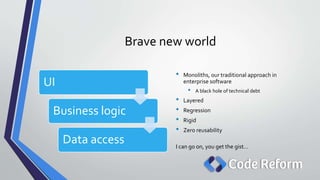
Brave new world
UI
Business logic
Data access
• Monoliths, our traditional approach in
enterprise software
• A black hole of technical debt
• Layered
• Regression
• Rigid
• Zero reusability
I can go on, you get the gist…
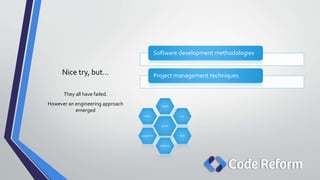
Nice try, but…
Software development methodologies
Project management techniques
They all have failed.
However an engineering approach
emerged
scrum
crystal
xp
lean
adaptive
pragmatic
dsdm
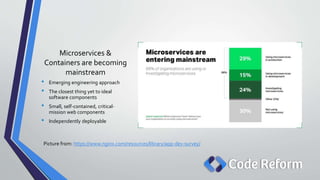
Microservices &
Containers are becoming
mainstream
• Emerging engineering approach
• The closest thing yet to ideal
software components
• Small, self-contained, critical-
mission web components
• Independently deployable
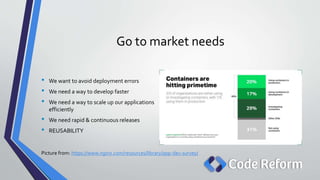
Picture from: https://www.nginx.com/resources/library/app-dev-survey/
Go to market needs
• We want to avoid deployment errors
• We need a way to develop faster
• We need a way to scale up our applications
efficiently
• We need rapid & continuous releases
• REUSABILITY
Picture from: https://www.nginx.com/resources/library/app-dev-survey/
What’s a container?
Containers
• Standard unit of software deployment
• Contains different code and dependencies
• Each container can run an entire application
• Container image is instantiated to run as a
process, serving the application
• Think of this analogy: Class vs object.
• Offers
• Isolation
• Portability
• Agility
• Scalability
A container does one thing and it does it in one process
Container principle
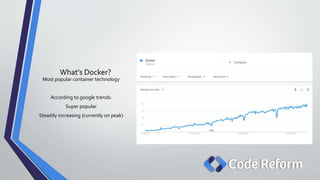
What’s Docker?
Most popular container technology
According to google trends:
Super popular
Steadily increasing (currently on peak)
Docker
• Lightweight container engine
• Similar to aVM – can host apps & services
• Supports Linux, CoreOS &Windows
• Linux being the most popular
• WindowsNano
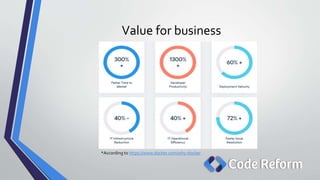
Value for business
*According to https://www.docker.com/why-docker
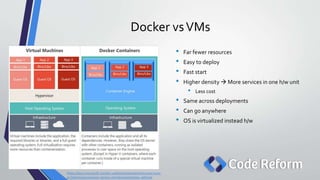
Docker vsVMs
• Far fewer resources
• Easy to deploy
• Fast start
• Higher density  More services in one h/w unit
• Less cost
• Same across deployments
• Can go anywhere
• OS is virtualized instead h/w
https://docs.microsoft.com/en-us/dotnet/standard/microservices-
architecture/container-docker-introduction/docker-defined
“
”
It works on my machine
Developers’ favorite phrase
“It runs on Docker”
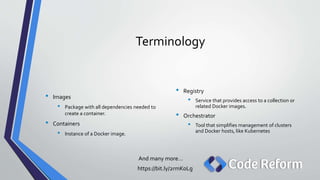
Terminology
And many more…
https://bit.ly/2rmKoLg
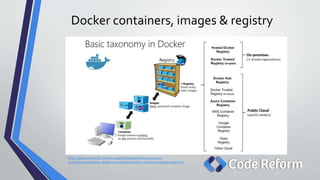
• Registry
• Service that provides access to a collection or
related Docker images.
• Orchestrator
• Tool that simplifies management of clusters
and Docker hosts, like Kubernetes
• Images
• Package with all dependencies needed to
create a container.
• Containers
• Instance of a Docker image.
Docker containers, images & registry
https://docs.microsoft.com/en-us/dotnet/standard/microservices-
architecture/container-docker-introduction/docker-containers-images-registries
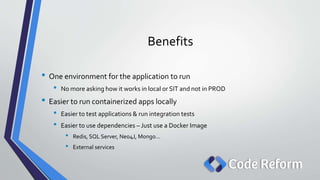
Benefits
• One environment for the application to run
• No more asking how it works in local or SIT and not in PROD
• Easier to run containerized apps locally
• Easier to test applications & run integration tests
• Easier to use dependencies – Just use a Docker Image
• Redis, SQL Server, Neo4J, Mongo…
• External services
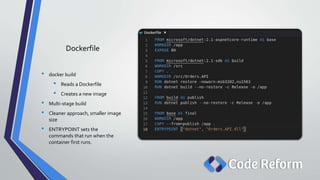
Dockerfile
• docker build
• Reads a Dockerfile
• Creates a new image
• Multi-stage build
• Cleaner approach, smaller image
size
• ENTRYPOINT sets the
commands that run when the
container first runs.
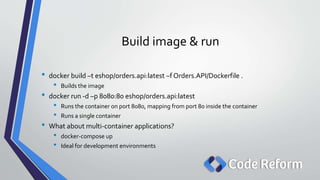
Build image & run
• docker build –t eshop/orders.api:latest –f Orders.API/Dockerfile .
• Builds the image
• docker run -d –p 8080:80 eshop/orders.api:latest
• Runs the container on port 8080, mapping from port 80 inside the container
• Runs a single container
• What about multi-container applications?
• docker-compose up
• Ideal for development environments
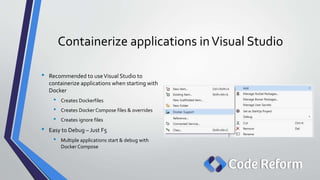
Containerize applications inVisual Studio
• Recommended to useVisual Studio to
containerize applications when starting with
Docker
• Creates Dockerfiles
• Creates Docker Compose files & overrides
• Creates ignore files
• Easy to Debug – Just F5
• Multiple applications start & debug with
Docker Compose
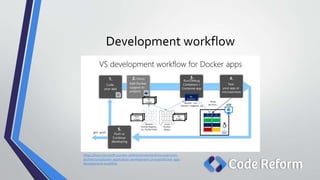
Development workflow
https://docs.microsoft.com/en-us/dotnet/standard/microservices-
architecture/docker-application-development-process/docker-app-
development-workflow
.NET Core & Containers
• Cross-platform
• Can target different OS compared to .NET Framework which requires Windows only
• Microservices
• .NET Core fits best the containers philosophy
• Lightweight compared to .NET Framework
• Container is lightweight also – Linux container size <Windows container size
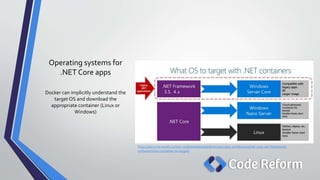
Operating systems for
.NET Core apps
Docker can implicitly understand the
target OS and download the
appropriate container (Linux or
Windows)
https://docs.microsoft.com/en-us/dotnet/standard/microservices-architecture/net-core-net-framework-
containers/net-container-os-targets
Composing multi-
container applications
Resources
• https://docs.microsoft.com/en-us/dotnet/standard/microservices-architecture/
• https://www.pluralsight.com/courses/docker-containers-big-picture
• https://www.pluralsight.com/courses/docker-getting-started
• https://www.packtpub.com/virtualization-and-cloud/microservices-development-
azure-java-video
• https://www.nginx.com/resources/library/app-dev-survey/
• https://www.docker.com/
Disclaimer: Diagram images used are taken from Microsoft’s guide on microservices
Questions?

Docker for developers - The big picture

  • 1.
  • 2.
    Brave new world UI Businesslogic Data access • Monoliths, our traditional approach in enterprise software • A black hole of technical debt • Layered • Regression • Rigid • Zero reusability I can go on, you get the gist…
  • 3.
    Nice try, but… Softwaredevelopment methodologies Project management techniques They all have failed. However an engineering approach emerged scrum crystal xp lean adaptive pragmatic dsdm
  • 4.
    Microservices & Containers arebecoming mainstream • Emerging engineering approach • The closest thing yet to ideal software components • Small, self-contained, critical- mission web components • Independently deployable Picture from: https://www.nginx.com/resources/library/app-dev-survey/
  • 5.
    Go to marketneeds • We want to avoid deployment errors • We need a way to develop faster • We need a way to scale up our applications efficiently • We need rapid & continuous releases • REUSABILITY Picture from: https://www.nginx.com/resources/library/app-dev-survey/
  • 6.
  • 8.
    Containers • Standard unitof software deployment • Contains different code and dependencies • Each container can run an entire application • Container image is instantiated to run as a process, serving the application • Think of this analogy: Class vs object. • Offers • Isolation • Portability • Agility • Scalability
  • 9.
    A container doesone thing and it does it in one process Container principle
  • 10.
    What’s Docker? Most popularcontainer technology According to google trends: Super popular Steadily increasing (currently on peak)
  • 11.
    Docker • Lightweight containerengine • Similar to aVM – can host apps & services • Supports Linux, CoreOS &Windows • Linux being the most popular • WindowsNano
  • 12.
    Value for business *Accordingto https://www.docker.com/why-docker
  • 13.
    Docker vsVMs • Farfewer resources • Easy to deploy • Fast start • Higher density  More services in one h/w unit • Less cost • Same across deployments • Can go anywhere • OS is virtualized instead h/w https://docs.microsoft.com/en-us/dotnet/standard/microservices- architecture/container-docker-introduction/docker-defined
  • 14.
    “ ” It works onmy machine Developers’ favorite phrase “It runs on Docker”
  • 15.
    Terminology And many more… https://bit.ly/2rmKoLg •Registry • Service that provides access to a collection or related Docker images. • Orchestrator • Tool that simplifies management of clusters and Docker hosts, like Kubernetes • Images • Package with all dependencies needed to create a container. • Containers • Instance of a Docker image.
  • 16.
    Docker containers, images& registry https://docs.microsoft.com/en-us/dotnet/standard/microservices- architecture/container-docker-introduction/docker-containers-images-registries
  • 17.
    Benefits • One environmentfor the application to run • No more asking how it works in local or SIT and not in PROD • Easier to run containerized apps locally • Easier to test applications & run integration tests • Easier to use dependencies – Just use a Docker Image • Redis, SQL Server, Neo4J, Mongo… • External services
  • 18.
    Dockerfile • docker build •Reads a Dockerfile • Creates a new image • Multi-stage build • Cleaner approach, smaller image size • ENTRYPOINT sets the commands that run when the container first runs.
  • 19.
    Build image &run • docker build –t eshop/orders.api:latest –f Orders.API/Dockerfile . • Builds the image • docker run -d –p 8080:80 eshop/orders.api:latest • Runs the container on port 8080, mapping from port 80 inside the container • Runs a single container • What about multi-container applications? • docker-compose up • Ideal for development environments
  • 20.
    Containerize applications inVisualStudio • Recommended to useVisual Studio to containerize applications when starting with Docker • Creates Dockerfiles • Creates Docker Compose files & overrides • Creates ignore files • Easy to Debug – Just F5 • Multiple applications start & debug with Docker Compose
  • 21.
  • 22.
    .NET Core &Containers • Cross-platform • Can target different OS compared to .NET Framework which requires Windows only • Microservices • .NET Core fits best the containers philosophy • Lightweight compared to .NET Framework • Container is lightweight also – Linux container size <Windows container size
  • 23.
    Operating systems for .NETCore apps Docker can implicitly understand the target OS and download the appropriate container (Linux or Windows) https://docs.microsoft.com/en-us/dotnet/standard/microservices-architecture/net-core-net-framework- containers/net-container-os-targets
  • 24.
  • 25.
    Resources • https://docs.microsoft.com/en-us/dotnet/standard/microservices-architecture/ • https://www.pluralsight.com/courses/docker-containers-big-picture •https://www.pluralsight.com/courses/docker-getting-started • https://www.packtpub.com/virtualization-and-cloud/microservices-development- azure-java-video • https://www.nginx.com/resources/library/app-dev-survey/ • https://www.docker.com/ Disclaimer: Diagram images used are taken from Microsoft’s guide on microservices
  • 26.

Editor's Notes

  • #2 Some notes
  • #4 Why so many errors in deployments? Why instruction books for deployments with steps? (Real world example) Why slow development? Why setting up so many dependencies, wasting time? (Real world example, 1 full day, 3 developers + 1 team lead/manager) Why CRQs? (Real world example)
  • #14 Sidestory – server migration in BAML
  • #19 Build a new stage, a small runtime-only base image Create /app directory in that image Expose port 80 Create a new stage with a larger image for building the application Create directory /src in the image Copy .csproj files Run dotnet restore Copy all directory tree for the solution to the /serc directory in the image Change current folder to Orders.API Build the project Then create a new stage, which publishes the artifacts from the .csproj Finally create a new stage, continuing from base and call it final Change current directory to /app Copy the /app directory from stage publish to the current directory Define the command to run when the container is started
  • #21 Open Visual Studio, create a new ASP.NET Core Application or open an existing and containerize it
  • #25 Create new solution Add a Web API application Add Docker support Run docker-compose up to compose all containers and their dependencies