A Design Process
The Design Process
•
•
•
•

What Is Design?
What Is a Design Process?
Design Process Examples
Design Process Used in IED
What Is Design?
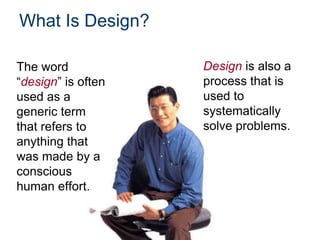
The word
“design” is often
used as a
generic term
that refers to
anything that
was made by a
conscious
human effort.

Design is also a
process that is
used to
systematically
solve problems.
What Is a Design Process?
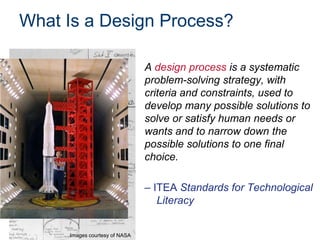
A design process is a systematic
problem-solving strategy, with
criteria and constraints, used to
develop many possible solutions to
solve or satisfy human needs or
wants and to narrow down the
possible solutions to one final
choice.
– ITEA Standards for Technological
Literacy

Images courtesy of NASA
Design Process
Various design
processes are
used across
different technical
fields. The
following are
examples.
Design Process Example
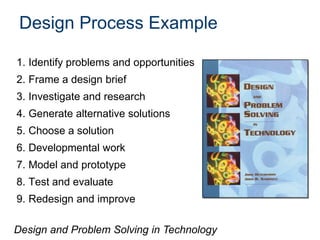
1. Identify problems and opportunities
2. Frame a design brief
3. Investigate and research
4. Generate alternative solutions
5. Choose a solution
6. Developmental work
7. Model and prototype
8. Test and evaluate

9. Redesign and improve
Design and Problem Solving in Technology
Design Process Example
1. Identify the need
2. Define the criteria
3. Explore/research/investigate
4. Generate alternate solutions
5. Choose a solution
6. Develop the solution
7. Model/prototype
8. Test and evaluate

9. Redesign and improve
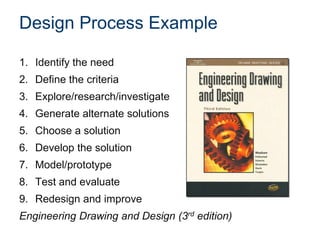
Engineering Drawing and Design (3rd edition)
Design Process Example
1.
2.
3.
4.
5.
6.
7.
8.
9.
10.
11.
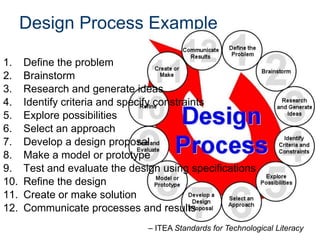
12.

Define the problem
Brainstorm
Research and generate ideas
Identify criteria and specify constraints
Explore possibilities
Select an approach
Develop a design proposal
Make a model or prototype
Test and evaluate the design using specifications
Refine the design
Create or make solution
Communicate processes and results
– ITEA Standards for Technological Literacy
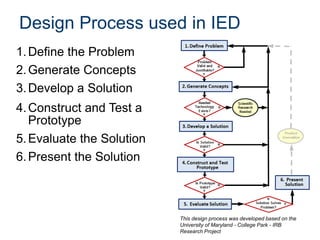
Design Process used in IED
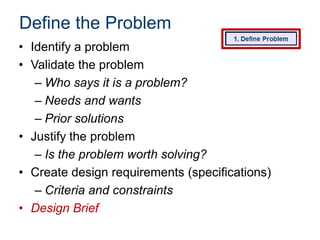
1. Define the Problem
2. Generate Concepts
3. Develop a Solution
4. Construct and Test a
Prototype
5. Evaluate the Solution
6. Present the Solution

This design process was developed based on the
University of Maryland - College Park - IRB
Research Project
Design Process
• Design process used in IED is an example
of one design process
• Many design processes exist and are
effective
• Consistently applying a single clearly
defined design process provides a basis
for understanding
Define the Problem
• Identify a problem
• Validate the problem
– Who says it is a problem?
– Needs and wants
– Prior solutions
• Justify the problem
– Is the problem worth solving?
• Create design requirements (specifications)
– Criteria and constraints
• Design Brief
Define the Problem
• Design Brief
– A written plan that identifies
a problem to be solved, its
criteria, and its constraints.
– Used to encourage thinking
of all aspects of a problem
before attempting a
solution.
Define the Problem
• Identify a problem
• Validate the problem
– Who says it is a problem?
– Needs and wants
– Prior solutions

• Justify the problem
– Is the problem worth solving?

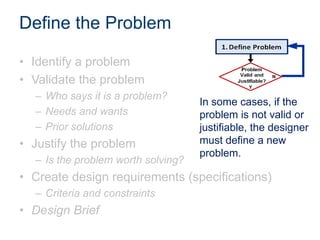
In some cases, if the
problem is not valid or
justifiable, the designer
must define a new
problem.

• Create design requirements (specifications)
– Criteria and constraints

• Design Brief
Generate Concepts
• Research
• Brainstorm possible
solutions
• Consider additional design
goals
• Apply STEM principles
• Select an approach
• Decision Matrix
Generate Concepts
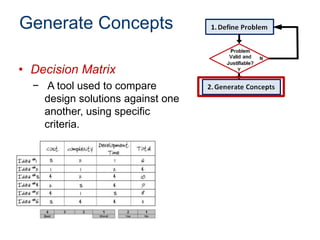
• Decision Matrix
− A tool used to compare
design solutions against one
another, using specific
criteria.
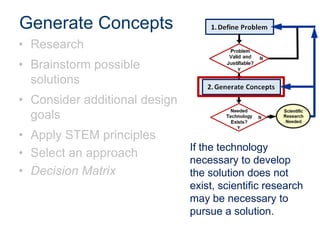
Generate Concepts
• Research
• Brainstorm possible
solutions
• Consider additional design
goals
• Apply STEM principles
• Select an approach
• Decision Matrix

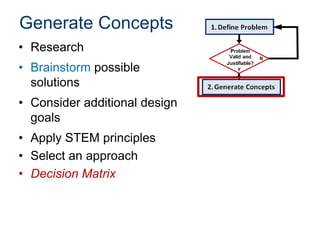
If the technology
necessary to develop
the solution does not
exist, scientific research
may be necessary to
pursue a solution.
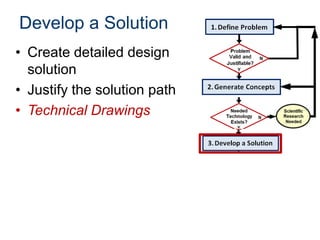
Develop a Solution
• Create detailed design
solution
• Justify the solution path
• Technical Drawings
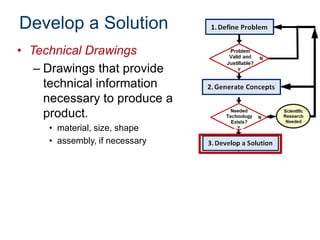
Develop a Solution
• Technical Drawings
– Drawings that provide
technical information
necessary to produce a
product.
• material, size, shape
• assembly, if necessary
Develop a Solution
• Select an approach
– Decision Matrix
• Create detailed design
solution
– Technical Drawings
• Justify the solution path

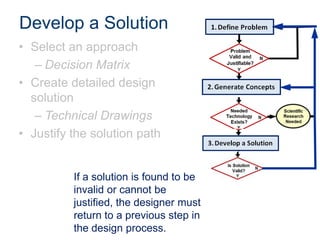
If a solution is found to be
invalid or cannot be
justified, the designer must
return to a previous step in
the design process.
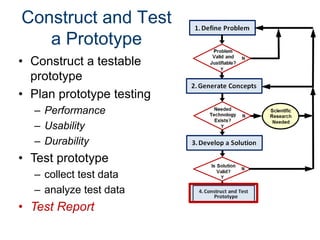
Construct and Test
a Prototype
• Construct a testable
prototype
• Plan prototype testing
– Performance
– Usability
– Durability

• Test prototype
– collect test data
– analyze test data

• Test Report
Construct and Test
a Prototype
• Construct a testable
prototype
• Plan prototype testing
– Performance
– Usability
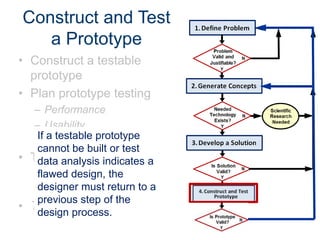
If a testable
– Durability prototype
cannot be built or test
• Test prototype
data analysis indicates a
– collect test data
flawed design, the
designer test return
– analyzemustdata to a
previous step of the
• Test Report
design process.
Evaluate the Solution
• Evaluate solution
effectiveness
• Reflect on design
– Recommend improvements

• Optimize/Redesign the
solution
– [Return to prior design
process steps, if necessary]
– Revise design documents

• Project Recommendations
Evaluate the Solution
• Evaluate solution
effectiveness
• Reflect on design
– Recommend improvements

• Optimize/Redesign the
solution
– [Return to prior design
process steps, if necessary]
– Revise design documents

• Project Recommendations
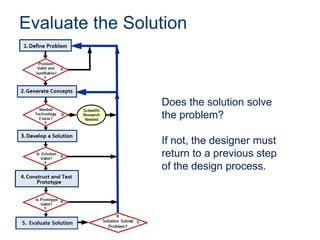
Evaluate the Solution

Does the solution solve
the problem?

If not, the designer must
return to a previous step
of the design process.
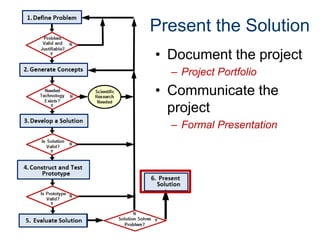
Present the Solution
• Document the project
– Project Portfolio

• Communicate the
project
– Formal Presentation
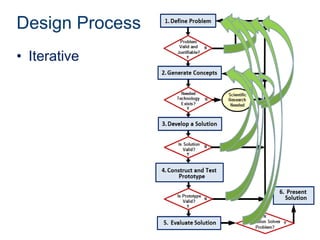
Design Process
• Iterative
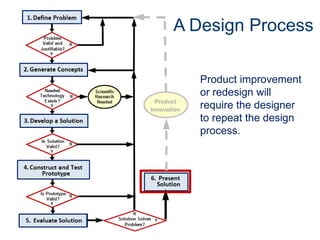
A Design Process

Product
Innovation

Product improvement
or redesign will
require the designer
to repeat the design
process.
Image Resources
National Aeronautics and Space Administration (NASA). (n.d.).
NASA image exchange. Retrieved from http://nix.nasa.gov/.

Design process2013

  • 1.
  • 2.
    The Design Process • • • • WhatIs Design? What Is a Design Process? Design Process Examples Design Process Used in IED
  • 3.
    What Is Design? Theword “design” is often used as a generic term that refers to anything that was made by a conscious human effort. Design is also a process that is used to systematically solve problems.
  • 4.
    What Is aDesign Process? A design process is a systematic problem-solving strategy, with criteria and constraints, used to develop many possible solutions to solve or satisfy human needs or wants and to narrow down the possible solutions to one final choice. – ITEA Standards for Technological Literacy Images courtesy of NASA
  • 5.
    Design Process Various design processesare used across different technical fields. The following are examples.
  • 6.
    Design Process Example 1.Identify problems and opportunities 2. Frame a design brief 3. Investigate and research 4. Generate alternative solutions 5. Choose a solution 6. Developmental work 7. Model and prototype 8. Test and evaluate 9. Redesign and improve Design and Problem Solving in Technology
  • 7.
    Design Process Example 1.Identify the need 2. Define the criteria 3. Explore/research/investigate 4. Generate alternate solutions 5. Choose a solution 6. Develop the solution 7. Model/prototype 8. Test and evaluate 9. Redesign and improve Engineering Drawing and Design (3rd edition)
  • 8.
    Design Process Example 1. 2. 3. 4. 5. 6. 7. 8. 9. 10. 11. 12. Definethe problem Brainstorm Research and generate ideas Identify criteria and specify constraints Explore possibilities Select an approach Develop a design proposal Make a model or prototype Test and evaluate the design using specifications Refine the design Create or make solution Communicate processes and results – ITEA Standards for Technological Literacy
  • 9.
    Design Process usedin IED 1. Define the Problem 2. Generate Concepts 3. Develop a Solution 4. Construct and Test a Prototype 5. Evaluate the Solution 6. Present the Solution This design process was developed based on the University of Maryland - College Park - IRB Research Project
  • 10.
    Design Process • Designprocess used in IED is an example of one design process • Many design processes exist and are effective • Consistently applying a single clearly defined design process provides a basis for understanding
  • 11.
    Define the Problem •Identify a problem • Validate the problem – Who says it is a problem? – Needs and wants – Prior solutions • Justify the problem – Is the problem worth solving? • Create design requirements (specifications) – Criteria and constraints • Design Brief
  • 12.
    Define the Problem •Design Brief – A written plan that identifies a problem to be solved, its criteria, and its constraints. – Used to encourage thinking of all aspects of a problem before attempting a solution.
  • 13.
    Define the Problem •Identify a problem • Validate the problem – Who says it is a problem? – Needs and wants – Prior solutions • Justify the problem – Is the problem worth solving? In some cases, if the problem is not valid or justifiable, the designer must define a new problem. • Create design requirements (specifications) – Criteria and constraints • Design Brief
  • 14.
    Generate Concepts • Research •Brainstorm possible solutions • Consider additional design goals • Apply STEM principles • Select an approach • Decision Matrix
  • 15.
    Generate Concepts • DecisionMatrix − A tool used to compare design solutions against one another, using specific criteria.
  • 16.
    Generate Concepts • Research •Brainstorm possible solutions • Consider additional design goals • Apply STEM principles • Select an approach • Decision Matrix If the technology necessary to develop the solution does not exist, scientific research may be necessary to pursue a solution.
  • 17.
    Develop a Solution •Create detailed design solution • Justify the solution path • Technical Drawings
  • 18.
    Develop a Solution •Technical Drawings – Drawings that provide technical information necessary to produce a product. • material, size, shape • assembly, if necessary
  • 19.
    Develop a Solution •Select an approach – Decision Matrix • Create detailed design solution – Technical Drawings • Justify the solution path If a solution is found to be invalid or cannot be justified, the designer must return to a previous step in the design process.
  • 20.
    Construct and Test aPrototype • Construct a testable prototype • Plan prototype testing – Performance – Usability – Durability • Test prototype – collect test data – analyze test data • Test Report
  • 21.
    Construct and Test aPrototype • Construct a testable prototype • Plan prototype testing – Performance – Usability If a testable – Durability prototype cannot be built or test • Test prototype data analysis indicates a – collect test data flawed design, the designer test return – analyzemustdata to a previous step of the • Test Report design process.
  • 22.
    Evaluate the Solution •Evaluate solution effectiveness • Reflect on design – Recommend improvements • Optimize/Redesign the solution – [Return to prior design process steps, if necessary] – Revise design documents • Project Recommendations
  • 23.
    Evaluate the Solution •Evaluate solution effectiveness • Reflect on design – Recommend improvements • Optimize/Redesign the solution – [Return to prior design process steps, if necessary] – Revise design documents • Project Recommendations
  • 24.
    Evaluate the Solution Doesthe solution solve the problem? If not, the designer must return to a previous step of the design process.
  • 25.
    Present the Solution •Document the project – Project Portfolio • Communicate the project – Formal Presentation
  • 26.
  • 27.
    A Design Process Product Innovation Productimprovement or redesign will require the designer to repeat the design process.
  • 28.
    Image Resources National Aeronauticsand Space Administration (NASA). (n.d.). NASA image exchange. Retrieved from http://nix.nasa.gov/.

Editor's Notes

  • #15 When generating concepts the designer should research past solutions and brainstorm new ideas. During the brainstorming process, additional design goals that will enhance the design may become apparent. As in all steps of the Design Process, the designer should apply STEM (science, technology, engineering, and mathematics) principles.Once you have generated multiple possible solutions, narrow your efforts to one (or a few) solution paths. One method of selecting an approach is the use of a Decision Matrix.
  • #17 If technology does not exist that would allow development of the solution path selected, you believe that alternate concepts can be developed with available technology, you may choose another concept that you have already generated or continue to brainstorm in step 2. However, if it appears that the problem may not be solvable at all with existing technology, you may return to step 1 to redefine the problem. One option is to define a problem that will lead to development of the technology necessary for a solution to the original problem. Note that, in general, a flow chart will not include a flow path that diverges without a decision box, as is the case here when returning to an earlier step. When returning to an earlier step, the designer must decide the most appropriate step to which to return.
  • #27 Although we have presented a design process in a somewhat linear fashion, the path from identifying a problem to presenting a solution is rarely straightforward. Designers must evaluate, reflect, redefine, and redesign throughout the process. It is common to repeat steps of the design process several times before an optimal solution is found.