PENSANDO EM
COMPONENTES: UM
PARADIGMA NOVO PARA
WEB UIS
Oliver Häger
1. Introdução
Uma (ultra-)breve História do Tempo
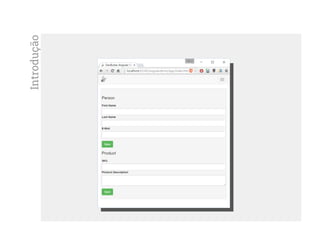
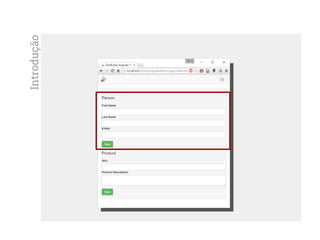
Introdução
Introdução
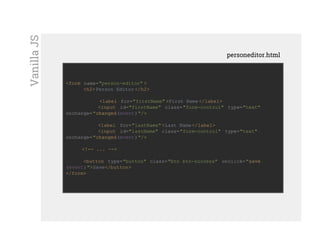
<form name="person-editor" >
<h2>Person Editor </h2>
<label for="firstName" >First Name</label>
<input id="firstName" class="form-control" type="text"
onchange="changed(event)"/>
<label for="lastName">Last Name</label>
<input id="lastName" class="form-control" type="text"
onchange="changed(event)"/>
<!-- ... -->
<button type="button" class="btn btn-success" onclick="save
(event)">Save</button>
</form>
personeditor.html
VanillaJS
var httpRequest = new XMLHttpRequest() ;
var person = {} ;
function changed(event){
person[event. target.id] = event.target.value;
}
function save(){
httpRequest.onreadystatechange = function(){/* ... */} ;
httpRequest. open("POST", "http://www.neolithic.com/person" );
httpRequest. setRequestHeader ('Content-Type' , 'application/json' );
httpRequest. send( JSON.stringify(person) );
}
personeditor.js
VanillaJS
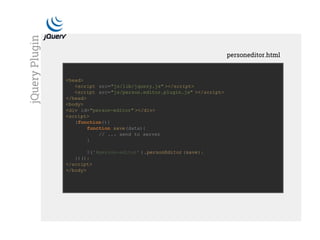
<head>
<script src="js/lib/jquery.js" ></script>
<script src="js/person.editor.plugin.js" ></script>
</head>
<body>
<div id="person-editor" ></div>
<script>
(function(){
function save(data){
// ... send to server
}
$('#person-editor' ).personEditor (save);
})();
</script>
</body>
personeditor.html
jQueryPlugin
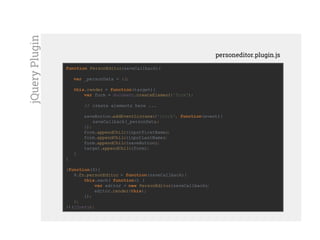
function PersonEditor(saveCallback){
var _personData = {};
this.render = function(target){
var form = document.createElement('form');
// create elements here ...
saveButton.addEventListener('click', function(event){
saveCallback(_personData);
});
form.appendChild(inputFirstName);
form.appendChild(inputLastName);
form.appendChild(saveButton);
target.appendChild(form);
}
}
(function($){
$.fn.personEditor = function(saveCallback){
this.each( function() {
var editor = new PersonEditor(saveCallback);
editor.render(this);
});
};
})(jQuery);
personeditor.plugin.js
jQueryPlugin
AngularJS
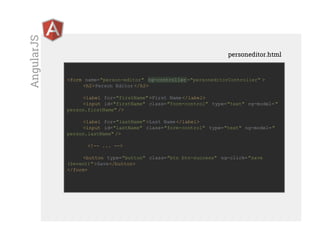
<form name="person-editor" ng-controller ="personeditorController" >
<h2>Person Editor </h2>
<label for="firstName" >First Name</label>
<input id="firstName" class="form-control" type="text" ng-model="
person.firstName" />
<label for="lastName">Last Name</label>
<input id="lastName" class="form-control" type="text" ng-model="
person.lastName" />
<!-- ... -->
<button type="button" class="btn btn-success" ng-click="save
($event)">Save</button>
</form>
personeditor.html
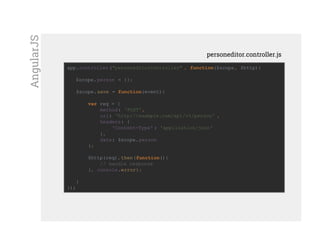
app.controller("personeditorController" , function($scope, $http){
$scope.person = {};
$scope.save = function(event){
var req = {
method: 'POST',
url: 'http://example.com/api/v1/person' ,
headers: {
'Content-Type' : 'application/json'
},
data: $scope.person
};
$http(req). then(function(){
// handle response
}, console.error);
}
});
personeditor.controller.js
AngularJS
2. Componentes
O novo paradigma
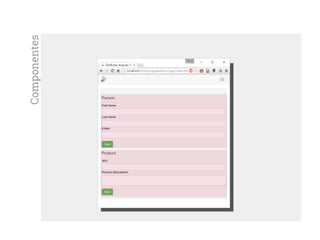
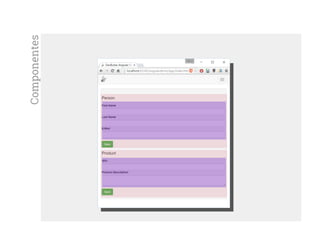
Componentes
Componentes
Componentes
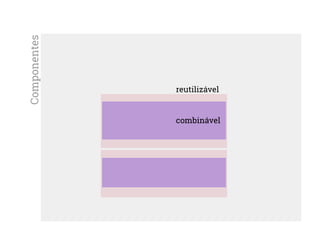
combinável
reutilizável
Componentes
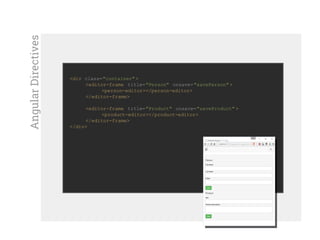
<div class="container" >
<editor-frame title="Person" onsave="savePerson" >
<person-editor></person-editor>
</editor-frame>
<editor-frame title="Product" onsave="saveProduct" >
<product-editor></product-editor>
</editor-frame>
</div>
AngularDirectives
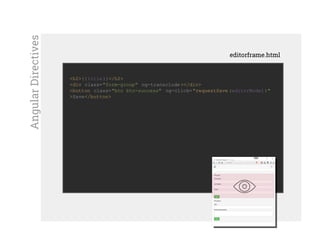
<h2>{{title}}</h2>
<div class="form-group" ng-transclude ></div>
<button class="btn btn-success" ng-click="requestSave (editorModel )"
>Save</button>
editorframe.html
AngularDirectives
angular.module('app.components.editorframe' , [])
.directive('editorFrame' , function() {
return {
templateUrl : 'components/ng/editorframe.html' ,
transclude: true,
scope : {
title : '@',
onsave : '='
},
controller : function($scope){
$scope. editorModel = {};
this.updateModel = function(model){
$scope. editorModel = model;
};
$scope.requestSave = function(editorModel) {
$scope. onsave(editorModel) ;
};
}
};
});
editorframe-component.js
AngularDirectives
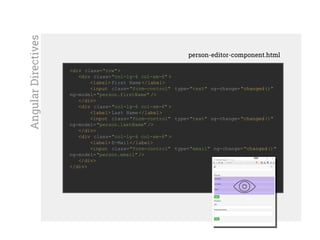
<div class="row">
<div class="col-lg-6 col-sm-6" >
<label> First Name</label>
<input class="form-control" type="text" ng-change="changed()"
ng-model="person.firstName" />
</div>
<div class="col-lg-6 col-sm-6" >
<label> Last Name</label>
<input class="form-control" type="text" ng-change="changed()"
ng-model="person.lastName" />
</div>
<div class="col-lg-6 col-sm-6" >
<label> E-Mail</label>
<input class="form-control" type="email" ng-change="changed()"
ng-model="person.email" />
</div>
</div>
person-editor-component.html
AngularDirectives
angular.module('app.components.personeditor' , ['app.components.
editorframe' ])
.directive('personEditor' , function($rootScope) {
return {
require : "^editorFrame" ,
restrict : "AE",
scope : {
} ,
templateUrl : 'components/ng/person-editor-directive.html' ,
link : function($scope, element, attrs, frameCtrl)
{
$scope. changed = function(){
frameCtrl. updateModel ($scope.person);
}
}
};
});
person-editor-component.js
AngularDirectives
Bibliotéca para View
Performático
Sem dependências
Facebook (e Instagram)
ReactJS
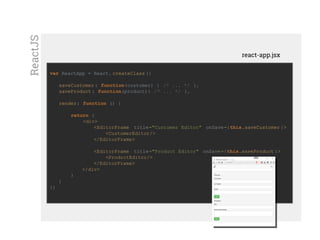
Mostrar custom elementvar ReactApp = React. createClass ({
saveCustomer : function(customer) { /* ... */ },
saveProduct : function(product){ /* ... */ },
render: function () {
return (
<div>
<EditorFrame title="Customer Editor" onSave={this.saveCustomer }>
<CustomerEditor/>
</EditorFrame>
<EditorFrame title="Product Editor" onSave={this.saveProduct }>
<ProductEditor/>
</EditorFrame>
</div>
)
}
})
react-app.jsx
ReactJS
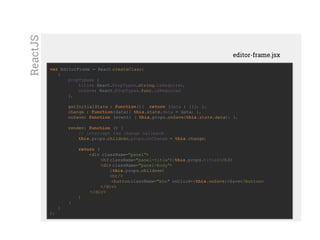
Mostrar custom elementvar EditorFrame = React.createClass(
{
propTypes: {
title: React.PropTypes.string.isRequired,
onSave: React.PropTypes.func.isRequired
},
getInitialState : function(){ return {data : {}}; },
change : function(data){ this.state.data = data; },
onSave: function (event) { this.props.onSave(this.state.data); },
render: function () {
// intercept the change callback
this.props.children.props.onChange = this.change;
return (
<div className="panel">
<h3 className="panel-title">{this.props.title}</h3>
<div className="panel-body">
{this.props.children}
<hr/>
<buttonclassName="btn" onClick={this.onSave}>Save</button>
</div>
</div>
)
}
}
);
editor-frame.jsx
ReactJS
Mostrar custom element
var CustomerEditor = React.createClass({
PropTypes: {
onChange : React.PropTypes.func.isRequired
},
getInitialState : function(){ return {data: {}}; },
editorDataChanged: function (event) {
this.state.data[event.target.name] = event.target.value;
this.props.onChange(this.state.data); // propagate data model
},
render: function () {
return (
<div>
<div className="form-group">
<input name="name" className="form-control" type="text"
onChange={this.editorDataChanged}/>
</div>
<div className="form-group">
<input name="email" className="form-control" type="text"
onChange={this.editorDataChanged}/>
</div>
</div>
)
}
});
customer-editor.jsx
ReactJS
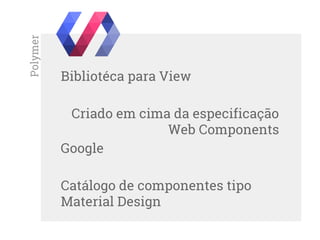
Bibliotéca para View
Criado em cima da especificação
Web Components
Google
Catálogo de componentes tipo
Material Design
Polymer
Mostrar custom element
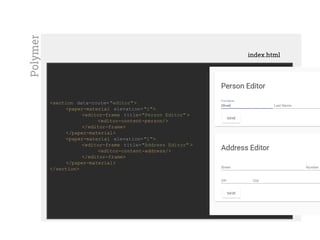
<section data-route= "editor">
<paper-material elevation="1">
<editor-frame title="Person Editor" >
<editor-content-person/>
</editor-frame>
</paper-material>
<paper-material elevation="1">
<editor-frame title="Address Editor" >
<editor-content-address/>
</editor-frame>
</paper-material>
</section>
index.html
Polymer
Mostrar custom element
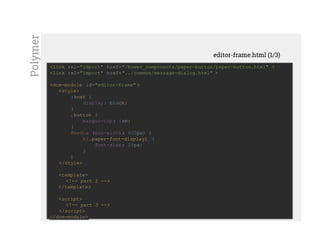
<link rel="import" href="/bower_components/paper-button/paper-button.html" >
<link rel="import" href="../common/message-dialog.html" >
<dom-module id="editor-frame" >
<style>
:host {
display: block;
}
.button {
margin-top: 1em;
}
@media (max-width: 600px) {
h1.paper-font-display1 {
font-size: 24px;
}
}
</style>
<template>
<!-- part 2 -->
</template>
<script>
<!-- part 3 -->
</script>
</dom-module>
editor-frame.html (1/3)
Polymer
Mostrar custom element<link rel="import" href="/bower_components/paper-button/paper-button.html" >
<link rel="import" href="../common/message-dialog.html" >
<dom-module id="editor-frame" >
<style>
<!-- part 1 -->
</style>
<template>
<h1 class="paper-font-display1" ><span>{{title}}</span></h1>
<div id="content">
<content></content>
</div>
<paper-button class="button" on-click="save" raised>Save</paper-button>
<message-dialog id="dialog" title="Saved Data" message="[[editorData]]"
></message-dialog>
</template>
<script>
<!-- part 3 -->
</script>
</dom-module>
editor-frame.html (2/3)
Polymer
Mostrar custom element<script>
(function () {
Polymer({
is: 'editor-frame' ,
properties: {
editorData: String,
title: {
type: String,
notify: true
}
},
ready: function() {
this.addEventListener ('changed-model' , this.updateModel );
},
updateModel : function(event){
this.editorData = JSON.stringify(event.detail.model);
},
save: function () {
this.$.dialog.open();
}
});
})();
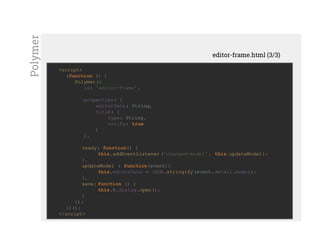
</script>
editor-frame.html (3/3)
Polymer
Mostrar custom element<link rel="import" href="/bower_components/paper-input/paper-input.html" >
<link rel="import" href="editor-content-behaviour.html" >
<dom-module id="editor-content-person" >
<style>
<!-- encapsulated style -->
</style>
<template>
<paper-input class="width-50" name="firstName" label="First Name" on-
change="handleChange" ></paper-input>
<paper-input class="width-50" name="lastName" label="Last Name" on-
change="handleChange" ></paper-input>
</template>
<script>
(function () {
"use strict" ;
Polymer({
is: 'editor-content-person' ,
behaviors : [EditorContentBehavior ]
});
})();
</script>
</dom-module>
editor-content-person.html
Polymer
Mostrar custom element
<script>
EditorContentBehavior = {
properties: {
model : {
type: Object,
value : function () { return {}; } // not shared among instances
}
},
handleChange : function(e){
this.model[e.target.name] = e.target.value;
this.fire('changed-model' , {model : this.model});
}
};
</script>
editor-content-behavior.html
Polymer
3. Componentização
Novos mundos
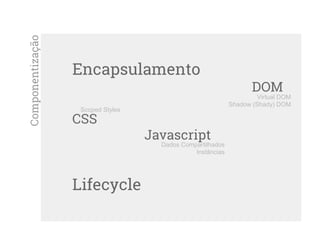
Componentização
Encapsulamento
DOM
CSS
Javascript
Lifecycle
Virtual DOM
Shadow (Shady) DOM
Scoped Styles
Dados Compartilhados
Instâncias
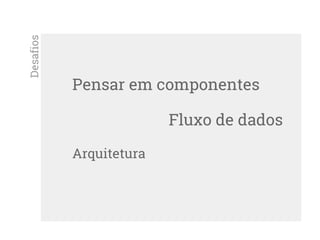
Pensar em componentes
Fluxo de dados
Arquitetura
Desafios
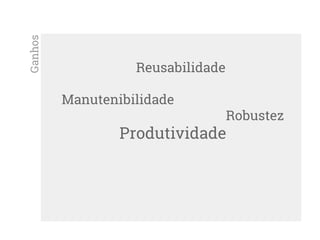
Reusabilidade
Manutenibilidade
Robustez
Produtividade
Ganhos
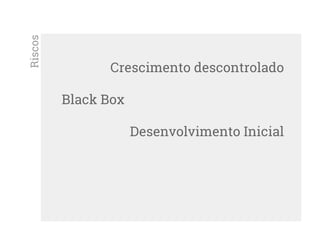
Crescimento descontrolado
Black Box
Desenvolvimento Inicial
Riscos
3. Outlook
The next big thing?
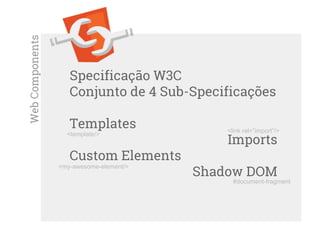
Specificação W3C
Conjunto de 4 Sub-Specificações
Templates
Imports
Custom Elements
Shadow DOM
WebComponents
#document-fragment
<my-awesome-element/>
<link rel=”import”/>
<template/>
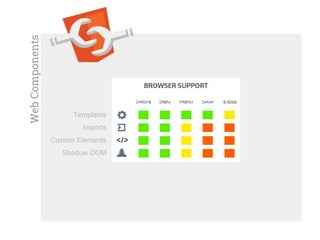
WebComponents
Templates
Imports
Custom Elements
Shadow DOM
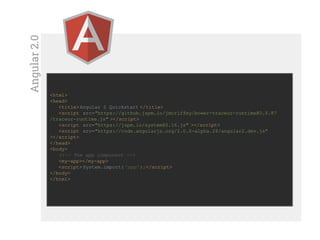
Angular2.0
<html>
<head>
<title>Angular 2 Quickstart </title>
<script src="https://github.jspm.io/jmcriffey/bower-traceur-runtime@0.0.87
/traceur-runtime.js" ></script>
<script src="https://jspm.io/system@0.16.js" ></script>
<script src="https://code.angularjs.org/2.0.0-alpha.28/angular2.dev.js"
></script>
</head>
<body>
<!-- The app component -->
<my-app></my-app>
<script> System.import( 'app');</script>
</body>
</html>
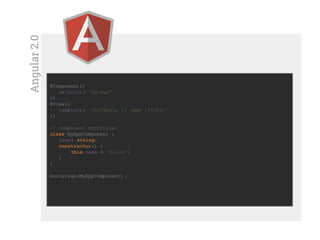
Angular2.0
@Component({
selector: 'my-app'
})
@View({
template: '<h1>Hello {{ name }}</h1>'
})
// Component controller
class MyAppComponent {
name: string;
constructor() {
this.name = 'Alice';
}
}
bootstrap(MyAppComponent) ;
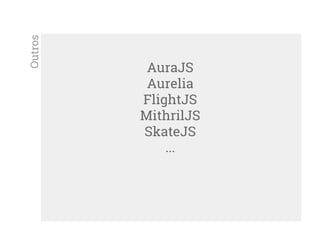
AuraJS
Aurelia
FlightJS
MithrilJS
SkateJS
...
Outros
oliver@devbutze.com
oliver.hager@dextra-sw.com
https://br.linkedin.com/in/oliverhager
Thnx!
Questions!

QCon 2015 - Thinking in components: A new paradigm for Web UI

  • 1.
  • 2.
  • 3.
  • 4.
  • 5.
  • 6.
    <form name="person-editor" > <h2>PersonEditor </h2> <label for="firstName" >First Name</label> <input id="firstName" class="form-control" type="text" onchange="changed(event)"/> <label for="lastName">Last Name</label> <input id="lastName" class="form-control" type="text" onchange="changed(event)"/> <!-- ... --> <button type="button" class="btn btn-success" onclick="save (event)">Save</button> </form> personeditor.html VanillaJS
  • 7.
    var httpRequest =new XMLHttpRequest() ; var person = {} ; function changed(event){ person[event. target.id] = event.target.value; } function save(){ httpRequest.onreadystatechange = function(){/* ... */} ; httpRequest. open("POST", "http://www.neolithic.com/person" ); httpRequest. setRequestHeader ('Content-Type' , 'application/json' ); httpRequest. send( JSON.stringify(person) ); } personeditor.js VanillaJS
  • 8.
    <head> <script src="js/lib/jquery.js" ></script> <scriptsrc="js/person.editor.plugin.js" ></script> </head> <body> <div id="person-editor" ></div> <script> (function(){ function save(data){ // ... send to server } $('#person-editor' ).personEditor (save); })(); </script> </body> personeditor.html jQueryPlugin
  • 9.
    function PersonEditor(saveCallback){ var _personData= {}; this.render = function(target){ var form = document.createElement('form'); // create elements here ... saveButton.addEventListener('click', function(event){ saveCallback(_personData); }); form.appendChild(inputFirstName); form.appendChild(inputLastName); form.appendChild(saveButton); target.appendChild(form); } } (function($){ $.fn.personEditor = function(saveCallback){ this.each( function() { var editor = new PersonEditor(saveCallback); editor.render(this); }); }; })(jQuery); personeditor.plugin.js jQueryPlugin
  • 10.
    AngularJS <form name="person-editor" ng-controller="personeditorController" > <h2>Person Editor </h2> <label for="firstName" >First Name</label> <input id="firstName" class="form-control" type="text" ng-model=" person.firstName" /> <label for="lastName">Last Name</label> <input id="lastName" class="form-control" type="text" ng-model=" person.lastName" /> <!-- ... --> <button type="button" class="btn btn-success" ng-click="save ($event)">Save</button> </form> personeditor.html
  • 11.
    app.controller("personeditorController" , function($scope,$http){ $scope.person = {}; $scope.save = function(event){ var req = { method: 'POST', url: 'http://example.com/api/v1/person' , headers: { 'Content-Type' : 'application/json' }, data: $scope.person }; $http(req). then(function(){ // handle response }, console.error); } }); personeditor.controller.js AngularJS
  • 12.
  • 13.
  • 14.
  • 15.
  • 16.
  • 17.
    <div class="container" > <editor-frametitle="Person" onsave="savePerson" > <person-editor></person-editor> </editor-frame> <editor-frame title="Product" onsave="saveProduct" > <product-editor></product-editor> </editor-frame> </div> AngularDirectives
  • 18.
    <h2>{{title}}</h2> <div class="form-group" ng-transclude></div> <button class="btn btn-success" ng-click="requestSave (editorModel )" >Save</button> editorframe.html AngularDirectives
  • 19.
    angular.module('app.components.editorframe' , []) .directive('editorFrame', function() { return { templateUrl : 'components/ng/editorframe.html' , transclude: true, scope : { title : '@', onsave : '=' }, controller : function($scope){ $scope. editorModel = {}; this.updateModel = function(model){ $scope. editorModel = model; }; $scope.requestSave = function(editorModel) { $scope. onsave(editorModel) ; }; } }; }); editorframe-component.js AngularDirectives
  • 20.
    <div class="row"> <div class="col-lg-6col-sm-6" > <label> First Name</label> <input class="form-control" type="text" ng-change="changed()" ng-model="person.firstName" /> </div> <div class="col-lg-6 col-sm-6" > <label> Last Name</label> <input class="form-control" type="text" ng-change="changed()" ng-model="person.lastName" /> </div> <div class="col-lg-6 col-sm-6" > <label> E-Mail</label> <input class="form-control" type="email" ng-change="changed()" ng-model="person.email" /> </div> </div> person-editor-component.html AngularDirectives
  • 21.
    angular.module('app.components.personeditor' , ['app.components. editorframe']) .directive('personEditor' , function($rootScope) { return { require : "^editorFrame" , restrict : "AE", scope : { } , templateUrl : 'components/ng/person-editor-directive.html' , link : function($scope, element, attrs, frameCtrl) { $scope. changed = function(){ frameCtrl. updateModel ($scope.person); } } }; }); person-editor-component.js AngularDirectives
  • 22.
    Bibliotéca para View Performático Semdependências Facebook (e Instagram) ReactJS
  • 23.
    Mostrar custom elementvarReactApp = React. createClass ({ saveCustomer : function(customer) { /* ... */ }, saveProduct : function(product){ /* ... */ }, render: function () { return ( <div> <EditorFrame title="Customer Editor" onSave={this.saveCustomer }> <CustomerEditor/> </EditorFrame> <EditorFrame title="Product Editor" onSave={this.saveProduct }> <ProductEditor/> </EditorFrame> </div> ) } }) react-app.jsx ReactJS
  • 24.
    Mostrar custom elementvarEditorFrame = React.createClass( { propTypes: { title: React.PropTypes.string.isRequired, onSave: React.PropTypes.func.isRequired }, getInitialState : function(){ return {data : {}}; }, change : function(data){ this.state.data = data; }, onSave: function (event) { this.props.onSave(this.state.data); }, render: function () { // intercept the change callback this.props.children.props.onChange = this.change; return ( <div className="panel"> <h3 className="panel-title">{this.props.title}</h3> <div className="panel-body"> {this.props.children} <hr/> <buttonclassName="btn" onClick={this.onSave}>Save</button> </div> </div> ) } } ); editor-frame.jsx ReactJS
  • 25.
    Mostrar custom element varCustomerEditor = React.createClass({ PropTypes: { onChange : React.PropTypes.func.isRequired }, getInitialState : function(){ return {data: {}}; }, editorDataChanged: function (event) { this.state.data[event.target.name] = event.target.value; this.props.onChange(this.state.data); // propagate data model }, render: function () { return ( <div> <div className="form-group"> <input name="name" className="form-control" type="text" onChange={this.editorDataChanged}/> </div> <div className="form-group"> <input name="email" className="form-control" type="text" onChange={this.editorDataChanged}/> </div> </div> ) } }); customer-editor.jsx ReactJS
  • 26.
    Bibliotéca para View Criadoem cima da especificação Web Components Google Catálogo de componentes tipo Material Design Polymer
  • 27.
    Mostrar custom element <sectiondata-route= "editor"> <paper-material elevation="1"> <editor-frame title="Person Editor" > <editor-content-person/> </editor-frame> </paper-material> <paper-material elevation="1"> <editor-frame title="Address Editor" > <editor-content-address/> </editor-frame> </paper-material> </section> index.html Polymer
  • 28.
    Mostrar custom element <linkrel="import" href="/bower_components/paper-button/paper-button.html" > <link rel="import" href="../common/message-dialog.html" > <dom-module id="editor-frame" > <style> :host { display: block; } .button { margin-top: 1em; } @media (max-width: 600px) { h1.paper-font-display1 { font-size: 24px; } } </style> <template> <!-- part 2 --> </template> <script> <!-- part 3 --> </script> </dom-module> editor-frame.html (1/3) Polymer
  • 29.
    Mostrar custom element<linkrel="import" href="/bower_components/paper-button/paper-button.html" > <link rel="import" href="../common/message-dialog.html" > <dom-module id="editor-frame" > <style> <!-- part 1 --> </style> <template> <h1 class="paper-font-display1" ><span>{{title}}</span></h1> <div id="content"> <content></content> </div> <paper-button class="button" on-click="save" raised>Save</paper-button> <message-dialog id="dialog" title="Saved Data" message="[[editorData]]" ></message-dialog> </template> <script> <!-- part 3 --> </script> </dom-module> editor-frame.html (2/3) Polymer
  • 30.
    Mostrar custom element<script> (function() { Polymer({ is: 'editor-frame' , properties: { editorData: String, title: { type: String, notify: true } }, ready: function() { this.addEventListener ('changed-model' , this.updateModel ); }, updateModel : function(event){ this.editorData = JSON.stringify(event.detail.model); }, save: function () { this.$.dialog.open(); } }); })(); </script> editor-frame.html (3/3) Polymer
  • 31.
    Mostrar custom element<linkrel="import" href="/bower_components/paper-input/paper-input.html" > <link rel="import" href="editor-content-behaviour.html" > <dom-module id="editor-content-person" > <style> <!-- encapsulated style --> </style> <template> <paper-input class="width-50" name="firstName" label="First Name" on- change="handleChange" ></paper-input> <paper-input class="width-50" name="lastName" label="Last Name" on- change="handleChange" ></paper-input> </template> <script> (function () { "use strict" ; Polymer({ is: 'editor-content-person' , behaviors : [EditorContentBehavior ] }); })(); </script> </dom-module> editor-content-person.html Polymer
  • 32.
    Mostrar custom element <script> EditorContentBehavior= { properties: { model : { type: Object, value : function () { return {}; } // not shared among instances } }, handleChange : function(e){ this.model[e.target.name] = e.target.value; this.fire('changed-model' , {model : this.model}); } }; </script> editor-content-behavior.html Polymer
  • 33.
  • 34.
  • 35.
    Pensar em componentes Fluxode dados Arquitetura Desafios
  • 36.
  • 37.
  • 38.
  • 39.
    Specificação W3C Conjunto de4 Sub-Specificações Templates Imports Custom Elements Shadow DOM WebComponents #document-fragment <my-awesome-element/> <link rel=”import”/> <template/>
  • 40.
  • 41.
    Angular2.0 <html> <head> <title>Angular 2 Quickstart</title> <script src="https://github.jspm.io/jmcriffey/bower-traceur-runtime@0.0.87 /traceur-runtime.js" ></script> <script src="https://jspm.io/system@0.16.js" ></script> <script src="https://code.angularjs.org/2.0.0-alpha.28/angular2.dev.js" ></script> </head> <body> <!-- The app component --> <my-app></my-app> <script> System.import( 'app');</script> </body> </html>
  • 42.
    Angular2.0 @Component({ selector: 'my-app' }) @View({ template: '<h1>Hello{{ name }}</h1>' }) // Component controller class MyAppComponent { name: string; constructor() { this.name = 'Alice'; } } bootstrap(MyAppComponent) ;
  • 43.
  • 44.