What Is Canary Deployment?
What Is Canary Deployment
In software engineering, canary deployment is the practice of making
staged releases. We roll out a software update to a small part of the
users first, so they may test it and provide feedback. Once the change is
accepted, the update is rolled out to the rest of the users.
Canary deployments show us how users interact with application
changes in the real world.
As in blue-green deployments, the canary strategy offers no-downtime
upgrades and easy rollbacks. Unlike blue-green, canary deployments are
smoother, and failures have limited impact.
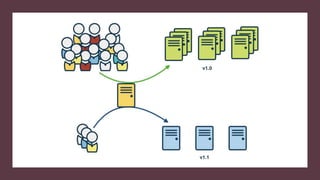
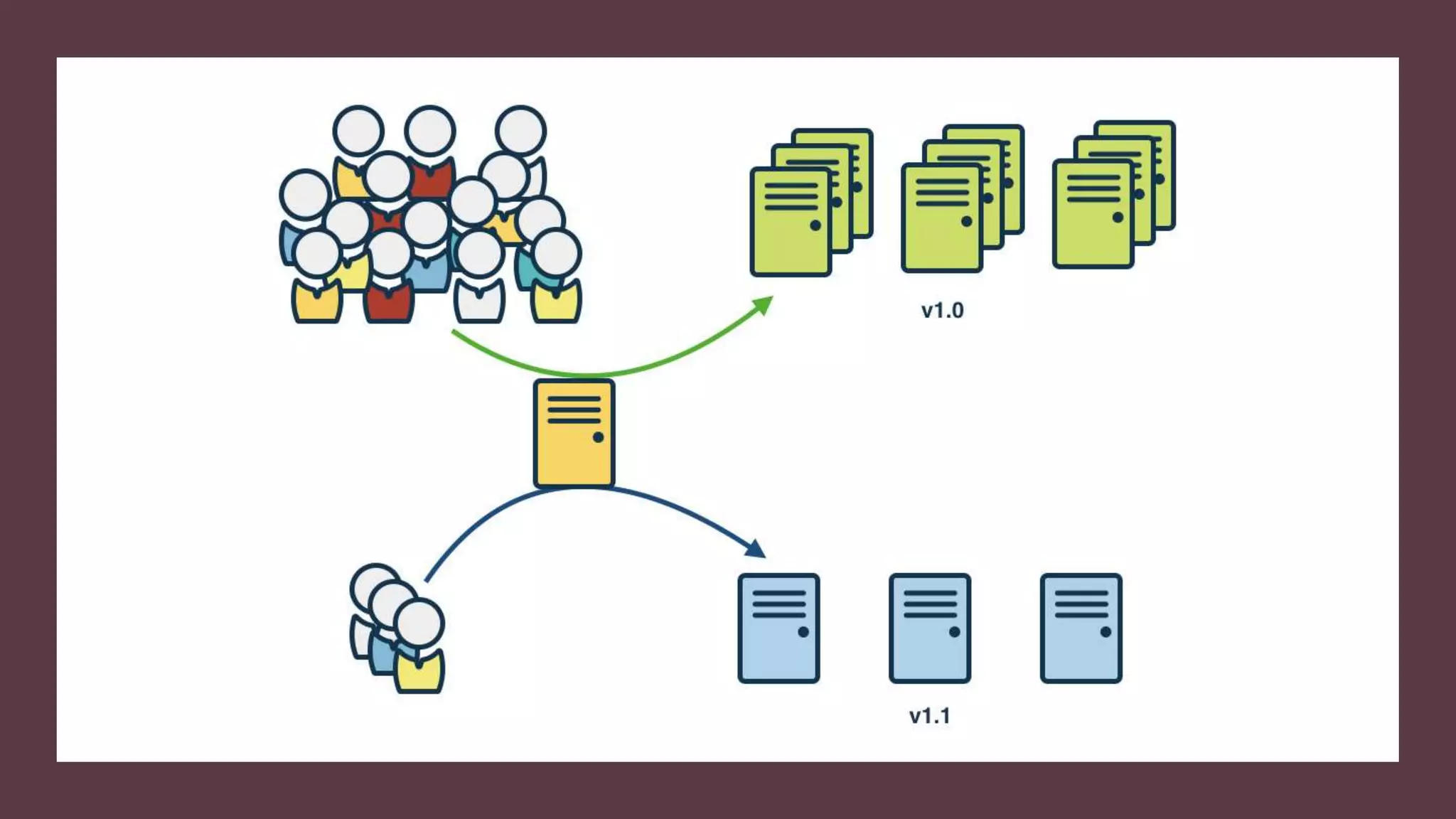
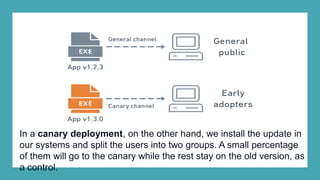
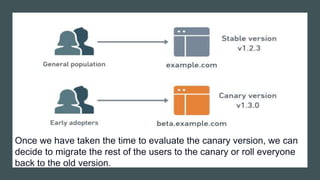
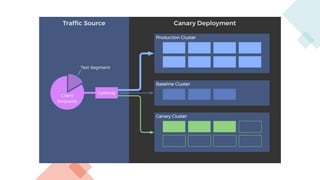
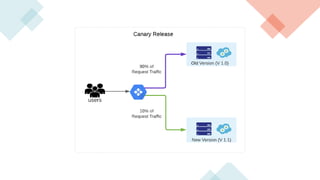
In a canary deployment, on the other hand, we install the update in
our systems and split the users into two groups. A small percentage
of them will go to the canary while the rest stay on the old version, as
a control.
Once we have taken the time to evaluate the canary version, we can
decide to migrate the rest of the users to the canary or roll everyone
back to the old version.
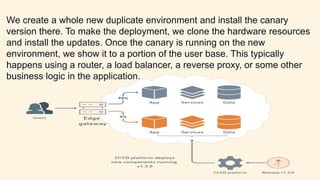
We create a whole new duplicate environment and install the canary
version there. To make the deployment, we clone the hardware resources
and install the updates. Once the canary is running on the new
environment, we show it to a portion of the user base. This typically
happens using a router, a load balancer, a reverse proxy, or some other
business logic in the application.
Benefits of Canary Deployments
•A/B testing: we can use the canary to do A/B testing. In other words, we
present two alternatives to the users and see which gets better reception.
•Capacity test: it’s impossible to test the capacity of a large production
environment. With canary deployments, capacity tests are built-in. Any
performance issues we have in our system will begin to crop up as we
slowly migrate the users to the canary.
•Feedback: we get invaluable input from real users.
•No cold-starts: new systems can take a while to start up. Canary
deployments slowly build up momentum to prevent cold-start slowness.
•No downtime: like blue-green deployments, a canary deployment doesn’t
generate downtime.
•Easy rollback: if something goes wrong, we can easily roll back to the
previous version.
Canary Deployment Strategy
We have to take into account a few things when planning a canary
deployment:
•Stages: how many users do we send to the canary at first, and in how
many stages.
•Duration: how long do we plan to run the canary? Canary deployments
usually run for minutes or hours. Canary releases are different, as we
must wait for enough clients to be updated before we can assess the
results. This can happen over several days or even weeks.
•Metrics: what metrics we should record to analyze progress, including
application performance and error reports. Well-chosen parameters are
essential for a successful canary deployment.
•Evaluation: what criteria we’ll use to determine the canary is a success.
A canary deployment strategy means deploying new versions of an application next to stable,
production versions. You can then see how the canary version compares to the baseline,
before promoting or rejecting the deployment.
Canary release is a software development strategy in which a new version of an API (as well
as other software) is deployed for testing purposes, and the base version remains deployed
as a production release for normal operations on the same stage. For purposes of discussion,
we refer to the base version as a production release in this documentation. Although this is
reasonable, you are free to apply canary release on any non-production version for testing.
In a canary release deployment, total API traffic is separated at random into a production
release and a canary release with a pre-configured ratio. Typically, the canary release
receives a small percentage of API traffic and the production release takes up the rest. The
updated API features are only visible to API traffic through the canary. You can adjust the
canary traffic percentage to optimize test coverage or performance.
By keeping canary traffic small and the selection random, most users are not adversely
affected at any time by potential bugs in the new version, and no single user is adversely
affected all the time.
After the test metrics pass your requirements, you can promote the canary release to the
production release and disable the canary from the deployment. This makes the new features
available in the production stage.
What is Canary Release?
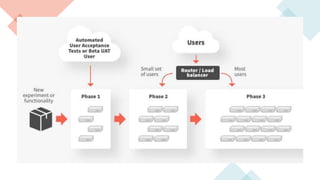
Canary release is a deployment rollout strategy that aims at minimizing new software
risks by directing a small percentage of users to the new version of the application.
After verifying that the new application works as intended, the traffic directed to it is
gradually increased and eventually, all traffic is directed to it.
In case an issue is detected at any point throughout the deployment, a rollback is
performed with ease because both the current and the new versions are in the
production environment.
THANK YOU
Like the Video and Subscribe the Channel

Deployment model Canary deployment

  • 1.
    What Is CanaryDeployment?
  • 2.
    What Is CanaryDeployment In software engineering, canary deployment is the practice of making staged releases. We roll out a software update to a small part of the users first, so they may test it and provide feedback. Once the change is accepted, the update is rolled out to the rest of the users. Canary deployments show us how users interact with application changes in the real world. As in blue-green deployments, the canary strategy offers no-downtime upgrades and easy rollbacks. Unlike blue-green, canary deployments are smoother, and failures have limited impact.
  • 3.
    In a canarydeployment, on the other hand, we install the update in our systems and split the users into two groups. A small percentage of them will go to the canary while the rest stay on the old version, as a control.
  • 4.
    Once we havetaken the time to evaluate the canary version, we can decide to migrate the rest of the users to the canary or roll everyone back to the old version.
  • 5.
    We create awhole new duplicate environment and install the canary version there. To make the deployment, we clone the hardware resources and install the updates. Once the canary is running on the new environment, we show it to a portion of the user base. This typically happens using a router, a load balancer, a reverse proxy, or some other business logic in the application.
  • 6.
    Benefits of CanaryDeployments •A/B testing: we can use the canary to do A/B testing. In other words, we present two alternatives to the users and see which gets better reception. •Capacity test: it’s impossible to test the capacity of a large production environment. With canary deployments, capacity tests are built-in. Any performance issues we have in our system will begin to crop up as we slowly migrate the users to the canary. •Feedback: we get invaluable input from real users. •No cold-starts: new systems can take a while to start up. Canary deployments slowly build up momentum to prevent cold-start slowness. •No downtime: like blue-green deployments, a canary deployment doesn’t generate downtime. •Easy rollback: if something goes wrong, we can easily roll back to the previous version.
  • 7.
    Canary Deployment Strategy Wehave to take into account a few things when planning a canary deployment: •Stages: how many users do we send to the canary at first, and in how many stages. •Duration: how long do we plan to run the canary? Canary deployments usually run for minutes or hours. Canary releases are different, as we must wait for enough clients to be updated before we can assess the results. This can happen over several days or even weeks. •Metrics: what metrics we should record to analyze progress, including application performance and error reports. Well-chosen parameters are essential for a successful canary deployment. •Evaluation: what criteria we’ll use to determine the canary is a success.
  • 8.
    A canary deploymentstrategy means deploying new versions of an application next to stable, production versions. You can then see how the canary version compares to the baseline, before promoting or rejecting the deployment. Canary release is a software development strategy in which a new version of an API (as well as other software) is deployed for testing purposes, and the base version remains deployed as a production release for normal operations on the same stage. For purposes of discussion, we refer to the base version as a production release in this documentation. Although this is reasonable, you are free to apply canary release on any non-production version for testing. In a canary release deployment, total API traffic is separated at random into a production release and a canary release with a pre-configured ratio. Typically, the canary release receives a small percentage of API traffic and the production release takes up the rest. The updated API features are only visible to API traffic through the canary. You can adjust the canary traffic percentage to optimize test coverage or performance. By keeping canary traffic small and the selection random, most users are not adversely affected at any time by potential bugs in the new version, and no single user is adversely affected all the time. After the test metrics pass your requirements, you can promote the canary release to the production release and disable the canary from the deployment. This makes the new features available in the production stage.
  • 11.
    What is CanaryRelease? Canary release is a deployment rollout strategy that aims at minimizing new software risks by directing a small percentage of users to the new version of the application. After verifying that the new application works as intended, the traffic directed to it is gradually increased and eventually, all traffic is directed to it. In case an issue is detected at any point throughout the deployment, a rollback is performed with ease because both the current and the new versions are in the production environment.
  • 13.
    THANK YOU Like theVideo and Subscribe the Channel