1IBM
_
Chapter
Opening
September 16, 2015Presentation Title
Shift Happens
Continually moving forward when the
outcome looks bleak
@Al_Wagner
2IBM
_
Avoiding
Deployment
Failures..
especially those that could cause a production outage, is top of
mind for many IT professionals. However, sometimes failures will
occur in production, which means that planning for recovery is
essential. Preventative measures like canary, blue/green or rolling
deployments can help, but also having the ability to roll forward
(instead of rolling back), also known as shifting right, means you can
push through a failure while learning from deployment process
mistakes and shortening mean time to recovery (MTTR).
• Deployment models like canary, blue/green and rolling that can
help prevent major production outages
• How to pinpoint deployment failures in your process and correct
them
• Pulling together a basic failure response plan
• How you can roll forward while improving your deployment
process
September 16, 2015Shift Happens
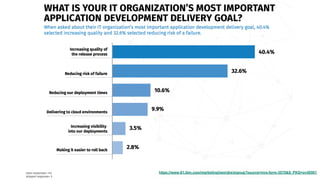
Survey says…
https://www-01.ibm.com/marketing/iwm/dre/signup?source=mrs-form-3570&S_PKG=ov50501
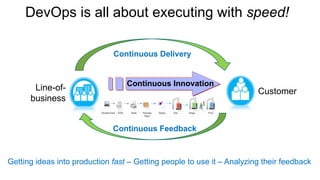
DevOps is all about executing with speed!
Line-of-
business
Customer
Getting ideas into production fast – Getting people to use it – Analyzing their feedback
Continuous Delivery
Continuous Feedback
Continuous Innovation
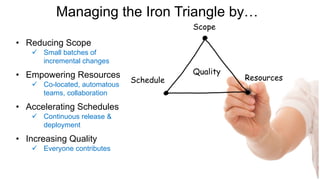
• Reducing Scope
ü Small batches of
incremental changes
• Empowering Resources
ü Co-located,
automatous teams
• Accelerating Schedules
ü Automate, automate,
automate
• Increasing Quality
ü Everyone contributes
ü Small batches of
incremental changes
ü Co-located, automatous
teams, collaboration
ü Continuous release &
deployment
ü Everyone contributes
5
Managing the Iron Triangle by…
Quality
Schedule
Scope
Resources
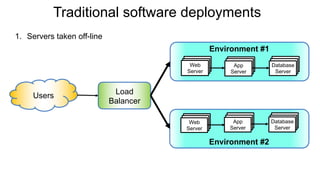
Traditional software deployments
Web
Server
App
Server
Database
Server
Web
Server
App
Server
Database
Server
Users
Environment #1
Environment #2
Load
Balancer
1. Servers taken off-line
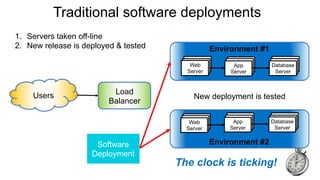
Traditional software deployments
Web
Server
App
Server
Database
Server
Web
Server
App
Server
Database
Server
Users
Environment #1
Environment #2
Load
Balancer
New deployment is tested
1. Servers taken off-line
2. New release is deployed & tested
The clock is ticking!
Software
Deployment
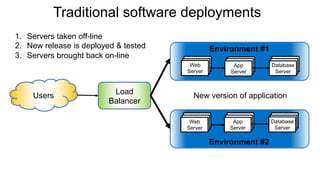
Traditional software deployments
Web
Server
App
Server
Database
Server
App
Server
Database
Server
Users
Environment #1
Environment #2
Load
Balancer
New version of application
1. Servers taken off-line
2. New release is deployed & tested
3. Servers brought back on-line
Web
Server
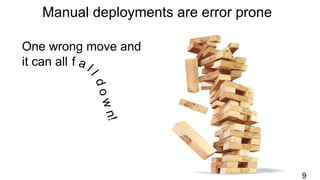
Manual deployments are error prone
9
One wrong move and
it can all
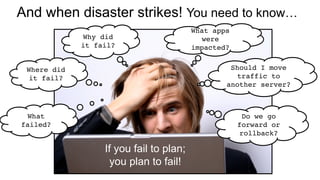
And when disaster strikes! You need to know…
What
failed?
Where did
it fail?
What apps
were
impacted?
Should I move
traffic to
another server?
Do we go
forward or
rollback?
If you fail to plan;
you plan to fail!
Why did
it fail?
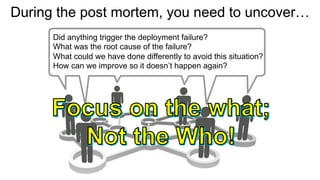
During the post mortem, you need to uncover…
Did anything trigger the deployment failure?
What was the root cause of the failure?
What could we have done differently to avoid this situation?
How can we improve so it doesn’t happen again?
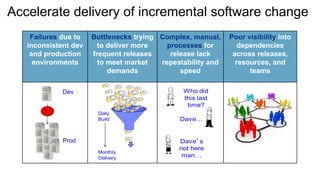
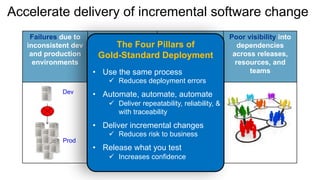
Accelerate delivery of incremental software change
Failures due to
inconsistent dev
and production
environments
Bottlenecks trying
to deliver more
frequent releases
to meet market
demands
Complex, manual,
processes for
release lack
repeatability and
speed
Poor visibility into
dependencies
across releases,
resources, and
teams
Accelerate delivery of incremental software change
Failures due to
inconsistent dev
and production
environments
Bottlenecks trying
to deliver more
frequent releases
to meet market
demands
Complex, manual,
processes for
release lack
repeatability and
speed
Poor visibility into
dependencies
across releases,
resources, and
teams
The Four Pillars of
Gold-Standard Deployment
• Use the same process
ü Reduces deployment errors
• Automate, automate, automate
ü Deliver repeatability, reliability, &
with traceability
• Deliver incremental changes
ü Reduces risk to business
• Release what you test
ü Increases confidence
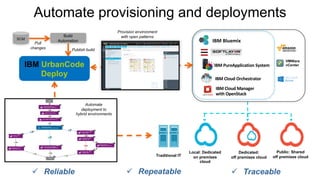
Automate provisioning and deployments
SCM
Build
Automation
Publish build
Pull
changes
IBM	Cloud	Orchestrator
IBM	PureApplication	System
IBM	Cloud	Manager
with	OpenStack
IBM	Bluemix
Provision environment
with open patterns
Public: Shared
off premises cloud
Dedicated:
off premises cloud
Local: Dedicated
on premises
cloud
Traditional IT
ü Traceable
VMWare
vCenter
ü Repeatableü Reliable
IBM UrbanCode
Deploy
Automate
deployment to
hybrid environments
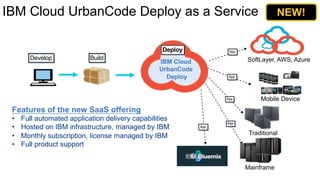
IBM Cloud UrbanCode Deploy as a Service
Develop Build
Mobile Device
Mainframe
Traditional
Deploy
Features of the new SaaS offering
• Full automated application delivery capabilities
• Hosted on IBM infrastructure, managed by IBM
• Monthly subscription, license managed by IBM
• Full product support
App
App
App
App
SoftLayer, AWS, Azure
App
IBM Cloud
UrbanCode
Deploy
NEW!
16Page© 2016 IBM Corporation
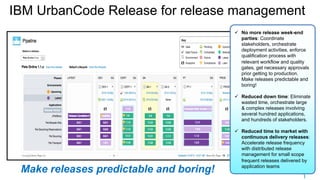
IBM UrbanCode Release for release management
1
ü No more release week-end
parties: Coordinate
stakeholders, orchestrate
deployment activities, enforce
qualification process with
relevant workflow and quality
gates, get necessary approvals
prior getting to production.
Make releases predictable and
boring!
ü Reduced down time: Eliminate
wasted time, orchestrate large
& complex releases involving
several hundred applications,
and hundreds of stakeholders.
ü Reduced time to market with
continuous delivery releases:
Accelerate release frequency
with distributed release
management for small scope
frequent releases delivered by
application teams
Make releases predictable and boring!
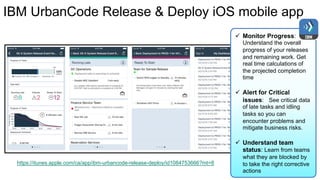
IBM UrbanCode Release & Deploy iOS mobile app
ü Monitor Progress:
Understand the overall
progress of your releases
and remaining work. Get
real time calculations of
the projected completion
time
ü Alert for Critical
issues: See critical data
of late tasks and idling
tasks so you can
encounter problems and
mitigate business risks.
ü Understand team
status: Learn from teams
what they are blocked by
to take the right corrective
actions
https://itunes.apple.com/ca/app/ibm-urbancode-release-deploy/id1084753666?mt=8
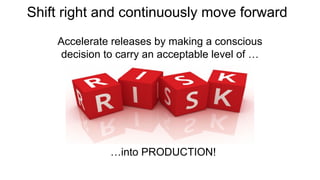
Shift right and continuously move forward
Accelerate releases by making a conscious
decision to carry an acceptable level of …
…into PRODUCTION!
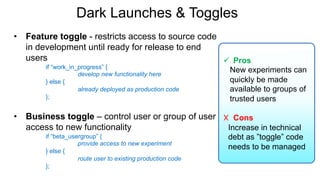
Dark Launches & Toggles
• Feature toggle - restricts access to source code
in development until ready for release to end
users
if “work_in_progress” {
develop new functionality here
} else {
already deployed as production code
};
• Business toggle – control user or group of user
access to new functionality
if “beta_usergroup” {
provide access to new experiment
} else {
route user to existing production code
};
ü Pros
New experiments can
quickly be made
available to groups of
trusted users
X Cons
Increase in technical
debt as ”toggle” code
needs to be managed
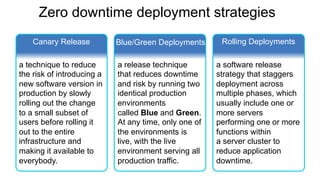
Zero downtime deployment strategies
Canary Release Blue/Green Deployments Rolling Deployments
a technique to reduce
the risk of introducing a
new software version in
production by slowly
rolling out the change
to a small subset of
users before rolling it
out to the entire
infrastructure and
making it available to
everybody.
a release technique
that reduces downtime
and risk by running two
identical production
environments
called Blue and Green.
At any time, only one of
the environments is
live, with the live
environment serving all
production traffic.
a software release
strategy that staggers
deployment across
multiple phases, which
usually include one or
more servers
performing one or more
functions within
a server cluster to
reduce application
downtime.
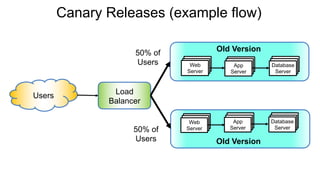
Canary Releases (example flow)
Web
Server
App
Server
Database
Server
Web
Server
App
Server
Database
Server
Users
Old Version
Old Version
50% of
Users
Load
Balancer
50% of
Users
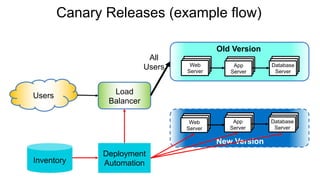
Canary Releases (example flow)
Web
Server
App
Server
Database
Server
Web
Server
App
Server
Database
Server
Users
Old Version
New Version
All
Users
Deployment
AutomationInventory
Load
Balancer
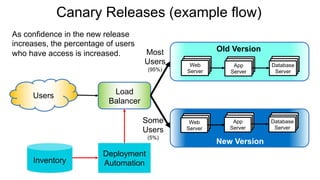
Canary Releases (example flow)
Web
Server
App
Server
Database
Server
Web
Server
App
Server
Database
Server
Users
Old Version
New Version
Most
Users
(95%)
Some
Users
(5%)
Deployment
AutomationInventory
Load
Balancer
As confidence in the new release
increases, the percentage of users
who have access is increased.
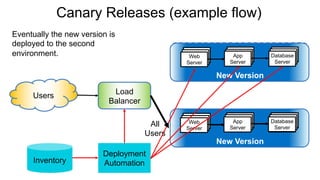
Canary Releases (example flow)
Web
Server
App
Server
Database
Server
Users Load
Balancer
Old Version
Web
Server
App
Server
Database
Server
New Version
All
Users
Deployment
AutomationInventory
Web
Server
App
Server
Database
Server
Web
Server
App
Server
Database
Server
New VersionNew Version
Eventually the new version is
deployed to the second
environment.
Canary Releases (example flow)
Web
Server
App
Server
Database
Server
Users Load
Balancer
Old Version
Web
Server
App
Server
Database
Server
New Version
Web
Server
App
Server
Database
Server
Web
Server
App
Server
Database
Server
New VersionNew Version
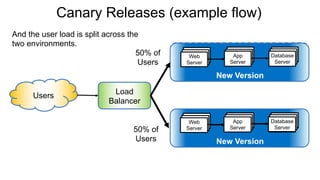
50% of
Users
50% of
Users
And the user load is split across the
two environments.
Blue / Green Deployments (example flow)
Web
Server
App
Server
Database
Server
Web
Server
App
Server
Database
Server
Environment #1
RouterUsers
All
Users
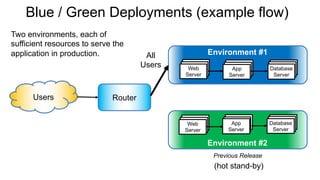
Two environments, each of
sufficient resources to serve the
application in production.
Environment #2
Previous Release
(hot stand-by)
Blue / Green Deployments (example flow)
Web
Server
App
Server
Database
Server
Web
Server
App
Server
Database
Server
Environment #1
Environment #2
RouterUsers
All
Users
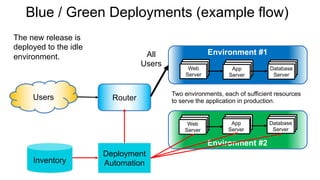
Two environments, each of sufficient resources
to serve the application in production.
Deployment
AutomationInventory
The new release is
deployed to the idle
environment.
Blue / Green Deployments (example flow)
Web
Server
App
Server
Database
Server
Web
Server
App
Server
Database
Server
Environment #1
RouterUsers
All
Users
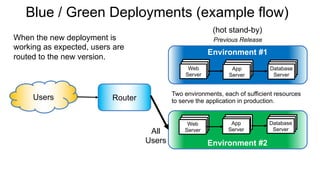
Two environments, each of sufficient resources
to serve the application in production.
Environment #2
Previous Release
(hot stand-by)
When the new deployment is
working as expected, users are
routed to the new version.
Load
Balancer
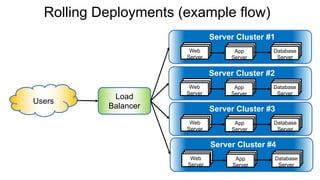
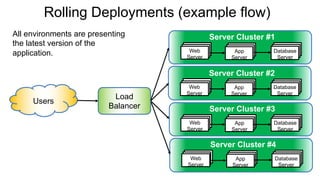
Rolling Deployments (example flow)
Web
Server
App
Server
Database
Server
Server Cluster #1
Web
Server
App
Server
Database
Server
Server Cluster #2
Web
Server
App
Server
Database
Server
Server Cluster #3
Web
Server
App
Server
Database
Server
Server Cluster #4
Users
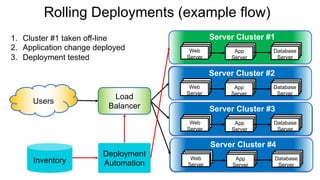
Rolling Deployments (example flow)
Web
Server
App
Server
Database
Server
Server Cluster #1
Web
Server
App
Server
Database
Server
Server Cluster #2
Web
Server
App
Server
Database
Server
Server Cluster #3
Web
Server
App
Server
Database
Server
Server Cluster #4
Users
Deployment
AutomationInventory
Load
Balancer
1. Cluster #1 taken off-line
2. Application change deployed
3. Deployment tested
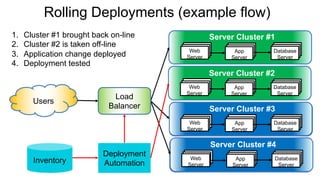
Rolling Deployments (example flow)
Web
Server
App
Server
Database
Server
Server Cluster #1
Web
Server
App
Server
Database
Server
Server Cluster #2
Web
Server
App
Server
Database
Server
Server Cluster #3
Web
Server
App
Server
Database
Server
Server Cluster #4
Users
Deployment
AutomationInventory
Load
Balancer
1. Cluster #1 brought back on-line
2. Cluster #2 is taken off-line
3. Application change deployed
4. Deployment tested
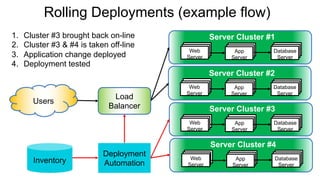
Rolling Deployments (example flow)
Web
Server
App
Server
Database
Server
Server Cluster #1
Web
Server
App
Server
Database
Server
Server Cluster #2
Web
Server
App
Server
Database
Server
Server Cluster #3
Web
Server
App
Server
Database
Server
Server Cluster #4
Users
Deployment
AutomationInventory
Load
Balancer
1. Cluster #3 brought back on-line
2. Cluster #3 & #4 is taken off-line
3. Application change deployed
4. Deployment tested
Rolling Deployments (example flow)
Web
Server
App
Server
Database
Server
Server Cluster #1
Web
Server
App
Server
Database
Server
Server Cluster #2
Web
Server
App
Server
Database
Server
Server Cluster #3
Web
Server
App
Server
Database
Server
Server Cluster #4
Users
Load
Balancer
All environments are presenting
the latest version of the
application.
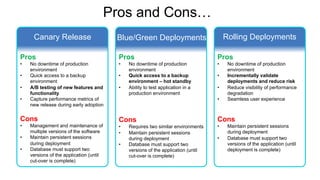
Pros and Cons…
Canary Release Blue/Green Deployments Rolling Deployments
Pros
• No downtime of production
environment
• Quick access to a backup
environment
• A/B testing of new features and
functionality
• Capture performance metrics of
new release during early adoption
Cons
• Management and maintenance of
multiple versions of the software
• Maintain persistent sessions
during deployment
• Database must support two
versions of the application (until
cut-over is complete)
Pros
• No downtime of production
environment
• Quick access to a backup
environment – hot standby
• Ability to test application in a
production environment
Cons
• Requires two similar environments
• Maintain persistent sessions
during deployment
• Database must support two
versions of the application (until
cut-over is complete)
Pros
• No downtime of production
environment
• Incrementally validate
deployments and reduce risk
• Reduce visibility of performance
degradation
• Seamless user experience
Cons
• Maintain persistent sessions
during deployment
• Database must support two
versions of the application (until
deployment is complete)
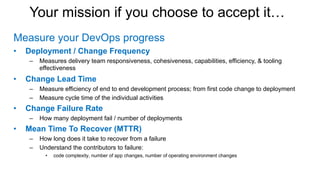
Your mission if you choose to accept it…
Measure your DevOps progress
• Deployment / Change Frequency
– Measures delivery team responsiveness, cohesiveness, capabilities, efficiency, & tooling
effectiveness
• Change Lead Time
– Measure efficiency of end to end development process; from first code change to deployment
– Measure cycle time of the individual activities
• Change Failure Rate
– How many deployment fail / number of deployments
• Mean Time To Recover (MTTR)
– How long does it take to recover from a failure
– Understand the contributors to failure:
• code complexity, number of app changes, number of operating environment changes
3
37IBM
_
September 16, 2015Shift Happens
Thank You

Shift Happens - Rapidly Rolling Forward During Production Failure

  • 1.
    1IBM _ Chapter Opening September 16, 2015PresentationTitle Shift Happens Continually moving forward when the outcome looks bleak @Al_Wagner
  • 2.
    2IBM _ Avoiding Deployment Failures.. especially those thatcould cause a production outage, is top of mind for many IT professionals. However, sometimes failures will occur in production, which means that planning for recovery is essential. Preventative measures like canary, blue/green or rolling deployments can help, but also having the ability to roll forward (instead of rolling back), also known as shifting right, means you can push through a failure while learning from deployment process mistakes and shortening mean time to recovery (MTTR). • Deployment models like canary, blue/green and rolling that can help prevent major production outages • How to pinpoint deployment failures in your process and correct them • Pulling together a basic failure response plan • How you can roll forward while improving your deployment process September 16, 2015Shift Happens
  • 3.
  • 4.
    DevOps is allabout executing with speed! Line-of- business Customer Getting ideas into production fast – Getting people to use it – Analyzing their feedback Continuous Delivery Continuous Feedback Continuous Innovation
  • 5.
    • Reducing Scope üSmall batches of incremental changes • Empowering Resources ü Co-located, automatous teams • Accelerating Schedules ü Automate, automate, automate • Increasing Quality ü Everyone contributes ü Small batches of incremental changes ü Co-located, automatous teams, collaboration ü Continuous release & deployment ü Everyone contributes 5 Managing the Iron Triangle by… Quality Schedule Scope Resources
  • 6.
  • 7.
    Traditional software deployments Web Server App Server Database Server Web Server App Server Database Server Users Environment#1 Environment #2 Load Balancer New deployment is tested 1. Servers taken off-line 2. New release is deployed & tested The clock is ticking! Software Deployment
  • 8.
    Traditional software deployments Web Server App Server Database Server App Server Database Server Users Environment#1 Environment #2 Load Balancer New version of application 1. Servers taken off-line 2. New release is deployed & tested 3. Servers brought back on-line Web Server
  • 9.
    Manual deployments areerror prone 9 One wrong move and it can all
  • 10.
    And when disasterstrikes! You need to know… What failed? Where did it fail? What apps were impacted? Should I move traffic to another server? Do we go forward or rollback? If you fail to plan; you plan to fail! Why did it fail?
  • 11.
    During the postmortem, you need to uncover… Did anything trigger the deployment failure? What was the root cause of the failure? What could we have done differently to avoid this situation? How can we improve so it doesn’t happen again?
  • 12.
    Accelerate delivery ofincremental software change Failures due to inconsistent dev and production environments Bottlenecks trying to deliver more frequent releases to meet market demands Complex, manual, processes for release lack repeatability and speed Poor visibility into dependencies across releases, resources, and teams
  • 13.
    Accelerate delivery ofincremental software change Failures due to inconsistent dev and production environments Bottlenecks trying to deliver more frequent releases to meet market demands Complex, manual, processes for release lack repeatability and speed Poor visibility into dependencies across releases, resources, and teams The Four Pillars of Gold-Standard Deployment • Use the same process ü Reduces deployment errors • Automate, automate, automate ü Deliver repeatability, reliability, & with traceability • Deliver incremental changes ü Reduces risk to business • Release what you test ü Increases confidence
  • 14.
    Automate provisioning anddeployments SCM Build Automation Publish build Pull changes IBM Cloud Orchestrator IBM PureApplication System IBM Cloud Manager with OpenStack IBM Bluemix Provision environment with open patterns Public: Shared off premises cloud Dedicated: off premises cloud Local: Dedicated on premises cloud Traditional IT ü Traceable VMWare vCenter ü Repeatableü Reliable IBM UrbanCode Deploy Automate deployment to hybrid environments
  • 15.
    IBM Cloud UrbanCodeDeploy as a Service Develop Build Mobile Device Mainframe Traditional Deploy Features of the new SaaS offering • Full automated application delivery capabilities • Hosted on IBM infrastructure, managed by IBM • Monthly subscription, license managed by IBM • Full product support App App App App SoftLayer, AWS, Azure App IBM Cloud UrbanCode Deploy NEW!
  • 16.
    16Page© 2016 IBMCorporation IBM UrbanCode Release for release management 1 ü No more release week-end parties: Coordinate stakeholders, orchestrate deployment activities, enforce qualification process with relevant workflow and quality gates, get necessary approvals prior getting to production. Make releases predictable and boring! ü Reduced down time: Eliminate wasted time, orchestrate large & complex releases involving several hundred applications, and hundreds of stakeholders. ü Reduced time to market with continuous delivery releases: Accelerate release frequency with distributed release management for small scope frequent releases delivered by application teams Make releases predictable and boring!
  • 17.
    IBM UrbanCode Release& Deploy iOS mobile app ü Monitor Progress: Understand the overall progress of your releases and remaining work. Get real time calculations of the projected completion time ü Alert for Critical issues: See critical data of late tasks and idling tasks so you can encounter problems and mitigate business risks. ü Understand team status: Learn from teams what they are blocked by to take the right corrective actions https://itunes.apple.com/ca/app/ibm-urbancode-release-deploy/id1084753666?mt=8
  • 18.
    Shift right andcontinuously move forward Accelerate releases by making a conscious decision to carry an acceptable level of … …into PRODUCTION!
  • 19.
    Dark Launches &Toggles • Feature toggle - restricts access to source code in development until ready for release to end users if “work_in_progress” { develop new functionality here } else { already deployed as production code }; • Business toggle – control user or group of user access to new functionality if “beta_usergroup” { provide access to new experiment } else { route user to existing production code }; ü Pros New experiments can quickly be made available to groups of trusted users X Cons Increase in technical debt as ”toggle” code needs to be managed
  • 20.
    Zero downtime deploymentstrategies Canary Release Blue/Green Deployments Rolling Deployments a technique to reduce the risk of introducing a new software version in production by slowly rolling out the change to a small subset of users before rolling it out to the entire infrastructure and making it available to everybody. a release technique that reduces downtime and risk by running two identical production environments called Blue and Green. At any time, only one of the environments is live, with the live environment serving all production traffic. a software release strategy that staggers deployment across multiple phases, which usually include one or more servers performing one or more functions within a server cluster to reduce application downtime.
  • 21.
    Canary Releases (exampleflow) Web Server App Server Database Server Web Server App Server Database Server Users Old Version Old Version 50% of Users Load Balancer 50% of Users
  • 22.
    Canary Releases (exampleflow) Web Server App Server Database Server Web Server App Server Database Server Users Old Version New Version All Users Deployment AutomationInventory Load Balancer
  • 23.
    Canary Releases (exampleflow) Web Server App Server Database Server Web Server App Server Database Server Users Old Version New Version Most Users (95%) Some Users (5%) Deployment AutomationInventory Load Balancer As confidence in the new release increases, the percentage of users who have access is increased.
  • 24.
    Canary Releases (exampleflow) Web Server App Server Database Server Users Load Balancer Old Version Web Server App Server Database Server New Version All Users Deployment AutomationInventory Web Server App Server Database Server Web Server App Server Database Server New VersionNew Version Eventually the new version is deployed to the second environment.
  • 25.
    Canary Releases (exampleflow) Web Server App Server Database Server Users Load Balancer Old Version Web Server App Server Database Server New Version Web Server App Server Database Server Web Server App Server Database Server New VersionNew Version 50% of Users 50% of Users And the user load is split across the two environments.
  • 26.
    Blue / GreenDeployments (example flow) Web Server App Server Database Server Web Server App Server Database Server Environment #1 RouterUsers All Users Two environments, each of sufficient resources to serve the application in production. Environment #2 Previous Release (hot stand-by)
  • 27.
    Blue / GreenDeployments (example flow) Web Server App Server Database Server Web Server App Server Database Server Environment #1 Environment #2 RouterUsers All Users Two environments, each of sufficient resources to serve the application in production. Deployment AutomationInventory The new release is deployed to the idle environment.
  • 28.
    Blue / GreenDeployments (example flow) Web Server App Server Database Server Web Server App Server Database Server Environment #1 RouterUsers All Users Two environments, each of sufficient resources to serve the application in production. Environment #2 Previous Release (hot stand-by) When the new deployment is working as expected, users are routed to the new version.
  • 29.
    Load Balancer Rolling Deployments (exampleflow) Web Server App Server Database Server Server Cluster #1 Web Server App Server Database Server Server Cluster #2 Web Server App Server Database Server Server Cluster #3 Web Server App Server Database Server Server Cluster #4 Users
  • 30.
    Rolling Deployments (exampleflow) Web Server App Server Database Server Server Cluster #1 Web Server App Server Database Server Server Cluster #2 Web Server App Server Database Server Server Cluster #3 Web Server App Server Database Server Server Cluster #4 Users Deployment AutomationInventory Load Balancer 1. Cluster #1 taken off-line 2. Application change deployed 3. Deployment tested
  • 31.
    Rolling Deployments (exampleflow) Web Server App Server Database Server Server Cluster #1 Web Server App Server Database Server Server Cluster #2 Web Server App Server Database Server Server Cluster #3 Web Server App Server Database Server Server Cluster #4 Users Deployment AutomationInventory Load Balancer 1. Cluster #1 brought back on-line 2. Cluster #2 is taken off-line 3. Application change deployed 4. Deployment tested
  • 32.
    Rolling Deployments (exampleflow) Web Server App Server Database Server Server Cluster #1 Web Server App Server Database Server Server Cluster #2 Web Server App Server Database Server Server Cluster #3 Web Server App Server Database Server Server Cluster #4 Users Deployment AutomationInventory Load Balancer 1. Cluster #3 brought back on-line 2. Cluster #3 & #4 is taken off-line 3. Application change deployed 4. Deployment tested
  • 33.
    Rolling Deployments (exampleflow) Web Server App Server Database Server Server Cluster #1 Web Server App Server Database Server Server Cluster #2 Web Server App Server Database Server Server Cluster #3 Web Server App Server Database Server Server Cluster #4 Users Load Balancer All environments are presenting the latest version of the application.
  • 34.
    Pros and Cons… CanaryRelease Blue/Green Deployments Rolling Deployments Pros • No downtime of production environment • Quick access to a backup environment • A/B testing of new features and functionality • Capture performance metrics of new release during early adoption Cons • Management and maintenance of multiple versions of the software • Maintain persistent sessions during deployment • Database must support two versions of the application (until cut-over is complete) Pros • No downtime of production environment • Quick access to a backup environment – hot standby • Ability to test application in a production environment Cons • Requires two similar environments • Maintain persistent sessions during deployment • Database must support two versions of the application (until cut-over is complete) Pros • No downtime of production environment • Incrementally validate deployments and reduce risk • Reduce visibility of performance degradation • Seamless user experience Cons • Maintain persistent sessions during deployment • Database must support two versions of the application (until deployment is complete)
  • 35.
    Your mission ifyou choose to accept it… Measure your DevOps progress • Deployment / Change Frequency – Measures delivery team responsiveness, cohesiveness, capabilities, efficiency, & tooling effectiveness • Change Lead Time – Measure efficiency of end to end development process; from first code change to deployment – Measure cycle time of the individual activities • Change Failure Rate – How many deployment fail / number of deployments • Mean Time To Recover (MTTR) – How long does it take to recover from a failure – Understand the contributors to failure: • code complexity, number of app changes, number of operating environment changes
  • 36.
  • 37.