Canary In a Pipeline
Darren Bathgate
Technical Architect
OSCON 2018
What Canary Is
Canary Deployment Phases
Canary In Microservices
Other Considerations
Demo
Presentation Outline
Information Security Level 2 – Sensitive
© 2017 – Proprietary & Confidential Information of Amdocs3
Full Service Consulting Firm
Architecture, front and back end development, business
analysis and DevTest.
Cloud Virtualization Experts And Enablers
AWS, Netflix stack, Kubernetes, Istio, enterprise
architecture and beyond.
DevOps Leadership
Platform builds, continuous delivery and scalable
resourcing.
Technical Architect at Kenzan
working out of Rhode Island
Worked at Kenzan for 7ish years
Assisted clients with building microservice platforms
using Netflix OSS on AWS Cloud
Transitioned clients into containerization using Docker,
ECS, and Kubernetes
First time conference presenter!
About Kenzan About Me
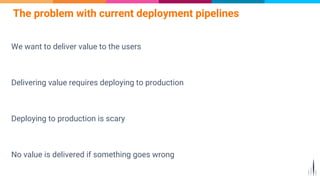
We want to deliver value to the users
Delivering value requires deploying to production
Deploying to production is scary
No value is delivered if something goes wrong
The problem with current deployment pipelines
Break the Deployment
Fear
Fear leads to fewer and larger deployments
Larger deployments introduce more problems
5
Deploy to production with confidence
Deploy more frequently
Deliver user value at a higher velocity
Introduce Canary to your pipeline
Origination of the Term
“Canary”
Refers to “canary in a coal mine”
Used as an early warning sign of mine
contamination
7
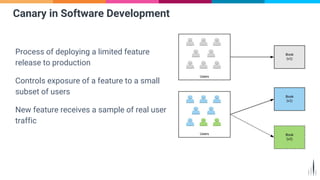
Process of deploying a limited feature
release to production
Controls exposure of a feature to a small
subset of users
New feature receives a sample of real user
traffic
Canary in Software Development
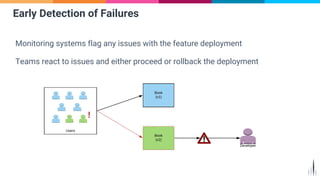
Monitoring systems flag any issues with the feature deployment
Teams react to issues and either proceed or rollback the deployment
Early Detection of Failures
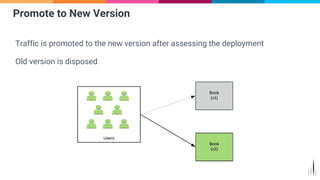
Traffic is promoted to the new version after assessing the deployment
Old version is disposed
Promote to New Version
Phases of Canary
Blue/Green Deployment
Traffic Shifting
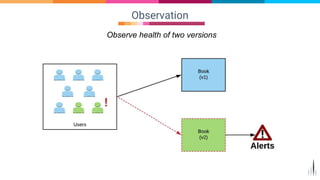
Observation
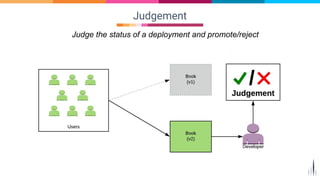
Judgement
11
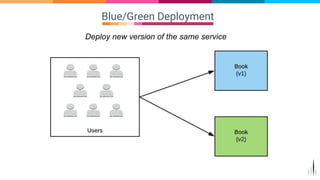
Blue/Green Deployment
Deploy new version of the same service
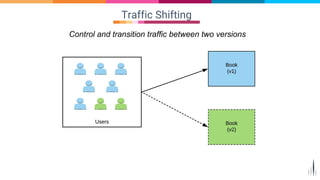
Traffic Shifting
Control and transition traffic between two versions
Observation
Observe health of two versions
Judgement
Judge the status of a deployment and promote/reject
Canary Chaos in
Microservices
Microservice architectures add additional complexity
to Canary
16
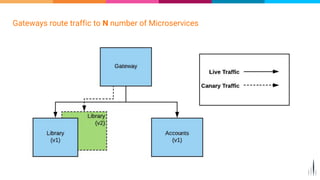
Gateways route traffic to N number of Microservices
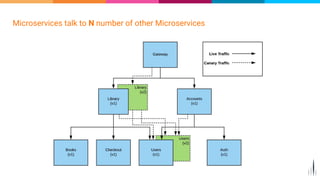
Microservices talk to N number of other Microservices
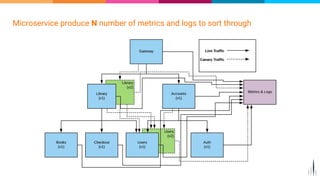
Microservice produce N number of metrics and logs to sort through
How to Solve Canary
Chaos?
¯_(ツ)_/¯
20
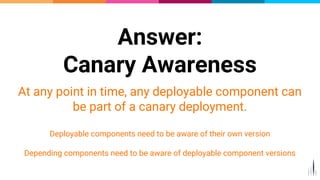
Answer:
Canary Awareness
At any point in time, any deployable component can
be part of a canary deployment.
Deployable components need to be aware of their own version
Depending components need to be aware of deployable component versions
21
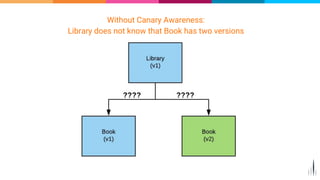
Without Canary Awareness:
Library does not know that Book has two versions
Without Canary Awareness:
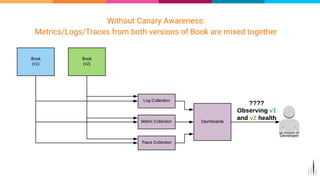
Metrics/Logs/Traces from both versions of Book are mixed together
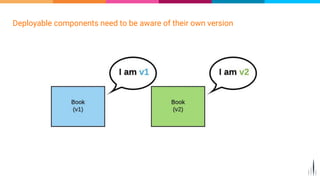
Deployable components need to be aware of their own version
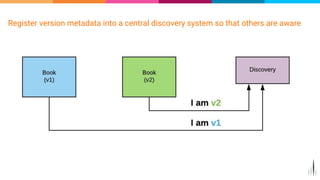
Register version metadata into a central discovery system so that others are aware
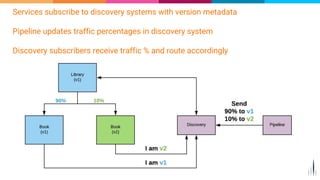
Services subscribe to discovery systems with version metadata
Pipeline updates traffic percentages in discovery system
Discovery subscribers receive traffic % and route accordingly
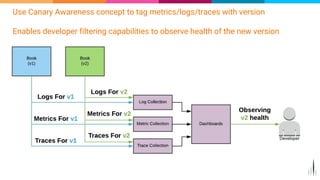
Use Canary Awareness concept to tag metrics/logs/traces with version
Enables developer filtering capabilities to observe health of the new version
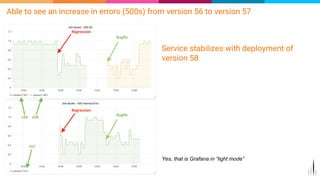
Able to see an increase in errors (500s) from version 56 to version 57
Yes, that is Grafana in “light mode”
Service stabilizes with deployment of
version 58
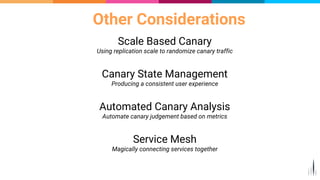
Other Considerations
Scale Based Canary
Using replication scale to randomize canary traffic
Canary State Management
Producing a consistent user experience
Automated Canary Analysis
Automate canary judgement based on metrics
Service Mesh
Magically connecting services together
29
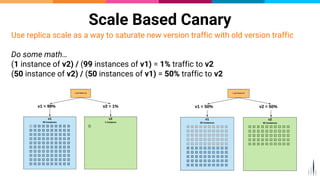
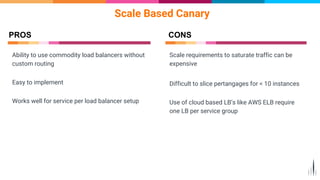
Scale Based Canary
Use replica scale as a way to saturate new version traffic with old version traffic
Do some math…
(1 instance of v2) / (99 instances of v1) = 1% traffic to v2
(50 instance of v2) / (50 instances of v1) = 50% traffic to v2
Ability to use commodity load balancers without
custom routing
Easy to implement
Works well for service per load balancer setup
Scale Based Canary
PROS
Scale requirements to saturate traffic can be
expensive
Difficult to slice pertangages for < 10 instances
Use of cloud based LB’s like AWS ELB require
one LB per service group
CONS
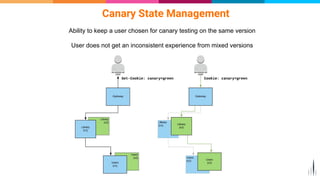
Canary State Management
Ability to keep a user chosen for canary testing on the same version
User does not get an inconsistent experience from mixed versions
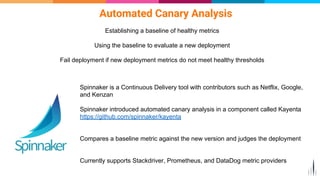
Automated Canary Analysis
Establishing a baseline of healthy metrics
Using the baseline to evaluate a new deployment
Fail deployment if new deployment metrics do not meet healthy thresholds
Spinnaker is a Continuous Delivery tool with contributors such as Netflix, Google,
and Kenzan
Spinnaker introduced automated canary analysis in a component called Kayenta
https://github.com/spinnaker/kayenta
Compares a baseline metric against the new version and judges the deployment
Currently supports Stackdriver, Prometheus, and DataDog metric providers
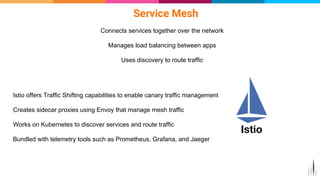
Service Mesh
Connects services together over the network
Manages load balancing between apps
Uses discovery to route traffic
Istio offers Traffic Shifting capabilities to enable canary traffic management
Creates sidecar proxies using Envoy that manage mesh traffic
Works on Kubernetes to discover services and route traffic
Bundled with telemetry tools such as Prometheus, Grafana, and Jaeger
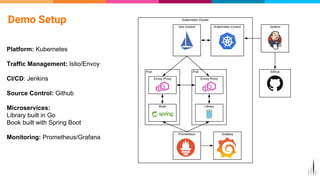
Demo Setup
Platform: Kubernetes
Traffic Management: Istio/Envoy
CI/CD: Jenkins
Source Control: Github
Microservices:
Library built in Go
Book built with Spring Boot
Monitoring: Prometheus/Grafana
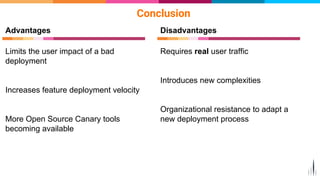
Conclusion
Requires real user traffic
Introduces new complexities
Organizational resistance to adapt a
new deployment process
Limits the user impact of a bad
deployment
Increases feature deployment velocity
More Open Source Canary tools
becoming available
Advantages Disadvantages
Questions?
Email: dbathgate@kenzan.com
Github: https://github.com/dbathgate

OSCON: Canary In a Pipeline

  • 1.
    Canary In aPipeline Darren Bathgate Technical Architect OSCON 2018
  • 2.
    What Canary Is CanaryDeployment Phases Canary In Microservices Other Considerations Demo Presentation Outline
  • 3.
    Information Security Level2 – Sensitive © 2017 – Proprietary & Confidential Information of Amdocs3 Full Service Consulting Firm Architecture, front and back end development, business analysis and DevTest. Cloud Virtualization Experts And Enablers AWS, Netflix stack, Kubernetes, Istio, enterprise architecture and beyond. DevOps Leadership Platform builds, continuous delivery and scalable resourcing. Technical Architect at Kenzan working out of Rhode Island Worked at Kenzan for 7ish years Assisted clients with building microservice platforms using Netflix OSS on AWS Cloud Transitioned clients into containerization using Docker, ECS, and Kubernetes First time conference presenter! About Kenzan About Me
  • 4.
    We want todeliver value to the users Delivering value requires deploying to production Deploying to production is scary No value is delivered if something goes wrong The problem with current deployment pipelines
  • 5.
    Break the Deployment Fear Fearleads to fewer and larger deployments Larger deployments introduce more problems 5
  • 6.
    Deploy to productionwith confidence Deploy more frequently Deliver user value at a higher velocity Introduce Canary to your pipeline
  • 7.
    Origination of theTerm “Canary” Refers to “canary in a coal mine” Used as an early warning sign of mine contamination 7
  • 8.
    Process of deployinga limited feature release to production Controls exposure of a feature to a small subset of users New feature receives a sample of real user traffic Canary in Software Development
  • 9.
    Monitoring systems flagany issues with the feature deployment Teams react to issues and either proceed or rollback the deployment Early Detection of Failures
  • 10.
    Traffic is promotedto the new version after assessing the deployment Old version is disposed Promote to New Version
  • 11.
    Phases of Canary Blue/GreenDeployment Traffic Shifting Observation Judgement 11
  • 12.
    Blue/Green Deployment Deploy newversion of the same service
  • 13.
    Traffic Shifting Control andtransition traffic between two versions
  • 14.
  • 15.
    Judgement Judge the statusof a deployment and promote/reject
  • 16.
    Canary Chaos in Microservices Microservicearchitectures add additional complexity to Canary 16
  • 17.
    Gateways route trafficto N number of Microservices
  • 18.
    Microservices talk toN number of other Microservices
  • 19.
    Microservice produce Nnumber of metrics and logs to sort through
  • 20.
    How to SolveCanary Chaos? ¯_(ツ)_/¯ 20
  • 21.
    Answer: Canary Awareness At anypoint in time, any deployable component can be part of a canary deployment. Deployable components need to be aware of their own version Depending components need to be aware of deployable component versions 21
  • 22.
    Without Canary Awareness: Librarydoes not know that Book has two versions
  • 23.
    Without Canary Awareness: Metrics/Logs/Tracesfrom both versions of Book are mixed together
  • 24.
    Deployable components needto be aware of their own version
  • 25.
    Register version metadatainto a central discovery system so that others are aware
  • 26.
    Services subscribe todiscovery systems with version metadata Pipeline updates traffic percentages in discovery system Discovery subscribers receive traffic % and route accordingly
  • 27.
    Use Canary Awarenessconcept to tag metrics/logs/traces with version Enables developer filtering capabilities to observe health of the new version
  • 28.
    Able to seean increase in errors (500s) from version 56 to version 57 Yes, that is Grafana in “light mode” Service stabilizes with deployment of version 58
  • 29.
    Other Considerations Scale BasedCanary Using replication scale to randomize canary traffic Canary State Management Producing a consistent user experience Automated Canary Analysis Automate canary judgement based on metrics Service Mesh Magically connecting services together 29
  • 30.
    Scale Based Canary Usereplica scale as a way to saturate new version traffic with old version traffic Do some math… (1 instance of v2) / (99 instances of v1) = 1% traffic to v2 (50 instance of v2) / (50 instances of v1) = 50% traffic to v2
  • 31.
    Ability to usecommodity load balancers without custom routing Easy to implement Works well for service per load balancer setup Scale Based Canary PROS Scale requirements to saturate traffic can be expensive Difficult to slice pertangages for < 10 instances Use of cloud based LB’s like AWS ELB require one LB per service group CONS
  • 32.
    Canary State Management Abilityto keep a user chosen for canary testing on the same version User does not get an inconsistent experience from mixed versions
  • 33.
    Automated Canary Analysis Establishinga baseline of healthy metrics Using the baseline to evaluate a new deployment Fail deployment if new deployment metrics do not meet healthy thresholds Spinnaker is a Continuous Delivery tool with contributors such as Netflix, Google, and Kenzan Spinnaker introduced automated canary analysis in a component called Kayenta https://github.com/spinnaker/kayenta Compares a baseline metric against the new version and judges the deployment Currently supports Stackdriver, Prometheus, and DataDog metric providers
  • 34.
    Service Mesh Connects servicestogether over the network Manages load balancing between apps Uses discovery to route traffic Istio offers Traffic Shifting capabilities to enable canary traffic management Creates sidecar proxies using Envoy that manage mesh traffic Works on Kubernetes to discover services and route traffic Bundled with telemetry tools such as Prometheus, Grafana, and Jaeger
  • 35.
    Demo Setup Platform: Kubernetes TrafficManagement: Istio/Envoy CI/CD: Jenkins Source Control: Github Microservices: Library built in Go Book built with Spring Boot Monitoring: Prometheus/Grafana
  • 36.
    Conclusion Requires real usertraffic Introduces new complexities Organizational resistance to adapt a new deployment process Limits the user impact of a bad deployment Increases feature deployment velocity More Open Source Canary tools becoming available Advantages Disadvantages
  • 37.