What is Data Backup and Disaster Recovery?
• Data backup is the process of making a copy (or several copies) of your data to
protect it. You use it to restore data in the case of accidental deletion, database
corruption, or if there was a problem with a software upgrade.
• Disaster recovery, on the other hand, refers to the processes for quickly
reestablishing access to resources after an outage. For instance, your plan
might include switching over to a redundant set of servers and storage systems
until your primary servers are functional again.
The loss of data is both costly and stressful. And when it comes to business operations, losing even 100
files will cost a company some downtime and even more significant is the loss of revenue. Most
businesses can’t afford this to happen. This is why having a backup and disaster recovery plan in place
is crucial for companies large and small. So, you need to both backup your data and have a
robust, tested disaster recovery plan to ensure business continuity.
What is Data Backup and Disaster Recovery?
Backups are simple; they are copy of your corporate systems and data that can
be used to bring a failed system back online. However, backups do not necessarily
include the infrastructure to restore to – you may have a copy of the data or systems,
but no infrastructure to run those systems or process that data. If have your systems
backed up to disk, tape, or the cloud but it may be very time consuming to utilize
these backups if you have a need.
Disaster Recovery refers to a more advanced form of system copies that include
processing capabilities. If you have a disaster you should be able to bring your
systems back online using your DR platform.
Data Backup vs Disaster Recovery
Data backups work best for long-term archival, or data
retention. This way you can quickly gain access to a lost or
damaged file if needed. On the other hand, disaster recovery is
best used to restore normal functions, in case of unforeseen
events, like natural disasters. So, you can simply perform a
failover to transfer workloads to the VM replicas at the disaster
recovery location. This way your business can continue to
function as normal until the production site is available again.
Data Backup vs Disaster Recovery
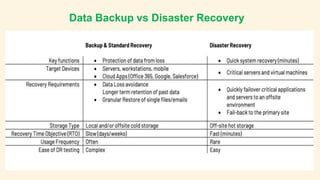
The goal of Backup is to protect corporate
data from loss, but the key function of
disaster recovery is to perform a fast recovery
after a disaster and ensure a high level of
availability of business critical application.
The targets for standard recovery are servers,
workstations and mobile devices whereas
disaster recovery is aimed at business critical
applications and servers.
Data Backup vs Disaster Recovery
A backup can be simply copying your files to another disk. This can be done in a multitude of
different ways including a secondary computer or a cloud-hosted backup solution. Having a backup is
essential for all business operations. Backups are used to protect data in case you accidentally delete
something important, if a computer gets stolen, or if the hard drive crashes. A backup can help you
easily restore the data you have recently lost.
Disaster recovery is related to backups except is most likely used for bigger problems. Disaster
recovery completely mirrors your entire system including disk drives and servers. This allows a company
to restore the entire system without having to reinstall the operating system. This can also allow your
employees to work while the system is being recovered using a mirrored system allowing no almost no
downtime at all.
Data Backup vs Disaster Recovery
A disaster recovery strategy requires a scaled out planning, which
includes determining mission critical systems, creation of recovery
order and communication process and a way to perform valid tests.
Whereas, planning backup is just a daily task and is simpler, as all it
has to do is meet the data retention requirements and RPO (Recovery
Point Objective).
Data Backup vs Disaster Recovery
Recovery time objectives(RTO) and Recovery point
objectives(RPO) are crucial for any business. RTO is the time it
takes your business to return to normal operations after an
outage, and RPO is the amount of data you can afford to lose in
a disaster. So, you must set this up properly. Data backups have
longer RTOs and RPOs making them not suitable for business-
critical data that must be quickly restored after a disaster.
However, disaster recovery is the opposite because you are
replicating your critical VMs to quickly perform failover if
necessary.
Data Backup vs Disaster Recovery
When it comes to resource allocations backups and disaster
recovery are complete opposites. Backups don’t require a lot of
attention or storage space as they are stored in a compressed
state. Disaster recovery, however, is the opposite. As it requires
a separate site with a fully operational IT environment ready if
you need to perform a failover at any moment.
Data Backup vs Disaster Recovery
Disasters are bad even if they are small scale; they always have the
capability to slow down a business. One can always restore original
data with the help of backup. In simple words, backup is the copy of
your data which is updated on a daily basis whereas; DR plan is the
copy IT infrastructure of your business saved in a secondary location.
With the help of backup you can fetch any document that goes
missing, but with a proper DR one can just reboot the whole
technological infrastructure.
Data Backup vs Disaster Recovery
What Is Cloud Backup and Recovery?
Cloud backup and recovery is a service that will take care
of copying and archiving files of the client on a remote
server. The data are transmitted over a secure network to
the cloud-based server. The cloud-based disaster recovery,
on the other hand, is an infrastructure as a service (IaaS),
which backs up the data on a remote server. It is
recommended that you choose backup-as-a-service
providers rather than rely on non-proprietary solutions to
handle your data.
File Backup vs Image Backup
A regular backup copies your server files and is meant for
restoring items on a small scale. A system image, by contrast,
copies the entire server or virtual machine. Image backups
creates a snapshot of the operating system and all the data
associated with it, including the system state, and
configurations.
When recovery is required a system image will allow full restore
without having to reinstall the operating system, find product
keys, setup users and permissions and other system settings.
Summary
Businesses today can’t afford to neglect data backup or
disaster recovery. No matter how hard it is to believe that it
might happen, it is always better to be prepared. Don’t wait for
disasters to happen and plan before it happens. Because data
backup and disaster recovery plans are only helpful if they’re
designed, deployed, and tested long before they are needed. if
you need quick recovery, but do not need long-
term retention, it may be possible to use DR as
a form of backup. On the other hand, if you do
not require quick recovery, but need long-term
retention then backup-only may be best.
THANK YOU
Like the Video and Subscribe the Channel

Disaster Recovery vs Data Backup what is the difference

  • 2.
    What is DataBackup and Disaster Recovery? • Data backup is the process of making a copy (or several copies) of your data to protect it. You use it to restore data in the case of accidental deletion, database corruption, or if there was a problem with a software upgrade. • Disaster recovery, on the other hand, refers to the processes for quickly reestablishing access to resources after an outage. For instance, your plan might include switching over to a redundant set of servers and storage systems until your primary servers are functional again. The loss of data is both costly and stressful. And when it comes to business operations, losing even 100 files will cost a company some downtime and even more significant is the loss of revenue. Most businesses can’t afford this to happen. This is why having a backup and disaster recovery plan in place is crucial for companies large and small. So, you need to both backup your data and have a robust, tested disaster recovery plan to ensure business continuity.
  • 3.
    What is DataBackup and Disaster Recovery? Backups are simple; they are copy of your corporate systems and data that can be used to bring a failed system back online. However, backups do not necessarily include the infrastructure to restore to – you may have a copy of the data or systems, but no infrastructure to run those systems or process that data. If have your systems backed up to disk, tape, or the cloud but it may be very time consuming to utilize these backups if you have a need. Disaster Recovery refers to a more advanced form of system copies that include processing capabilities. If you have a disaster you should be able to bring your systems back online using your DR platform.
  • 5.
    Data Backup vsDisaster Recovery Data backups work best for long-term archival, or data retention. This way you can quickly gain access to a lost or damaged file if needed. On the other hand, disaster recovery is best used to restore normal functions, in case of unforeseen events, like natural disasters. So, you can simply perform a failover to transfer workloads to the VM replicas at the disaster recovery location. This way your business can continue to function as normal until the production site is available again.
  • 6.
    Data Backup vsDisaster Recovery The goal of Backup is to protect corporate data from loss, but the key function of disaster recovery is to perform a fast recovery after a disaster and ensure a high level of availability of business critical application. The targets for standard recovery are servers, workstations and mobile devices whereas disaster recovery is aimed at business critical applications and servers.
  • 7.
    Data Backup vsDisaster Recovery A backup can be simply copying your files to another disk. This can be done in a multitude of different ways including a secondary computer or a cloud-hosted backup solution. Having a backup is essential for all business operations. Backups are used to protect data in case you accidentally delete something important, if a computer gets stolen, or if the hard drive crashes. A backup can help you easily restore the data you have recently lost. Disaster recovery is related to backups except is most likely used for bigger problems. Disaster recovery completely mirrors your entire system including disk drives and servers. This allows a company to restore the entire system without having to reinstall the operating system. This can also allow your employees to work while the system is being recovered using a mirrored system allowing no almost no downtime at all.
  • 8.
    Data Backup vsDisaster Recovery A disaster recovery strategy requires a scaled out planning, which includes determining mission critical systems, creation of recovery order and communication process and a way to perform valid tests. Whereas, planning backup is just a daily task and is simpler, as all it has to do is meet the data retention requirements and RPO (Recovery Point Objective).
  • 9.
    Data Backup vsDisaster Recovery Recovery time objectives(RTO) and Recovery point objectives(RPO) are crucial for any business. RTO is the time it takes your business to return to normal operations after an outage, and RPO is the amount of data you can afford to lose in a disaster. So, you must set this up properly. Data backups have longer RTOs and RPOs making them not suitable for business- critical data that must be quickly restored after a disaster. However, disaster recovery is the opposite because you are replicating your critical VMs to quickly perform failover if necessary.
  • 10.
    Data Backup vsDisaster Recovery When it comes to resource allocations backups and disaster recovery are complete opposites. Backups don’t require a lot of attention or storage space as they are stored in a compressed state. Disaster recovery, however, is the opposite. As it requires a separate site with a fully operational IT environment ready if you need to perform a failover at any moment.
  • 11.
    Data Backup vsDisaster Recovery Disasters are bad even if they are small scale; they always have the capability to slow down a business. One can always restore original data with the help of backup. In simple words, backup is the copy of your data which is updated on a daily basis whereas; DR plan is the copy IT infrastructure of your business saved in a secondary location. With the help of backup you can fetch any document that goes missing, but with a proper DR one can just reboot the whole technological infrastructure.
  • 12.
    Data Backup vsDisaster Recovery
  • 13.
    What Is CloudBackup and Recovery? Cloud backup and recovery is a service that will take care of copying and archiving files of the client on a remote server. The data are transmitted over a secure network to the cloud-based server. The cloud-based disaster recovery, on the other hand, is an infrastructure as a service (IaaS), which backs up the data on a remote server. It is recommended that you choose backup-as-a-service providers rather than rely on non-proprietary solutions to handle your data.
  • 14.
    File Backup vsImage Backup A regular backup copies your server files and is meant for restoring items on a small scale. A system image, by contrast, copies the entire server or virtual machine. Image backups creates a snapshot of the operating system and all the data associated with it, including the system state, and configurations. When recovery is required a system image will allow full restore without having to reinstall the operating system, find product keys, setup users and permissions and other system settings.
  • 15.
    Summary Businesses today can’tafford to neglect data backup or disaster recovery. No matter how hard it is to believe that it might happen, it is always better to be prepared. Don’t wait for disasters to happen and plan before it happens. Because data backup and disaster recovery plans are only helpful if they’re designed, deployed, and tested long before they are needed. if you need quick recovery, but do not need long- term retention, it may be possible to use DR as a form of backup. On the other hand, if you do not require quick recovery, but need long-term retention then backup-only may be best.
  • 16.
    THANK YOU Like theVideo and Subscribe the Channel