
What is Amazon CloudWatch?
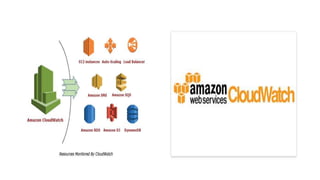
Designed as an AWS component, Amazon CloudWatch provides cloud-based
resources including – EC2 instances, elastic, load balancers, auto-scaling
other Amazon services like Amazon S3, SNS, SQS, and RDS. Amazon
monitor multiple AWS instances and applications from a centralized
What is Amazon CloudWatch?
CloudWatch can also be used to:
•Detect any anomaly in your cloud environment.
•Create custom dashboards that include metrics of the AWS services that you
•Create and configure alarms that can monitor AWS metrics and initiate
•Gain complete visibility into application performance, utilization of AWS
your operations.
AWS CloudWatch updates
Here are some of the latest features that CloudWatch has released:
•Contributor Insights - CloudWatch released this feature to public preview late in 2019, and it is now
fully available as of April 2020. Contributor Insights are metrics from other users you can use to analyze
log data, create time series, and glean other insights.
•CloudWatch Synthetics - A service that allows you to monitor your APIs and endpoints
using canaries.
•ServiceLens - Integrates with AWS X-Ray to provide better visibility of your apps and services.
•Container Insights - Enables you to collect and analyze data from your containerized applications and
services.
CloudWatch Metrics
Metrics:
•Are specific to a AWS region.
•Can’t be deleted.
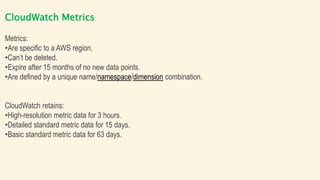
•Expire after 15 months of no new data points.
•Are defined by a unique name/namespace/dimension combination.
CloudWatch retains:
•High-resolution metric data for 3 hours.
•Detailed standard metric data for 15 days.
•Basic standard metric data for 63 days.
Amazon CloudWatch Use Case
Monitor application performance
Visualize performance data, create alarms, and correlate data to
understand and resolve the root cause of performance issues in your
AWS resources.
Perform root cause analysis
Analyze metrics, logs, logs analytics, and user requests to speed up
debugging and reduce overall mean time to resolution.
Amazon CloudWatch Use Case
Optimize resources proactively
Automate resource planning and lower costs by setting actions to occur
when thresholds are met based on your specifications or machine
learning models.
Test website impacts
Find out exactly when your website is impacted and for how long by
viewing screenshots, logs, and web requests at any point in time.
Amazon CloudWatch Use Case
Set Alarms
Set alarms on any of your metrics to send you notifications or take other
automated actions. For example, when a specific Amazon EC2 metric
crosses your alarm threshold, you can use Auto Scaling to dynamically
add or remove EC2 instances or send you a notification.
Amazon CloudWatch Use Case
Monitor and React to Resource Changes
CloudWatch Events provides a stream of events describing changes to
your Amazon Web Services resources. You can easily build workflows
that automatically take actions you define, such as stopping an Amazon
EC2 instance, sending an Amazon SNS message, or adding a message
to the Amazon SQS Queue, when an event of interest occurs.
Amazon CloudWatch
Amazon CloudWatch monitors your Amazon Web Services (AWS)
resources and the applications you run on AWS in real time. You can use
CloudWatch to collect and track metrics, which are variables you can
measure for your resources and applications.
The CloudWatch home page automatically displays metrics about every
AWS service you use. You can additionally create custom dashboards to
display metrics about your custom applications, and display custom
collections of metrics that you choose.
Amazon CloudWatch
You can create alarms that watch metrics and send notifications or
automatically make changes to the resources you are monitoring when a
threshold is breached. For example, you can monitor the CPU usage and
disk reads and writes of your Amazon EC2 instances and then use that
data to determine whether you should launch additional instances to
handle increased load. You can also use this data to stop under-used
instances to save money.
With CloudWatch, you gain system-wide visibility into resource utilization,
application performance, and operational health.
Amazon CloudWatch Related Services
•Amazon Simple Notification Service (Amazon SNS) coordinates and
manages the delivery or sending of messages to subscribing endpoints
or clients. You use Amazon SNS with CloudWatch to send messages
when an alarm threshold has been reached. For more information,
see Setting up Amazon SNS notifications.
•Amazon EC2 Auto Scaling enables you to automatically launch or
terminate Amazon EC2 instances based on user-defined policies, health
status checks, and schedules. You can use a CloudWatch alarm with
Amazon EC2 Auto Scaling to scale your EC2 instances based on
demand. For more information, see Dynamic Scaling in the Amazon EC2
Auto Scaling User Guide.
THANK YOU
Like the Video and Subscribe the Channel

What is AWS Cloud Watch

  • 2.
    What is AmazonCloudWatch? Designed as an AWS component, Amazon CloudWatch provides cloud-based resources including – EC2 instances, elastic, load balancers, auto-scaling other Amazon services like Amazon S3, SNS, SQS, and RDS. Amazon monitor multiple AWS instances and applications from a centralized
  • 3.
    What is AmazonCloudWatch? CloudWatch can also be used to: •Detect any anomaly in your cloud environment. •Create custom dashboards that include metrics of the AWS services that you •Create and configure alarms that can monitor AWS metrics and initiate •Gain complete visibility into application performance, utilization of AWS your operations.
  • 5.
    AWS CloudWatch updates Hereare some of the latest features that CloudWatch has released: •Contributor Insights - CloudWatch released this feature to public preview late in 2019, and it is now fully available as of April 2020. Contributor Insights are metrics from other users you can use to analyze log data, create time series, and glean other insights. •CloudWatch Synthetics - A service that allows you to monitor your APIs and endpoints using canaries. •ServiceLens - Integrates with AWS X-Ray to provide better visibility of your apps and services. •Container Insights - Enables you to collect and analyze data from your containerized applications and services.
  • 6.
    CloudWatch Metrics Metrics: •Are specificto a AWS region. •Can’t be deleted. •Expire after 15 months of no new data points. •Are defined by a unique name/namespace/dimension combination. CloudWatch retains: •High-resolution metric data for 3 hours. •Detailed standard metric data for 15 days. •Basic standard metric data for 63 days.
  • 8.
    Amazon CloudWatch UseCase Monitor application performance Visualize performance data, create alarms, and correlate data to understand and resolve the root cause of performance issues in your AWS resources. Perform root cause analysis Analyze metrics, logs, logs analytics, and user requests to speed up debugging and reduce overall mean time to resolution.
  • 9.
    Amazon CloudWatch UseCase Optimize resources proactively Automate resource planning and lower costs by setting actions to occur when thresholds are met based on your specifications or machine learning models. Test website impacts Find out exactly when your website is impacted and for how long by viewing screenshots, logs, and web requests at any point in time.
  • 10.
    Amazon CloudWatch UseCase Set Alarms Set alarms on any of your metrics to send you notifications or take other automated actions. For example, when a specific Amazon EC2 metric crosses your alarm threshold, you can use Auto Scaling to dynamically add or remove EC2 instances or send you a notification.
  • 11.
    Amazon CloudWatch UseCase Monitor and React to Resource Changes CloudWatch Events provides a stream of events describing changes to your Amazon Web Services resources. You can easily build workflows that automatically take actions you define, such as stopping an Amazon EC2 instance, sending an Amazon SNS message, or adding a message to the Amazon SQS Queue, when an event of interest occurs.
  • 12.
    Amazon CloudWatch Amazon CloudWatchmonitors your Amazon Web Services (AWS) resources and the applications you run on AWS in real time. You can use CloudWatch to collect and track metrics, which are variables you can measure for your resources and applications. The CloudWatch home page automatically displays metrics about every AWS service you use. You can additionally create custom dashboards to display metrics about your custom applications, and display custom collections of metrics that you choose.
  • 13.
    Amazon CloudWatch You cancreate alarms that watch metrics and send notifications or automatically make changes to the resources you are monitoring when a threshold is breached. For example, you can monitor the CPU usage and disk reads and writes of your Amazon EC2 instances and then use that data to determine whether you should launch additional instances to handle increased load. You can also use this data to stop under-used instances to save money. With CloudWatch, you gain system-wide visibility into resource utilization, application performance, and operational health.
  • 14.
    Amazon CloudWatch RelatedServices •Amazon Simple Notification Service (Amazon SNS) coordinates and manages the delivery or sending of messages to subscribing endpoints or clients. You use Amazon SNS with CloudWatch to send messages when an alarm threshold has been reached. For more information, see Setting up Amazon SNS notifications. •Amazon EC2 Auto Scaling enables you to automatically launch or terminate Amazon EC2 instances based on user-defined policies, health status checks, and schedules. You can use a CloudWatch alarm with Amazon EC2 Auto Scaling to scale your EC2 instances based on demand. For more information, see Dynamic Scaling in the Amazon EC2 Auto Scaling User Guide.
  • 15.
    THANK YOU Like theVideo and Subscribe the Channel