Deployment
Strategies
Jahangir Shaik
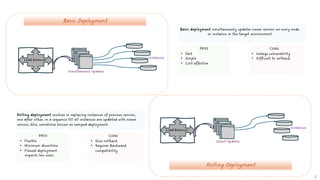
Basic Deployment
Rolling Deployment
Load Balancer
Simultaneous Updates
Instances
Load Balancer
Select Updates
Instances
Basic deployment simultaneously updates newer version on every node
or instance in the target environment
PROS
• Fast
• Simple
• Cost effective
CONS
• Outage vulnerability
• Difficult to rollback
Rolling deployment involves in replacing instances of previous version,
one after other, in a sequence till all instances are updated with newer
version; Also, sometimes known as ramped deployment
PROS
• Flexible
• Minimum downtime
• Flawed deployment
impacts less users
CONS
• Slow rollback
• Requires Backward
compatibility
2
Multi-service Deployment
Blue Green Deployment
Load Balancer
Multiservice Updates
Instances
Load Balancer
PROD
STAGE
Blue-green deployment is a release method that has two different but
identical environments wherein one environment is updated with newer
version and when testing is complete, traffic is switched from older
version environment to newer, updated environment
PROS
• Instant rollout /
rollback
• Minimum downtime
• Zero versioning issues
CONS
• High cost
• Difficult to scale
• Distorted user
transactions
Multi-service deployment simultaneously updates every node in the
target environment with multiple services; Similar to basic deployment
but mostly applicable for services
PROS
• Fast
• Simple
• Cost effective
CONS
• Outage vulnerability
• Difficult to rollback
3
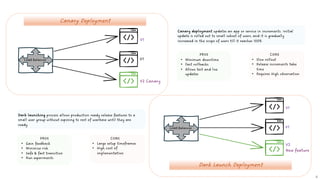
Canary Deployment
Dark Launch Deployment
Load Balancer
V1
V1
V2 Canary
Load Balancer
V1
V1
V2
New feature
Canary deployment updates an app or service in increments. Initial
update is rolled out to small subset of users, and it is gradually
increased in the scope of users till it reaches 100%
PROS
• Minimum downtime
• Fast rollbacks
• Allows test and live
updates
CONS
• Slow rollout
• Release increments take
time
• Requires High observation
Dark launching process allows production ready release features to a
small user group without exposing to rest of userbase until they are
ready
PROS
• Gain feedback
• Minimize risk
• Safe & fast transition
• Run experiments
CONS
• Large setup timeframes
• High cost of
implementation
4
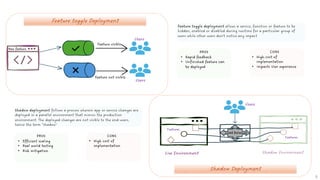
Feature toggle Deployment
Shadow Deployment
Load Balancer
Users
Users
Live Environment
Users
Shadow deployment follows a process wherein app or service changes are
deployed in a parallel environment that mimics the production
environment. The deployed changes are not visible to the end-users,
hence the term “shadow”
PROS
• Efficient scaling
• Real world testing
• Risk mitigation
CONS
• High cost of
implementation
Feature toggle deployment allows a service, function or feature to be
hidden, enabled or disabled during runtime for a particular group of
users while other users don’t notice any impact
PROS
• Rapid feedback
• Unfinished feature can
be deployed
CONS
• High cost of
implementation
• Impacts User experience
Features
Features
New feature
5
Feature visible
Feature not visible
Users
Users
Users
Users
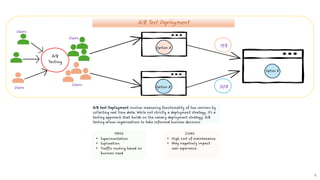
A/B test Deployment involves measuring functionality of two versions by
collecting real time data. While not strictly a deployment strategy, it’s a
testing approach that builds on the canary deployment strategy. A/B
testing allows organizations to take informed business decisions
PROS
• Experimentation
• Exploration
• Traffic routing based on
business need
CONS
• High cost of maintenance
• May negatively impact
user experience
A/B Test Deployment
A/B
Testing
15%
30%
Option A
Option B
Option B
6
Thank you

SUMMARY OF DEVOPS IT DEPLOYMENT STRATEGIES

  • 1.
  • 2.
    Basic Deployment Rolling Deployment LoadBalancer Simultaneous Updates Instances Load Balancer Select Updates Instances Basic deployment simultaneously updates newer version on every node or instance in the target environment PROS • Fast • Simple • Cost effective CONS • Outage vulnerability • Difficult to rollback Rolling deployment involves in replacing instances of previous version, one after other, in a sequence till all instances are updated with newer version; Also, sometimes known as ramped deployment PROS • Flexible • Minimum downtime • Flawed deployment impacts less users CONS • Slow rollback • Requires Backward compatibility 2
  • 3.
    Multi-service Deployment Blue GreenDeployment Load Balancer Multiservice Updates Instances Load Balancer PROD STAGE Blue-green deployment is a release method that has two different but identical environments wherein one environment is updated with newer version and when testing is complete, traffic is switched from older version environment to newer, updated environment PROS • Instant rollout / rollback • Minimum downtime • Zero versioning issues CONS • High cost • Difficult to scale • Distorted user transactions Multi-service deployment simultaneously updates every node in the target environment with multiple services; Similar to basic deployment but mostly applicable for services PROS • Fast • Simple • Cost effective CONS • Outage vulnerability • Difficult to rollback 3
  • 4.
    Canary Deployment Dark LaunchDeployment Load Balancer V1 V1 V2 Canary Load Balancer V1 V1 V2 New feature Canary deployment updates an app or service in increments. Initial update is rolled out to small subset of users, and it is gradually increased in the scope of users till it reaches 100% PROS • Minimum downtime • Fast rollbacks • Allows test and live updates CONS • Slow rollout • Release increments take time • Requires High observation Dark launching process allows production ready release features to a small user group without exposing to rest of userbase until they are ready PROS • Gain feedback • Minimize risk • Safe & fast transition • Run experiments CONS • Large setup timeframes • High cost of implementation 4
  • 5.
    Feature toggle Deployment ShadowDeployment Load Balancer Users Users Live Environment Users Shadow deployment follows a process wherein app or service changes are deployed in a parallel environment that mimics the production environment. The deployed changes are not visible to the end-users, hence the term “shadow” PROS • Efficient scaling • Real world testing • Risk mitigation CONS • High cost of implementation Feature toggle deployment allows a service, function or feature to be hidden, enabled or disabled during runtime for a particular group of users while other users don’t notice any impact PROS • Rapid feedback • Unfinished feature can be deployed CONS • High cost of implementation • Impacts User experience Features Features New feature 5 Feature visible Feature not visible
  • 6.
    Users Users Users Users A/B test Deploymentinvolves measuring functionality of two versions by collecting real time data. While not strictly a deployment strategy, it’s a testing approach that builds on the canary deployment strategy. A/B testing allows organizations to take informed business decisions PROS • Experimentation • Exploration • Traffic routing based on business need CONS • High cost of maintenance • May negatively impact user experience A/B Test Deployment A/B Testing 15% 30% Option A Option B Option B 6
  • 7.