
© 2018, Amazon Web Services, Inc. or its Affiliates. All rights reserved
Amazon Lightsail Workshop
Deploying and scaling a Node.js app on Lightsail
Mike Coleman, Developer Advocate
@mikegcoleman
mikegcol@amazon.com
Who am I
•Developer Advocate for Amazon Lightsail
•But, I’m not a developer
•Based out of Portland, Oregon
•Previous: Docker, Puppet (Labs), VMware, Microsoft,
Intel, HP(E)
•@mikegcoleman (but I tweet about soccer, a lot)
What you will learn
After today you will be understand how to:
• What is Amazon Lightsail
• When do you choose Lightsail
• Launch a monolithic application on Lightsail
• Break out app components
• Scale an application using snapshots and
a load balancer
Amazon Lightsail: Cloud made easy
• Bundled compute, storage, networking
• Fully configured server
• Low, predictable price
• Intuitive, global Lightsail console
• Easy growth path
• Access to AWS services
• Tailored API & CLI
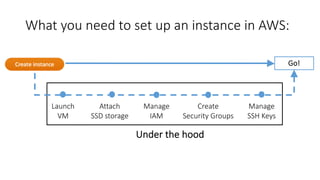
What you need to set up an instance in AWS:
Launch
VM
Attach
SSD storage
Manage
IAM
Create
Security Groups
Manage
SSH Keys
Go!
Under the hood
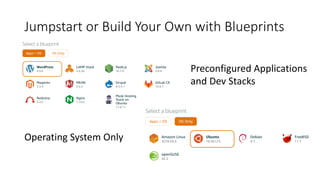
Jumpstart or Build Your Own with Blueprints
Preconfigured Applications
and Dev Stacks
Operating System Only
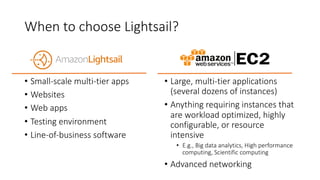
When to choose Lightsail?
• Small-scale multi-tier apps
• Websites
• Web apps
• Testing environment
• Line-of-business software
• Large, multi-tier applications
(several dozens of instances)
• Anything requiring instances that
are workload optimized, highly
configurable, or resource
intensive
• E.g., Big data analytics, High performance
computing, Scientific computing
• Advanced networking
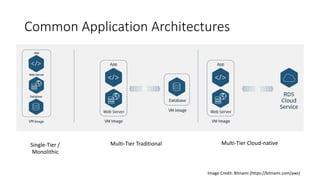
Common Application Architectures
Single-Tier /
Monolithic
Multi-Tier Traditional Multi-Tier Cloud-native
Image Credit: Bitnami (https://bitnami.com/aws)
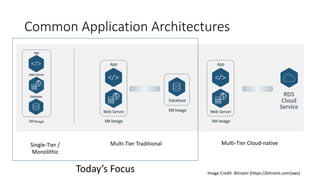
Common Application Architectures
Single-Tier /
Monolithic
Multi-Tier Traditional Multi-Tier Cloud-native
Image Credit: Bitnami (https://bitnami.com/aws)
Today’s Focus
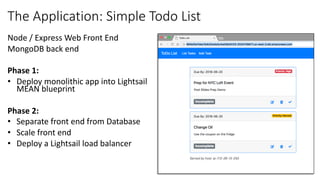
Node / Express Web Front End
MongoDB back end
Phase 1:
• Deploy monolithic app into Lightsail
MEAN blueprint
Phase 2:
• Separate front end from Database
• Scale front end
• Deploy a Lightsail load balancer
The Application: Simple Todo List
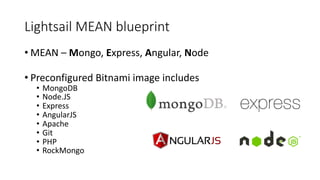
Lightsail MEAN blueprint
• MEAN – Mongo, Express, Angular, Node
• Preconfigured Bitnami image includes
• MongoDB
• Node.JS
• Express
• AngularJS
• Apache
• Git
• PHP
• RockMongo
Getting our Application Running
• Create Lightsail instance
• Disable Apache
• Create user account in Mongo
• Clone Github repo
• Configure application environment variables
• Run the app
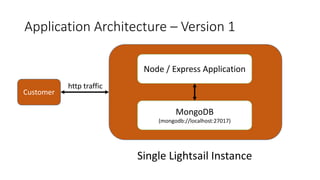
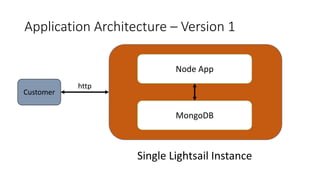
Application Architecture – Version 1
Node / Express Application
MongoDB
(mongodb://localhost:27017)
Single Lightsail Instance
http traffic
Customer
Demo
Monolithic Node App
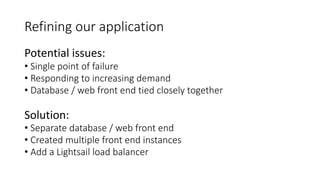
Refining our application
Potential issues:
• Single point of failure
• Responding to increasing demand
• Database / web front end tied closely together
Solution:
• Separate database / web front end
• Created multiple front end instances
• Add a Lightsail load balancer
Application Architecture – Version 1
Node App
MongoDB
Single Lightsail Instance
http
Customer
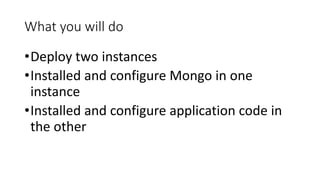
What you will do
•Deploy two instances
•Installed and configure Mongo in one
instance
•Installed and configure application code in
the other
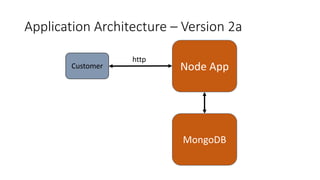
Application Architecture – Version 2a
Node App
http
MongoDB
Customer
Scaling the front end with snapshots
•Front end is stateless
•Create Lightsail snapshot
•Deploy multiple instances from snapshot
•Create Lightsail load balancer
•And front-end instances to Load balancer
Lightsail load balancers
•Simplified Amazon load
balancer implementation
•Set up in a few clicks
•Handles http / https traffic
•Balances across ports 80
and 443
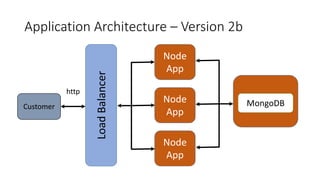
Application Architecture – Version 2b
Node
App
http
Customer MongoDBLoadBalancer
Node
App
Node
App
Demo
Scaling the front end

Deploying and Scaling Your First Cloud Application with Amazon Lightsail

  • 1.
    © 2018, AmazonWeb Services, Inc. or its Affiliates. All rights reserved Amazon Lightsail Workshop Deploying and scaling a Node.js app on Lightsail Mike Coleman, Developer Advocate @mikegcoleman mikegcol@amazon.com
  • 2.
    Who am I •DeveloperAdvocate for Amazon Lightsail •But, I’m not a developer •Based out of Portland, Oregon •Previous: Docker, Puppet (Labs), VMware, Microsoft, Intel, HP(E) •@mikegcoleman (but I tweet about soccer, a lot)
  • 3.
    What you willlearn After today you will be understand how to: • What is Amazon Lightsail • When do you choose Lightsail • Launch a monolithic application on Lightsail • Break out app components • Scale an application using snapshots and a load balancer
  • 4.
    Amazon Lightsail: Cloudmade easy • Bundled compute, storage, networking • Fully configured server • Low, predictable price • Intuitive, global Lightsail console • Easy growth path • Access to AWS services • Tailored API & CLI
  • 5.
    What you needto set up an instance in AWS: Launch VM Attach SSD storage Manage IAM Create Security Groups Manage SSH Keys Go! Under the hood
  • 6.
    Jumpstart or BuildYour Own with Blueprints Preconfigured Applications and Dev Stacks Operating System Only
  • 7.
    When to chooseLightsail? • Small-scale multi-tier apps • Websites • Web apps • Testing environment • Line-of-business software • Large, multi-tier applications (several dozens of instances) • Anything requiring instances that are workload optimized, highly configurable, or resource intensive • E.g., Big data analytics, High performance computing, Scientific computing • Advanced networking
  • 8.
    Common Application Architectures Single-Tier/ Monolithic Multi-Tier Traditional Multi-Tier Cloud-native Image Credit: Bitnami (https://bitnami.com/aws)
  • 9.
    Common Application Architectures Single-Tier/ Monolithic Multi-Tier Traditional Multi-Tier Cloud-native Image Credit: Bitnami (https://bitnami.com/aws) Today’s Focus
  • 10.
    Node / ExpressWeb Front End MongoDB back end Phase 1: • Deploy monolithic app into Lightsail MEAN blueprint Phase 2: • Separate front end from Database • Scale front end • Deploy a Lightsail load balancer The Application: Simple Todo List
  • 11.
    Lightsail MEAN blueprint •MEAN – Mongo, Express, Angular, Node • Preconfigured Bitnami image includes • MongoDB • Node.JS • Express • AngularJS • Apache • Git • PHP • RockMongo
  • 12.
    Getting our ApplicationRunning • Create Lightsail instance • Disable Apache • Create user account in Mongo • Clone Github repo • Configure application environment variables • Run the app
  • 13.
    Application Architecture –Version 1 Node / Express Application MongoDB (mongodb://localhost:27017) Single Lightsail Instance http traffic Customer
  • 14.
  • 15.
    Refining our application Potentialissues: • Single point of failure • Responding to increasing demand • Database / web front end tied closely together Solution: • Separate database / web front end • Created multiple front end instances • Add a Lightsail load balancer
  • 16.
    Application Architecture –Version 1 Node App MongoDB Single Lightsail Instance http Customer
  • 17.
    What you willdo •Deploy two instances •Installed and configure Mongo in one instance •Installed and configure application code in the other
  • 18.
    Application Architecture –Version 2a Node App http MongoDB Customer
  • 19.
    Scaling the frontend with snapshots •Front end is stateless •Create Lightsail snapshot •Deploy multiple instances from snapshot •Create Lightsail load balancer •And front-end instances to Load balancer
  • 20.
    Lightsail load balancers •SimplifiedAmazon load balancer implementation •Set up in a few clicks •Handles http / https traffic •Balances across ports 80 and 443
  • 21.
    Application Architecture –Version 2b Node App http Customer MongoDBLoadBalancer Node App Node App
  • 22.