Microservices
and
Deploying Methodologies
1
26th April, 2019
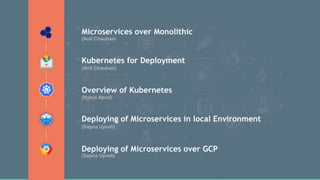
Microservices over Monolithic
Kubernetes for Deployment
Deploying of Microservices in local Environment
Deploying of Microservices over GCP
Overview of Kubernetes
(Anil Chauhan)
(Anil Chauhan)
(Rahul Abrol)
(Sapna Upreti)
(Sapna Upreti)
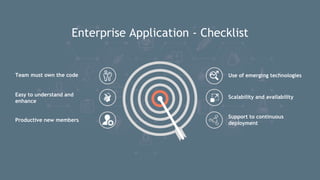
Enterprise Application - Checklist
Use of emerging technologiesTeam must own the code
Easy to understand and
enhance
Productive new members
Scalability and availability
Support to continuous
deployment
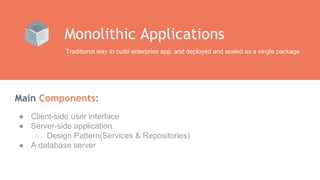
Main Components:
Monolithic Applications
Traditional way to build enterprise app, and deployed and scaled as a single package
● Client-side user interface
● Server-side application
○ Design Pattern(Services & Repositories)
● A database server
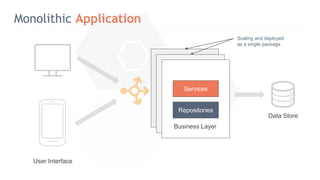
Monolithic Application
Services
Repositories
Scaling and deployed
as a single package
Business Layer
Data Store
User Interface
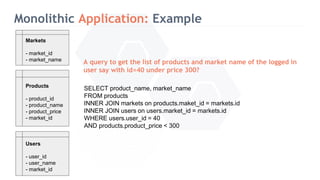
Monolithic Application: Example
Products
- product_id
- product_name
- product_price
- market_id
Users
- user_id
- user_name
- market_id
Markets
- market_id
- market_name
A query to get the list of products and market name of the logged in
user say with id=40 under price 300?
SELECT product_name, market_name
FROM products
INNER JOIN markets on products.maket_id = markets.id
INNER JOIN users on users.market_id = markets.id
WHERE users.user_id = 40
AND products.product_price < 300
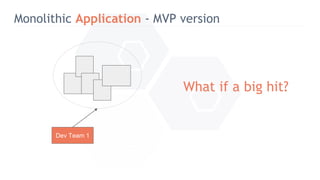
Monolithic Application - MVP version
Dev Team 1
What if a big hit?
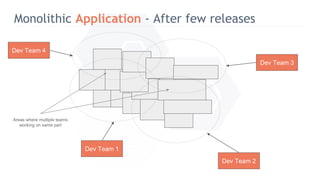
Monolithic Application - After few releases
Dev Team 1
Dev Team 2
Dev Team 3
Dev Team 4
Areas where multiple teams
working on same part
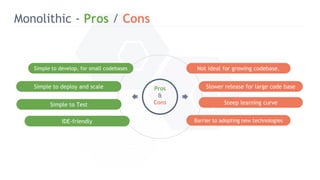
Monolithic - Pros / Cons
Not ideal for growing codebase.
Barrier to adopting new technologies
Steep learning curve
Simple to develop, for small codebases
Simple to Test
Simple to deploy and scale Pros
&
Cons
Slower release for large code base
IDE-friendly
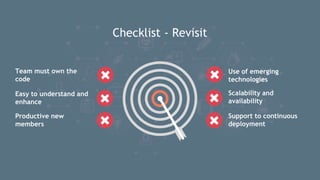
Checklist - Revisit
Use of emerging
technologies
Team must own the
code
Easy to understand and
enhance
Productive new
members
Scalability and
availability
Support to continuous
deployment
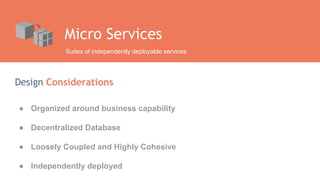
Design Considerations
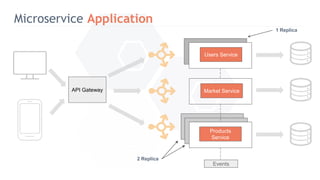
Micro Services
Suites of independently deployable services
● Organized around business capability
● Decentralized Database
● Loosely Coupled and Highly Cohesive
● Independently deployed
Microservice Application
Users Service
Market Service
Products
Service
API Gateway
Events
2 Replica
1 Replica
Microservice Application: Example
products
{
id: 1,
name: ‘AWS’
price: 300,
market: {
id: 1,
name: US
}
}
Users
{
id: 1,
name: ‘John Smith’
market: {
id: 1,
name: US
}
}
markets
{
id: 1,
name: US,
currency: ‘$’,
created_at: ‘123’,
updated_at: ‘abc’
}
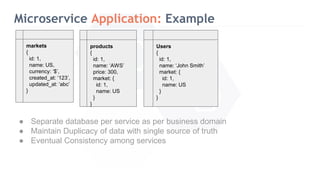
● Separate database per service as per business domain
● Maintain Duplicacy of data with single source of truth
● Eventual Consistency among services
Microservice - Pros / Cons
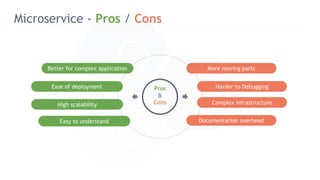
More moving parts
Documentation overhead
Complex infrastructure
Better for complex application
High scalability
Ease of deployment Pros
&
Cons
Harder to Debugging
Easy to understand
Checklist - Revisit
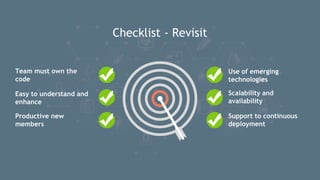
Use of emerging
technologies
Team must own the
code
Easy to understand and
enhance
Productive new
members
Scalability and
availability
Support to continuous
deployment
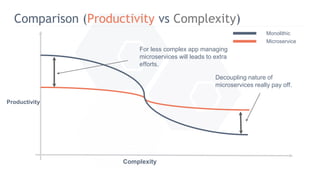
Comparison (Productivity vs Complexity)
Productivity
Complexity
For less complex app managing
microservices will leads to extra
efforts.
Decoupling nature of
microservices really pay off.
Microservice
Monolithic
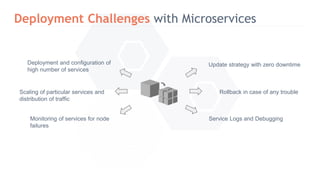
Deployment Challenges with Microservices
Deployment and configuration of
high number of services
Monitoring of services for node
failures
Scaling of particular services and
distribution of traffic
Service Logs and Debugging
Update strategy with zero downtime
Rollback in case of any trouble
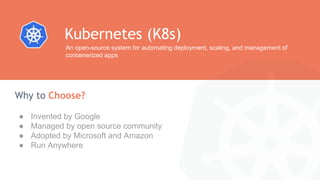
● Invented by Google
● Managed by open source community
● Adopted by Microsoft and Amazon
● Run Anywhere
Why to Choose?
Kubernetes (K8s)
An open-source system for automating deployment, scaling, and management of
containerized apps
Overview of K8s
19
(Rahul Abrol)
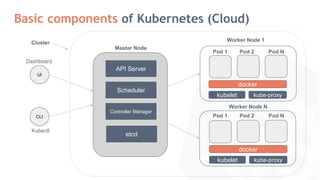
Basic components of Kubernetes (Cloud)
Cluster
CLI
Kubectl
Master Node
API Server
Scheduler
Controller Manager
etcd
Worker Node 1
kubelet kube-proxy
docker
Pod 1 Pod 2 Pod N
Worker Node N
kubelet kube-proxy
docker
Pod 1 Pod 2 Pod N
UI
Dashboard
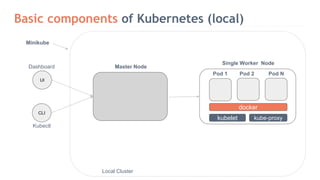
Basic components of Kubernetes (local)
CLI
Kubectl
Minikube
Master Node
Single Worker Node
kubelet kube-proxy
docker
Pod 1 Pod 2 Pod N
Local Cluster
UI
Dashboard
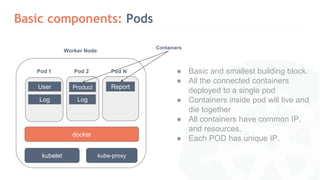
Basic components: Pods
Worker Node
kubelet kube-proxy
docker
Pod 1 Pod 2 Pod N
Containers
● Basic and smallest building block.
● All the connected containers
deployed to a single pod
● Containers inside pod will live and
die together
● All containers have common IP,
and resources.
● Each POD has unique IP.
User
Log
Product Report
Log
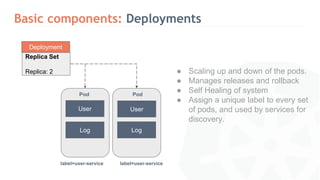
Basic components: Deployments
● Scaling up and down of the pods.
● Manages releases and rollback
● Self Healing of system
● Assign a unique label to every set
of pods, and used by services for
discovery.
Deployment
Replica Set
Replica: 2
Pod Pod
User User
Log Log
label=user-service label=user-service
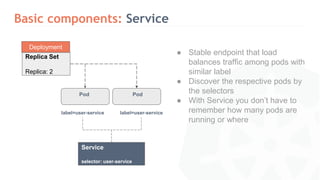
Basic components: Service
● Stable endpoint that load
balances traffic among pods with
similar label
● Discover the respective pods by
the selectors
● With Service you don’t have to
remember how many pods are
running or where
Deployment
Replica Set
Replica: 2
Pod Pod
label=user-service label=user-service
Service
selector: user-service
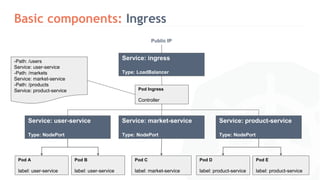
Basic components: Ingress
Service: user-service
Type: NodePort
Service: market-service
Type: NodePort
Service: product-service
Type: NodePort
Pod A
label: user-service
Pod B
label: user-service
Pod C
label: market-service
Pod D
label: product-service
Pod E
label: product-service
Pod Ingress
Controller
Service: ingress
Type: LoadBalancer
Public IP
-Path: /users
Service: user-service
-Path: /markets
Service: market-service
-Path: /products
Service: product-service
Deployment on GCP
26
(Sapna Upreti)
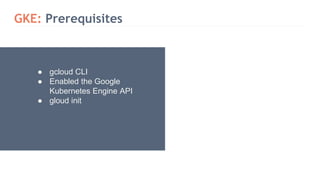
GKE: Prerequisites
● gcloud CLI
● Enabled the Google
Kubernetes Engine API
● gloud init
GKE: in action
30
K8s: Rollbacks
● Rolling out your application to
previous version
● Set the revision that you want
● Kubernetes will scale up the
corresponding ReplicaSet, and
scaled down the current one
Handy Commands:
● kubectl rollout history deployments products
● kubectl rollout status deployments products
● kubectl rollout undo deployments products
K8s: Rollbacks in action
33
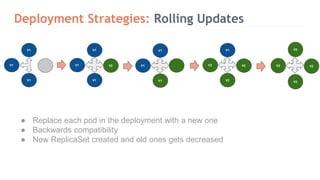
Deployment Strategies: Rolling Updates
● Replace each pod in the deployment with a new one
● Backwards compatibility
● New ReplicaSet created and old ones gets decreased
V1
V1
V1
V1
V1
V1
V2
V1
V1
V1
V1
V2
V2
V2
V2
V2
V2
V2` ` ` `
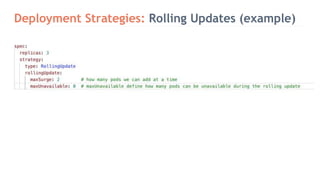
Deployment Strategies: Rolling Updates (example)
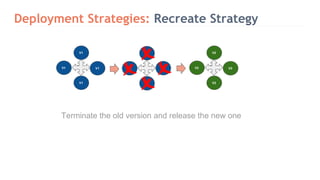
Deployment Strategies: Recreate Strategy
Terminate the old version and release the new one
V1
V1
V1
V1
V1
V1
V1
V1
V2
V2
V2
V2` ` `
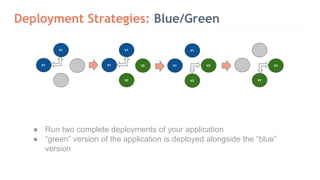
Deployment Strategies: Blue/Green
● Run two complete deployments of your application
● “green” version of the application is deployed alongside the “blue”
version
V1
V1
V1
V1
V2
V2
V1
V1
V2
V2
V2
V2
Deployment Strategies in
action
40
Deployment on Local
42
(Sapna Upreti)
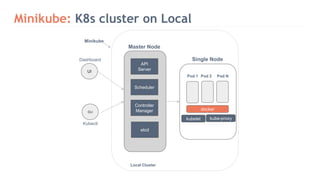
Minikube: K8s cluster on Local
UI
CLI
Kubectl
Minikube
Master Node
API
Server
Scheduler
Controller
Manager
etcd
Single Node
kubelet kube-proxy
docker
Pod 1 Pod 2 Pod N
Local Cluster
Dashboard
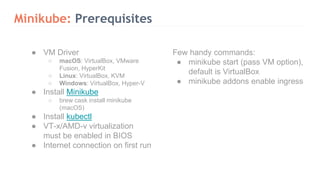
Minikube: Prerequisites
Few handy commands:
● minikube start (pass VM option),
default is VirtualBox
● minikube addons enable ingress
● VM Driver
○ macOS: VirtualBox, VMware
Fusion, HyperKit
○ Linux: VirtualBox, KVM
○ Windows: VirtualBox, Hyper-V
● Install Minikube
○ brew cask install minikube
(macOS)
● Install kubectl
● VT-x/AMD-v virtualization
must be enabled in BIOS
● Internet connection on first run
Minikube- in action
56
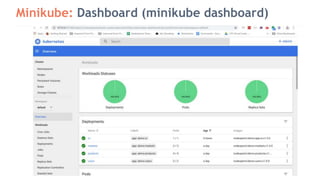
Minikube: Dashboard (minikube dashboard)
Tools and Clouds
62
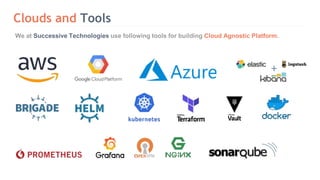
Clouds and Tools
We at Successive Technologies use following tools for building Cloud Agnostic Platform.
Queries?
Thank You

Microservices and Deployment Methodologies

  • 1.
  • 2.
    Microservices over Monolithic Kubernetesfor Deployment Deploying of Microservices in local Environment Deploying of Microservices over GCP Overview of Kubernetes (Anil Chauhan) (Anil Chauhan) (Rahul Abrol) (Sapna Upreti) (Sapna Upreti)
  • 3.
    Enterprise Application -Checklist Use of emerging technologiesTeam must own the code Easy to understand and enhance Productive new members Scalability and availability Support to continuous deployment
  • 4.
    Main Components: Monolithic Applications Traditionalway to build enterprise app, and deployed and scaled as a single package ● Client-side user interface ● Server-side application ○ Design Pattern(Services & Repositories) ● A database server
  • 5.
    Monolithic Application Services Repositories Scaling anddeployed as a single package Business Layer Data Store User Interface
  • 6.
    Monolithic Application: Example Products -product_id - product_name - product_price - market_id Users - user_id - user_name - market_id Markets - market_id - market_name A query to get the list of products and market name of the logged in user say with id=40 under price 300? SELECT product_name, market_name FROM products INNER JOIN markets on products.maket_id = markets.id INNER JOIN users on users.market_id = markets.id WHERE users.user_id = 40 AND products.product_price < 300
  • 7.
    Monolithic Application -MVP version Dev Team 1 What if a big hit?
  • 8.
    Monolithic Application -After few releases Dev Team 1 Dev Team 2 Dev Team 3 Dev Team 4 Areas where multiple teams working on same part
  • 9.
    Monolithic - Pros/ Cons Not ideal for growing codebase. Barrier to adopting new technologies Steep learning curve Simple to develop, for small codebases Simple to Test Simple to deploy and scale Pros & Cons Slower release for large code base IDE-friendly
  • 10.
    Checklist - Revisit Useof emerging technologies Team must own the code Easy to understand and enhance Productive new members Scalability and availability Support to continuous deployment
  • 11.
    Design Considerations Micro Services Suitesof independently deployable services ● Organized around business capability ● Decentralized Database ● Loosely Coupled and Highly Cohesive ● Independently deployed
  • 12.
    Microservice Application Users Service MarketService Products Service API Gateway Events 2 Replica 1 Replica
  • 13.
    Microservice Application: Example products { id:1, name: ‘AWS’ price: 300, market: { id: 1, name: US } } Users { id: 1, name: ‘John Smith’ market: { id: 1, name: US } } markets { id: 1, name: US, currency: ‘$’, created_at: ‘123’, updated_at: ‘abc’ } ● Separate database per service as per business domain ● Maintain Duplicacy of data with single source of truth ● Eventual Consistency among services
  • 14.
    Microservice - Pros/ Cons More moving parts Documentation overhead Complex infrastructure Better for complex application High scalability Ease of deployment Pros & Cons Harder to Debugging Easy to understand
  • 15.
    Checklist - Revisit Useof emerging technologies Team must own the code Easy to understand and enhance Productive new members Scalability and availability Support to continuous deployment
  • 16.
    Comparison (Productivity vsComplexity) Productivity Complexity For less complex app managing microservices will leads to extra efforts. Decoupling nature of microservices really pay off. Microservice Monolithic
  • 17.
    Deployment Challenges withMicroservices Deployment and configuration of high number of services Monitoring of services for node failures Scaling of particular services and distribution of traffic Service Logs and Debugging Update strategy with zero downtime Rollback in case of any trouble
  • 18.
    ● Invented byGoogle ● Managed by open source community ● Adopted by Microsoft and Amazon ● Run Anywhere Why to Choose? Kubernetes (K8s) An open-source system for automating deployment, scaling, and management of containerized apps
  • 19.
  • 20.
    Basic components ofKubernetes (Cloud) Cluster CLI Kubectl Master Node API Server Scheduler Controller Manager etcd Worker Node 1 kubelet kube-proxy docker Pod 1 Pod 2 Pod N Worker Node N kubelet kube-proxy docker Pod 1 Pod 2 Pod N UI Dashboard
  • 21.
    Basic components ofKubernetes (local) CLI Kubectl Minikube Master Node Single Worker Node kubelet kube-proxy docker Pod 1 Pod 2 Pod N Local Cluster UI Dashboard
  • 22.
    Basic components: Pods WorkerNode kubelet kube-proxy docker Pod 1 Pod 2 Pod N Containers ● Basic and smallest building block. ● All the connected containers deployed to a single pod ● Containers inside pod will live and die together ● All containers have common IP, and resources. ● Each POD has unique IP. User Log Product Report Log
  • 23.
    Basic components: Deployments ●Scaling up and down of the pods. ● Manages releases and rollback ● Self Healing of system ● Assign a unique label to every set of pods, and used by services for discovery. Deployment Replica Set Replica: 2 Pod Pod User User Log Log label=user-service label=user-service
  • 24.
    Basic components: Service ●Stable endpoint that load balances traffic among pods with similar label ● Discover the respective pods by the selectors ● With Service you don’t have to remember how many pods are running or where Deployment Replica Set Replica: 2 Pod Pod label=user-service label=user-service Service selector: user-service
  • 25.
    Basic components: Ingress Service:user-service Type: NodePort Service: market-service Type: NodePort Service: product-service Type: NodePort Pod A label: user-service Pod B label: user-service Pod C label: market-service Pod D label: product-service Pod E label: product-service Pod Ingress Controller Service: ingress Type: LoadBalancer Public IP -Path: /users Service: user-service -Path: /markets Service: market-service -Path: /products Service: product-service
  • 26.
  • 27.
    GKE: Prerequisites ● gcloudCLI ● Enabled the Google Kubernetes Engine API ● gloud init
  • 28.
  • 29.
    K8s: Rollbacks ● Rollingout your application to previous version ● Set the revision that you want ● Kubernetes will scale up the corresponding ReplicaSet, and scaled down the current one Handy Commands: ● kubectl rollout history deployments products ● kubectl rollout status deployments products ● kubectl rollout undo deployments products
  • 30.
  • 31.
    Deployment Strategies: RollingUpdates ● Replace each pod in the deployment with a new one ● Backwards compatibility ● New ReplicaSet created and old ones gets decreased V1 V1 V1 V1 V1 V1 V2 V1 V1 V1 V1 V2 V2 V2 V2 V2 V2 V2` ` ` `
  • 32.
  • 33.
    Deployment Strategies: RecreateStrategy Terminate the old version and release the new one V1 V1 V1 V1 V1 V1 V1 V1 V2 V2 V2 V2` ` `
  • 34.
    Deployment Strategies: Blue/Green ●Run two complete deployments of your application ● “green” version of the application is deployed alongside the “blue” version V1 V1 V1 V1 V2 V2 V1 V1 V2 V2 V2 V2
  • 35.
  • 36.
  • 37.
    Minikube: K8s clusteron Local UI CLI Kubectl Minikube Master Node API Server Scheduler Controller Manager etcd Single Node kubelet kube-proxy docker Pod 1 Pod 2 Pod N Local Cluster Dashboard
  • 38.
    Minikube: Prerequisites Few handycommands: ● minikube start (pass VM option), default is VirtualBox ● minikube addons enable ingress ● VM Driver ○ macOS: VirtualBox, VMware Fusion, HyperKit ○ Linux: VirtualBox, KVM ○ Windows: VirtualBox, Hyper-V ● Install Minikube ○ brew cask install minikube (macOS) ● Install kubectl ● VT-x/AMD-v virtualization must be enabled in BIOS ● Internet connection on first run
  • 39.
  • 40.
  • 41.
  • 42.
    Clouds and Tools Weat Successive Technologies use following tools for building Cloud Agnostic Platform.
  • 43.
  • 44.

Editor's Notes

  • #2 As we all know how rapidly this IT industry is growing and the amount of buzzwords that are thrown around these days. All thanks to this Open Source Community So for today we have picked two of the most famous words: and they are Microservices and Kubernetes aka K8s.
  • #3 And in we will talk about Why companies are diverting towards microservices based architecture. How Kubernetes helps us in deploying these microservices.
  • #4 To start with, we have set certain benchmarks within our company which we are following while building the app and they are as following: Team must have full control over the code they develop. System must be capable enough to provide speedy and bug free releases. How early a new member would become productive Whether system allow us to use latest and emerging technologies, say we are building the system in node.js from last 2 years, and now “GO” language is in trend and whether we would be able to use it for rolling our new features? How easily we can scale the system as per the traffic requirements? How easily we are able to deploy the new releases or quick fixes using CI/CD pipeline?
  • #5 So just start with the standard way of developing the app i.e Monolithic app. In Monolithic app - the three components we are interested in will be the user interface, the data access layer, and the common data store and normally wrapped as a single package. Sometime - UI and business layer are wrapped as single package, eg. Laravel with Blade, and at other time they both are wrapped separately i.e Laravel with React as SPA
  • #21 The master is responsible for exposing the application program interface (API), scheduling the deployments and managing the overall cluster. etcd is an open source, distributed key-value database, The master queries etcd to retrieve various parameters of the state of the nodes, pods and containers. API server implements an interface, which means different tools and libraries can readily communicate with it. Controller - it can be considered as a daemon which runs in nonterminating loop and is responsible for collecting and sending information to API server. The scheduler is responsible for workload utilization and allocating pod to new node.
  • #26 Ingress: This contains the mapping between URL paths and Services. Controller: Routes the traffic to respective services Service: Have public IP address
  • #27 Will cover rollback and deployment policies in GCP
  • #28 The gcloud command-line interface is a tool that provides the primary CLI to Google Cloud Platform. You can use this tool to perform many common platform tasks either from the command-line or in scripts and other automations. For example, you can use the gcloud CLI to create and manage: Google Compute Engine virtual machine instances and other resources Google Cloud SQL instances Google Kubernetes Engine clusters Google Cloud Dataproc clusters and jobs Google Cloud DNS managed zones and record sets Google Cloud Deployment manager deployments
  • #30 gcloud container clusters get-credentials - fetch credentials for a running cluster
  • #31 Will cover rollback and deployment policies in GCP
  • #32 kubectl config get-contexts Kubectl config use-context <your cluster>
  • #33 Rollback means rolling out your application to previous version
  • #34 Will cover rollback and deployment policies in GCP
  • #35 kubectl config get-contexts Kubectl config use-context <your cluster>
  • #36 The RollingUpdate strategy will replace each pod in the deployment with a new one in turn, such that no outage will occur. This is great if you have developed your application with backwards compatibility so that new deployments can run alongside old ones. Rolling updates, allow Deployments' update to take place with zero downtime by incrementally updating Pods instances with new ones. The new Pods will be scheduled on Nodes with available resources. a secondary ReplicaSet is created with the new version of the application, then the number of replicas of the old version is decreased and the new version is increased until the correct number of replicas is reached.
  • #37 When setup together with horizontal pod autoscaling it can be handy to use a percentage based value instead of a number for maxSurge and maxUnavailable. If you trigger a deployment while an existing rollout is in progress, the deployment will pause the rollout and proceed to a new release by overriding the rollout. Pro: version is slowly released across instances convenient for stateful applications that can handle rebalancing of the data Cons: rollout/rollback can take time supporting multiple APIs is hard no control over traffic
  • #38 The recreate strategy is a dummy deployment which consists of shutting down version A then deploying version B after version A is turned off. This technique implies downtime of the service that depends on both shutdown and boot duration of the application. The Recreate strategy simply kills all of the existing pods before they are replaced with a set of new ones. This is useful if you have introduced breaking changes which could cause problems if there are pods running your old code and new code simultaneously. The downside here is that there will be a brief outage between the old pods being killed and the new pods being scheduled.
  • #39 A blue-green deployment is when you run two complete deployments of your application. A deployment that is currently in production, and a deployment with the changes you want to introduce. You then put a proxy or load balancer in front of your application and use it to route traffic to the new deployment when you are ready to take your changes into production A blue/green deployment differs from a rolling update deployment because the “green” version of the application is deployed alongside the “blue” version. After testing that the new version meets the requirements, we update the Kubernetes Service object that plays the role of load balancer to send traffic to the new version by replacing the version label in the selector field.
  • #40 Using Kubernetes we can easily do blue-green releases with a Service resource to act as our router, and two Deployment resources. We can then toggle the Label Selector on the Service to switch between blue and green.
  • #41 Will cover rollback and deployment policies in GCP
  • #42 kubectl config get-contexts Kubectl config use-context <your cluster>
  • #45 Minikube, a tool that runs a single-node Kubernetes cluster in a virtual machine on your laptop The Kubernetes command-line tool, kubectl, allows you to run commands against Kubernetes clusters. You can use kubectl to deploy applications, inspect and manage cluster resources, and view logs.
  • #46 Kubectl config is use to get and set the cluster context Now, you will be able to see minikube in the clusters list
  • #47 Now for using the minikube cluster kubectl config use-context minikube Now you can see the context has been switched to minikube cluster
  • #48 Now that our cluster is running we can go ahead and start deploying stuff. Deploy our pods(containers), using deployments. A deployment, pretty much just manages the state of our pods. Here comes the fun part! Deployments are requirements you give to Kubernetes regarding your applications (your Pods). Basically, with deployments you tell Kubernetes: Hey Kube, always keep 5 instances (or replicas) of these Pods running — always. It’s Kubernetes’s job to ensure that your cluster will host 5 replicas of your Pods at any given time. Let’s create deployment.yaml for three services as explained by Anil/Rahul
  • #49 When a Pod is not ready, it is removed from Service load balancers
  • #50 A Deployment named demo-product is created, indicated by the .metadata.name field. The Deployment creates four replicated Pods, indicated by the replicas field. The selector field defines how the Deployment finds which Pods to manage. In this case, you simply select a label that is defined in the Pod template (app: nginx). However, more sophisticated selection rules are possible, as long as the Pod template itself satisfies the rule. Note: matchLabels is a map of {key,value} pairs. A single {key,value} in the matchLabels map is equivalent to an element of matchExpressions, whose key field is “key”, the operator is “In”, and the values array contains only “value”. The requirements are ANDed. The template field contains the following sub-fields: The Pods are labeled app: demo-products using the labels field. The Pod template’s specification, or .template.spec field, indicates that the Pods run one container, nginx, which runs the nginx Docker Hub image at version 1.7.9. Create one container and name it nginx using the name field. Run the nginx image at version 1.7.9. Open port 80 so that the container can send and accept traffic.
  • #51 A Deployment named demo-product is created, indicated by the .metadata.name field. The Deployment creates four replicated Pods, indicated by the replicas field. The selector field defines how the Deployment finds which Pods to manage. In this case, you simply select a label that is defined in the Pod template (app: nginx). However, more sophisticated selection rules are possible, as long as the Pod template itself satisfies the rule. Note: matchLabels is a map of {key,value} pairs. A single {key,value} in the matchLabels map is equivalent to an element of matchExpressions, whose key field is “key”, the operator is “In”, and the values array contains only “value”. The requirements are ANDed. The template field contains the following sub-fields: The Pods are labeled app: demo-products using the labels field. The Pod template’s specification, or .template.spec field, indicates that the Pods run one container, nginx, which runs the nginx Docker Hub image at version 1.7.9. Create one container and name it nginx using the name field. Run the nginx image at version 1.7.9. Open port 80 so that the container can send and accept traffic.
  • #52 Expose our pods using Services. Oh, yet another fun concept … Pods’ lifecycle are erratic; they come and go by Kubernetes’ will. Not healthy? Killed. Not in the right place? Cloned, and killed. (No, you definitely don’t want to be ruled by Kube!) So how can you send a request to your application if you can’t know for sure where it lives? The answer lies in services. Services define sets of your deployed Pods, so you can send a request to “whichever available Pod of your application type.”
  • #53 This specification will create a new Service object named “demo-markets” which targets TCP port 1000 on any Pod with the "app=demo-markets" label Note that a Service can map an incoming port to any targetPort. By default the targetPort will be set to the same value as the port field. Perhaps more interesting is that targetPort can be a string, referring to the name of a port in the backend Pods. The actual port number assigned to that name can be different in each backend Pod. This offers a lot of flexibility for deploying and evolving your Services. For example, you can change the port number that pods expose in the next version of your backend software, without breaking clients. Although each Pod has a unique IP address, those IPs are not exposed outside the cluster without a Service. Services allow your applications to receive traffic. Services can be exposed in different ways by specifying a type in the ServiceSpec
  • #54 This specification will create a new Service object named “demo-markets” which targets TCP port 1000 on any Pod with the "app=demo-markets" label Note that a Service can map an incoming port to any targetPort. By default the targetPort will be set to the same value as the port field. Perhaps more interesting is that targetPort can be a string, referring to the name of a port in the backend Pods. The actual port number assigned to that name can be different in each backend Pod. This offers a lot of flexibility for deploying and evolving your Services. For example, you can change the port number that pods expose in the next version of your backend software, without breaking clients. Although each Pod has a unique IP address, those IPs are not exposed outside the cluster without a Service. Services allow your applications to receive traffic. Services can be exposed in different ways by specifying a type in the ServiceSpec
  • #55 This specification will create a new Service object named “demo-services” which targets TCP port 1000 on any Pod with the "app=demo-users" label Note that a Service can map an incoming port to any targetPort. By default the targetPort will be set to the same value as the port field. Perhaps more interesting is that targetPort can be a string, referring to the name of a port in the backend Pods. The actual port number assigned to that name can be different in each backend Pod. This offers a lot of flexibility for deploying and evolving your Services. For example, you can change the port number that pods expose in the next version of your backend software, without breaking clients. Although each Pod has a unique IP address, those IPs are not exposed outside the cluster without a Service. Services allow your applications to receive traffic. Services can be exposed in different ways by specifying a type in the ServiceSpec
  • #56 So we have Pods in our cluster. We have Services so we can talk to them from within our cluster. (Technically, there are ways to make services available from the outside, but we’ll purposefully skip that part for now.) Now, we’d like to expose our Services to the internet so customers can access our products.
  • #57 Will cover rollback and deployment policies in GCP
  • #61 Will cover rollback and deployment policies in GCP
  • #63 Will cover rollback and deployment policies in GCP