Real World
Rails Deployment


    Alan Hecht
Deployment Options

• Heroku - PaaS

• Shared Web Hosting

• Virtual Private Server

• Amazon Web Services - IaaS
Heroku - PaaS

• No setup & no system administration
  -   Easy to deploy

• Free when using one web process
  -   Pay as you scale

• App will idle after inactivity if only using one
  process (“dyno”)

• Additional “dyno” + database > 5MB is
  $50/month
Shared Web Hosting

• Cheap - $5 to $10 per month


• Web hosting control panel (i.e. cPanel) to
  configure web server & web application


• Limited to what is on the server


• Not recommended
  -   Constrained by CPU usage
Virtual Private Server
• Starts at around $25 per month


• Extremely flexible, can load anything you want


• System administration knowledge required
  -   Must maintain server


• Good for one or two standalone servers
Amazon Web Services - IaaS
• Building a virtual data center
  • Netflix runs on AWS


• Can load instances with a pre-built O/S


• Pay as you scale


• Most expensive option
Running Rails

• WEBrick should only be used in a
  development environment

• Need a web server to handle static
  requests
  - Images, HTML, JavaScript, CSS

• Need a Ruby web application server to
  handle Rails requests (i.e. Unicorn,
  Thin, or Passenger)
Web Server

• Apache & Nginx the two most popular
  choices


• Rack is used as an interface between
  the web server and Rails
Apache

• Most popular web server and has the
  many options & features


• Process-based web server


• Good for handling dynamic content via
  modules
Nginx

• Light weight web server that only
  handles static content


• Event-based web server


• Low memory usage
Apache or Nginx

• Pick one - either works

• Nginx better on a VPS because of low
  memory usage

• Apache is full-featured

• Nginx does a few things well
Rails Web App Servers

• Phusion Passenger, Thin, and Unicorn
  currently the most widely used Rails app
  servers


• Can be installed as a web server plugin
  or as a separate Ruby Gem
Phusion Passenger

• Acts as an Apache or Nginx module


• Philosophy – same as Rails (DRY,
  convention over configuration)


• Easy to deploy & maintain
  - No separate configuration file
Thin

• Event based Rails server


• Philosophy – tiny, fast, and secure


• Used by Heroku
Unicorn

• Process-based Rails server


• Philosophy – Unicorn is Unix


• Used by Twitter & GitHub
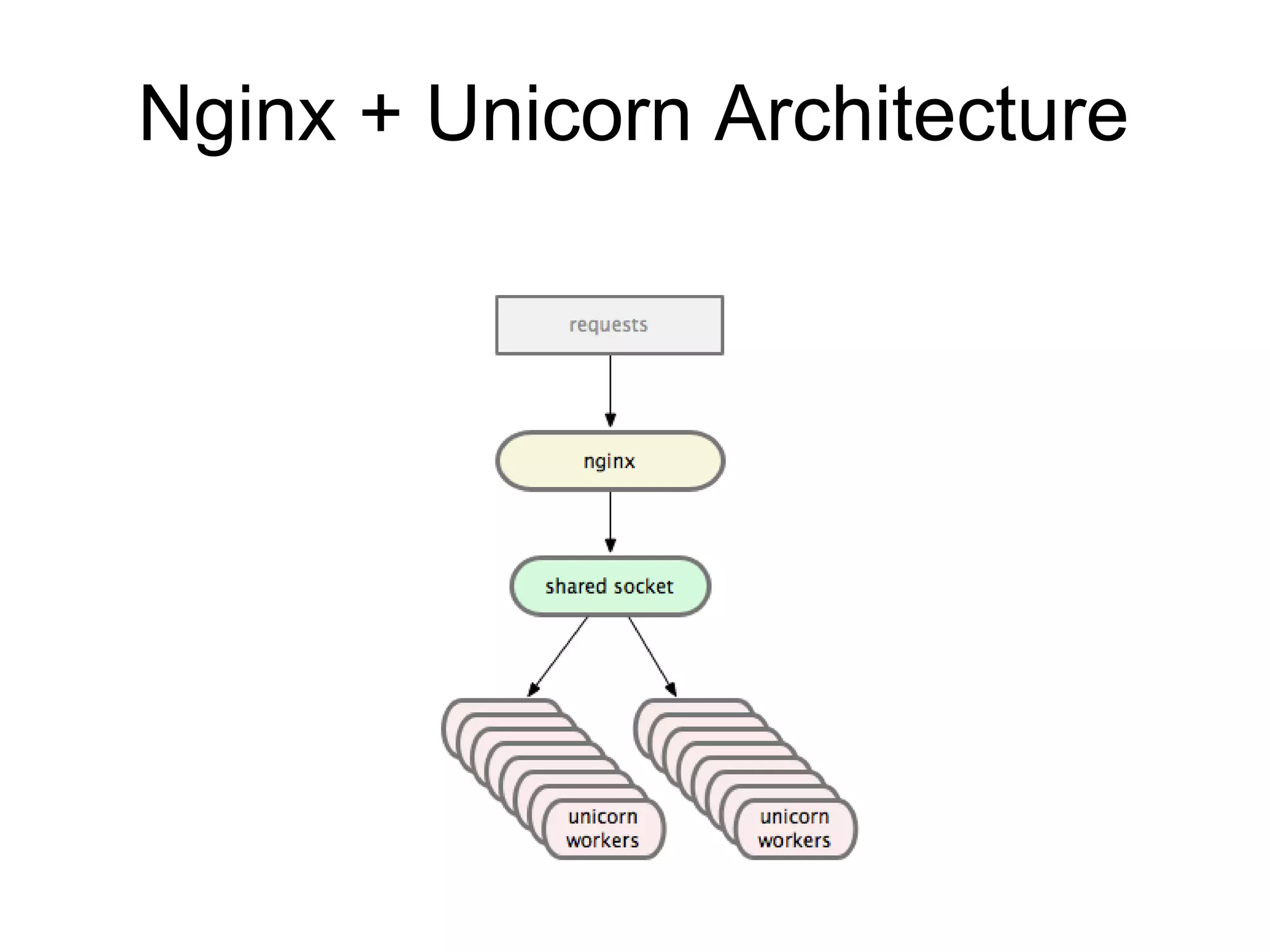
Nginx + Unicorn Architecture
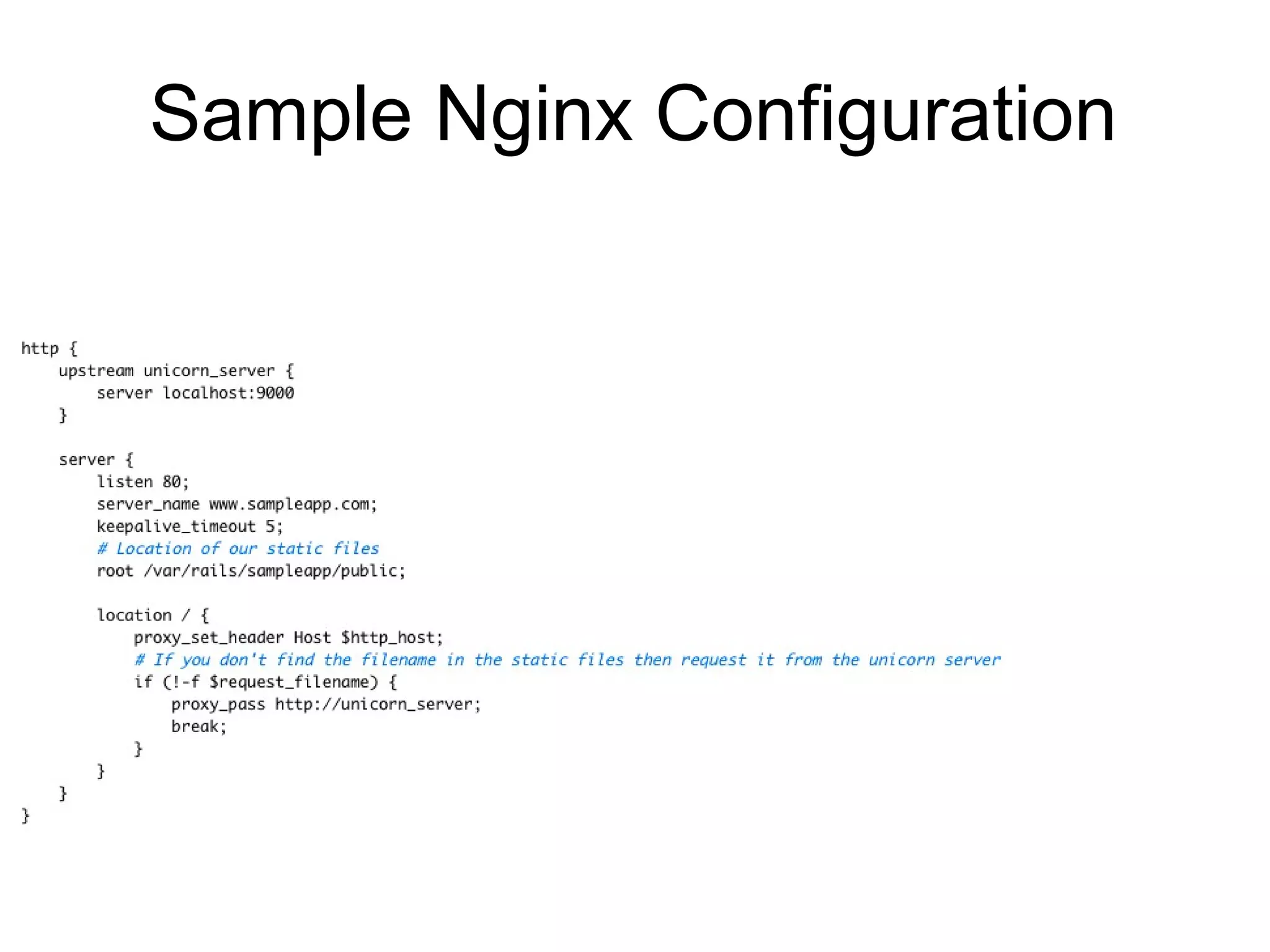
Sample Nginx Configuration
Which One?

• People have built scalable sites with all
  three


• Thin & Unicorn need configuration,
  Passenger does not


• Performance depends on the
  application
  - “Hello World” apps not useful for profiling
Capistrano

•Tool for deploying Rails (or Rack)
applications


•Similar in structure to Rakefile
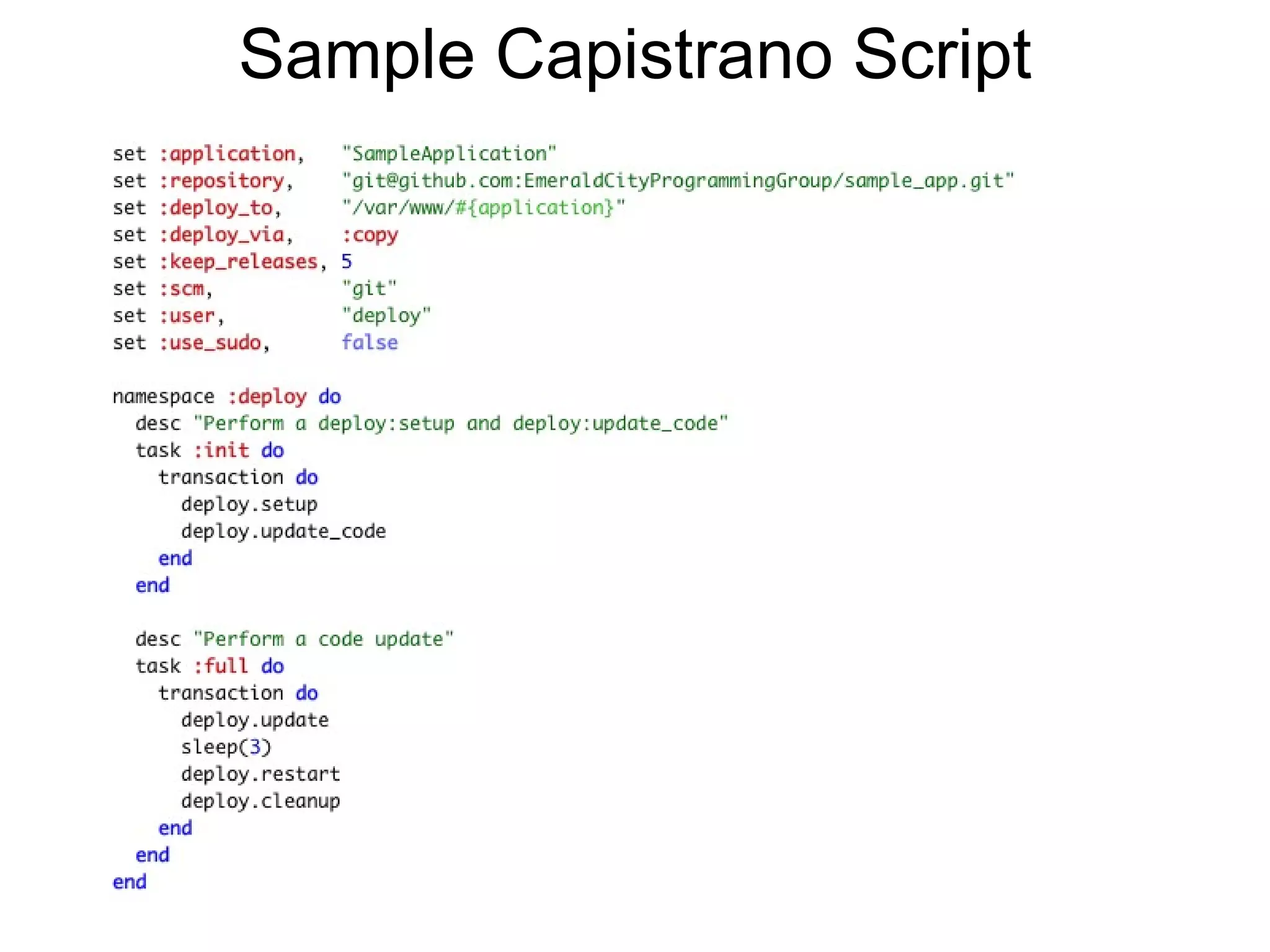
Sample Capistrano Script
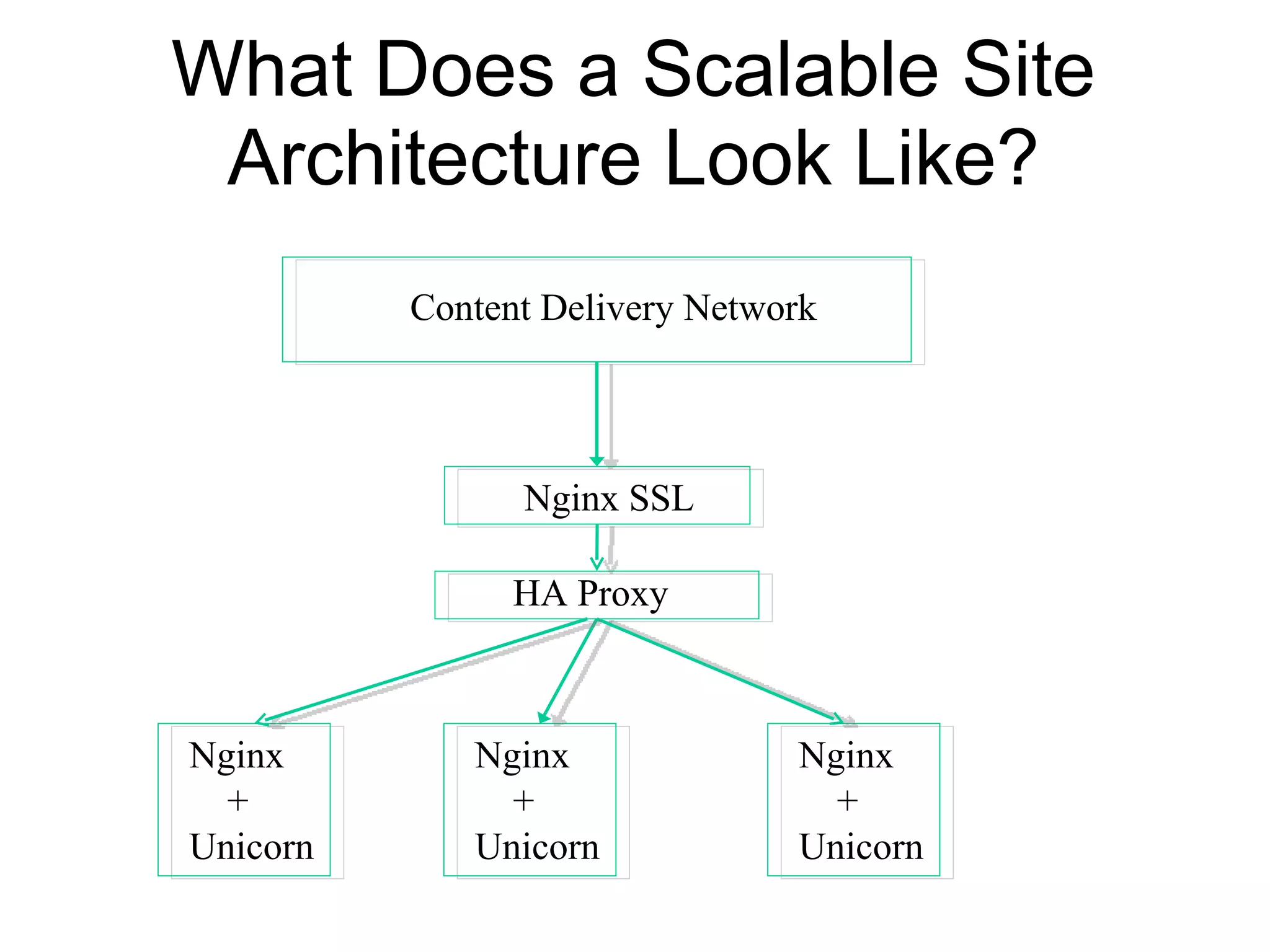
What Does a Scalable Site
 Architecture Look Like?
          Content Delivery Network


                Nginx SSL

                HA Proxy


Nginx        Nginx              Nginx
  +            +                  +
Unicorn      Unicorn            Unicorn

Real World Rails Deployment

  • 1.
  • 2.
    Deployment Options • Heroku- PaaS • Shared Web Hosting • Virtual Private Server • Amazon Web Services - IaaS
  • 3.
    Heroku - PaaS •No setup & no system administration - Easy to deploy • Free when using one web process - Pay as you scale • App will idle after inactivity if only using one process (“dyno”) • Additional “dyno” + database > 5MB is $50/month
  • 4.
    Shared Web Hosting •Cheap - $5 to $10 per month • Web hosting control panel (i.e. cPanel) to configure web server & web application • Limited to what is on the server • Not recommended - Constrained by CPU usage
  • 5.
    Virtual Private Server •Starts at around $25 per month • Extremely flexible, can load anything you want • System administration knowledge required - Must maintain server • Good for one or two standalone servers
  • 6.
    Amazon Web Services- IaaS • Building a virtual data center • Netflix runs on AWS • Can load instances with a pre-built O/S • Pay as you scale • Most expensive option
  • 7.
    Running Rails • WEBrickshould only be used in a development environment • Need a web server to handle static requests - Images, HTML, JavaScript, CSS • Need a Ruby web application server to handle Rails requests (i.e. Unicorn, Thin, or Passenger)
  • 8.
    Web Server • Apache& Nginx the two most popular choices • Rack is used as an interface between the web server and Rails
  • 9.
    Apache • Most popularweb server and has the many options & features • Process-based web server • Good for handling dynamic content via modules
  • 10.
    Nginx • Light weightweb server that only handles static content • Event-based web server • Low memory usage
  • 11.
    Apache or Nginx •Pick one - either works • Nginx better on a VPS because of low memory usage • Apache is full-featured • Nginx does a few things well
  • 12.
    Rails Web AppServers • Phusion Passenger, Thin, and Unicorn currently the most widely used Rails app servers • Can be installed as a web server plugin or as a separate Ruby Gem
  • 13.
    Phusion Passenger • Actsas an Apache or Nginx module • Philosophy – same as Rails (DRY, convention over configuration) • Easy to deploy & maintain - No separate configuration file
  • 14.
    Thin • Event basedRails server • Philosophy – tiny, fast, and secure • Used by Heroku
  • 15.
    Unicorn • Process-based Railsserver • Philosophy – Unicorn is Unix • Used by Twitter & GitHub
  • 16.
    Nginx + UnicornArchitecture
  • 17.
  • 18.
    Which One? • Peoplehave built scalable sites with all three • Thin & Unicorn need configuration, Passenger does not • Performance depends on the application - “Hello World” apps not useful for profiling
  • 19.
    Capistrano •Tool for deployingRails (or Rack) applications •Similar in structure to Rakefile
  • 20.
  • 21.
    What Does aScalable Site Architecture Look Like? Content Delivery Network Nginx SSL HA Proxy Nginx Nginx Nginx + + + Unicorn Unicorn Unicorn