
Getting Started with Spring Boot
by David Kiss
Agenda
• What is Spring Boot?
• Configuration
• DB versioning with Liquibase
• Health checks
• Admin tasks
• Tracing HTTP requests
• Stand-alone jar
What is Spring Boot
• Spring Boot makes it easy to get started with
building web applications with minimum fuss
• Provides out-of-the-box features like
embedded servlet container, security,
metrics, health checks, externalized
configuration)
• No code generation
• No requirement for XML configuration.
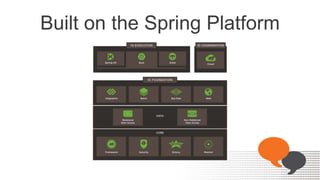
Built on the Spring Platform
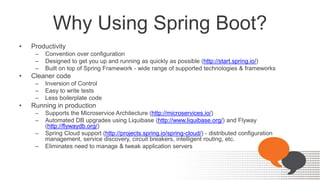
Why Using Spring Boot?
• Productivity
– Convention over configuration
– Designed to get you up and running as quickly as possible (http://start.spring.io/)
– Built on top of Spring Framework - wide range of supported technologies & frameworks
• Cleaner code
– Inversion of Control
– Easy to write tests
– Less boilerplate code
• Running in production
– Supports the Microservice Architecture (http://microservices.io/)
– Automated DB upgrades using Liquibase (http://www.liquibase.org/) and Flyway
(http://flywaydb.org/)
– Spring Cloud support (http://projects.spring.io/spring-cloud/) - distributed configuration
management, service discovery, circuit breakers, intelligent routing, etc.
– Eliminates need to manage & tweak application servers
How We Benefit From Spring Boot?
• Increased developer productivity
• Ease of deployment
• Support from large and active community
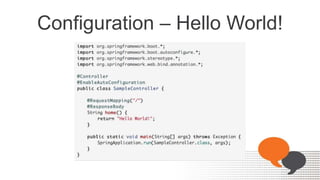
Configuration – Hello World!
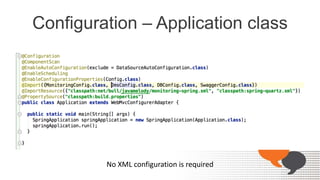
Configuration – Application class
No XML configuration is required
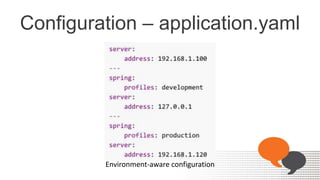
Configuration – application.yaml
Environment-aware configuration
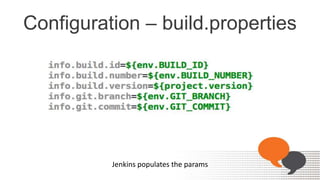
Configuration – build.properties
Jenkins populates the params
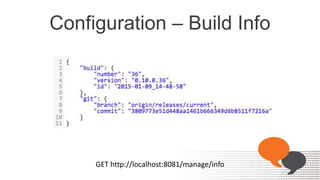
Configuration – Build Info
GET http://localhost:8081/manage/info
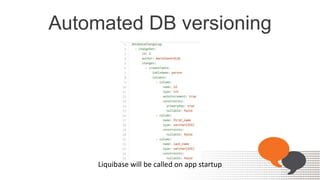
Automated DB versioning
Liquibase will be called on app startup
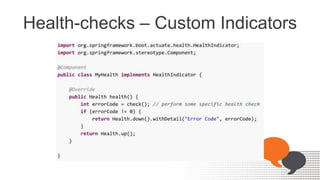
Health-checks – Custom Indicators
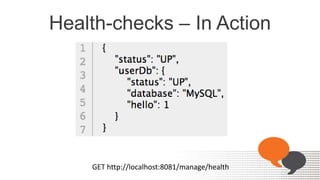
Health-checks – In Action
GET http://localhost:8081/manage/health
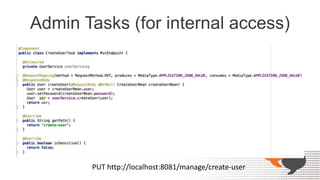
Admin Tasks (for internal access)
PUT http://localhost:8081/manage/create-user
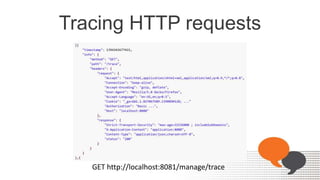
Tracing HTTP requests
GET http://localhost:8081/manage/trace
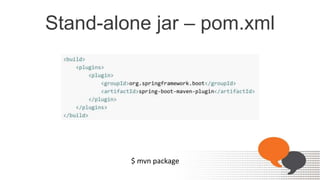
Stand-alone jar – pom.xml
$ mvn package
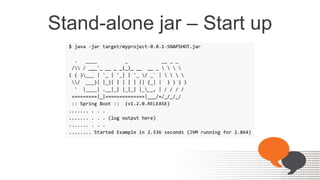
Stand-alone jar – Start up
Q&A

Getting Started with Spring Boot

  • 1.
    Getting Started withSpring Boot by David Kiss
  • 2.
    Agenda • What isSpring Boot? • Configuration • DB versioning with Liquibase • Health checks • Admin tasks • Tracing HTTP requests • Stand-alone jar
  • 3.
    What is SpringBoot • Spring Boot makes it easy to get started with building web applications with minimum fuss • Provides out-of-the-box features like embedded servlet container, security, metrics, health checks, externalized configuration) • No code generation • No requirement for XML configuration.
  • 4.
    Built on theSpring Platform
  • 5.
    Why Using SpringBoot? • Productivity – Convention over configuration – Designed to get you up and running as quickly as possible (http://start.spring.io/) – Built on top of Spring Framework - wide range of supported technologies & frameworks • Cleaner code – Inversion of Control – Easy to write tests – Less boilerplate code • Running in production – Supports the Microservice Architecture (http://microservices.io/) – Automated DB upgrades using Liquibase (http://www.liquibase.org/) and Flyway (http://flywaydb.org/) – Spring Cloud support (http://projects.spring.io/spring-cloud/) - distributed configuration management, service discovery, circuit breakers, intelligent routing, etc. – Eliminates need to manage & tweak application servers
  • 6.
    How We BenefitFrom Spring Boot? • Increased developer productivity • Ease of deployment • Support from large and active community
  • 7.
  • 8.
    Configuration – Applicationclass No XML configuration is required
  • 9.
  • 10.
  • 11.
    Configuration – BuildInfo GET http://localhost:8081/manage/info
  • 12.
    Automated DB versioning Liquibasewill be called on app startup
  • 13.
  • 14.
    Health-checks – InAction GET http://localhost:8081/manage/health
  • 15.
    Admin Tasks (forinternal access) PUT http://localhost:8081/manage/create-user
  • 16.
    Tracing HTTP requests GEThttp://localhost:8081/manage/trace
  • 17.
    Stand-alone jar –pom.xml $ mvn package
  • 18.
  • 19.