
Demystifying S-Controls and AJAX Mike Dannenfeldt, Education Architect Salesforce.com Track: New AppExchange Developer
Agenda S-Control Overview AJAX Toolkit Overview Getting Started w/S-Controls Demo Available Resources Q & A
Introduction to S-Controls
What is an S-Control? An S-Control is a single custom web page created by a web developer and hosted within the Salesforce application. An S-Controls can support any technology that a user’s web browser can support (HTML, Javascript, Java Applets, Flash, ActiveX, etc). After all it is a web page! S-Controls power the customized functionality behind custom buttons and custom links. S-Controls utilize the AJAX Toolkit and the AppExchange API to query and modify Salesforce data.
S-Control Types Custom HTML Write custom HTML/JavaScript to render your own pages or load an Active-X Control or Java Applet URL  Reusable URL definition Same interface as setting up a URL for a Custom Link: http://www.whateverwebsite.com?{!User.FirstName} Snippet  Reusable S-Control code Can be any code: HTML, JavaScript, merge field references, formula functions, anything Snippet code is included inline at runtime
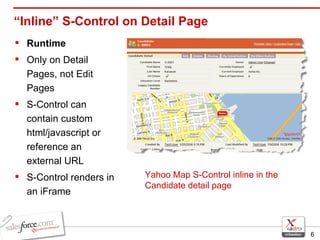
“Inline” S-Control on Detail Page Runtime  Only on Detail Pages, not Edit Pages S-Control can contain custom html/javascript or reference an external URL S-Control renders in an iFrame Yahoo Map S-Control inline in the Candidate detail page
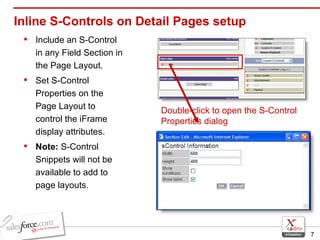
Inline S-Controls on Detail Pages setup Include an S-Control in any Field Section in the Page Layout. Set S-Control Properties on the Page Layout to control the iFrame display attributes. Note:  S-Control Snippets will not be available to add to page layouts.  Double-click to open the S-Control Properties dialog
When to Use S-Controls Consider using S-Controls if you…  Want to streamline a common user process  i.e. reduce the number of clicks Creating Web Services Mash-Ups i.e. yahoo maps and Salesforce
When to Use S-Controls, cont’d Know that your process flow is closed loop  i.e., no outside databases or data sources that aren’t web services enabled Have a small number of records to update or display Unable to host custom ASP.NET or JSP web control
Some Cautions About S-Controls S-Controls are good candidates for UI enhancements, not full scale intensive integrations. The User experience should always be kept central when designing and developing S-Controls.  A poorly designed S-Control that performs slowly will frustrate Users
Some Cautions About S-Controls, cont’d Only a skilled web developer should be creating and deploying S-Controls in your environment. Javascript can be tricky and time consuming to debug Novice developers may struggle to get custom pages & scripts to behave the same across different browser types (IE, Firefox, etc) User Experience should be thoroughly tested before deployment You support your custom S-Control code
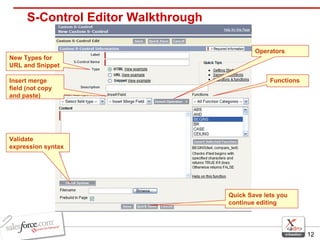
S-Control Editor Walkthrough Functions Operators Insert merge field (not copy and paste) New Types for URL and Snippet Quick Save lets you continue editing Validate expression syntax
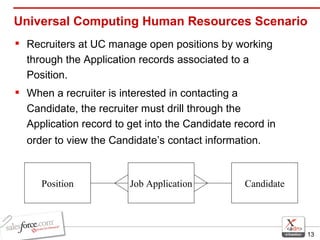
Universal Computing Human Resources Scenario Recruiters at UC manage open positions by working through the Application records associated to a Position.  When a recruiter is interested in contacting a Candidate, the recruiter must drill through the Application record to get into the Candidate record in order to view the Candidate’s contact information.   Job Application Candidate Position
Universal Containers HR Scenario, cont In order to improve this process and make it more efficient, Universal Containers has decided to create an “inline” S-Control to be added to the Application page layout.   The HTML S-Control reveals associated Candidate information No need to drill into the Candidate record Custom HTML S-Control has Salesforce look and feel  Seemless User experience
Introduction to the AJAX Toolkit
AJAX Toolkit Asynchronous JavaScript and XML (AJAX) Toolkit allows developers to use AJAX paradigm to create powerful extensions to their UI by providing easy access to the AppExchange API from javascript. With the Toolkit, it’s easier to create and parse the SOAP messages of the AppExchange API
Features of the AJAX Toolkit Complete support for the AppExchange API and Schema via the Partner WSDL Significant performance improvements over the BETA Toolkit Supports synchronous and asynchronous calls Complete documentation available for download on the AppExchange Developer Network www.salesforce.com/developer Coming with Winter ’07 release!
AJAX Toolkit – Connecting Simply include a <script> reference in your S-Control to use the Toolkit This will load the toolkit and a global object, sforce.connection, is created which contains all of the API calls and toolkit methods. Create, Update, Delete, Query, etc. Security and access will be based off the User who launched the S-Control by default A “login” function that takes a username/password is also supported by the toolkit
S-Control Design 2 major pieces of S-Control design The HTML Output (ie. The Visual) The Javascript (ie. The Function/Code) HTML Determine what the User should see, how forms and tables need to be formatted, the look & feel, etc Javascript Write Javascript functions that use AJAX to perform API operations such as: query, create, update, or delete  Some of your Javascript functions may be triggered automatically when the page loads, others you may want to be triggered by User actions such as a button click … you decide!
S-Control Design, cont’d S-Controls should always start with the following: <!DOCTYPE HTML PUBLIC &quot;-//W3C//DTD HTML 4.01 Transitional//EN” &quot;http://www.w3.org/TR/html4/loose.dtd&quot;> Second, add the <HTML> and <HEAD> tags: <HTML><HEAD> <!-- The following line loads the AJAX Toolkit --> <script src=&quot;/soap/ajax/8.0/connection.js&quot;></script> <script> function myFirstFunction() { … } </script> </head> Last, create the <BODY> before closing with </HTML>
Interactive: Examining an AJAX S-Control Let’s take a closer look at the Inline S-Control we added to the Job Application Page Layout How is the AJAX Toolkit initialized? How is the look & feel controlled? Where is the AppExchange API being used? What is the S-Control logic flow?
DEMO #1 New Custom Detail Button
Universal Containers Scenario - Problem UC receives numerous Job Applications per Position.  Once a Position has been closed it requires a great deal of effort (clicking) to close out each Job Application associated to the Position.
Universal Containers Scenario - Solution Users would like a button to perform a mass update on a Position’s Job Application records that are in an “Open”  status Update the records’  status  to “Closed” and set the  stage  to “Closed – Position Closed”. Job Application records that are in a “Hold” or “Closed”  status  should not be updated by the button.
DEMO #2 Standard Button Override
Universal Containers Scenario - Problem UC Interviewers create Review records to store Candidate evaluation scores against an Application.  The review questionnaire contains questions that exceed the maximum length the label of a field can be.
Universal Containers Scenario - Solution In order to work around the label length restriction, the “New” button of the Review object will be overridden to display a custom HTML form that has no question length restrictions.  When the interviewer submits the custom HTML form, the field data should be saved into a new Review record associated to the Application.
Need More Information or Help?
Resources AppExchange Developer Network (ADN) Comprehensive web site for AppExchange Developers Documentation & Samples (API, AJAX) Developer community forum www.salesforce.com/developer AppExchange Developer Support (ADS) Per-incident, code-level support for developers creating solutions on the AppExchange platform  Support for Custom apps, Custom integrations, S-Controls  4 hour response time for logged cases  More info: devsupport@salesforce.com
Resources, cont’d Creating On-Demand Applications with AppExchange Salesforce.com publication Illustrates technologies and concepts required to develop AppExchange apps AppExchange Laboratory (AppLab) 5-day Hands-On Instructor Led Course Instruction for how to build, deploy, and install native and composite AppExchange apps For Developers, IT Managers and Power Users More info and to register: http://www.salesforce.com/trainingsupport/workshops.jsp
Q & A
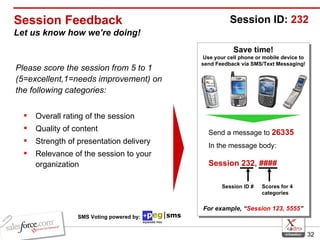
Session Feedback Let us know how we’re doing! Please score the session from 5 to 1 (5=excellent,1=needs improvement) on the following categories: Overall rating of the session Quality of content Strength of presentation delivery Relevance of the session to your organization Save time! Use your cell phone or mobile device to send Feedback via SMS/Text Messaging! Send a message to  26335 In the message body:   Session 232, ####   For example, “ Session 123, 5555 ” Session ID:  232 Session ID # Scores for 4 categories SMS Voting powered by:

Demystifying S-Controls and AJAX

  • 1.
    Demystifying S-Controls andAJAX Mike Dannenfeldt, Education Architect Salesforce.com Track: New AppExchange Developer
  • 2.
    Agenda S-Control OverviewAJAX Toolkit Overview Getting Started w/S-Controls Demo Available Resources Q & A
  • 3.
  • 4.
    What is anS-Control? An S-Control is a single custom web page created by a web developer and hosted within the Salesforce application. An S-Controls can support any technology that a user’s web browser can support (HTML, Javascript, Java Applets, Flash, ActiveX, etc). After all it is a web page! S-Controls power the customized functionality behind custom buttons and custom links. S-Controls utilize the AJAX Toolkit and the AppExchange API to query and modify Salesforce data.
  • 5.
    S-Control Types CustomHTML Write custom HTML/JavaScript to render your own pages or load an Active-X Control or Java Applet URL Reusable URL definition Same interface as setting up a URL for a Custom Link: http://www.whateverwebsite.com?{!User.FirstName} Snippet Reusable S-Control code Can be any code: HTML, JavaScript, merge field references, formula functions, anything Snippet code is included inline at runtime
  • 6.
    “Inline” S-Control onDetail Page Runtime Only on Detail Pages, not Edit Pages S-Control can contain custom html/javascript or reference an external URL S-Control renders in an iFrame Yahoo Map S-Control inline in the Candidate detail page
  • 7.
    Inline S-Controls onDetail Pages setup Include an S-Control in any Field Section in the Page Layout. Set S-Control Properties on the Page Layout to control the iFrame display attributes. Note: S-Control Snippets will not be available to add to page layouts. Double-click to open the S-Control Properties dialog
  • 8.
    When to UseS-Controls Consider using S-Controls if you… Want to streamline a common user process i.e. reduce the number of clicks Creating Web Services Mash-Ups i.e. yahoo maps and Salesforce
  • 9.
    When to UseS-Controls, cont’d Know that your process flow is closed loop i.e., no outside databases or data sources that aren’t web services enabled Have a small number of records to update or display Unable to host custom ASP.NET or JSP web control
  • 10.
    Some Cautions AboutS-Controls S-Controls are good candidates for UI enhancements, not full scale intensive integrations. The User experience should always be kept central when designing and developing S-Controls. A poorly designed S-Control that performs slowly will frustrate Users
  • 11.
    Some Cautions AboutS-Controls, cont’d Only a skilled web developer should be creating and deploying S-Controls in your environment. Javascript can be tricky and time consuming to debug Novice developers may struggle to get custom pages & scripts to behave the same across different browser types (IE, Firefox, etc) User Experience should be thoroughly tested before deployment You support your custom S-Control code
  • 12.
    S-Control Editor WalkthroughFunctions Operators Insert merge field (not copy and paste) New Types for URL and Snippet Quick Save lets you continue editing Validate expression syntax
  • 13.
    Universal Computing HumanResources Scenario Recruiters at UC manage open positions by working through the Application records associated to a Position. When a recruiter is interested in contacting a Candidate, the recruiter must drill through the Application record to get into the Candidate record in order to view the Candidate’s contact information. Job Application Candidate Position
  • 14.
    Universal Containers HRScenario, cont In order to improve this process and make it more efficient, Universal Containers has decided to create an “inline” S-Control to be added to the Application page layout. The HTML S-Control reveals associated Candidate information No need to drill into the Candidate record Custom HTML S-Control has Salesforce look and feel Seemless User experience
  • 15.
    Introduction to theAJAX Toolkit
  • 16.
    AJAX Toolkit AsynchronousJavaScript and XML (AJAX) Toolkit allows developers to use AJAX paradigm to create powerful extensions to their UI by providing easy access to the AppExchange API from javascript. With the Toolkit, it’s easier to create and parse the SOAP messages of the AppExchange API
  • 17.
    Features of theAJAX Toolkit Complete support for the AppExchange API and Schema via the Partner WSDL Significant performance improvements over the BETA Toolkit Supports synchronous and asynchronous calls Complete documentation available for download on the AppExchange Developer Network www.salesforce.com/developer Coming with Winter ’07 release!
  • 18.
    AJAX Toolkit –Connecting Simply include a <script> reference in your S-Control to use the Toolkit This will load the toolkit and a global object, sforce.connection, is created which contains all of the API calls and toolkit methods. Create, Update, Delete, Query, etc. Security and access will be based off the User who launched the S-Control by default A “login” function that takes a username/password is also supported by the toolkit
  • 19.
    S-Control Design 2major pieces of S-Control design The HTML Output (ie. The Visual) The Javascript (ie. The Function/Code) HTML Determine what the User should see, how forms and tables need to be formatted, the look & feel, etc Javascript Write Javascript functions that use AJAX to perform API operations such as: query, create, update, or delete Some of your Javascript functions may be triggered automatically when the page loads, others you may want to be triggered by User actions such as a button click … you decide!
  • 20.
    S-Control Design, cont’dS-Controls should always start with the following: <!DOCTYPE HTML PUBLIC &quot;-//W3C//DTD HTML 4.01 Transitional//EN” &quot;http://www.w3.org/TR/html4/loose.dtd&quot;> Second, add the <HTML> and <HEAD> tags: <HTML><HEAD> <!-- The following line loads the AJAX Toolkit --> <script src=&quot;/soap/ajax/8.0/connection.js&quot;></script> <script> function myFirstFunction() { … } </script> </head> Last, create the <BODY> before closing with </HTML>
  • 21.
    Interactive: Examining anAJAX S-Control Let’s take a closer look at the Inline S-Control we added to the Job Application Page Layout How is the AJAX Toolkit initialized? How is the look & feel controlled? Where is the AppExchange API being used? What is the S-Control logic flow?
  • 22.
    DEMO #1 NewCustom Detail Button
  • 23.
    Universal Containers Scenario- Problem UC receives numerous Job Applications per Position. Once a Position has been closed it requires a great deal of effort (clicking) to close out each Job Application associated to the Position.
  • 24.
    Universal Containers Scenario- Solution Users would like a button to perform a mass update on a Position’s Job Application records that are in an “Open” status Update the records’ status to “Closed” and set the stage to “Closed – Position Closed”. Job Application records that are in a “Hold” or “Closed” status should not be updated by the button.
  • 25.
    DEMO #2 StandardButton Override
  • 26.
    Universal Containers Scenario- Problem UC Interviewers create Review records to store Candidate evaluation scores against an Application. The review questionnaire contains questions that exceed the maximum length the label of a field can be.
  • 27.
    Universal Containers Scenario- Solution In order to work around the label length restriction, the “New” button of the Review object will be overridden to display a custom HTML form that has no question length restrictions. When the interviewer submits the custom HTML form, the field data should be saved into a new Review record associated to the Application.
  • 28.
  • 29.
    Resources AppExchange DeveloperNetwork (ADN) Comprehensive web site for AppExchange Developers Documentation & Samples (API, AJAX) Developer community forum www.salesforce.com/developer AppExchange Developer Support (ADS) Per-incident, code-level support for developers creating solutions on the AppExchange platform Support for Custom apps, Custom integrations, S-Controls 4 hour response time for logged cases More info: devsupport@salesforce.com
  • 30.
    Resources, cont’d CreatingOn-Demand Applications with AppExchange Salesforce.com publication Illustrates technologies and concepts required to develop AppExchange apps AppExchange Laboratory (AppLab) 5-day Hands-On Instructor Led Course Instruction for how to build, deploy, and install native and composite AppExchange apps For Developers, IT Managers and Power Users More info and to register: http://www.salesforce.com/trainingsupport/workshops.jsp
  • 31.
  • 32.
    Session Feedback Letus know how we’re doing! Please score the session from 5 to 1 (5=excellent,1=needs improvement) on the following categories: Overall rating of the session Quality of content Strength of presentation delivery Relevance of the session to your organization Save time! Use your cell phone or mobile device to send Feedback via SMS/Text Messaging! Send a message to 26335 In the message body: Session 232, #### For example, “ Session 123, 5555 ” Session ID: 232 Session ID # Scores for 4 categories SMS Voting powered by: