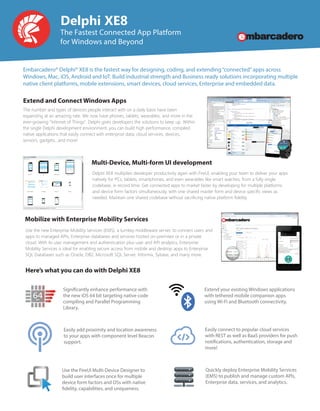
Delphi XE8 multiplies developer productivity again with FireUI, enabling your team to deliver your apps
natively for PCs, tablets, smartphones, and even wearables like smart watches, from a fully single
codebase, in record time. Get connected apps to market faster by developing for multiple platforms
and device form factors simultaneously, with one shared master form and device specific views as
needed. Maintain one shared codebase without sacrificing native platform fidelity.
Delphi XE8
The Fastest Connected App Platform
for Windows and Beyond
Embarcadero® Delphi® XE8 is the fastest way for designing, coding, and extending“connected”apps across
Windows, Mac, iOS, Android and IoT. Build industrial strength and Business ready solutions incorporating multiple
native client platforms, mobile extensions, smart devices, cloud services, Enterprise and embedded data.
Extend and Connect Windows Apps
The number and types of devices people interact with on a daily basis have been
expanding at an amazing rate. We now have phones, tablets, wearables, and more in the
ever-growing “Internet of Things”. Delphi gives developers the solutions to keep up. Within
the single Delphi development environment, you can build high performance, compiled
native applications that easily connect with enterprise data, cloud services, devices,
sensors, gadgets…and more!
Multi-Device, Multi-form UI development
Mobilize with Enterprise Mobility Services
Use the new Enterprise Mobility Services (EMS), a turnkey middleware server, to connect users and
apps to managed APIs, Enterprise databases and services hosted on-premises or in a private
cloud. With its user management and authentication plus user and API analytics, Enterprise
Mobility Services is ideal for enabling secure access from mobile and desktop apps to Enterprise
SQL Databases such as Oracle, DB2, Microsoft SQL Server, Informix, Sybase, and many more.
Significantly enhance performance with
the new iOS 64 bit targeting native code
compiling and Parallel Programming
Library.
Use the FireUI Multi-Device Designer to
build user interfaces once for multiple
device form factors and OSs with native
fidelity, capabilities, and uniqueness.
Easily add proximity and location awareness
to your apps with component level Beacon
support.
Here’s what you can do with Delphi XE8
Extend your existing Windows applications
with tethered mobile companion apps
using Wi-Fi and Bluetooth connectivity.
Easily connect to popular cloud services
with REST as well as BaaS providers for push
notifications, authentication, storage and
more!
Quickly deploy Enterprise Mobility Services
(EMS) to publish and manage custom APls,
Enterprise data, services, and analytics.
Download a Free Trial Now! Visit www.embarcadero.com/trial
sales@embarcadero.com | www.embarcadero.com
© 2015 Embarcadero Technologies, Inc. Embarcadero, the Embarcadero Technologies logos, and all other Embarcadero Technologies product or service names are trademarks or registered trademarks of
Embarcadero Technologies, Inc. All other trademarks are property of their respective owners. 032415
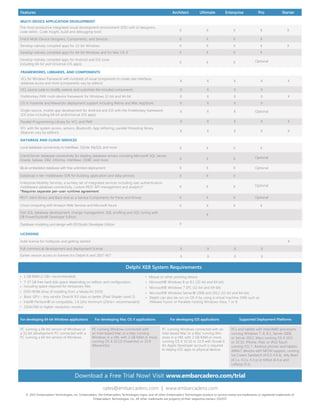
Delphi XE8 System Requirements
• 1 GB RAM (2 GB+ recommended)
7-37 GB free hard disk space depending on edition and configuration,
including space required for temporary files
•
•
• DVD-ROM drive (if installing from a Media Kit DVD)
• Basic GPU – Any vendor DirectX 9.0 class or better (Pixel Shader Level 2)
• Intel® Pentium® or compatible, 1.6 GHz minimum (2GHz+ recommended)
• 1024x768 or higher-resolution monitor
• Mouse or other pointing device
• Microsoft® Windows 8 or 8.1 (32-bit and 64-bit)
• Microsoft® Windows 7 SP1 (32-bit and 64-bit)
• Microsoft® Windows Server® 2008 and 2012 (32-bit and 64-bit)
• Delphi can also be run on OS X by using a virtual machine (VM) such as
VMware Fusion or Parallels hosting Windows Vista, 7 or 8
For developing 64-bit Windows applications For developing Mac OS X applications For developing iOS applications Supported Deployment Platforms
PC running a 64-bit version of Windows or
a 32-bit development PC connected with a
PC running a 64-bit version of Windows.
PC running Windows connected with
an Intel-based Mac or a Mac running
Windows in a VM, with 2 GB RAM or more,
running OS X 10.10 (Yosemite) or 10.9
(Mavericks).
PC running Windows connected with an
Intel-based Mac or a Mac running Win-
dows in a VM, with 2 GB RAM or more,
running OS X 10.10 or 10.9 with Xcode 6
An Apple Developer account is required
to deploy iOS apps to physical devices.
PCs and tablets with Intel/AMD processors
running Windows 7, 8, 8.1, Server 2008,
or Server 2012. Macs running OS X 10.9
or 10.10. iPhone, iPad, or iPod Touch
running iOS 7. Android phones and tablets:
ARMv7 devices with NEON support, running
Ice Cream Sandwich (4.0.3-4.0.4), Jelly Bean
(4.1.x, 4.2.x, 4.3.x) or KitKat (4.4.x) and
Lollipop (5.x).
LICENSING
Indie license for hobbyists and getting started X
Full commercial development and deployment license X X X X
Earlier version access to licenses for Delphi 6 and 2007-XE7 X X X X
DATABASE AND CLOUD SERVICES
Local database connectivity to InterBase, SQLite, MySQL and more
IBLite embedded database with free unlimited deployment
Cloud computing with Amazon Web Services and Microsoft Azure
Database modeling and design with ER/Studio Developer Edition
X X X
X X X
X X X
X X X
X X X
X
X
X
X
X
X X
FRAMEWORKS, LIBRARIES, AND COMPONENTS
VCL for Windows framework with hundreds of visual components to create user interfaces,
database access and more (components vary by edition)
X X X X X
VCL source code to modify, extend, and customize the included components X X X X
FireMonkey FMX multi-device framework for Windows 32-bit and 64-bit X X X X X
OS X Yosemite and Mavericks deployment support including Retina and Mac AppStore X X X X
Single-source, mobile app development for Android and iOS with the FireMonkey framework
iOS (now including 64-bit andUniversal iOS apps)
Client/Server database connectivity for leading database servers including Microsoft SQL Server,
Oracle, Sybase, DB2, Informix, InterBase, ODBC and more
DataSnap n-tier middleware SDK for building application and data services
REST client library and Back-end as a Service Components for Parse and Kinvey
Enterprise Mobility Services, a turnkey set of integrated services including user authentication,
middleware database connectivity, custom REST API management and analytics*
*Requires separate per-user runtime agreement
Fast SQL database development, change management, SQL profiling and SQL tuning with
DB PowerStudio® Developer Edition
RTL with file system access, sensors, Bluetooth, App tethering, parallel threading library
(features vary by edition)
Parallel Programming Library for VCL and FMX
X X X Optional
Optional
Optional
Optional
OptionalX X X
Optional
X X X X X
X X X X X
Features Architect Ultimate Enterprise Pro Starter
MULTI-DEVICE APPLICATION DEVELOPMENT
X X X X X
X
FireUI Multi-Device Designers, Components, and Services X X X X
Develop natively compiled apps for 32-bit Windows X X X X
XDevelop natively compiled apps for 64-bit Windows and for Mac OS X X X X
X X X
The most productive integrated visual development environment (IDE) with UI designers,
code editor, Code Insight, build and debugging tools
Develop natively compiled apps for Android and iOS (now
including 64-bit and Universal iOS apps)

Delphi XE8 Datasheet

  • 1.
    Delphi XE8 multipliesdeveloper productivity again with FireUI, enabling your team to deliver your apps natively for PCs, tablets, smartphones, and even wearables like smart watches, from a fully single codebase, in record time. Get connected apps to market faster by developing for multiple platforms and device form factors simultaneously, with one shared master form and device specific views as needed. Maintain one shared codebase without sacrificing native platform fidelity. Delphi XE8 The Fastest Connected App Platform for Windows and Beyond Embarcadero® Delphi® XE8 is the fastest way for designing, coding, and extending“connected”apps across Windows, Mac, iOS, Android and IoT. Build industrial strength and Business ready solutions incorporating multiple native client platforms, mobile extensions, smart devices, cloud services, Enterprise and embedded data. Extend and Connect Windows Apps The number and types of devices people interact with on a daily basis have been expanding at an amazing rate. We now have phones, tablets, wearables, and more in the ever-growing “Internet of Things”. Delphi gives developers the solutions to keep up. Within the single Delphi development environment, you can build high performance, compiled native applications that easily connect with enterprise data, cloud services, devices, sensors, gadgets…and more! Multi-Device, Multi-form UI development Mobilize with Enterprise Mobility Services Use the new Enterprise Mobility Services (EMS), a turnkey middleware server, to connect users and apps to managed APIs, Enterprise databases and services hosted on-premises or in a private cloud. With its user management and authentication plus user and API analytics, Enterprise Mobility Services is ideal for enabling secure access from mobile and desktop apps to Enterprise SQL Databases such as Oracle, DB2, Microsoft SQL Server, Informix, Sybase, and many more. Significantly enhance performance with the new iOS 64 bit targeting native code compiling and Parallel Programming Library. Use the FireUI Multi-Device Designer to build user interfaces once for multiple device form factors and OSs with native fidelity, capabilities, and uniqueness. Easily add proximity and location awareness to your apps with component level Beacon support. Here’s what you can do with Delphi XE8 Extend your existing Windows applications with tethered mobile companion apps using Wi-Fi and Bluetooth connectivity. Easily connect to popular cloud services with REST as well as BaaS providers for push notifications, authentication, storage and more! Quickly deploy Enterprise Mobility Services (EMS) to publish and manage custom APls, Enterprise data, services, and analytics.
  • 2.
    Download a FreeTrial Now! Visit www.embarcadero.com/trial sales@embarcadero.com | www.embarcadero.com © 2015 Embarcadero Technologies, Inc. Embarcadero, the Embarcadero Technologies logos, and all other Embarcadero Technologies product or service names are trademarks or registered trademarks of Embarcadero Technologies, Inc. All other trademarks are property of their respective owners. 032415 Delphi XE8 System Requirements • 1 GB RAM (2 GB+ recommended) 7-37 GB free hard disk space depending on edition and configuration, including space required for temporary files • • • DVD-ROM drive (if installing from a Media Kit DVD) • Basic GPU – Any vendor DirectX 9.0 class or better (Pixel Shader Level 2) • Intel® Pentium® or compatible, 1.6 GHz minimum (2GHz+ recommended) • 1024x768 or higher-resolution monitor • Mouse or other pointing device • Microsoft® Windows 8 or 8.1 (32-bit and 64-bit) • Microsoft® Windows 7 SP1 (32-bit and 64-bit) • Microsoft® Windows Server® 2008 and 2012 (32-bit and 64-bit) • Delphi can also be run on OS X by using a virtual machine (VM) such as VMware Fusion or Parallels hosting Windows Vista, 7 or 8 For developing 64-bit Windows applications For developing Mac OS X applications For developing iOS applications Supported Deployment Platforms PC running a 64-bit version of Windows or a 32-bit development PC connected with a PC running a 64-bit version of Windows. PC running Windows connected with an Intel-based Mac or a Mac running Windows in a VM, with 2 GB RAM or more, running OS X 10.10 (Yosemite) or 10.9 (Mavericks). PC running Windows connected with an Intel-based Mac or a Mac running Win- dows in a VM, with 2 GB RAM or more, running OS X 10.10 or 10.9 with Xcode 6 An Apple Developer account is required to deploy iOS apps to physical devices. PCs and tablets with Intel/AMD processors running Windows 7, 8, 8.1, Server 2008, or Server 2012. Macs running OS X 10.9 or 10.10. iPhone, iPad, or iPod Touch running iOS 7. Android phones and tablets: ARMv7 devices with NEON support, running Ice Cream Sandwich (4.0.3-4.0.4), Jelly Bean (4.1.x, 4.2.x, 4.3.x) or KitKat (4.4.x) and Lollipop (5.x). LICENSING Indie license for hobbyists and getting started X Full commercial development and deployment license X X X X Earlier version access to licenses for Delphi 6 and 2007-XE7 X X X X DATABASE AND CLOUD SERVICES Local database connectivity to InterBase, SQLite, MySQL and more IBLite embedded database with free unlimited deployment Cloud computing with Amazon Web Services and Microsoft Azure Database modeling and design with ER/Studio Developer Edition X X X X X X X X X X X X X X X X X X X X X X FRAMEWORKS, LIBRARIES, AND COMPONENTS VCL for Windows framework with hundreds of visual components to create user interfaces, database access and more (components vary by edition) X X X X X VCL source code to modify, extend, and customize the included components X X X X FireMonkey FMX multi-device framework for Windows 32-bit and 64-bit X X X X X OS X Yosemite and Mavericks deployment support including Retina and Mac AppStore X X X X Single-source, mobile app development for Android and iOS with the FireMonkey framework iOS (now including 64-bit andUniversal iOS apps) Client/Server database connectivity for leading database servers including Microsoft SQL Server, Oracle, Sybase, DB2, Informix, InterBase, ODBC and more DataSnap n-tier middleware SDK for building application and data services REST client library and Back-end as a Service Components for Parse and Kinvey Enterprise Mobility Services, a turnkey set of integrated services including user authentication, middleware database connectivity, custom REST API management and analytics* *Requires separate per-user runtime agreement Fast SQL database development, change management, SQL profiling and SQL tuning with DB PowerStudio® Developer Edition RTL with file system access, sensors, Bluetooth, App tethering, parallel threading library (features vary by edition) Parallel Programming Library for VCL and FMX X X X Optional Optional Optional Optional OptionalX X X Optional X X X X X X X X X X Features Architect Ultimate Enterprise Pro Starter MULTI-DEVICE APPLICATION DEVELOPMENT X X X X X X FireUI Multi-Device Designers, Components, and Services X X X X Develop natively compiled apps for 32-bit Windows X X X X XDevelop natively compiled apps for 64-bit Windows and for Mac OS X X X X X X X The most productive integrated visual development environment (IDE) with UI designers, code editor, Code Insight, build and debugging tools Develop natively compiled apps for Android and iOS (now including 64-bit and Universal iOS apps)