ANDROID operating
system
PRESENTED TO:-
Er. Rosy Bhumrah
Subject Incharge:OS
Dep. B.C.A
PRESENTED BY:-
Piush Kumar Anand,1717307
Pradip Khadka,1717313
BCA 4th Semester.
CONTENTS
 History
 Introduction to android
 Versions of Android
 Features of android
 Security
 Advantages of android
 Dis-advantages of android
 Conclusion and future scope
HISTORY
 Android Incorporation(Inc.) was founded in Palo Alto , California , united states in
October 2003 by Andy Rubin[co-founder of danger Inc.],Rich miner[co-founder of
wildfire communication Inc.],Nick sears[once VP at T- mobile] and Chris
white[headed design & interface development at web TV] to develop.
 Android is a mobile operating system developed by Google.
 Based on LINUX kernel.
 Google purchased the initial developer of the software android incorporated in 2005.
 It is a open source software platform and operating system for mobile devices.
 Android has its own virtual machine i.e DVMA(Dalvik Virtual Machine),which is used for executing the android application.
 The version history of the Android mobile operating system began with the public release of the Android beta on November 5,
2007 And the first commercial version, Android 1.0, was released on September 23, 2008.
Introduction
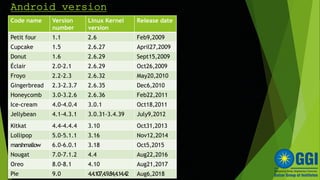
Android version
Code name Version
number
Linux Kernel
version
Release date
Petit four 1.1 2.6 Feb9,2009
Cupcake 1.5 2.6.27 April27,2009
Donut 1.6 2.6.29 Sept15,2009
Éclair 2.0-2.1 2.6.29 Oct26,2009
Froyo 2.2-2.3 2.6.32 May20,2010
Gingerbread 2.3-2.3.7 2.6.35 Dec6,2010
Honeycomb 3.0-3.2.6 2.6.36 Feb22,2011
Ice-cream 4.0-4.0.4 3.0.1 Oct18,2011
Jellybean 4.1-4.3.1 3.0.31-3.4.39 July9,2012
Kitkat 4.4-4.4.4 3.10 Oct31,2013
Lollipop 5.0-5.1.1 3.16 Nov12,2014
marshmallow 6.0-6.0.1 3.18 Oct5,2015
Nougat 7.0-7.1.2 4.4 Aug22,2016
Oreo 8.0-8.1 4.10 Aug21,2017
Pie 9.0 4.4.107,4.9.84,4.14.42 Aug6,2018
Android 1.1-Petit four
 Release date: September 23, 2008
 Android 1.0 was the first commercially available release of the OS. It was available on the
pioneering device - the T-Mobile G1 (released October 2008 in the US and the UK) along with
the Android source code.
 Inbuilt apps included:
 Android Market • Web Browser • Pictures • Camera
 Gmail • Google Contacts • Google Calendar
• Over the air syncing via Google Sync
 Email app supporting POP3, IMAP & SMTP
• Calculator • YouTube • Settings
 Alarm clock • Dialer • Google Maps.
Android 1.5-Cupcake
 Release date: April 27, 2009
 Cupcake was the first Android release to have a sweet public-facing name, a tradition
Google has adhered to since, with every subsequent Android release being named
after a dessert - whose name started with the next letter of the alphabet.
 Inbuilt apps included:
 User pictures shown for Favorites in Contacts
 Call log events now date/time stamped
 One-touch access to a contact card from call log events
 Ability to upload videos and photos to YouTube and Picasa respectively.
 Auto-pairing and stereo support for Bluetooth (A2DP and
AVRCP profiles).
Android 1.6 - Donut
 Release date: September 15, 2009
 Donut introduced support for WVGA(Wide Video Graphic Array) allowing Android to run
on a variety of devices with different displays with varying aspect ratios - a marked
improvement from the fixed 320x480 supported up until now.
 Inbuilt apps included:
 Speed improvements in searching and camera applications
 Updated technology support for CDMA/EVDO, 802.1x,
VPNs, and a text-to-speech engine
 The Gallery, camera, and camcorder became better
integrated in addition to faster camera access.
 Third-party accessibility services
Android 2.0 - Eclair
 Release date: October 26, 2009
 Eclair further optimized performance, came with a revamped UI and supported more
screen sizes and resolutions, while also bringing live wallpapers. Google Maps
Navigation became a viable replacement for in-car navigation units with its turn by turn
directions, 3D view, voice guidance and traffic information.
 Inbuilt apps included:
 Multiple Account sync for email and contacts.
 Ability to search all saved SMS and MMS messages.
 Motion Event class enhanced to track multi-touch events.
 Quick Contact feature, showing a pop-up for call, SMS and email, as soon as you tap
on a contact's avatar.
Android 2.2 - Froyo
 Release date: May 20, 2010
 Speed, memory, and performance optimizations were the prominent headline features
for Froyo, delivered by the introduction of the Dalvik JIT compiler, delivering up to 5X
performance improvements in CPU bound code.
 Inbuilt apps included:
 USB tethering and Wi-Fi hotspot functionality
 Support for Bluetooth car and desk docks
 Animated GIF support
 Gallery allows users to view picture stacks using a zoom gesture
 Quick switching between multiple keyboard languages/dictionaries
Android 2.3 - Gingerbread
 Release date: December 6, 2010
 Further stretching its legs, Gingerbread delivered a better user experience by simplifying the
UI and improving performance even further in addition to paving the way for even more form
factors with support for extra-large screens sizes and resolutions.
 Inbuilt apps included:
 Camera software enhancements.
 Improved battery efficiency.
 Support for voice or video chat using Google Talk
 New audio effects such as reverb, equalization, headphone virtualization, and bass boost.
Android 3.0 - Honeycomb
 Release date: February 22, 2011
 Honeycomb provided an optimized UI for tablets with their larger screen real-estate. Reducing
the requirement for physical navigation buttons Honeycomb's System Bar featured quick
access to notifications, status, and soft navigation buttons, available at the bottom of the
screen.
 Inbuilt apps included:
 Ability to encrypt all user data
 Support for joysticks and gamepads
 Multiple browser tabs, auto form auto-fill
and new “incognito” mode.
 Quick access to camera exposure, focus, flash, zoom,
front-facing camera, time-lapse, and other camera features.
Android 4.0 – Ice-Cream Sandwich
 Release date: October 18, 2011
 Ice-Cream Sandwich consolidated both Android 2.3 and Android 3.0 into a single unified release with
a hardware accelerated user interface that would support both smartphones and tablets.
 Inbuilt apps included:
 Integrated screenshot capture.
 New gallery layout.
 Improved visual voicemail
 Pinch-to-zoom functionality in the calendar.
 Application access directly from lock screen.
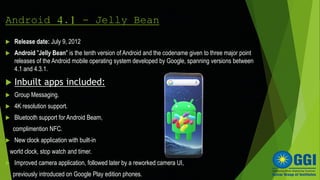
Android 4.1 - Jelly Bean
 Release date: July 9, 2012
 Android "Jelly Bean" is the tenth version of Android and the codename given to three major point
releases of the Android mobile operating system developed by Google, spanning versions between
4.1 and 4.3.1.
 Inbuilt apps included:
 Group Messaging.
 4K resolution support.
 Bluetooth support for Android Beam,
complimention NFC.
 New clock application with built-in
world clock, stop watch and timer.
 Improved camera application, followed later by a reworked camera UI,
previously introduced on Google Play edition phones.
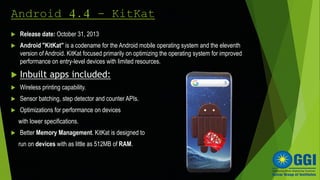
Android 4.4 - KitKat
 Release date: October 31, 2013
 Android "KitKat" is a codename for the Android mobile operating system and the eleventh
version of Android. KitKat focused primarily on optimizing the operating system for improved
performance on entry-level devices with limited resources.
 Inbuilt apps included:
 Wireless printing capability.
 Sensor batching, step detector and counter APIs.
 Optimizations for performance on devices
with lower specifications.
 Better Memory Management. KitKat is designed to
run on devices with as little as 512MB of RAM.
Android 5.0 - Lollipop
 Release date: November 12, 2014
 As opposed to previous incremental design updates, Lollipop introduced a
system-wide new look call Material Design, adding shadows and motion while
improving navigation. Notifications moved to the lock screen.
 Inbuilt apps included:
 Support for 64-bit CPUs.
 High-definition voice calls.
 Smart lock feature.
 Updated emoji.
 Official support for multiple SIM cards.
 Recent activities screen with tasks instead of applications.
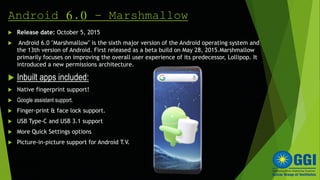
Android 6.0 - Marshmallow
 Release date: October 5, 2015
 Android 6.0 "Marshmallow" is the sixth major version of the Android operating system and
the 13th version of Android. First released as a beta build on May 28, 2015.Marshmallow
primarily focuses on improving the overall user experience of its predecessor, Lollipop. It
introduced a new permissions architecture.
 Inbuilt apps included:
 Native fingerprint support!
 Google assistant support.
 Finger-print & face lock support.
 USB Type-C and USB 3.1 support
 More Quick Settings options
 Picture-in-picture support for Android T.V.
Android 8.0 - Oreo
 Release date: August 21, 2017
 Oreo introduced further polish to the user interface by offering, Picture-in-picture support,
Notification Dots that can be pressed quickly see what's new, and easily clear them by swiping
away. Android Instant Apps allows access to new apps right from the browser, no installation
needed.
 Inbuilt apps included:
 Automatic light and dark themes.
 Multi-display support.
 Multiple camera support.
 Snooze Notifications
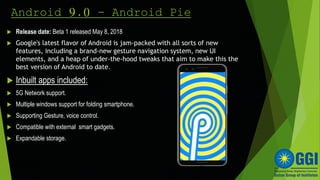
Android 9.0 - Android Pie
 Release date: Beta 1 released May 8, 2018
 Google's latest flavor of Android is jam-packed with all sorts of new
features, including a brand-new gesture navigation system, new UI
elements, and a heap of under-the-hood tweaks that aim to make this the
best version of Android to date.
 Inbuilt apps included:
 5G Network support.
 Multiple windows support for folding smartphone.
 Supporting Gesture, voice control.
 Compatible with external smart gadgets.
 Expandable storage.
FEATURES OF ANDROID
 Android is not a single piece of hardware(especially many types of sensors and other
hardware component).
 Android supports wireless communication using:-
3G Network
4G Network
5G Network
Bluetooth connectivity
 Multi-tasking and Multi-language support.
 Android supports advanced audio/video calling and media formats such as MPEG-
4,MP3,JPEG,PNG,GIF,etc.
 Web browser and screen shots.
 File sharing.
SECURITY
 Permission based access control.
 An encrypted file system that can be enabled to protected data on lost or stolen
devices.
 Phone lock such as(pattern ,fingerprint , face-lock).
ADVANTAGES OF ANDROID
 Biggest advantage of android is that it is an open source
platform and free.
 Android display can be used horizontal and vertical.
 Android phones can also function as a router to share
internet.
 Ease of Notification –Any SMS, e-mail, there will always be
a notification on the home screen/Lock screen.
DIS-ADVANTAGE
 Android Linux –based system, so as to modify, the
user must know the commands on the Linux
system.
 Application force closes if they are too large.
 Device over heats easily during multi-tasking.
 The phone itself has very little memory storage,
so you have to keep apps, videos, and photo on
external card.
CONCLUSION & future
scope
 Android is now stepping up in next level of mobile internet.
 There are chances of android mobile sales becomes way more than in further days.
 There are chances of android may becomes the widely used operating system in the
world.
 Android is the most used technology of our current time, which is in process to use in
smart T.V, smart watch , digital camera, cars, etc.
Android operating system

Android operating system

  • 1.
    ANDROID operating system PRESENTED TO:- Er.Rosy Bhumrah Subject Incharge:OS Dep. B.C.A PRESENTED BY:- Piush Kumar Anand,1717307 Pradip Khadka,1717313 BCA 4th Semester.
  • 2.
    CONTENTS  History  Introductionto android  Versions of Android  Features of android  Security  Advantages of android  Dis-advantages of android  Conclusion and future scope
  • 3.
    HISTORY  Android Incorporation(Inc.)was founded in Palo Alto , California , united states in October 2003 by Andy Rubin[co-founder of danger Inc.],Rich miner[co-founder of wildfire communication Inc.],Nick sears[once VP at T- mobile] and Chris white[headed design & interface development at web TV] to develop.
  • 4.
     Android isa mobile operating system developed by Google.  Based on LINUX kernel.  Google purchased the initial developer of the software android incorporated in 2005.  It is a open source software platform and operating system for mobile devices.  Android has its own virtual machine i.e DVMA(Dalvik Virtual Machine),which is used for executing the android application.  The version history of the Android mobile operating system began with the public release of the Android beta on November 5, 2007 And the first commercial version, Android 1.0, was released on September 23, 2008. Introduction
  • 5.
    Android version Code nameVersion number Linux Kernel version Release date Petit four 1.1 2.6 Feb9,2009 Cupcake 1.5 2.6.27 April27,2009 Donut 1.6 2.6.29 Sept15,2009 Éclair 2.0-2.1 2.6.29 Oct26,2009 Froyo 2.2-2.3 2.6.32 May20,2010 Gingerbread 2.3-2.3.7 2.6.35 Dec6,2010 Honeycomb 3.0-3.2.6 2.6.36 Feb22,2011 Ice-cream 4.0-4.0.4 3.0.1 Oct18,2011 Jellybean 4.1-4.3.1 3.0.31-3.4.39 July9,2012 Kitkat 4.4-4.4.4 3.10 Oct31,2013 Lollipop 5.0-5.1.1 3.16 Nov12,2014 marshmallow 6.0-6.0.1 3.18 Oct5,2015 Nougat 7.0-7.1.2 4.4 Aug22,2016 Oreo 8.0-8.1 4.10 Aug21,2017 Pie 9.0 4.4.107,4.9.84,4.14.42 Aug6,2018
  • 6.
    Android 1.1-Petit four Release date: September 23, 2008  Android 1.0 was the first commercially available release of the OS. It was available on the pioneering device - the T-Mobile G1 (released October 2008 in the US and the UK) along with the Android source code.  Inbuilt apps included:  Android Market • Web Browser • Pictures • Camera  Gmail • Google Contacts • Google Calendar • Over the air syncing via Google Sync  Email app supporting POP3, IMAP & SMTP • Calculator • YouTube • Settings  Alarm clock • Dialer • Google Maps.
  • 7.
    Android 1.5-Cupcake  Releasedate: April 27, 2009  Cupcake was the first Android release to have a sweet public-facing name, a tradition Google has adhered to since, with every subsequent Android release being named after a dessert - whose name started with the next letter of the alphabet.  Inbuilt apps included:  User pictures shown for Favorites in Contacts  Call log events now date/time stamped  One-touch access to a contact card from call log events  Ability to upload videos and photos to YouTube and Picasa respectively.  Auto-pairing and stereo support for Bluetooth (A2DP and AVRCP profiles).
  • 8.
    Android 1.6 -Donut  Release date: September 15, 2009  Donut introduced support for WVGA(Wide Video Graphic Array) allowing Android to run on a variety of devices with different displays with varying aspect ratios - a marked improvement from the fixed 320x480 supported up until now.  Inbuilt apps included:  Speed improvements in searching and camera applications  Updated technology support for CDMA/EVDO, 802.1x, VPNs, and a text-to-speech engine  The Gallery, camera, and camcorder became better integrated in addition to faster camera access.  Third-party accessibility services
  • 9.
    Android 2.0 -Eclair  Release date: October 26, 2009  Eclair further optimized performance, came with a revamped UI and supported more screen sizes and resolutions, while also bringing live wallpapers. Google Maps Navigation became a viable replacement for in-car navigation units with its turn by turn directions, 3D view, voice guidance and traffic information.  Inbuilt apps included:  Multiple Account sync for email and contacts.  Ability to search all saved SMS and MMS messages.  Motion Event class enhanced to track multi-touch events.  Quick Contact feature, showing a pop-up for call, SMS and email, as soon as you tap on a contact's avatar.
  • 10.
    Android 2.2 -Froyo  Release date: May 20, 2010  Speed, memory, and performance optimizations were the prominent headline features for Froyo, delivered by the introduction of the Dalvik JIT compiler, delivering up to 5X performance improvements in CPU bound code.  Inbuilt apps included:  USB tethering and Wi-Fi hotspot functionality  Support for Bluetooth car and desk docks  Animated GIF support  Gallery allows users to view picture stacks using a zoom gesture  Quick switching between multiple keyboard languages/dictionaries
  • 11.
    Android 2.3 -Gingerbread  Release date: December 6, 2010  Further stretching its legs, Gingerbread delivered a better user experience by simplifying the UI and improving performance even further in addition to paving the way for even more form factors with support for extra-large screens sizes and resolutions.  Inbuilt apps included:  Camera software enhancements.  Improved battery efficiency.  Support for voice or video chat using Google Talk  New audio effects such as reverb, equalization, headphone virtualization, and bass boost.
  • 12.
    Android 3.0 -Honeycomb  Release date: February 22, 2011  Honeycomb provided an optimized UI for tablets with their larger screen real-estate. Reducing the requirement for physical navigation buttons Honeycomb's System Bar featured quick access to notifications, status, and soft navigation buttons, available at the bottom of the screen.  Inbuilt apps included:  Ability to encrypt all user data  Support for joysticks and gamepads  Multiple browser tabs, auto form auto-fill and new “incognito” mode.  Quick access to camera exposure, focus, flash, zoom, front-facing camera, time-lapse, and other camera features.
  • 13.
    Android 4.0 –Ice-Cream Sandwich  Release date: October 18, 2011  Ice-Cream Sandwich consolidated both Android 2.3 and Android 3.0 into a single unified release with a hardware accelerated user interface that would support both smartphones and tablets.  Inbuilt apps included:  Integrated screenshot capture.  New gallery layout.  Improved visual voicemail  Pinch-to-zoom functionality in the calendar.  Application access directly from lock screen.
  • 14.
    Android 4.1 -Jelly Bean  Release date: July 9, 2012  Android "Jelly Bean" is the tenth version of Android and the codename given to three major point releases of the Android mobile operating system developed by Google, spanning versions between 4.1 and 4.3.1.  Inbuilt apps included:  Group Messaging.  4K resolution support.  Bluetooth support for Android Beam, complimention NFC.  New clock application with built-in world clock, stop watch and timer.  Improved camera application, followed later by a reworked camera UI, previously introduced on Google Play edition phones.
  • 15.
    Android 4.4 -KitKat  Release date: October 31, 2013  Android "KitKat" is a codename for the Android mobile operating system and the eleventh version of Android. KitKat focused primarily on optimizing the operating system for improved performance on entry-level devices with limited resources.  Inbuilt apps included:  Wireless printing capability.  Sensor batching, step detector and counter APIs.  Optimizations for performance on devices with lower specifications.  Better Memory Management. KitKat is designed to run on devices with as little as 512MB of RAM.
  • 16.
    Android 5.0 -Lollipop  Release date: November 12, 2014  As opposed to previous incremental design updates, Lollipop introduced a system-wide new look call Material Design, adding shadows and motion while improving navigation. Notifications moved to the lock screen.  Inbuilt apps included:  Support for 64-bit CPUs.  High-definition voice calls.  Smart lock feature.  Updated emoji.  Official support for multiple SIM cards.  Recent activities screen with tasks instead of applications.
  • 17.
    Android 6.0 -Marshmallow  Release date: October 5, 2015  Android 6.0 "Marshmallow" is the sixth major version of the Android operating system and the 13th version of Android. First released as a beta build on May 28, 2015.Marshmallow primarily focuses on improving the overall user experience of its predecessor, Lollipop. It introduced a new permissions architecture.  Inbuilt apps included:  Native fingerprint support!  Google assistant support.  Finger-print & face lock support.  USB Type-C and USB 3.1 support  More Quick Settings options  Picture-in-picture support for Android T.V.
  • 18.
    Android 8.0 -Oreo  Release date: August 21, 2017  Oreo introduced further polish to the user interface by offering, Picture-in-picture support, Notification Dots that can be pressed quickly see what's new, and easily clear them by swiping away. Android Instant Apps allows access to new apps right from the browser, no installation needed.  Inbuilt apps included:  Automatic light and dark themes.  Multi-display support.  Multiple camera support.  Snooze Notifications  Snooze Notifications
  • 19.
    Android 9.0 -Android Pie  Release date: Beta 1 released May 8, 2018  Google's latest flavor of Android is jam-packed with all sorts of new features, including a brand-new gesture navigation system, new UI elements, and a heap of under-the-hood tweaks that aim to make this the best version of Android to date.  Inbuilt apps included:  5G Network support.  Multiple windows support for folding smartphone.  Supporting Gesture, voice control.  Compatible with external smart gadgets.  Expandable storage.
  • 20.
    FEATURES OF ANDROID Android is not a single piece of hardware(especially many types of sensors and other hardware component).  Android supports wireless communication using:- 3G Network 4G Network 5G Network Bluetooth connectivity  Multi-tasking and Multi-language support.  Android supports advanced audio/video calling and media formats such as MPEG- 4,MP3,JPEG,PNG,GIF,etc.  Web browser and screen shots.  File sharing.
  • 21.
    SECURITY  Permission basedaccess control.  An encrypted file system that can be enabled to protected data on lost or stolen devices.  Phone lock such as(pattern ,fingerprint , face-lock).
  • 22.
    ADVANTAGES OF ANDROID Biggest advantage of android is that it is an open source platform and free.  Android display can be used horizontal and vertical.  Android phones can also function as a router to share internet.  Ease of Notification –Any SMS, e-mail, there will always be a notification on the home screen/Lock screen.
  • 23.
    DIS-ADVANTAGE  Android Linux–based system, so as to modify, the user must know the commands on the Linux system.  Application force closes if they are too large.  Device over heats easily during multi-tasking.  The phone itself has very little memory storage, so you have to keep apps, videos, and photo on external card.
  • 24.
    CONCLUSION & future scope Android is now stepping up in next level of mobile internet.  There are chances of android mobile sales becomes way more than in further days.  There are chances of android may becomes the widely used operating system in the world.  Android is the most used technology of our current time, which is in process to use in smart T.V, smart watch , digital camera, cars, etc.