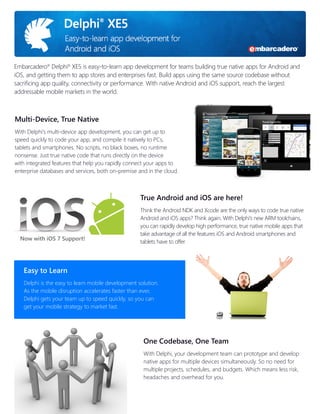
Embarcadero® Delphi® XE5 is easy-to-learn app development for teams building true native apps for Android and
iOS, and getting them to app stores and enterprises fast. Build apps using the same source codebase without
sacrificing app quality, connectivity or performance. With native Android and iOS support, reach the largest
addressable mobile markets in the world.

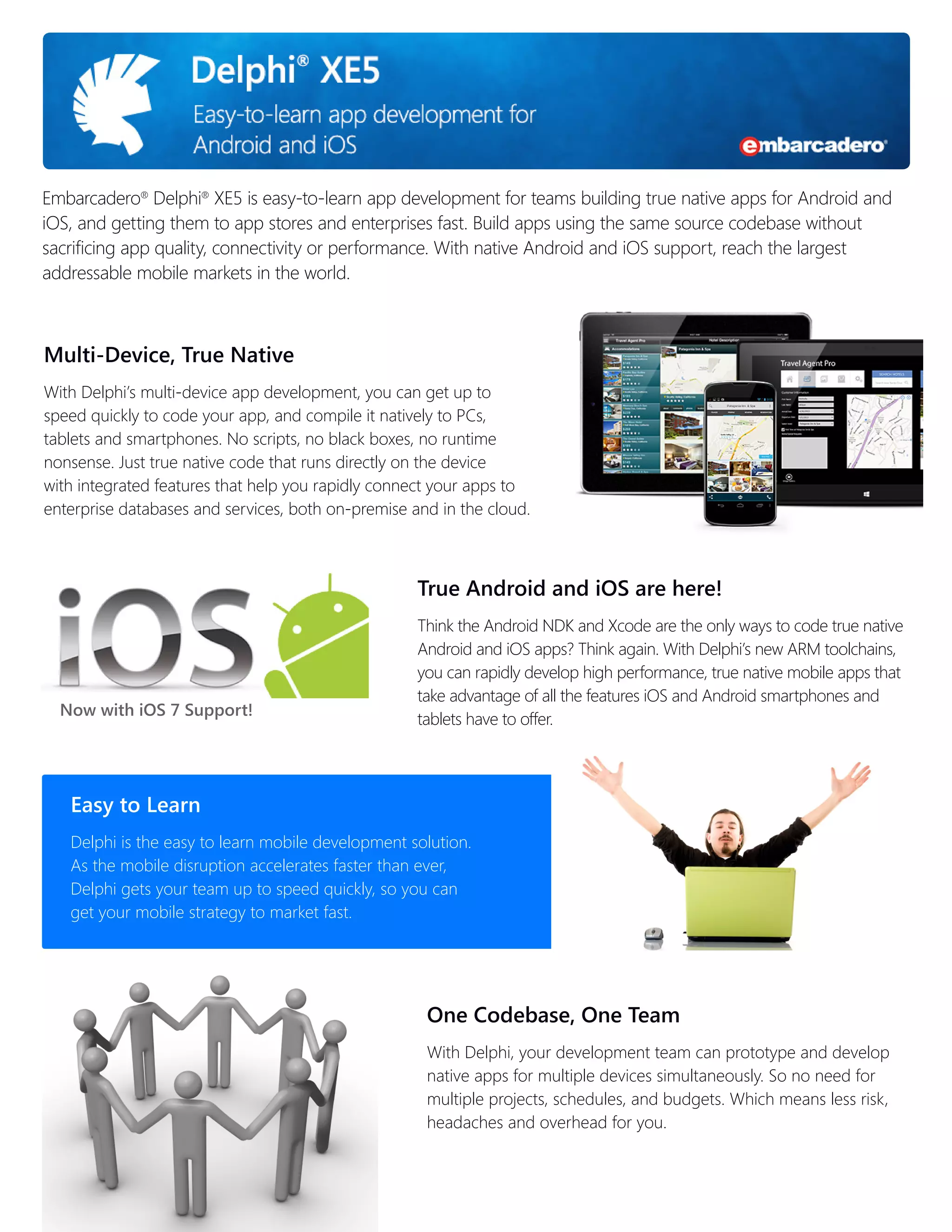
Multi-Device, True Native
With Delphi’s multi-device app development, you can get up to
speed quickly to code your app, and compile it natively to PCs,
tablets and smartphones. No scripts, no black boxes, no runtime
nonsense. Just true native code that runs directly on the device
with integrated features that help you rapidly connect your apps to
enterprise databases and services, both on-premise and in the cloud.

True Android and iOS are here!

Now with iOS 7 Support!

Think the Android NDK and Xcode are the only ways to code true native
Android and iOS apps? Think again. With Delphi’s new ARM toolchains,
you can rapidly develop high performance, true native mobile apps that
take advantage of all the features iOS and Android smartphones and
tablets have to offer.

Easy to Learn
Delphi is the easy to learn mobile development solution.
As the mobile disruption accelerates faster than ever,
Delphi gets your team up to speed quickly, so you can
get your mobile strategy to market fast.

One Codebase, One Team
With Delphi, your development team can prototype and develop
native apps for multiple devices simultaneously. So no need for
multiple projects, schedules, and budgets. Which means less risk,
headaches and overhead for you.
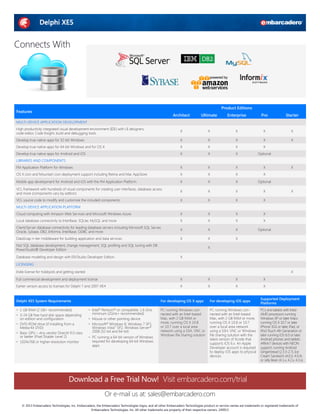
Connects With

Product Editions

Features

Architect

Ultimate

Enterprise

Pro

Starter

High productivity integrated visual development environment (IDE) with UI designers,
code editor, Code Insight, build and debugging tools

X

X

X

X

X

Develop true native apps for 32-bit Windows

X

X

X

X

X

Develop true native apps for 64-bit Windows and for OS X

X

X

X

X

Develop true native apps for Android and iOS

X

X

X

Optional

FM Application Platform for Windows

X

X

X

X

OS X Lion and Mountain Lion deployment support including Retina and Mac AppStore

X

X

X

X

Mobile app development for Android and iOS with the FM Application Platform

X

X

X

Optional

VCL framework with hundreds of visual components for creating user interfaces, database access
and more (components vary by edition)

X

X

X

X

VCL source code to modify and customize the included components

X

X

X

X

Cloud computing with Amazon Web Services and Microsoft Windows Azure

X

X

X

X

Local database connectivity to InterBase, SQLite, MySQL and more

X

X

X

X

Client/Server database connectivity for leading database servers including Microsoft SQL Server,
Oracle, Sybase, DB2, Informix, InterBase, ODBC and more

X

X

X

Optional

DataSnap n-tier middleware for building application and data services

X

X

X

MULTI-DEVICE APPLICATION DEVELOPMENT

LIBRARIES AND COMPONENTS
X

X

MULTI-DEVICE APPLICATION PLATFORM

Fast SQL database development, change management, SQL profiling and SQL tuning with DB
PowerStudio® Developer Edition
Database modeling and design with ER/Studio Developer Edition

X
X

LICENSING
Indie license for hobbyists and getting started

X

Full commercial development and deployment license

X

X

X

X

Earlier version access to licenses for Delphi 7 and 2007-XE4

X

X

X

X

Delphi XE5 System Requirements
•	 1 GB RAM (2 GB+ recommended)
•	 3-24 GB free hard disk space depending
on edition and configuration
•	 DVD-ROM drive (if installing from a
Media Kit DVD)
•	 Basic GPU – Any vendor DirectX 9.0 class
or better (Pixel Shader Level 2)
•	 1024x768 or higher-resolution monitor

For developing OS X apps
•	 Intel® Pentium® or compatible, 1.6 GHz
minimum (2GHz+ recommended)
•	 Mouse or other pointing device
•	 Microsoft® Windows 8, Windows 7 SP1,
Windows Vista™ SP2, Windows Server®
2008 (32-bit and 64-bit)
•	 PC running a 64-bit version of Windows
required for developing 64-bit Windows
apps

For developing iOS apps

PC running Windows connected with an Intel-based
Mac, with 2 GB RAM or
more, running OS X 10.8
or 10.7 over a local area
network using a SSH, VNC or
Windows file sharing solution

PC running Windows connected with an Intel-based
Mac, with 2 GB RAM or more,
running OS X 10.8 or 10.7
over a local area network
using a SSH, VNC or Windows
file sharing solution with the
latest version of Xcode that
supports iOS 6.x. An Apple
Developer account is required
to deploy iOS apps to physical
devices.

Supported Deployment
Platforms
PCs and tablets with Intel/
AMD processors running
Windows XP or later. Macs
running OS X 10.7 or later.
iPhone 3GS or later, iPad, or
iPod Touch 4th Generation or
later running iOS 6.0 or later.
Android phones and tablets:
ARMv7 devices with NEON
support, running Android
Gingerbread (2.3.3-2.7), Ice
Cream Sandwich (4.0.3, 4.0.4)
or Jelly Bean (4.1.x, 4.2.x, 4.3.x).

Download a Free Trial Now! Visit embarcadero.com/trial
Or e-mail us at: sales@embarcadero.com
© 2013 Embarcadero Technologies, Inc. Embarcadero, the Embarcadero Technologies logos, and all other Embarcadero Technologies product or service names are trademarks or registered trademarks of
Embarcadero Technologies, Inc. All other trademarks are property of their respective owners. 240913

Delphi XE5 Datasheet

  • 1.
    Embarcadero® Delphi® XE5is easy-to-learn app development for teams building true native apps for Android and iOS, and getting them to app stores and enterprises fast. Build apps using the same source codebase without sacrificing app quality, connectivity or performance. With native Android and iOS support, reach the largest addressable mobile markets in the world. Multi-Device, True Native With Delphi’s multi-device app development, you can get up to speed quickly to code your app, and compile it natively to PCs, tablets and smartphones. No scripts, no black boxes, no runtime nonsense. Just true native code that runs directly on the device with integrated features that help you rapidly connect your apps to enterprise databases and services, both on-premise and in the cloud. True Android and iOS are here! Now with iOS 7 Support! Think the Android NDK and Xcode are the only ways to code true native Android and iOS apps? Think again. With Delphi’s new ARM toolchains, you can rapidly develop high performance, true native mobile apps that take advantage of all the features iOS and Android smartphones and tablets have to offer. Easy to Learn Delphi is the easy to learn mobile development solution. As the mobile disruption accelerates faster than ever, Delphi gets your team up to speed quickly, so you can get your mobile strategy to market fast. One Codebase, One Team With Delphi, your development team can prototype and develop native apps for multiple devices simultaneously. So no need for multiple projects, schedules, and budgets. Which means less risk, headaches and overhead for you.
  • 2.
    Connects With Product Editions Features Architect Ultimate Enterprise Pro Starter Highproductivity integrated visual development environment (IDE) with UI designers, code editor, Code Insight, build and debugging tools X X X X X Develop true native apps for 32-bit Windows X X X X X Develop true native apps for 64-bit Windows and for OS X X X X X Develop true native apps for Android and iOS X X X Optional FM Application Platform for Windows X X X X OS X Lion and Mountain Lion deployment support including Retina and Mac AppStore X X X X Mobile app development for Android and iOS with the FM Application Platform X X X Optional VCL framework with hundreds of visual components for creating user interfaces, database access and more (components vary by edition) X X X X VCL source code to modify and customize the included components X X X X Cloud computing with Amazon Web Services and Microsoft Windows Azure X X X X Local database connectivity to InterBase, SQLite, MySQL and more X X X X Client/Server database connectivity for leading database servers including Microsoft SQL Server, Oracle, Sybase, DB2, Informix, InterBase, ODBC and more X X X Optional DataSnap n-tier middleware for building application and data services X X X MULTI-DEVICE APPLICATION DEVELOPMENT LIBRARIES AND COMPONENTS X X MULTI-DEVICE APPLICATION PLATFORM Fast SQL database development, change management, SQL profiling and SQL tuning with DB PowerStudio® Developer Edition Database modeling and design with ER/Studio Developer Edition X X LICENSING Indie license for hobbyists and getting started X Full commercial development and deployment license X X X X Earlier version access to licenses for Delphi 7 and 2007-XE4 X X X X Delphi XE5 System Requirements • 1 GB RAM (2 GB+ recommended) • 3-24 GB free hard disk space depending on edition and configuration • DVD-ROM drive (if installing from a Media Kit DVD) • Basic GPU – Any vendor DirectX 9.0 class or better (Pixel Shader Level 2) • 1024x768 or higher-resolution monitor For developing OS X apps • Intel® Pentium® or compatible, 1.6 GHz minimum (2GHz+ recommended) • Mouse or other pointing device • Microsoft® Windows 8, Windows 7 SP1, Windows Vista™ SP2, Windows Server® 2008 (32-bit and 64-bit) • PC running a 64-bit version of Windows required for developing 64-bit Windows apps For developing iOS apps PC running Windows connected with an Intel-based Mac, with 2 GB RAM or more, running OS X 10.8 or 10.7 over a local area network using a SSH, VNC or Windows file sharing solution PC running Windows connected with an Intel-based Mac, with 2 GB RAM or more, running OS X 10.8 or 10.7 over a local area network using a SSH, VNC or Windows file sharing solution with the latest version of Xcode that supports iOS 6.x. An Apple Developer account is required to deploy iOS apps to physical devices. Supported Deployment Platforms PCs and tablets with Intel/ AMD processors running Windows XP or later. Macs running OS X 10.7 or later. iPhone 3GS or later, iPad, or iPod Touch 4th Generation or later running iOS 6.0 or later. Android phones and tablets: ARMv7 devices with NEON support, running Android Gingerbread (2.3.3-2.7), Ice Cream Sandwich (4.0.3, 4.0.4) or Jelly Bean (4.1.x, 4.2.x, 4.3.x). Download a Free Trial Now! Visit embarcadero.com/trial Or e-mail us at: sales@embarcadero.com © 2013 Embarcadero Technologies, Inc. Embarcadero, the Embarcadero Technologies logos, and all other Embarcadero Technologies product or service names are trademarks or registered trademarks of Embarcadero Technologies, Inc. All other trademarks are property of their respective owners. 240913