D.E.I TECHNICAL COLLEGE
COURSE TITLE: DATABASE PROGRAMMING WITH SQL
COURSE CODE: DEE431
SLIDE: 3
CLASS: DIPLOMA IN INFORMATION TECHNOLOGY VOCATIONAL
SEMESTER: FOURTH
SESSION: 2019-20
TOPICS COVER
 RDBMS
 INTRODUCTION TO SQL
 INTRODUCTION TO MYSQL
2
RDBMS
 RDBMS stands for Relational Database Management System.
 RDBMS is the basis for SQL, and for all modern database systems such as MS SQL Server,
IBM DB2, Oracle, MySQL, and Microsoft Access.
 A Relational database management system (RDBMS) is a database management system (DBMS) that
is based on the relational model as introduced by E. F. Codd.
 The data in RDBMS is stored in database objects called tables. A table is a collection of
related data entries and it consists of columns and rows.
3
WHAT IS SQL?
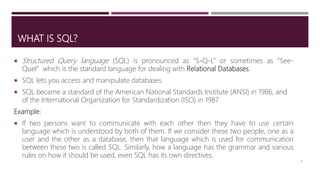
 Structured Query language (SQL) is pronounced as “S-Q-L” or sometimes as “See-
Quel” which is the standard language for dealing with Relational Databases.
 SQL lets you access and manipulate databases
 SQL became a standard of the American National Standards Institute (ANSI) in 1986, and
of the International Organization for Standardization (ISO) in 1987
Example:
 If two persons want to communicate with each other then they have to use certain
language which is understood by both of them. If we consider these two people, one as a
user and the other as a database, then that language which is used for communication
between these two is called SQL. Similarly, how a language has the grammar and various
rules on how it should be used, even SQL has its own directives.
4
EVOLUTION OF SQL
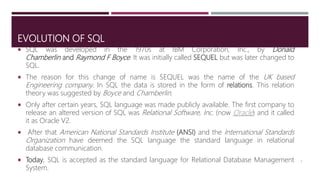
 SQL was developed in the 1970s at IBM Corporation, Inc., by Donald
Chamberlin and Raymond F Boyce. It was initially called SEQUEL but was later changed to
SQL.
 The reason for this change of name is SEQUEL was the name of the UK based
Engineering company. In SQL the data is stored in the form of relations. This relation
theory was suggested by Boyce and Chamberlin.
 Only after certain years, SQL language was made publicly available. The first company to
release an altered version of SQL was Relational Software, Inc. (now Oracle) and it called
it as Oracle V2.
 After that American National Standards Institute (ANSI) and the International Standards
Organization have deemed the SQL language the standard language in relational
database communication.
 Today, SQL is accepted as the standard language for Relational Database Management
System.
5
WHAT CAN SQL DO?
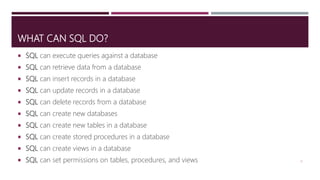
 SQL can execute queries against a database
 SQL can retrieve data from a database
 SQL can insert records in a database
 SQL can update records in a database
 SQL can delete records from a database
 SQL can create new databases
 SQL can create new tables in a database
 SQL can create stored procedures in a database
 SQL can create views in a database
 SQL can set permissions on tables, procedures, and views 6
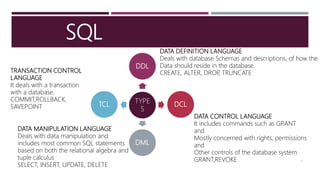
SQL
7
TYPE
S
DDL
DCL
DML
TCL
DATA DEFINITION LANGUAGE
Deals with database Schemas and descriptions, of how the
Data should reside in the database.
CREATE, ALTER, DROP, TRUNCATETRANSACTION CONTROL
LANGUAGE
It deals with a transaction
with a database.
COMMIT,ROLLBACK,
SAVEPOINT
DATA CONTROL LANGUAGE
It includes commands such as GRANT
and
Mostly concerned with rights, permissions
and
Other controls of the database system.
GRANT,REVOKE
DATA MANIPULATION LANGUAGE
Deals with data manipulation and
includes most common SQL statements
based on both the relational algebra and
tuple calculus
SELECT, INSERT, UPDATE, DELETE
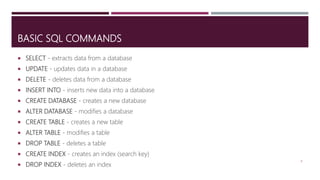
BASIC SQL COMMANDS
 SELECT - extracts data from a database
 UPDATE - updates data in a database
 DELETE - deletes data from a database
 INSERT INTO - inserts new data into a database
 CREATE DATABASE - creates a new database
 ALTER DATABASE - modifies a database
 CREATE TABLE - creates a new table
 ALTER TABLE - modifies a table
 DROP TABLE - deletes a table
 CREATE INDEX - creates an index (search key)
 DROP INDEX - deletes an index
8
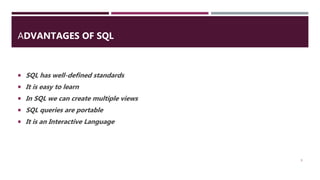
ADVANTAGES OF SQL
 SQL has well-defined standards
 It is easy to learn
 In SQL we can create multiple views
 SQL queries are portable
 It is an Interactive Language
9
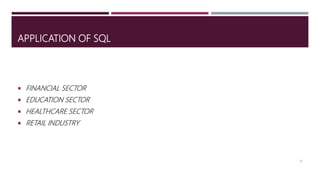
APPLICATION OF SQL
 FINANCIAL SECTOR
 EDUCATION SECTOR
 HEALTHCARE SECTOR
 RETAIL INDUSTRY
10
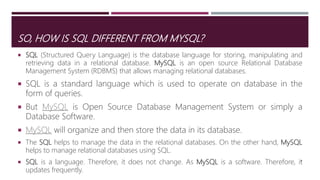
SO, HOW IS SQL DIFFERENT FROM MYSQL?
 SQL (Structured Query Language) is the database language for storing, manipulating and
retrieving data in a relational database. MySQL is an open source Relational Database
Management System (RDBMS) that allows managing relational databases.
 SQL is a standard language which is used to operate on database in the
form of queries.
 But MySQL is Open Source Database Management System or simply a
Database Software.
 MySQL will organize and then store the data in its database.
 The SQL helps to manage the data in the relational databases. On the other hand, MySQL
helps to manage relational databases using SQL.
 SQL is a language. Therefore, it does not change. As MySQL is a software. Therefore, it
updates frequently.
11
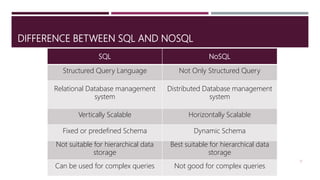
DIFFERENCE BETWEEN SQL AND NOSQL
12
SQL NoSQL
Structured Query Language Not Only Structured Query
Relational Database management
system
Distributed Database management
system
Vertically Scalable Horizontally Scalable
Fixed or predefined Schema Dynamic Schema
Not suitable for hierarchical data
storage
Best suitable for hierarchical data
storage
Can be used for complex queries Not good for complex queries
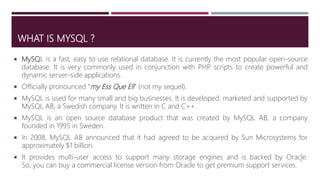
WHAT IS MYSQL ?
 MySQL is a fast, easy to use relational database. It is currently the most popular open-source
database. It is very commonly used in conjunction with PHP scripts to create powerful and
dynamic server-side applications.
 Officially pronounced “my Ess Que Ell” (not my sequel).
 MySQL is used for many small and big businesses. It is developed, marketed and supported by
MySQL AB, a Swedish company. It is written in C and C++.
 MySQL is an open source database product that was created by MySQL AB, a company
founded in 1995 in Sweden.
 In 2008, MySQL AB announced that it had agreed to be acquired by Sun Microsystems for
approximately $1 billion.
 It provides multi-user access to support many storage engines and is backed by Oracle.
So, you can buy a commercial license version from Oracle to get premium support services.
13
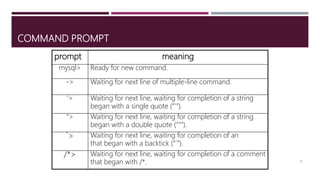
COMMAND PROMPT
14
prompt meaning
mysql> Ready for new command.
-> Waiting for next line of multiple-line command.
‘> Waiting for next line, waiting for completion of a string
began with a single quote (“'”).
“> Waiting for next line, waiting for completion of a string
began with a double quote (“"”).
`> Waiting for next line, waiting for completion of an
that began with a backtick (“`”).
/*> Waiting for next line, waiting for completion of a comment
that began with /*.
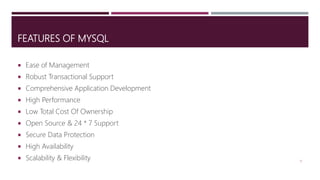
FEATURES OF MYSQL
 Ease of Management
 Robust Transactional Support
 Comprehensive Application Development
 High Performance
 Low Total Cost Of Ownership
 Open Source & 24 * 7 Support
 Secure Data Protection
 High Availability
 Scalability & Flexibility 15
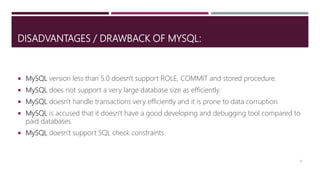
DISADVANTAGES / DRAWBACK OF MYSQL:
 MySQL version less than 5.0 doesn't support ROLE, COMMIT and stored procedure.
 MySQL does not support a very large database size as efficiently.
 MySQL doesn't handle transactions very efficiently and it is prone to data corruption.
 MySQL is accused that it doesn't have a good developing and debugging tool compared to
paid databases.
 MySQL doesn't support SQL check constraints.
16
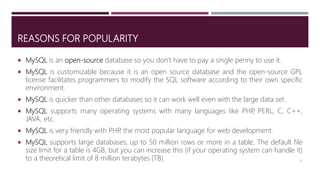
REASONS FOR POPULARITY
 MySQL is an open-source database so you don't have to pay a single penny to use it.
 MySQL is customizable because it is an open source database and the open-source GPL
license facilitates programmers to modify the SQL software according to their own specific
environment.
 MySQL is quicker than other databases so it can work well even with the large data set.
 MySQL supports many operating systems with many languages like PHP, PERL, C, C++,
JAVA, etc.
 MySQL is very friendly with PHP, the most popular language for web development.
 MySQL supports large databases, up to 50 million rows or more in a table. The default file
size limit for a table is 4GB, but you can increase this (if your operating system can handle it)
to a theoretical limit of 8 million terabytes (TB). 17
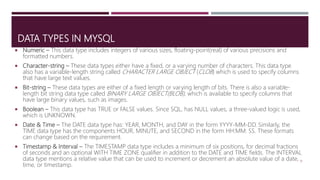
DATA TYPES IN MYSQL
 Numeric – This data type includes integers of various sizes, floating-point(real) of various precisions and
formatted numbers.
 Character-string – These data types either have a fixed, or a varying number of characters. This data type
also has a variable-length string called CHARACTER LARGE OBJECT (CLOB) which is used to specify columns
that have large text values.
 Bit-string – These data types are either of a fixed length or varying length of bits. There is also a variable-
length bit string data type called BINARY LARGE OBJECT(BLOB), which is available to specify columns that
have large binary values, such as images.
 Boolean – This data type has TRUE or FALSE values. Since SQL, has NULL values, a three-valued logic is used,
which is UNKNOWN.
 Date & Time – The DATE data type has: YEAR, MONTH, and DAY in the form YYYY-MM-DD. Similarly, the
TIME data type has the components HOUR, MINUTE, and SECOND in the form HH:MM: SS. These formats
can change based on the requirement.
 Timestamp & Interval – The TIMESTAMP data type includes a minimum of six positions, for decimal fractions
of seconds and an optional WITH TIME ZONE qualifier in addition to the DATE and TIME fields. The INTERVAL
data type mentions a relative value that can be used to increment or decrement an absolute value of a date,
time, or timestamp.
18
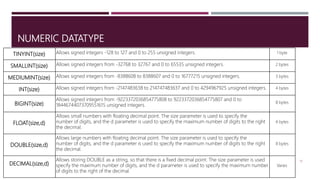
NUMERIC DATATYPE
19
TINYINT(size) Allows signed integers -128 to 127 and 0 to 255 unsigned integers. 1 byte
SMALLINT(size) Allows signed integers from -32768 to 32767 and 0 to 65535 unsigned integers. 2 bytes
MEDIUMINT(size) Allows signed integers from -8388608 to 8388607 and 0 to 16777215 unsigned integers. 3 bytes
INT(size) Allows signed integers from -2147483638 to 214747483637 and 0 to 4294967925 unsigned integers. 4 bytes
BIGINT(size)
Allows signed integers from -9223372036854775808 to 9223372036854775807 and 0 to
18446744073709551615 unsigned integers.
8 bytes
FLOAT(size,d)
Allows small numbers with floating decimal point. The size parameter is used to specify the
number of digits, and the d parameter is used to specify the maximum number of digits to the right
the decimal.
4 bytes
DOUBLE(size,d)
Allows large numbers with floating decimal point. The size parameter is used to specify the
number of digits, and the d parameter is used to specify the maximum number of digits to the right
the decimal.
8 bytes
DECIMAL(size,d)
Allows storing DOUBLE as a string, so that there is a fixed decimal point. The size parameter is used
specify the maximum number of digits, and the d parameter is used to specify the maximum number
of digits to the right of the decimal.
Varies
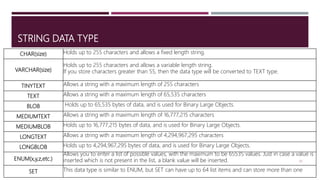
STRING DATA TYPE
20
CHAR(size) Holds up to 255 characters and allows a fixed length string.
VARCHAR(size)
Holds up to 255 characters and allows a variable length string.
If you store characters greater than 55, then the data type will be converted to TEXT type.
TINYTEXT Allows a string with a maximum length of 255 characters
TEXT Allows a string with a maximum length of 65,535 characters
BLOB Holds up to 65,535 bytes of data, and is used for Binary Large Objects.
MEDIUMTEXT Allows a string with a maximum length of 16,777,215 characters
MEDIUMBLOB Holds up to 16,777,215 bytes of data, and is used for Binary Large Objects.
LONGTEXT Allows a string with a maximum length of 4,294,967,295 characters
LONGBLOB Holds up to 4,294,967,295 bytes of data, and is used for Binary Large Objects.
ENUM(x,y,z,etc.)
Allows you to enter a list of possible values, with the maximum to be 65535 values. Just in case a value is
inserted which is not present in the list, a blank value will be inserted.
SET This data type is similar to ENUM, but SET can have up to 64 list items and can store more than one
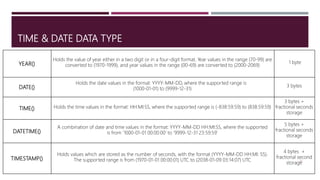
TIME & DATE DATA TYPE
21
YEAR()
Holds the value of year either in a two digit or in a four-digit format. Year values in the range (70-99) are
converted to (1970-1999), and year values in the range (00-69) are converted to (2000-2069)
1 byte
DATE()
Holds the date values in the format: YYYY-MM-DD, where the supported range is
(1000-01-01) to (9999-12-31)
3 bytes
TIME() Holds the time values in the format: HH:MI:SS, where the supported range is (-838:59:59) to (838:59:59)
3 bytes +
fractional seconds
storage
DATETIME()
A combination of date and time values in the format: YYYY-MM-DD HH:MI:SS, where the supported
is from ‘1000-01-01 00:00:00’ to ‘9999-12-31 23:59:59’
5 bytes +
fractional seconds
storage
TIMESTAMP()
Holds values which are stored as the number of seconds, with the format (YYYY-MM-DD HH:MI: SS).
The supported range is from (1970-01-01 00:00:01) UTC to (2038-01-09 03:14:07) UTC
4 bytes +
fractional second
storage
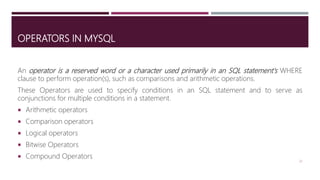
OPERATORS IN MYSQL
An operator is a reserved word or a character used primarily in an SQL statement's WHERE
clause to perform operation(s), such as comparisons and arithmetic operations.
These Operators are used to specify conditions in an SQL statement and to serve as
conjunctions for multiple conditions in a statement.
 Arithmetic operators
 Comparison operators
 Logical operators
 Bitwise Operators
 Compound Operators
22
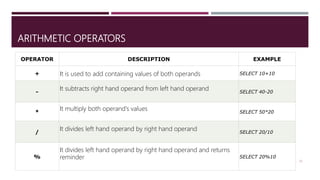
ARITHMETIC OPERATORS
23
OPERATOR DESCRIPTION EXAMPLE
+ It is used to add containing values of both operands SELECT 10+10
-
It subtracts right hand operand from left hand operand SELECT 40-20
*
It multiply both operand's values SELECT 50*20
/
It divides left hand operand by right hand operand SELECT 20/10
%
It divides left hand operand by right hand operand and returns
reminder SELECT 20%10
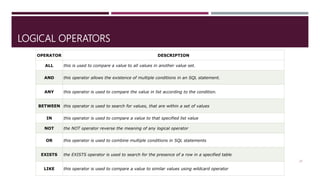
LOGICAL OPERATORS
24
OPERATOR DESCRIPTION
ALL this is used to compare a value to all values in another value set.
AND this operator allows the existence of multiple conditions in an SQL statement.
ANY this operator is used to compare the value in list according to the condition.
BETWEEN this operator is used to search for values, that are within a set of values
IN this operator is used to compare a value to that specified list value
NOT the NOT operator reverse the meaning of any logical operator
OR this operator is used to combine multiple conditions in SQL statements
EXISTS the EXISTS operator is used to search for the presence of a row in a specified table
LIKE this operator is used to compare a value to similar values using wildcard operator
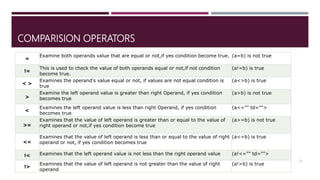
COMPARISION OPERATORS
25
=
Examine both operands value that are equal or not,if yes condition become true. (a=b) is not true
!=
This is used to check the value of both operands equal or not,if not condition
become true.
(a!=b) is true
< >
Examines the operand's value equal or not, if values are not equal condition is
true
(a<>b) is true
>
Examine the left operand value is greater than right Operand, if yes condition
becomes true
(a>b) is not true
<
Examines the left operand value is less than right Operand, if yes condition
becomes true
(a<="" td="">
>=
Examines that the value of left operand is greater than or equal to the value of
right operand or not,if yes condition become true
(a>=b) is not true
<=
Examines that the value of left operand is less than or equal to the value of right
operand or not, if yes condition becomes true
(a<=b) is true
!< Examines that the left operand value is not less than the right operand value (a!<="" td="">
!>
Examines that the value of left operand is not greater than the value of right
operand
(a!>b) is true
26

DEE 431 Introduction to Mysql Slide 3

  • 1.
    D.E.I TECHNICAL COLLEGE COURSETITLE: DATABASE PROGRAMMING WITH SQL COURSE CODE: DEE431 SLIDE: 3 CLASS: DIPLOMA IN INFORMATION TECHNOLOGY VOCATIONAL SEMESTER: FOURTH SESSION: 2019-20
  • 2.
    TOPICS COVER  RDBMS INTRODUCTION TO SQL  INTRODUCTION TO MYSQL 2
  • 3.
    RDBMS  RDBMS standsfor Relational Database Management System.  RDBMS is the basis for SQL, and for all modern database systems such as MS SQL Server, IBM DB2, Oracle, MySQL, and Microsoft Access.  A Relational database management system (RDBMS) is a database management system (DBMS) that is based on the relational model as introduced by E. F. Codd.  The data in RDBMS is stored in database objects called tables. A table is a collection of related data entries and it consists of columns and rows. 3
  • 4.
    WHAT IS SQL? Structured Query language (SQL) is pronounced as “S-Q-L” or sometimes as “See- Quel” which is the standard language for dealing with Relational Databases.  SQL lets you access and manipulate databases  SQL became a standard of the American National Standards Institute (ANSI) in 1986, and of the International Organization for Standardization (ISO) in 1987 Example:  If two persons want to communicate with each other then they have to use certain language which is understood by both of them. If we consider these two people, one as a user and the other as a database, then that language which is used for communication between these two is called SQL. Similarly, how a language has the grammar and various rules on how it should be used, even SQL has its own directives. 4
  • 5.
    EVOLUTION OF SQL SQL was developed in the 1970s at IBM Corporation, Inc., by Donald Chamberlin and Raymond F Boyce. It was initially called SEQUEL but was later changed to SQL.  The reason for this change of name is SEQUEL was the name of the UK based Engineering company. In SQL the data is stored in the form of relations. This relation theory was suggested by Boyce and Chamberlin.  Only after certain years, SQL language was made publicly available. The first company to release an altered version of SQL was Relational Software, Inc. (now Oracle) and it called it as Oracle V2.  After that American National Standards Institute (ANSI) and the International Standards Organization have deemed the SQL language the standard language in relational database communication.  Today, SQL is accepted as the standard language for Relational Database Management System. 5
  • 6.
    WHAT CAN SQLDO?  SQL can execute queries against a database  SQL can retrieve data from a database  SQL can insert records in a database  SQL can update records in a database  SQL can delete records from a database  SQL can create new databases  SQL can create new tables in a database  SQL can create stored procedures in a database  SQL can create views in a database  SQL can set permissions on tables, procedures, and views 6
  • 7.
    SQL 7 TYPE S DDL DCL DML TCL DATA DEFINITION LANGUAGE Dealswith database Schemas and descriptions, of how the Data should reside in the database. CREATE, ALTER, DROP, TRUNCATETRANSACTION CONTROL LANGUAGE It deals with a transaction with a database. COMMIT,ROLLBACK, SAVEPOINT DATA CONTROL LANGUAGE It includes commands such as GRANT and Mostly concerned with rights, permissions and Other controls of the database system. GRANT,REVOKE DATA MANIPULATION LANGUAGE Deals with data manipulation and includes most common SQL statements based on both the relational algebra and tuple calculus SELECT, INSERT, UPDATE, DELETE
  • 8.
    BASIC SQL COMMANDS SELECT - extracts data from a database  UPDATE - updates data in a database  DELETE - deletes data from a database  INSERT INTO - inserts new data into a database  CREATE DATABASE - creates a new database  ALTER DATABASE - modifies a database  CREATE TABLE - creates a new table  ALTER TABLE - modifies a table  DROP TABLE - deletes a table  CREATE INDEX - creates an index (search key)  DROP INDEX - deletes an index 8
  • 9.
    ADVANTAGES OF SQL SQL has well-defined standards  It is easy to learn  In SQL we can create multiple views  SQL queries are portable  It is an Interactive Language 9
  • 10.
    APPLICATION OF SQL FINANCIAL SECTOR  EDUCATION SECTOR  HEALTHCARE SECTOR  RETAIL INDUSTRY 10
  • 11.
    SO, HOW ISSQL DIFFERENT FROM MYSQL?  SQL (Structured Query Language) is the database language for storing, manipulating and retrieving data in a relational database. MySQL is an open source Relational Database Management System (RDBMS) that allows managing relational databases.  SQL is a standard language which is used to operate on database in the form of queries.  But MySQL is Open Source Database Management System or simply a Database Software.  MySQL will organize and then store the data in its database.  The SQL helps to manage the data in the relational databases. On the other hand, MySQL helps to manage relational databases using SQL.  SQL is a language. Therefore, it does not change. As MySQL is a software. Therefore, it updates frequently. 11
  • 12.
    DIFFERENCE BETWEEN SQLAND NOSQL 12 SQL NoSQL Structured Query Language Not Only Structured Query Relational Database management system Distributed Database management system Vertically Scalable Horizontally Scalable Fixed or predefined Schema Dynamic Schema Not suitable for hierarchical data storage Best suitable for hierarchical data storage Can be used for complex queries Not good for complex queries
  • 13.
    WHAT IS MYSQL?  MySQL is a fast, easy to use relational database. It is currently the most popular open-source database. It is very commonly used in conjunction with PHP scripts to create powerful and dynamic server-side applications.  Officially pronounced “my Ess Que Ell” (not my sequel).  MySQL is used for many small and big businesses. It is developed, marketed and supported by MySQL AB, a Swedish company. It is written in C and C++.  MySQL is an open source database product that was created by MySQL AB, a company founded in 1995 in Sweden.  In 2008, MySQL AB announced that it had agreed to be acquired by Sun Microsystems for approximately $1 billion.  It provides multi-user access to support many storage engines and is backed by Oracle. So, you can buy a commercial license version from Oracle to get premium support services. 13
  • 14.
    COMMAND PROMPT 14 prompt meaning mysql>Ready for new command. -> Waiting for next line of multiple-line command. ‘> Waiting for next line, waiting for completion of a string began with a single quote (“'”). “> Waiting for next line, waiting for completion of a string began with a double quote (“"”). `> Waiting for next line, waiting for completion of an that began with a backtick (“`”). /*> Waiting for next line, waiting for completion of a comment that began with /*.
  • 15.
    FEATURES OF MYSQL Ease of Management  Robust Transactional Support  Comprehensive Application Development  High Performance  Low Total Cost Of Ownership  Open Source & 24 * 7 Support  Secure Data Protection  High Availability  Scalability & Flexibility 15
  • 16.
    DISADVANTAGES / DRAWBACKOF MYSQL:  MySQL version less than 5.0 doesn't support ROLE, COMMIT and stored procedure.  MySQL does not support a very large database size as efficiently.  MySQL doesn't handle transactions very efficiently and it is prone to data corruption.  MySQL is accused that it doesn't have a good developing and debugging tool compared to paid databases.  MySQL doesn't support SQL check constraints. 16
  • 17.
    REASONS FOR POPULARITY MySQL is an open-source database so you don't have to pay a single penny to use it.  MySQL is customizable because it is an open source database and the open-source GPL license facilitates programmers to modify the SQL software according to their own specific environment.  MySQL is quicker than other databases so it can work well even with the large data set.  MySQL supports many operating systems with many languages like PHP, PERL, C, C++, JAVA, etc.  MySQL is very friendly with PHP, the most popular language for web development.  MySQL supports large databases, up to 50 million rows or more in a table. The default file size limit for a table is 4GB, but you can increase this (if your operating system can handle it) to a theoretical limit of 8 million terabytes (TB). 17
  • 18.
    DATA TYPES INMYSQL  Numeric – This data type includes integers of various sizes, floating-point(real) of various precisions and formatted numbers.  Character-string – These data types either have a fixed, or a varying number of characters. This data type also has a variable-length string called CHARACTER LARGE OBJECT (CLOB) which is used to specify columns that have large text values.  Bit-string – These data types are either of a fixed length or varying length of bits. There is also a variable- length bit string data type called BINARY LARGE OBJECT(BLOB), which is available to specify columns that have large binary values, such as images.  Boolean – This data type has TRUE or FALSE values. Since SQL, has NULL values, a three-valued logic is used, which is UNKNOWN.  Date & Time – The DATE data type has: YEAR, MONTH, and DAY in the form YYYY-MM-DD. Similarly, the TIME data type has the components HOUR, MINUTE, and SECOND in the form HH:MM: SS. These formats can change based on the requirement.  Timestamp & Interval – The TIMESTAMP data type includes a minimum of six positions, for decimal fractions of seconds and an optional WITH TIME ZONE qualifier in addition to the DATE and TIME fields. The INTERVAL data type mentions a relative value that can be used to increment or decrement an absolute value of a date, time, or timestamp. 18
  • 19.
    NUMERIC DATATYPE 19 TINYINT(size) Allowssigned integers -128 to 127 and 0 to 255 unsigned integers. 1 byte SMALLINT(size) Allows signed integers from -32768 to 32767 and 0 to 65535 unsigned integers. 2 bytes MEDIUMINT(size) Allows signed integers from -8388608 to 8388607 and 0 to 16777215 unsigned integers. 3 bytes INT(size) Allows signed integers from -2147483638 to 214747483637 and 0 to 4294967925 unsigned integers. 4 bytes BIGINT(size) Allows signed integers from -9223372036854775808 to 9223372036854775807 and 0 to 18446744073709551615 unsigned integers. 8 bytes FLOAT(size,d) Allows small numbers with floating decimal point. The size parameter is used to specify the number of digits, and the d parameter is used to specify the maximum number of digits to the right the decimal. 4 bytes DOUBLE(size,d) Allows large numbers with floating decimal point. The size parameter is used to specify the number of digits, and the d parameter is used to specify the maximum number of digits to the right the decimal. 8 bytes DECIMAL(size,d) Allows storing DOUBLE as a string, so that there is a fixed decimal point. The size parameter is used specify the maximum number of digits, and the d parameter is used to specify the maximum number of digits to the right of the decimal. Varies
  • 20.
    STRING DATA TYPE 20 CHAR(size)Holds up to 255 characters and allows a fixed length string. VARCHAR(size) Holds up to 255 characters and allows a variable length string. If you store characters greater than 55, then the data type will be converted to TEXT type. TINYTEXT Allows a string with a maximum length of 255 characters TEXT Allows a string with a maximum length of 65,535 characters BLOB Holds up to 65,535 bytes of data, and is used for Binary Large Objects. MEDIUMTEXT Allows a string with a maximum length of 16,777,215 characters MEDIUMBLOB Holds up to 16,777,215 bytes of data, and is used for Binary Large Objects. LONGTEXT Allows a string with a maximum length of 4,294,967,295 characters LONGBLOB Holds up to 4,294,967,295 bytes of data, and is used for Binary Large Objects. ENUM(x,y,z,etc.) Allows you to enter a list of possible values, with the maximum to be 65535 values. Just in case a value is inserted which is not present in the list, a blank value will be inserted. SET This data type is similar to ENUM, but SET can have up to 64 list items and can store more than one
  • 21.
    TIME & DATEDATA TYPE 21 YEAR() Holds the value of year either in a two digit or in a four-digit format. Year values in the range (70-99) are converted to (1970-1999), and year values in the range (00-69) are converted to (2000-2069) 1 byte DATE() Holds the date values in the format: YYYY-MM-DD, where the supported range is (1000-01-01) to (9999-12-31) 3 bytes TIME() Holds the time values in the format: HH:MI:SS, where the supported range is (-838:59:59) to (838:59:59) 3 bytes + fractional seconds storage DATETIME() A combination of date and time values in the format: YYYY-MM-DD HH:MI:SS, where the supported is from ‘1000-01-01 00:00:00’ to ‘9999-12-31 23:59:59’ 5 bytes + fractional seconds storage TIMESTAMP() Holds values which are stored as the number of seconds, with the format (YYYY-MM-DD HH:MI: SS). The supported range is from (1970-01-01 00:00:01) UTC to (2038-01-09 03:14:07) UTC 4 bytes + fractional second storage
  • 22.
    OPERATORS IN MYSQL Anoperator is a reserved word or a character used primarily in an SQL statement's WHERE clause to perform operation(s), such as comparisons and arithmetic operations. These Operators are used to specify conditions in an SQL statement and to serve as conjunctions for multiple conditions in a statement.  Arithmetic operators  Comparison operators  Logical operators  Bitwise Operators  Compound Operators 22
  • 23.
    ARITHMETIC OPERATORS 23 OPERATOR DESCRIPTIONEXAMPLE + It is used to add containing values of both operands SELECT 10+10 - It subtracts right hand operand from left hand operand SELECT 40-20 * It multiply both operand's values SELECT 50*20 / It divides left hand operand by right hand operand SELECT 20/10 % It divides left hand operand by right hand operand and returns reminder SELECT 20%10
  • 24.
    LOGICAL OPERATORS 24 OPERATOR DESCRIPTION ALLthis is used to compare a value to all values in another value set. AND this operator allows the existence of multiple conditions in an SQL statement. ANY this operator is used to compare the value in list according to the condition. BETWEEN this operator is used to search for values, that are within a set of values IN this operator is used to compare a value to that specified list value NOT the NOT operator reverse the meaning of any logical operator OR this operator is used to combine multiple conditions in SQL statements EXISTS the EXISTS operator is used to search for the presence of a row in a specified table LIKE this operator is used to compare a value to similar values using wildcard operator
  • 25.
    COMPARISION OPERATORS 25 = Examine bothoperands value that are equal or not,if yes condition become true. (a=b) is not true != This is used to check the value of both operands equal or not,if not condition become true. (a!=b) is true < > Examines the operand's value equal or not, if values are not equal condition is true (a<>b) is true > Examine the left operand value is greater than right Operand, if yes condition becomes true (a>b) is not true < Examines the left operand value is less than right Operand, if yes condition becomes true (a<="" td=""> >= Examines that the value of left operand is greater than or equal to the value of right operand or not,if yes condition become true (a>=b) is not true <= Examines that the value of left operand is less than or equal to the value of right operand or not, if yes condition becomes true (a<=b) is true !< Examines that the left operand value is not less than the right operand value (a!<="" td=""> !> Examines that the value of left operand is not greater than the value of right operand (a!>b) is true
  • 26.